

USB-C hubs add ports for displays, storage, charging, and wired networks, but the right choice depends on which connections you actually need. I rank the UGREEN Revodok Pro 6-in-1 as the best overall pick because its listed 10 Gbps data, 4K at 60 Hz HDMI, and 100W power delivery offer a balanced mix. The Anker 555 8-in-1 stands out for buyers who need Ethernet and more connections, while the Belkin 4-Port suits a simpler, data-focused setup. The main tradeoffs are port variety versus compactness, display capability versus the number of data ports, and charging passthrough versus a dedicated power supply. Read on for the full breakdown of all 14 hubs and guidance on choosing one that matches your devices.

Get audio and creator gear delivered free with Prime
- Fast, free delivery on millions of items
- Prime Video, Amazon Music and more included
- Member-only deals all year
Complete the kit


Key Takeaways
- The UGREEN Revodok Pro 6-in-1 brings 10 Gbps data, 4K at 60 Hz HDMI, and 100W power delivery together, making it the most balanced feature set in this lineup.
- The Anker 555 8-in-1 is the clearest fit when Ethernet and a broader selection of connections matter more than keeping the hub minimal.
- The Belkin 4-Port is a focused choice for adding fast USB data ports and charging passthrough, but it is not a substitute for a hub with HDMI, card readers, or Ethernet.
- Several hubs list 100W power delivery, but that figure describes passthrough capability; the laptop may receive less power after the hub’s own needs and the charger’s output are accounted for.
- The product names reveal meaningful display and data differences: some list 4K at 60 Hz or 10 Gbps data, while others only specify 4K HDMI or USB 3.0, so checking the exact port requirements matters.
| Belkin 4-Port USB-C Hub Adapter, 10Gbps, 100W Pass-Through Charging |  | Best for USB-C Peripherals | Ports: 4 USB-C ports | Data transfer rate: Up to 10Gbps | Pass-through charging: Up to 100W input; up to 85W to host | VIEW ON AMAZON | See Our Full Breakdown |
| Anker USB C Hub, 5-in-1 USB-C to HDMI Splitter with 4K Display |  | Best for Basic Monitor Setups | Connectivity: 5-in-1 | HDMI: 4K@30Hz | USB-C data port: 5Gbps | VIEW ON AMAZON | See Our Full Breakdown |
| Anker 5-in-1 USB-C Hub with HDMI 4K and 85W Power Delivery | 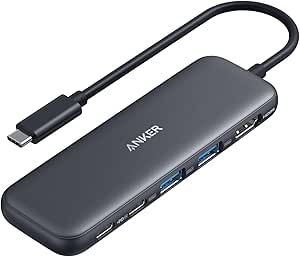 | Best for Windows and MacBook Basics | Number of ports: 5 | Video output: HDMI | USB data rate: Up to 5Gbps | VIEW ON AMAZON | See Our Full Breakdown |
| Acer 5-in-1 USB-C Hub with 4 USB-C 3.2 Ports and 100W Power Delivery |  | Best for All-USB-C Setups | Data ports: 4 USB-C 3.2 Gen 2 | Total ports: 5 | Maximum data transfer rate: 10Gbps shared across data ports | VIEW ON AMAZON | See Our Full Breakdown |
| Anker 555 USB-C Hub (8-in-1), Ethernet Adapter with 4K@60Hz HDMI |  | Best for a Full Desk Setup | Ports: HDMI, Ethernet, USB-C data, 2 × USB-A, SD/microSD reader, USB-C PD input | Video output: 4K@60Hz with DP 1.4; 4K@30Hz with DP 1.2 | Data transfer speed: Up to 10Gbps | VIEW ON AMAZON | See Our Full Breakdown |
| Anker 5-in-1 USB-C Hub with 4K HDMI |  | Best for USB-A Peripherals | Ports: 5: HDMI, 1 USB-A 3.0, 2 USB-A 2.0, and USB-C power delivery input | USB-A 3.0 speed: Up to 5Gbps | USB-A 2.0 speed: Up to 480Mbps | VIEW ON AMAZON | See Our Full Breakdown |
| USB C Hub 10-in-1 with 4K HDMI, SD/TF Card Reader, 100W PD Charging, USB 3.0 & 2.0 Ports for Laptops and Tablets |  | Best for Port Variety | Number of ports: 10 | HDMI: Up to 4K at 60Hz | USB ports: 2 USB 3.0 and 3 USB 2.0 | VIEW ON AMAZON | See Our Full Breakdown |
| Acer 7-in-1 USB-C Hub with 4K HDMI, 100W PD, and SD Card Readers |  | Best for Card-Based Workflows | Ports: 7: HDMI, 2 USB-A 3.1, USB-C data, USB-C PD, SD, and microSD | HDMI: Up to 4K at 30Hz | Power delivery: Up to 100W | VIEW ON AMAZON | See Our Full Breakdown |
| UGREEN Revodok Pro 6-in-1 USB-C Hub with 10 Gbps Data, 4K 60 Hz HDMI, and 100W Power Delivery |  | Best for Fast Data and 4K Displays | Ports: 6 | USB-C ports: 2 | USB-A ports: 2 | VIEW ON AMAZON | See Our Full Breakdown |
| Anker 4-in-1 USB-C Data Hub, 5Gbps, 2 ft Cable |  | Best for Simple USB Expansion | Ports: 4 USB ports | Interface: USB-C | Data transfer: Up to 5Gbps | VIEW ON AMAZON | See Our Full Breakdown |
| UGREEN 5-in-1 USB-C Hub with 4K HDMI and 100W Power Delivery | 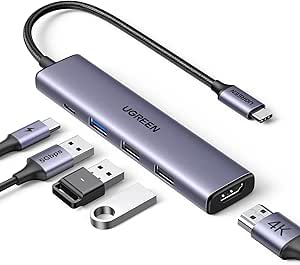 | Best for USB-A Peripherals | Ports: 5 total: 1 HDMI, 1 USB-C PD, 3 USB-A | HDMI: 4K | USB-C power delivery: Up to 100W | VIEW ON AMAZON | See Our Full Breakdown |
| Anker USB-C Hub 7-in-1 Multi-Port Adapter 4K@60Hz USB‑C to HDMI Splitter |  | Best for Card Readers and Fast Data | Ports: 7 | USB-A: 2 ports, up to 5 Gbps | USB-C data: 1 port, up to 5 Gbps | VIEW ON AMAZON | See Our Full Breakdown |
| Acer 5-in-1 USB-C Hub with 4K HDMI |  | Best for 4K at 60Hz in a Five-Port Hub | Ports: 5 | Interfaces: HDMI, USB 2.0, USB 3.0, USB Type-C | HDMI output: Up to 4K at 60Hz | VIEW ON AMAZON | See Our Full Breakdown |
| BENFEI 5-in-1 USB-C Hub with 4K HDMI and 100W Power Delivery |  | Best for High-Speed USB-A Accessories | Ports: 5 total: 1 HDMI, 1 USB-C power pass-through, 3 USB-A | HDMI: Up to 4K at 30Hz | USB-A data transfer: Up to 10 Gbps | VIEW ON AMAZON | See Our Full Breakdown |
| usbc hub | Ports | HDMI | Compatibility | Weight |
|---|---|---|---|---|
| Belkin 4-Port USB-C Hub Adapte | 4 USB-C ports | — | USB-C MacBook, iPad, Chromebook, and PC laptops | 50 g |
| Anker USB C Hub | — | 4K@30Hz | — | — |
| Anker 5-in-1 USB-C Hub with HD | — | — | Windows and MacBook computers with USB-C DP Alt Mode and Power Delivery; USB4 and Thunderbolt 3/4/5 ports | 1.44 ounces |
| Acer 5-in-1 USB-C Hub with 4 U | — | — | — | 0.06 kg |
| Anker 555 USB-C Hub | HDMI, Ethernet, USB-C data, 2 × USB-A, SD/microSD reader, USB-C PD input | — | macOS 12 or later, Windows 10/11, ChromeOS, USB4, and Thunderbolt; Linux not supported | — |
| Anker 5-in-1 USB-C Hub with 4K | 5: HDMI, 1 USB-A 3.0, 2 USB-A 2.0, and USB-C power delivery input | Up to 4K at 30Hz | macOS 12 and newer, Windows 10 and 11, ChromeOS, and laptops with DP Alt Mode and Power Delivery; Linux not supported | — |
| USB C Hub 10-in-1 with 4K HDMI | — | Up to 4K at 60Hz | — | — |
| Acer 7-in-1 USB-C Hub with 4K | 7: HDMI, 2 USB-A 3.1, USB-C data, USB-C PD, SD, and microSD | Up to 4K at 30Hz | Windows, ChromeOS, Linux, and Mac OS X 10.5 or higher | 68 g |
| UGREEN Revodok Pro 6-in-1 USB- | 6 | 4K at 60Hz | — | 180 g |
| Anker 4-in-1 USB-C Data Hub | 4 USB ports | — | — | 1.12 oz |
| UGREEN 5-in-1 USB-C Hub with 4 | 5 total: 1 HDMI, 1 USB-C PD, 3 USB-A | 4K | MacBook M1–M5, iPad Pro, iMac, iPhone 17 Pro/Pro Max, and other supported USB-C devices | 91 g |
| Anker USB-C Hub 7-in-1 Multi-P | 7 | 4K at 60Hz | — | — |
| Acer 5-in-1 USB-C Hub with 4K | 5 | — | Windows, macOS, ChromeOS, and Linux with a supported USB-C port | — |
| BENFEI 5-in-1 USB-C Hub with 4 | 5 total: 1 HDMI, 1 USB-C power pass-through, 3 USB-A | Up to 4K at 30Hz | — | — |
More Details on Our Top Picks
Belkin 4-Port USB-C Hub Adapter, 10Gbps, 100W Pass-Through Charging
I’d choose the Belkin 4-Port USB-C Hub when the main problem is a shortage of USB-C connections, not a need for display output or legacy ports. Its four USB-C ports support data transfers up to 10Gbps, making it a stronger fit for compatible fast storage and modern peripherals than the Anker 5-in-1 hubs here, whose data ports top out at 5Gbps. It also passes through up to 100W, with as much as 85W reaching the laptop, so a connected computer can stay powered while the ports are in use. The tradeoff is its focused port selection: there’s no HDMI, USB-A, Ethernet, or card reader. I’d also account for the adapter using up to 15W of the charging input. Its small, light body suits a mobile setup, but it only works with a host USB-C port.
Pros:- Four USB-C ports add connections for modern peripherals.
- Up to 10Gbps data transfer supports faster compatible devices than the 5Gbps Anker 5-in-1 models.
- Pass-through charging accepts up to 100W and supplies up to 85W to the host.
- Compact 50 g design and plug-and-play setup suit portable use.
Cons:- No HDMI or other video output.
- No USB-A, Ethernet, or memory-card connections.
- The adapter can use up to 15W of incoming power, and the host must have USB-C.
Best for: Laptop users with several USB-C peripherals or fast external drives who want compact expansion and pass-through charging.
Not ideal for: Anyone who needs an external monitor, USB-A accessories, Ethernet, or card readers from one hub.
- Ports:4 USB-C ports
- Data transfer rate:Up to 10Gbps
- Pass-through charging:Up to 100W input; up to 85W to host
- Compatibility:USB-C MacBook, iPad, Chromebook, and PC laptops
- Dimensions:Approximately 2.95 × 1.65 × 0.55 in
- Weight:50 g
- Housing:Plastic with at least 72% post-consumer recycled content
- Warranty:2-year limited warranty
Our verdict“Choose the Belkin if your setup is built around multiple fast USB-C peripherals; pick a video-focused hub if monitor output or broader port variety matters more.”
Anker USB C Hub, 5-in-1 USB-C to HDMI Splitter with 4K Display
The Anker 5-in-1 USB-C Hub with 4K HDMI is a practical pick for someone adding one external display while keeping a few everyday accessories connected. Its 4K@30Hz HDMI output suits presentations, browsing, and general office work, while two USB-A ports accommodate older peripherals that the four-USB-C Belkin cannot. Pass-through charging supports up to 85W, though it requires a separate charger. Compared with the Anker 555, this model is simpler: it gives up Ethernet, card readers, 10Gbps connections, and 4K@60Hz support in exchange for a more focused set of connections. The main limitation is that its USB-C ports are for data, not video, so the HDMI port is the only display route. I’d skip it for high-refresh monitor work or a desk that needs wired networking.
Pros:- HDMI output supports 4K resolution at 30Hz for everyday display tasks.
- Two USB-A ports connect common legacy accessories.
- USB-C and USB-A data ports support transfer speeds up to 5Gbps.
- Supports up to 85W pass-through charging with an external charger.
Cons:- HDMI is limited to 4K@30Hz, unlike the Anker 555’s 4K@60Hz option with DP 1.4.
- USB-C ports do not provide video output.
- Pass-through charging needs a separate charger, and full iPad power may require a 45W charger.
Best for: Students and office laptop users who need a basic 4K monitor connection, USB-A accessories, and charging through one hub.
Not ideal for: Users who want 4K@60Hz, Ethernet, memory-card readers, or video output through a USB-C port.
- Connectivity:5-in-1
- HDMI:4K@30Hz
- USB-C data port:5Gbps
- USB-A ports:2 ports, up to 5Gbps
- Power Delivery input:Up to 100W
- Pass-through charging:Up to 85W
- Charger requirement:External charger required; not included
Our verdict“Pick this Anker for a straightforward monitor-and-accessory setup, but choose the Anker 555 if you need faster display refresh, Ethernet, or card readers.”
Anker 5-in-1 USB-C Hub with HDMI 4K and 85W Power Delivery
I’d put this Anker 5-in-1 on the shortlist for a Windows or MacBook owner who wants HDMI, USB-A, one USB-C data connection, and laptop charging without a larger multiport dock. Like the other Anker 5-in-1 in this group, it offers 4K HDMI at 30Hz and up to 85W pass-through charging; its data ports reach 5Gbps rather than the Belkin’s 10Gbps. That makes it adequate for routine peripherals and file transfers, but less compelling for users moving large files frequently. The USB-C PD-in connection is charging-only, and HDMI is the sole video output. The ABS body keeps the unit light, though it lacks the aluminum enclosure of the Acer hub. It also excludes Linux support, a meaningful limitation for buyers using that operating system.
Pros:- Combines HDMI, USB-A, USB-C data, and charging input in a compact five-port layout.
- Provides up to 85W pass-through charging.
- USB-A and USB-C data connections support speeds up to 5Gbps.
- Light ABS enclosure weighs 1.44 ounces.
Cons:- HDMI is the only video output and supports up to 4K@30Hz.
- The USB-C PD-in port is for charging only, not data or audio.
- Not compatible with Linux, unlike the Acer 5-in-1 USB-C hub with four USB-C data ports.
Best for: Windows and MacBook users who want one compact adapter for a 4K@30Hz monitor, USB-A accessories, and pass-through charging.
Not ideal for: Linux users, people needing 4K@60Hz, or anyone who wants USB-C video, Ethernet, or faster-than-5Gbps data connections.
- Number of ports:5
- Video output:HDMI
- USB data rate:Up to 5Gbps
- Pass-through charging:Up to 85W
- Compatibility:Windows and MacBook computers with USB-C DP Alt Mode and Power Delivery; USB4 and Thunderbolt 3/4/5 ports
- Operating system support:Windows 7, Chrome OS, macOS 12 or later; Linux not supported
- Enclosure material:ABS
- Dimensions:4.78 × 1.59 × 0.45 in
- Weight:1.44 ounces
Our verdict“Choose this model for a compact, conventional Windows or MacBook desk setup, but look elsewhere if Linux support or higher-refresh video is required.”
Acer 5-in-1 USB-C Hub with 4 USB-C 3.2 Ports and 100W Power Delivery
The Acer 5-in-1 is the most specialized choice here: it adds four USB-C 3.2 Gen 2 data ports and a separate 100W Power Delivery port, with no attempt to serve as a video adapter. That makes it a better match than the HDMI-equipped Anker 5-in-1 models for users whose accessories are already USB-C and who need several connections at once. Its aluminum enclosure and compact footprint make it easy to carry, while compatibility spans Windows, macOS, Chrome OS, and Linux. There is a tradeoff in the shared bandwidth: the four data ports share a maximum of 10Gbps, so connecting several fast drives won’t give each port that full rate simultaneously. I’d rule it out if you need a monitor connection, and host charging depends on the laptop’s USB-C port supporting Power Delivery.
Pros:- Four USB-C 3.2 Gen 2 data ports suit modern peripheral-heavy setups.
- A separate 100W Power Delivery port handles compatible host charging.
- Aluminum alloy enclosure is compact and weighs 0.06 kg.
- Supports Chrome OS, Linux, macOS, and Windows.
Cons:- No video output, unlike either Anker 5-in-1 HDMI hub.
- The maximum 10Gbps data bandwidth is shared across all four data ports.
- Host charging requires a laptop USB-C port that supports Power Delivery.
Best for: Users with several USB-C drives or peripherals who need a portable hub and do not require monitor output.
Not ideal for: People building a single-cable monitor setup or expecting each connected device to receive its own 10Gbps bandwidth.
- Data ports:4 USB-C 3.2 Gen 2
- Total ports:5
- Maximum data transfer rate:10Gbps shared across data ports
- Power Delivery:100W
- Video output:Not supported
- Enclosure:Aluminum alloy
- Weight:0.06 kg
- Cable length:0.5 ft
- Operating system compatibility:Chrome OS, Linux, macOS, and Windows
Our verdict“Buy the Acer if you need multiple USB-C data connections and broad OS support, but choose an HDMI hub if you want to connect a display.”
Anker 555 USB-C Hub (8-in-1), Ethernet Adapter with 4K@60Hz HDMI
For a laptop that needs to connect to a monitor, wired network, removable media, and several peripherals, the Anker 555 8-in-1 covers more ground than any other product in this batch. Its standout advantage is 4K@60Hz HDMI with a DP 1.4 host, alongside Ethernet, SD and microSD readers, and USB data ports rated up to 10Gbps. Compared with the smaller Anker 5-in-1 hubs, it is much better suited to a fixed desk or frequent media transfers, while the Belkin is slimmer and more focused on USB-C peripherals. The tradeoffs are compatibility and power: Linux is unsupported, DP 1.2 limits HDMI to 4K@30Hz, and reaching up to 85W pass-through calls for a 100W charger, which is not included. I’d match it to the laptop’s display standard before buying.
Pros:- Broad 8-in-1 selection includes HDMI, Ethernet, USB ports, and SD/microSD readers.
- Supports 4K@60Hz HDMI with a compatible DP 1.4 host.
- USB-C and USB-A data connections support speeds up to 10Gbps.
- Pass-through charging supplies up to 85W to the host.
Cons:- DP 1.2 hosts are limited to 4K@30Hz.
- Linux is not supported.
- Full pass-through charging calls for a 100W charger, which is not included.
Best for: MacBook, Windows, or ChromeOS laptop users who want one hub for a high-refresh 4K display, wired Ethernet, card readers, and data devices.
Not ideal for: Linux users, owners of laptops limited to DP 1.2 who expect 4K@60Hz, or travelers seeking the smallest possible adapter.
- Ports:HDMI, Ethernet, USB-C data, 2 × USB-A, SD/microSD reader, USB-C PD input
- Video output:4K@60Hz with DP 1.4; 4K@30Hz with DP 1.2
- Data transfer speed:Up to 10Gbps
- Pass-through charging:Up to 85W; hub uses 15W
- Recommended charger:100W charger for full pass-through charging
- Built-in cable length:7.48 in
- Compatibility:macOS 12 or later, Windows 10/11, ChromeOS, USB4, and Thunderbolt; Linux not supported
Our verdict“Choose the Anker 555 for a desk that needs display, networking, card access, and fast data from one connection, provided your laptop supports DP 1.4 and your OS is compatible.”
Anker 5-in-1 USB-C Hub with 4K HDMI
I’d choose this Anker when the main goal is connecting older USB-A accessories while adding a monitor and laptop charging. Its three USB-A data ports give it an advantage over the Acer 7-in-1, which instead spends ports on SD and microSD readers. The tradeoff is that only one Anker port is USB 3.0; the other two use USB 2.0, so they suit keyboards, mice, and similar accessories better than fast storage. HDMI supports 4K at 30Hz, adequate for many office displays but less fluid than the UGREEN Revodok Pro’s 4K at 60Hz. Pass-through charging reaches 90W, though the charger is not included, and the USB-C input is for power rather than peripherals. I’d skip it if you use Linux, which is listed as incompatible.
Pros:- Combines HDMI with three USB-A data ports in a compact hub
- Offers up to 90W pass-through charging
- Supports HDMI output up to 4K at 30Hz
Cons:- Two USB-A ports are limited to USB 2.0 speeds
- Wall charger is sold separately
- Not compatible with Linux, and its USB-C power input cannot connect peripherals
Best for: Laptop users with several USB-A accessories who also need HDMI and pass-through charging for an office setup.
Not ideal for: Linux users, people who need 4K at 60Hz, or anyone seeking fast performance across several USB-A storage devices.
- Ports:5: HDMI, 1 USB-A 3.0, 2 USB-A 2.0, and USB-C power delivery input
- USB-A 3.0 speed:Up to 5Gbps
- USB-A 2.0 speed:Up to 480Mbps
- HDMI:Up to 4K at 30Hz
- Pass-through charging:Up to 90W; maximum power input 100W
- Compatibility:macOS 12 and newer, Windows 10 and 11, ChromeOS, and laptops with DP Alt Mode and Power Delivery; Linux not supported
- Dimensions and weight:4.8 × 1.2 × 0.46 in; 0.06 kg
- Material and warranty:Plastic; 18 months
Our verdict“Pick this Anker for a compact mix of HDMI, charging, and multiple USB-A accessories, but choose the UGREEN Revodok Pro for smoother 4K video and faster data.”
USB C Hub 10-in-1 with 4K HDMI, SD/TF Card Reader, 100W PD Charging, USB 3.0 & 2.0 Ports for Laptops and Tablets
This hub is the most useful fit here when one connection needs to serve a mix of accessories and memory cards. Its 10-port layout includes SD and TF readers, two USB 3.0 ports, three USB 2.0 ports, HDMI, and 100W power delivery. That breadth makes it more flexible for photo workflows than the Anker 5-in-1, which has more limited USB-A capacity and no card readers. Video is also specified at 4K at 60Hz, a smoother target than the Acer 7-in-1’s 30Hz output. The tradeoffs are device compatibility and storage limits: the host needs DisplayPort Alt Mode or Thunderbolt for HDMI, only one HDD or SSD connection is supported, and the USB-C port is data-only rather than a charging output. I’d verify your laptop’s video support before choosing it.
Pros:- Includes SD and TF card readers alongside multiple USB ports
- Specifies 4K HDMI output at 60Hz
- Supports up to 100W power delivery
- Provides two USB 3.0 ports for faster accessory data transfer
Cons:- HDMI requires host support for DisplayPort Alt Mode or Thunderbolt
- Limited to one HDD or SSD connection
- USB-C port is data-only and cannot be used for charging
Best for: Laptop and tablet owners who regularly move files from SD or TF cards and want many connection types from one hub.
Not ideal for: Buyers who need multiple external drives at once, a USB-C charging output, or HDMI without host-device video support.
- Number of ports:10
- HDMI:Up to 4K at 60Hz
- USB ports:2 USB 3.0 and 3 USB 2.0
- Card readers:SD and TF
- Power delivery:Up to 100W
- Data transfer:Up to 5Gbps
- Video compatibility:Requires host support for DisplayPort Alt Mode or Thunderbolt
- Drive limit:One HDD or SSD connection
Our verdict“Choose this model for its broad card-reader and port selection, provided your device supports video output and you only need one connected drive.”
Acer 7-in-1 USB-C Hub with 4K HDMI, 100W PD, and SD Card Readers
I’d put this Acer ahead of the Anker 5-in-1 for anyone who frequently imports photos or other files from memory cards. Its SD and microSD readers sit alongside two USB-A 3.1 ports, a USB-C data port, HDMI, and a separate power-delivery input. The aluminum housing also sets it apart from the plastic Anker, while the 68 g weight keeps it portable. The main compromise is display performance: HDMI tops out at 4K at 30Hz, whereas the UGREEN Revodok Pro supports 4K at 60Hz. The Acer’s USB ports are for data only, not video or audio, and HDMI depends on DP Alt Mode support from the host. Its broad listed operating-system compatibility includes Linux, unlike the Anker 5-in-1, but that does not remove the video-port requirement.
Pros:- Combines SD and microSD readers with USB-A and USB-C data ports
- Aluminum housing with a portable 68 g weight
- Supports up to 100W power delivery
- Lists compatibility with Windows, ChromeOS, Linux, and Mac OS X 10.5 or higher
Cons:- HDMI is limited to 4K at 30Hz
- Video output requires USB-C DP Alt Mode support
- USB-A and USB-C data ports do not carry video or audio
Best for: Photographers and other laptop users who need SD and microSD access, USB-A accessories, and charging in one portable hub.
Not ideal for: Users who want a 4K 60Hz external display or expect USB data ports to carry video or audio.
- Ports:7: HDMI, 2 USB-A 3.1, USB-C data, USB-C PD, SD, and microSD
- HDMI:Up to 4K at 30Hz
- Power delivery:Up to 100W
- Data transfer:Up to 5Gbps
- Material:Aluminum
- Dimensions:5.1 × 1.4 × 0.7 in
- Weight:68 g
- Compatibility:Windows, ChromeOS, Linux, and Mac OS X 10.5 or higher
Our verdict“Choose the Acer for card-reader convenience and broad operating-system compatibility, but favor the UGREEN Revodok Pro for a smoother 4K display.”
UGREEN Revodok Pro 6-in-1 USB-C Hub with 10 Gbps Data, 4K 60 Hz HDMI, and 100W Power Delivery
The UGREEN Revodok Pro is the strongest choice in this group when the priority is pairing a high-refresh 4K display with fast file transfers. Its 4K at 60Hz HDMI outpaces the 30Hz output on both the Acer 7-in-1 and Anker 5-in-1, while its USB-A and USB-C data ports reach up to 10Gbps—twice the stated speed of the 10-in-1 hub. Two USB-C and two USB-A ports give it a balanced mix, with 100W power delivery for charging the host. That focus comes at the expense of breadth: unlike the Acer, it has no card readers, and only four of its six ports carry data. At 180 g, it is also heavier than the listed Acer. I’d confirm support for the specific features you need on your device.
Pros:- Supports HDMI output at 4K and 60Hz
- Offers data transfer up to 10Gbps
- Includes two USB-C and two USB-A data ports
- Provides up to 100W Power Delivery
Cons:- No SD or microSD card reader
- Only four of the six ports are USB data ports
- At 180 g, it weighs more than the listed Acer hub
Best for: Laptop, tablet, phone, or handheld gaming device owners who need 4K at 60Hz and fast USB-C and USB-A data.
Not ideal for: Photographers who need built-in SD or microSD readers, or buyers seeking the lightest hub for travel.
- Ports:6
- USB-C ports:2
- USB-A ports:2
- HDMI:4K at 60Hz
- Power delivery:Up to 100W
- Data transfer:Up to 10Gbps
- Weight:180 g
- Enclosure and warranty:Aluminum and plastic; 2 years
Our verdict“Choose the Revodok Pro for fast data and smoother 4K output, but pick the Acer 7-in-1 if card readers matter more than transfer speed.”
Anker 4-in-1 USB-C Data Hub, 5Gbps, 2 ft Cable
This Anker is the straightforward pick when the job is adding USB ports, not building a full laptop dock. It provides four USB data ports at up to 5Gbps and a 2 ft cable, which gives more room to position the hub than the compact, directly connected style of the Anker 5-in-1. That cable can help keep accessories within reach, but the hub does not add HDMI, card readers, or charging. Compared with the UGREEN Revodok Pro, it is far more limited for display and high-speed connectivity, yet its simpler feature set may suit a desk with several USB peripherals and no need for video output. Charging is explicitly unsupported, so it cannot replace a pass-through charging hub when a laptop’s USB-C port must also receive power.
Pros:- Adds four USB ports for compatible devices
- Supports data transfer up to 5Gbps
- Two-foot cable offers flexible placement
- Compact and lightweight at 1.12 oz
Cons:- Does not support charging
- Provides no HDMI or card-reader connections
- USB data speed is lower than the UGREEN Revodok Pro’s stated 10Gbps
Best for: Users who need four USB connections for data accessories and want a longer cable for flexible desk placement.
Not ideal for: Laptop users who need HDMI, card readers, or pass-through charging from the same hub.
- Ports:4 USB ports
- Interface:USB-C
- Data transfer:Up to 5Gbps
- Cable length:2 ft
- Dimensions:4.2 × 1.2 × 0.4 in
- Weight:1.12 oz
- Material and color:Plastic; black
- Charging and warranty:Charging not supported; 18 months
Our verdict“Pick this Anker for simple, cable-flexible USB data expansion, but choose a charging or HDMI-equipped hub if you need more than peripheral connections.”
UGREEN 5-in-1 USB-C Hub with 4K HDMI and 100W Power Delivery
I’d choose the UGREEN CM478 when the main job is connecting older USB-A accessories alongside a display and laptop charger. Its three USB-A ports offer more plug-in flexibility than the Anker 7-in-1, which has two USB-A ports but adds card readers and a data-only USB-C port. The tradeoff is that two of UGREEN’s USB-A ports are limited to 480 Mbps, so they’re better suited to a mouse, keyboard, or basic peripheral than frequent large file transfers. The hub supports 4K HDMI and up to 100W power delivery, all in a compact aluminum shell. I’d pick the Anker instead for card transfers or faster connections across every USB data port; UGREEN makes more sense when port count for everyday accessories matters most.
Pros:- Three USB-A ports accommodate more peripherals than the Anker 7-in-1’s two USB-A ports.
- 4K HDMI adds a display connection in a compact adapter.
- Up to 100W USB-C power delivery supports charging while the hub is connected.
- Aluminum enclosure and 91 g weight suit a portable laptop setup.
Cons:- Two USB-A ports are limited to 480 Mbps, which can slow larger file transfers.
- No SD or TF card readers for direct memory-card access.
Best for: Laptop users who regularly connect several USB-A accessories and also need HDMI and pass-through charging.
Not ideal for: Photographers or anyone moving large files through USB-A often, since two of its three USB-A ports are limited to 480 Mbps.
- Ports:5 total: 1 HDMI, 1 USB-C PD, 3 USB-A
- HDMI:4K
- USB-C power delivery:Up to 100W
- USB-A data rates:Up to 5 Gbps; two ports support 480 Mbps
- Dimensions:4.79 × 1.09 × 0.47 in
- Weight:91 g
- Material:Aluminum
- Compatibility:MacBook M1–M5, iPad Pro, iMac, iPhone 17 Pro/Pro Max, and other supported USB-C devices
Our verdict“Choose the UGREEN if you need three USB-A connections plus HDMI and charging, but pick the Anker 7-in-1 for card readers and faster data ports.”
Anker USB-C Hub 7-in-1 Multi-Port Adapter 4K@60Hz USB‑C to HDMI Splitter
This Anker is the most versatile pick here for someone who moves files from cards and USB devices as well as connecting a monitor. Its SD and TF readers are a clear advantage over the UGREEN 5-in-1, which instead gives you a third USB-A port. Anker’s two USB-A ports and data-only USB-C port each support 5 Gbps, making it a better fit for regular file transfers than a hub with slower USB-A connections. It also supports 4K at 60Hz and up to 85W power delivery. That charging ceiling is below the UGREEN’s 100W, and the extra USB-C port cannot charge or output video. I’d choose this model for card-based workflows; skip it if you need more USB-A sockets or the highest listed power pass-through.
Pros:- SD and TF readers support direct memory-card transfers.
- Two USB-A ports and the data-only USB-C port support up to 5 Gbps.
- HDMI supports 4K output at 60Hz.
- Compact metal housing weighs 67 g.
Cons:- USB-C data port is not a charging or video output port.
- Power delivery is capped at 85W, below the UGREEN 5-in-1’s 100W rating.
- A power adapter is not included.
Best for: Photographers, students, and laptop users who transfer files from SD or TF cards and want a 4K 60Hz display connection.
Not ideal for: People who need three USB-A ports, USB-C video output, or more than 85W of pass-through charging.
- Ports:7
- USB-A:2 ports, up to 5 Gbps
- USB-C data:1 port, up to 5 Gbps
- USB-C power delivery:Up to 85W
- HDMI:4K at 60Hz
- Card readers:SD and TF
- Dimensions:5.17 × 1.46 × 0.47 in
- Weight and enclosure:67 g; metal
Our verdict“Pick the Anker for card readers, fast data connections, and 4K 60Hz HDMI; choose the UGREEN if you need a third USB-A port and higher-rated power delivery.”
Acer 5-in-1 USB-C Hub with 4K HDMI
The Acer stands out among these five-port options by pairing 4K HDMI at 60Hz with up to 90W pass-through charging. That makes it a stronger match for a smooth external-display setup than the BENFEI 5-in-1, whose 4K output is limited to 30Hz. Acer also lists up to 5 Gbps data transfer and compatibility across Windows, macOS, ChromeOS, and Linux. The catch is that the host USB-C port must support DisplayPort Alt Mode, Power Delivery, and data; a USB-C connector alone does not guarantee all three. The hub also lacks ultrawide monitor support, and the power adapter and cable are not included. I’d favor it for a standard 4K monitor, but choose another hub if your display is ultrawide or your laptop’s USB-C capabilities are uncertain.
Pros:- 4K HDMI at 60Hz provides a smoother display mode than the BENFEI’s 4K at 30Hz.
- Pass-through charging supports up to 90W output.
- Data transfer supports speeds up to 5 Gbps.
- Aluminum shell and support for Windows, macOS, ChromeOS, and Linux broaden its use.
Cons:- Requires a host USB-C port with DisplayPort Alt Mode, Power Delivery, and data support.
- Ultrawide monitors are not supported.
- Power adapter and cable are not included.
Best for: People with a compatible USB-C laptop who want 4K 60Hz HDMI and pass-through charging without adding card-reader ports.
Not ideal for: Ultrawide-monitor owners or buyers whose USB-C port lacks DisplayPort Alt Mode, Power Delivery, or data support.
- Ports:5
- Interfaces:HDMI, USB 2.0, USB 3.0, USB Type-C
- HDMI output:Up to 4K at 60Hz
- Power delivery:Up to 100W input; up to 90W output
- Data transfer rate:Up to 5 Gbps
- Compatibility:Windows, macOS, ChromeOS, and Linux with a supported USB-C port
- Host port requirement:USB-C with DisplayPort Alt Mode, Power Delivery, and data transfer support
- Ultrawide monitor support:Not supported
- Material:Aluminum shell
Our verdict“Choose the Acer for a compatible laptop and standard 4K 60Hz monitor, but skip it if you need ultrawide support or a more forgiving host connection.”
BENFEI 5-in-1 USB-C Hub with 4K HDMI and 100W Power Delivery
BENFEI is the better fit when fast USB-A connections matter more than a high-refresh-rate display. It supports up to 10 Gbps on USB-A, faster than the UGREEN 5-in-1’s 5 Gbps port and its two 480 Mbps ports. That can help when connecting compatible storage, while the 20 cm woven cable offers more reach than a flush-mounted adapter. The compromises are clear: HDMI tops out at 4K at 30Hz, and its USB-C port is for power pass-through only, not data or video. That makes the Anker 7-in-1 a better choice for 4K 60Hz, card readers, or USB-C data. I’d pick BENFEI for USB-A storage and charging, but not as a single hub for display flexibility and varied USB-C devices.
Pros:- USB-A data transfer supports up to 10 Gbps.
- Pass-through charging supports up to 90W output from up to 100W input.
- 20 cm woven cable adds reach and resists tangling.
- Aluminum case provides a compact housing.
Cons:- 4K HDMI output is limited to 30Hz, unlike the Anker 7-in-1’s 4K at 60Hz.
- USB-C port supports power pass-through only, with no data or video.
- No SD or TF card readers.
Best for: Laptop users connecting high-speed USB-A storage who also need charging pass-through and a basic 4K display connection.
Not ideal for: People who want 4K at 60Hz, USB-C data or video, or SD and TF card readers.
- Ports:5 total: 1 HDMI, 1 USB-C power pass-through, 3 USB-A
- HDMI:Up to 4K at 30Hz
- USB-A data transfer:Up to 10 Gbps
- Power delivery:Up to 100W input; up to 90W pass-through charging
- Cable:20 cm silicone woven
- Case material:Aluminum
- USB-C port function:Charging only; no data or video
- Warranty:18 months
Our verdict“Choose BENFEI for high-speed USB-A storage and charging, but pick the Anker 7-in-1 if smoother 4K video or USB-C data matters more.”

How We Picked
I ranked these USB-C hubs by how clearly their listed features solve common laptop connection problems: adding a display, connecting peripherals, reading cards, accessing Ethernet, and passing power through to the host. I gave more weight to a useful mix of capabilities than to a high port count alone, and treated explicit performance details—such as 10 Gbps data or 4K at 60 Hz HDMI—as more informative than a broad label like “4K HDMI.”
The order also reflects versatility, usability, and fit. A hub with Ethernet or card readers can suit a wider range of work than a data-only adapter, while a simpler model may be the better pick when a buyer needs just a few ports. I distinguish products only by the specifications supplied here; details not stated in a product name, such as exact port speeds or display limitations, should be confirmed before purchase. Every option has a tradeoff, whether that is a narrower port selection, less explicit performance information, or more connections than a lightweight setup needs.
Factors to Consider When Choosing Usbc Hubs
I would start with the devices you need to connect at the same time, then check what your laptop can support through its USB-C port. A hub’s headline port count does not tell you whether it can drive your monitor at the refresh rate you want or keep a laptop charged under load. These checks help avoid paying for connections you will not use—or buying a hub that lacks the one capability your setup depends on.
Match the hub to your laptop’s USB-C capabilities
USB-C describes the connector, not a guaranteed set of features. Some laptop ports support video output and high-speed data, while others may support only certain functions or charging. Check the laptop’s specifications for DisplayPort Alt Mode, USB data rates, and power input before choosing a hub. A hub cannot add video output if the host port does not provide it. This check matters most when HDMI is the reason you are shopping. It also helps distinguish a hub compatibility issue from a faulty cable or display.
Read the display specification beyond “4K HDMI”
Resolution and refresh rate work together: a label that says 4K does not tell you whether the hub supports 30 Hz or 60 Hz. For office documents, lower refresh rates may be acceptable, but they can make cursor movement and scrolling feel less fluid. Confirm the hub’s supported resolution and refresh rate alongside your laptop’s video output and monitor input. If you plan to connect more than one external display, check whether the hub supports that arrangement on your operating system and laptop model. Avoid treating HDMI presence alone as proof that every monitor setup will work. The more specific the stated display limit, the easier it is to compare options accurately.
Choose data speed for the devices you attach
Data speed matters most for external SSDs, large transfers, and frequent backups; keyboards and mice need far less bandwidth. A hub’s listed maximum speed may apply to a particular port rather than every port at once, and connected devices can share the hub’s upstream bandwidth. Check which ports are USB-A or USB-C and whether the listed speed fits your fastest device. If you mainly connect low-bandwidth accessories, a simpler hub can be a sensible choice. For storage-heavy work, a clearly specified 10 Gbps connection offers more confidence than an unspecified data port. Also check whether a USB-C port carries data, power, video, or some combination—port shape alone does not answer that.
Treat power delivery as passthrough, not a charger guarantee
100W power delivery is a maximum passthrough figure, not a promise that your laptop receives the full amount. The charger, cable, host device, and hub all affect delivered power, and some power may be used by the hub itself. Compare the hub’s stated passthrough limit with your laptop’s charging needs and use a compatible USB-C charger with enough output. If you rely on one connection for charging and peripherals, confirm that the hub’s power input is separate from its host cable. A data-only hub may be a better fit if charging through the adapter is unnecessary. Buyers should also check whether the charger itself is included rather than assuming it comes with the hub.
Buy ports you will use, not the biggest number
Port mix beats raw port count when desk space and daily workflow matter. Ethernet can be useful for a stable wired connection, while SD and TF readers can save photographers from carrying a separate reader. Extra USB ports help with peripherals, but a hub with many connections can still be a poor fit if it omits the one display or card connection you need. List the devices you expect to plug in together and check whether the hub can support them at the same time. A compact adapter may be easier to travel with; a larger multiport model can reduce cable clutter at a fixed desk. Do not assume similarly named hubs from the same brand have identical port layouts.
Check cable layout, heat, and everyday placement
Physical design affects convenience just as much as the port list. A short attached cable can keep a hub close to a laptop, while a longer lead may help position it beside a monitor stand or make connections easier to reach. Think about where the ports will sit once the hub is plugged in, especially if adjacent laptop ports are crowded. Multiport adapters can become warm during sustained use, so a layout with room for airflow is preferable to burying the hub under papers or equipment. For travel, weigh the cable and connector design against the benefit of having card readers or Ethernet built in. Verify dimensions and cable length in the full listing when portability or desk placement is a deciding factor.
Frequently Asked Questions
Will any of these USB-C hubs work with my laptop?
Not automatically: the laptop’s USB-C port must support the functions you want from the hub. Check for video output support if you plan to use HDMI, and confirm the port’s data and charging capabilities as well. The hub’s listed features cannot override limits in the laptop’s hardware or operating system. Look up the exact laptop model and compare its specifications with the hub’s requirements before buying. If the product listing does not state compatibility clearly, ask the seller or manufacturer rather than relying on the connector shape alone.
Does 100W power delivery mean my laptop will receive 100W?
No—the figure is a passthrough ceiling, not a guarantee of power delivered to the laptop. The charger must supply enough power, and the hub and connected devices can affect what reaches the host. Your laptop may also limit charging to its own supported input level. Check the hub’s detailed power specifications, the charger’s output, and your laptop’s charging requirements together. If your laptop needs high-wattage charging during demanding work, allow for this difference rather than choosing solely by the 100W label.
Is 4K HDMI enough for a 4K monitor?
Not by itself: “4K HDMI” does not specify the refresh rate or every supported display mode. This roundup includes models that name 4K at 60 Hz, while other product names give a 4K label without stating the same detail. Check the full product specifications for resolution, refresh rate, and any operating-system limits. Your laptop’s USB-C video output and the HDMI cable also need to support the intended mode. If smooth desktop use matters, verify 60 Hz support before choosing a hub.
Should I choose a hub with Ethernet or a smaller one with more USB data ports?
Choose based on the connection you cannot easily replace. Ethernet makes sense if you regularly work on wired networks or need a steadier connection in a crowded wireless environment. A data-focused hub is a better match if your daily setup relies on external drives and USB accessories but not wired networking. The Anker 555 is the lineup’s clearest Ethernet-oriented option, while the Belkin 4-Port focuses on data ports and power passthrough. Before buying, count how many devices you connect at once and check whether a separate adapter would be more practical.
Do I need a hub with 10 Gbps data, or is a 5 Gbps model enough?
For everyday peripherals, 5 Gbps is often sufficient; the difference matters more with fast external storage and repeated large file transfers. A 10 Gbps label can shorten transfer times only when the host port, hub port, cable, and attached drive all support that speed. If your accessories are mostly keyboards, mice, or basic storage, prioritize the right port types and display support instead. The UGREEN Revodok Pro and Belkin product names specify 10 Gbps, which makes their stated data capability easier to compare. Confirm whether that speed applies to the specific port you plan to use and whether other connected devices share bandwidth.
Conclusion
For the broadest balance of stated capabilities, I recommend the UGREEN Revodok Pro 6-in-1 as best overall, with its specified 10 Gbps data, 4K at 60 Hz HDMI, and 100W power delivery. The Anker 555 8-in-1 is my pick for buyers who need Ethernet and a wider connection set, while the Belkin 4-Port is the best fit for a simpler data-focused setup. For best value, I would start by comparing the UGREEN 5-in-1 and BENFEI 5-in-1 against the ports you need, then verify their full specifications before deciding; the supplied details do not establish a price winner. The best option for beginners is a straightforward five-in-one model that matches their laptop, monitor, and charger without paying for unused ports. For photographers, the Acer 7-in-1 or the 10-in-1 hub with SD/TF readers may be a better starting point; for buyers seeking a premium-style feature set, the Anker 555 offers the broadest named assortment here. Before ordering, confirm host compatibility, display refresh rate, port speeds, and charging requirements.
Evergreen bestsellers Picks

De'Longhi Magnifica Start Automatic Espresso Machine with Milk Frother, Silver

Ninja Foodi 6-in-1 DualZone FlexBasket Air Fryer, 7-Qt MegaZone, Black, DZ071

Dyson Cyclone V10 Origin Cordless Vacuum
As an affiliate, we earn on qualifying purchases.