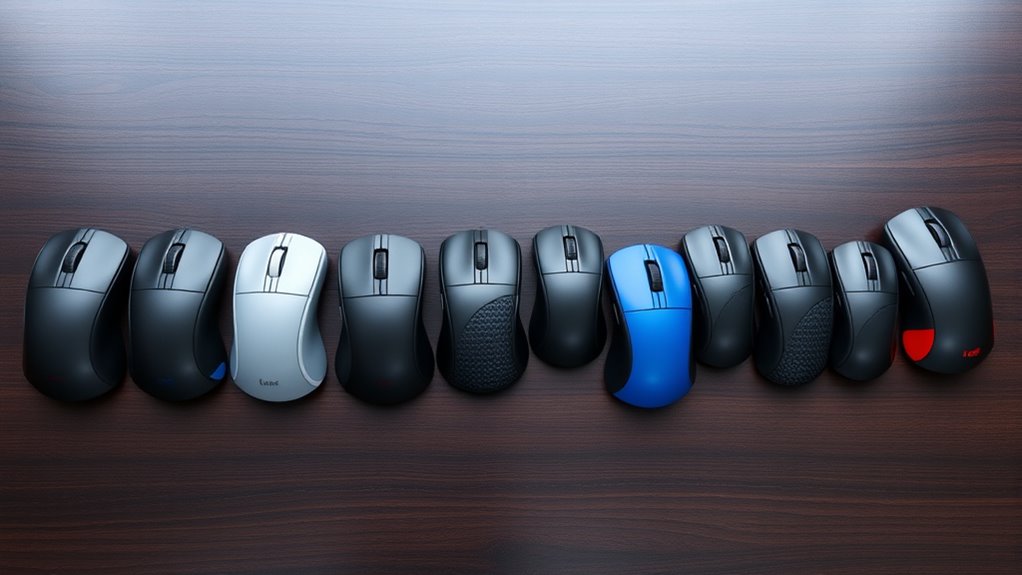

If you’re searching for vertical mice for wrist pain relief, you’re likely balancing comfort, functionality, and price. The Logitech Lift stands out as the best overall pick, offering a comfortable ergonomic design with quiet clicks and versatile connectivity. The Evoluent VerticalMouse VMDSW is another top contender, especially for those with specific hand sizes or a need for customizable buttons. However, many options trade off between advanced features and affordability. Continue reading to explore the full list and find the best fit for your needs.

Get audio and creator gear delivered free — and shop member deals
- Fast, free delivery on millions of items
- Access to Prime Big Deal Days deals on October 6–7
- Prime Video, Amazon Music and more included
Complete the kit


Key Takeaways
- The most comfortable models prioritize natural hand positioning and adjustable DPI for personalized control.
- Wired options often provide more reliable connectivity but sacrifice convenience and portability.
- Premium mice tend to offer more customizable buttons and advanced ergonomic features, justifying higher prices.
- Smaller or budget options may lack some features but still provide effective wrist relief for light use.
- A balanced choice considers both ergonomic design and compatibility with your devices and workflow.
| Logitech Lift Vertical Ergonomic Mouse, Wireless, Bluetooth or Logi Bolt USB Receiver, Quiet Clicks, 4 Buttons, Compatible with Windows/macOS/iPadOS, Laptop, PC – Graphite (Renewed) |  | Best Overall for Comfort and Versatility | Connectivity Technology: Bluetooth, USB, Wireless | Additional Features: Wireless | Movement Detection: Optical, Laser | VIEW ON AMAZON | See Our Full Breakdown |
| TRELC Ergonomic Wireless Vertical Optical Mouse with Adjustable DPI | 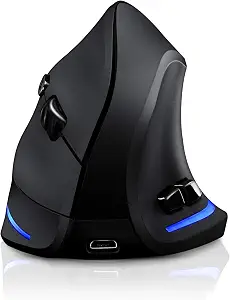 | Best for Customizable Precision | DPI levels: 1000/1600/2400 | Buttons: 6 | Connectivity: Wireless with USB dongle | VIEW ON AMAZON | See Our Full Breakdown |
| Lekvey Ergonomic Wireless Vertical Mouse |  | Best for Long-Term Comfort and Compatibility | DPI Levels: 800 / 1200 / 1600 | Battery Life: Over 150 hours | Size: 5.0″ x 3.0″ x 2.5″ | VIEW ON AMAZON | See Our Full Breakdown |
| Anker 2.4G Wireless Ergonomic Vertical Mouse |  | Best Budget-Friendly for Basic Use | Connectivity: 2.4 GHz wireless via USB receiver | DPI Resolution: 800/1200/1600 | Dimensions: 120*62.8*74.8 mm | VIEW ON AMAZON | See Our Full Breakdown |
| Wireless Ergonomic Vertical Mouse with Adjustable DPI and 6 Buttons |  | Best for Range and Additional Controls | Connection: 2.4G USB Wireless | DPI: 800/1200/1600 | Buttons: 6 | VIEW ON AMAZON | See Our Full Breakdown |
| Evoluent VerticalMouse VMDSW Ergonomic Vertical Mouse for Right Hand, Small, Wireless USB |  | Best for Right-Handed Users Seeking Precise, Customizable Control | Connection: Wireless USB Receiver | Number of Buttons: 6 | Speeds: 4 | VIEW ON AMAZON | See Our Full Breakdown |
| Logitech Lift Vertical Ergonomic Mouse |  | Best for Multi-Platform Users Wanting Long Battery Life and Comfort | Weight: 125 g | Dimensions: 108 x 70 x 71 mm | Tracking: 4000 DPI | VIEW ON AMAZON | See Our Full Breakdown |
| TECKNET Ergonomic Wireless Vertical Mouse with Bluetooth and USB-A |  | Best for Versatile Connectivity and All-Day Comfort | Connectivity: Bluetooth 5.0/3.0, USB-A | Battery: 600mAh rechargeable | DPI: 800 to 4800 adjustable | VIEW ON AMAZON | See Our Full Breakdown |
| Evoluent VerticalMouse 4 – Wired Ergonomic Mouse for Right Hand, Medium to Large, 6 Customizable Buttons, 4 Speed Settings |  | Best for Users Preferring Wired Reliability and Customization | Type: Wired Vertical Mouse | Hand Orientation: Right Hand | Size: Medium to Large | VIEW ON AMAZON | See Our Full Breakdown |
| Logitech Lift Vertical Ergonomic Wireless Mouse – Graphite | | Best for Multi-Platform Users Wanting Long Battery Life and Quiet Operation | Weight: 125 g | Dimensions: 108 x 70 x 71 mm | Tracking: 4000 DPI | VIEW ON AMAZON | See Our Full Breakdown |
| Tecknet Ergonomic Wireless Vertical Mouse, 4800 DPI, Bluetooth & 2.4GHz, Silent, 3-Device Switching |  | Best Overall for Versatile, Multi-Device Use | DPI: 4800/3200/2400/1600/1200/800 | Connectivity: Bluetooth 5.0/3.0, 2.4GHz USB | Battery: 2 AAA batteries (not included) | VIEW ON AMAZON | See Our Full Breakdown |
| Ergonomic Vertical Mouse for Wrist Pain Relief, Wired USB for Laptop and PC |  | Best Budget-Friendly Choice for Immediate Relief | Connection: Wired USB | Cable Length: 1.7 meters | Weight: 103g | VIEW ON AMAZON | See Our Full Breakdown |
| IFYOO 2.4G / BT / Wired Tri-Mode RGB Rechargeable G53 Wireless Vertical Ergonomic Mouse, 5 Side Buttons, Max 8400 DPI, for Windows, Mac, iPad OS, Android – Black |  | Best for Customization and High-Precision Control | Connectivity Technology: Wi-Fi, 2.4G, Bluetooth, Wired | Buttons: 10 | DPI: Max 8400 | VIEW ON AMAZON | See Our Full Breakdown |
| ProtoArc EM11 NL Wireless Ergonomic Vertical Mouse, Rechargeable, Black |  | Best Compact Design for Small Hands | Hand size compatibility: Under 7.5 inches | Connectivity: Bluetooth, 2.4G USB-A | Battery: 500mAh Li-Ion rechargeable | VIEW ON AMAZON | See Our Full Breakdown |
| Logitech MX Vertical Advanced Ergonomic Mouse, Wireless Bluetooth or USB (Renewed) |  | Best for Long Battery Life and Compatibility | Connectivity Technology: Bluetooth, USB | Additional Features: Wireless | Movement Detection: Optical | VIEW ON AMAZON | See Our Full Breakdown |
| vertical mice for wrist pain relief | Compatibility |
|---|---|
| Logitech Lift Vertical Ergonom | — |
| TRELC Ergonomic Wireless Verti | Windows, Mac, Linux |
| Lekvey Ergonomic Wireless Vert | Windows, Linux, Mac |
| Anker 2.4G Wireless Ergonomic | — |
| Wireless Ergonomic Vertical Mo | — |
| Evoluent VerticalMouse VMDSW E | Windows |
| Logitech Lift Vertical Ergonom | — |
| TECKNET Ergonomic Wireless Ver | Windows, Mac OS |
| Evoluent VerticalMouse 4 | — |
| Logitech Lift Vertical Ergonom | — |
| Tecknet Ergonomic Wireless Ver | Windows, Mac, Chrome, Linux |
| Ergonomic Vertical Mouse for W | Laptop, PC, Chromebook |
| IFYOO 2.4G / BT / Wired Tri-Mo | Windows 11/10/8/7, Mac OS, iPad OS, Android |
| ProtoArc EM11 NL Wireless Ergo | Windows 8/10, Mac OS X 10.12+, Android 4.3+ |
| Logitech MX Vertical Advanced | — |
More Details on Our Top Picks
Logitech Lift Vertical Ergonomic Mouse, Wireless, Bluetooth or Logi Bolt USB Receiver, Quiet Clicks, 4 Buttons, Compatible with Windows/macOS/iPadOS, Laptop, PC – Graphite (Renewed)
This model stands out for its ergonomic vertical design, which effectively reduces wrist strain during prolonged use, making it a strong contender against the Lekvey. Its quiet, customizable buttons enhance productivity without noise distraction, although it offers limited advanced customization compared to higher-end options like the Logitech MX Vertical. The wireless connectivity via Bluetooth and Logi Bolt provides seamless device compatibility, but its right-handed only orientation might exclude left-handed users. Compared to the TRELC, it offers a longer battery life of up to 2 years, reducing maintenance. However, since it’s a pre-owned product, the condition can vary, which might affect durability.
Pros:- Reduces wrist strain with ergonomic vertical design
- Quiet, customizable buttons for distraction-free work
- Multiple connectivity options for versatile device use
- Long battery life of up to 2 years
Cons:- Only suitable for right-handed users
- Refurbished condition may vary
Best for: Writers, professionals, and office workers seeking a reliable, comfortable mouse for daily use across multiple devices
Not ideal for: Left-handed users or those wanting extensive customization and wired connectivity options
- Connectivity Technology:Bluetooth, USB, Wireless
- Additional Features:Wireless
- Movement Detection:Optical, Laser
- Button Quantity:4
- Hand Orientation:Right-handed
Our verdict“This is a well-rounded choice for right-handed users prioritizing comfort, quiet operation, and multi-device compatibility.”
TRELC Ergonomic Wireless Vertical Optical Mouse with Adjustable DPI
This mouse excels for users who need adjustable sensitivity, making it ideal for detailed tasks or gaming when compared with the Lekvey, which offers no DPI customization. Its vertical design reduces wrist fatigue, but the limited DPI levels (1000/1600/2400) may not suit professional graphic work requiring finer control. The wireless connection is straightforward, yet it requires a USB dongle, which could be inconvenient for users with limited ports. Unlike the Logitech Lift, it lacks multi-platform connectivity, restricting use on some devices. Its straightforward design makes it a practical, budget-friendly option for general use, but the absence of advanced features limits its appeal for power users.
Pros:- Reduces wrist fatigue with ergonomic vertical design
- Adjustable DPI levels for tailored precision
- Rechargeable battery eliminates ongoing battery costs
- Simple plug-and-play setup
Cons:- Limited DPI range for specialized tasks
- Requires USB port for the dongle
Best for: Gamers, graphic designers, or anyone needing adjustable DPI for precision work
Not ideal for: Users who prefer Bluetooth connectivity or need extensive customization
- DPI levels:1000/1600/2400
- Buttons:6
- Connectivity:Wireless with USB dongle
- Battery:Rechargeable
- Compatibility:Windows, Mac, Linux
Our verdict“Ideal for users needing customizable sensitivity, especially gamers or detailed design tasks, but less suited for those seeking wireless convenience without dongles.”
Lekvey Ergonomic Wireless Vertical Mouse
This mouse is designed for users who prioritize wrist pain relief and wide OS compatibility, outperforming the TRELC in ease of use across different operating systems. Its neutral handshake position helps reduce strain, but the DPI options (800/1200/1600) might feel limiting for high-precision tasks. The long battery life of over 150 hours supports extended use, yet its lack of Bluetooth connectivity could be a drawback for those with limited USB ports. Compared with the Anker, it offers a more ergonomic shape but at the expense of fewer customization features. The absence of Bluetooth might restrict some users, but overall it provides a practical balance of comfort and compatibility.
Pros:- Reduces wrist pain with ergonomic neutral design
- Long-lasting rechargeable battery
- Wide OS compatibility including Linux and Mac
- Easy plug-and-play setup
Cons:- No Bluetooth connectivity
- Limited DPI settings for detailed tasks
Best for: Remote workers and long-term users seeking comfort without complex features
Not ideal for: Power users needing Bluetooth or advanced customization options
- DPI Levels:800 / 1200 / 1600
- Battery Life:Over 150 hours
- Size:5.0″ x 3.0″ x 2.5″
- Compatibility:Windows, Linux, Mac
- Rechargeable:Yes
Our verdict“A solid choice for users prioritizing ergonomic comfort and broad OS support, but not for those needing Bluetooth or high sensitivity.”
Anker 2.4G Wireless Ergonomic Vertical Mouse
This model offers a comfortable, ergonomic vertical design at a lower price point, making it suitable for users new to vertical mice or on a tight budget. Its adjustable DPI (800/1200/1600) helps with precise tracking, and webpage navigation buttons add convenience. Compared to the Lekvey, it has a more compact, lightweight build but lacks some of the long battery life benefits. The reliance on AA batteries and the noisy click sounds may be drawbacks for office environments seeking quiet operation. Its straightforward design makes it a practical entry-level choice but less appealing for heavy-duty or long-term professional use.
Pros:- Reduces wrist strain with ergonomic design
- Adjustable DPI for control
- Includes webpage navigation buttons
- Energy-efficient with sleep mode
Cons:- Key click sounds are loud
- Requires AAA batteries (not included)
Best for: Beginners or casual users seeking affordable wrist pain relief
Not ideal for: Heavy users or those needing quieter operation and extended battery life
- Connectivity:2.4 GHz wireless via USB receiver
- DPI Resolution:800/1200/1600
- Dimensions:120*62.8*74.8 mm
- Weight:3.4 oz
- Batteries:2 AAA (not included)
- Warranty:18 months
Our verdict“A budget-friendly option suitable for newcomers or light use, but not ideal for all-day professional tasks.”
Wireless Ergonomic Vertical Mouse with Adjustable DPI and 6 Buttons
This mouse provides a stable 2.4G wireless connection and additional web browsing buttons, making it a strong competitor against the Anker for users who need longer range and more functionality. Its ergonomic vertical shape helps reduce wrist discomfort for extended periods, but the lack of forward/backward buttons on Mac OS may limit its convenience for Mac users. The adjustable DPI (800/1200/1600) offers some customization, yet it doesn’t match the fine control of high-end models like the Logitech MX Vertical. Batteries are not included, which might be inconvenient for some. Overall, it balances comfort, range, and functionality at a reasonable price, though it’s not suited for users requiring extensive customization or Mac-specific features.
Pros:- Ergonomic design reduces wrist discomfort
- Adjustable DPI for sensitivity control
- Long wireless range up to 10 meters
- Additional web browsing buttons
Cons:- Forward/back buttons not available on Mac OS
- Batteries not included
Best for: Remote workers or students needing a comfortable mouse with good wireless range and extra buttons
Not ideal for: Mac users who need full button support or those requiring high-precision tasks
- Connection:2.4G USB Wireless
- DPI:800/1200/1600
- Buttons:6
- Max working distance:10 meters
- Batteries:2 AAA (not included)
Our verdict“Suitable for those seeking a comfortable, long-range wireless mouse with extra controls, but less ideal for Mac users or high-precision needs.”
Evoluent VerticalMouse VMDSW Ergonomic Vertical Mouse for Right Hand, Small, Wireless USB
This model stands out for its ergonomic design tailored specifically for right-handed users, with a sculpted shape that significantly reduces wrist strain compared to traditional mice. Unlike the Logitech Lift, it offers more customizable button placement, but its small size may not suit users with larger hands, and the need for software installation can be a barrier. The VMDSW’s wireless connectivity ensures clutter-free use, making it ideal for those who prioritize precision and a tailored fit, though its limited compatibility to right-handed users narrows its appeal.
Pros:- Ergonomic, right-handed design reduces wrist strain
- Customizable buttons improve productivity
- Adjustable speed enhances precision
Cons:- Limited to right-handed users, reducing versatility
- Small size may not fit all hand sizes comfortably
- Requires software installation for full customization
Best for: Right-handed professionals who need precise, customizable control for extended computer use
Not ideal for: Left-handed users or those with larger hands who may find the small size uncomfortable
- Connection:Wireless USB Receiver
- Number of Buttons:6
- Speeds:4
- Compatibility:Windows
- Color:Red
- Size:Small
Our verdict“This mouse is best suited for right-handed users seeking targeted ergonomic support and personalization, accepting some size limitations.”
Logitech Lift Vertical Ergonomic Mouse
Compared with the Evoluent VMDSW, the Logitech Lift offers a more natural 57-degree vertical angle that promotes a comfortable wrist posture and supports longer periods of use. Its long battery life, lasting up to 24 months, outperforms many competitors, making it ideal for those who dislike frequent charging. However, the design may not be suitable for larger hands, and some features require Logi Options+ software, similar to the Evoluent, but with broader OS support. This pick makes the most sense for users who want comfort across multiple devices with less fuss about software setup.
Pros:- Ergonomically promotes natural wrist posture
- Long-lasting battery with up to 24 months of use
- Supports multiple OS and seamless device switching
Cons:- Requires Logi Options+ software for full features
- Design may not suit larger hands
- Basic functions are limited without drivers
Best for: Users across Windows, macOS, and Linux needing reliable comfort and multi-device support
Not ideal for: Larger-handed users or those who prefer wired mice, as the design may not accommodate bigger hands comfortably
- Weight:125 g
- Dimensions:108 x 70 x 71 mm
- Tracking:4000 DPI
- Battery type:1x AA
- Battery life:24 months
- Connectivity:Bluetooth, Logi Bolt USB
Our verdict“This mouse balances comfort and versatility for multi-platform users, with a long battery life and multi-device compatibility, at the expense of larger hand fit.”
TECKNET Ergonomic Wireless Vertical Mouse with Bluetooth and USB-A
This model makes a compelling case for users who want versatile connectivity options, with both Bluetooth 5.0/3.0 and USB-A. Its 52° ergonomic tilt promotes wrist comfort similar to the Logitech Lift but adds adjustable DPI levels up to 4800, benefiting those who need fine control. Compared to the Evoluent VerticalMouse 4, it offers silent clicks and six programmable buttons, yet the vertical design may require a learning curve, and some users might find the size slightly bulky. It’s suitable for busy work environments where quiet operation and multi-device support matter most.
Pros:- Multiple connectivity options simplify device management
- Silent clicks reduce noise in shared spaces
- Rechargeable battery lasts up to two months
Cons:- Vertical orientation takes adjustment time
- Limited compatibility with Mac OS for some functions
- Size might be less ideal for very small hands
Best for: Professionals needing seamless Bluetooth and USB-A connection with customizable controls
Not ideal for: Users preferring wired mice exclusively or those with very small hands, who may find the design less intuitive
- Connectivity:Bluetooth 5.0/3.0, USB-A
- Battery:600mAh rechargeable
- DPI:800 to 4800 adjustable
- Buttons:6 programmable
- Compatibility:Windows, Mac OS
- Design:52° ergonomic tilt
Our verdict“A flexible, quiet, and customizable vertical mouse perfect for busy professionals with multi-device setups, accepting a moderate learning curve.”
Evoluent VerticalMouse 4 – Wired Ergonomic Mouse for Right Hand, Medium to Large, 6 Customizable Buttons, 4 Speed Settings
Compared with wireless options like the Logitech Lift, the Evoluent VerticalMouse 4 emphasizes wired stability, which appeals to users prioritizing consistent connection. Its natural handshake design supports long-term wrist comfort, especially for medium to large hands, with four adjustable speed settings for tailored control. Although the wired nature limits mobility, its reliable tracking makes it ideal for stationary setups. The larger size might not suit smaller hands, but the sculpted shape and multiple customizable buttons make it a favorite for users who need precision and stability without wireless concerns.
Pros:- Supports a natural handshake grip reducing wrist strain
- Multiple speed settings and customizable buttons
- Reliable tracking on various surfaces
Cons:- Wired connection limits movement flexibility
- Requires software for full customization, which may not be compatible with all OS
- Larger size may not fit smaller hands comfortably
Best for: Stationary users who prefer wired reliability and require multiple customizable controls
Not ideal for: Portable users or those with smaller hands, due to its size and cable dependency
- Type:Wired Vertical Mouse
- Hand Orientation:Right Hand
- Size:Medium to Large
- Buttons:6 customizable
- Speed Settings:4
- Special Features:Ergonomic design, thumb rest
Our verdict“Ideal for users who want stable, wired ergonomics with extensive customization, accepting limited mobility.”
Logitech Lift Vertical Ergonomic Wireless Mouse – Graphite
This version of the Logitech Lift shares many strengths with the non-color variants but adds a sleek graphite finish. Its 57-degree tilt promotes a natural wrist posture, similar to the Evoluent VerticalMouse 4 but with broader OS support, including Linux and Android, unlike some competitors. Its long battery life of 24 months and whisper-quiet clicks make it suitable for quiet work environments. Compared to the TECKNET, it offers a more refined design but lacks the adjustable DPI levels. This mouse suits users who need a blend of comfort, durability, and multi-platform compatibility, with some tradeoffs in customization options.
Pros:- Ergonomic design reduces wrist and forearm strain
- Long battery life up to two years
- Compatible across multiple OS and devices
Cons:- Requires Logi Options+ software for full customization
- Design may not fit larger hands comfortably
- Limited to right-handed use
Best for: Multi-platform users seeking a comfortable, quiet, and durable wireless mouse with long battery life
Not ideal for: Users who require highly customizable DPI or wired reliability, or those with larger hands
- Weight:125 g
- Dimensions:108 x 70 x 71 mm
- Tracking:4000 DPI
- Battery Type:1x AA
- Battery Life:24 months
- Connectivity:Bluetooth, Logi Bolt USB
Our verdict“A reliable, comfortable, and long-lasting wireless mouse suitable for multi-device users who prioritize quiet operation and broad OS compatibility, with some customization limitations.”
Tecknet Ergonomic Wireless Vertical Mouse, 4800 DPI, Bluetooth & 2.4GHz, Silent, 3-Device Switching
This mouse stands out for its high adjustable DPI up to 4800, making it suitable for users who need precise control, especially compared to the Logitech MX Vertical, which has a lower maximum DPI. Its seamless switching among three devices via Bluetooth and 2.4GHz is a major advantage for multitasking professionals. The silent click feature minimizes noise, but the design is right-handed only, which limits usability for left-handed users. While the multiple connectivity options are a plus, it relies on two AAA batteries, adding ongoing cost and inconvenience. Compared to simpler models, this offers greater flexibility and control but sacrifices some ergonomic simplicity for tech-savvy users who switch devices often.
Pros:- Adjustable DPI levels for precise control
- Silent clicking reduces noise disturbance
- Ergonomic design minimizes wrist strain
- Supports seamless switching between three devices
Cons:- Designed exclusively for right-handed users
- Requires 2 AAA batteries (not included)
- Side buttons are not compatible with MacOS
Best for: Tech professionals and multitaskers who need high precision and device switching across multiple platforms
Not ideal for: Left-handed users or those seeking a battery-free, plug-and-play solution
- DPI:4800/3200/2400/1600/1200/800
- Connectivity:Bluetooth 5.0/3.0, 2.4GHz USB
- Battery:2 AAA batteries (not included)
- Compatibility:Windows, Mac, Chrome, Linux
- Design:Right-handed ergonomic vertical
- Inactivity Mode:Deep sleep after 10-30 minutes
Our verdict“This mouse is ideal for busy users needing high accuracy and multi-device support, despite its right-handed bias and battery dependency.”
Ergonomic Vertical Mouse for Wrist Pain Relief, Wired USB for Laptop and PC
This wired vertical mouse offers effective wrist pain relief with an ergonomic design aimed at small to medium hands, making it a straightforward choice for office workers or students. Compared with the more feature-rich IFYOO model, it lacks wireless connectivity and adjustable DPI beyond basic levels, but it compensates with simplicity and reliability. Its wired connection ensures stable performance, yet it limits mobility and cable management may be cumbersome. The mouse’s compact size and silent click make it suitable for quiet environments, though users with larger hands or those preferring wireless options may find it less comfortable. It’s a solid, budget-friendly option for users prioritizing immediate ergonomic benefits over advanced features.
Pros:- Reduces wrist, arm, and shoulder pain
- Silent clicking for quiet environments
- Plug-and-play with reliable performance
- Compact design suitable for small to medium hands
Cons:- Limited to wired connection, reducing mobility
- May be too small for larger hands
- No adjustable DPI beyond basic levels
Best for: Office workers or students with small to medium hands seeking a simple, reliable solution
Not ideal for: Users with larger hands or those requiring wireless freedom or high DPI settings
- Connection:Wired USB
- Cable Length:1.7 meters
- Weight:103g
- Design:Vertical ergonomic
- Compatibility:Laptop, PC, Chromebook
- Hand Size Compatibility:Small to medium hands (palm width ≤ 3.5 inches)
Our verdict“This mouse delivers targeted ergonomic relief for small to medium hands at an affordable price, with tradeoffs in flexibility and size.”
IFYOO 2.4G / BT / Wired Tri-Mode RGB Rechargeable G53 Wireless Vertical Ergonomic Mouse, 5 Side Buttons, Max 8400 DPI, for Windows, Mac, iPad OS, Android – Black
The IFYOO G53 supports three connection modes—wireless (2.4G and Bluetooth) and wired—making it highly versatile for various devices. Its adjustable DPI up to 8400 provides excellent precision, ideal for detailed tasks or gaming. The 5 side buttons and RGB lighting add customization options, but some shortcuts may not work seamlessly on Mac or iPad OS, and driver software is limited to Windows, which could hinder usability for some. Its rechargeable battery and extensive compatibility make it suited for power users who value flexibility and control, though the complex feature set may be overwhelming for beginners. Compared with the simpler ProtoArc EM11, this offers more advanced features at the cost of complexity.
Pros:- Supports multiple connection modes including wireless and wired
- Ergonomic design reduces wrist strain
- Adjustable DPI for high precision
- Customizable RGB lighting modes
Cons:- Some shortcuts don’t work on Mac or iPad OS
- Driver software limited to Windows
- Battery life varies with usage
Best for: Power users who need high DPI, extensive customization, and multi-device connectivity
Not ideal for: Beginners or users seeking a straightforward, plug-and-play ergonomic mouse
- Connectivity Technology:Wi-Fi, 2.4G, Bluetooth, Wired
- Buttons:10
- DPI:Max 8400
- Lighting:RGB with 9 modes, 4 logo colors
- Battery:600 mAh rechargeable lithium polymer
- Range:10 meters
- Compatibility:Windows 11/10/8/7, Mac OS, iPad OS, Android
Our verdict“This versatile, feature-rich mouse is perfect for tech-savvy users needing high precision and customization, despite its complexity and limited Mac support.”
ProtoArc EM11 NL Wireless Ergonomic Vertical Mouse, Rechargeable, Black
The ProtoArc EM11 NL is tailored for users with small to medium hands, offering a natural grip that alleviates wrist tension. Its dual Bluetooth and USB-A connectivity allows easy switching among up to three devices, and the rechargeable 500mAh battery ensures minimal downtime. Silent clicking and an ergonomic vertical shape make it suitable for focused work environments. However, the learning curve might challenge new users unfamiliar with vertical mice, and the lack of programmable buttons limits customization. The forward and back buttons are not compatible with Mac OS, which could be a drawback for Mac users. This model makes sense for those prioritizing a compact, portable ergonomic option over extensive programmability or larger sizes.
Pros:- Reduces wrist strain with ergonomic vertical design
- Connects to up to three devices simultaneously
- Rechargeable via Type-C
- Silent clicking minimizes noise
Cons:- Learning curve for new vertical mouse users
- All buttons are not programmable
- Forward/back buttons limited to Windows
Best for: Users with small or medium hands seeking a portable, ergonomic, multi-device mouse
Not ideal for: Larger-handed users or those seeking fully programmable buttons or extensive feature sets
- Hand size compatibility:Under 7.5 inches
- Connectivity:Bluetooth, 2.4G USB-A
- Battery:500mAh Li-Ion rechargeable
- Charging port:Type-C
- DPI levels:1000/1600/2400
- Compatibility:Windows 8/10, Mac OS X 10.12+, Android 4.3+
Our verdict“This compact, rechargeable vertical mouse is ideal for small hands needing ergonomic relief and multi-device convenience, with some limitations in customization.”
Logitech MX Vertical Advanced Ergonomic Mouse, Wireless Bluetooth or USB (Renewed)
The Logitech MX Vertical is designed for extended ergonomic relief, offering an adjustable angle that reduces wrist tension. Its optical sensor provides reliable tracking, and with a battery life of around 4 months, it minimizes charging interruptions. Compared to the IFYOO, which has higher DPI options, this model’s maximum is 4500 DPI, which might be less suitable for high-precision tasks. Its wireless options via Bluetooth and USB make it flexible, but being a renewed product, it may have limited warranty and some users might find the vertical orientation takes time to adapt to. This mouse suits users who prioritize long-term comfort and seamless device compatibility over cutting-edge DPI or RGB features.
Pros:- Reduces hand and wrist strain with ergonomic design
- Wireless connectivity via Bluetooth or USB
- Long battery life of up to 4 months
- Compatible with Mac and Windows
Cons:- Renewed product may have limited warranty
- Vertical design may require adaptation
- Maximum DPI of 4500 might be insufficient for some high-precision tasks
Best for: Professionals seeking a durable, long-lasting ergonomic mouse compatible with multiple devices
Not ideal for: High-precision gamers or users needing DPI above 4500 for detailed work
- Connectivity Technology:Bluetooth, USB
- Additional Features:Wireless
- Movement Detection:Optical
- Button Quantity:4
- Hand Orientation:Right
- Battery Life:4 months
Our verdict“This mouse offers reliable, long-term ergonomic support for daily use, with some limitations in DPI and the potential concerns of a renewed product.”

How We Picked
These vertical mice were selected based on a combination of ergonomic design, build quality, ease of use, connectivity options, and user reviews. Priority was given to models that specifically aim to reduce wrist strain, with adjustable features and comfortable grips. We also considered value for money, ensuring options suit different budgets without sacrificing core ergonomic benefits. The ranking reflects a balance between performance, versatility, and user satisfaction, helping buyers identify options that genuinely support wrist pain relief.Factors to Consider When Choosing Vertical Mice For Wrist Pain Relief
When choosing a vertical mouse for wrist pain relief, it’s important to evaluate how the design aligns with your specific needs. Factors like size, grip style, and adjustability can significantly influence comfort and effectiveness. Understanding these considerations can prevent common mistakes, such as choosing a mouse that is too small or lacking necessary features, which might not provide lasting relief or could worsen discomfort.Ergonomic Design and Fit
The primary goal of a vertical mouse is to promote a more natural hand position. Look for models that fit your hand size and grip style—whether palm, claw, or fingertip. An ill-fitting mouse can cause additional strain, negating its benefits. Adjustable angles or height settings can enhance comfort, especially if you have specific wrist or arm conditions.
Connectivity and Compatibility
Decide whether you prefer wireless or wired. Wireless mice offer greater freedom of movement and less clutter but can have latency issues or require battery management. Ensure the mouse supports your devices—Bluetooth, USB receiver, or both. Compatibility with your operating system is also essential for seamless use and customization.
Adjustable Features and Customization
Features like adjustable DPI, programmable buttons, and customizable ergonomics can set a mouse apart. These allow you to tailor the device to your workflow and comfort preferences. However, more features often come with a higher price tag and complexity, so consider whether they align with your actual needs or add unnecessary complexity.
Build Quality and Durability
Since these mice are intended for daily use, durability matters. Look for sturdy materials, good reviews on longevity, and warranties or return policies. A well-built mouse can withstand years of use without losing its ergonomic benefits. Cheaper models may sacrifice build quality, which could lead to discomfort or failure over time.
Price and Value
While spending more often yields advanced features and better ergonomics, budget options can still provide meaningful relief for light or occasional use. Consider your frequency of use and specific needs—investing in a higher-quality model might be worthwhile if you spend long hours at the computer. Conversely, if wrist pain is occasional, a more affordable model might suffice.
Frequently Asked Questions
Can a vertical mouse really reduce wrist pain?
Yes, a vertical mouse can significantly reduce wrist pain by promoting a more natural hand and wrist position, which minimizes strain and pressure on the tendons and nerves. This ergonomic posture helps prevent common repetitive strain injuries like carpal tunnel syndrome. However, the effectiveness depends on choosing a model that fits your hand well and using it consistently as part of your ergonomic setup.
Is wireless or wired better for wrist pain relief?
Wireless mice offer greater freedom of movement, which can reduce tension caused by cable resistance or awkward positioning. However, wired mice often provide more reliable connectivity and consistent performance, especially during intensive tasks. For wrist relief, the choice depends on your workspace—wireless is generally more convenient, but ensure the mouse’s shape and size suit your ergonomic needs regardless of the connection type.
What features should I prioritize in a vertical mouse for wrist pain?
Focus on ergonomic features such as adjustable height, angle, and grip style, along with a comfortable fit for your hand size. DPI adjustability can help reduce unnecessary arm movements, and programmable buttons allow customization to minimize repetitive motions. Durability and ease of use should also be considered, especially if you plan to use the mouse for many hours daily.
Are more expensive vertical mice worth the investment?
Higher-priced models often include advanced ergonomic features, more durable materials, and greater customization options, which can enhance comfort and longevity. If you spend numerous hours daily on your computer and experience wrist pain, investing in a premium mouse can provide better relief and reduce long-term discomfort. However, for light or occasional use, a mid-range or budget model may still deliver meaningful benefits.
How do I find the right size for my hand?
Choosing the correct size involves measuring your hand and comparing it to the manufacturer’s specifications. A properly fitted vertical mouse should allow your hand to rest comfortably without overstretching or feeling cramped. Many brands offer size guides or adjustable models that can adapt to different hand shapes, which is especially useful if you have larger or smaller hands than average.
Conclusion
For those seeking the best overall balance of comfort, features, and value, the Logitech Lift makes an excellent choice. If budget is a concern or you’re new to ergonomic mice, the Trecl Wireless Vertical Mouse offers solid relief at a lower price point. Advanced users or those with severe wrist issues should consider the Evoluent VerticalMouse 4 for its customizability and durability. Beginners should look for simple, easy-to-use designs, while power users may prioritize models with extensive programmable buttons and adjustable ergonomics. Ultimately, selecting the right vertical mouse depends on your specific wrist pain, hand size, and daily workflow needs.
Halloween Picks
halloween
As an affiliate, we earn on qualifying purchases.