When it comes to gaming routers, the goal is to minimize lag, maximize speed, and ensure a stable connection during intense gaming sessions. The best models offer advanced features like WiFi 7, multiple bands, and dedicated gaming modes, but they also come with tradeoffs such as higher cost or setup complexity. The standout choice for overall performance is the ASUS ROG Strix GS-BE12000, thanks to its tri-band WiFi 7 and mesh capabilities. For those prioritizing value, the TP-Link AXE5400 offers strong WiFi 6E performance at a more accessible price. Read on for a detailed breakdown of these options, what sets them apart, and which one suits your gaming needs best.

Get audio and creator gear delivered free with Prime
- Fast, free delivery on millions of items
- Prime Video, Amazon Music and more included
- Member-only deals all year
Complete the kit


Key Takeaways
- WiFi 7 routers dominate the high-end market with faster speeds and lower latency, but they come at a premium price.
- Tri-band configurations generally provide better performance for gaming, especially with multiple devices connected simultaneously.
- Advanced features like mesh compatibility and multi-link operation can significantly improve stability and coverage in larger setups.
- Value-oriented options still deliver good gaming performance but may lack some premium features or maximum throughput.
- Choosing the right router depends heavily on your specific gaming environment, device count, and budget.
| ASUS ROG Strix GS-BE12000 WiFi 7 Gaming Router – Tri-Band, 12Gbps, Mesh |  | Best Overall High-Performance Gaming Router | WiFi Standard: WiFi 7 (802.11be), WiFi 6 (802.11ax) | Speed: 12000 Mbps | Wired Capacity: 20G | VIEW ON AMAZON | See Our Full Breakdown |
| MSI Radix AXE6600 WiFi 6E Tri-Band Gaming Router | 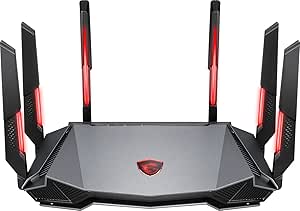 | Best for Customizable Gaming Aesthetics and Performance | WiFi Bands: 2.4GHz, 5GHz, 6GHz | Speed: up to 6.6Gbps | Processor: 1.8 GHz quad-core | VIEW ON AMAZON | See Our Full Breakdown |
| NETGEAR Nighthawk WiFi 7 Router, Up to 2,500 sq ft, 9.3 Gbps |  | Best for Large Homes Needing Extensive Coverage | Coverage: 2,500 sq ft | Speed: 9.3 Gbps | Bands: Tri-band | VIEW ON AMAZON | See Our Full Breakdown |
| NETGEAR Nighthawk WiFi 7 Router RS90, Up to 2,000 sq ft, 3.6 Gbps |  | Best for Mid-Sized Homes and Multi-Device Gaming | WiFi Standard: WiFi 7 | Max Speed: 3.6 Gbps | Coverage: 2000 sq ft | VIEW ON AMAZON | See Our Full Breakdown |
| TP-Link Tri-Band AXE5400 Wi-Fi 6E Gaming Router Archer GXE75 | 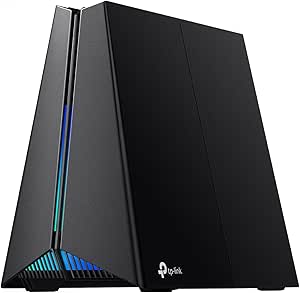 | Best for Gamers Favoring Wi-Fi 6E and Customization | Wi-Fi Speed: up to 5.4 Gbps | Bands: 2.4 GHz, 5 GHz, 6 GHz | Processor: Quad-core CPU | VIEW ON AMAZON | See Our Full Breakdown |
| ASUS TUF Gaming BE6500 WiFi 7 Router – Dual-Band, Up to 6.5 Gbps Wireless, Game Accelerator, Multi-Link Operation, 2.5GbE Ports, Mesh & VPN Compatible, Subscription-Free Security |  | Best for Advanced Gamers Seeking Reliable High-Speed Connection | WiFi Standard: WiFi 7 (802.11be) | Speed: up to 6.5 Gbps | Bands: Dual-band | VIEW ON AMAZON | See Our Full Breakdown |
| ASUS ROG Rapture GT-BE98 Pro WiFi 7 Gaming Router – Quad-Band, 30Gbps, Mesh |  | Best for Ultra-High-Speed, Large-Scale Gaming Networks | WiFi Standard: WiFi 7 (802.11be) | Max Speed: 30 Gbps | Bands: Quad-Band | VIEW ON AMAZON | See Our Full Breakdown |
| TP-Link BE6500 Dual-Band WiFi 7 Router (BE400) |  | Best for Reliable High-Speed Home Coverage | Wi-Fi Technology: Wi-Fi 7 | Maximum Speed: 5764 Mbps (5GHz) | Coverage: Up to 2,400 sq ft | VIEW ON AMAZON | See Our Full Breakdown |
| TP-Link AXE5400 Tri-Band WiFi 6E Router |  | Best for Future-Proof, High-Capacity Gaming & Streaming | WiFi Speed: up to 5400 Mbps | WiFi Bands: Tri-Band (6 GHz, 5 GHz, 2.4 GHz) | Processor: 1.0 GHz dual-core CPU | VIEW ON AMAZON | See Our Full Breakdown |
| GL.iNet GL-MT6000 Flint 2 Wi-Fi 6 Gaming Router Dual 2.5G Ports |  | Best for Compact, High-Speed Gaming on a Budget | Wi-Fi Standard: Wi-Fi 6 | Max Speed: 6 Gbps | Number of Ports: 6 (2 x 2.5G, 4 x 1G) | VIEW ON AMAZON | See Our Full Breakdown |
| gaming router | Ports |
|---|---|
| ASUS ROG Strix GS-BE12000 WiFi | 1x 2.5G WAN, 7x 2.5G LAN |
| MSI Radix AXE6600 WiFi 6E Tri- | — |
| NETGEAR Nighthawk WiFi 7 Route | 2.5 G WAN, 2 x 2.5 G LAN, 2 x 1 G LAN |
| NETGEAR Nighthawk WiFi 7 Route | One 2.5 Gbps WAN, Four 1 Gbps LAN |
| TP-Link Tri-Band AXE5400 Wi-Fi | 1 x 2.5Gbps WAN, 3 x 1 Gbps LAN |
| ASUS TUF Gaming BE6500 WiFi 7 | 4 x 2.5GbE (1 WAN, 3 LAN) |
| ASUS ROG Rapture GT-BE98 Pro W | — |
| TP-Link BE6500 Dual-Band WiFi | 1x 2.5 Gbps WAN/LAN, 1x 2.5 Gbps LAN, 3x 1 Gbps LAN |
| TP-Link AXE5400 Tri-Band WiFi | — |
| GL.iNet GL-MT6000 Flint 2 Wi-F | — |
More Details on Our Top Picks
ASUS ROG Strix GS-BE12000 WiFi 7 Gaming Router – Tri-Band, 12Gbps, Mesh
The ASUS ROG Strix GS-BE12000 stands out for its blazing fast WiFi 7 tri-band speeds up to 12Gbps, making it ideal for demanding gaming setups and smart home integration. Compared with the NETGEAR Nighthawk WiFi 7 Router, this model offers superior coverage and security features like AiProtection Pro, but it comes with a complex setup that might challenge less tech-savvy users. Its extensive wired capacity and multiple SSIDs support multiple IoT devices and VPNs, making it well-suited for advanced users needing a robust, customizable network. However, its size and price could be barriers for smaller spaces or budget-conscious buyers.
Pros:- Blazing fast WiFi 7 tri-band speeds up to 12Gbps
- Excellent coverage up to 3000 sq. ft. with multiple antennas
- Advanced security including AiProtection Pro and WPA3
- Multiple SSIDs for IoT and VPN customization
Cons:- Complex setup process for non-technical users
- High price point may not suit all budgets
- Large physical size requires significant space
Best for: Power users who want top-tier speed, security, and coverage for gaming and smart home devices
Not ideal for: Casual gamers or users with limited space or budget, due to its size and premium price
- WiFi Standard:WiFi 7 (802.11be), WiFi 6 (802.11ax)
- Speed:12000 Mbps
- Wired Capacity:20G
- Ports:1x 2.5G WAN, 7x 2.5G LAN
- CPU:Quad-core 2.0GHz
- Range:up to 3000 sq. ft.
Our verdict“This is best suited for experienced gamers and smart home enthusiasts who need maximum performance and security, and are prepared for a premium investment.”
MSI Radix AXE6600 WiFi 6E Tri-Band Gaming Router
The MSI Radix AXE6600 combines high-speed WiFi 6E with AI QoS and RGB Mystic Light, making it ideal for gamers who want both performance and style. It offers speeds up to 6.6Gbps and a powerful 1.8GHz quad-core processor, positioning it as a solid choice against the TP-Link AXE5400, which is less customizable but simpler. The RGB lighting and gaming-centric features make it appealing to those who value aesthetics, but setting up the advanced features can be daunting for non-technical users. Its design and features cater to gamers who enjoy a personalized look without sacrificing core performance.
Pros:- Supports WiFi 6E tri-band speeds up to 6.6Gbps
- Powerful 1.8GHz quad-core processor for reliable gaming
- RGB Mystic Light for customizable aesthetics
- Optimized for gaming with AI QoS and Game Accelerator
Cons:- Setup can be complex for less tech-savvy users
- Premium price may be high for basic needs
- Large size may require ample space
Best for: Gaming enthusiasts who want high performance combined with customizable aesthetics and RGB lighting
Not ideal for: Casual users or those preferring a plug-and-play setup without RGB features
- WiFi Bands:2.4GHz, 5GHz, 6GHz
- Speed:up to 6.6Gbps
- Processor:1.8 GHz quad-core
- Features:AI QoS, RGB Mystic Light, Game Accelerator
Our verdict“This router fits gamers who want both high-speed WiFi 6E and aesthetic customization, accepting a more complex setup and higher cost.”
NETGEAR Nighthawk WiFi 7 Router, Up to 2,500 sq ft, 9.3 Gbps
The NETGEAR Nighthawk WiFi 7 Router offers a compelling balance of speed and coverage, supporting speeds up to 9.3 Gbps across tri-bands. It excels in providing extensive coverage up to 2,500 sq ft and supports multiple devices, making it suitable for demanding smart homes. When compared to the ASUS ROG Strix GS-BE12000, it may not reach the same top-tier speeds but offers easier setup and management via the Nighthawk app. Its multi-gig ports ensure fast wired connections, though users should be aware that subscription fees for continued Armor security can add to ongoing costs.
Pros:- High-speed WiFi 7 with speeds up to 9.3 Gbps
- Coverage up to 2,500 sq ft for large homes
- Supports multiple devices with tri-band MU-MIMO
- Multi-gig wired ports for fast connections
Cons:- Real-world speeds depend on device compatibility
- Additional subscription costs for security after trial
- May be overkill for small homes or casual use
Best for: Large household or smart home users needing broad coverage and reliable performance
Not ideal for: Users with small spaces or those who want maximum speed for intense gaming, as speeds are slightly lower than higher-end models
- Coverage:2,500 sq ft
- Speed:9.3 Gbps
- Bands:Tri-band
- Ports:2.5 G WAN, 2 x 2.5 G LAN, 2 x 1 G LAN
- Compatibility:Most cable, fiber, DSL, satellite
- Security:NETGEAR Armor (trial)
Our verdict“This router is well-suited for large homes that need reliable, high-speed WiFi with straightforward management, despite ongoing security costs.”
NETGEAR Nighthawk WiFi 7 Router RS90, Up to 2,000 sq ft, 3.6 Gbps
The NETGEAR Nighthawk RS90 provides a reliable WiFi 7 experience with speeds up to 3.6 Gbps, supporting up to 50 devices over 2000 sq ft. It’s a practical choice for users who want easy setup and management via the Nighthawk app, especially when compared to more complex gaming routers like the ASUS ROG Strix GS-BE12000. While it doesn’t deliver the highest speed on this list, it strikes a good balance for households with multiple devices, streaming, and gaming needs. However, it requires a separate modem or gateway and may need bridge mode configuration, which could be a hassle for some.
Pros:- Supports WiFi 7 speeds up to 3.6 Gbps
- Coverage up to 2000 sq ft for mid-sized homes
- Supports many devices with MU-MIMO and OFDMA
- Easy setup and management via app
Cons:- Requires separate modem or gateway for internet
- Limited maximum speed compared to higher-end models
- Additional subscription costs for ongoing security
Best for: Families or small households with multiple devices seeking reliable WiFi coverage and simple management
Not ideal for: High-end gamers or users requiring ultra-fast speeds or extensive security features without additional subscription costs
- WiFi Standard:WiFi 7
- Max Speed:3.6 Gbps
- Coverage:2000 sq ft
- Ports:One 2.5 Gbps WAN, Four 1 Gbps LAN
- Compatibility:WiFi 6 and earlier devices
- Security:Advanced Router Protection, NETGEAR Armor (trial)
Our verdict“This router is a solid choice for households needing dependable coverage and multi-device support with straightforward setup, but not the highest gaming speeds.”
TP-Link Tri-Band AXE5400 Wi-Fi 6E Gaming Router Archer GXE75
The TP-Link Archer GXE75 excels for gamers who want tri-band Wi-Fi 6E speeds up to 5.4 Gbps with a dedicated 6 GHz band to reduce congestion. Its 2.5Gbps WAN port and comprehensive security features like WPA3 and SPI firewall make it ideal for high-performance gaming setups. When compared with the MSI Radix AXE6600, this router offers similar speed but lacks RGB lighting and some gaming-specific software, making it more straightforward for those prioritizing raw performance over aesthetics. The setup can be somewhat complex for non-technical users, and its large size demands considerable space.
Pros:- High-speed tri-band Wi-Fi 6E with dedicated 6 GHz band
- Includes a 2.5Gbps multi-gigabit port for fast wired connections
- Security features like WPA3 and DoS protection
- Supports multiple devices with extensive software controls
Cons:- Setup complexity may be off-putting for novices
- Size may require significant space on desk or shelf
- Premium price for high-end features
Best for: Serious gamers seeking high-speed Wi-Fi 6E with advanced security and customizable network options
Not ideal for: Casual users or those who prefer simple plug-and-play routers without extensive setup
- Wi-Fi Speed:up to 5.4 Gbps
- Bands:2.4 GHz, 5 GHz, 6 GHz
- Processor:Quad-core CPU
- Ports:1 x 2.5Gbps WAN, 3 x 1 Gbps LAN
- Security:WPA3, DoS protection, SPI firewall
Our verdict“This router is a strong pick for gamers who want Wi-Fi 6E performance with extensive security and customization, accepting some setup complexity and higher cost.”
ASUS TUF Gaming BE6500 WiFi 7 Router – Dual-Band, Up to 6.5 Gbps Wireless, Game Accelerator, Multi-Link Operation, 2.5GbE Ports, Mesh & VPN Compatible, Subscription-Free Security
The ASUS TUF Gaming BE6500 stands out for delivering high-speed WiFi 7 connectivity up to 6.5 Gbps, making it ideal for gamers who need low latency and stable streaming. Compared with the TP-Link BE6500, it offers more gaming-specific features like Game Accelerator and open NAT, but its setup can be complex for non-technical users. Its multiple 2.5GbE ports support wired gaming and streaming, which is a plus for those prioritizing stable connections. However, the premium price and limited detailed reviews might deter casual users or those new to high-end routers. This router is best suited for tech-savvy gamers who want top-tier speed and security, despite a challenging setup process.
Pros:- High-speed WiFi 7 connectivity up to 6.5 Gbps for seamless gaming and streaming
- Multiple 2.5GbE ports enable reliable wired connections
- Features like Game Accelerator and open NAT improve gaming performance
Cons:- Complex setup process may challenge non-technical users
- Premium price point might be prohibitive for casual or budget-focused buyers
Best for: Hardcore gamers and tech enthusiasts who want cutting-edge WiFi 7 performance with gaming optimizations
Not ideal for: Casual users or families seeking an easy plug-and-play setup on a budget
- WiFi Standard:WiFi 7 (802.11be)
- Speed:up to 6.5 Gbps
- Bands:Dual-band
- Ports:4 x 2.5GbE (1 WAN, 3 LAN)
- Features:Game Accelerator, Multi-Link Operation (MLO), Mesh, VPN, Subscription-Free Security
Our verdict“This router is perfect for gamers who require top speeds and advanced features but are comfortable with complex setup processes.”
ASUS ROG Rapture GT-BE98 Pro WiFi 7 Gaming Router – Quad-Band, 30Gbps, Mesh
The ASUS ROG Rapture GT-BE98 Pro excels with its quad-band support and astonishing speeds up to 30 Gbps, making it suitable for massive gaming setups or households with many connected devices. Compared to the ASUS TUF BE6500, it offers significantly higher speeds and external antennas for better coverage, but its complexity and premium cost make it less ideal for casual users. The multiple high-speed wired ports support extensive wired gaming and streaming needs, with advanced mesh capabilities to extend coverage seamlessly. However, its setup complexity and high price may deter more casual or less experienced users. This model makes the most sense for large households or competitive gamers who need top-tier speed and coverage, despite the challenging setup.
Pros:- Supports ultra-fast WiFi 7 speeds up to 30 Gbps for demanding gaming and streaming
- External dual antennas enhance coverage and signal strength
- Multiple high-speed ports and mesh support for expansive network setup
Cons:- Setup can be complex, especially for beginners
- High price may be out of reach for average consumers
Best for: Large gaming households or professional streamers needing maximum speed and expansive coverage
Not ideal for: Casual gamers or small households seeking an easy, affordable router
- WiFi Standard:WiFi 7 (802.11be)
- Max Speed:30 Gbps
- Bands:Quad-Band
- Channels:320MHz in 6 GHz band
- Antennas:External dual-feeding antennas
- Wired Ports:1x 10G, 3x 2.5G
Our verdict“Ideal for power users who require the highest speeds and coverage but are prepared for a complex setup process.”
TP-Link BE6500 Dual-Band WiFi 7 Router (BE400)
The TP-Link BE6500 offers solid WiFi 7 speeds up to 5764 Mbps on the 5GHz band, making it a practical choice for large homes with many devices. Compared with the ASUS TUF BE6500, it provides comparable speed but emphasizes ease of use with the Tether app and extensive coverage. Its security features like WPA3 and HomeShield add value for safety-conscious users. However, it isn’t compatible with mesh systems like Deco and requires a separate modem, which could complicate setup for some. For those seeking a straightforward, reliable router with strong security, this makes a compelling option. This router suits users who want high-speed, dependable coverage without the complexity of mesh integration.
Pros:- Supports high-speed WiFi 7 up to 5764 Mbps for demanding applications
- Extensive coverage area up to 2,400 sq ft for large homes
- Strong security features including WPA3 and HomeShield
Cons:- Not compatible with mesh WiFi systems like Deco
- Requires a separate modem for internet access
- Some advanced features may be complex for casual users
Best for: Families or professionals needing reliable coverage for many devices in large homes
Not ideal for: Advanced users seeking mesh network compatibility or those with existing mesh systems
- Wi-Fi Technology:Wi-Fi 7
- Maximum Speed:5764 Mbps (5GHz)
- Coverage:Up to 2,400 sq ft
- Number of Devices Supported:Up to 90
- Ports:1x 2.5 Gbps WAN/LAN, 1x 2.5 Gbps LAN, 3x 1 Gbps LAN
Our verdict“Best suited for users wanting high-speed, secure coverage without the fuss of mesh systems or complicated setups.”
TP-Link AXE5400 Tri-Band WiFi 6E Router
The TP-Link AXE5400 Tri-Band WiFi 6E Router supports speeds up to 5400 Mbps across three bands, with the new 6 GHz band providing extra responsiveness for gaming and streaming. Compared with WiFi 7 options, it offers excellent future-proofing and high capacity, particularly with OFDMA technology supporting numerous devices. Its mesh support adds flexibility, but it requires a modem and can be complicated for users unfamiliar with advanced networking. For those seeking a long-term investment in WiFi 6E, this router offers reliable, fast connections for demanding environments. This pick is best for tech-savvy users wanting to future-proof their network with high capacity and minimal latency.
Pros:- Supports tri-band WiFi 6E with 6 GHz band for faster, low-latency connections
- High capacity with OFDMA technology supporting many devices
- Supports mesh extension and VPN functionality
Cons:- Requires a compatible modem, adding complexity
- Setup can be challenging for non-technical users
- Price may be high for some buyers
Best for: High-end gamers and smart home enthusiasts planning to upgrade to WiFi 6E for maximum device capacity
Not ideal for: Casual users or those looking for simple, plug-and-play solutions without mesh or advanced setup
- WiFi Speed:up to 5400 Mbps
- WiFi Bands:Tri-Band (6 GHz, 5 GHz, 2.4 GHz)
- Processor:1.0 GHz dual-core CPU
- Memory:512 MB High-Speed Memory
- Supports:EasyMesh, VPN Server/Client, TP-Link HomeShield
Our verdict“Designed for users wanting cutting-edge WiFi 6E with high capacity and future-proofing, despite setup complexity.”
GL.iNet GL-MT6000 Flint 2 Wi-Fi 6 Gaming Router Dual 2.5G Ports
The GL.iNet GL-MT6000 Flint 2 offers Wi-Fi 6 speeds up to 6 Gbps and dual 2.5G ports, making it a compact yet powerful choice for gamers who want reliable, low-latency connections. Unlike the larger, more complex routers like the ASUS ROG GT-BE98, this device provides an accessible setup with intuitive controls and VPN support. It’s ideal for users who need a portable or space-efficient router without sacrificing speed or device capacity. However, initial firmware updates and its feature set might be overwhelming for casual users seeking simple plug-and-play options. Still, for tech-savvy gamers wanting a robust, space-saving device, this stands out. This router fits best for gamers or streamers looking for speed and VPN features in a smaller package.
Pros:- Supports Wi-Fi 6 with speeds up to 6 Gbps for seamless gaming and streaming
- Dual 2.5G ports support high-speed wired connections
- Includes advanced VPN support and ad-blocking features
Cons:- Requires firmware updates upon initial setup
- Feature set can be overwhelming for casual users
- Limited coverage compared to larger, more expensive models
Best for: Gamers and streamers seeking a small, high-speed router with VPN support and easy setup
Not ideal for: Non-technical users or those needing simple, straightforward routers without complex features
- Wi-Fi Standard:Wi-Fi 6
- Max Speed:6 Gbps
- Number of Ports:6 (2 x 2.5G, 4 x 1G)
- RAM:1 GB
- Security Protocol:WPA3
- Coverage:Wide coverage
Our verdict“Best suited for tech-savvy gamers wanting a compact, high-speed WiFi 6 router with VPN capabilities and space efficiency.”

How We Picked
We evaluated gaming routers based on performance benchmarks, ease of setup, build quality, feature set, and value for money. Priority was given to routers offering high throughput, low latency, and stability during gaming, especially in congested networks. We also considered future-proofing features like WiFi 7 and mesh compatibility, ensuring the options are relevant for upcoming gaming demands. The ranking reflects a balance between top-tier performance and practical usability, helping gamers select models that excel under real-world conditions without unnecessary complexity or cost.Factors to Consider When Choosing Gaming Routers
Choosing the right gaming router involves more than just looking at speed ratings. Several factors influence how well a router will perform during gaming, especially in busy household environments or competitive settings. Understanding these factors can help you avoid common pitfalls and invest wisely to get the best experience possible.Performance and Speed Capabilities
For gaming, raw speed matters, but latency and stability are equally important. Look for routers with high throughput (preferably WiFi 6E or WiFi 7) and low ping times. Keep in mind that gigabit speeds won’t matter if your internet plan doesn’t support it or if your network is congested. Prioritize routers with robust hardware and advanced QoS features to prioritize gaming traffic effectively.
Band Support and Coverage
Tri-band or quad-band routers tend to offer better performance for gaming because they can distribute device traffic more evenly. This is especially beneficial in larger homes or multi-device setups, where coverage and interference can degrade performance. Mesh compatibility can also help extend coverage without sacrificing speed, but it adds complexity and cost—important considerations for your setup.
Future-Proofing Features
WiFi 7 is the latest standard, promising higher speeds and lower latency, making it a smart investment for gamers planning to upgrade soon. However, these routers are often more expensive, and your devices may not support WiFi 7 yet. WiFi 6E remains a solid choice for now, offering less congestion and improved performance over WiFi 6. Balancing current needs with future-proofing can save money and frustration in the long run.
Ease of Setup and User Interface
Most gaming routers come with sophisticated features, but not all are user-friendly. Look for models with intuitive apps or web interfaces that guide you through setup and customization. Features like automatic updates, simple QoS controls, and clear status indicators make managing your network less complicated, especially if you’re not a networking expert.
Additional Features and Security
Security features such as VPN support, automatic firmware updates, and strong encryption are vital, especially if you want to keep your gaming data safe. Some routers also include gaming-specific tools like dedicated gaming modes, traffic prioritization, or reduced lag features. Weigh these extras against price to determine whether they’re worth the additional investment.
Frequently Asked Questions
Is WiFi 7 worth it for gaming in 2026?
WiFi 7 offers the latest advances in speed, latency reduction, and network efficiency, making it very appealing for gaming, especially in high-demand environments. However, the technology is still emerging, and not all devices support it yet. If you plan to upgrade your gaming setup within the next year or two, investing in WiFi 7 now can future-proof your network. But if your current devices are limited to WiFi 6 or 6E, sticking with those standards may provide the best value until WiFi 7 becomes more widespread.
Should I prioritize tri-band or quad-band routers for gaming?
Tri-band routers generally provide ample bandwidth for most gaming setups, offering a dedicated 5GHz or 6GHz band to reduce congestion. Quad-band routers add an extra band, which can further improve performance in very large or device-dense environments. However, they tend to be more expensive and complex to set up. For most gamers, a high-quality tri-band router balances performance and simplicity effectively.
How important is mesh compatibility for gaming routers?
Mesh compatibility allows you to extend coverage seamlessly across larger spaces or multiple floors, maintaining consistent speeds and low latency. This can be a game-changer if you experience dead zones or have a large home. However, mesh systems often come at a higher cost and may introduce some latency if not configured properly. For gamers in smaller spaces, a high-performance standalone router might suffice, but for larger homes, mesh is often worth considering.
Are gaming routers complicated to set up?
Many modern gaming routers are designed with user-friendly interfaces and mobile apps that simplify setup, often requiring just a few minutes. Advanced features like QoS and traffic prioritization are usually accessible through intuitive controls, but they can seem overwhelming if you’re unfamiliar with networking. Reading the user manual and watching setup tutorials can make the process much easier. If you prefer a plug-and-play experience, look for models praised for their simplicity.
Do I need a gaming-specific router or will a regular high-speed router suffice?
While gaming routers include features like traffic prioritization and low-latency modes, many high-speed routers without a gaming label also perform well for gaming. The key is to look for models with QoS and low ping performance rather than just marketing features. If you experience frequent lag or connection drops, a dedicated gaming router might offer added peace of mind. Otherwise, a reliable, high-quality router with robust performance specs can often meet gaming needs without the extra cost.
Conclusion
For gamers seeking the best overall experience with cutting-edge features, the ASUS ROG Strix GS-BE12000 offers unmatched performance and future-proofing. Budget-conscious players or those with smaller setups will find the TP-Link AXE5400 provides excellent value without sacrificing essential features. For newcomers or casual gamers, the GL.iNet GL-MT6000 Flint offers simplicity and decent performance at a lower price point. Power users with extensive setups should consider the ASUS ROG Rapture GT-BE98 Pro or mesh-compatible options for broader coverage. Ultimately, selecting the right router hinges on your specific gaming environment, device ecosystem, and budget—making it easier to enjoy seamless, lag-free gaming in 2026.