
Among these USB MIDI pad controllers, I rank the Akai Professional APC64 as the best overall for its mix of pad control and performance-focused features. The Novation Launchpad X is a strong choice for Ableton users who want a responsive grid for clip launching, while the Akai MPD218 keeps the focus on straightforward drum-pad input. The main tradeoff is between compact, simple controllers and larger models with more controls that can take longer to learn and require more desk space. Wireless options add placement flexibility, but buyers should check how their preferred software handles connectivity and setup. Read on for the full breakdown and help matching a controller to your workflow.

Get audio and creator gear delivered free with Prime
- Fast, free delivery on millions of items
- Prime Video, Amazon Music and more included
- Member-only deals all year
Complete the kit


Key Takeaways
- The APC64 leads as the most versatile pick: it is aimed at players who want pad input and broader performance control in one device, rather than a basic drum-only layout.
- Grid controllers and drum pads solve different problems: the Launchpad X and Launchpad Mini MK3 suit clip-based workflows, while the MPD218 and LPD8 are more directly focused on triggering drum sounds and samples.
- More controls do not automatically mean a better fit: the APC40 MKII and APC64 offer more hands-on control than compact options, but their larger layouts make less sense for a minimal setup.
- Wireless models prioritize placement flexibility: the Mini Wireless and Umelody JP-MINI may suit mobile setups, while wired USB models avoid relying on a wireless connection.
- Small controllers involve real layout compromises: the LPD8 and nanoPAD2 are easier to fit into tight spaces, but their compact designs provide less room for hands-on control than larger pads or grids.
| Mini Wireless MIDI Controller Pad – 16 RGB Velocity Pads with Aftertouch, Bluetooth & USB |  | Best for Wireless Portability | Pads: 16 RGB velocity-sensitive pads with aftertouch | Connectivity: Bluetooth and USB MIDI | USB connector: USB Type-C | VIEW LATEST PRICE | See Our Full Breakdown |
| Novation Launchpad X MIDI USB Grid Controller |  | Best for Ableton Live | Pads: 64 velocity- and pressure-sensitive RGB pads | Connectivity: USB-C | Custom modes: 4 | VIEW LATEST PRICE | See Our Full Breakdown |
| Akai Professional MPC Studio USB MIDI Pad Controller |  | Best for MPC Software Beat Making | Pads: 16 velocity-sensitive RGB pads with aftertouch | Connectivity: USB | Power: USB-powered | VIEW LATEST PRICE | See Our Full Breakdown |
| Akai Professional MPD218 USB MIDI Pad Controller |  | Best Value for Hands-On Controls | Pads: 16 velocity- and pressure-sensitive MPC pads | Pad banks: 3 | Assignable triggers: 48 | VIEW LATEST PRICE | See Our Full Breakdown |
| Umelody JP-MINI Wireless MIDI Pad Controller with 16 Velocity-Sensitive RGB Pads |  | Best Compact Wireless Pick | Pads: 16 velocity-sensitive RGB pads with aftertouch | Velocity response: 4 velocity curves | Connectivity: Wireless MIDI and USB-C | VIEW LATEST PRICE | See Our Full Breakdown |
| Akai Professional APC64 USB MIDI Pad Controller | 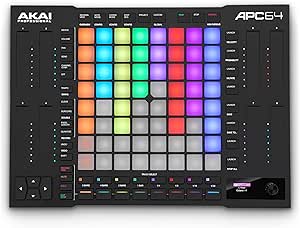 | Best for Hybrid DAW and Hardware Setups | Pads: 64 RGB velocity-sensitive pads with polyphonic aftertouch | Touch strips: 8 assignable | Sequencer: 8-track, 32-step | VIEW LATEST PRICE | See Our Full Breakdown |
| Akai Professional APC40 MKII USB MIDI Pad Controller |  | Best for Ableton Live Mixing | Clip-launching grid: 5×8 RGB pads | Faders: 9 channel faders | Knobs and controls: 8 control knobs and 8 device controls | VIEW LATEST PRICE | See Our Full Breakdown |
| Donner STARRYPAD PRO MIDI Pad Controller |  | Best for Wireless, Battery-Powered Portability | Pads: 16 velocity-sensitive RGB pads with polyphonic aftertouch | Knobs: 8 assignable rotary knobs | Connectivity: USB-C and wireless MIDI | VIEW LATEST PRICE | See Our Full Breakdown |
| Akai Professional APC Mini MK2 USB MIDI Pad Controller |  | Best Compact Ableton Control Surface | Pads: 64 RGB backlit pads | Faders: 9 assignable faders | Modes: Drum and Note | VIEW LATEST PRICE | See Our Full Breakdown |
| Novation Launchpad Mini MK3 MIDI USB Grid Controller |  | Best Lightweight Grid Controller | Pads: 64 RGB touch pads | Connectivity: USB-C | Power: Bus-powered | VIEW LATEST PRICE | See Our Full Breakdown |
| Akai Professional LPD8 USB MIDI Pad Controller |  | Best for Knob-Based Control | Pads: 8 velocity-sensitive RGB-backlit drum pads | Assignable knobs: 8 | Programmable presets: 4 | VIEW LATEST PRICE | See Our Full Breakdown |
| Donner STARRYPAD USB MIDI Pad Controller |  | Best for Flexible Assignments | Pads: 16 backlit silicone pads | Assignable pads: Up to 48 across 3 banks | Controls: 2 faders, 2 knobs, 3 buttons, and shift key | VIEW LATEST PRICE | See Our Full Breakdown |
| Korg nanoPAD2 Slim-Line USB MIDI Pad Controller, Black |  | Best Compact 16-Pad Option | Model: nanoPAD2BK | Pads: 16 velocity-sensitive trigger pads | Additional control: X-Y touchpad | VIEW LATEST PRICE | See Our Full Breakdown |
| USB MIDI pad controller | Connectivity | Pads |
|---|---|---|
| Mini Wireless MIDI Controller | Bluetooth and USB MIDI | 16 RGB velocity-sensitive pads with aftertouch |
| Novation Launchpad X MIDI USB | USB-C | 64 velocity- and pressure-sensitive RGB pads |
| Akai Professional MPC Studio U | USB | 16 velocity-sensitive RGB pads with aftertouch |
| Akai Professional MPD218 USB M | USB | 16 velocity- and pressure-sensitive MPC pads |
| Umelody JP-MINI Wireless MIDI | Wireless MIDI and USB-C | 16 velocity-sensitive RGB pads with aftertouch |
| Akai Professional APC64 USB MI | USB-C, 1 MIDI input, 2 MIDI outputs, 8 CV/Gate outputs | 64 RGB velocity-sensitive pads with polyphonic aftertouch |
| Akai Professional APC40 MKII U | USB 2.0 Type-B; 1/4-inch TS footswitch input | — |
| Donner STARRYPAD PRO MIDI Pad | USB-C and wireless MIDI | 16 velocity-sensitive RGB pads with polyphonic aftertouch |
| Akai Professional APC Mini MK2 | USB 2.0 Type-B | 64 RGB backlit pads |
| Novation Launchpad Mini MK3 MI | USB-C | 64 RGB touch pads |
| Akai Professional LPD8 USB MID | USB | 8 velocity-sensitive RGB-backlit drum pads |
| Donner STARRYPAD USB MIDI Pad | USB-C and MIDI in/out | 16 backlit silicone pads |
| Korg nanoPAD2 Slim-Line USB MI | USB | 16 velocity-sensitive trigger pads |
More Details on Our Top Picks
Mini Wireless MIDI Controller Pad – 16 RGB Velocity Pads with Aftertouch, Bluetooth & USB
Bluetooth and USB MIDI make this 16-pad controller the clearest choice here for beat makers who want to move between a desk setup and a portable rig without always reaching for a cable. Its rechargeable battery is listed for up to 15 hours, while velocity-sensitive RGB pads with aftertouch offer more expressive input than a basic trigger pad. Mapping through a PC or mobile app also gives it flexibility across compatible software. Compared with the Akai MPD218, this model trades the Akai’s 18 assignable knobs and three pad banks for wireless operation and a smaller travel footprint. That portability comes with compromises: the pads may feel cramped during long finger-drumming sessions, and just three assignable buttons limit hands-on control of a more elaborate setup.
Pros:- Bluetooth and USB MIDI support both cable-free and wired setups.
- Rechargeable battery is listed for up to 15 hours of use.
- Velocity response and aftertouch support expressive pad performance.
- Customizable mapping is available through PC software or a mobile app.
Cons:- Small pads may be uncomfortable for extended finger-drumming sessions.
- Three assignable buttons offer limited control for complex live setups.
Best for: Mobile producers and DJs who want a rechargeable, wireless 16-pad controller for compatible phones, tablets, or computers.
Not ideal for: Finger drummers who need generous pad spacing or producers who rely on several physical controls beyond the pads.
- Pads:16 RGB velocity-sensitive pads with aftertouch
- Connectivity:Bluetooth and USB MIDI
- USB connector:USB Type-C
- Battery:Rechargeable; listed for up to 15 hours
- Mapping:Customizable through PC software or mobile app
- Compatible platforms:Windows, macOS, iOS, Android, HarmonyOS
- Control type:Drum pad controller
Our verdict“Choose this model for compact wireless MIDI control; pick the Akai MPD218 instead if you value more knobs and banked pad assignments over Bluetooth.”
Novation Launchpad X MIDI USB Grid Controller
The 64-pad RGB grid gives the Launchpad X a different job from the 16-pad beat-making controllers in this list: it can launch clips and scenes, manage mixer functions, and play notes or scales from one surface. Its velocity- and pressure-sensitive pads also make it more expressive than a grid focused mainly on triggering clips. Four customizable modes add room for personal MIDI mappings, though its strongest integration is with Ableton Live. Compared with the Akai MPC Studio, the Launchpad X offers far more simultaneous grid buttons and a workflow built around arranging and performing clips, while the MPC Studio puts more emphasis on a traditional 16-pad beat-making layout and bundled MPC software. The tradeoff is focus: buyers outside Ableton’s workflow may find less value in its integrated controls, and it needs a connected computer and compatible music software to perform.
Pros:- Large 64-pad RGB grid supports clip and scene launching.
- Velocity and pressure sensitivity enable expressive playing.
- Note and scale modes support melodies, chords, and basslines.
- Four customizable modes allow MIDI mapping changes.
Cons:- Deepest integration is focused on Ableton Live.
- Requires a connected device and compatible music software.
Best for: Ableton Live users who want one USB grid for clip launching, mixer control, and playing notes or scales.
Not ideal for: Producers seeking a standalone instrument or a compact 16-pad layout centered on finger-drumming.
- Pads:64 velocity- and pressure-sensitive RGB pads
- Connectivity:USB-C
- Custom modes:4
- Compatible software:Ableton Live, Logic Pro, HUI
- Compatible platforms:Mac and Windows
- USB ports:1
- Color:Black
Our verdict“Pick the Launchpad X for an Ableton-centered grid workflow, while the MPC Studio is a closer fit for 16-pad beat making and bundled production software.”
Akai Professional MPC Studio USB MIDI Pad Controller
The MPC Studio pairs a familiar 16-pad layout with a full MPC2 software license, so it makes a strong case for producers who want a computer-based beat-making setup with a clear software direction. Its RGB pads respond to velocity and aftertouch, while the assignable ribbon strip adds a hands-on way to shape parameters without relying only on a mouse. The included sound packs and Splice access also give new projects material to work with. Compared with the Akai MPD218, the MPC Studio leans harder into its dedicated software package and adds LCD feedback and a ribbon control; the MPD218 instead gives users 18 assignable knobs and three pad banks. The MPC Studio remains computer-dependent, however, and its single USB connection may call for a hub when other peripherals are part of the setup.
Pros:- 16 velocity-sensitive RGB pads include aftertouch.
- Bundled MPC2 software license and sound packs support a focused beat-making workflow.
- Assignable ribbon strip provides hands-on parameter control.
- USB-powered design needs no separate power supply.
Cons:- Requires a computer and software rather than operating as a standalone unit.
- Single USB connection may require a hub for other peripherals.
Best for: Computer-based beat makers who want a 16-pad controller, ribbon control, and a bundled MPC2 production workflow.
Not ideal for: Players who need standalone operation, multiple onboard connections, or a bank of physical knobs for parameter control.
- Pads:16 velocity-sensitive RGB pads with aftertouch
- Connectivity:USB
- Power:USB-powered
- Additional control:Assignable ribbon touch strip
- Display:Integrated LCD feedback
- Included software:MPC2 software license, sound packs, and two months of Splice access
- Compatible platforms:Mac and Windows
- USB ports:1
Our verdict“Choose the MPC Studio for its bundled MPC workflow and ribbon control; choose the MPD218 if you want more assignable knobs and pad banks.”
Akai Professional MPD218 USB MIDI Pad Controller
For a straightforward wired setup, the MPD218 combines 16 velocity- and pressure-sensitive MPC pads with a practical set of 18 assignable knobs. Three banks expand those pads to 48 assignable triggers, giving producers more sounds or functions to call up without changing controllers. Note Repeat and Full Level add useful performance tools, and included software offers a starting point for computer-based production. Compared with the Akai MPC Studio, the MPD218 gives you more physical knobs and banked assignments, while the MPC Studio adds LCD feedback, a ribbon strip, and a more centered MPC2 software package. The MPD218’s tradeoff is a simpler control surface: it lacks wireless connectivity and the dedicated display and ribbon features of the MPC Studio. iOS users also need a Camera Connection Kit, sold separately.
Pros:- 18 assignable 360-degree knobs provide hands-on parameter control.
- Three pad banks provide 48 assignable triggers.
- Velocity- and pressure-sensitive pads support expressive playing.
- Includes MPC Beats, Ableton Live Lite, and Drum Synth 500.
Cons:- USB-only connectivity does not support wireless operation.
- iOS connection requires a Camera Connection Kit sold separately.
- No integrated display or ribbon control for direct visual feedback or gestures.
Best for: Producers who want a compact USB pad controller with multiple banks and physical knobs for mapping software instruments or effects.
Not ideal for: Wireless performers or iOS users who want a direct connection without purchasing an additional adapter.
- Pads:16 velocity- and pressure-sensitive MPC pads
- Pad banks:3
- Assignable triggers:48
- Knobs:18 assignable 360-degree potentiometers
- Connectivity:USB
- Power:USB-powered
- Included software:MPC Beats, Ableton Live Lite, Drum Synth 500
- Dimensions:8 x 18 x 2 inches
Our verdict“Choose the MPD218 for wired pad control with knobs and three banks; the MPC Studio is better suited to buyers who want LCD feedback and a bundled MPC-focused workflow.”
Umelody JP-MINI Wireless MIDI Pad Controller with 16 Velocity-Sensitive RGB Pads
At 150 g and 106.5 x 115 x 16.5 mm, the JP-MINI is the most clearly specified pocket-sized option in this group. It offers Bluetooth-style wireless MIDI and USB-C, plus four velocity curves and aftertouch, letting players adjust pad response rather than relying on a single feel. Its Note Repeat includes swing, latch or hold, and DAW tempo sync, which adds useful rhythm control despite the small footprint. Compared with the first Mini Wireless MIDI Controller Pad, the JP-MINI lists four velocity curves and detailed Note Repeat options, while the other model specifies up to 15 hours of battery life and app-based custom mapping. Neither replaces a larger control surface: the JP-MINI has only 16 pads and no built-in sounds, and wireless compatibility can depend on the device and app. Lightning adapters are sold separately.
Pros:- Compact 150 g body is easy to carry.
- Wireless MIDI and USB-C offer cable-free or wired connection options.
- Four velocity curves and aftertouch provide response flexibility.
- Note Repeat supports swing, latch or hold, and DAW tempo sync.
Cons:- Requires a DAW or music app because it has no built-in sounds.
- Lightning adapter is sold separately.
- Android wireless operation may depend on a compatible app.
Best for: Traveling producers who want a very light 16-pad controller with adjustable velocity response and Note Repeat.
Not ideal for: Buyers who need onboard sounds, a larger pad surface, or guaranteed wireless compatibility across every mobile setup.
- Pads:16 velocity-sensitive RGB pads with aftertouch
- Velocity response:4 velocity curves
- Connectivity:Wireless MIDI and USB-C
- Dimensions:106.5 x 115 x 16.5 mm
- Weight:150 g
- Battery:750 mAh rechargeable
- Compatibility:Windows, macOS, iOS, Android, HarmonyOS
- Included components:Controller, USB-C cable, user guide
Our verdict“Pick the JP-MINI for a lightweight travel controller with adjustable pad response, but choose the other Mini Wireless model if its stated battery life and app-based mapping better match your setup.”
Akai Professional APC64 USB MIDI Pad Controller
The APC64 is the most capable choice here for combining Ableton Live control with external instruments. Its 64 velocity-sensitive pads with polyphonic aftertouch offer more expressive playing than the clip-focused grids on the APC Mini MK2 and Launchpad Mini MK3, while eight touch strips add hands-on performance control. The built-in 8-track, 32-step sequencer can keep patterns moving without a computer, and MIDI plus CV/Gate outputs connect it to hardware beyond the usual USB workflow. That breadth also makes it a more involved fit: its controls are designed around Ableton, and the 1/8-inch MIDI ports may require adapters. Choose it over the APC40 MKII if pad expression and hardware sequencing matter more than dedicated mixer faders.
Pros:- 64 RGB pads with polyphonic aftertouch support expressive playing
- Eight assignable touch strips offer performance control beyond basic pad triggering
- Built-in 8-track, 32-step sequencer supports use without a DAW
- MIDI and CV/Gate outputs connect to a broad range of external gear
Cons:- Ableton-focused design may be less convenient with other DAWs
- 1/8-inch MIDI connections may require adapters for standard MIDI cables
Best for: Ableton Live producers who want expressive pads, standalone sequencing, and connections to external MIDI or CV/Gate instruments
Not ideal for: Producers seeking a simple, DAW-agnostic clip launcher or full-size MIDI ports without adapters
- Pads:64 RGB velocity-sensitive pads with polyphonic aftertouch
- Touch strips:8 assignable
- Sequencer:8-track, 32-step
- Connectivity:USB-C, 1 MIDI input, 2 MIDI outputs, 8 CV/Gate outputs
- Display:Color display
- Compatibility:PC and Mac; Ableton Live 11 onwards
- Power:USB bus-powered
- Material:Metal
Our verdict“Choose the APC64 if you want one controller for Ableton, expressive pad performance, and external hardware sequencing.”
Akai Professional APC40 MKII USB MIDI Pad Controller
Where the APC64 emphasizes expressive pads and external hardware, the APC40 MKII puts Ableton Live mixing first. Its 5×8 RGB grid handles clip launching, while nine channel faders, eight knobs, eight device controls, and an assignable crossfader give a performer direct access to mixer and effect adjustments. That layout is a better match for live sets that need hands-on level and scene control than the smaller APC Mini MK2, which has faders but a more compact control surface. The tradeoff is footprint: at nearly 17 inches wide, it takes more desk or stage space than the Launchpad Mini MK3. It is also tightly oriented around Ableton, so buyers using other DAWs may not get the same value from its dedicated workflow.
Pros:- 5×8 RGB grid provides visual feedback for clip launching
- Nine channel faders and an assignable crossfader support hands-on mixing
- Separate knobs and device controls provide quick access to parameters
- USB-powered operation avoids a separate power supply
Cons:- Wide, comparatively heavy body is less convenient for travel than compact grid controllers
- Ableton-oriented controls may be less useful with other DAW workflows
- USB Type-B connection requires a cable and may need an adapter for newer devices
Best for: Ableton Live performers who want a clip grid alongside dedicated mixer faders, device controls, and crossfader access
Not ideal for: Traveling musicians with limited bag or desk space, or producers who need a controller centered on another DAW
- Clip-launching grid:5×8 RGB pads
- Faders:9 channel faders
- Knobs and controls:8 control knobs and 8 device controls
- Crossfader:Assignable A/B crossfader
- Connectivity:USB 2.0 Type-B; 1/4-inch TS footswitch input
- Software:Ableton Live; includes Ableton Live Lite and downloadable instruments, effects, and sample packs
- Dimensions:9.96 × 16.68 × 1.8 in (D × W × H)
- Weight and material:1.8 kg; durable high-grade plastic
Our verdict“Pick the APC40 MKII for Ableton sets where dedicated mixing controls matter more than a compact footprint or expressive pads.”
Donner STARRYPAD PRO MIDI Pad Controller
The STARRYPAD PRO stands apart from the Ableton-centered APC models by prioritizing portable use across devices. Its 16 velocity-sensitive RGB pads and eight assignable knobs provide a compact setup for triggering sounds and shaping parameters, while USB-C and wireless MIDI support Android, iOS, Mac, and Windows. A built-in battery rated for up to 10 hours means it can fit a mobile session without relying on a nearby USB power source. Compared with the 64-pad Launchpad Mini MK3, it gives up grid size and clip-launching capacity in exchange for wireless operation and knobs. It is a better fit for compact production or practice than dense Ableton scene work. It still needs software to make sound, and full lighting and settings customization requires installing software.
Pros:- Built-in battery supports up to 10 hours of use
- Wireless MIDI and USB-C support a range of mobile and desktop devices
- Eight assignable knobs provide hands-on parameter control
- Polyphonic aftertouch and customizable velocity curves support expressive playing
Cons:- 16 pads provide less space for clips or sounds than 64-pad grid controllers
- Requires external software or instruments to produce audio
- Full lighting and settings customization requires software installation
Best for: Mobile producers and beat makers who want a battery-powered pad controller with wireless MIDI for phones, tablets, or computers
Not ideal for: Ableton performers who need a large clip-launching grid or anyone expecting the controller to generate audio on its own
- Pads:16 velocity-sensitive RGB pads with polyphonic aftertouch
- Knobs:8 assignable rotary knobs
- Connectivity:USB-C and wireless MIDI
- Compatibility:Android, iOS, Mac, and Windows
- Battery life:Up to 10 hours
- Included software:Cubase LE, WaveLab LE, and Melodics
- Color:Black
- Warranty:1 year
Our verdict“Choose the STARRYPAD PRO if wireless, battery-powered use and cross-platform compatibility matter more than a large pad grid.”
Akai Professional APC Mini MK2 USB MIDI Pad Controller
The APC Mini MK2 combines a 64-pad RGB grid with nine assignable faders in a smaller, more stripped-back package than the APC40 MKII. That makes it a practical fit for Ableton users who want clip launching and basic mixer or device control without giving up as much desk space. Drum and Note modes also let the pads handle more than launching clips, adding a useful production option the Launchpad Mini MK3 does not list in its supplied features. The compromise is a USB cable requirement and an Ableton-centered workflow; it is not the choice for wireless use or hardware sequencing. Compared with the APC64, it offers fewer performance controls and no stated external MIDI or CV/Gate connections, but its simpler layout may suit users who want the essentials.
Pros:- 64 RGB pads provide visual feedback for clip launching
- Nine assignable faders add hands-on mixer and device control
- Drum and Note modes support sample triggering and melody playing
- USB-powered plug-and-play setup works with Mac and Windows
Cons:- Ableton-focused design may limit usefulness with other DAWs
- Requires a USB cable, unlike wireless MIDI options
- Does not list dedicated MIDI or CV/Gate connections for external hardware
Best for: Ableton Live users who want a compact clip-launching grid with faders and drum or note modes
Not ideal for: Mobile musicians seeking wireless operation, or hardware-focused producers who need dedicated MIDI and CV/Gate connections
- Pads:64 RGB backlit pads
- Faders:9 assignable faders
- Modes:Drum and Note
- Connectivity:USB 2.0 Type-B
- Software:Ableton Live
- Platform:Mac and Windows
- Color:Black
Our verdict“Pick the APC Mini MK2 for a compact Ableton setup that needs both a full pad grid and practical fader control.”
Novation Launchpad Mini MK3 MIDI USB Grid Controller
The Launchpad Mini MK3 is the straightforward choice for portable Ableton clip launching. Its 64 RGB pads give scenes and session activity clear visual feedback, while the slim, bus-powered design keeps setup simple when working away from a studio. Three custom modes add room for MIDI mapping, so it can do more than trigger clips, though it lacks the faders found on the APC Mini MK2 and the APC40 MKII. That difference makes the Novation a better fit for travel and grid-based performance, not hands-on level mixing. It also uses a touch grid, which may feel less satisfying for players who want velocity-sensitive pads for expressive drum parts. Ableton Live integration is its clearest strength; its stated compatibility with Logic Pro and HUI offers alternatives, but the core experience remains grid-focused.
Pros:- 64 RGB pads provide clear session and clip feedback
- Slim, bus-powered design suits travel and compact workspaces
- Three custom modes allow additional MIDI mapping
- USB-C connection supports a modern compact setup
Cons:- Touch grid is less suited to expressive velocity-sensitive drum playing
- No listed faders or knobs for direct mixer control
- Ableton-focused workflow may be less useful to users of other DAWs
Best for: Ableton users who need a lightweight, bus-powered grid for clip and scene launching in a travel or small-desk setup
Not ideal for: Drummers who want velocity-sensitive pads or performers who need dedicated faders and knobs for mixing
- Pads:64 RGB touch pads
- Connectivity:USB-C
- Power:Bus-powered
- Custom modes:3
- Compatible software:Ableton Live, Logic Pro, and HUI
- Compatible platforms:Mac and Windows 10 or Windows 7
- Included software:Ableton Live Lite
- Color:Black
Our verdict“Choose the Launchpad Mini MK3 if portability and a clear 64-pad grid matter more than expressive pads or mixer controls.”
Akai Professional LPD8 USB MIDI Pad Controller
The LPD8 suits producers who want drum triggering and hands-on parameter control in a small USB-powered unit. Its eight velocity-sensitive RGB pads provide clear visual feedback, while eight assignable knobs let me adjust mixer or plugin settings without reaching for a mouse. Compared with the Korg nanoPAD2, the LPD8 trades twice as many pads and an X-Y touchpad for a dedicated row of knobs, making it the better fit when sound shaping matters as much as tapping in beats. The compact, light build also suits a portable setup. The tradeoff is capacity: eight pads can feel limiting for larger sample sets, and its four presets must be created and managed on a computer. I’d choose a larger pad grid if frequent bank switching is part of the workflow.
Pros:- Eight velocity-sensitive RGB pads offer visual feedback while performing.
- Eight assignable knobs provide direct control of DAW and plugin parameters.
- Compact, lightweight design fits portable music setups.
- USB-powered setup works with Mac and Windows without driver installation.
Cons:- Eight pads offer less room for samples than the 16-pad STARRYPAD and nanoPAD2.
- Presets must be created and managed from a computer.
Best for: Portable producers who want a compact set of drum pads plus physical knobs for DAW and plugin control.
Not ideal for: Beatmakers who need 16 or more pads at once, or anyone who wants to edit presets directly on the controller.
- Pads:8 velocity-sensitive RGB-backlit drum pads
- Assignable knobs:8
- Programmable presets:4
- Connectivity:USB
- Compatibility:Mac and Windows
- Compatible software:Ableton Live, GarageBand, Logic, Studio One, Cubase, Pro Tools, FL Studio, Adobe Audition
- Dimensions:3.24 x 12.12 x 1.32 inches
- Weight:0.4 kg
Our verdict“Choose the LPD8 if dedicated knobs and portability matter more to you than having a large pad grid.”
Donner STARRYPAD USB MIDI Pad Controller
The Donner STARRYPAD stands out for assignment flexibility: its 16 velocity-sensitive pads can cover up to 48 functions across three banks, while two faders, two knobs, and three buttons add control beyond triggering sounds. Compared with the Akai Professional LPD8, it gives me more pads and more ways to organize them, but it lacks the LPD8’s eight-knob layout. USB-C and MIDI in/out also make this a stronger choice for a setup that may include mobile devices or external MIDI gear. The included Cubase LE and Melodics courses give new users a starting point, though the controller itself makes no sound: a DAW or other sound source is still required. Some iPhone and iPad connections need an Apple Lightning-to-USB adapter, which adds a compatibility wrinkle.
Pros:- Three switchable banks provide up to 48 pad assignments.
- Velocity-sensitive pads offer customizable lighting and response.
- Faders, knobs, and buttons add control beyond the pad grid.
- USB-C and MIDI in/out support computers, mobile devices, and external MIDI equipment.
Cons:- Requires DAW or other sound-producing software; it does not produce sound on its own.
- Some iPhone and iPad connections require an Apple Lightning-to-USB adapter.
Best for: Producers who want multiple pad banks, extra hands-on controls, and the option to connect mobile devices or external MIDI equipment.
Not ideal for: Players who need a standalone instrument, or iPhone and iPad users who want to connect without checking adapter requirements.
- Pads:16 backlit silicone pads
- Assignable pads:Up to 48 across 3 banks
- Controls:2 faders, 2 knobs, 3 buttons, and shift key
- Connectivity:USB-C and MIDI in/out
- Compatibility:Android, iOS, Mac, and Windows
- Included software:Cubase LE and Melodics courses
- Power:USB
Our verdict“Pick the STARRYPAD if banked assignments and broad connectivity outweigh a simpler plug-in-and-play setup.”
Korg nanoPAD2 Slim-Line USB MIDI Pad Controller, Black
The Korg nanoPAD2 is a straightforward choice for players who want 16 velocity-sensitive pads in a slim USB controller. Its main distinction from the Akai Professional LPD8 is the larger pad count and an X-Y touchpad for controlling MIDI parameters; the Akai instead gives up that touch surface and half the pads for eight dedicated knobs. That makes the Korg more appealing for entering drum parts and shaping parameters with touch, while the Akai is better suited to repeated knob adjustments. The nanoPAD2’s compact design keeps it easy to pack, but its plastic construction may feel less substantial than a sturdier controller. It also relies on a computer or compatible device over USB, so it isn’t a standalone source of sound. Buyers should check software and platform compatibility for their specific setup.
Pros:- Sixteen velocity-sensitive pads provide more playing space than the LPD8.
- X-Y touchpad supports MIDI parameter control.
- Slim, compact form is easy to carry.
- Works with listed music software including Ableton Live, Avid Pro Tools, and FL Studio.
Cons:- Plastic construction may feel less substantial than a more robust controller.
- USB connection requires a computer or compatible device; it does not produce sound by itself.
- No dedicated knobs are listed for hands-on parameter adjustment.
Best for: Mobile-minded producers who want a compact 16-pad controller and an X-Y surface for MIDI parameter input.
Not ideal for: Producers who need dedicated physical knobs, a standalone sound source, or a more substantial-feeling build.
- Model:nanoPAD2BK
- Pads:16 velocity-sensitive trigger pads
- Additional control:X-Y touchpad
- Connectivity:USB
- Compatible software:Ableton Live, Avid Pro Tools, FL Studio
- Supported platforms:Mac OS X 10.10 Yosemite, Windows 11
- Color:Black
- Material:Plastic
- Item weight:0.36 kg
Our verdict“Choose the nanoPAD2 if you want a compact 16-pad layout with touch-based control rather than the LPD8’s dedicated knobs.”
How We Picked
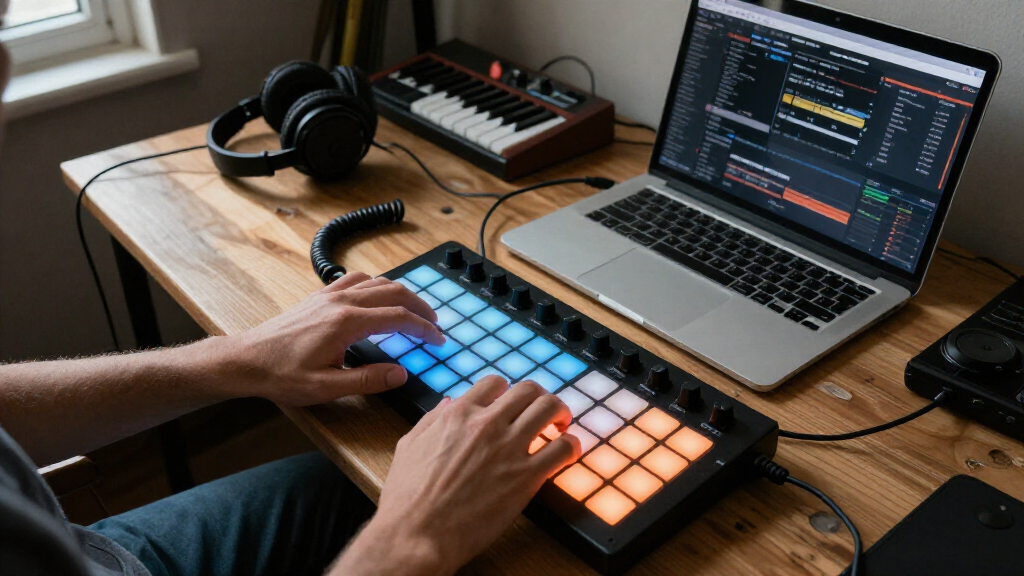
I compared these controllers as USB-connected tools for making music, not as interchangeable sets of buttons. The main criteria were pad layout and responsiveness, the amount and type of hands-on control, connection options, portability, and how readily each design fits a distinct workflow such as drum programming or clip launching. I also weighed setup complexity and physical footprint, since extra controls only help when a buyer can use them comfortably.
The ranking favors useful versatility without unnecessary complexity. The APC64 takes the top spot for buyers seeking a broad performance surface; Launchpad X ranks highly for grid-based Ableton use, and MPD218 is a compelling focused option for drum input. Smaller or more specialized models rank lower for all-around use, not because compactness is a flaw, but because their narrower layouts suit fewer workflows. Wireless models are judged on their placement advantage alongside the added connection choice buyers need to account for.
Factors to Consider When Choosing USB MIDI Pad Controllers
Before choosing a pad controller, I would start with the task it needs to handle every session. A controller for finger-drumming, one for launching clips, and one for controlling a live set can all have pads yet feel very different in practice. These broader checks can help prevent a mismatch that a feature list alone may not reveal.
Choose the Pad Layout for Your Main Task
A grid of evenly arranged pads is useful for launching clips, navigating scenes, or triggering material in a visual, grid-based workflow. Traditional drum-pad layouts put the emphasis on striking and repeating notes, which can feel more direct for beat programming. Do not choose by pad count alone: a large grid is not automatically easier for finger-drumming, and a smaller set of pads may be enough when you mainly trigger a few sounds. Think through the actions you repeat most often, then check whether the layout keeps those actions within comfortable reach. If you need both clip launching and drum input, prioritize the layout that will handle the more frequent task.
Check Software Compatibility Before Buying
USB describes the connection, not a guarantee that every controller will map itself the way you expect in every music application. Some buyers want a ready-made control surface, while others are comfortable assigning MIDI notes and messages manually. Check support for your specific software and operating system, including whether the controller’s intended functions depend on a particular host. A device can still send MIDI without offering seamless integration, so separate basic connectivity from a polished workflow. If you rely on a set of custom mappings, confirm that you can save and recall them reliably.
Balance Portability Against Hands-On Control
A compact controller takes less desk space and travels more easily, but small surfaces can make frequent performance gestures feel cramped. Larger controllers may provide more pads, knobs, or dedicated controls, yet they also occupy more room and can add setup decisions. Consider where the unit will live: a fixed studio desk can support a wider layout, while a laptop bag favors a smaller footprint. Avoid paying for controls that your workflow will rarely use, but do not undersize the device if you expect to perform with it live. The best compromise is the smallest layout that still gives your common actions enough space.
Decide Whether Wireless Operation Is Worth the Extra Choice
Wireless MIDI can reduce cable clutter and let you place a controller where a USB lead would be awkward. That convenience comes with another connection path to set up and maintain, so it may be less attractive for a fixed workstation that already has accessible USB ports. Check how the controller supports wired and wireless use, and whether it can fall back to USB when needed. For live performance, think about the reliability of the whole connection chain rather than treating wireless as an automatic upgrade. Choose wireless for a real placement or mobility benefit, not just because the feature appears on a specification list.
Prioritize the Controls You Will Reach for Repeatedly
Extra knobs, faders, or performance controls can reduce trips to a mouse when they match actions you change often. They can also make a surface more complicated if those controls are difficult to map or sit outside your normal workflow. List the adjustments you make during recording or performance, such as changing a parameter or triggering a scene, and compare that list with the controller’s physical controls. Buyers who mainly enter drum notes may prefer a focused pad layout over a larger control surface. A broader surface makes more sense when hands-on changes are part of the performance, not an occasional convenience.
Plan for Setup, Mapping, and Long-Term Use
A controller’s usefulness depends on how quickly you can restore a working setup after moving computers, changing software, or opening a new project. Before buying, find out whether you can save mappings and whether the device relies on particular presets or configuration steps. For a beginner, a simpler setup can be more productive than a highly flexible device that demands frequent customization. Advanced users may value that flexibility if it supports a repeatable personal workflow. Also think about the physical demands of your use: frequent live playing puts more emphasis on stable placement and accessible controls than occasional studio note entry.
Frequently Asked Questions
Can I use a USB MIDI pad controller without Ableton Live?
Often, yes: a USB MIDI controller can send note or control messages to software that accepts MIDI input. The exact experience depends on the controller and the application, since some features may be designed around a particular program or require manual mapping elsewhere. Before buying, check compatibility with your intended software and distinguish basic MIDI input from automatic integration. If you plan to use custom mappings, confirm that your software can save them with projects or templates. That check can matter more than the controller’s overall pad count.
Should I choose a Launchpad-style grid or drum pads?
Choose a grid when you expect to launch clips, scenes, or other material arranged in rows and columns. A drum-pad-focused layout is a more natural match when your priority is playing notes and triggering percussion sounds by hand. Some software can assign either kind of controller to several tasks, but a flexible mapping does not erase the physical layout difference. Ask which action you want to perform without looking away from your music software. If clip launching dominates, start with a grid; if beat entry dominates, start with drum pads.
Is a wireless MIDI pad controller a good choice for live performance?
It can be a good fit when freedom from a USB cable makes stage placement easier or keeps a mobile setup tidy. For a performance where connection interruptions would be costly, buyers should weigh that convenience against the extra wireless setup and the possibility of needing a wired fallback. Check whether the model supports USB operation as well as wireless use, and test the full software connection before relying on it onstage. Wireless capability alone does not say how well a particular setup will behave. Choose it when the mobility benefit is meaningful and your connection plan is clear.
Do I need velocity-sensitive pads for finger-drumming?
Velocity sensitivity lets the force of a hit affect the MIDI note’s velocity, which can help make drum parts more expressive without editing each note afterward. It is especially useful when you want differences in playing strength to shape the sound. It is less important if you trigger fixed clips, use one-shot sounds at a consistent level, or plan to adjust dynamics in software. Pad feel and response also affect playability, so a velocity specification by itself cannot predict whether a layout will suit your hands. Match the feature to how you actually create dynamics.
When is it worth choosing a larger controller over a compact one?
A larger controller makes sense when you need more playing area or want dedicated controls close at hand during performance. It can be less convenient if your desk is crowded, you travel often, or you only trigger a small number of sounds. Compare the space you have with the controls you will use repeatedly, rather than assuming a larger surface offers better value for every buyer. Compact options can be more practical for basic triggering and mobile work, while broader layouts suit more involved sessions. The right size is the one that supports your routine without creating unused bulk.
Conclusion
For the broadest mix of performance control and pad use, I recommend the Akai Professional APC64 as best overall; it is the strongest fit when a basic drum surface feels limiting. The Akai MPD218 is my best-value focused pick for buyers who want straightforward drum-pad input, while the Akai Professional APC40 MKII is the best premium-style choice for people who want a larger, hands-on control surface. Beginners who favor a visual clip-launching workflow should start with the Novation Launchpad Mini MK3, while the Launchpad X is a better match when a larger grid and more room to work matter. For tight spaces, look at the Akai LPD8 or Korg nanoPAD2; for wireless placement flexibility, compare the Mini Wireless and Umelody JP-MINI. Choose according to your main task, software, and available space rather than pad count alone.
Halloween Picks

Pumpkin Halloween Fog Machine with 12-Color LED Lights, Bluetooth Speaker, and Remote

9 ft Halloween Inflatable Haunted Castle with Dragon and Ghost

Thuodo 8 FT Tall Halloween Inflatable Three-Headed Dragon with LEDs
As an affiliate, we earn on qualifying purchases.