
The best gaming mouse for most players is the Razer Viper V4 Pro Wireless, a focused choice for fast, competitive play. The Logitech G305 LIGHTSPEED offers a simpler wireless option, while the Razer Basilisk V3 Pro suits players who want more buttons and a fuller ergonomic shape. The main tradeoffs are speed versus extra controls, lightweight handling versus a larger grip, and wireless freedom versus a wired connection. I compare all 15 mice by their strengths, compromises, and intended users. Read on for the full breakdown and help choosing the right fit for your games and habits.

Get audio and creator gear delivered free with Prime
- Fast, free delivery on millions of items
- Prime Video, Amazon Music and more included
- Member-only deals all year
Complete the kit


Key Takeaways
- The Razer Viper V4 Pro Wireless leads for competitive play: this roundup prioritizes a streamlined, speed-focused design over extra buttons and broad ergonomic features.
- The Logitech G305 LIGHTSPEED is a practical wireless alternative: it makes a stronger case for buyers who want a straightforward gaming mouse rather than a feature-heavy premium model.
- The Basilisk family favors control and customization: its wired, wireless, and higher-spec options serve different setups, so buyers should compare the exact model instead of assuming they are interchangeable.
- Shape and weight divide the lineup more than lighting does: ambidextrous esports-style models suit quick movement, while fuller ergonomic and multi-button designs cater to different grip and game needs.
- Wired still has a place in this group: the DeathAdder Essential, G502 HERO, Basilisk V3, and Redragon M612 give buyers direct-connected options without requiring a wireless setup.
| Razer Viper V4 Pro Wireless Esports Gaming Mouse |  | Best for High-Speed Competitive Play | Weight: 49 g | Sensor: Razer Focus Pro 50K Optical Sensor Gen-3 | Maximum DPI: 50,000 | VIEW LATEST PRICE | See Our Full Breakdown |
| Logitech G305 LIGHTSPEED Wireless Gaming Mouse, Black |  | Best for Simple, Long-Running Wireless Play | Sensor: HERO optical | Maximum sensitivity: 12,000 DPI | Report rate: 1 ms | VIEW LATEST PRICE | See Our Full Breakdown |
| Logitech G PRO X3 SUPERSTRIKE Wireless Gaming Mouse, Black |  | Best for Customizable Click Feedback | Weight: 59 g | Sensor: HERO 2 optical | Maximum sensitivity: Listed as up to 48,000 DPI; product information also lists 40,000 DPI | VIEW LATEST PRICE | See Our Full Breakdown |
| Razer Basilisk V3 Pro Wireless Gaming Mouse |  | Best for Button-Rich, Multi-Game Setups | Sensor: Razer Focus Pro 30K optical sensor | Maximum sensitivity: 30,000 DPI | Programmable buttons: 11 | VIEW LATEST PRICE | See Our Full Breakdown |
| Razer Viper V3 HyperSpeed Wireless Gaming Mouse |  | Best for Long Battery Life Without Recharging | Weight: 82 g | Sensor: Razer Focus Pro 30K optical | Maximum sensitivity: 30,000 DPI | VIEW LATEST PRICE | See Our Full Breakdown |
| Razer DeathAdder Essential Wired Gaming Mouse, Black | 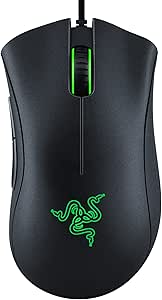 | Best Ergonomic Wired Pick | Connectivity: Wired | Sensor: Optical | Maximum sensitivity: 6,400 DPI | VIEW LATEST PRICE | See Our Full Breakdown |
| Razer Basilisk V3 Pro 35K Wireless Gaming Mouse, Black |  | Best Feature-Rich Wireless Pick | Connectivity: 2.4 GHz wireless, Bluetooth, USB-C wired | Sensor: Razer Focus Pro 35K Optical Sensor Gen-2 | Maximum sensitivity: 35,000 DPI | VIEW LATEST PRICE | See Our Full Breakdown |
| Logitech G502 X Plus Wireless RGB Gaming Mouse, Black |  | Best for Programmable Controls | Connectivity: USB, wireless | Sensor: HERO 25K optical | Maximum sensitivity: 25,600 DPI | VIEW LATEST PRICE | See Our Full Breakdown |
| Redragon M810 PRO Wireless RGB Gaming Mouse |  | Best Customizable Wireless Pick | Connectivity: 2.4 GHz wireless, USB-C | Sensor: Pixart PAW3325 optical | Maximum sensitivity: 12,000 DPI | VIEW LATEST PRICE | See Our Full Breakdown |
| Logitech G502 HERO Wired Gaming Mouse |  | Best Wired Pick for Weight Tuning | Connectivity: USB | Sensor: Optical | Maximum sensitivity: 25,600 DPI | VIEW LATEST PRICE | See Our Full Breakdown |
| Redragon M612 Wired RGB Optical Gaming Mouse |  | Best for Macro-Heavy Play on a Budget | Connectivity: USB wired | Sensor: Optical | Maximum sensitivity: 8000 DPI | VIEW LATEST PRICE | See Our Full Breakdown |
| Razer Basilisk V3 Wired Ergonomic Gaming Mouse |  | Best Wired Ergonomic Feature Set | Connectivity: USB wired | Design: Right-handed ergonomic shape with thumb rest | Buttons: 11 programmable | VIEW LATEST PRICE | See Our Full Breakdown |
| Razer Basilisk V3 X HyperSpeed Wireless Gaming Mouse |  | Best for Wireless Versatility and Long Battery Life | Connectivity: Razer HyperSpeed Wireless and Bluetooth | Controls: 9 programmable | Sensor: 5G Advanced optical | VIEW LATEST PRICE | See Our Full Breakdown |
| Logitech G PRO X SUPERLIGHT 2 Wireless Gaming Mouse, Black |  | Best for Lightweight Competitive FPS | Weight: 60 g | Sensor: HERO 2 optical | Maximum DPI: 44,000 | VIEW LATEST PRICE | See Our Full Breakdown |
| Logitech G703 Lightspeed Wireless Gaming Mouse |  | Best for a Fuller Wireless Grip | Connectivity: LIGHTSPEED wireless | Sensor: HERO 25K optical | Maximum sensitivity: 25,600 DPI | VIEW LATEST PRICE | See Our Full Breakdown |
| gaming mice | Connectivity | Sensor | Maximum sensitivity | Weight |
|---|---|---|---|---|
| Razer Viper V4 Pro Wireless Es | Razer HyperSpeed Wireless Gen-2; USB Type-A to USB Type-C cable included | Razer Focus Pro 50K Optical Sensor Gen-3 | — | 49 g |
| Logitech G305 LIGHTSPEED Wirel | LIGHTSPEED wireless, USB receiver | HERO optical | 12,000 DPI | 99 g |
| Logitech G PRO X3 SUPERSTRIKE | 2.4 GHz LIGHTSPEED wireless | HERO 2 optical | Listed as up to 48,000 DPI; product information also lists 40,000 DPI | 59 g |
| Razer Basilisk V3 Pro Wireless | 2.4 GHz wireless, Bluetooth, and USB | Razer Focus Pro 30K optical sensor | 30,000 DPI | — |
| Razer Viper V3 HyperSpeed Wire | USB wireless | Razer Focus Pro 30K optical | 30,000 DPI | 82 g |
| Razer DeathAdder Essential Wir | Wired | Optical | 6,400 DPI | 0.13 kg |
| Razer Basilisk V3 Pro 35K Wire | 2.4 GHz wireless, Bluetooth, USB-C wired | Razer Focus Pro 35K Optical Sensor Gen-2 | 35,000 DPI | — |
| Logitech G502 X Plus Wireless | USB, wireless | HERO 25K optical | 25,600 DPI | 13.44 oz |
| Redragon M810 PRO Wireless RGB | 2.4 GHz wireless, USB-C | Pixart PAW3325 optical | 12,000 DPI | 4 ounces |
| Logitech G502 HERO Wired Gamin | USB | Optical | 25,600 DPI | — |
| Redragon M612 Wired RGB Optica | USB wired | Optical | 8000 DPI | 126 g |
| Razer Basilisk V3 Wired Ergono | USB wired | — | 26,000 DPI | — |
| Razer Basilisk V3 X HyperSpeed | Razer HyperSpeed Wireless and Bluetooth | 5G Advanced optical | 18,000 DPI | — |
| Logitech G PRO X SUPERLIGHT 2 | Radio frequency and USB | HERO 2 optical | — | 60 g |
| Logitech G703 Lightspeed Wirel | LIGHTSPEED wireless | HERO 25K optical | 25,600 DPI | 95 g |
More Details on Our Top Picks
Razer Viper V4 Pro Wireless Esports Gaming Mouse
The 49 g body and up to 8,000 Hz polling make the Viper V4 Pro the most competition-focused choice in this group. Its lightweight build suits fast, repeated movements, while the 50,000 DPI sensor and Gen-4 optical switches provide headroom for players who want detailed control and durable clicks. Compared with the Logitech G PRO X3 SUPERSTRIKE, it weighs less and offers longer stated battery life at 1,000 Hz, but it lacks that model’s customizable haptic click feedback. The main tradeoff is power: battery life falls from up to 180 hours at 1,000 Hz to 45 hours at 8,000 Hz. I’d choose it for speed-first play, not for someone who wants the most feature-rich click customization or a mouse that avoids desktop software.
Pros:- Light 49 g design supports quick, repeated movements
- Wireless polling options reach up to 8,000 Hz
- Up to 180 hours of battery life at 1,000 Hz
- Gen-4 optical switches are rated for over 100 million clicks
Cons:- Battery life drops to up to 45 hours at 8,000 Hz
- Advanced customization requires Razer Synapse 4
- Ambidextrous shape may offer less right-hand contouring than an ergonomic mouse
Best for: Competitive PC and Mac players who prioritize a very light mouse, high polling rates, and wireless responsiveness.
Not ideal for: Players who want customizable haptic click behavior or plan to use 8,000 Hz polling without frequent charging.
- Weight:49 g
- Sensor:Razer Focus Pro 50K Optical Sensor Gen-3
- Maximum DPI:50,000
- Maximum polling rate:8,000 Hz
- Tracking speed:930 IPS
- Battery life:Up to 180 hours at 1,000 Hz; up to 45 hours at 8,000 Hz
- Switches:Razer Optical Mouse Switches Gen-4, rated for over 100 million clicks
- Connectivity:Razer HyperSpeed Wireless Gen-2; USB Type-A to USB Type-C cable included
Our verdict“Choose the Viper V4 Pro if low weight and high polling matter more to your competitive play than haptic click customization or maximum battery life at peak settings.”
Logitech G305 LIGHTSPEED Wireless Gaming Mouse, Black
The G305 is the straightforward wireless pick: LIGHTSPEED connectivity, six programmable buttons, and up to 250 hours from one AA battery keep the setup simple. Its 12,000 DPI HERO sensor is less ambitious on paper than the sensors in the Razer Viper V4 Pro or Razer Viper V3 HyperSpeed, but sensitivity figures alone do not determine how well a mouse suits everyday gaming. At 99 g, it is also much heavier than the Viper V4 Pro’s 49 g, making it a less natural fit for players who favor rapid, low-effort flicks. In return, the G305 avoids rechargeable-battery routines and offers receiver storage for travel. I’d pick it for dependable wireless gaming and a compact, uncomplicated feature set, rather than cutting-edge polling or an ultralight feel.
Pros:- LIGHTSPEED wireless connection with a 1 ms report rate
- Up to 250 hours of battery life from one AA battery
- Six programmable buttons
- Built-in receiver storage is useful for portable setups
Cons:- At 99 g, it is considerably heavier than the Viper V4 Pro
- Uses a replaceable AA battery rather than USB-C charging
- Maximum sensitivity is lower than the 30,000 DPI and 50,000 DPI options in this lineup
Best for: Players who want a compact wireless mouse with programmable buttons, long AA battery life, and a simple receiver-based setup.
Not ideal for: Competitive players seeking an ultralight mouse, very high polling rates, or USB-C recharging.
- Sensor:HERO optical
- Maximum sensitivity:12,000 DPI
- Report rate:1 ms
- Connectivity:LIGHTSPEED wireless, USB receiver
- Buttons:6 programmable
- Hand orientation:Ambidextrous
- Weight:99 g
- Battery:One AA battery; up to 250 hours of battery life
Our verdict“Pick the G305 if you value uncomplicated wireless play and long AA battery life more than low weight or newer high-polling features.”
Logitech G PRO X3 SUPERSTRIKE Wireless Gaming Mouse, Black
The defining feature here is customizable haptic click feedback: players can adjust click actuation and reset points instead of relying only on a conventional switch feel. That makes the PRO X3 SUPERSTRIKE a more specialized choice than the Razer Viper V4 Pro, which is lighter at 49 g and uses rated optical switches but does not list haptic click tuning. The Logitech weighs 59 g, supports up to 8,000 Hz polling, and pairs its LIGHTSPEED wireless connection with a HERO 2 sensor. Its stated battery life reaches 135 hours, though advanced settings require Logitech G HUB. The listed maximum sensitivity is inconsistent across the product information, so I would put more weight on its tactile controls and other stated capabilities than on that figure. It suits players who want to tune click behavior, not minimal software dependence.
Pros:- Haptic feedback offers customizable click actuation and reset points
- LIGHTSPEED wireless supports up to 8,000 Hz polling
- 59 g weight is light while retaining its specialized click system
- USB-C charging and up to 135 hours of stated battery life
Cons:- Advanced features require Logitech G HUB
- Right-handed design excludes left-handed users
- Product information gives conflicting maximum sensitivity figures
Best for: Right-handed players who want to customize click actuation and reset feedback alongside high-polling wireless performance.
Not ideal for: Left-handed users or players who prefer a lighter mouse and want to avoid using companion software for advanced settings.
- Weight:59 g
- Sensor:HERO 2 optical
- Maximum sensitivity:Listed as up to 48,000 DPI; product information also lists 40,000 DPI
- Polling rate:Up to 8,000 Hz
- Connectivity:2.4 GHz LIGHTSPEED wireless
- Battery life:Up to 135 hours
- Charging:USB-C
- Buttons and handedness:5 buttons; right-handed
Our verdict“Choose the PRO X3 SUPERSTRIKE if tunable haptic clicks are a priority and you are comfortable trading some simplicity for that control.”
Razer Basilisk V3 Pro Wireless Gaming Mouse
The Basilisk V3 Pro favors control and versatility over the low weight of esports-oriented mice. Its 11 programmable buttons and HyperScroll tilt wheel give players more ways to map abilities, macros, and navigation than the six-button G305 or Viper V3 HyperSpeed. It also supports Bluetooth, 2.4 GHz wireless, and USB, making it easier to share between devices. The cost of that flexibility is a larger feature set to configure and a right-handed shape that will not fit everyone. Battery life varies by connection, reaching up to 150 hours on Bluetooth and 110 hours on HyperSpeed Wireless. Unlike the Viper V4 Pro, it does not reach 8,000 Hz polling without a separately sold dock or dongle. I’d favor it for games that benefit from extra inputs, not for players focused on minimal weight.
Pros:- Eleven programmable buttons support varied game layouts
- HyperScroll tilt wheel offers more navigation options
- Bluetooth, 2.4 GHz wireless, and USB connectivity
- 13-zone Chroma RGB lighting and a sensor rated for tracking on glass
Cons:- 8,000 Hz polling requires a separately sold dock or dongle
- Battery life changes with connection mode
- Right-handed shape and extensive controls are less suited to minimalist setups
Best for: Right-handed players who want many programmable controls, a versatile scroll wheel, and multiple connection options for varied games.
Not ideal for: Left-handed users and competitive players who prioritize a low-weight design or want 8,000 Hz polling without additional hardware.
- Sensor:Razer Focus Pro 30K optical sensor
- Maximum sensitivity:30,000 DPI
- Programmable buttons:11
- Connectivity:2.4 GHz wireless, Bluetooth, and USB
- Lighting:13-zone Chroma RGB
- Scroll wheel:HyperScroll tilt wheel
- Hand orientation:Right-handed
- Battery life:Up to 150 hours on Bluetooth; up to 110 hours on HyperSpeed Wireless
Our verdict“Pick the Basilisk V3 Pro if you want programmable controls and connection flexibility, rather than an ultralight mouse built around competitive speed.”
Razer Viper V3 HyperSpeed Wireless Gaming Mouse
The Viper V3 HyperSpeed suits players who want a capable wireless mouse without managing a rechargeable battery: its included AA battery lasts up to 280 hours, the longest stated runtime among these five picks. Its Focus Pro 30K sensor and low-latency HyperSpeed connection place it above the G305’s 12,000 DPI maximum on sensitivity, though that specification alone does not make it a better fit for every player. At 82 g, it is lighter than the G305’s 99 g but far heavier than the 49 g Viper V4 Pro. That middle ground makes it a practical everyday gaming choice, not the speed specialist. On-mouse DPI controls are handy for quick adjustments, while the AA battery and listed Windows 11 requirement may limit its appeal for some setups.
Pros:- Up to 280 hours of battery life from one included AA battery
- 82 g weight is lower than the Logitech G305’s 99 g
- Focus Pro 30K optical sensor
- On-mouse DPI controls allow quick sensitivity changes
Cons:- Requires an AA battery rather than USB-C charging
- Heavier than the 49 g Viper V4 Pro
- Windows 11 is listed as the minimum required operating system
Best for: Players who want a moderately light wireless mouse, on-mouse sensitivity controls, and long runtime from a replaceable AA battery.
Not ideal for: Players who want a rechargeable USB-C mouse, the lightest possible build, or broad compatibility beyond the listed operating system requirements.
- Weight:82 g
- Sensor:Razer Focus Pro 30K optical
- Maximum sensitivity:30,000 DPI
- Connectivity:USB wireless
- Battery:One AA battery, included
- Battery life:Up to 280 hours
- Buttons:6
- Switch lifespan:60 million clicks
- Dimensions:5 × 2.51 in
Our verdict“Choose the Viper V3 HyperSpeed if long AA battery life and a moderate weight matter more than rechargeable convenience or an ultralight build.”
Razer DeathAdder Essential Wired Gaming Mouse, Black
The DeathAdder Essential suits right-handed players who want a familiar ergonomic shape and straightforward wired control. Its 6,400 DPI optical sensor and five programmable buttons cover everyday gaming needs, while the rubberized scroll wheel offers a more secure feel during repeated weapon or menu changes. Compared with the wireless Redragon M810 PRO, this Razer gives up cordless freedom and extra buttons in favor of a simpler, cord-powered setup. Its switches are rated for up to 10 million clicks, but the sensor and control count are more basic than the higher-spec Logitech G502 HERO. The long cable provides room to position the mouse, though it cannot remove cable drag from the desk. Choose it for ergonomic basics, not extensive macro control or left-handed use.
Pros:- Ergonomic right-handed shape supports extended play
- Five programmable buttons allow basic remapping and macros
- Optical sensor offers sensitivity up to 6,400 DPI
- Mechanical switches are rated for up to 10 million clicks
Cons:- Wired connection can restrict movement and introduce cable drag
- Five-button layout is less flexible than the Logitech G502 HERO’s 11 programmable buttons
- Right-handed shape does not suit left-handed players
Best for: Right-handed players seeking a simple, ergonomic wired mouse for PC or compatible gaming consoles, with a few programmable controls.
Not ideal for: Left-handed players, wireless-first setups, or gamers who want a high-DPI sensor and a large set of programmable buttons.
- Connectivity:Wired
- Sensor:Optical
- Maximum sensitivity:6,400 DPI
- Programmable buttons:5
- Hand orientation:Right-handed
- Switch durability:Up to 10 million clicks
- Dimensions:5 × 2.43 in
- Weight:0.13 kg
- Cable range:5.0 m
Our verdict“Choose the DeathAdder Essential if you want an ergonomic, no-fuss wired mouse and do not need wireless play or a large button layout.”
Razer Basilisk V3 Pro 35K Wireless Gaming Mouse, Black
The Basilisk V3 Pro 35K is the most connection-flexible choice here: it supports 2.4 GHz wireless, Bluetooth, and USB-C wired use. That mix helps players move between a gaming PC, a travel setup, and a charging cable without changing mice. Its 13 customizable controls and configurable scroll modes offer more ways to tailor play than the DeathAdder Essential, while its 35,000 DPI sensor has far more sensitivity headroom than the Logitech G502 X Plus. High maximum DPI alone is not a guarantee of better aim, though, and the feature-rich design brings more software setup. Battery life is listed at up to 140 hours on 2.4 GHz or 210 on Bluetooth. Razer Synapse handles advanced customization, and the optional Dock Pro and HyperPolling dongle add-ons are separate purchases.
Pros:- Three connection modes include 2.4 GHz, Bluetooth, and USB-C wired use
- Thirteen customizable controls and configurable scroll modes
- Listed battery life reaches up to 140 hours on 2.4 GHz
- 35,000 DPI optical sensor provides a broad sensitivity range
Cons:- Advanced customization uses Razer Synapse
- Mouse Dock Pro and HyperPolling Wireless Dongle are sold separately
- Right-handed design and PC-focused Windows compatibility limit fit for some setups
Best for: Right-handed PC gamers who want multiple connection modes, extensive control customization, and long listed battery life.
Not ideal for: Players who prefer a light, simple mouse, use macOS or Linux, or want the optional dock and polling accessory included.
- Connectivity:2.4 GHz wireless, Bluetooth, USB-C wired
- Sensor:Razer Focus Pro 35K Optical Sensor Gen-2
- Maximum sensitivity:35,000 DPI
- Customizable controls:13
- Battery life:Up to 140 hours on 2.4 GHz; up to 210 hours on Bluetooth
- Lighting:13-zone Chroma RGB
- Switches:Razer Optical Mouse Switches Gen-3
- Hand orientation:Right
- Compatibility:PC; Windows 10 or Windows 11
Our verdict“Pick the Basilisk V3 Pro 35K if you want a highly customizable wireless mouse with wired fallback and are comfortable with software setup and optional accessories.”
Logitech G502 X Plus Wireless RGB Gaming Mouse, Black
The G502 X Plus gives players who rely on shortcuts a substantial set of 13 programmable controls, a removable DPI-shift button, and a dual-mode scroll wheel. Its HERO 25K sensor and LIGHTFORCE hybrid optical-mechanical switches make it a capable wireless gaming option, while up to 120 hours of listed battery life can reduce charging interruptions. Compared with the Razer Basilisk V3 Pro 35K, it has a lower maximum DPI and fewer connection modes in the supplied specs, but its control layout and scroll options keep it appealing for games that benefit from many commands. RGB lighting is customizable across eight LEDs. The tradeoffs are a substantial 13.44-ounce listed weight and the fact that POWERPLAY wireless charging requires a separate solution. This is a feature-rich control pick, not a lightweight minimalist mouse.
Pros:- Thirteen programmable controls support extensive remapping
- Dual-mode scroll wheel can switch between controlled and fast scrolling
- HERO 25K sensor offers sensitivity up to 25,600 DPI
- LIGHTFORCE hybrid switches and customizable RGB lighting
Cons:- Listed weight of 13.44 ounces may not suit players seeking a light mouse
- POWERPLAY wireless charging solution is sold separately
- Supplied specs list USB and wireless connectivity but do not specify a Bluetooth mode
Best for: Players who want many programmable commands, a configurable scroll wheel, and wireless play for PC or Mac.
Not ideal for: Competitive players prioritizing a light mouse, or buyers seeking wireless charging without purchasing a separate POWERPLAY solution.
- Connectivity:USB, wireless
- Sensor:HERO 25K optical
- Maximum sensitivity:25,600 DPI
- Programmable controls:13
- Switches:LIGHTFORCE hybrid optical-mechanical
- Battery life:Up to 120 hours
- Weight:13.44 oz
- Lighting:Customizable 8-LED LIGHTSYNC RGB
- Wireless charging:POWERPLAY compatible; charging solution sold separately
Our verdict“Choose the G502 X Plus if programmable controls and scroll flexibility matter more to you than a lightweight build or included wireless charging.”
Redragon M810 PRO Wireless RGB Gaming Mouse
The Redragon M810 PRO offers a practical route to wireless gaming with eight programmable buttons, USB-C connectivity, and a rechargeable battery rated for up to 45 hours in eco mode. Its Pixart PAW3325 sensor supports up to 12,000 DPI, enough range for players who want to tune sensitivity without paying for the much higher ceiling listed by the Razer Basilisk V3 Pro 35K. The M810 PRO is also more control-focused than the five-button DeathAdder Essential, with rapid-fire and macro options listed among its features. A 1,000 Hz polling rate and 10-meter wireless range round out the setup. The compromises are a right-handed design and a battery-life figure tied to eco mode. The product information also gives conflicting maximum-DPI figures, so buyers should not rely on the title’s 10,000 DPI wording.
Pros:- Eight programmable buttons include rapid-fire and macro options
- 2.4 GHz wireless and USB-C connectivity
- Pixart PAW3325 sensor with listed maximum sensitivity of 12,000 DPI
- Rechargeable battery is rated for up to 45 hours in eco mode
Cons:- Right-handed design does not suit left-handed users
- Battery-life figure is specified for eco mode rather than all use
- Product title lists 10,000 DPI while specifications state a 12,000 DPI maximum
Best for: Right-handed gamers who want a rechargeable 2.4 GHz mouse with programmable macro controls and adjustable DPI settings.
Not ideal for: Left-handed players, buyers seeking very long battery life outside eco mode, or anyone who needs an unambiguous advertised maximum DPI.
- Connectivity:2.4 GHz wireless, USB-C
- Sensor:Pixart PAW3325 optical
- Maximum sensitivity:12,000 DPI
- Programmable buttons:8
- Polling rate:1,000 Hz
- Battery life:Up to 45 hours in eco mode
- Wireless range:10 meters
- Weight:4 ounces
- Hand orientation:Right
Our verdict“The M810 PRO makes sense for right-handed players wanting wireless macro controls, provided they accept the eco-mode battery caveat and conflicting DPI information.”
Logitech G502 HERO Wired Gaming Mouse
The G502 HERO is the wired choice for players who want extensive controls and the ability to change mouse weight. Its 11 programmable buttons, dual-mode hyper-fast scroll wheel, and five removable 3.6-gram weights offer more customization than the five-button DeathAdder Essential. The sensor adjusts up to 25,600 DPI, putting it in a higher sensitivity class than that Razer model, though a high DPI ceiling matters less than finding a comfortable setting. Unlike the wireless G502 X Plus, this version avoids battery charging but keeps a cable attached to the setup. The included weights let you tune the feel, yet they also make this a poor match for anyone seeking a light, uncomplicated mouse. It is a strong fit for wired players who want to tailor both controls and handling.
Pros:- Eleven programmable buttons support varied game commands
- Five removable 3.6-gram weights let users adjust the feel
- Dual-mode scroll wheel supports fast and controlled scrolling
- Optical sensor adjusts up to 25,600 DPI
Cons:- USB cable limits movement compared with wireless options such as the Logitech G502 X Plus
- Right-handed design excludes left-handed users
- RGB synchronization requires Logitech Gaming Software
Best for: Wired PC gamers who want many programmable buttons, fast or controlled scrolling, and removable weights to adjust mouse feel.
Not ideal for: Wireless-first players, left-handed users, or anyone prioritizing a lightweight mouse with minimal customization.
- Connectivity:USB
- Sensor:Optical
- Maximum sensitivity:25,600 DPI
- Programmable buttons:11
- Scroll wheel:Dual-mode hyper-fast scroll
- Adjustable weights:Five removable 3.6 g weights
- Hand orientation:Right-handed
- Power source:Corded electric
- Compatibility:PC; minimum operating system Windows 7
Our verdict“Choose the G502 HERO if you want a wired mouse with abundant controls and adjustable weight, rather than wireless freedom or a light build.”
Redragon M612 Wired RGB Optical Gaming Mouse
The M612 makes the most sense for players who want lots of programmable controls without moving to a wireless setup. Its 11 buttons and macro options give MMO, strategy, and utility-focused players room to map frequent commands, while five preset DPI steps make it easy to switch sensitivity without opening software. Compared with the Razer Basilisk V3, it offers a similar button count but a lower maximum sensitivity and a simpler scroll wheel. The textured side grip and right-handed shape add support during long sessions, though its 126 g weight favors a planted feel over quick, low-effort flicks. The wired connection avoids battery upkeep, but the cable limits freedom of movement, and left-handed players should skip its right-oriented design.
Pros:- 11 programmable buttons support macros and rapid-fire options
- Sensitivity can be adjusted from 500 to 8000 DPI
- Textured ergonomic grip adds purchase on the side
- RGB lighting offers five modes
Cons:- Wired connection restricts movement compared with wireless options such as the Razer Basilisk V3 X HyperSpeed
- At 126 g, it is heavier than the Logitech G PRO X SUPERLIGHT 2
- Right-handed shape does not suit left-handed users
Best for: Right-handed MMO, strategy, and action-game players who want many programmable inputs and prefer a wired mouse.
Not ideal for: Left-handed players or competitive FPS players seeking a lightweight mouse and unrestricted wireless movement.
- Connectivity:USB wired
- Sensor:Optical
- Maximum sensitivity:8000 DPI
- Preset DPI levels:500, 1000, 2000, 3000, 4000
- Buttons:11 programmable
- Weight:126 g
- Hand orientation:Right
- Compatibility:Gaming consoles, PC, and Mac
Our verdict“Choose the M612 if you want abundant programmable controls and a textured wired grip, but skip it for lightweight competitive play.”
Razer Basilisk V3 Wired Ergonomic Gaming Mouse
The Basilisk V3 is the wired pick for players who want a comfortable right-handed shape and controls for more than just aiming. Its thumb rest, 11 programmable buttons, and tilt-capable HyperScroll wheel make it well suited to games with layered commands, while the wheel’s dual modes also help when scrolling through long menus or documents. Against the Redragon M612, the Basilisk brings a 26,000 DPI sensor, more elaborate scroll functionality, and 11-zone Chroma lighting; the tradeoff is reliance on Razer’s Windows 10 or 11 software environment rather than the M612’s listed Mac support. Its cable avoids battery management, but it also gives up the freedom of the wireless Basilisk V3 X HyperSpeed. Left-handed players should look elsewhere.
Pros:- Ergonomic right-handed shape includes a thumb rest
- 11 programmable buttons support customized game controls
- Dual-mode tilt wheel offers both free-spinning and tactile scrolling
- 26,000 DPI optical sensor provides a broad sensitivity range
Cons:- Wired connection limits movement compared with the Basilisk V3 X HyperSpeed
- Right-handed shape is unsuitable for many left-handed players
- Listed operating-system support is limited to Windows 10 and 11
Best for: Right-handed PC players who want a thumb-rest shape, many remappable controls, and a versatile scroll wheel without a wireless battery.
Not ideal for: Left-handed gamers, Mac users seeking listed OS support, or anyone who wants a cable-free desk setup.
- Connectivity:USB wired
- Design:Right-handed ergonomic shape with thumb rest
- Buttons:11 programmable
- Scroll wheel:Dual-mode HyperScroll tilt wheel
- Lighting:11 Razer Chroma RGB zones
- Maximum sensitivity:26,000 DPI
- Switches:Gen 2 optical mouse switches
- Operating systems:Windows 10 and Windows 11
Our verdict“Pick the Basilisk V3 for wired play with a thumb rest, extensive controls, and a versatile wheel, provided its right-handed shape fits you.”
Razer Basilisk V3 X HyperSpeed Wireless Gaming Mouse
The Basilisk V3 X HyperSpeed suits players who want wireless flexibility without giving up extra controls. It offers nine programmable controls and two connection modes: HyperSpeed wireless for gaming and Bluetooth for compatible devices when conserving battery matters more. Its stated runtime—up to 285 hours on HyperSpeed or 535 hours on Bluetooth—means fewer battery changes than the Logitech G703’s listed 35 hours with RGB enabled, though actual life varies with use. The G703 has six programmable buttons and a lighter 95 g listed weight, while the Basilisk provides more controls and a longer stated runtime. Its 18,000 DPI sensor is less highly specified than the wired Basilisk V3’s 26,000 DPI sensor, and this model uses an AA battery rather than USB-C charging. The right-handed shape also rules it out for some players.
Pros:- HyperSpeed wireless and Bluetooth provide two connection options
- Nine programmable controls allow game-specific mappings
- Long stated battery life reduces how often the AA battery needs replacement
- Customizable Chroma RGB lighting
Cons:- Uses an AA battery rather than built-in USB-C charging
- Battery life varies with connection mode and use
- Right-handed shape does not suit left-handed players
Best for: Right-handed players who want a versatile wireless mouse for gaming and everyday use, with Bluetooth as a second connection option.
Not ideal for: Left-handed players, those who prefer rechargeable USB-C mice, or competitive players prioritizing the lightest design.
- Connectivity:Razer HyperSpeed Wireless and Bluetooth
- Controls:9 programmable
- Sensor:5G Advanced optical
- Maximum sensitivity:18,000 DPI
- Switches:Gen-2 mechanical, rated up to 60 million clicks
- Battery:1 AA battery, included
- Battery life:Up to 285 hours with HyperSpeed; up to 535 hours with Bluetooth
- Compatibility:Mac and PC
Our verdict“Choose the Basilisk V3 X HyperSpeed for flexible wireless connections and many controls, if an AA-powered right-handed mouse suits your setup.”
Logitech G PRO X SUPERLIGHT 2 Wireless Gaming Mouse, Black
The G PRO X SUPERLIGHT 2 is built around low weight and direct control, making it the strongest fit here for players who want a mouse that is easy to reposition during rapid aim adjustments. At 60 g, it is substantially lighter than the 95 g Logitech G703 and the 126 g Redragon M612. Its HERO 2 sensor reaches 44,000 DPI, but the practical draw is the combination of high tracking capability and a light shell, not the need to use maximum sensitivity. LIGHTFORCE hybrid switches and a listed polling rate of up to 8 kHz target responsive competitive play. In exchange, you get just five buttons, fewer built-in command options than the Basilisk V3 X HyperSpeed, and a right-handed design. USB-C charging is convenient, though its battery life is listed at up to 95 hours.
Pros:- 60 g weight supports quick repositioning and repeated flicks
- HERO 2 optical sensor supports up to 44,000 DPI
- LIGHTFORCE hybrid switches are designed for responsive inputs
- USB-C charging and up to 95 hours of stated battery life
Cons:- Five buttons offer fewer command options than the Basilisk V3 X HyperSpeed
- Right-hand orientation may not suit left-handed players
- Up to 95 hours of battery life is shorter than the Basilisk V3 X HyperSpeed’s stated Bluetooth runtime
Best for: Competitive FPS players who prioritize a lightweight wireless mouse, precise tracking, and a simple five-button layout.
Not ideal for: Players who need numerous side buttons for macros, prefer a heavier ergonomic shape, or need a left-handed mouse.
- Weight:60 g
- Sensor:HERO 2 optical
- Maximum DPI:44,000
- Maximum polling rate:8 kHz
- Connectivity:Radio frequency and USB
- Buttons:5
- Battery life:Up to 95 hours
- Charging:USB-C
Our verdict“Choose the G PRO X SUPERLIGHT 2 if a light, focused competitive mouse matters more than extra buttons or a fuller ergonomic shape.”
Logitech G703 Lightspeed Wireless Gaming Mouse
The G703 is the more substantial wireless option for players who want a 95 g body with rubber side grips rather than the featherweight feel of the G PRO X SUPERLIGHT 2. Its HERO 25K sensor supports up to 25,600 DPI, and LIGHTSPEED wireless keeps the setup cable-free. Six programmable buttons offer a middle ground: more flexibility than the Superlight 2’s five, but fewer commands than the nine on the Basilisk V3 X HyperSpeed. Battery life is listed at up to 35 hours with RGB enabled, so it needs more frequent charging than either Logitech’s 95-hour Superlight 2 or the Basilisk’s stated runtimes. POWERPLAY compatibility can support wireless charging, but that system is separate. The G703 also lists an optional 10 g weight, which adds heft rather than helping players seeking an especially light mouse.
Pros:- LIGHTSPEED wireless connection avoids a mouse cable
- HERO 25K sensor supports up to 25,600 DPI
- Rubber side grips provide a secure hold
- Six programmable buttons and LIGHTSYNC RGB allow customization
Cons:- Up to 35 hours of battery life with RGB enabled is less than the Superlight 2’s listed runtime
- POWERPLAY wireless charging system is a separate purchase
- Optional 10 g weight adds mass and is not included
Best for: Right-handed wireless players who prefer a fuller, grippy mouse with six programmable buttons and do not need an ultralight build.
Not ideal for: Players seeking long intervals between charges, a very light mouse, or wireless charging without buying an additional system.
- Connectivity:LIGHTSPEED wireless
- Sensor:HERO 25K optical
- Maximum sensitivity:25,600 DPI
- Weight:95 g
- Buttons:6 programmable
- Battery life:Up to 35 hours with RGB enabled
- Lighting:LIGHTSYNC RGB
- Charging compatibility:POWERPLAY wireless charging system
Our verdict“Pick the G703 if you want a grippy, medium-weight wireless mouse with customizable controls, and can accept more frequent charging.”
How We Picked
I ranked these mice by how clearly each one serves a gaming need: responsive control, comfortable handling, useful button layout, dependable connection, and practical build. I also weighed how well each design fits its intended role, since a light, pared-back mouse and a heavier, button-rich one solve different problems. The lineup includes wired and wireless choices, esports-focused shapes, ergonomic designs, and entry-level alternatives.
The order favors versatile picks that suit a broad range of players, then gives specialized models credit when their tradeoffs make sense for a defined audience. Premium features alone do not earn a higher place: I considered whether extra controls, wireless convenience, or a performance-focused design offer a meaningful reason to choose that model. Closely related versions are judged as separate products because connectivity and feature differences can change which one fits a buyer’s setup.
Factors to Consider When Choosing Best Gaming Mice
Choosing a gaming mouse is less about chasing the longest spec list and more about matching the design to your hand, games, and setup. I’d start with the compromises you notice during a long session, not the features that look most impressive on a box.
Match the Shape to Your Grip and Hand
A mouse can have strong performance and still feel wrong if its body forces your fingers into an awkward position. Palm grip usually benefits from a shape that supports more of the hand, while claw and fingertip grips often leave more room for quick repositioning. Compare the width, height, and thumb-rest contour, not just whether a listing calls a mouse ergonomic. If you can, check dimensions against a mouse you already find comfortable. A common mistake is buying a compact model for its portability without checking whether it leaves your hand cramped. Comfort over longer sessions matters more than a brief first impression.
Choose Weight for Your Games, Not a Spec Contest
Lower weight can make repeated flicks and rapid repositioning feel less effortful, which may suit fast shooters. A heavier mouse can feel more planted and may be a better match for players who value stability or want several extra controls. Neither choice is automatically more accurate: mouse sensitivity, pad friction, and how you move your arm all affect control. If you play different genres, think about which games dominate your time rather than buying for an occasional match. Also account for the battery or cable arrangement, since the complete setup can change how a mouse feels in motion. Avoid treating the lightest number as a guarantee of better aim.
Pick Wireless or Wired Around Your Setup
Wireless models reduce cable drag and make a desk easier to arrange, but they add charging or battery upkeep. Wired mice avoid charging and can be a sensible fit for a fixed desktop, though cable movement may bother players with broad, sweeping motions. Wireless options also differ in how they handle power, so check the specific model’s battery approach before choosing. A mouse used for long sessions away from a charging point may call for a different compromise than one used beside a dock or USB port. Don’t assume that wireless is automatically less responsive or that a cable is automatically inconvenient; the real issue is how the connection fits your play and routine. Keep the receiver or cable placement in mind when planning a compact setup.
Count Useful Buttons, Not Just Buttons
Extra controls help when your games use many abilities, inventory actions, or macros, but they can add bulk and make the thumb area harder to manage. For a competitive shooter, a simpler layout may keep the mouse easy to grip and reduce accidental presses. For strategy, MMO, or mixed-use play, additional inputs can move frequent commands within reach. Think through the actions you would actually assign before paying for a button-rich design. Software support and onboard profile options can also affect whether those controls are convenient across multiple computers. More buttons only add value when their placement and configuration suit your habits.
Separate Sensor Needs From Marketing Numbers
Most buyers should first look for reliable tracking and settings that work with their games, rather than treating the largest sensitivity figure as a performance ranking. Very high sensitivity ranges rarely matter if you play at a lower setting and never change it. Consistent tracking, controllable lift-off behavior, and a comfortable shape are more likely to affect daily use. Polling and wireless features can matter to competitive players, but they should be weighed alongside the rest of the setup, including the display and game. Avoid paying extra for a specification you cannot use or notice. A balanced mouse that fits your grip is often a better choice than a number-led upgrade.
Decide Where Premium Features Earn Their Keep
A premium mouse can make sense when its distinct performance features, materials, wireless design, or controls solve a real problem for you. It is a weaker fit if you mainly need dependable pointer control for casual play and everyday computer use. At the entry level, prioritize a comfortable shape and a layout you can use without fuss over decorative lighting or elaborate software. Check whether the model’s configuration tools work with your computer and whether you are willing to maintain profiles or recharge it. Buyers comparing near-identical names should verify the exact version and connection type before ordering. Spend more for a feature you will use regularly, not simply because a model sits at the top of a product family.
Frequently Asked Questions
Is a lightweight mouse always better for competitive shooters?
No. A lighter mouse can make rapid movements easier, but it may feel less steady to someone accustomed to a heavier shape. Grip, sensitivity, mouse-pad friction, and the way you aim all affect control. A player who uses broad arm movements may value a different balance than someone who makes small wrist adjustments. Choose a weight that feels controlled during both quick flicks and careful tracking, rather than selecting by weight alone.
Should I choose a wireless mouse if I play ranked matches?
Wireless can be a good fit for competitive play when the model provides a connection suited to your needs and you keep its power needs in mind. It removes cable drag, which some players find distracting during fast movement. Wired models remain useful if you prefer not to charge a mouse or want a simpler fixed setup. The decision should also account for receiver placement and whether your desk gives the mouse enough room to move. Compare the actual model’s connection and upkeep rather than assuming all wireless mice behave alike.
Do I need a mouse with extra programmable buttons?
Extra buttons are useful when you have frequent commands that are awkward to reach on a keyboard, such as abilities or inventory actions. They can be less helpful in a shooter if they crowd the thumb area or invite accidental clicks. Consider the games you play most and list the commands you would genuinely assign before choosing a layout. Software and profile support matter too, especially if you switch between games or computers. If you would leave the buttons unused, a simpler design may feel better and be easier to manage.
Can I use one gaming mouse for shooters and strategy games?
Yes, but the best compromise depends on which genre gets more playtime. A streamlined mouse can feel nimble in shooters, while a more ergonomic design with additional controls can make strategy commands easier to access. A middle-ground model may handle both adequately without being the first choice for either specialty. Check whether adjustable button assignments and profiles are easy to manage if you regularly change games. Prioritize the shape and control layout you can comfortably use across your longest sessions.
How do I choose between similar versions of the same mouse?
Start by confirming the exact model name, because a shared product family can include wired and wireless versions or other feature changes. Then compare the details that affect your setup: connection, button layout, sensor features, charging or battery needs, and included controls. Don’t assume a newer-sounding version is automatically the right one for your needs. If the differences do not address a problem you have, the simpler variant may be the more sensible match. Confirming the exact model before buying also helps avoid choosing a product based on another version’s specifications.
Conclusion
For the best overall gaming mouse, I’d start with the Razer Viper V4 Pro Wireless if competitive speed and a focused layout are your priorities. The Logitech G305 LIGHTSPEED is my value-oriented pick for buyers who want straightforward wireless gaming, while the Razer Basilisk V3 Pro is the premium choice for players seeking extra controls. Beginners who want a simpler wired starting point can look at the Razer DeathAdder Essential or Logitech G502 HERO, choosing between a more direct layout and broader controls. For specific needs, consider the lightweight, streamlined Logitech G PRO X SUPERLIGHT 2 for competitive play, or the wired Basilisk V3 and G502 HERO if you prefer a connected mouse with added functions. Match shape and controls to your hand and games first; then choose the connection and feature set that fits your routine.