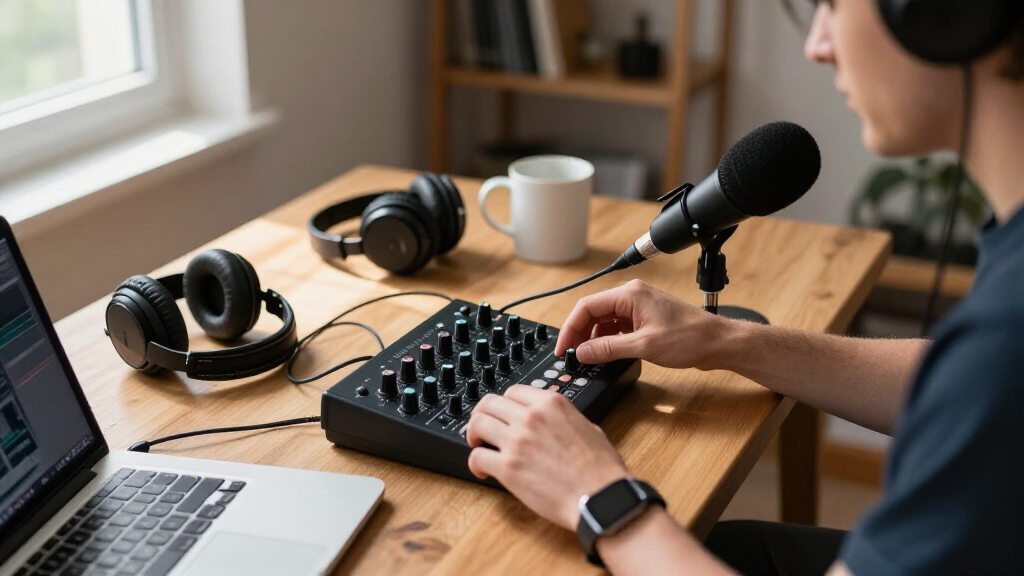
Shopping for USB audio mixers for podcasting means balancing three things: how many people you need to record, how much hands-on control you want during recording, and whether you need a complete bundle or already own microphones. The MAONO AME2 Audio Interface Mixer takes my best overall spot because it combines real XLR inputs, a podcast-style console layout, and sound effects into a package that grows with your show. For solo hosts on a tight budget, the FIFINE Podcast Equipment Bundle delivers a microphone and mixer together for less than most standalone interfaces, while the MAONO P2 is the strongest pick if you record away from a desk with its USB-C connectivity across PC, Mac, and iOS devices. The main tradeoff in this category is that cheap all-in-one bundles sacrifice audio fidelity and upgrade paths, whereas proper mixers like the BOMGE BM-05 and W IN-MIX demand you buy microphones separately. Read on for the full ranking, including who each mixer is for and who should skip it.
Complete the kit



Key Takeaways
- The MAONO AME2 won best overall because it is the only console-style mixer here that pairs genuine XLR/TRS inputs with on-board effects and a self-listening headphone path, giving it the clearest upgrade path from beginner to two-host show.
- Bundle models (FIFINE, TENLAMP G10, OZMI, F993) dominate the sub-entry tier, but the comparison showed they cluster around the same limitations: fixed preamps, plastic faders, and microphones you will likely outgrow within a year of serious podcasting.
- Only two picks — the MAONO P2 and M-Audio M-Track Duo — are true audio interfaces rather than mixers; they lack live sound effects and fader control but record noticeably cleaner signals, which matters more for edited interviews than for live streaming.
- 48V phantom power separates the versatile mixers from the rest: the BOMGE BM-05, W IN-MIX, and Aveek can drive professional condenser mics, while most gaming-styled units like the SC3W and PUPGSIS cannot, capping your microphone choices.
- Bluetooth connectivity appeared on five mixers in this lineup, but it proved most useful on the IN-MIX and Aveek for playing intro music — and least useful on gaming mixers, where latency makes it a poor fit for live calls.
| FIFINE Podcast Equipment Bundle Set with Microphone and USB Audio Mixer |  | Best Starter Bundle | Microphone Type: Dynamic XLR | Microphone Build: Sturdy metal | Microphone Features: Noise shielding, shockproof, cardioid pattern | VIEW LATEST PRICE | See Our Full Breakdown |
| FIFINE Ampligame SC3W Gaming Audio Mixer with Indi-Fader and Volume Control | 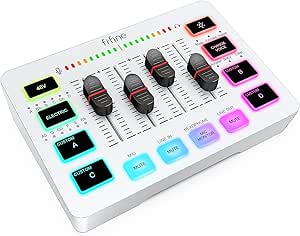 | Best for Live Streamers | Channels: 4 | Microphone Input: XLR | Phantom Power: 48V | VIEW LATEST PRICE | See Our Full Breakdown |
| Aveek 5 Channel Audio Mixer with Built-in PC Recording Interface and Bluetooth |  | Best Value Multi-Input Mixer | Channels: 5 | Connectivity: USB | Audio Inputs: XLR, 1/4″, RCA, USB, Bluetooth | VIEW LATEST PRICE | See Our Full Breakdown |
| M-Audio M-Track Duo USB Audio Interface |  | Best Portable Recording Interface | Audio Resolution: 48kHz | Inputs: 2x combo XLR/Line/Instrument | Phantom Power: Yes | VIEW LATEST PRICE | See Our Full Breakdown |
| BOMGE BM-05 5-Channel Audio Mixer with USB, Bluetooth, Echo/Delay Effects and 48V Phantom Power |  | Best for Multi-Mic Roundtables | Channels: 5 | XLR Inputs: 3 (with 48V phantom power) | Stereo Inputs: 1 pair 6.35mm + 1 pair RCA | VIEW LATEST PRICE | See Our Full Breakdown |
| Podcast Equipment Bundle for 2, F993 All-in-One Audio Mixer |  | Best Two-Person Starter Kit | Compatible Devices: Android, Windows, iOS, macOS | Connectivity: AUX, USB | Channels: 3 | VIEW LATEST PRICE | See Our Full Breakdown |
| FIFINE SC8 Gaming Audio Mixer for Live Streaming with 7.1ch Surround Sound |  | Best for XLR Streaming Setups | Channels: 5 | Connectivity: USB | Microphone Input: XLR with 48V phantom power | VIEW LATEST PRICE | See Our Full Breakdown |
| TENLAMP G10 Creator Audio Mixer Bundle with Microphone for Streaming |  | Best Plug-and-Play Value Bundle | Included Components: Audio mixer, condenser microphone, essential accessories | Noise Reduction: Yes | Voice Changer: Yes | VIEW LATEST PRICE | See Our Full Breakdown |
| MAONO AME2 Audio Interface Mixer, Podcast Studio Console with XLR Input |  | Best Effects and Sound-Pad Console | Preamp: Phantom power, 60dB gain | Sound Pads: 11 customizable pads with recording and looping | Inputs: XLR, 6.35mm instrument, AUX-IN, MIC1/2, INST | VIEW LATEST PRICE | See Our Full Breakdown |
| PUPGSIS Gaming Audio Mixer for PC Streaming, Soundboard with Voice Changer |  | Best Budget Soundboard for Streamers | Channels: 4 | Connectivity: USB | Mic Input: 1/4″ TRS dynamic (XLR via adapter cable) | VIEW LATEST PRICE | See Our Full Breakdown |
| W IN-MIX 6 Channel Audio Mixer with Bluetooth, USB MP3 Player, 48V Phantom Power |  | Best for Live-Sound Podcasting | Channels: 6 | Connectivity: Bluetooth 5.0, USB | Inputs: XLR | VIEW LATEST PRICE | See Our Full Breakdown |
| MAONO P2 Hybrid USB-C Audio Interface with Dual XLR Inputs |  | Best for Pristine Recording Quality | Channels: 2 | Connectivity: USB-C (USB-A/C cable included) | Sample Rate: Up to 192 kHz / 24-bit | VIEW LATEST PRICE | See Our Full Breakdown |
| IN-MIX 6-Channel Audio Mixer with Bluetooth, USB, 99 DSP Effects, and 48V Phantom Power |  | Best Value Multi-Mic Mixer | Channels: 6 (4 mono + 2 stereo) | Effects: 99 DSP effects | Connectivity: Bluetooth 5.0, USB | VIEW LATEST PRICE | See Our Full Breakdown |
| FIFINE Ampligame SC3 Gaming Audio Mixer with Indi-Fader and Volume Control |  | Best for Live Streamers | Channels: 4 (mic, line-in, headphone, line-out faders) | Connectivity: USB-C (audio and power), XLR mic input | Phantom Power: 48V | VIEW LATEST PRICE | See Our Full Breakdown |
| OZMI Podcast Equipment Bundle with RGB Audio Mixer, Microphone, Headphones, and Boom Arm |  | Best Complete Starter Kit | Mixer: RGB audio mixer with voice changer and sound effects | Microphone: 3.5mm condenser (included) | Headphones: Monitoring headphones (included) | VIEW LATEST PRICE | See Our Full Breakdown |
| USB audio mixers for podcasting | Channels | Connectivity |
|---|---|---|
| FIFINE Podcast Equipment Bundl | — | — |
| FIFINE Ampligame SC3W Gaming A | 4 | — |
| Aveek 5 Channel Audio Mixer wi | 5 | USB |
| M-Audio M-Track Duo USB Audio | — | — |
| BOMGE BM-05 5-Channel Audio Mi | 5 | — |
| Podcast Equipment Bundle for 2 | 3 | AUX, USB |
| FIFINE SC8 Gaming Audio Mixer | 5 | USB |
| TENLAMP G10 Creator Audio Mixe | — | — |
| MAONO AME2 Audio Interface Mix | — | USB-C, USB-A, Bluetooth |
| PUPGSIS Gaming Audio Mixer for | 4 | USB |
| W IN-MIX 6 Channel Audio Mixer | 6 | Bluetooth 5.0, USB |
| MAONO P2 Hybrid USB-C Audio In | 2 | USB-C (USB-A/C cable included) |
| IN-MIX 6-Channel Audio Mixer w | 6 (4 mono + 2 stereo) | Bluetooth 5.0, USB |
| FIFINE Ampligame SC3 Gaming Au | 4 (mic, line-in, headphone, line-out faders) | USB-C (audio and power), XLR mic input |
| OZMI Podcast Equipment Bundle | — | Bluetooth, 3.5mm AUX, OTG/PC |
More Details on Our Top Picks
FIFINE Podcast Equipment Bundle Set with Microphone and USB Audio Mixer
Most podcast mixers assume you already own a microphone, which is exactly why this FIFINE bundle makes sense as a first purchase. You get a dynamic XLR microphone built from metal with a shock mount and cardioid pattern, plus a compact dual-input mixer with headphone and speaker monitoring. Compared with the M-Audio M-Track Duo, which requires you to buy a mic separately, this arrives ready to record on day one. The tradeoff is capability: there’s no phantom power here, so condenser mics are off the table, and the noise shielding on a dynamic mic means you’ll want to be close to the capsule. Setup also leans technical for someone who has never touched gain knobs before, but the separate volume controls for each input make the learning curve manageable.
Pros:- Complete kit with a matched dynamic XLR mic — no separate mic shopping required
- Sturdy all-metal microphone with shockproof mounting and cardioid pickup
- Dual inputs accept both microphones and instruments for flexible recording
- Independent volume knobs for each input and output simplify level balancing
Cons:- No phantom power, limiting future upgrades to dynamic mics only
- Setup requires more technical understanding than a true plug-and-play interface
Best for: First-time podcasters who want a matched mic-and-mixer kit instead of piecing together separate gear
Not ideal for: Anyone planning to use condenser microphones, since there’s no phantom power
- Microphone Type:Dynamic XLR
- Microphone Build:Sturdy metal
- Microphone Features:Noise shielding, shockproof, cardioid pattern
- Input Ports:XLR and instrument input
- Mixer Inputs:Dual input interface
- Monitoring:Headphone monitoring and speaker output
- Volume Control:Separate knobs per input/output
Our verdict“Buy this if you’re starting a podcast from zero and want one box that covers mic, mixer, and monitoring — skip it if you already own a condenser mic.”
FIFINE Ampligame SC3W Gaming Audio Mixer with Indi-Fader and Volume Control
This model stands out for entertainment-focused live streaming rather than pure podcast production. Where the Aveek 5 Channel focuses on clean multi-input mixing, the SC3W prioritizes performance tools: four individually controlled channels, a voice changer, custom sound buttons for on-the-fly effects, and RGB lighting that fits a streamer’s setup. The 48V phantom power means it handles condenser mics that the cheaper FIFINE bundle can’t, which matters if you want broadcast sensitivity. The catches are real, though — everything is wired, so cable management across a dual-PC setup gets messy, and the sheer number of buttons and faders creates a learning curve that casual podcasters may not want to climb. For a show that’s also a live performance, that complexity pays off.
Pros:- 4-channel individual control for mic, chat, music, and game audio
- 48V phantom power supports condenser microphones
- Dedicated mute buttons and real-time monitoring built in
- Custom sound buttons and voice effects boost live audience engagement
Cons:- Fully wired — no wireless options, so multi-device setups get cable-heavy
- Feature density creates a real learning curve for audio newcomers
Best for: Streamers who juggle multiple audio sources, sound effects, and live audience interaction on air
Not ideal for: Podcasters recording solo interviews who don’t need voice effects or RGB flair
- Channels:4
- Microphone Input:XLR
- Phantom Power:48V
- Mute Button:Yes
- Real-time Monitoring:Yes
- RGB Lighting:Yes
- Voice Change:Yes
- Custom Sound Button:Yes
Our verdict“This pick makes the most sense for streamers who treat audio as part of the show; interview-focused podcasters should look at simpler mixers.”
Aveek 5 Channel Audio Mixer with Built-in PC Recording Interface and Bluetooth
For a roundtable podcast on a budget, this Aveek mixer covers the essentials: five channels, XLR, RCA, and 1/4″ inputs, phantom power, per-channel EQ and gain, plus built-in USB recording so your computer sees it as an audio interface. Compared with the BOMGE BM-05, it trades away the third XLR input and onboard echo effects in exchange for Bluetooth streaming with playback controls — handy for pulling intro music straight from a phone. The limitations deserve attention: Bluetooth can’t run alongside other functions, so you’ll choose between wireless music and USB recording, not both. Output is limited to active speakers, and the setup instructions assume some prior mixer knowledge. Still, for the price of a basic interface, you get genuine multi-mic flexibility that a 2-channel unit can’t match.
Pros:- Five channels with XLR, 1/4″, and RCA inputs handle multi-guest setups
- Built-in PC recording and USB playback act as a full audio interface
- Bluetooth streaming with playback controls for wireless music sources
- Per-channel EQ, gain, and phantom power give real mixing control
Cons:- Bluetooth cannot operate simultaneously with other mixer functions
- Setup instructions are vague, which frustrates first-time mixer owners
- Only works with active speakers — no passive output support
Best for: Small podcast teams or bands who need multiple mic inputs and computer recording without a big budget
Not ideal for: Anyone wanting Bluetooth music and USB recording to work at the same time
- Channels:5
- Connectivity:USB
- Audio Inputs:XLR, 1/4″, RCA, USB, Bluetooth
- Output Connectors:3.5mm, XLR, 1/4″, RCA
- Phantom Power:48V
- Power Source:Corded Electric
- Dimensions:8.27″D x 8.27″W x 2.56″H
Our verdict“The most sensible choice when you need several microphones recorded at once for minimal spend, provided you can live without simultaneous Bluetooth.”
M-Audio M-Track Duo USB Audio Interface
If your podcast travels — hotel rooms, conference floors, a guest’s home studio — this is the most portable option in the lineup. The M-Track Duo isn’t a traditional mixer; it’s a 2-channel USB interface with combo inputs that accept XLR mics, guitars, and line-level sources, driven by clean Crystal preamps. Compared with the FIFINE bundle, you sacrifice the included microphone but gain zero-latency monitoring through a USB/Direct switch — the feature that prevents the distracting echo that plagues cheaper setups. The honest tradeoff: 48kHz resolution sits below the 96kHz+ offered by some competitors, though for spoken voice it’s rarely audible. There’s also no MIDI, so musician-producers should look elsewhere. What you get instead is dead-simple operation that never gets in the way of a conversation.
Pros:- Combo XLR/Line/Instrument inputs handle any two sources without adapters
- Zero-latency USB/Direct monitoring prevents echo during recording
- Compact and bus-powered design travels easily alongside a laptop
- Bundled MPC Beats software adds production capability out of the box
Cons:- Capped at 48kHz resolution, below the 96kHz+ of competing interfaces
- No MIDI input/output for music production workflows
- Only two channels — not expandable for larger guest rosters
Best for: Podcasters who record on the move or at a desk and want simple, reliable two-mic capture
Not ideal for: Multi-guest roundtables needing more than two inputs, and producers who need MIDI or 96kHz audio
- Audio Resolution:48kHz
- Inputs:2x combo XLR/Line/Instrument
- Phantom Power:Yes
- Preamps:Crystal preamps
- Latency Control:USB/Direct switch for zero-latency monitoring
- Outputs:1/4″ headphone, stereo 1/4″ main
- Compatibility:Mac, PC
- Included Software:MPC Beats (Akai Professional)
Our verdict“This model is better suited to mobile two-person recording than any full mixer here; buy it for simplicity and portability, not channel count.”
BOMGE BM-05 5-Channel Audio Mixer with USB, Bluetooth, Echo/Delay Effects and 48V Phantom Power
When your show regularly seats three or more people, three XLR inputs with phantom power become the feature that decides everything — and that’s this mixer’s core advantage. The Aveek 5 Channel offers a similar channel count, but the BOMGE adds onboard echo and delay effects, 2-band EQ per channel, and dual USB paths: USB-B for computer recording plus USB-A for flash-drive playback and capture. That makes it a fit for podcasting and small live gigs alike. The compromises are awkward, though. Bluetooth, USB, and channels 4/5 can’t operate simultaneously, the wireless range is a bizarre 1.5 feet, and phone recording demands a separate OTG adapter. Treat Bluetooth as a bonus rather than a feature and the value case holds up; rely on it and you’ll be disappointed.
Pros:- 3 XLR inputs with 48V phantom power for multi-guest condenser setups
- Dual USB paths: record to computer via USB-B and playback from flash drives via USB-A
- Onboard 2-band EQ, gain, and echo/delay effects for shaping voices
- Built-in USB sound card works for both computer and mobile recording
Cons:- Bluetooth, USB, and channels 4/5 cannot be used at the same time
- Bluetooth range is effectively unusable at roughly 1.5 feet
- Phone connection requires a separate USB OTG adapter
Best for: Roundtable podcasts and small performances needing three condenser mics mixed at once
Not ideal for: Streamers who expect usable Bluetooth range or simultaneous wireless and USB functions
- Channels:5
- XLR Inputs:3 (with 48V phantom power)
- Stereo Inputs:1 pair 6.35mm + 1 pair RCA
- Outputs:1 pair RCA + 1 pair 6.35mm main
- USB:USB-B for recording, USB-A for playback/recording
- Bluetooth:Yes (works within 1.5 ft)
- EQ:2-band per channel
- Effects:Echo and Delay
- Headphone Jack:3.5mm
Our verdict“The strongest choice here for three-mic shows on a modest budget — as long as you plan around its clunky Bluetooth limitations.”
Podcast Equipment Bundle for 2, F993 All-in-One Audio Mixer
Most budget mixer bundles assume a solo host, but the SINWE F993 stands out for being built around two-person podcasting, pairing the console with a BM-800 microphone, scissor arm, shock mount, and pop filter so a co-host setup doesn’t require piecemeal shopping. The 24-bit/192kHz resolution is a genuine step above what the TENLAMP G10 bundle advertises, which matters if episodes eventually get edited and mastered. Voice presets and sound effects are baked in for live banter, and driver-free operation across Windows, macOS, iOS, and Android keeps multi-platform workflows simple. The tradeoff is friction: phone users without a 3.5mm jack need an OTG adapter that isn’t boxed, and the sheer number of controls can overwhelm a true first-timer compared with a simpler plug-and-play kit.
Pros:- 24-bit/192kHz resolution delivers headroom for edited, polished episodes
- Complete accessory package including scissor arm, shock mount, and pop filter
- Driver-free compatibility across Windows, macOS, iOS, and Android
- Built-in soundboard with voice presets and audio effects for live shows
Cons:- Requires a separately purchased OTG adapter for phones lacking a 3.5mm jack
- Dense control layout has a steeper learning curve than simpler starter bundles
- Warranty terms are thin compared with brands like FIFINE or MAONO
Best for: Two-host podcast teams who want a complete microphone-plus-mixer setup in a single purchase
Not ideal for: Solo streamers who already own a quality mic — much of this bundle’s value is in the included accessories they’d be paying for twice
- Compatible Devices:Android, Windows, iOS, macOS
- Connectivity:AUX, USB
- Channels:3
- Maximum Sample Rate:192 kHz (24-bit)
- Included Accessories:Scissor arm, shock mount, pop filter, anti-wind foam
- Effects:4 voice presets + 10 audio effects
Our verdict“This bundle makes the most sense for a two-person podcast team starting from zero who want everything in one box and can tolerate a setup learning curve.”
FIFINE SC8 Gaming Audio Mixer for Live Streaming with 7.1ch Surround Sound
Where bundles like the TENLAMP G10 rely on included condenser mics, the FIFINE SC8 is aimed at creators who already own, or plan to buy, an XLR microphone — and its 48V phantom power plus studio-grade preamp support is what justifies that position. Dedicated faders for mic, game, and chat audio mean you can duck game sound mid-sentence without alt-tabbing, which is a workflow advantage no all-in-one bundle in this lineup matches. Virtual 7.1 surround sound and RGB lighting lean hard into the gaming-streamer identity rather than podcast purity. The catches are real: USB microphones are flat-out unsupported, the XLR cable isn’t included, and routing game, chat, and mic signals takes genuine study — this is a mixer for someone committed to the craft, not a casual starter.
Pros:- 48V phantom power and XLR input support studio-quality dynamic and condenser mics
- Independent faders for mic, game, and chat audio eliminate software mixing
- Virtual 7.1 surround sound with customizable sound profiles
- USB, optical, and AUX connectivity covers consoles and PCs alike
Cons:- No USB microphone support at all
- XLR cable not included, so factor that into the total cost
- Multi-source routing has a genuinely steep setup learning curve
Best for: Streamers with an XLR microphone who want hardware-level control over separate game, chat, and mic volumes
Not ideal for: Anyone with a USB microphone — it’s incompatible — or beginners who want a plug-in-and-go experience
- Channels:5
- Connectivity:USB
- Microphone Input:XLR with 48V phantom power
- Output Connectors:3.5mm audio jack, USB
- Audio Features:Virtual 7.1ch surround, customizable sound profiles
- Dimensions:9.53″D x 6.14″W x 2.68″H
Our verdict“The SC8 is the pick for a streamer ready to graduate from USB mics to XLR and take hardware control of a multi-source audio chain.”
TENLAMP G10 Creator Audio Mixer Bundle with Microphone for Streaming
If the FIFINE SC8 demands an XLR mic and an evening with the manual, the TENLAMP G10 takes the opposite approach: a plug-and-play console with microphone included that works on Windows, Mac, iOS, and Android the moment it’s connected. For a first-time podcaster, that immediacy is the whole point — real-time knobs for bass, treble, reverb, and pitch let you shape your voice without touching software, and built-in noise reduction quietly handles the untreated-bedroom echo problem. Compared with the SINWE F993, the G10 trades away some spec-sheet polish and two-person focus in exchange for simplicity and a lower entry barrier. The ceiling is the limitation: there’s little here for an engineer wanting routing depth, and long-term durability documentation is sparse, so treat this as a launchpad rather than a forever console.
Pros:- True plug-and-play operation across PC, phone, and tablet
- Microphone and accessories included — nothing else to buy to start recording
- Real-time hardware control of bass, treble, reverb, and pitch
- Built-in noise reduction cleans up untreated recording spaces
Cons:- Feature set is shallow for anyone with audio engineering ambitions
- Build quality and long-term durability are not well documented
Best for: First-time creators who want a working mic-and-mixer setup in under ten minutes with no software fuss
Not ideal for: Audio-focused creators who need routing depth, XLR inputs, or expandable channel counts — this console caps out early
- Included Components:Audio mixer, condenser microphone, essential accessories
- Noise Reduction:Yes
- Voice Changer:Yes
- Sound Effects:Yes
- Audio Controls:Bass, treble, reverb, pitch
- Compatibility:PC, phone, tablet — Windows, Mac, iOS, Android
Our verdict“The G10 is the right call when the goal is recording episode one tonight, not building a studio — buy it to start, not to scale.”
MAONO AME2 Audio Interface Mixer, Podcast Studio Console with XLR Input
The MAONO AME2 earns its spot for showmanship: 11 customizable sound pads with recording and looping outgun the four pads on the PUPGSIS mixer, letting a producer fire stingers, intro music, and audience reactions live. A 60dB-gain preamp with phantom power gives quiet dynamic mics the push most budget consoles can’t manage, and the input spread — XLR, 6.35mm instrument, AUX, and a second mic channel — makes it far more flexible than the single-mic TENLAMP G10 for interview-format shows. Six reverb modes, twelve auto-tune presets, and tone controls round out a genuinely deep effects rack. The tradeoff mirrors the FIFINE SC8’s: no USB mic support, and the feature density means the manual is required reading before the first session. This model rewards podcasters who treat audio as part of the performance.
Pros:- 11 customizable sound pads with recording and looping for live show production
- 60dB preamp gain with phantom power properly drives low-output dynamic mics
- Multiple inputs (XLR, instrument, dual mic, AUX) support guests and instruments
- Extensive effects: 6 reverb modes, 12 auto-tune presets, tone and pitch controls
Cons:- No support for USB microphones
- Feature-dense layout requires reading the manual before first use
- Bluetooth and app-based presets add setup complexity casual users may never touch
Best for: Show-focused podcasters who want sound pads, pitch effects, and multi-input flexibility for guests and instruments
Not ideal for: USB mic owners and hands-off beginners — the interface requires XLR gear and manual reading to unlock its value
- Preamp:Phantom power, 60dB gain
- Sound Pads:11 customizable pads with recording and looping
- Inputs:XLR, 6.35mm instrument, AUX-IN, MIC1/2, INST
- Outputs:Studio monitor, live output, smartphone streaming
- Effects:6 reverb modes, 12 auto-tune, tone controls, pitch changer
- Connectivity:USB-C, USB-A, Bluetooth
- Compatibility:PC, Mac, smartphones, tablets
Our verdict“For podcasters who see sound effects and layered inputs as part of the show, the AME2 is the most capable console in this group — provided you bring an XLR mic.”
PUPGSIS Gaming Audio Mixer for PC Streaming, Soundboard with Voice Changer
Positioned below the MAONO AME2 in scope, the PUPGSIS T12S targets the streamer who wants the voice-changer-plus-soundboard formula on a budget: four programmable pads, two interactive effects, adjustable hardware reverb, and hardware-level noise filtering for loud gaming rooms — all without opening companion software. The noise cancellation is its standout practical feature, since fan hum and room racket are exactly what cheaper consoles let through. Bluetooth works for piping in background music from a phone, though it’s input-only, so zero-latency monitoring still demands wired headphones. Compatibility is narrower than it first appears: only XLR and 1/4″ TRS dynamic mics are supported, the required TRS-to-XLR cable must be sourced separately, and USB mics won’t work. For a solo variety streamer, that’s an acceptable bargain; for anyone building a serious setup, the AME2 or FIFINE SC8 are better foundations.
Pros:- Four programmable sound pads load custom clips for instant live triggers
- Hardware noise cancellation effectively strips fan hum and room noise
- Adjustable reverb and voice changer run entirely on-device with no software
- Bluetooth input streams background music wirelessly from a phone or tablet
Cons:- Only supports XLR and 1/4″ TRS dynamic mics; USB and 48V mics are incompatible
- Required TRS-to-XLR cable must be obtained separately
- Bluetooth is input-only — wireless headphone monitoring is impossible
Best for: Solo variety streamers on a budget who want instant sound effects, a voice changer, and hardware denoise
Not ideal for: USB or 48V dynamic mic owners — neither is supported — or podcasters needing multiple guest inputs
- Channels:4
- Connectivity:USB
- Mic Input:1/4″ TRS dynamic (XLR via adapter cable)
- Sound Effects:4 custom pads + 2 interactive effects
- Effects:Voice changer, adjustable reverb, denoise, mute
- Bluetooth:Input only (background audio)
- Extras:RGB lighting
Our verdict“A sensible budget soundboard for a solo streamer who already owns a compatible dynamic mic and prioritizes effects over expandability.”
W IN-MIX 6 Channel Audio Mixer with Bluetooth, USB MP3 Player, 48V Phantom Power
Where most picks in this roundup lean toward deskbound podcasting, this option stands out as a true hybrid: a traditional 6-channel mixer that works as well in front of a live audience as it does in a home studio. With 256 preset DSP effects — more than double the 99 found on the IN-MIX TC-series sibling below — it gives podcasters who record with music, sound effects, or live guests far more sonic shaping to play with. The per-channel 3-band EQ plus a 7-band master EQ means a two-host show with intro music can be balanced precisely before it ever hits the recording.
The tradeoff is heft and complexity. At 6.2 pounds and AC-powered only, it is far less desk-friendly than the FIFINE Ampligame SC3, and podcasters running a simple single-mic setup will never touch most of those effects. Compared with the M-Audio M-Track Duo, it sacrifices clean simplicity for raw channel count.
Pros:- 256 preset DSP effects give huge flexibility for live processing and creative shows
- 6 XLR channels with 48V phantom power handle multi-mic and instrument setups
- Bluetooth 5.0 plus USB playback and recording covers both streaming and capture
- Per-channel 3-band EQ and 7-band master EQ allow precise mix shaping
Cons:- Overkill for simple one- or two-mic podcast setups
- No battery option — strictly AC powered, limiting portable recording
- 6-channel ceiling may still feel tight for full bands or larger panels
Best for: Podcasters who record live shows, roundtables with multiple mics, or episodes featuring music and effects
Not ideal for: Solo podcasters at a desk — the size, AC power requirement, and deep effect menus are wasted on a one-mic setup
- Channels:6
- Connectivity:Bluetooth 5.0, USB
- Inputs:XLR
- Outputs:RCA
- DSP Effects:256 presets
- Phantom Power:48V
- Dimensions:12.2″D x 3.7″W x 12.4″H
- Weight:6.2 pounds
Our verdict“This mixer makes the most sense for podcasters whose show doubles as a live event, where effect variety and multi-channel mixing actually get used.”
MAONO P2 Hybrid USB-C Audio Interface with Dual XLR Inputs
This pick is not a mixer in the streaming-console sense — it is a proper audio interface, and that distinction matters. With 24-bit/192kHz recording and an exceptionally quiet -130dB EIN noise floor, it records cleaner audio than any of the effect-laden gaming mixers in this lineup, including the FIFINE SC8 or PUPGSIS soundboard. For podcasters who care about broadcast-grade sound and plan to edit, master, or syndicate their episodes, that low noise floor is the difference between a hiss you fight in post and a track that needs almost nothing.
The standout trick is hybrid dual USB connectivity: you can record to a computer and a phone simultaneously, which no other option here offers. The flip side is channel count — just two inputs, compared with six on the IN-MIX mixers — and its phantom power specs are not clearly documented, so condenser mic owners should verify compatibility before buying.
Pros:- Studio-grade 24-bit/192kHz conversion with a very low -130dB noise floor
- Hybrid dual USB lets you record to computer and mobile device at the same time
- Direct low-latency monitoring with independent mute controls
- Solid aluminum-alloy build in a compact, desk-friendly tilted design
Cons:- Only 2 channels — multi-guest podcast sessions will run out of inputs fast
- Phantom power details are unspecified, requiring condenser mic owners to verify compatibility
- No built-in effects or entertainment features, so it depends on software like ProStudio 2
Best for: Audio-focused podcasters and musician-creators who prioritize recording fidelity over live effects and channel count
Not ideal for: Streamers who want soundboards, voice changers, and faders — this is a recording tool, not a live-performance console
- Channels:2
- Connectivity:USB-C (USB-A/C cable included)
- Sample Rate:Up to 192 kHz / 24-bit
- Preamp Gain:56dB
- Noise Floor (EIN):-130dB
- Compatible Devices:PC, Mac, iPhone, iPad, Android, guitar, microphones
- Housing:Aluminum alloy
- Weight:0.5 kg
Our verdict“If your priority is the cleanest possible two-mic recording rather than live showmanship, this interface beats every gaming mixer here on pure sound quality.”
IN-MIX 6-Channel Audio Mixer with Bluetooth, USB, 99 DSP Effects, and 48V Phantom Power
Think of this as the sensible middle child of the mixer world. It shares the 6-channel layout of the W IN-MIX above but trims the DSP presets from 256 to 99 — a cut most podcasters will never notice, since 99 effects already covers reverb, delay, and vocal processing many times over. In exchange, you get a lighter, more desk-friendly 2.1-pound chassis and a genuinely versatile routing setup: 4 mono XLR/line channels with phantom power on all of them, plus 2 stereo channels.
The balanced XLR outputs and AUX send put it a step above simpler options like the Aveek 5-Channel mixer when connecting to studio monitors or a PA. The catch is completeness — XLR cables are sold separately, unlike the OZMI bundle which includes a mic and headphones, and anyone expecting to grow past six channels will hit the same ceiling as the W IN-MIX.
Pros:- 4 mono XLR channels with 48V phantom power on each, plus 2 stereo channels
- Bluetooth, USB recording/playback, and 99 DSP effects built in — no extra gear needed
- Balanced XLR outputs and AUX send for clean PA and monitor connections
- Compact 2.1-pound build fits easily on a podcast desk
Cons:- XLR cables not included, adding hidden cost to the purchase
- Six-channel limit will not accommodate larger panels or bands
- Fewer effect presets than the W IN-MIX, though few podcasters will miss them
Best for: Two-to-four person podcast panels and small home studios that need multiple mics without paying for effects they won’t use
Not ideal for: Buyers wanting a complete starter package — no cables, mic, or headphones are included, so costs add up quickly
- Channels:6 (4 mono + 2 stereo)
- Effects:99 DSP effects
- Connectivity:Bluetooth 5.0, USB
- Phantom Power:+48V on all mono channels
- EQ:3-band per channel; 7-band master graphic EQ
- Outputs:Balanced XLR, 3.5mm TRS, RCA, USB, AUX send
- Signal-to-Noise Ratio:≥98dB
- Weight:2.1 pounds
Our verdict“For podcasters who need real multi-mic capacity at a working-studio level, this strikes the best balance between capability and footprint in this batch.”
FIFINE Ampligame SC3 Gaming Audio Mixer with Indi-Fader and Volume Control
This model is built for a different job than most of this roundup: live control during a broadcast. The four independent faders — mic, line-in, headphone, and output — let you duck your music or mute yourself in a single motion, which matters when a stream is happening in real time. Compared with the MAONO AME2 console or the PUPGSIS soundboard, the SC3 is more compact and plugs in over a single USB-C connection that handles both audio and power, keeping the desk clean.
The XLR input with 48V phantom power means it takes a proper broadcast mic, not just a USB stick microphone — though it notably does not support USB microphones at all, a real limitation if you already own one. The voice changer, auto-tune, and RGB lighting are fun but enthusiast-flavored; podcasters producing a serious narrative show will likely leave them off, and with only two inputs and two outputs, complex routing is off the table.
Pros:- XLR mic input with 48V phantom power supports professional broadcast microphones
- Four independent faders give instant, visible control during live shows
- Single USB-C cable handles both audio and power for a tidy setup
- Plug-and-play on Windows and macOS with no drivers
Cons:- Does not support USB microphones, forcing an XLR mic purchase
- Only two inputs and two outputs — limited routing for complex setups
- Gaming-focused effects and RGB lighting will feel gimmicky to serious podcast producers
Best for: Twitch and YouTube streamers who podcast live and want instant fader control over mic and music levels
Not ideal for: Owners of USB microphones — the XLR-only input makes them incompatible without a new mic purchase
- Channels:4 (mic, line-in, headphone, line-out faders)
- Connectivity:USB-C (audio and power), XLR mic input
- Phantom Power:48V
- Outputs:3.5mm line out, 3.5mm headphone jack
- Effects:Built-in sound effects, voice changer, auto-tune
- Compatibility:Windows, macOS
- Dimensions:4.44″D x 6.45″W x 1.6″H
- Weight:0.5 kg
Our verdict“For creators whose podcast is a live performance first and a recording second, the fader control here justifies choosing it over bigger, studio-oriented mixers.”
OZMI Podcast Equipment Bundle with RGB Audio Mixer, Microphone, Headphones, and Boom Arm
This is the only option in this batch that arrives as a full recording ecosystem: mixer, condenser mic, monitoring headphones, boom arm, and pop filter in one box. That matters for beginners, because unlike the IN-MIX 6-channel mixer — which ships without even an XLR cable — there is nothing to buy afterward. The built-in 3600mAh rechargeable battery also opens up mobile recording that AC-dependent mixers like the W IN-MIX simply cannot do.
The honest tradeoff is quality ceiling. The 3.5mm condenser microphone is a starter-grade piece, and it will not approach what an XLR mic through the MAONO P2 interface can capture. Voice effects and RGB lighting lean toward the streaming crowd rather than audio purists, and battery runtime is unspecified, which makes long recording sessions a small gamble. Compared with the FIFINE bundle set earlier in this roundup, the appeal here is portability and the included boom arm rather than raw sound quality.
Pros:- Everything included — mixer, mic, headphones, boom arm, and pop filter in one purchase
- Built-in 3600mAh battery enables recording away from an outlet
- Bluetooth, 3.5mm AUX, and OTG/PC connectivity cover phones and computers
- Voice effects and RGB lighting make it engaging for streaming and gaming content
Cons:- Starter-grade 3.5mm condenser mic limits achievable audio quality
- Battery life is not specified, making session planning uncertain
- Setup and configuration take time for users new to audio gear
Best for: First-time podcasters and streamers who want to start recording day one without researching separate components
Not ideal for: Podcasters chasing broadcast-grade audio — the 3.5mm mic and effects-first mixer cap the sound quality well below an XLR setup
- Mixer:RGB audio mixer with voice changer and sound effects
- Microphone:3.5mm condenser (included)
- Headphones:Monitoring headphones (included)
- Boom Arm:Long-arm with pop filter (included)
- Battery:Built-in 3600mAh rechargeable
- Connectivity:Bluetooth, 3.5mm AUX, OTG/PC
Our verdict“Buy this if you want a zero-research, zero-extra-purchases entry into podcasting; skip it once sound quality becomes your top priority.”
How We Picked
I ranked these mixers on five criteria weighted for podcasting specifically: input quality and flexibility (XLR vs. consumer jacks, phantom power availability, preamp cleanliness), recording reliability over USB, hands-on control during a live session (faders, mute buttons, monitoring), ecosystem fit (bundled microphone quality, software compatibility, mobile support), and value relative to your likely upgrade path. A mixer that records two hosts cleanly at a mid-range price outranked a flashier unit with RGB lighting and weaker preamps, because podcast listeners hear audio quality far longer than they see the gear.
The ranking logic also accounts for who is buying. Beginners were served by bundles that work out of the box, even when the microphone is average, while intermediate podcasters were steered toward mixers with real XLR inputs and phantom power that let them invest in better mics later. That is why a plainer unit like the M-Audio M-Track Duo sits above several feature-packed gaming mixers: fewer gimmicks, better signal path. Products that duplicate each other closely — such as the two FIFINE Ampligame SC3 variants — were separated by connectivity and effect differences rather than ranked as equals.
Factors to Consider When Choosing USB Audio Mixers For Podcasting
Before choosing from the fifteen mixers above, it helps to understand the broader category and the mistakes podcasters most often make when buying. These are the factors that actually change how your episodes sound and how long your gear stays useful.Mixer or Interface: Know Which Problem You Are Solving
The most common mistake in this category is buying a gaming-style effects mixer when what you actually need is a clean recording interface. Streamers benefit from live voice changers, sound pads, and RGB flair because their audience hears everything in real time. Podcasters who edit in post get almost nothing from those features — and often pay for them with noisier preamps and cheap faders. If your episodes are recorded and edited before release, an interface-first design like the M-Track Duo or MAONO P2 will give you a purer signal. If you record live shows, co-host banter, or simulcast to video, a console mixer earns its keep. Decide which workflow describes you before comparing feature lists at all.
Phantom Power and Your Microphone Upgrade Path
48V phantom power is the single biggest divider in this lineup, and many first-time buyers do not realize why until it is too late. Professional condenser microphones — the kind most serious podcasts eventually move to — simply will not work without it. Mixers like the BOMGE BM-05, W IN-MIX, and Aveek include it; most FIFINE and PUPGSIS gaming units do not. My advice: even if you are starting with a bundled dynamic mic, choose a mixer that supports phantom power unless you are certain you will replace the whole setup at once. A phantom-capable mixer turns a future microphone purchase into a simple upgrade rather than a full-system replacement. Skipping this check is how podcasters end up buying their second mixer within a year.
Channel Count: Buy for Your Show in Six Months
Count your inputs honestly, then add one. A solo host needs one mic input plus a channel for music or call audio — but the moment you add a co-host, guest chair, or phone call segment, that two-channel mixer becomes the bottleneck. The comparison showed that five- and six-channel units like the BOMGE and IN-MIX cost only modestly more than two-channel bundles, yet the extra channels are often the difference between keeping your mixer and selling it. At the same time, do not overbuy: a six-channel mixer for a permanent solo show adds desk clutter and unused preamps without improving sound. Match channel count to your realistic six-month plan, not your fantasy studio.
Bundles: Convenience Now, Compromise Later
Bundle sets tempt every new podcaster because they appear to solve everything at once — mixer, microphone, sometimes headphones and a boom arm. The tradeoff the reviews kept surfacing is that bundled microphones are almost always the weakest link, and the mixers in those kits tend to have fixed gain staging and limited monitoring. That said, bundles from FIFINE, TENLAMP, and OZMI are not a bad purchase; they are a bad long-term investment. If you want to test whether podcasting sticks before committing real money, a bundle is a rational choice. If you have already published ten episodes and know you are continuing, buy the mixer and microphone separately from the start — you will save money over the upgrade path.
Monitoring and Latency: The Underrated Spec
Nothing sabotages a recording session faster than hearing your own voice delayed in your headphones. Zero-latency monitoring — a direct headphone path from the mixer itself, rather than through your computer — separates pleasant recording experiences from frustrating ones, and it is absent or poorly implemented on several budget units in this roundup. This matters doubly for interview shows, because guests distracted by echo in their headphones give worse answers and lose their flow. Before buying any mixer, confirm it has a dedicated headphone output with its own volume control and a direct-monitor switch. This is also where pricier units like the MAONO AME2 justify themselves over lookalike gaming consoles with similar spec sheets.
Connectivity: USB-C, iOS, and Future Proofing
USB is the baseline here, but the details vary more than you might expect. Older units ship with full-size USB-B ports, newer ones like the MAONO P2 use USB-C, and a handful support iPhone and iPad directly — a genuine advantage if you record field interviews or travel for your show. Also check whether the mixer is class-compliant, meaning it works without drivers on any computer; driver-dependent units cause headaches when you switch laptops or operating systems. Bluetooth input, included on five models here, is genuinely handy for playing intro music but introduces too much latency for live call guests, so treat it as a bonus rather than a buying reason. Match connectivity to where you actually record, not where you imagine recording.
Frequently Asked Questions
Can I use a gaming audio mixer like the FIFINE SC3W for a podcast, or do I need a dedicated podcast mixer?
You can, but with clear expectations. Gaming mixers handle voice changers, sound effects, and live-stream routing well, and a solo podcast recorded through one will sound perfectly acceptable after editing. Where they fall short is microphone flexibility — most lack XLR inputs with phantom power, so you are locked into consumer-grade mics forever. They also tend to prioritize showmanship features over preamp quality, which becomes audible once you compare recordings side by side with an interface like the MAONO P2. If you already own a gaming mixer, record a few episodes on it before upgrading; if you are buying fresh specifically for podcasting, a console like the MAONO AME2 serves you longer.
How many channels do I need for a two-person podcast?
At minimum you need two microphone inputs plus a way to bring in music or remote guests, so a five-channel mixer is the practical sweet spot — which is why models like the BOMGE BM-05 and Aveek ranked well for growing shows. Two channels technically cover two mics, but you will have no room for intro music, a phone call, or a third guest without re-cabling mid-session. Also verify that each mic gets its own gain knob; some budget mixers share gain across stereo pairs, which makes it impossible to balance a quiet talker against a loud one. Recording each voice to its own track, if the mixer supports it, also makes editing and noise cleanup far easier later.
Are podcast equipment bundles with a microphone and mixer a waste of money?
Not universally — they are a calculated trade between convenience and longevity. A bundle like the FIFINE or OZMI kit gets you recording the same day with matched components and no compatibility guesswork, which genuinely matters for a first episode. The honest drawback is that the included microphone is almost always the weak point, with limited dynamic range and higher self-noise than even a modest standalone XLR mic. If you are unsure whether podcasting will stick, a bundle is the low-risk entry. If you have committed to the show, spending the same total budget on a phantom-powered mixer plus a separate microphone delivers noticeably better audio that lasts years longer.
Do I need 48V phantom power if my microphone came with the mixer?
Probably not today, but very likely within a year if you keep podcasting. Bundled microphones are typically dynamic or USB-powered electret designs that need no phantom power, which is why budget mixers omit it. The problem arises when you upgrade: nearly all respected podcasting condensers require 48V, and a mixer without it cannot power them at all. Since mixers with phantom power — the BOMGE, W IN-MIX, and Aveek among them — cost only slightly more than equivalents without, I treat it as cheap insurance. One caution: never enable phantom power with a ribbon or incompatible dynamic mic connected, as it can damage the microphone.
Will a USB mixer work with my recording software, or am I locked into an app?
Any mixer that presents itself as a class-compliant USB audio device — which covers most in this roundup, including all the MAONO, M-Audio, and BOMGE models — will appear automatically in Audacity, GarageBand, Reaper, Descript, or Zoom with no extra software. This is worth confirming before purchase because a few effect-heavy gaming mixers route audio through proprietary apps to unlock their sound pads and voice effects, and those apps may not exist for your platform of choice. If you record on an iPhone or iPad, double-check the manufacturer explicitly supports iOS, since not all USB mixers do; the MAONO P2 is one of the few here that handles mobile reliably. Standard recording apps only see the mixer as an input device, so multitrack recording requires a mixer that sends each channel separately rather than a summed stereo mix.
Conclusion
After comparing all fifteen, my recommendations map cleanly to buyer type. For the best overall, the MAONO AME2 stands out for pairing real XLR inputs, phantom-ready preamps, and a console layout that works for both solo and two-host shows — it is the pick that will not need replacing as your podcast improves. The best value goes to the Aveek 5 Channel Mixer, which delivers phantom power, Bluetooth, and a built-in recording interface at a price that undercuts bigger-name rivals with the same core feature set. For beginners, the FIFINE Podcast Equipment Bundle is the least painful way from unboxing to a published episode, provided you accept that its microphone is a starting point rather than a destination.
On the premium end, the MAONO P2 justifies its position with USB-C flexibility across computers and iOS devices plus genuinely clean dual-XLR preamps — the right choice for edited interview shows and field recording. For specific needs: choose the BOMGE BM-05 or W IN-MIX when you need maximum channel count and built-in effects for live performance or karaoke alongside podcasting; pick the M-Track Duo if signal purity on a minimal budget matters more than live control; and grab the FIFINE SC8 or PUPGSIS only if your podcast doubles as a live stream where effects and voice changing are part of the show. Whatever your choice, prioritize phantom power and clean monitoring over lighting and effects — your listeners will hear the difference long after the RGB grows dim.