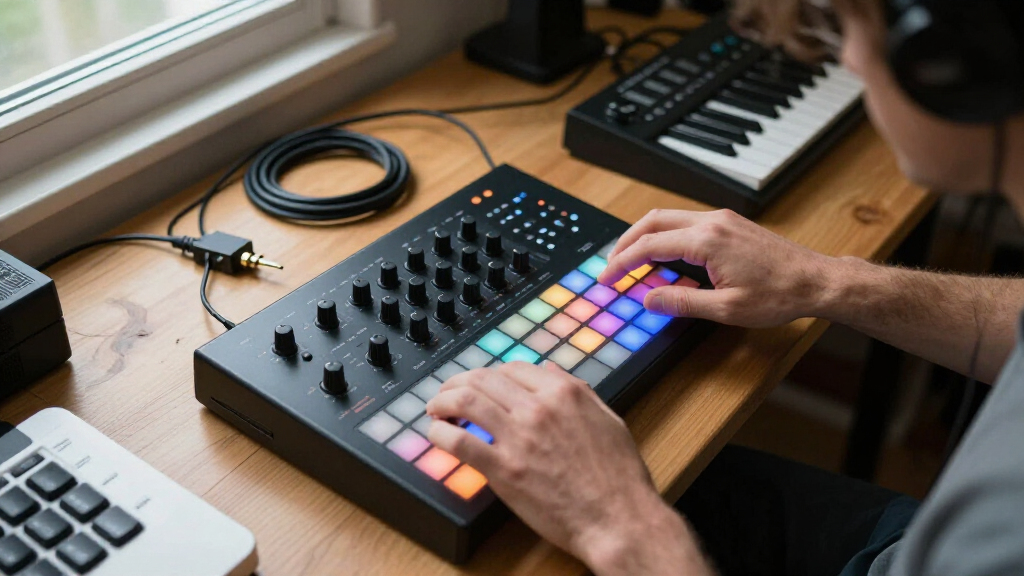
For electronic music, I’d choose the Teenage Engineering EP–133 K.O. II as the best overall pick for its hands-on sampling and beat-making workflow. The Korg Volca Drum stands out for shaping original percussion, while the Alesis SR-18 suits musicians who want a dedicated rhythm unit without building beats around a computer. The main tradeoff is between standalone beat creation, sound design, and a focused tool for playing or controlling drums. The Donner STARRYPAD is a controller rather than a complete drum machine, so it depends on other gear or software. Read on for how each option fits a different electronic-music setup.

Get audio and creator gear delivered free with Prime
- Fast, free delivery on millions of items
- Prime Video, Amazon Music and more included
- Member-only deals all year
Complete the kit



Key Takeaways
- The EP–133 K.O. II leads for all-in-one beat making: its sampler-and-sequencer approach is a better match for building complete electronic grooves than a pad controller alone.
- The Volca Drum prioritizes sound creation over familiar drum-kit playback: it is the specialist pick for sculpting electronic percussion rather than simply triggering standard samples.
- The SR-18 and BeatBuddy MINI 2 serve different rhythmic jobs: the SR-18 is a dedicated drum unit, while the BeatBuddy is a pedal designed for hands-free accompaniment.
- Portable tools are not automatically self-contained studios: the STARRYPAD is a MIDI controller, and buyers should account for the sound source and software or hardware it will control.
- Several picks are focused tools, not interchangeable grooveboxes: the Stylophone BEAT favors compact, direct interaction, while the Akai MPC Sample centers on portable sampling.
| Singular Sound BeatBuddy MINI 2 Hands-Free Drum Machine Pedal |  | Best for Hands-Free Playing | Brand: Singular Sound | Model: BeatBuddy MINI 2 | Included songs: 200 | VIEW LATEST PRICE | See Our Full Breakdown |
| Teenage Engineering EP–133 K.O. II Sampler, Drum Machine and Sequencer |  | Best for Portable Sampling and Performance | Brand: Teenage Engineering | Model: EP–133 K.O. II | Memory: 128 MB | VIEW LATEST PRICE | See Our Full Breakdown |
| Akai Professional MPC Sample Portable Sampler |  | Best Standalone Pad-Based Sampler | Brand: Akai Professional | Model: MPCSAMPLE | Pads: 16 responsive MPC pads | VIEW LATEST PRICE | See Our Full Breakdown |
| Korg Volca Drum Digital Percussion Synthesizer |  | Best for Synthesized Percussion | Brand: Korg | Model: Volca Drum | Type: Digital drum machine | VIEW LATEST PRICE | See Our Full Breakdown |
| Stylophone BEAT Compact Stylus Drum Machine |  | Best Simple Battery-Powered Pattern Maker | Model: BEAT | Drum kits: 4 | Bass sounds: 4 | VIEW LATEST PRICE | See Our Full Breakdown |
| Donner STARRYPAD USB MIDI Pad Controller |  | Best for DAW-Based Beat Making | Pads: 16 backlit silicone pads | Assignable pads: 48 across 3 banks | Pad response: Velocity sensitivity settings | VIEW LATEST PRICE | See Our Full Breakdown |
| Alesis SR-18 Studio-Grade Drum Machine |  | Best Standalone Pattern Workstation | Drum and percussion sounds: 500 | Bass sounds: 50 | Preset patterns: 100 | VIEW LATEST PRICE | See Our Full Breakdown |
| drum machines for electronic music | Model | Brand | Power |
|---|---|---|---|
| Singular Sound BeatBuddy MINI | BeatBuddy MINI 2 | Singular Sound | 9-volt DC power supply |
| Teenage Engineering EP–133 K.O | EP–133 K.O. II | Teenage Engineering | 4 AAA batteries or USB-C |
| Akai Professional MPC Sample P | MPCSAMPLE | Akai Professional | — |
| Korg Volca Drum Digital Percus | Volca Drum | Korg | — |
| Stylophone BEAT Compact Stylus | BEAT | — | 3 AA batteries (not included) |
| Donner STARRYPAD USB MIDI Pad | — | — | — |
| Alesis SR-18 Studio-Grade Drum | — | — | AC adapter or six AA batteries |
More Details on Our Top Picks
Singular Sound BeatBuddy MINI 2 Hands-Free Drum Machine Pedal
The BeatBuddy MINI 2 suits players who need drum accompaniment they can control without stopping to reach for a sequencer. Its pedal controls beats, fills, transitions, and stops while you play, making it a more performance-focused choice than the Korg Volca Drum, which is built around shaping and sequencing electronic percussion. The included 200-song library spans multiple genres, and the visual metronome can help with practice and time signatures. The tradeoff is that you’re working from its built-in beat selection rather than creating sounds and patterns with the same flexibility offered by the Teenage Engineering EP–133 K.O. II. It is also compact enough for a pedalboard, but it requires a DC power supply. I’d choose it for live accompaniment, not for designing intricate electronic drum parts.
Pros:- Hands-free control of beats, fills, transitions, and stops supports uninterrupted playing.
- A library of 200 songs across multiple genres provides ready-to-use accompaniment.
- Visual metronome supports rhythm practice and time-signature learning.
- Compact, lightweight form fits easily on a pedalboard.
Cons:- Beat creation is limited to the included library.
- Requires a 9-volt DC power supply.
Best for: Guitarists, singers, and other live performers who want foot-controlled drum backing and fills without operating a tabletop sequencer.
Not ideal for: Electronic producers who want to build original drum sounds, sample audio, or program detailed patterns beyond a fixed beat library.
- Brand:Singular Sound
- Model:BeatBuddy MINI 2
- Included songs:200
- Dimensions:4.5 x 2.5 x 2.7 inches
- Weight:10.6 ounces
- Power:9-volt DC power supply
- Audio interface:1/4-inch
- Connector:1/4-inch TRS
Our verdict“Choose the BeatBuddy MINI 2 if you want foot-controlled backing for live playing; choose the EP–133 K.O. II if original sampling and sequencing matter more.”
Teenage Engineering EP–133 K.O. II Sampler, Drum Machine and Sequencer
The EP–133 K.O. II is the most sampling-centered choice here: its built-in microphone, speaker, resampling, and punch-in effects support making and changing material away from a computer. Its four sequencer groups, each with 99 patterns, offer more room for arranging than the Korg Volca Drum and its 16-step sequencer. Compared with the Akai MPC Sample, the K.O. II lists more sample slots and adds a built-in speaker, while both provide portable sampling and performance tools. The tradeoff is a 128 MB memory limit and power that depends on four AAA batteries or USB-C. I’d favor it for quick capture and expressive pattern play; producers who prioritize a pad-based workflow or rechargeable battery operation may prefer the MPC Sample.
Pros:- Built-in microphone and speaker support portable sampling and playback.
- Four sequencer groups with 99 patterns each provide room for varied arrangements.
- Sampling and resampling support sound creation beyond preset drum kits.
- Master and punch-in effects give performers options for shaping sounds live.
Cons:- 128 MB of memory may constrain larger sample collections.
- Requires four AAA batteries or a USB-C power source.
Best for: Mobile electronic musicians who want to capture sounds with a built-in mic, turn them into patterns, and perform without a computer.
Not ideal for: Producers who need a rechargeable internal battery or prefer a clearly specified pad-based workflow for playing samples.
- Brand:Teenage Engineering
- Model:EP–133 K.O. II
- Memory:128 MB
- Sample slots:999
- Sequencer:4 groups with 99 patterns each
- Voices:12 stereo or 16 mono
- Effects:6 master effects and 12 punch-in effects
- Inputs and outputs:Line-in, line-out, sync in/out, MIDI in/out, USB-C
- Power:4 AAA batteries or USB-C
Our verdict“Pick the EP–133 K.O. II for portable sampling and pattern performance, while the MPC Sample is a stronger fit if rechargeable power and 16 pads are priorities.”
Akai Professional MPC Sample Portable Sampler
The Akai MPC Sample makes the most sense for producers who want a standalone, pad-driven way to sample, chop, and sequence drums. Its 16 MPC pads and 2.4-inch color display give it a more direct sample-playing workflow than the BeatBuddy MINI 2, which focuses on hands-free playback of preset accompaniment. Compared with the EP–133 K.O. II, the MPC Sample specifies a rechargeable battery and a broad set of audio and MIDI connections, while the K.O. II offers more listed sample slots and its own built-in speaker. The MPC’s built-in mic and speaker support work away from a computer, and four processors with 60 effect types allow substantial sound shaping. The tradeoffs are the need for a microSD card for removable storage and a separately sourced adapter for standard MIDI DIN connections.
Pros:- Sixteen MPC pads provide a hands-on way to play and trigger samples.
- Built-in speaker, microphone, and rechargeable battery support portable music making.
- Over 100 factory kits offer material to start from.
- Four effect processors with 60 effect types support onboard sound shaping.
Cons:- A microSD card is required for removable storage.
- The MIDI DIN adapter is not included.
Best for: Beatmakers who want a portable standalone unit for recording, chopping, and sequencing samples with physical pads and onboard effects.
Not ideal for: Players seeking foot-controlled accompaniment or those who need removable storage included and standard MIDI DIN connections without an extra adapter.
- Brand:Akai Professional
- Model:MPCSAMPLE
- Pads:16 responsive MPC pads
- Display:2.4-inch full-color display
- Battery:Rechargeable lithium-ion
- Storage:microSD card
- Effects:4 processors with 60 effect types
- Audio inputs and outputs:Stereo 1/4-inch TRS line in/out; 1/8-inch headphone output
- Connectivity:USB-C audio/MIDI; MIDI in/out via 1/8-inch to MIDI DIN adapter (not included); sync out
Our verdict“Choose the MPC Sample for a rechargeable, pad-based standalone sampling workflow; the EP–133 K.O. II is a better match if built-in speaker use and a larger listed sample-slot count lead your priorities.”
Korg Volca Drum Digital Percussion Synthesizer
The Korg Volca Drum is the clearest fit for producers who want to shape electronic percussion rather than rely on sampled kits or preset backing. Its six-part DSP synth engine supplies a dedicated palette for constructing drum sounds, while Active Step, slice, accent, choke, and randomize functions give its 16-step sequencer ways to vary patterns. That makes it more sound-design-focused than the Stylophone BEAT, which offers four drum kits and four bass sounds, but less suited to recording and chopping external audio than the Akai MPC Sample. The compact body and built-in speaker make it easy to place in a small setup. Its main limitation is that the supplied product details don’t specify battery life or power requirements, so portability planning is less clear than with the rechargeable MPC Sample.
Pros:- Six-part DSP engine supports a broad range of synthesized percussion sounds.
- Active Step, slice, accent, choke, and randomize functions encourage varied rhythms.
- Compact design and built-in speaker suit small spaces and portable setups.
- Dedicated 16-step sequencer keeps rhythm programming immediate.
Cons:- It is focused on synthesized percussion rather than sampling and chopping audio.
- The product details do not specify battery life or power requirements.
Best for: Electronic producers who want a compact dedicated percussion synthesizer for shaping drum timbres and adding variation to short patterns.
Not ideal for: Sample-based beatmakers who want to record and chop external audio, or buyers who need clearly stated power and battery details.
- Brand:Korg
- Model:Volca Drum
- Type:Digital drum machine
- Synth engine:Six-part DSP
- Sequencer:16-step
- Functions:Active Step, slice, accent, choke, two randomize functions
- Built-in speaker:Yes
- Dimensions:7.6 x 4.53 x 1.54 inches
- Weight:0.37 kg
Our verdict“Choose the Volca Drum for hands-on synthesized percussion and pattern variation; opt for the MPC Sample if sampling and chopping are central to your workflow.”
Stylophone BEAT Compact Stylus Drum Machine
The Stylophone BEAT is a simple entry point for sketching short rhythms and layering patterns, not a deep production hub. Four drum kits and four bass sounds give beginners a small, approachable palette, while its click track and tempo lock help keep layered parts aligned. Compared with the Korg Volca Drum, it offers less sound-design depth but a straightforward selection of kits and bass sounds; unlike the BeatBuddy MINI 2, it is aimed at creating layered patterns rather than controlling backing beats with a footswitch. A built-in speaker and headphone connection make practice easy, and three AA batteries support use away from an outlet. The limits are meaningful: the body is plastic, the sound set is fixed at the listed kits and bass sounds, and batteries are not included.
Pros:- Four drum kits and four bass sounds provide a small but usable starting palette.
- Layer recording supports building patterns piece by piece.
- Click track and tempo lock help keep parts aligned.
- Built-in speaker with volume control and a headphone connection support private or quick listening.
Cons:- The fixed set of kits and bass sounds offers less sound-design range than the Korg Volca Drum.
- Three AA batteries are required and are not included.
- Plastic construction may not suit players looking for a more robust performance instrument.
Best for: Beginners and casual electronic musicians who want a compact, battery-powered device for experimenting with layered drum and bass patterns.
Not ideal for: Producers seeking extensive sound design, sample recording, advanced sequencing, or a more durable-feeling instrument for demanding live use.
- Model:BEAT
- Drum kits:4
- Bass sounds:4
- Power:3 AA batteries (not included)
- Weight:10.1 ounces
- Dimensions:7.09 x 4.8 x 1.5 inches
- Body material:Plastic
- Headphone connection:Wired headphones
- Connector type:USB
Our verdict“Pick the Stylophone BEAT for uncomplicated, portable pattern sketching; choose the Volca Drum if you want more control over synthesized percussion sounds.”
Donner STARRYPAD USB MIDI Pad Controller
The STARRYPAD is a controller, not a standalone drum machine: it sends MIDI to compatible software, which supplies the sounds. That makes it a better fit for producers who want to trigger and shape DAW instruments than for anyone seeking a ready-to-play hardware box like the Alesis SR-18. Its 16 velocity-sensitive pads expand to 48 assignments across three banks, giving performers room for more samples or drum parts without adding another controller. Two faders, two knobs, and MIDI input/output offer extra hands-on control beyond a basic pad grid. USB-C support across Android, iOS, Mac, and Windows broadens its setup options, though an iPhone or iPad with Lightning needs a separate adapter. The tradeoff is clear: software is required for sound, even though Cubase LE and Melodics courses are included.
Pros:- Three switchable banks provide 48 assignable pad slots.
- Velocity sensitivity and customizable backlighting support expressive playing and clearer pad identification.
- Two faders, two knobs, and MIDI input/output add control beyond the pads.
- Includes Cubase LE and Melodics courses for getting started with software-based beat making.
Cons:- Cannot produce sound without compatible DAW software.
- Lightning-equipped iPhones and iPads require a separate adapter.
- Its usefulness depends on software compatibility and setup rather than standalone operation.
Best for: DAW-based producers who want velocity-sensitive pads, multiple assignment banks, and extra MIDI controls in a compact controller.
Not ideal for: Players seeking a standalone drum machine for immediate sound without a computer or mobile DAW, or Lightning-device users who do not want to add an adapter.
- Pads:16 backlit silicone pads
- Assignable pads:48 across 3 banks
- Pad response:Velocity sensitivity settings
- Additional controls:2 faders, 2 knobs, 3 buttons
- Connectivity:USB-C, MIDI input/output
- Compatibility:Android, iOS, Mac, Windows
- Included software:Melodics courses, Cubase LE
- Standalone sound:No; requires DAW software
Our verdict“Choose the STARRYPAD if you make beats in a DAW and want flexible pad control; choose the Alesis SR-18 instead if you need a self-contained sound source.”
Alesis SR-18 Studio-Grade Drum Machine
The SR-18 is the strongest pick here for standalone pattern making: its 500 drum and percussion sounds, 50 bass sounds, and built-in reverb, EQ, and compression let you build parts without relying on a DAW for sound. Compared with the Donner STARRYPAD, which only triggers software instruments, the SR-18 is a self-contained sound source with preset and user-programmable patterns. Its 100 presets and 200 user patterns give electronic producers room to start quickly, then develop their own material. MIDI connectivity also lets it work alongside other gear. The tradeoff is a more traditional hardware workflow and 12 pads, fewer than the STARRYPAD’s 16; it is not the same kind of flexible software controller. Battery operation adds portability, but requires six AA batteries, which are not included.
Pros:- 500 drum and percussion sounds plus 50 bass sounds provide a broad palette without needing a separate sound library.
- 100 preset and 200 user patterns support both quick starting points and custom programming.
- Built-in reverb, EQ, and compression let users shape sounds on the unit.
- MIDI connectivity and AC or battery power suit studio and portable setups.
Cons:- Six AA batteries are required for battery operation and are not included.
- Its 12 pads offer fewer physical triggers than the Donner STARRYPAD’s 16.
- It is oriented around its own pattern workflow rather than serving as a pad controller for DAW instruments.
Best for: Electronic musicians who want a standalone drum-and-bass pattern maker with a broad sound library, built-in effects, and MIDI integration.
Not ideal for: DAW-first producers who need a dedicated 16-pad software controller, or buyers who want an included battery set for portable use.
- Drum and percussion sounds:500
- Bass sounds:50
- Preset patterns:100
- User patterns:200
- Pads:12 velocity-sensitive pads
- Effects:Reverb, EQ, compression
- Connectivity:MIDI
- Power:AC adapter or six AA batteries
- Warranty:1 year
Our verdict“Pick the SR-18 if you want a self-contained drum and bass pattern maker; choose the STARRYPAD if your sounds and sequencing live in a DAW.”
How We Picked
I ranked these options by how well they serve electronic music production, not by treating every rhythm product as the same kind of machine. I weighed whether each can create or sequence beats on its own, how much control it gives over sounds and patterns, how readily it fits into a wider setup, and how approachable its workflow is. Portability and hands-on operation matter, but they do not outweigh a mismatch between the product’s role and the buyer’s goal.
The EP–133 K.O. II ranks first because its sampling and sequencing make it the broadest fit for making electronic beats. The Volca Drum and MPC Sample offer more specialized routes into percussion design and sampling; the SR-18 and BeatBuddy focus on dedicated rhythm playback and accompaniment. The Stylophone BEAT is a compact, direct instrument, while the STARRYPAD ranks lower as a standalone recommendation because it is a controller, not a self-contained sound-and-sequencing solution. This ranking favors creative independence while recognizing that a more focused tool may suit a particular setup better.
| drum machines for electronic music | Brand | Model |
|---|---|---|
| Singular Sound BeatBuddy MINI | Singular Sound | BeatBuddy MINI 2 |
| Teenage Engineering EP–133 K.O | Teenage Engineering | EP–133 K.O. II |
| Akai Professional MPC Sample P | Akai Professional | MPCSAMPLE |
| Korg Volca Drum Digital Percus | Korg | Volca Drum |
| Stylophone BEAT Compact Stylus | — | BEAT |
| Donner STARRYPAD USB MIDI Pad | — | — |
| Alesis SR-18 Studio-Grade Drum | — | — |
Factors to Consider When Choosing Drum Machines For Electronic Music
Before choosing a drum machine, I’d start with the role it needs to play in your music. These products span grooveboxes, percussion synthesizers, samplers, accompaniment tools, and a MIDI controller, so similar names do not guarantee similar workflows. The following decisions can help you avoid buying a device that sounds appealing but leaves a key part of your setup missing.
Choose Between a Complete Beat-Making Tool and a Controller
First decide whether you need the device to produce and sequence sound, or just provide hands-on control over another sound source. A standalone-capable machine can reduce setup friction, while a controller may offer a compact way to trigger software or external instruments you already own. A common mistake is to compare pad count or size without checking what generates the audio. If you choose a controller, include the required computer, software, or hardware sound module in your plan. Pay for a controller when it improves an existing setup, not when you expect it to replace a complete drum machine.
Match the Sound-Making Method to Your Music
Electronic percussion can come from samples, synthesized sounds, or preset drum patterns, and each method changes how a beat develops. Sampling is useful when you want to build from recorded or imported material; synthesis favors shaping percussion from its building blocks. Preset-oriented rhythm units can help when you want a ready-made accompaniment role instead of detailed sound design. Do not assume that a larger library will automatically suit your genre: the ability to edit, layer, or sequence sounds may matter more. Before buying, decide whether your main goal is finding sounds quickly or making unfamiliar ones.
Check How Patterns Fit Your Writing Process
A drum machine can feel inspiring in a live, hands-on session yet slow down a project if its pattern workflow does not match how you arrange music. Think about whether you build short loops, change sections during performance, or finish songs in a digital audio workstation. A device with a focused pattern workflow may be easier to use, while a sampler-based instrument can support more varied material but ask for more decisions. Avoid choosing on the strength of a single striking feature without checking how you move from an idea to a finished arrangement. If you already have a DAW workflow, prioritize clear ways to capture and develop patterns rather than duplicating every studio function.
Treat Portability as a Workflow Choice
Compact gear is most useful when it lets you create in the places and situations where you actually work. Check whether portability means a genuinely independent setup or simply a small device that still relies on other equipment. Smaller controls can make quick pattern entry less comfortable, particularly when you want precise edits or longer sessions. A portable unit is a poor fit if you will mostly leave it connected to a studio setup and need extensive hands-on control. Choose compactness for mobility, not as a substitute for checking the interface and required connections.
Plan the Connections Before You Buy
Consider how the machine will connect to your other instruments, computer, mixer, or performance system. A device that matches your beat-making style can still create friction if it does not fit the way you record or play. Sketch the signal path in advance: identify where audio comes from, where patterns are sequenced, and how the final sound reaches your recording setup. MIDI control and audio output solve different problems, so do not treat them as interchangeable. This check matters most when combining a controller with a separate sound source or integrating several compact devices.
Pay More for a Workflow You Will Use
A higher-cost or more feature-rich machine makes sense when its added capabilities remove a real limitation in your music-making. If you mainly need a steady rhythm part, detailed sampling controls may add complexity rather than value. If beat creation is central to your tracks, having sampling, sequencing, and direct performance controls together can justify choosing a broader tool. Common overspending comes from buying features for hypothetical future projects instead of a current need. Write down the two or three tasks you want the machine to handle most often, then compare options against those tasks.
Frequently Asked Questions
Can a MIDI pad controller work as a drum machine by itself?
Not by itself if it only sends MIDI messages. A controller needs a sound source, such as compatible software or external hardware, and may also depend on a computer or other host. That setup can be a strong choice when you already own the sound tools and want a compact way to play them. If you want to make beats without arranging a separate audio setup, choose a device that supplies the sounds and beat-making functions you need. Check the connection and software requirements before treating a controller as a standalone purchase.
Should I choose a sampler or a percussion synthesizer for electronic beats?
Choose a sampler if your ideas start with recorded sounds, existing samples, or audio you want to reshape. A percussion synthesizer is a more natural fit when you want to generate and alter drum timbres directly. Neither approach is universally better: sampling can bring a distinctive source into a beat, while synthesis can encourage sounds that are not tied to a familiar recording. Consider what you already have access to and whether you enjoy editing audio or shaping sound parameters. If you are unsure, favor the method that gets you from a blank pattern to a usable groove with fewer obstacles.
Is a dedicated rhythm machine a good choice if I make electronic music?
It can be, especially if you want a focused tool for producing drum parts or playing accompaniment. The key question is whether its workflow supports the way you compose, rather than whether it is labeled a drum machine. A dedicated unit may be less flexible for sampling or sound design than a broader sampler-based instrument. If your tracks depend on unusual percussion and detailed beat edits, weigh that limitation carefully. If you mainly need reliable rhythm parts, a more focused device may be simpler to work with.
Do I need a computer to make electronic beats with these options?
Not for every option, but some products in this roundup are meant to control another sound source rather than make sound independently. Standalone-focused instruments can support a more self-contained session, while a MIDI controller needs compatible software or external hardware. Even with a standalone machine, a computer may still be useful for recording, editing, and arranging full tracks. Separate the question of making a beat from the question of producing and finishing a song. Confirm what each device does without a computer before choosing it for a portable or screen-free setup.
Which features should I prioritize if I want to perform beats live?
Prioritize controls you can reach quickly, a pattern workflow that supports changing sections, and a setup that connects reliably to your performance system. A device built around hands-free accompaniment solves a different live problem from one designed for triggering and shaping electronic sounds. Check whether you can move between patterns or parts without interrupting the performance you have in mind. Also account for any external sound source, mixer, or computer your setup requires. The best live choice is the one whose controls match your stage role, not simply the device with the most production features.
Conclusion
For most electronic producers looking for one flexible starting point, I’d choose the Teenage Engineering EP–133 K.O. II as the best overall option. The Korg Volca Drum is my pick for distinctive synthesized percussion, while the Akai MPC Sample makes more sense for buyers who want a portable sampling-centered workflow. For a dedicated rhythm unit, look to the Alesis SR-18; for guitarists or other players who want hands-free accompaniment, the BeatBuddy MINI 2 is the more focused fit. Beginners should choose based on the simplest workflow that matches their goal: the EP–133 for making and sequencing beats, or the SR-18 for a more direct rhythm role. The Stylophone BEAT suits buyers who want a compact, immediate instrument, while the Donner STARRYPAD is best reserved for someone who already has a sound source and needs MIDI pad control.
Fall Picks
fall essentials
As an affiliate, we earn on qualifying purchases.