Wireless DJ headphones offer freedom from a cable, but latency and connection type can make some pairs a better fit for the booth than others. I rank the AlphaTheta HDJ-F10 with SonicLink as the best overall for DJ-focused wireless monitoring, while the OneOdio Studio Max 1 stands out for its stated 20 ms latency and wired option, and the Pioneer DJ HDJ-CUE1BT suits beginners who want a straightforward entry point. The main tradeoff is between low-latency wireless performance and the flexibility or simplicity of more general-purpose Bluetooth models. Comfort, isolation, and a dependable wired fallback also matter when a headphone is used for long sessions or live sets. Read on for the full breakdown and help matching a pair to your setup.

Get audio and creator gear delivered free with Prime
- Fast, free delivery on millions of items
- Prime Video, Amazon Music and more included
- Member-only deals all year
Complete the kit


Key Takeaways
- The HDJ-F10 models are the lineup’s DJ-first choices: SonicLink targets responsive wireless monitoring, while the F10-TX bundle includes a transmitter for compatible use.
- The Studio Max 1 makes latency a stated selling point: its 20 ms claim and wired mode give it a practical angle for buyers who want both wireless convenience and a cable fallback.
- Wireless does not mean one shared connection experience: these options include 2.4 GHz, SonicLink, and Bluetooth-oriented designs, so compatibility and intended use matter as much as the word “wireless.”
- There are two distinct AIAIAI paths: the TMA-2 DJ Wireless is aimed at DJ use, while the TMA-2 Studio Wireless is the more studio-oriented alternative.
- Entry-level versatility comes with compromises: the OneOdio A70 and Pioneer DJ HDJ-CUE1BT suit accessible everyday use, but buyers prioritizing dedicated low-latency DJ monitoring should compare their connection approach with the specialized models.
| OneOdio A70 Bluetooth Over-Ear Headphones | 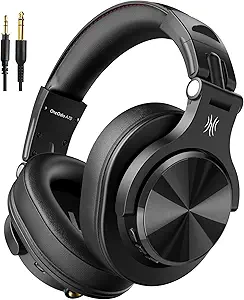 | Best Value for Long Wireless Sessions | Wireless playback: Up to 72 hours | Drivers: 40 mm neodymium | Connectivity: Bluetooth and wired | VIEW LATEST PRICE | See Our Full Breakdown |
| PUPGSIS PG-MXPRO 2.4GHz Wireless DJ Headphones |  | Best for Multi-Mode Wireless Monitoring | Connectivity: 2.4GHz wireless, Bluetooth 5.3, and wired | 2.4GHz latency: 20 ms | Drivers: 50 mm dynamic | VIEW LATEST PRICE | See Our Full Breakdown |
| AlphaTheta HDJ-F10-TX Wireless DJ Headphones with SonicLink Transmitter |  | Best Complete Low-Latency Kit | Included transmitter: HP-TX01 | Wireless latency: 9 ms | Drivers: 40 mm | VIEW LATEST PRICE | See Our Full Breakdown |
| AIAIAI TMA-2 DJ Wireless Headphones |  | Best Modular Pick | Connectivity: W+ Link and Bluetooth | Bluetooth version: 5.3 | Bluetooth range: 10 meters | VIEW LATEST PRICE | See Our Full Breakdown |
| AlphaTheta HDJ-F10 Wireless DJ Headphones with SonicLink and Noise Cancelling |  | Best for Noise-Control Flexibility | Drivers: 40 mm PEEK dynamic | Wireless connectivity: SonicLink and Bluetooth | SonicLink latency: 9 ms | VIEW LATEST PRICE | See Our Full Breakdown |
| Pioneer DJ HDJ-CUE1BT On-Ear DJ Headphones |  | Best for Beginners | Type: On-ear DJ headphones | Connectivity: Wired and Bluetooth | Driver: 40 mm dynamic | VIEW LATEST PRICE | See Our Full Breakdown |
| OneOdio Studio Max 1 Wireless DJ & Wired Studio Headphones, 20ms Latency |  | Best for Battery Life | Connectivity: Wired and wireless | Bluetooth: Version 5.2; 10 m range | Driver: 50 mm | VIEW LATEST PRICE | See Our Full Breakdown |
| OneOdio Studio Max 2 Wireless DJ Headphones |  | Best for Low-Latency Wireless | Connectivity: Bluetooth 6.0, 2.4G wireless, 3.5 mm and 6.35 mm wired | Latency: 9 ms | Audio codec: LDAC | VIEW LATEST PRICE | See Our Full Breakdown |
| AIAIAI TMA-2 Studio Wireless Over-Ear Headphones |  | Best for Lightweight Studio Sessions | Connectivity: W+ Link, Bluetooth 5.3, and wired 3.5 mm | Wireless latency: Under 10 ms via W+ Link | Battery life: More than 20 hours | VIEW LATEST PRICE | See Our Full Breakdown |
| wireless DJ headphone | Connectivity | Battery life | Warranty | Drivers |
|---|---|---|---|---|
| OneOdio A70 Bluetooth Over-Ear | Bluetooth and wired | — | — | 40 mm neodymium |
| PUPGSIS PG-MXPRO 2.4GHz Wirele | 2.4GHz wireless, Bluetooth 5.3, and wired | Up to 60 hours Bluetooth; up to 30 hours 2.4GHz | 1 year | 50 mm dynamic |
| AlphaTheta HDJ-F10-TX Wireless | SonicLink, Bluetooth, and wired | Up to 9 hours SonicLink; up to 30 hours Bluetooth | 2 years | 40 mm |
| AIAIAI TMA-2 DJ Wireless Headp | W+ Link and Bluetooth | More than 25 hours | 2 years | 40 mm bio-cellulose |
| AlphaTheta HDJ-F10 Wireless DJ | — | Up to 9 hours SonicLink; up to 30 hours Bluetooth | 2 years | 40 mm PEEK dynamic |
| Pioneer DJ HDJ-CUE1BT On-Ear D | Wired and Bluetooth | — | 1 year manufacturer | — |
| OneOdio Studio Max 1 Wireless | Wired and wireless | Up to 120 hours Bluetooth; 50 hours dongle mode | — | — |
| OneOdio Studio Max 2 Wireless | Bluetooth 6.0, 2.4G wireless, 3.5 mm and 6.35 mm wired | Up to 120 hours | 2 years | — |
| AIAIAI TMA-2 Studio Wireless O | W+ Link, Bluetooth 5.3, and wired 3.5 mm | More than 20 hours | 2 years | — |
More Details on Our Top Picks
OneOdio A70 Bluetooth Over-Ear Headphones
The A70 makes the most sense for DJs who want wireless convenience between sets but still need a dependable wired option for monitoring. Its up to 72 hours of Bluetooth playback outlasts the AlphaTheta HDJ-F10 models’ Bluetooth runtime, while the included 3.5 mm-to-6.35 mm cable supports connection to common DJ gear without relying on battery power. The foldable, rotatable design also makes it easier to pack than a fixed-format pair.
The tradeoff is that the product information does not specify a low-latency wireless mode, so I would choose the PUPGSIS PG-MXPRO instead for latency-sensitive wireless cueing. The A70’s audio-sharing feature also needs a compatible cable connection, and the missing Bluetooth-version and charging-time details leave some planning questions unanswered. It is a practical, flexible pick, rather than a purpose-built wireless monitoring system.
Pros:- Up to 72 hours of wireless playback
- Can be used wired when the battery is depleted
- Includes 3.5 mm-to-6.35 mm and 3.5 mm-to-3.5 mm cables
- Foldable, rotatable design and cable-based audio sharing
Cons:- No dedicated low-latency wireless mode is specified
- Audio sharing depends on a compatible cable connection
- Bluetooth version and charging time are not specified
Best for: DJs who want long Bluetooth listening time, wired backup for a mixer, and foldable headphones for commuting or travel.
Not ideal for: DJs who need documented low-latency wireless monitoring for beatmatching; the A70 description does not specify a dedicated low-latency mode.
- Wireless playback:Up to 72 hours
- Drivers:40 mm neodymium
- Connectivity:Bluetooth and wired
- Included cables:3.5 mm to 6.35 mm; 3.5 mm to 3.5 mm
- Microphone:Built-in HD microphone with noise reduction
- Design:Over-ear, rotatable, and foldable
- Color:Black
Our verdict“Choose the A70 for long battery life and flexible wired backup, but pick the PUPGSIS PG-MXPRO if low-latency wireless cueing is your priority.”
PUPGSIS PG-MXPRO 2.4GHz Wireless DJ Headphones
The PG-MXPRO is the flexible choice for DJs who want a specific low-latency wireless mode without giving up Bluetooth or wired connections. Its 20 ms 2.4GHz mode is designed for monitoring, while Bluetooth 5.3 suits casual listening and the 3.5 mm and 6.35 mm ports offer direct connections to a broad range of gear. That makes it more adaptable for mixed home-studio and DJ use than the OneOdio A70, which has long Bluetooth playback but no stated low-latency mode.
The main compromise is runtime: the 2.4GHz mode is rated for 30 hours, half the stated Bluetooth runtime. The AlphaTheta HDJ-F10 offers a faster stated 9 ms SonicLink connection, but its SonicLink battery life is much shorter. The PG-MXPRO’s supplied details do not include its weight, so DJs planning long sets may have less information about fit and comfort before choosing.
Pros:- 2.4GHz wireless mode is specified at 20 ms latency
- Three connection types: 2.4GHz, Bluetooth 5.3, and wired
- 3.5 mm and 6.35 mm wired ports support varied equipment
- Bluetooth playback is rated for up to 60 hours
Cons:- 2.4GHz battery life is rated for 30 hours, below Bluetooth runtime
- The stated 20 ms latency is higher than the AlphaTheta HDJ-F10’s 9 ms SonicLink figure
- Weight is not specified
Best for: DJs and home producers who want low-latency wireless monitoring, Bluetooth for everyday listening, and wired connections in one pair.
Not ideal for: DJs who prioritize the shortest stated wireless latency or need confirmed weight and fit details for extended sessions.
- Connectivity:2.4GHz wireless, Bluetooth 5.3, and wired
- 2.4GHz latency:20 ms
- Drivers:50 mm dynamic
- Frequency response:20 Hz–40 kHz
- Battery life:Up to 60 hours Bluetooth; up to 30 hours 2.4GHz
- Wired ports:3.5 mm and 6.35 mm
- Warranty:1 year
Our verdict“Pick the PG-MXPRO if you want one headset for 2.4GHz monitoring, Bluetooth listening, and wired DJ connections.”
AlphaTheta HDJ-F10-TX Wireless DJ Headphones with SonicLink Transmitter
The HDJ-F10-TX stands apart because it arrives with the HP-TX01 transmitter, giving DJs a complete SonicLink setup for wireless monitoring rather than requiring them to source a transmitter separately. Its stated 9 ms latency is lower than the PUPGSIS PG-MXPRO’s 20 ms 2.4GHz figure, making the AlphaTheta the stronger fit for cueing where timing matters. Bluetooth and wired listening add flexibility outside the booth, while active noise cancellation and transparency mode let the listener adjust how much of the surrounding room they hear.
That focused performance comes with limits: SonicLink battery life is rated at up to 9 hours, compared with the PG-MXPRO’s 30 hours in 2.4GHz mode. The listed 2.3-pound weight may also be a concern for long sets. I’d favor this TX bundle for DJs who want a ready-to-use low-latency system, not for buyers whose first priorities are light wear or extended wireless runtime.
Pros:- HP-TX01 transmitter is included for SonicLink monitoring
- SonicLink latency is specified at 9 ms
- Supports Bluetooth and wired listening as alternatives
- Includes active noise cancellation and transparency mode
Cons:- SonicLink battery life is rated for up to 9 hours
- Listed weight of 2.3 pounds may feel heavy during extended sessions
- Bluetooth runtime is shorter than the OneOdio A70’s stated 72 hours
Best for: DJs who want a bundled transmitter and low-latency wireless monitoring for cueing, plus Bluetooth and wired listening options.
Not ideal for: DJs who need a lightweight headset for prolonged wear or long low-latency sessions beyond its stated 9-hour SonicLink runtime.
- Included transmitter:HP-TX01
- Wireless latency:9 ms
- Drivers:40 mm
- Connectivity:SonicLink, Bluetooth, and wired
- Battery life:Up to 9 hours SonicLink; up to 30 hours Bluetooth
- Noise control:Active noise cancellation and transparency mode
- Weight:2.3 pounds
- Warranty:2 years
Our verdict“Choose the HDJ-F10-TX if you want a bundled transmitter and 9 ms wireless monitoring, and can accept shorter SonicLink runtime and a heavier build.”
AIAIAI TMA-2 DJ Wireless Headphones
The TMA-2 DJ Wireless is the lineup’s strongest fit for buyers who value repairability and a lighter, more adaptable design over a traditional wired fallback. Its W+ Link is intended for low-latency DJ use, while Bluetooth 5.3 handles everyday listening. The modular construction lets owners replace or upgrade parts, a useful distinction from the AlphaTheta HDJ-F10, which emphasizes a road-ready build and noise control instead. Memory-foam on-ear cushions also provide isolation without the bulk of an over-ear design.
Its key limitation for DJ setups is the lack of a headphone jack, so there is no wired backup if the battery runs out or a compatible wireless connection is unavailable. Battery life exceeds 25 hours, shorter than the OneOdio A70’s 72-hour Bluetooth rating, and the stated Bluetooth range is 10 meters. I’d choose it for modular ownership and wireless performance, but not for DJs who require a cable option at the mixer.
Pros:- W+ Link is designed for ultra-low-latency DJ audio
- Modular construction supports replacement and upgrades
- More than 25 hours of battery life
- Memory-foam on-ear cushions provide sound isolation
Cons:- No headphone jack for wired DJ monitoring or battery-free listening
- Battery runtime is below the OneOdio A70’s stated 72 hours
- Bluetooth range is limited to 10 meters
Best for: DJs who want low-latency wireless use, replaceable or upgradeable parts, and an on-ear fit for both booth sessions and everyday listening.
Not ideal for: DJs who need a wired connection to a mixer or want the longest stated battery life in this group.
- Connectivity:W+ Link and Bluetooth
- Bluetooth version:5.3
- Bluetooth range:10 meters
- Drivers:40 mm bio-cellulose
- Battery life:More than 25 hours
- Battery charge time:2 hours
- Cushions:Memory-foam on-ear
- Warranty:2 years
Our verdict“Choose the TMA-2 DJ Wireless if modular parts and low-latency wireless matter more to you than a wired fallback.”
AlphaTheta HDJ-F10 Wireless DJ Headphones with SonicLink and Noise Cancelling
The HDJ-F10 suits DJs who want 9 ms SonicLink monitoring and the added flexibility of active noise cancellation and transparency mode. Those listening modes make it more adaptable to changing environments than the AIAIAI TMA-2 DJ Wireless, which centers on modular design and does not list noise control. The AlphaTheta also supports Bluetooth and wired listening, so it can serve for casual playback and conventional cabled setups as well as low-latency wireless use.
Its 40 mm PEEK drivers and road-ready construction are aimed at regular transport, while the foldable design helps with packing. The tradeoff is runtime: SonicLink is rated for up to 9 hours, whereas Bluetooth reaches 30 hours. The HDJ-F10-TX includes the HP-TX01 transmitter; this version’s supplied details do not list one, so check what is included if you need a ready-to-use SonicLink connection. At a listed 2.2 pounds, it may also feel substantial over a long set.
Pros:- SonicLink monitoring is specified at 9 ms latency
- Active noise cancellation and transparency mode support different listening conditions
- Supports SonicLink, Bluetooth, and wired listening
- Foldable design and construction tested to MIL-STD-810H
Cons:- SonicLink battery life is rated for up to 9 hours
- Listed weight of 2.2 pounds may be substantial for long sessions
- Unlike the HDJ-F10-TX listing, the supplied product details do not specify an included transmitter
Best for: DJs who need SonicLink monitoring plus noise cancellation and transparency for sets in varied listening environments.
Not ideal for: Buyers who need a confirmed bundled transmitter, extended low-latency runtime, or a particularly light headset.
- Drivers:40 mm PEEK dynamic
- Wireless connectivity:SonicLink and Bluetooth
- SonicLink latency:9 ms
- Bluetooth version:4
- Battery life:Up to 9 hours SonicLink; up to 30 hours Bluetooth
- Noise control:Active noise cancellation and transparency mode
- Weight:2.2 pounds
- Design:Foldable; tested to MIL-STD-810H
- Warranty:2 years
Our verdict“Choose the HDJ-F10 if noise-control options and low-latency monitoring matter most, but verify transmitter needs and plan around its 9-hour SonicLink runtime.”
Pioneer DJ HDJ-CUE1BT On-Ear DJ Headphones
The Pioneer DJ HDJ-CUE1BT is the clearest fit for aspiring DJs who want Bluetooth for casual listening but need a wired option for monitoring. Its tuning emphasizes bass and beat cues, while the swivel earcups make one-ear cueing more practical than on headphones built mainly for general studio use. Compared with the OneOdio Studio Max 1, it has a simpler feature set and no stated long-battery-life advantage, but its straightforward DJ-focused layout may suit someone learning basic mixing. The tradeoff is the on-ear fit: it can press more directly on the ears during long sessions than the over-ear Studio Max 1. Its foldable build helps with transport, though the entry-level construction is not aimed at matching premium professional models.
Pros:- Wired and Bluetooth connectivity cover monitoring and everyday listening
- Bass-focused tuning helps make beats easier to follow
- Swivel earcups support one-ear cueing
- Foldable design is convenient for carrying
Cons:- On-ear fit may become uncomfortable during extended sessions
- Entry-level build quality is less suited to buyers seeking premium professional durability
Best for: Beginner DJs who want one foldable headset for wired booth monitoring and Bluetooth listening away from the decks
Not ideal for: DJs who regularly play long sets and need the more spacious fit of over-ear headphones, or buyers seeking premium professional construction
- Type:On-ear DJ headphones
- Connectivity:Wired and Bluetooth
- Driver:40 mm dynamic
- Impedance:36 ohm
- Sensitivity:104 dB
- Weight:250 g
- Cable:1.2 m coiled, extends to 1.8 m
- Warranty:1 year manufacturer
Our verdict“Choose the HDJ-CUE1BT if you are learning to DJ and value wired monitoring with Bluetooth convenience more than long-session comfort or premium construction.”
OneOdio Studio Max 1 Wireless DJ & Wired Studio Headphones, 20ms Latency
If charging between sessions is the problem, the OneOdio Studio Max 1 makes a strong case with up to 120 hours of Bluetooth playback. Its 50 mm drivers and supplied low-latency transmitter add flexibility for DJ practice and production, while 3.5 mm and 6.35 mm connections make it easier to use with different gear. Against the Pioneer DJ HDJ-CUE1BT, it offers over-ear cushions and far longer stated battery life, but the Pioneer is a more direct beginner pick with a simpler DJ-oriented feature set. The Studio Max 1’s key compromise is that battery life falls to 50 hours in dongle mode; its headline endurance does not apply to every wireless setup. I would choose it for long practice stretches, not for buyers who need the most clearly documented latency in this group.
Pros:- Up to 120 hours of Bluetooth playback
- Low-latency transmitter supports responsive wireless use
- 3.5 mm and 6.35 mm jacks suit a range of audio equipment
- Foldable over-ear design with protein leather cushions
Cons:- Battery life drops to 50 hours in dongle mode
- Its stated latency is higher than the Studio Max 2’s 9 ms figure
- Available only in black
Best for: DJs and producers who want over-ear comfort, broad wired compatibility, and infrequent charging for practice and studio work
Not ideal for: Buyers who need the lowest stated wireless latency or expect the full 120-hour battery figure while using the transmitter
- Connectivity:Wired and wireless
- Bluetooth:Version 5.2; 10 m range
- Driver:50 mm
- Battery life:Up to 120 hours Bluetooth; 50 hours dongle mode
- Latency:20 ms
- Audio support:LDAC; Hi-Res Audio certified
- Headphone jacks:3.5 mm and 6.35 mm
- Controls:Buttons
Our verdict“Pick the Studio Max 1 if long Bluetooth runtime and flexible wired connections matter more than the lowest latency or maximum dongle-mode endurance.”
OneOdio Studio Max 2 Wireless DJ Headphones
The OneOdio Studio Max 2 is the strongest fit here when keeping wireless cueing responsive is the priority: its stated 9 ms latency is lower than the Studio Max 1’s 20 ms figure, and it offers Bluetooth, 2.4G wireless, and wired connections. That range of options lets a buyer match the connection to the task, from low-latency monitoring to ordinary listening. Its 120-hour battery life and fast-charge claim also suit extended studio schedules. Compared with the AIAIAI TMA-2 Studio Wireless, the Studio Max 2 gives more connection types and a much longer stated runtime, while AIAIAI is lighter at 227 g and includes a W+ Link transmitter. The tradeoffs here are passive noise control only and no listed weight, so comfort and isolation are harder to judge from the supplied specifications.
Pros:- Stated 9 ms latency via RapidWill+ 3.0
- Bluetooth, 2.4G wireless, and wired connection options
- Up to 120 hours of battery life with fast charging
- LDAC support and a 20 Hz–40 kHz frequency response
Cons:- Passive noise control only, with no active noise cancellation
- Product data does not specify weight
- Fast wireless performance depends on using a compatible wireless mode
Best for: DJs who want very low stated wireless latency, several connection options, and long runtimes for home or studio sessions
Not ideal for: DJs who need active noise cancellation or want a published weight to judge portability before buying
- Connectivity:Bluetooth 6.0, 2.4G wireless, 3.5 mm and 6.35 mm wired
- Latency:9 ms
- Audio codec:LDAC
- Driver:45 mm
- Frequency response:20 Hz–40 kHz
- Impedance:34 ohm
- Battery life:Up to 120 hours
- Charging:2.5 hours; 5-minute fast charge provides 9 hours of playback
- Warranty:2 years
Our verdict“Choose the Studio Max 2 if low-latency wireless and connection flexibility matter more than active noise cancellation or a documented lightweight design.”
AIAIAI TMA-2 Studio Wireless Over-Ear Headphones
At 227 g, the AIAIAI TMA-2 Studio Wireless is the lightest clearly specified option among these four, making it appealing for DJs who wear headphones through long creative sessions. Its W+ Link connection is rated under 10 ms latency for cable-like response, and the included transmitter gives that mode a place in the box rather than leaving the buyer to source it separately. Compared with the OneOdio Studio Max 2, AIAIAI offers less stated battery endurance—20-plus hours rather than 120—but includes app-based EQ customization and a protective pouch. The main compromise is its non-folding design, which takes up more space in a bag. Low-latency wireless also relies on the proprietary W+ Link transmitter; Bluetooth remains available, but the supplied data does not assign it the same latency.
Pros:- Light 227 g weight for extended wear
- Under 10 ms latency through W+ Link
- App EQ allows sound-profile adjustments
- Includes W+ Link transmitter, cable, and protective pouch
Cons:- Does not fold for compact storage
- Low-latency wireless mode requires the proprietary W+ Link transmitter
- More than 20 hours of playback is less than the OneOdio models’ stated 120 hours
Best for: DJs and producers who prioritize a lightweight over-ear fit, adjustable sound, and low-latency wireless for studio sessions
Not ideal for: Traveling DJs who need folding headphones or users who want the longest battery life and multiple low-latency wireless standards
- Connectivity:W+ Link, Bluetooth 5.3, and wired 3.5 mm
- Wireless latency:Under 10 ms via W+ Link
- Battery life:More than 20 hours
- Weight:227 g
- Impedance:32 ohm
- Driver type:Dynamic
- Included items:Cable, protective pouch, and W+ Link transmitter
- Warranty:2 years
Our verdict“Choose the TMA-2 Studio Wireless if low weight and adjustable sound matter more than folding storage or marathon battery life.”
How We Picked
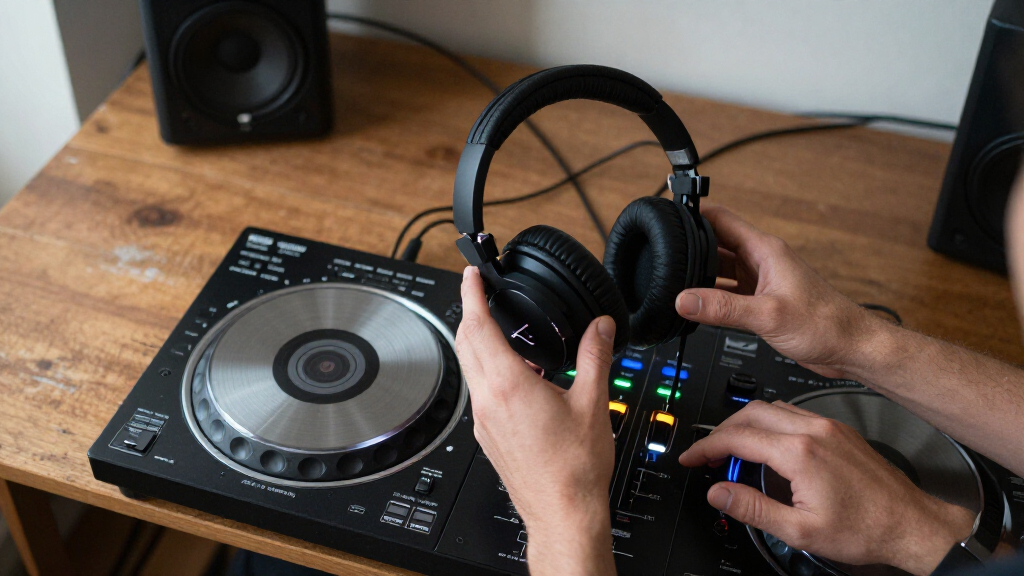
I ranked these headphones around the demands that separate DJ monitoring from ordinary wireless listening: wireless latency and connection design, the availability of a wired fallback, and how clearly each model’s stated features suit booth, practice, or studio use. I also weighed usability factors such as over-ear versus on-ear fit, noise-reduction or isolation features, and whether the package includes a transmitter rather than requiring a separate compatible source.
The order favors models with a clearer DJ-monitoring purpose and more useful connection flexibility, then distinguishes studio-focused and general-purpose picks by who benefits from them. A model is not ranked higher just for offering more features: compatibility, practical setup, and whether those features solve a real DJ need matter more. Since wireless performance depends on the source and environment, buyers should confirm the connection requirements for their own mixer or device before choosing.
| wireless DJ headphone | Battery life |
|---|---|
| OneOdio A70 Bluetooth Over-Ear | — |
| PUPGSIS PG-MXPRO 2.4GHz Wirele | Up to 60 hours Bluetooth; up to 30 hours 2.4GHz |
| AlphaTheta HDJ-F10-TX Wireless | Up to 9 hours SonicLink; up to 30 hours Bluetooth |
| AIAIAI TMA-2 DJ Wireless Headp | More than 25 hours |
| AlphaTheta HDJ-F10 Wireless DJ | Up to 9 hours SonicLink; up to 30 hours Bluetooth |
| Pioneer DJ HDJ-CUE1BT On-Ear D | — |
| OneOdio Studio Max 1 Wireless | Up to 120 hours Bluetooth; 50 hours dongle mode |
| OneOdio Studio Max 2 Wireless | Up to 120 hours |
| AIAIAI TMA-2 Studio Wireless O | More than 20 hours |
Factors to Consider When Choosing Wireless DJ Headphones
Before choosing a pair, decide how wireless headphones will fit into your actual setup. The best match for cueing tracks at home may not be the right choice for monitoring beside a loud PA, and Bluetooth convenience does not automatically mean suitable DJ latency.
Match the Wireless Link to Your DJ Setup
Start by checking what sends audio from your mixer, controller, or computer, rather than assuming any wireless headphone will pair directly. Bluetooth is convenient for phones and everyday playback, but DJ cueing can expose delays that are barely noticeable when listening casually. Dedicated systems such as 2.4 GHz or SonicLink use a different connection approach, and may require a compatible transmitter or supplied hardware. Check whether that transmitter is included and what input it accepts before buying. A common mistake is choosing based on the headphone’s wireless label without checking the full signal path. For critical live cueing, a wired option remains a useful fallback if the wireless link is incompatible or unreliable at the venue.
Treat Latency Claims as One Part of the Decision
A latency figure can help compare products, but it does not tell the whole story of how a setup will feel. The audio source, transmitter, interference, and distance can all affect the experience, so look for a figure tied to the product’s intended wireless mode rather than assuming it applies to Bluetooth. Consider what you will monitor: beatmatching and cue timing are less forgiving than casual listening between sets. If the manufacturer’s specification is unclear about the connection used, ask for clarification or plan to use a cable for demanding work. Also check whether the low-latency mode limits range or device compatibility. The useful question is not simply “How low is the number?” but whether the complete chain suits your mixer and monitoring habits.
Choose Isolation and Fit for the Room
In a quiet bedroom, comfort and long-session wear may matter more than maximum isolation. In a club or rehearsal room, outside sound can mask cue details, so a secure seal and a fit you can adjust quickly become more valuable. Over-ear designs often cover more of the ear, while on-ear models can feel less enclosing but may admit more room sound. Neither style is automatically better: glasses, head shape, and how you monitor one ear at a time can change the fit. Avoid judging comfort from padding descriptions alone, since clamping force and heat build-up affect extended use. If possible, check return terms and replacement-pad availability before committing to a pair you plan to wear for long sessions.
Decide How Much Wired Flexibility You Need
A cable can rescue a set when a battery runs low, a wireless connection drops, or a source does not support the headphone’s preferred link. But wired fallback only helps if the headphones can operate passively or support the needed wired mode while powered off; verify that detail in the product specifications. Buyers who move between a mixer, laptop, and phone may value more than one connection option, while someone who only practices at a desk may prefer a simpler setup. Check the cable type and whether it can be replaced, since a proprietary or hard-to-source cable can limit serviceability. Do not pay extra for connection modes you will never use. The right amount of flexibility is the amount that covers your real devices and foreseeable backup needs.
Weigh Battery Routine Against Session Length
Wireless headphones add a charging routine that wired pairs avoid. Compare the stated battery life with the length of your longest practice or performance, then leave room for battery aging and the time spent using extra features. Noise cancellation and transmitter use can affect how long a setup runs, so do not treat a headline figure as guaranteed for every mode. Consider whether the headphones can charge while playing and whether a wired connection still works with a depleted battery. For occasional home mixing, charging between sessions may be easy; for travel or back-to-back sets, a reliable cable fallback can matter more than a small difference in claimed runtime. Keep charging access and replacement-battery information in mind if you expect frequent use.
Pay for Features That Solve a Specific Problem
Premium wireless DJ headphones make the most sense when their connection system, monitoring features, or build suit repeated demanding use. If you mostly listen to music and practice casually, a simpler Bluetooth-oriented model may cover your needs without adding transmitter setup or specialized features. Studio-focused headphones can be a better fit for editing and production, but a studio label alone does not confirm that wireless latency works for live cueing. Modular or replaceable parts can matter to DJs who want to maintain a pair over time, while they may be less compelling for occasional users. Compare the complete kit, not just the headphone: included transmitters, cables, and compatible accessories can change the practical value. Spend more for a clear workflow benefit, not for a feature name you cannot use with your equipment.
Frequently Asked Questions
Can I use Bluetooth headphones to cue tracks in a live DJ set?
You can connect Bluetooth headphones to compatible devices, but ordinary Bluetooth can introduce enough delay to make cue timing feel disconnected from the mix. That makes Bluetooth more suitable for music playback, preparation, or casual practice than for latency-sensitive live monitoring. A purpose-built low-latency system may be a better wireless choice, though its transmitter and source compatibility still need checking. If you cannot confirm the full connection chain, keep a wired pair available for the booth. Test the exact setup with your controller or mixer before relying on it during a performance.
Do I need a transmitter, or can wireless DJ headphones connect straight to my mixer?
That depends on the headphone’s wireless system and the outputs available on your mixer. Some designs pair with a dedicated transmitter, while Bluetooth models need a compatible Bluetooth source or an added transmitter that may introduce latency. Check the transmitter’s input connections against your mixer’s headphone or line output, and confirm whether the transmitter is part of the package. Also look for any pairing limits, since a system may not connect to generic wireless devices. If setup simplicity matters, a direct wired connection is often easier to confirm.
Is a low-latency wireless pair enough to replace wired headphones for gigs?
Not by itself. A low-latency link addresses timing, but battery charge, wireless interference, transmitter placement, and compatibility can still affect a live set. Check whether the headphones support wired listening and whether that mode works if the battery is empty. It is also sensible to test the system in a room with other wireless equipment before using it on stage. DJs who cannot risk a monitoring interruption may prefer wireless for convenience while keeping a dependable cable or spare pair within reach.
Should I choose over-ear or on-ear headphones for DJing?
Choose based on fit, isolation, and how you monitor rather than assuming one shape is always better. Over-ear cups can provide more coverage, which may help in noisy rooms, but can feel warm or bulky during long sessions. On-ear headphones can be easier to move or pack, though the fit may press directly on the ears and let in more sound. If you cue with one ear uncovered, check how easily the cups rotate or sit against your head. Comfort is personal, so a return option can be valuable when you cannot try a pair first.
What should I check before buying a wireless DJ headphone as a beginner?
Start with the gear you already own: confirm whether your controller or mixer can use the headphone wirelessly, or whether you will need a transmitter. For learning beatmatching, avoid assuming that a familiar Bluetooth connection will provide responsive cueing. A wired fallback, simple controls, and a comfortable fit can be more useful than advanced features you may not use. Check the cable and charging requirements as well as the stated wireless range and latency. If you are unsure how wireless will behave in your setup, a wired-ready model reduces the chance that connection issues interrupt practice.
Conclusion
For the broadest DJ-focused choice, I recommend the AlphaTheta HDJ-F10 with SonicLink as best overall; choose the HDJ-F10-TX if the included transmitter best fits your setup. The OneOdio Studio Max 1 is my best value-minded pick for buyers drawn to its stated 20 ms latency and wired mode, while the HDJ-CUE1BT makes the most sense for beginners who want an accessible, familiar entry point. For a premium or more specialized path, compare the two AIAIAI TMA-2 models by DJ versus studio use, rather than treating them as interchangeable. Choose the PUPGSIS PG-MXPRO if its 2.4 GHz setup matches your intended connection, and consider the OneOdio A70 for general wireless listening with DJ practice. My final recommendation is to verify compatibility and keep a wired fallback for any performance where cue timing cannot be left to chance.
Halloween Picks
halloween
As an affiliate, we earn on qualifying purchases.