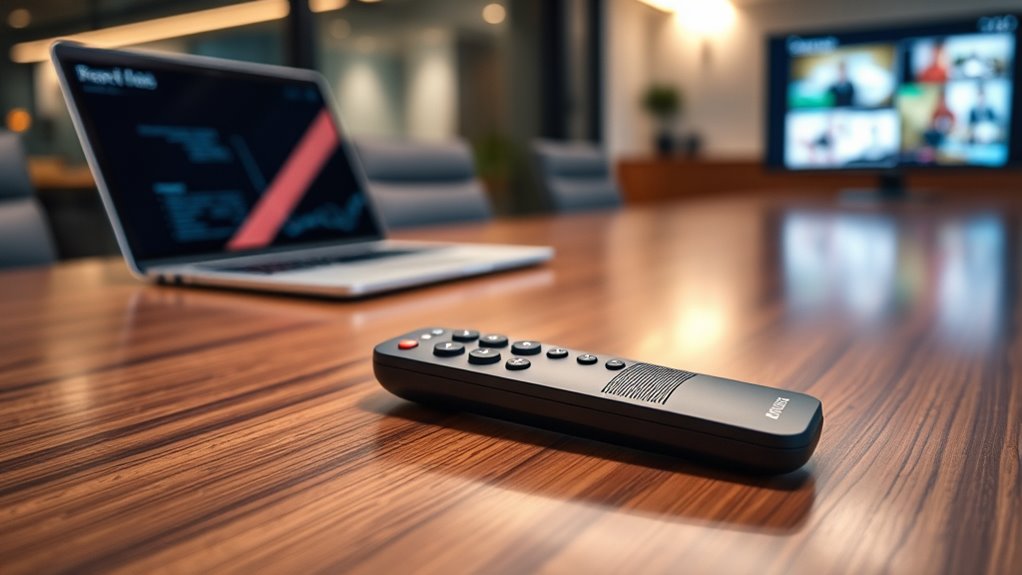

Bluetooth presentation remotes let you advance slides without staying beside your computer, but the right pick depends on your devices, presentation software, and need for extras like a laser pointer or media controls. I’d put the Logitech Spotlight Presentation Remote first for its more advanced presentation controls, while the Microsoft Presenter+ stands out for Bluetooth-focused use and the DinoFire USB-C clicker for its choice of Bluetooth and 2.4 GHz connections. The main tradeoffs are wireless convenience versus receiver compatibility, simple controls versus added features, and rechargeable designs versus replaceable batteries. I compare all 14 options by connection, usability, and intended audience below. Read on for the full breakdown and a guide to choosing a remote that fits your setup.

Get audio and creator gear delivered free with Prime
- Fast, free delivery on millions of items
- Prime Video, Amazon Music and more included
- Member-only deals all year
Complete the kit


Key Takeaways
- Connection flexibility separates several leading picks: the DinoFire and rechargeable Bluetooth/2.4 GHz model can suit setups where having more than one connection method is useful, while dedicated Bluetooth models keep the setup more direct.
- The Logitech Spotlight models occupy the feature-rich end of this lineup: they are better suited to presenters who want more than basic slide advancement, though that extra capability may be unnecessary for a simple classroom deck.
- Logitech R400 and R500s offer a more familiar presentation-tool approach: they prioritize straightforward controls and laser-pointer functionality rather than the broader media-remotes role of the Satechi R2.
- USB-C receiver support matters separately from Bluetooth: the DinoFire’s USB-C option may help with newer laptops, but buyers should confirm their computer’s available ports and which connection mode they plan to use.
- Rechargeable designs and replaceable-battery models serve different habits: choose based on whether you prefer charging ahead of a talk or carrying a spare battery for a quick swap.
| Wireless Presentation Clicker with Laser Pointer for PowerPoint |  | Best for Long-Range Laser Pointing | Clicker control range: 98 ft / 30 m | Laser pointer range: 328 ft / 100 m | Batteries: 2 AAA, included | VIEW ON AMAZON | See Our Full Breakdown |
| Wireless Presenter with Volume Control and Long Wireless Range | 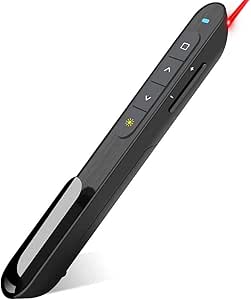 | Best for Windows PowerPoint Controls | Connectivity: 2.4 GHz RF USB | Wireless range: Up to 100 ft | Pointer color: Bright red | VIEW ON AMAZON | See Our Full Breakdown |
| Rechargeable Wireless Presentation Clicker with Bluetooth and 2.4 GHz RF |  | Best Overall for Bluetooth Flexibility | Connectivity: Bluetooth 4.2 and 2.4 GHz RF | Control range: Up to 98 ft | Red light range: 330 ft | VIEW ON AMAZON | See Our Full Breakdown |
| Wireless Presentation Clicker Remote for PowerPoint, Presenter |  | Best for USB-A and USB-C Flexibility | Receiver type: USB-A and USB-C 2-in-1 | Clicker range: 98 ft / 30 m | Laser pointer range: 328 ft / 100 m | VIEW ON AMAZON | See Our Full Breakdown |
| Logitech Wireless Presenter R400 USB A PowerPoint Clicker with Laser | 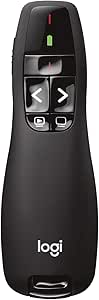 | Best for Simple, Familiar Operation | Connectivity: 2.4 GHz RF wireless | Wireless range: Up to 50 ft | Laser type: Class 2 red laser | VIEW ON AMAZON | See Our Full Breakdown |
| Logitech R500s Wireless Presenter with Laser Pointer |  | Best Overall for Mixed-Device Presenting | Connectivity: USB receiver or Bluetooth Low Energy | Wireless range: Up to 20 meters (65 feet) | Compatibility: Windows, Mac OS, iOS, Android | VIEW ON AMAZON | See Our Full Breakdown |
| DinoFire USB-C Wireless Presentation Clicker with Bluetooth and 2.4 GHz RF |  | Best for Multi-Connection Computer Setups | Connectivity: Bluetooth and 2.4 GHz RF | Receivers: USB-A and USB-C | Maximum range: 164 feet | VIEW ON AMAZON | See Our Full Breakdown |
| QUI Presentation Clicker with Volume Control, Wireless Presenter Remote |  | Best for Simple, Long-Range Presentations | Control range: Up to 328 feet | Power: 1 AAA battery, not included | Compatibility: Mac OS and Windows | VIEW ON AMAZON | See Our Full Breakdown |
| Satechi R2 Bluetooth Presentation and Media Remote |  | Best for Mac and iPad Presentation-Media Control | Connectivity: Bluetooth 5.0 or 2.4 GHz USB receiver | Maximum range: 10 meters (32 feet) | Buttons: 9 | VIEW ON AMAZON | See Our Full Breakdown |
| Logitech Spotlight Presentation Remote Universal Wireless – Gold |  | Best Premium On-Screen Presentation Control | Connectivity: USB-A receiver and Bluetooth | Compatibility: Windows and Mac OS | Listed presentation formats: PowerPoint, Keynote, PDF, Google Slides, Prezi | VIEW ON AMAZON | See Our Full Breakdown |
| Microsoft Presenter+ Wireless Bluetooth Presentation Clicker (2022), Black |  | Best for Microsoft Teams | Connectivity: Wireless and Bluetooth | Compatibility: Microsoft Teams and popular presentation and meeting apps | Controls: Slide navigation, digital pointing in PowerPoint Live, mute control, and Teams meeting button | VIEW ON AMAZON | See Our Full Breakdown |
| Norwii N27 Bluetooth Presentation Clicker |  | Best for Long-Range Flexibility | Connectivity: Bluetooth and USB-A receiver | Wireless range: 100 meters (328 feet) | Battery: 1 AAA battery (not included) | VIEW ON AMAZON | See Our Full Breakdown |
| Logitech Spotlight Presentation Remote – Black |  | Best for On-Screen Emphasis | Connectivity: Bluetooth and USB receiver | Maximum range: 30 meters | Controls: 5-button control | VIEW ON AMAZON | See Our Full Breakdown |
| Lenovo Portable Rechargeable Presentation Remote with Bluetooth 5.3 |  | Best Compact Rechargeable Pick | Connectivity: Bluetooth 5.3 | Wireless range: Up to 30 meters | Weight: 18.8 g (0.663 oz) | VIEW ON AMAZON | See Our Full Breakdown |
| bluetooth presentation remote | Connectivity | Compatibility | Battery |
|---|---|---|---|
| Wireless Presentation Clicker | — | Windows 2003, XP, Vista, 7, 8, 10; Mac OS; Linux | — |
| Wireless Presenter with Volume | 2.4 GHz RF USB | — | — |
| Rechargeable Wireless Presenta | Bluetooth 4.2 and 2.4 GHz RF | — | Rechargeable, USB-C charging |
| Wireless Presentation Clicker | — | Windows 2003, XP, Vista, 7, 8, 10; Mac OS; Linux | — |
| Logitech Wireless Presenter R4 | 2.4 GHz RF wireless | — | — |
| Logitech R500s Wireless Presen | USB receiver or Bluetooth Low Energy | Windows, Mac OS, iOS, Android | 1 included AAA battery |
| DinoFire USB-C Wireless Presen | Bluetooth and 2.4 GHz RF | — | 2 AAA batteries, not included |
| QUI Presentation Clicker with | — | Mac OS and Windows | — |
| Satechi R2 Bluetooth Presentat | Bluetooth 5.0 or 2.4 GHz USB receiver | MacBook and iPad; not compatible with Windows 10/11 | Rechargeable lithium-polymer |
| Logitech Spotlight Presentatio | USB-A receiver and Bluetooth | Windows and Mac OS | — |
| Microsoft Presenter+ Wireless | Wireless and Bluetooth | Microsoft Teams and popular presentation and meeting apps | — |
| Norwii N27 Bluetooth Presentat | Bluetooth and USB-A receiver | Windows, macOS, Android, Linux; PowerPoint, Google Slides, Prezi, and Keynote | 1 AAA battery (not included) |
| Logitech Spotlight Presentatio | Bluetooth and USB receiver | Personal computer | Rechargeable lithium-ion polymer |
| Lenovo Portable Rechargeable P | Bluetooth 5.3 | Windows 10 or later; macOS 12 or later | 135 mAh rechargeable lithium polymer |
More Details on Our Top Picks
Wireless Presentation Clicker with Laser Pointer for PowerPoint
This model suits presenters who want broad room coverage without adding rechargeable-battery upkeep. Its 98-foot clicker range gives more movement than the Logitech R400’s 50-foot range, while the laser is specified to reach 328 feet. That laser distance is far beyond what most indoor talks need, but the remote’s lightweight 58 g body and ergonomic grip make it easy to carry and handle. Plug-and-play compatibility across Windows, Mac, and Linux, plus support for common presentation and office software, makes it a flexible choice for mixed-device settings. The tradeoff is power: it takes two AAA batteries rather than charging over USB, so users need to keep spares on hand. Choose it over the rechargeable B0B76QWSR6 if you prefer simple battery swaps; skip it if cable-free charging is a priority.
Pros:- Clicker control range reaches 98 feet for movement around a large room.
- Laser pointer range is specified at 328 feet.
- Lightweight 58 g design with an ergonomic grip.
- Works with Windows, Mac, and Linux and common presentation software.
Cons:- Uses two AAA batteries and has no rechargeable option.
- The stated laser range is more than most indoor presentations require.
- A laser pointer may not suit presentations on LCD or LED displays.
Best for: Presenters who move around medium-to-large rooms and use Windows, Mac, or Linux computers with a laser pointer.
Not ideal for: Frequent presenters who want USB recharging or mainly present on screens where a laser pointer is unsuitable.
- Clicker control range:98 ft / 30 m
- Laser pointer range:328 ft / 100 m
- Batteries:2 AAA, included
- Weight:58 g
- Compatibility:Windows 2003, XP, Vista, 7, 8, 10; Mac OS; Linux
- Software support:Google Slides, MS Word, Excel, PowerPoint
Our verdict“Choose this for broad room coverage and a familiar laser-pointer setup, but pick the rechargeable B0B76QWSR6 if battery charging matters more.”
Wireless Presenter with Volume Control and Long Wireless Range
Rather than focusing on Bluetooth, this presenter is a straightforward 2.4 GHz USB-receiver remote with a useful spread of PowerPoint controls. Alongside slide navigation, it can adjust volume, switch windows, open hyperlinks, and blank the screen—handy when a talk includes video or switching between materials. Its stated 100-foot range edges past the 98-foot control range of the rechargeable B0B76QWSR6, but it lacks that model’s Bluetooth connection and rechargeable battery. The bright red pointer adds a familiar way to direct attention, though the listing cautions against use on LCD, LED, and TV screens. This is a better fit for Windows presenters who want direct access to extra controls than for buyers seeking a broadly compatible Bluetooth remote. The AAA battery is not included, so it is not ready to use straight from the box.
Pros:- Includes slide navigation, volume, hyperlink, window-switching, and full/black-screen controls.
- 2.4 GHz USB connection with a stated range of up to 100 feet.
- Compact ergonomic design with bump-buttons for tactile control.
- Bright red pointer for directing attention on suitable projection surfaces.
Cons:- Requires one AAA battery, which is not included.
- Windows support is implied, with no broad compatibility details provided.
- Pointer is not recommended for LCD, LED, or TV screens.
Best for: Windows-based PowerPoint presenters who want volume, window, hyperlink, and screen controls from a USB receiver.
Not ideal for: Mac, Linux, or tablet users seeking confirmed cross-platform Bluetooth support, or presenters who use LCD/LED screens for pointing.
- Connectivity:2.4 GHz RF USB
- Wireless range:Up to 100 ft
- Pointer color:Bright red
- Power source:1 AAA battery, not included
- Controls:Page forward/backward, volume, hyperlink, switch windows, full/black screen
- Design:Compact ergonomic body with bump-buttons
Our verdict“Pick this for its Windows-oriented presentation controls and long RF range, but choose the B0B76QWSR6 for rechargeable power and Bluetooth connectivity.”
Rechargeable Wireless Presentation Clicker with Bluetooth and 2.4 GHz RF
This is the most versatile fit here for buyers specifically seeking a Bluetooth presentation remote. It also includes a 2.4 GHz USB receiver, so you can choose Bluetooth or a plug-in connection depending on the computer. That dual setup separates it from the USB-only B01410YNAM, while the USB-C rechargeable battery avoids the AAA replacements required by several other picks. Its six buttons cover slide movement, volume, hyperlinks, windows, and screen modes, making it useful for more than basic page turning. The stated control range is 98 feet, close to the 100 feet listed for the B01410YNAM. The tradeoffs are that USB receiver use still needs a USB port and the remote is not recommended for iPad. Buyers who only need simple slide navigation may find its extra controls unnecessary.
Pros:- Offers both Bluetooth 4.2 and 2.4 GHz USB-receiver connections.
- USB-C rechargeable battery with a low-battery indicator.
- Six buttons cover slides, volume, hyperlinks, windows, and screen modes.
- USB receiver stores inside the presenter, and the body includes a clip.
Cons:- USB receiver mode requires an available USB port.
- Not recommended for iPad.
- Additional controls may be unnecessary for users who only need slide navigation.
Best for: Presenters who switch between Bluetooth and USB-equipped laptops and want rechargeable power with expanded controls.
Not ideal for: iPad-first presenters or users who need a remote with confirmed iPad compatibility.
- Connectivity:Bluetooth 4.2 and 2.4 GHz RF
- Control range:Up to 98 ft
- Red light range:330 ft
- Battery:Rechargeable, USB-C charging
- Charging and use:Full charge in 2 hours; up to 7 days use per charge; up to 30 days standby
- Buttons:6
- Supported systems:Windows, Mac OS, Linux, Android
- Receiver:USB receiver stored in the presenter
Our verdict“Choose this for rechargeable power and connection flexibility across compatible computers, but skip it if iPad support is a requirement.”
Wireless Presentation Clicker Remote for PowerPoint, Presenter
The standout reason to choose this clicker is its USB-A and USB-C 2-in-1 receiver, which can simplify setup when a presentation laptop lacks a traditional USB-A port. Like the B0B257B6WM, it offers a 98-foot clicker range, a 328-foot laser specification, and compatibility with Windows, Mac, and Linux. The key distinction is connection convenience rather than richer controls: the product data does not list the volume, window, or screen-mode functions offered by the B01410YNAM and B0B76QWSR6. It also uses two AAA batteries, so it cannot match the rechargeable model for ongoing convenience. The laser may be too bright in some environments, and its long reach is unlikely to matter in a typical classroom or meeting room. This is a practical pick when receiver-port fit matters more than Bluetooth or advanced buttons.
Pros:- 2-in-1 USB-A and USB-C receiver broadens connection options.
- Clicker control range reaches 98 feet.
- Compatible with Windows, Mac OS, and Linux.
- Includes two AAA batteries.
Cons:- Uses replaceable AAA batteries rather than rechargeable power.
- Laser pointer may be too bright in some environments.
- The listed controls do not include the extra functions found on some alternatives.
Best for: Presenters carrying USB-C laptops who want a simple laser clicker with a receiver that also supports USB-A.
Not ideal for: Buyers who specifically need Bluetooth, a rechargeable battery, or documented volume and screen controls.
- Receiver type:USB-A and USB-C 2-in-1
- Clicker range:98 ft / 30 m
- Laser pointer range:328 ft / 100 m
- Batteries:2 AAA, included
- Compatibility:Windows 2003, XP, Vista, 7, 8, 10; Mac OS; Linux
Our verdict“Choose this for a simple laser presenter with USB-A and USB-C receiver flexibility, but opt for the B0B76QWSR6 if Bluetooth or recharging is a priority.”
Logitech Wireless Presenter R400 USB A PowerPoint Clicker with Laser
The Logitech R400 favors uncomplicated operation over the longer reach and broader connections offered by other picks. Its intuitive touch-keys and no-software setup suit presenters who want to advance slides without configuring a Bluetooth link or learning a large set of controls. The tradeoff is range: at 50 feet, it reaches less far than the 98-foot B0B257B6WM and the 100-foot B01410YNAM. Its built-in red laser and receiver storage bay keep the basic kit together, but the connection is 2.4 GHz RF rather than Bluetooth, and the receiver is USB-A. That makes it less adaptable to newer laptops without a suitable port. AAA batteries are not included, and the listing notes a preference for a particular battery brand, so check your supply before presenting.
Pros:- No software installation is required.
- Intuitive touch-keys support straightforward slideshow control.
- Built-in red laser pointer.
- Receiver stores in a built-in docking bay.
Cons:- 50-foot wireless range is shorter than the 98- and 100-foot alternatives here.
- Uses AAA batteries, which are not included.
- USB-A 2.4 GHz receiver does not provide Bluetooth connectivity.
Best for: Presenters who use USB-A Windows laptops and want a familiar, no-software remote for straightforward slide control.
Not ideal for: People who need Bluetooth, USB-C receiver support, rechargeable power, or freedom to roam beyond 50 feet.
- Connectivity:2.4 GHz RF wireless
- Wireless range:Up to 50 ft
- Laser type:Class 2 red laser
- Batteries:AAA, not included
- Receiver storage:Built-in docking bay
- Software setup:No software required
Our verdict“Choose the R400 for uncomplicated slide control on USB-A systems, but select a longer-range or Bluetooth model if your setup calls for more flexibility.”
Logitech R500s Wireless Presenter with Laser Pointer
The Logitech R500s is the most balanced choice here for presenters who move between computers or want a familiar laser-pointer workflow. It pairs over Bluetooth or a USB receiver, works across Windows, Mac, iOS, and Android, and reaches up to 20 meters—more room to move than the Satechi R2, whose stated range is 10 meters. Its companion app adds button customization, battery monitoring, and an on-screen timer, useful extras for recurring talks rather than bare-bones slide changes. The tradeoff is that some app functions need installation and are limited to Mac and PC, while the laser can switch off in battery-saving mode when charge is low. Choose it for broad compatibility and dependable core controls, not for the Spotlight’s on-screen highlighting and magnification.
Pros:- Bluetooth and USB receiver connectivity offer flexibility across setups.
- Compatibility spans Windows, Mac, iOS, and Android.
- Up to 20 meters of wireless range supports movement around a room.
- Companion app provides button customization, battery monitoring, and an on-screen timer.
Cons:- Some companion-app features require installation and are limited to Mac and PC.
- The laser is disabled in battery-saving mode when the battery is low.
Best for: Presenters who use different operating systems and want both Bluetooth and a USB receiver, plus a conventional laser pointer.
Not ideal for: Mac or PC users who want on-screen highlighting and magnification, or presenters who need advanced app functions without installing software.
- Connectivity:USB receiver or Bluetooth Low Energy
- Wireless range:Up to 20 meters (65 feet)
- Compatibility:Windows, Mac OS, iOS, Android
- Battery:1 included AAA battery
- Battery life:Up to 12 months
- Pointer:Red laser
- Dimensions:4.9 × 1.4 × 1 inches
- Warranty:1-year limited hardware warranty
Our verdict“Choose the R500s for cross-platform flexibility and a familiar laser pointer, unless you need the Spotlight’s on-screen presentation effects.”
DinoFire USB-C Wireless Presentation Clicker with Bluetooth and 2.4 GHz RF
The DinoFire clicker suits presenters who need connection options and more than slide navigation. Bluetooth and 2.4 GHz RF are paired with both USB-A and USB-C receivers, helping it fit newer laptops as well as desktops without relying on one port type. Its stated range reaches 164 feet, and controls include volume, window switching, screen control, and hyperlink activation. That makes it more of a computer-control remote than the simpler QUI Presentation Clicker, which focuses on basic presentation actions and claims a longer 328-foot range. DinoFire’s tradeoffs are practical: it needs two AAA batteries that are not included, and it sleeps after 30 seconds of inactivity. It is a strong fit for feature-rich laptop presentations, but less appealing if you want a rechargeable remote or uninterrupted use without waking it.
Pros:- Bluetooth and 2.4 GHz RF provide two wireless connection methods.
- USB-A and USB-C receivers suit a range of computer ports.
- Includes volume adjustment, window switching, screen control, and hyperlink activation.
- Stated wireless range reaches up to 164 feet.
Cons:- Requires two AAA batteries, which are not included.
- Enters sleep mode after 30 seconds of inactivity.
- Supports a maximum of one device.
Best for: Presenters who switch between USB-A and USB-C computers and want volume, window, and hyperlink controls alongside slide navigation.
Not ideal for: Buyers who prefer rechargeable power, need to control multiple devices, or find frequent sleep-and-wake behavior disruptive.
- Connectivity:Bluetooth and 2.4 GHz RF
- Receivers:USB-A and USB-C
- Maximum range:164 feet
- Battery:2 AAA batteries, not included
- Supported devices:1
- Controls:Slide navigation, screen control, volume, hyperlink activation, window switching
- Compatible devices:Laptop and desktop computer
- Warranty:3 years
Our verdict“Pick DinoFire for broad receiver compatibility and extra computer controls, but skip it if the short inactivity timeout or disposable batteries do not suit your routine.”
QUI Presentation Clicker with Volume Control, Wireless Presenter Remote
The QUI Presentation Clicker is the straightforward pick for rooms where the presenter may need to move well away from the computer. Its claimed 328-foot control range exceeds the DinoFire’s 164 feet and the Logitech R500s’s 20 meters, while plug-and-play operation avoids companion software. It handles common tasks such as page navigation, volume, hyperlinks, and full-screen or black-screen switching, with compatibility listed for Windows, Mac, PowerPoint, Keynote, Google Slides, Excel, ACDSee, and Prezi. That broad software list does not make it a feature-rich remote: unlike the Logitech Spotlight, it has no on-screen highlighting or magnification, and it offers no advanced customization. The AAA battery is not included, and there is no carrying case or protective cover. Choose it for uncomplicated controls and range, not app-based tuning.
Pros:- Stated control range of up to 328 feet supports movement across large spaces.
- Plug-and-play operation requires no software installation.
- Works with several operating systems and presentation programs.
- Includes volume, hyperlink, and full-screen or black-screen controls.
Cons:- Requires one AAA battery, which is not included.
- Lacks advanced features such as customizable controls and on-screen highlighting.
- No carrying case or protective cover is included.
Best for: Teachers, conference presenters, and speakers who want plug-and-play controls and a long stated range without installing software.
Not ideal for: Presenters who need Bluetooth pairing, rechargeable power, advanced customization, or on-screen highlighting and magnification.
- Control range:Up to 328 feet
- Power:1 AAA battery, not included
- Compatibility:Mac OS and Windows
- Listed software:PowerPoint, Keynote, Google Slides, Excel, ACDSee, Prezi
- Controls:Page up/down, hyperlink navigation, volume, full-screen and black-screen switch
- Setup:Plug and play; no software installation required
- Pointer:Red pointer light
Our verdict“Choose QUI for simple setup and long-range basic controls, but look elsewhere for Bluetooth, customization, or rechargeable power.”
Satechi R2 Bluetooth Presentation and Media Remote
The Satechi R2 stands apart by treating presentations and media playback as equal jobs. Its nine buttons and dedicated modes let MacBook and iPad users control slides or media from one rechargeable aluminum remote, avoiding the battery replacement needed by the Logitech R500s. It connects through Bluetooth 5.0 or a 2.4 GHz USB receiver and works up to 10 meters, which is shorter than the R500s’s 20-meter range and the QUI clicker’s stated 328 feet. The main limitation is compatibility: the product data specifies MacBook and iPad support and says it does not work with Windows 10/11. It also supports only one device. This is a focused choice for Apple users who value media controls and USB-C recharging, not a universal remote for mixed computer environments.
Pros:- Dedicated presentation and media modes expand its use beyond slide navigation.
- Rechargeable lithium-polymer battery charges through USB-C.
- Bluetooth 5.0 and a 2.4 GHz USB receiver provide connection choices.
- Aluminum design and nine buttons offer a slim, clearly divided control layout.
Cons:- Not compatible with Windows 10/11.
- Supports one device.
- Its 10-meter range is shorter than the R500s and the QUI clicker’s stated range.
Best for: MacBook and iPad users who want one rechargeable remote for slide presentations and media playback.
Not ideal for: Windows 10/11 users, people presenting across multiple devices, or speakers who need more range than 10 meters.
- Connectivity:Bluetooth 5.0 or 2.4 GHz USB receiver
- Maximum range:10 meters (32 feet)
- Buttons:9
- Battery:Rechargeable lithium-polymer
- Compatibility:MacBook and iPad; not compatible with Windows 10/11
- Weight:61.4 g
- Dimensions:7.09 × 2.76 × 0.98 inches
- Warranty:2-year limited warranty
Our verdict“Choose the R2 if you present and control media on a MacBook or iPad; skip it for Windows compatibility or multi-device use.”
Logitech Spotlight Presentation Remote Universal Wireless – Gold
The Logitech Spotlight is the specialist pick for speakers who want to direct attention on the display rather than point a laser at it. Its highlighting, magnification, and cursor-control tools can make dense charts or small details easier for an audience to follow, setting it apart from the Logitech R500s, which uses a conventional red laser and prioritizes broad operating-system compatibility. Spotlight also offers USB-A or Bluetooth connectivity and smart timing alerts, with customization through the Logi Options+ app. That added control comes with setup work: full functionality depends on app configuration, while the R500s is a simpler choice for standard slide navigation. The listed compatibility covers Windows, Mac OS, and several presentation formats, but the product data does not specify range or battery details. It makes the most sense for polished, screen-focused talks, not casual click-through use.
Pros:- On-screen highlighting and magnification direct audience attention to details.
- Cursor control adds an alternative to a conventional laser pointer.
- USB-A receiver and Bluetooth provide two connection options.
- Logi Options+ supports customization, and smart timing alerts help manage a talk.
Cons:- Full functionality requires setup with the Logi Options+ app.
- Its advanced presentation tools may be unnecessary for basic slide control.
- Product data does not specify wireless range or battery details.
Best for: Professional speakers who present detailed visuals and want to highlight or magnify on-screen content for an audience.
Not ideal for: Casual presenters who need only basic slide navigation, or buyers who want full functionality without installing and configuring an app.
- Connectivity:USB-A receiver and Bluetooth
- Compatibility:Windows and Mac OS
- Listed presentation formats:PowerPoint, Keynote, PDF, Google Slides, Prezi
- On-screen tools:Highlighting, magnification, cursor control
- Timing:Smart timing alerts
- Customization:Logi Options+ app
- Color:Gold
Our verdict“Choose Spotlight for customizable on-screen highlighting and magnification, but opt for the R500s if you want simpler laser-based control.”
Microsoft Presenter+ Wireless Bluetooth Presentation Clicker (2022), Black
I’d pick the Microsoft Presenter+ for presenters whose meetings and slides run through Microsoft Teams. Teams certification, a dedicated meeting button, and mute control with status feedback make it more meeting-focused than the Norwii N27, which emphasizes broad platform support and a laser pointer. It also offers slide navigation and digital pointing in PowerPoint Live, so the controls suit both presenting and speaking during a call. The tradeoff is a narrower appeal: the supplied details don’t specify a laser, USB receiver, or operating range, and its up-to-six-day battery life is less compelling for people seeking long intervals between charges. Compared with the Logitech Spotlight’s highlighting and magnification modes, Presenter+ favors direct Teams controls over elaborate visual emphasis.
Pros:- Certified for Microsoft Teams with a dedicated meeting button
- Mute control provides status feedback
- Combines slide navigation with digital pointing in PowerPoint Live
- Works with popular presentation and meeting apps
Cons:- Battery life is listed as up to six days, which may mean more frequent charging than remotes with longer stated runtimes
- Product details do not specify a laser pointer or USB receiver option
- Its strongest advantages center on Teams, making it less specialized for visual highlighting than the Logitech Spotlight
Best for: Microsoft Teams presenters who want slide navigation, mute feedback, and a dedicated meeting button in one remote
Not ideal for: Presenters who need a built-in laser pointer, a stated long wireless range, or advanced highlight and magnify effects
- Connectivity:Wireless and Bluetooth
- Compatibility:Microsoft Teams and popular presentation and meeting apps
- Controls:Slide navigation, digital pointing in PowerPoint Live, mute control, and Teams meeting button
- Battery life:Up to 6 days
- Color:Black
- Teams certification:Certified for Microsoft Teams
Our verdict“Choose Presenter+ if Teams controls and visible mute status matter more to you than a laser pointer or advanced on-screen effects.”
Norwii N27 Bluetooth Presentation Clicker
The Norwii N27 is a strong fit when a presentation setup may need either Bluetooth or a USB-A receiver. That dual connection choice sets it apart from the Bluetooth-only Lenovo remote, while its stated 100-meter range gives speakers room to move around a large venue. The built-in red laser is also a straightforward alternative to the Logitech Spotlight’s digital highlighting and magnification: it points at a physical screen without relying on those advanced modes. Norwii supports Windows, macOS, Android, and Linux, plus major slide apps, but it pairs with only one device at a time. Its AAA battery is not included, and reprogrammable buttons require dedicated software. I’d favor it over Presenter+ for mixed-device flexibility, but not for Teams-specific meeting controls.
Pros:- Bluetooth and USB-A receiver connectivity accommodate different host setups
- Stated wireless range reaches 100 meters
- Built-in red laser pointer offers direct pointing at a projection screen
- Reprogrammable buttons and support for Windows, macOS, Android, and Linux
Cons:- Requires one AAA battery, which is not included
- Supports only one paired device at a time
- Button reprogramming depends on dedicated software
Best for: Presenters using different computers or operating systems who want Bluetooth and USB-A connectivity plus a traditional laser pointer
Not ideal for: People who switch between multiple paired devices during a session or want a rechargeable remote with no separate battery to buy
- Connectivity:Bluetooth and USB-A receiver
- Wireless range:100 meters (328 feet)
- Battery:1 AAA battery (not included)
- Weight:18 g
- Dimensions:5.5 x 0.7 x 0.9 inches
- Compatibility:Windows, macOS, Android, Linux; PowerPoint, Google Slides, Prezi, and Keynote
- Supported devices:Computer, laptop, projector, and smart board
- Maximum paired devices:1
- Warranty:1 year
Our verdict“Choose the N27 if you value long stated range, a physical laser, and connection flexibility more than multi-device pairing or rechargeable power.”
Logitech Spotlight Presentation Remote – Black
The Logitech Spotlight stands out for presenters who need to direct attention to details on a screen, not just advance slides. Its highlight and magnify tools offer more visual control than the Norwii N27’s red laser, especially when presenting shared content remotely or pointing out small interface elements. Bluetooth and a USB receiver provide two connection options, and the stated 30-meter range matches the Lenovo’s reach. Spotlight adds time-management alerts through the Logi Options+ app, but that software dependence is a real tradeoff: some features require setup, unlike the simpler slide-and-laser approach of the N27. The built-in rechargeable battery avoids disposable cells, though it cannot be replaced by the user. Its fast-charge claim is appealing, but buyers should be comfortable with a proprietary rechargeable design.
Pros:- Highlight and magnify modes give more precise screen emphasis than a standard laser pointer
- Bluetooth and USB receiver connectivity support different presentation setups
- Smart time-management alerts can help speakers keep to a schedule
- Rechargeable battery supports quick charging and extended use between charges
Cons:- Full functionality requires the Logi Options+ application
- Built-in lithium-ion polymer battery is not user-replaceable
- Supports one device at a time
Best for: Presenters who teach or demo detailed on-screen content and want digital highlighting, magnification, and timing alerts
Not ideal for: Buyers who prefer a simple laser remote, want user-replaceable batteries, or do not want to rely on companion software for full functionality
- Connectivity:Bluetooth and USB receiver
- Maximum range:30 meters
- Controls:5-button control
- Pointer features:Highlight and magnify
- Battery:Rechargeable lithium-ion polymer
- Charging:One-minute charge stated to last up to three months
- Compatibility:Personal computer
- Weight:49.2 g
- Device limit:1
Our verdict“Choose Spotlight if precise digital emphasis matters more than a replaceable battery or a simpler, software-free control set.”
Lenovo Portable Rechargeable Presentation Remote with Bluetooth 5.3
At 18.8 g, the Lenovo is the compact, rechargeable choice in this group. Its Bluetooth 5.3 connection and USB-C charging make it a tidy fit for a laptop bag, while the up-to-one-month battery life avoids the N27’s need for a separate AAA battery. It also offers several digital pointer modes—cursor, highlight, magnify, and marker—so it can handle more than basic slide changes. Compared with the Logitech Spotlight, Lenovo lists a similar 30-meter range and overlapping visual tools, but gives up the Spotlight’s USB receiver option and timing alerts. Advanced modes and custom controls require Lenovo’s LADM app, and compatibility is limited to Windows 10 or later and macOS 12 or later. I’d choose it for portability, not broad operating-system coverage.
Pros:- Lightweight 18.8 g design is easy to carry
- Digital pointer, cursor, highlight, magnify, and marker modes support varied presentations
- Rechargeable battery provides up to one month per charge
- USB-C charging and Bluetooth 5.3 connection
Cons:- Advanced modes and button customization require the Lenovo Accessories and Display Manager app
- Listed compatibility is limited to Windows 10 or later and macOS 12 or later
- Bluetooth-only connectivity lacks the USB receiver option offered by the Logitech Spotlight and Norwii N27
Best for: Laptop-based presenters who want a lightweight Bluetooth remote with rechargeable power and multiple digital pointer modes
Not ideal for: Presenters using Android or Linux, or anyone who needs a USB receiver as a backup connection
- Connectivity:Bluetooth 5.3
- Wireless range:Up to 30 meters
- Weight:18.8 g (0.663 oz)
- Dimensions:1.17 x 0.38 x 3.65 inches
- Battery:135 mAh rechargeable lithium polymer
- Battery life:Up to one month per charge
- Charging:USB-C
- Compatibility:Windows 10 or later; macOS 12 or later
- Model:GXH1Q30399
Our verdict“Choose the Lenovo if low carry weight, USB-C charging, and digital pointer modes outweigh the need for wider platform support or receiver connectivity.”

How We Picked
I compared these 14 presentation remotes around the decisions that affect a real presentation: how each connects, whether it offers useful controls beyond advancing slides, how portable it is, and how readily its design fits common presentation routines. I also weighed the differences among Bluetooth, USB receivers, USB-C receivers, and dual-mode models, since a remote can be convenient on paper but awkward if it does not match the presenter’s computer or meeting-room setup.
The ranking gives priority to useful capability without needless complexity. Feature-rich options such as Logitech Spotlight rise for presenters who can make use of their additional controls; simpler Logitech and generic clickers suit buyers who need reliable basic slide movement. Models with multiple connection modes earn attention for flexibility, while compact, rechargeable, or media-focused remotes serve narrower needs. I also account for tradeoffs: added features can mean more setup or controls to learn, and Bluetooth-only convenience may not suit every shared computer or room system. Product-specific compatibility and included accessories should be checked before purchase, since names alone do not confirm every operating-system or software detail.
Factors to Consider When Choosing Bluetooth Presentation Remotes
Before choosing a model, match the remote to the way you present rather than shopping by feature count. These four checks can prevent common mismatches that product specifications may not make obvious.
Choose the connection around the computers you actually use
Bluetooth can keep a laptop’s USB ports free, but it depends on the computer recognizing and maintaining the pairing. A USB receiver can be more convenient when you move between shared computers, though it requires an open port and a place to store the dongle. Dual-mode models can cover more situations, but only if you are willing to select and set up the appropriate mode. Check whether your work computer permits Bluetooth accessories or restricts new device pairing. Also confirm if the remote’s receiver is USB-A or USB-C rather than assuming an adapter will be available. For regular use in unfamiliar rooms, connection flexibility may matter more than a longer feature list.
Check software and operating-system support before buying
A remote can pair successfully and still offer different controls across PowerPoint, Keynote, Google Slides, or presentation software used by your organization. Basic next-and-previous buttons tend to ask less of the software than custom gestures, highlighting, or media controls. If you depend on a particular feature, look for confirmation that it works with your operating system and presentation app, not just that the remote connects. Managed work laptops may block software installation or Bluetooth pairing, so ask an administrator or check the device policy first. A simple clicker can be the safer choice for shared equipment. Treat compatibility as a match between remote, computer, and app rather than a Bluetooth checkbox.
Decide whether a laser pointer is useful in your room
A laser pointer can direct attention on a physical projection, but it offers little benefit when presenting through a video call or on a large interactive display. Pointer visibility also depends on the screen, room lighting, and audience distance, so the feature does not guarantee that everyone can follow the point. Some feature-rich remotes use on-screen highlighting or other digital controls instead, which may suit remote presentations better. Decide where you present most often before paying attention to laser specifications. If your venues vary, check any rules about laser pointers and keep a backup way to indicate content. Buyers who only need slide changes can skip pointer features and favor simpler controls.
Match the controls to how much you want to do from the podium
Volume, media, and custom presentation controls can reduce trips back to the laptop, especially for talks with embedded video or mixed media. They also add buttons and behaviors that may take practice, so extra controls are not automatically an advantage. Before choosing a more elaborate remote, list the tasks you routinely perform while speaking: advancing slides, starting a clip, adjusting sound, or drawing attention to a point. A basic presenter keeps the learning curve short for occasional talks and guest computers. If you present frequently, a richer control set may justify the setup time. Prioritize the controls you will use repeatedly, not those that merely appear useful in a specification list.
Think through charging, batteries, and presentation-day backups
Rechargeable remotes avoid routine battery replacement, but they need to be charged before a talk and may be unavailable if forgotten. Models using replaceable batteries can be ready again quickly if you keep a spare, though batteries add an ongoing task. Consider how often you present and whether you can charge the remote at your desk or while traveling. A visible battery indicator or a regular pre-event check can matter more than the battery type itself. For high-stakes talks, pack a spare connection option or plan to advance slides from the computer if the remote fails. Portability also matters: a compact model is easier to carry, but make sure its controls remain easy for you to operate without looking down.
Frequently Asked Questions
Will a Bluetooth presentation remote work with every laptop and slide app?
No. Bluetooth describes the connection, not guaranteed support for every operating system, presentation app, or feature. A remote may pair but offer only basic slide control in a particular app, while advanced functions can depend on software support. Check the product’s compatibility details against both your computer and the app you use. If you present on a managed work device, confirm that Bluetooth accessories can be paired.
Should I choose Bluetooth or a USB receiver for presentations?
Choose Bluetooth when you want to avoid occupying a USB port and can pair the remote with your own computer ahead of time. A receiver can be convenient for shared computers or rooms where you do not want to pair a device each time, but it must match an available port. Dual-mode models may give you a fallback, at the cost of managing more than one connection method. Think about the computers you will use most often, not only the one on your desk.
Do I need a laser pointer if I present mostly online?
Usually, a physical laser pointer is most useful when an audience can see a projected image in the room. During online presentations, viewers may not see the laser on a shared screen, so a digital pointer or highlighting feature may be more useful if the app supports it. If you present both in person and online, compare pointer options with your software and typical meeting setup. Otherwise, a simpler remote may cover your needs without an unused extra feature.
Are dual Bluetooth and 2.4 GHz remotes worth choosing over Bluetooth-only models?
They can be useful if you move between computers or want another connection route when Bluetooth pairing is inconvenient. That flexibility only helps if the receiver works with your available ports and you keep track of it. Bluetooth-only models may involve less hardware to carry and can be a cleaner fit for a dedicated laptop setup. Choose dual-mode when you have a clear use for both connections, rather than treating extra modes as a guarantee of better performance.
Is a rechargeable presentation remote a better choice than one with replaceable batteries?
Neither power style is automatically better; the right choice depends on your routine. Rechargeable models suit people who can add the remote to their normal charging habit, while replaceable-battery designs can be easier to revive quickly if a spare is on hand. For infrequent presentations, remember that a rechargeable remote may need attention after sitting unused. Whichever you choose, check power before an important talk and keep a backup way to control the slides.
Conclusion
For a single all-around recommendation, I’d choose the Logitech Spotlight for presenters who can use its more advanced presentation controls; the black and gold listings appear to serve the same broader role, so compare their exact included details before deciding. For best value in a straightforward workflow, the Logitech R400 is a sensible starting point if you want familiar slide and laser-pointer controls. Beginners who want a simple presentation-focused design can look to the Logitech R500s or R400 rather than learning a more feature-heavy remote. For a premium, more capable presentation tool, consider Logitech Spotlight; for Bluetooth-focused use, compare it with the Microsoft Presenter+ and Satechi R2 based on the controls you will use. If you need connection flexibility or a USB-C option, the DinoFire is the standout fit; if rechargeability and newer Bluetooth are the priority, consider the Lenovo. Match the final choice to your computer ports, software, and presentation habits, then confirm compatibility before buying.