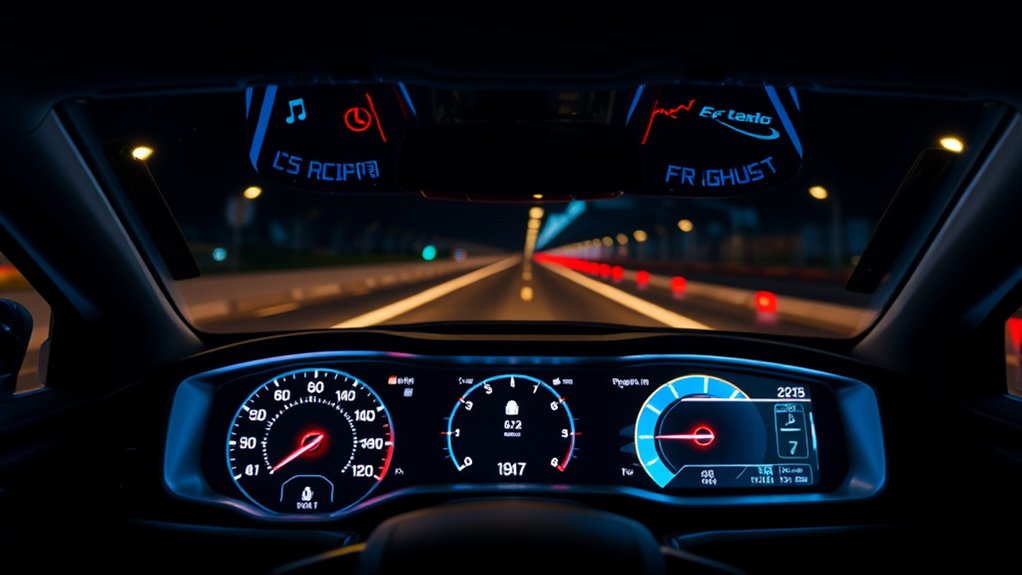

Car HUD displays put speed and, on some models, navigation or vehicle data in your line of sight. The Upgraded HUD Head-up Display is my best overall pick for drivers who want wireless CarPlay and Android Auto alongside diagnostics, while the KUOWEIHUD K1 suits buyers seeking a simpler GPS speed readout and the VGEBY 5.5-Inch offers a larger OBD-based display. The main tradeoffs are whether you want GPS or OBD data, how much information you need, and whether your car can support the display’s power connection. Placement, glare, and compatibility can matter as much as the feature list. Read on for the full comparison and advice on matching a display to your car.

Get audio and creator gear delivered free with Prime
- Fast, free delivery on millions of items
- Prime Video, Amazon Music and more included
- Member-only deals all year
Complete the kit


Key Takeaways
- The Upgraded HUD is the most feature-rich pick here, combining wireless phone integration with diagnostic data; its broader feature set may be more than drivers who only want speed need.
- KUOWEIHUD K1 and K4 stand out among the GPS options for buyers who want a dedicated display without relying on OBD vehicle data.
- VGEBY’s 5.5-inch OBDII/EUOBD unit prioritizes a larger, multicolor readout, but an OBD display depends on vehicle compatibility and a suitable port.
- MAIMEIMI’s dual GPS and OBD system and LORPHEIR’s OBD2 and GPS display offer two data paths, which can be useful when one source is unavailable or less suitable.
- The lineup spans simple USB-powered speedometers, such as ATNPTN and the green windshield display, through multi-function OBD and phone-connected models; extra functions bring more setup and display choices.
| 2-Pack Smart in Car Hud Co Pilot Display Navigation Windshield Copilot for Cars with GPS Speedometer Heads up USB Powered 10hz Refresh Rate Mph Digits Auto Brightness Satellite Positioning |  | Best Two-Vehicle Set | Power: USB | Speed display: MPH | Refresh rate: 10 Hz | VIEW ON AMAZON | See Our Full Breakdown |
| Upgraded HUD Head-up Display – High-Definition, Wireless CarPlay & Android Auto, Diagnostic Functions, Speed Alert, Plug‑and‑Play Navigation, OBD Vehicle Instrument Panel | 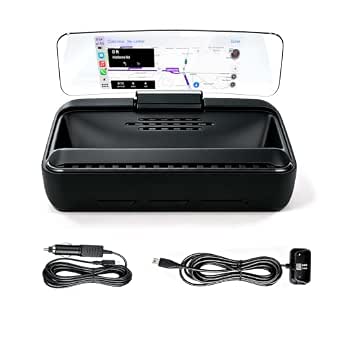 | Best Connected Dashboard | Brand: iopkm | Model: HUD-V3 | Voltage: 12 V | VIEW ON AMAZON | See Our Full Breakdown |
| KUOWEIHUD K1 GPS Heads-Up Display for Cars |  | Best Compact GPS Pick | Brand: KUOWEIHUD | Model: K1-White | Power: USB, 5 V | VIEW ON AMAZON | See Our Full Breakdown |
| ATNPTN GPS Heads-Up Display Speedometer for Vehicles, MPH, USB Powered, Automatic Brightness |  | Best Warranty Coverage | Brand: ATNPTN | Positioning: GPS + BDS | Refresh rate: 10 Hz | VIEW ON AMAZON | See Our Full Breakdown |
| KUOWEIHUD K4 GPS Heads-Up Display for Cars |  | Best for Custom Speed Alerts | Brand: KUOWEIHUD | Model: K4-WHITE | Power: 5 V USB | VIEW ON AMAZON | See Our Full Breakdown |
| VGEBY 5.5-Inch Multi-Color OBDII/EUOBD Heads-Up Display |  | Best for OBD Diagnostics | Brand: VGEBY | Display size: 5.5 inches | Interface: OBD II/EUOBD | VIEW ON AMAZON | See Our Full Breakdown |
| MAIMEIMI OBD2 & GPS Dual System Heads Up Display with Turn Indication |  | Best for Navigation Cues | Brand: MAIMEIMI | Model: C1+Navigation | Voltage: 12 volts | VIEW ON AMAZON | See Our Full Breakdown |
| Head-Up Display (HUD) Digital Speedometer for Cars |  | Best for Flexible Installation | Brand: wiiyii | Model: M7 | Dimensions: 3.54 × 2.09 × 1.02 inches | VIEW ON AMAZON | See Our Full Breakdown |
| wiiyii A8 Heads-Up Display for Cars |  | Best for a Large OBD Readout | Brand: wiiyii | Model: A8 | Display size: 5.5 inches | VIEW ON AMAZON | See Our Full Breakdown |
| KUOWEIHUD K1 GPS Head-Up Display for Cars |  | Best Compact GPS Speed Display | Brand: KUOWEIHUD | Model: K1 | Power: USB, 5 volts | VIEW ON AMAZON | See Our Full Breakdown |
| LORPHEIR OBD2 and GPS Car HUD Display |  | Best for Detailed Vehicle Data | Connectivity: OBD2 and GPS | Displayed parameters: Over 20, including speed, RPM, water temperature, voltage, and fuel consumption | Mounting: Rotating suction cup bracket, console base, and adhesive tape | VIEW ON AMAZON | See Our Full Breakdown |
| Car Windshield Heads-Up Display, Green |  | Best for a Clear, Simple Speed Readout | Display color: Green | Positioning: GPS and BDS | Refresh rate: 10 Hz | VIEW ON AMAZON | See Our Full Breakdown |
| wiiyii P6 OBD2 and GPS Head-Up Display Gauge for Cars |  | Best for OBD2 Diagnostics | Display modes: OBD and GPS | OBD data: More than 100 types | Features: Speed, voltage, fuel consumption, RPM, water temperature, fault codes, data stream, and overspeed alarm | VIEW ON AMAZON | See Our Full Breakdown |
| AZIJYV M22 GPS Windshield Heads-Up Display Speedometer |  | Best for Speed and Trip Information | Display type: GPS windshield heads-up display | Displayed information: Speed, clock, travel time, distance, and compass direction | Speed units: MPH and KM/H | VIEW ON AMAZON | See Our Full Breakdown |
| car hud display | Brand | Power | Model |
|---|---|---|---|
| 2-Pack Smart in Car Hud Co Pil | — | USB | — |
| Upgraded HUD Head-up Display | iopkm | — | HUD-V3 |
| KUOWEIHUD K1 GPS Heads-Up Disp | KUOWEIHUD | USB, 5 V | K1-White |
| ATNPTN GPS Heads-Up Display Sp | ATNPTN | 5 V USB | — |
| KUOWEIHUD K4 GPS Heads-Up Disp | KUOWEIHUD | 5 V USB | K4-WHITE |
| VGEBY 5.5-Inch Multi-Color OBD | VGEBY | — | — |
| MAIMEIMI OBD2 & GPS Dual Syste | MAIMEIMI | — | C1+Navigation |
| Head-Up Display | wiiyii | — | M7 |
| wiiyii A8 Heads-Up Display for | wiiyii | — | A8 |
| KUOWEIHUD K1 GPS Head-Up Displ | KUOWEIHUD | USB, 5 volts | K1 |
| LORPHEIR OBD2 and GPS Car HUD | — | — | — |
| Car Windshield Heads-Up Displa | — | USB | — |
| wiiyii P6 OBD2 and GPS Head-Up | — | — | — |
| AZIJYV M22 GPS Windshield Head | — | USB | — |
More Details on Our Top Picks
2-Pack Smart in Car Hud Co Pilot Display Navigation Windshield Copilot for Cars with GPS Speedometer Heads up USB Powered 10hz Refresh Rate Mph Digits Auto Brightness Satellite Positioning
For drivers who want a simple speed readout in more than one vehicle, this two-pack has a clear advantage over the single KUOWEIHUD K1: one display can stay in each car, truck, or motorcycle with a USB port. Its large MPH digits and automatic brightness adjustment keep the focus on speed without relying on an OBD connection or extra vehicle data. That simplicity also limits what it can do: the listing describes GPS speed display, not the K4’s switchable units, manual calibration, or overspeed alert. Satellite reception can also falter in places such as tunnels or garages, and the supplied details do not state a speed accuracy range. I’d choose this set for basic speed visibility across two vehicles, not for richer driving information.
Pros:- Two displays cover separate vehicles
- Large MPH digits are designed for quick speed checks
- USB power avoids an OBD connection
- Automatic brightness adjusts to surrounding light
Cons:- GPS reception may be limited in tunnels or garages
- Displays MPH only according to the supplied description
- Speed accuracy range is not specified
Best for: Drivers who want a basic GPS speed display installed in two USB-equipped vehicles
Not ideal for: Drivers who need KM/H, speed calibration, or an overspeed alert, since those controls are not listed
- Power:USB
- Speed display:MPH
- Refresh rate:10 Hz
- Positioning:Satellite positioning
- Brightness:Automatic adjustment
- Included quantity:2 displays
Our verdict“Choose this set if you want a straightforward GPS speed readout available in two vehicles.”
Upgraded HUD Head-up Display – High-Definition, Wireless CarPlay & Android Auto, Diagnostic Functions, Speed Alert, Plug‑and‑Play Navigation, OBD Vehicle Instrument Panel
This model is the most feature-rich option in this group: wireless Apple CarPlay and Android Auto bring navigation, calls, and media to the HUD, while its OBD connection supplies vehicle data. That makes it a different proposition from the GPS-only KUOWEIHUD K1 and K4, which focus on speed and avoid OBD setup. The anti-glare display and silicone base address visibility and stability, while plug-and-play installation avoids dashboard modification. The tradeoff is a more involved dependency chain: the unit needs a constant power source and OBD connection, and voice controls rely on smartphone integration. Buyers seeking only a large speed readout may find those connected features unnecessary. I’d pick it when navigation and vehicle information matter as much as speed.
Pros:- Wireless Apple CarPlay and Android Auto reduce cable clutter
- Anti-glare display is described for sunlight and night use
- OBD connection provides access to vehicle data
- High-friction silicone base helps keep the unit stable
Cons:- Requires a constant power source and OBD connection
- Voice commands depend on smartphone integration
- More connected features may be unnecessary for buyers seeking speed only
Best for: Drivers who want wireless phone navigation and vehicle data displayed together on an OBD-connected HUD
Not ideal for: Drivers who want a simple GPS speed display without an OBD connection or smartphone integration
- Brand:iopkm
- Model:HUD-V3
- Voltage:12 V
- Display:High-definition anti-glare
- Installation:Universal plug-and-play OBD
- Operating temperature:-30°C to +75°C
- Phone integration:Wireless Apple CarPlay and Android Auto
Our verdict“Choose this HUD if you want phone navigation and OBD vehicle information alongside speed.”
KUOWEIHUD K1 GPS Heads-Up Display for Cars
The KUOWEIHUD K1 is a compact choice for drivers who want speed in their line of sight without adding an OBD connection. At 2.76 by 1.69 by 0.79 inches and 1.6 ounces, it is smaller and lighter on paper than the ATNPTN display, while its GPS and BDS positioning and 10 Hz refresh rate are clearly specified. Its stated speed deviation of 0.6–1.8 MPH gives buyers a useful sense of expected variation; the two-pack listing does not provide that detail. The K1’s compact footprint comes with a narrow purpose: it shows MPH, rather than the K4’s switchable MPH/KM/H and overspeed alert. Like other GPS-only units, it can lose reception around tunnels, garages, or metallic windshield film.
Pros:- Small, lightweight body takes up little dashboard space
- USB power does not require an OBD port
- GPS and BDS positioning with a 10 Hz refresh rate
- Specified speed deviation helps set expectations
Cons:- GPS reception can suffer in tunnels, garages, or behind metallic film
- Speed readings may deviate by 0.6–1.8 MPH
- The listed speed display is MPH rather than switchable units
Best for: Drivers with limited dashboard space who want a compact USB-powered GPS speed display
Not ideal for: Drivers who need KM/H, a customizable overspeed alert, or a display based on vehicle data
- Brand:KUOWEIHUD
- Model:K1-White
- Power:USB, 5 V
- Positioning:GPS + BDS
- Refresh rate:10 Hz
- Maximum displayed speed:115 MPH
- Speed accuracy deviation:0.6–1.8 MPH
- Dimensions and weight:2.76 x 1.69 x 0.79 inches; 1.6 ounces
- Compatibility:Cars, trucks, and motorcycles with a USB port
Our verdict“Pick the K1 if compact size and clearly stated GPS speed behavior matter more than extra alerts or unit options.”
ATNPTN GPS Heads-Up Display Speedometer for Vehicles, MPH, USB Powered, Automatic Brightness
The ATNPTN pairs the familiar basics of a GPS speed HUD with a two-year warranty, a coverage detail not listed for the KUOWEIHUD K1 or K4. It also specifies GPS and BDS positioning, 10 Hz updates, automatic light-sensor brightness, and a 0.6–1.8 MPH speed deviation, making its strengths and limits easy to weigh against the two KUOWEIHUD models. As with the K1, it displays MPH and needs usable satellite reception; the K4 adds unit switching, calibration, and an overspeed alert for drivers who want more control. Its listed 3.2-ounce weight is heavier than the K1’s 1.6 ounces. I’d favor ATNPTN when warranty coverage matters more than compactness or configurable speed features.
Pros:- Two-year warranty is explicitly listed
- GPS and BDS positioning with 10 Hz refresh rate
- Automatic brightness responds to ambient light
- USB setup avoids an OBD connection
Cons:- GPS readings may deviate by about 0.6–1.8 MPH
- Reception can be limited indoors, in tunnels, or behind metallic film
- At 3.2 ounces, it weighs more than the KUOWEIHUD K1
Best for: Drivers who want a basic GPS speed HUD and value a stated two-year warranty
Not ideal for: Drivers who want a very light unit, switchable speed units, or customizable overspeed settings
- Brand:ATNPTN
- Positioning:GPS + BDS
- Refresh rate:10 Hz
- Maximum displayed speed:115 MPH
- Power:5 V USB
- Brightness:Automatic adjustment via light sensor
- Speed accuracy deviation:Approximately 0.6–1.8 MPH
- Dimensions and weight:2.5 x 3.5 x 2.5 inches; 3.2 ounces
- Warranty:2 years
Our verdict“Choose ATNPTN if warranty coverage is your priority for a straightforward GPS MPH display.”
KUOWEIHUD K4 GPS Heads-Up Display for Cars
The KUOWEIHUD K4 adds useful control to the basic GPS HUD formula: drivers can switch between MPH and KM/H, adjust brightness, calibrate speed, and set a customizable overspeed alert. That makes it a better fit for drivers who want to tailor a speed display than the MPH-only KUOWEIHUD K1 or ATNPTN. It still uses GPS and BDS positioning with a 10 Hz refresh rate, so its speed data depends on satellite reception rather than an OBD link. Tunnels, garages, severe weather, and metallic windshield film can interfere, which matters if you expect readings everywhere. The K4’s 3.48-inch length also makes it larger than the K1. I’d choose it for configurable speed monitoring, not phone navigation or broader vehicle diagnostics.
Pros:- Switchable MPH and KM/H units
- Manual speed calibration adds control over the displayed reading
- Customizable overspeed alert supports a chosen speed threshold
- Adjustable brightness and GPS + BDS positioning
Cons:- GPS reception may be affected by tunnels, garages, weather, or metallic film
- Larger than the KUOWEIHUD K1 listed in this group
- Does not list phone navigation or OBD diagnostic functions
Best for: Drivers who switch between MPH and KM/H or want calibration and a configurable overspeed alert
Not ideal for: Drivers who need phone navigation, diagnostic data, or dependable readings where GPS reception is poor
- Brand:KUOWEIHUD
- Model:K4-WHITE
- Power:5 V USB
- Positioning:GPS + BDS
- Refresh rate:10 Hz
- Speed units:MPH or KM/H
- Maximum displayed speed:115 MPH
- Dimensions and weight:3.48 x 1.97 x 0.89 inches; 1.6 ounces
- Material:ABS
Our verdict“Choose the K4 if you want a GPS speed HUD with unit switching, calibration, and an overspeed alert.”
VGEBY 5.5-Inch Multi-Color OBDII/EUOBD Heads-Up Display
I’d choose the VGEBY when reading vehicle data matters as much as seeing speed. Its OBDII/EUOBD connection can show RPM, coolant temperature, battery voltage, fuel consumption, mileage, and fault codes, giving it a broader diagnostic focus than the GPS-only KUOWEIHUD K1. Adjustable or automatic brightness and alerts for overspeed, temperature, fatigue, and low voltage add prompts beyond the basic readings. The tradeoff is its reliance on a compatible OBD port: unlike the K1, it cannot serve vehicles that lack the supported OBD connection. Its 5.5-inch screen may also take more dashboard space than a compact speed-only unit. This makes the VGEBY a better fit for drivers who want vehicle information in one glance than for buyers seeking the simplest universal speed display.
Pros:- Shows a wide range of vehicle readings, including fault codes
- Offers adjustable and automatic brightness
- Provides overspeed, fatigue, temperature, and low-voltage alerts
- Powers on and off automatically with the vehicle
Cons:- Requires a compatible OBDII or EUOBD vehicle
- Offers no GPS fallback for unsupported vehicles
- The 5.5-inch display may occupy more dashboard space than compact speed-only HUDs
Best for: Drivers with a compatible OBDII or EUOBD vehicle who want speed readings, engine data, and basic fault information together.
Not ideal for: Drivers of vehicles without OBDII or EUOBD support, or anyone who only needs GPS-based speed like the KUOWEIHUD K1 provides.
- Brand:VGEBY
- Display size:5.5 inches
- Interface:OBD II/EUOBD
- Displayed units:km/h and MPH
- Item weight:2.46 ounces
- Material:Metal
Our verdict“Choose the VGEBY if your compatible car’s engine readings and alerts matter more than universal GPS speed display.”
MAIMEIMI OBD2 & GPS Dual System Heads Up Display with Turn Indication
The MAIMEIMI C1+Navigation is the choice here for drivers who want a data-heavy HUD with turn indications. It combines OBD2 and GPS modes, so GPS can supply basic speed information where an OBD connection is unavailable, while a compatible OBD link adds engine metrics. Its listed readings include speed, RPM, temperature, voltage, fuel consumption, altitude, and direction; turn prompts depend on connecting the companion app. Compared with the simpler wiiyii M7, this model offers navigation cues and a wider stated metric set, but its setup depends on a phone for those cues. The product data also flags OBD compatibility exclusions for several popular brands, while GPS readings can suffer where satellite reception is weak. Buyers should check their car’s protocol before relying on OBD data.
Pros:- Combines OBD2 and GPS operating modes
- Lists a broad set of real-time vehicle metrics
- Plug-and-play connection avoids complex wiring
- Anti-glare screen is intended for daytime and nighttime visibility
Cons:- OBD mode excludes several named brands, including Dodge, Jeep, Honda, and Mazda
- GPS performance can weaken in tunnels and underground parking
- Turn indication requires a smartphone app connection
Best for: Drivers who want engine data when supported and app-linked turn indications on a windshield display.
Not ideal for: Owners of the listed OBD-incompatible brands, or drivers who need dependable navigation prompts without a smartphone connection or GPS reception.
- Brand:MAIMEIMI
- Model:C1+Navigation
- Voltage:12 volts
- Display types:OBD2 and GPS
- Compatibility:Most cars manufactured from 2008 onward; OBDII/EOBD protocols
- App support:Android 4.4–12.0 and iOS 5.0+
- Listed metrics:Speed, RPM, water temperature, PSI, voltage, odometer, fuel consumption, altitude, and direction
- Alarm features:Overspeed, overheating, abnormal voltage, and RPM limits
Our verdict“Pick the MAIMEIMI if you want app-linked turn cues and broad vehicle data, after checking OBD compatibility for your car.”
Head-Up Display (HUD) Digital Speedometer for Cars
The wiiyii M7 makes sense for drivers who want a compact HUD with a choice between vehicle data and GPS speed. Its OBD-II and GPS modes broaden where it can be used, and the GPS mode is listed as working with all vehicles; the automatic brightness and selectable speed and temperature units help it adapt to different driving conditions and preferences. Compared with the MAIMEIMI C1+Navigation, the M7 has a simpler feature set and no listed app-linked turn indication, so it is less suited to navigation cues. Its OBD mode also has notable exclusions: electric and diesel vehicles, pickup trucks, RVs, and modified vehicles are listed as unsupported. GPS mode helps with fit, but buyers seeking engine readings still need to confirm their vehicle works with OBD mode.
Pros:- Offers both OBD-II and GPS modes
- GPS mode is listed for all vehicles
- Automatically adjusts brightness
- Supports km/h or MPH and °C or °F
Cons:- OBD mode excludes electric and diesel vehicles, pickup trucks, RVs, and modified vehicles
- Does not list app-linked turn guidance like the MAIMEIMI C1+Navigation
- GPS reception may limit use where satellite signals are obstructed
Best for: Drivers who want a small display with GPS speed as a fallback and OBD readings in a compatible vehicle.
Not ideal for: Owners of electric or diesel vehicles, pickup trucks, RVs, or modified vehicles who want to use OBD mode for engine data.
- Brand:wiiyii
- Model:M7
- Dimensions:3.54 × 2.09 × 1.02 inches
- Weight:150 g
- Compatibility:OBD-II vehicles from 2008 onward; GPS mode listed for all vehicles
- Speed units:km/h or MPH
- Temperature units:°C or °F
- Certifications:CE, FCC, ROHS
Our verdict“Choose the M7 if you want a compact dual-mode display and can use GPS speed when OBD readings are unavailable.”
wiiyii A8 Heads-Up Display for Cars
The wiiyii A8 is the OBD-focused pick for drivers who prefer a larger display and want basic fault functions alongside everyday readings. Its 5.5-inch screen shows speed, RPM, water temperature, voltage, distance, and fuel consumption, with speeding and voltage alarms. The listed fault detection and clearing give it a diagnostic angle that the GPS-based KUOWEIHUD K1 does not offer, while the K1 is the more flexible choice for vehicles without a compatible OBD connection. The A8’s biggest limit is also its defining choice: it supports OBDII and EOBD, but not OBD I or JOBD, and has no GPS mode listed. It suits compatible cars where a broad, glanceable readout matters more than universal fit.
Pros:- Large 5.5-inch screen presents multiple readings at a glance
- Displays speed, RPM, temperature, voltage, distance, and fuel consumption
- Includes speeding and voltage alarms
- Offers basic fault detection and clearing
Cons:- Does not support OBD I or JOBD
- No GPS mode is listed for vehicles without a compatible OBD connection
- Larger display may be less suited to drivers wanting a minimal dashboard footprint
Best for: Drivers of OBDII or EOBD vehicles who want a large readout, several engine metrics, and basic fault functions.
Not ideal for: Drivers with OBD I or JOBD vehicles, or those who need a GPS-based display that can work without OBD.
- Brand:wiiyii
- Model:A8
- Display size:5.5 inches
- Native resolution:800 × 480
- Weight:0.2 kg
- Compatibility:OBDII and EOBD; does not support OBD I or JOBD
- Displayed data:Speed, RPM, water temperature, voltage, driving distance, and fuel consumption
- Features:Speeding and voltage alarms, km/mile switching, fault detection and clearing
- Certifications:CE, FCC, RoHS
Our verdict“Choose the A8 if your OBDII or EOBD car is compatible and you value a large, data-rich screen over GPS flexibility.”
KUOWEIHUD K1 GPS Head-Up Display for Cars
The KUOWEIHUD K1 is the simplest fit for buyers who want projected speed without connecting to the car’s OBD system. It uses GPS and BDS positioning, runs from USB, and refreshes at 10 Hz, making it compatible with cars, trucks, and motorcycles that have a USB port. Its compact body and automatic brightness keep the setup straightforward compared with the larger wiiyii A8, which adds engine readings and fault functions but requires OBDII or EOBD. The K1’s limits follow from its GPS-only approach: the listed display is speed in MPH, and the stated deviation is 0.6–1.8 MPH. Tunnels, weather, and metallic windshield film can also affect reception. It is a focused speed display, not an engine-data dashboard.
Pros:- Works without an OBD port through USB power
- GPS and BDS positioning with a 10 Hz refresh rate
- Automatic brightness adjustment
- Compact design suits vehicles with limited dashboard space
Cons:- Displays speed in MPH only, according to the listed specs
- Stated speed deviation is 0.6–1.8 MPH
- Satellite reception can be affected by tunnels, weather, and metallic windshield film
Best for: Drivers of cars, trucks, or motorcycles with USB power who want an uncomplicated GPS speed readout in MPH.
Not ideal for: Drivers who need RPM, temperature, fault information, selectable speed units, or reliable speed data in GPS-obstructed areas.
- Brand:KUOWEIHUD
- Model:K1
- Power:USB, 5 volts
- Positioning:GPS and BDS
- Refresh rate:10 Hz
- Display:MPH, up to 115 MPH
- Dimensions:2.76 × 1.69 × 0.79 inches
- Weight and material:1.6 ounces; ABS
- Compatibility:Cars, trucks, and motorcycles with a USB port
Our verdict“Pick the K1 if you want a compact USB-powered MPH display and do not need engine data or GPS-independent readings.”
LORPHEIR OBD2 and GPS Car HUD Display
The LORPHEIR L5010 earns its place for drivers who want more than a windshield speed readout: it can show over 20 parameters, including RPM, water temperature, voltage, and fuel consumption. Its OBD2 connection supplies vehicle data, while GPS mode gives it an option for vehicles that cannot use OBD2. Compared with the AZIJYV M22, which focuses on speed and trip details, the L5010 suits drivers who want a broader view of vehicle operation. Multiple mounting choices and display modes help it fit different dashboards, and overspeed and fatigue alerts add reminders. The tradeoff is extra setup and compatibility uncertainty: OBD2 works with most vehicles made after 2008, while the GPS fallback does not provide the same vehicle diagnostics.
Pros:- Combines OBD2 vehicle data with GPS mode
- Displays over 20 parameters, including RPM and water temperature
- Includes several mounting options and customizable display modes
- Provides overspeed and fatigue alerts
Cons:- OBD2 features work with most vehicles made after 2008, so compatibility can vary
- GPS mode does not replace OBD2 access to engine data
- The wider feature set may take more setup than a speed-only HUD
Best for: Drivers with a compatible OBD2 vehicle who want engine and trip data visible alongside speed
Not ideal for: Drivers seeking a simple speed-only display or those who need guaranteed OBD2 data support on an older or unusual vehicle
- Connectivity:OBD2 and GPS
- Displayed parameters:Over 20, including speed, RPM, water temperature, voltage, and fuel consumption
- Mounting:Rotating suction cup bracket, console base, and adhesive tape
- Operating temperature:-40°C to +80°C
- Voltage protection:11–18V
- Dimensions:4 x 3 x 2 inches
- Weight:10 ounces
Our verdict“Choose the LORPHEIR if you want a data-rich OBD2 display and can confirm your vehicle supports its diagnostic connection.”
Car Windshield Heads-Up Display, Green
This green GPS and BDS speed HUD is a straightforward pick for drivers who mainly want speed in their line of sight. Its 10 Hz refresh rate and support for up to 32 satellites are aimed at keeping the readout responsive when reception is available. USB power, manual calibration, adjustable brightness, and switchable MPH or KM/H settings make it more configurable than the basic speed-and-trip display on the AZIJYV M22. The large anti-reflective display also gives it a visibility-focused role among these choices. Its limitation is the same one that comes with satellite-based speed: tunnels, garages, poor weather, and metallic windshield film can interrupt reception, so drivers who need a steady readout in those conditions should look at an OBD2 option such as the wiiyii P6.
Pros:- Uses GPS and BDS positioning with a 10 Hz refresh rate
- Supports MPH and KM/H with manual speed calibration
- Large anti-reflective display with adjustable brightness
- USB power and customizable overspeed alert
Cons:- Satellite reception can be disrupted by tunnels, garages, poor weather, or metallic windshield film
- Shows speed rather than the broad OBD2 vehicle data available on the wiiyii P6
- Manual calibration may require adjustment to match the vehicle’s speed reading
Best for: Drivers who want a simple, large green speed display with adjustable brightness and manual calibration
Not ideal for: Drivers who regularly travel through tunnels or park in underground garages and need speed data without satellite reception
- Display color:Green
- Positioning:GPS and BDS
- Refresh rate:10 Hz
- Satellite support:Up to 32 satellites
- Power:USB
- Speed units:MPH or KM/H
- Speed calibration:Manual
- Overspeed alert:Customizable
Our verdict“Pick this model if a bright, configurable speed readout matters more to you than diagnostics or operation without GPS reception.”
wiiyii P6 OBD2 and GPS Head-Up Display Gauge for Cars
The wiiyii P6 is aimed at drivers who want an HUD to surface diagnostic information as well as speed. In OBD mode it can read more than 100 types of vehicle data, including fault codes and data streams, giving it a deeper diagnostic role than the speed-focused green GPS display. GPS mode adds a fallback for vehicles without OBD2 support, though that mode cannot supply the same vehicle-specific readings. The adjustable bracket supports dashboard or windshield mounting without permanent installation, and brightness control helps adapt the display to the cabin. Compared with the LORPHEIR L5010, it makes its diagnostic breadth the central draw, but OBD availability still depends on the vehicle. Buyers wanting a compact, minimal screen may also find the P6’s larger bracketed setup more involved.
Pros:- Reads more than 100 types of vehicle data through OBD
- Combines OBD and GPS display modes
- Supports speed, voltage, fuel consumption, RPM, water temperature, and fault codes
- Adjustable brightness and overspeed alert
Cons:- OBD diagnostic features are unavailable on vehicles without OBD2 support
- GPS mode cannot provide the same diagnostic data as the OBD connection
- The bracketed display takes more space than a simple speed-only unit
Best for: Owners of OBD2-compatible cars who want fault codes and live vehicle data alongside speed
Not ideal for: Drivers who only want a compact speed readout or whose vehicles lack OBD2 support for diagnostic features
- Display modes:OBD and GPS
- OBD data:More than 100 types
- Features:Speed, voltage, fuel consumption, RPM, water temperature, fault codes, data stream, and overspeed alarm
- Installation:Adjustable bracket for dashboard or windshield mounting
- Material:Plastic
- Dimensions:5.24 x 3.54 x 4.33 inches
- Weight:190 g
- Included components:P6-HUD, OBD cable, rotary suction cup bracket, 3M tape, manual, and crowbar
Our verdict“Choose the P6 if your car supports OBD2 and you want a windshield-adjacent view of diagnostics as well as speed.”
AZIJYV M22 GPS Windshield Heads-Up Display Speedometer
The AZIJYV M22 gives GPS speed a little more context by adding clock, travel time, distance, and compass direction. That makes it a better fit for drivers who want basic trip information on the windshield without connecting to the car’s diagnostic port. Automatic startup and shutdown with the vehicle keeps daily use simple, while USB power and MPH or KM/H support keep setup flexible. Compared with the Car Windshield Heads-Up Display, Green, the M22 adds trip and direction details, but its description does not specify a 10 Hz refresh rate or support for up to 32 satellites. It also depends on GPS acquisition; buildings, garages, other GPS devices, and metallic window film can affect the signal, while daytime visibility may call for reflective film or brightness adjustment.
Pros:- Shows speed, clock, travel time, distance, and compass direction
- Supports MPH and KM/H
- Overspeed beeping alert adds an audible reminder
- Automatically powers on and off with the car
Cons:- Must acquire GPS satellites before displaying speed
- Reception can be affected by garages, buildings, other GPS devices, and metal window film
- Daytime visibility may require reflective film or brightness adjustment
Best for: Drivers who want GPS speed plus basic trip details and automatic startup without OBD2 wiring
Not ideal for: Drivers who need diagnostic data, dependable operation indoors, or a clearly specified high-refresh GPS readout
- Display type:GPS windshield heads-up display
- Displayed information:Speed, clock, travel time, distance, and compass direction
- Speed units:MPH and KM/H
- Alert:Overspeed beeping alarm
- Power:USB
- Operation:Automatic power on and off with the car
- Included components:M22 HUD, reflective film, instructions, USB cable, and anti-slip pad
Our verdict“Pick the M22 if you want an easy-to-start GPS HUD that adds trip details, and you can accept its reliance on satellite reception.”

How We Picked
I ranked these car HUD displays by how well their stated features address everyday driving needs: clear speed information, useful navigation or vehicle data, straightforward power and setup, and the ability to work across different cars. I gave more weight to practical fit than to the length of a feature list. GPS models can suit drivers who want an independent speed display, while OBD models can show vehicle information but call for a compatible connection. Dual-system designs earn a place for flexibility, though buyers should weigh the added complexity.
The order reflects each product’s apparent balance of usefulness, versatility, and setup demands based on the supplied product descriptions. The Upgraded HUD leads for combining phone integration and diagnostics; the KUOWEIHUD K1 and VGEBY represent simpler GPS and larger OBD display priorities. The remaining choices serve narrower needs, including basic speed readouts, GPS-only layouts, and combined data sources. Where descriptions provide limited detail, I avoid assuming capabilities beyond the stated features and recommend checking fit and compatibility before choosing.
Factors to Consider When Choosing Car Hud Displays
Before choosing among car HUD displays, decide what information you want to see while driving and how your vehicle can supply it. A display that fits your dashboard and connection options may be more useful than a model with functions you will rarely use.
Choose GPS, OBD, or Both
GPS-based displays calculate speed using satellite positioning, so they can work without reading data from the car’s diagnostic port. OBD models draw vehicle information through that port, which can expose more than speed but depends on the car and the specific functions supported. A dual-system unit can give you another data source, though it may add setup steps and choices about which reading to use. Check your vehicle’s port, model year, and the product’s compatibility notes before ordering an OBD display. If you mainly want a speed readout, a GPS model may be the more direct fit. If you want engine or vehicle data, verify that the exact information you need is supported.
Plan the Power and Cable Route
USB power is straightforward when your car has a convenient outlet, but the cable still needs a safe route that does not cross controls or interfere with visibility. OBD-powered models avoid a separate USB lead in some setups, though the port’s position can make the unit harder to place neatly. Measure the distance from the chosen display location to the power source before settling on a model. Also check whether your preferred mounting spot leaves room for the cable and does not obstruct airbags or the driver’s view. A tidy installation can matter more over daily use than a small difference in screen features. Avoid assuming that “plug-and-play” means every car will have an equally simple installation.
Match Screen Size to Your Sightline
A larger display can make figures easier to pick out at a glance, but it can also take up more windshield or dashboard space. Small units are less intrusive and may be easier to position, yet their readouts can be harder to read from a distance. Think about your seating position and the angle at which you naturally glance toward the road. Windshield reflections, tinted glass, and strong daylight can all affect legibility. If possible, favor a placement that keeps the display within a quick glance without covering road hazards. Do not choose by screen size alone; brightness control and a stable mount also affect practical visibility.
Keep the Display Information Focused
Extra data can be helpful when you have a clear reason to check it, but more simultaneous readouts can compete for attention. Decide whether you want speed only, turn guidance, diagnostic details, or phone-based navigation before paying for a feature-rich device. A model with CarPlay or Android Auto may make sense if those phone functions are central to your driving routine. Drivers who need only speed may find a simpler display easier to understand at a glance. Check what information is shown at once and whether the device lets you change its layout or alerts. A useful HUD supports a brief glance rather than inviting you to study a screen.
Check Navigation and Speed Expectations
Navigation features differ: a product may offer turn indication, phone-based navigation, or only a speed readout. Confirm the source of directions and whether your phone must stay connected for them to appear. GPS speed can also behave differently from the vehicle’s speedometer, particularly when satellite reception is weak or has not settled after startup. Decide which reading you will treat as your primary reference and avoid relying on a HUD as a replacement for attentive driving. If alerts are available, check whether they can be adjusted to suit your preferences. These details help prevent buying a display whose navigation or warning behavior differs from what you expected.
Pay for Functions You Will Use
More features can justify a more involved setup when they solve a specific need, such as viewing diagnostics or phone navigation without looking down. They add little value if you plan to use only a basic speed display. Compare the connection type, information sources, screen layout, and controls before judging a model by its feature count. A larger OBD display may be a better match for data-focused drivers, while a compact GPS unit can suit someone who wants a minimal readout. Check the included mounting and power arrangements, since extra accessories may affect how easily the device fits your car. Your best choice is the one whose daily functions and installation suit your vehicle and driving habits.
Frequently Asked Questions
Should I choose a GPS HUD or an OBD HUD for my car?
Choose GPS if you mainly want a standalone speed readout and prefer not to depend on your car’s diagnostic port. Choose OBD if you want vehicle information beyond speed, after checking that your car supports the display and the specific data you want. A dual-system model can offer flexibility, but it may require more setup. Your vehicle’s port location and available power connections can also affect installation. Match the data source to the job you actually need the display to do.
Will an OBD HUD work with every car?
No. OBD compatibility varies with the vehicle and the information the display reads, so check the product’s compatibility details against your car’s make, model, and year. Having a diagnostic port does not guarantee that every listed function will work. Port location can also make cable routing or mounting awkward. If compatibility is unclear and you only need speed, a GPS-powered option may avoid some OBD-specific constraints.
Can a HUD show navigation directions from my phone?
Some models include phone integration or turn indication, while others focus on speed and do not provide full navigation. Read the connection and navigation descriptions carefully: directions may depend on a paired phone, a particular app, or an active connection. The Upgraded HUD is the clearest fit in this lineup for buyers seeking wireless CarPlay or Android Auto. MAIMEIMI lists turn indication, but that does not by itself establish that it offers the same phone integration. Confirm the precise direction features you expect before buying.
Where should I mount a car HUD display?
Position it where you can read it with a brief glance while keeping your view of the road clear. The best spot depends on your seat height, dashboard shape, windshield angle, and cable reach. A large display may need more room, while a compact GPS unit can be easier to place discreetly. Check for glare at different times of day and avoid blocking controls, visibility, or airbag deployment areas. Follow the device and vehicle guidance for safe mounting.
Is a feature-rich HUD worth choosing if I only need speed?
Usually, a simpler GPS speed display is a closer match when speed is your only goal. Models with diagnostics, phone integration, or multiple data sources can be useful, but they add setup and information you may not need. In this roundup, ATNPTN and the basic windshield display are among the simpler choices, while the Upgraded HUD targets drivers who want more functions. Consider whether the extra readouts will help your routine before choosing a more involved unit. Clear placement and easy-to-read speed figures should come first for a speed-only buyer.
Conclusion
For the broadest mix of functions, I recommend the Upgraded HUD Head-up Display as best overall, especially for drivers who want phone integration and diagnostics in one unit. The KUOWEIHUD K1 is my best value-style pick for buyers focused on a dedicated GPS speed readout, while the VGEBY 5.5-Inch is better suited to drivers who prefer a larger OBD display and have confirmed vehicle compatibility. Beginners who want a simpler setup should start with a USB-powered GPS option such as ATNPTN. For specific needs, consider MAIMEIMI for its dual GPS and OBD approach, or the KUOWEIHUD K4 if you want another dedicated GPS option. Choose based on the data you need and the connection your car can support.
Halloween Picks
halloween
As an affiliate, we earn on qualifying purchases.