
Finding the right coding toy for kids involves balancing ease of use, educational value, and engagement. The Learning Resources Code & Go Robot Mouse stands out as the best overall for its intuitive design and broad appeal, while the Snap Circuits Jr. Electronics Exploration Kit offers a hands-on electronics experience for budding engineers. However, these toys often face tradeoffs between simplicity and complexity—more advanced options can be overwhelming for beginners, yet essential for older or more experienced kids. Continue reading for a detailed comparison to help you choose the best fit for your child’s interests and learning style.

Get audio and creator gear delivered free with Prime
- Fast, free delivery on millions of items
- Prime Video, Amazon Music and more included
- Member-only deals all year
Complete the kit


Key Takeaways
- The top-ranked options balance ease of use with educational depth, making them suitable for a range of ages.
- Robotics kits tend to be more engaging but often come with a higher price and complexity level.
- Electronics exploration sets are excellent for kids interested in hardware, but they require more patience and fine motor skills.
- Some kits are better for beginners while others are designed for more advanced learners, highlighting the importance of matching the toy to the child’s skill level.
- Durability and expandability are key factors—choosing kits that grow with your child can provide better long-term value.
| Learning Resources Code & Go Robot Mouse |  | Best Overall for Young Beginners | Includes: Robot mouse, 30 double-sided coding cards, Activity Guide | Batteries: 3 AAA batteries required (not included) | Ages: 4+ | VIEW ON AMAZON | See Our Full Breakdown |
| Snap Circuits Jr. SC-100 Electronics Exploration Kit |  | Best for Hands-On STEM Building | ASIN: B00008BFZH | Recommended Age: 8 years and up | Number of Projects: 100+ | VIEW ON AMAZON | See Our Full Breakdown |
| Learning Resources Code & Go Robot Mouse Activity Set |  | Best for Classroom STEM Activities | Ages: 4+ | Includes: Robot mouse, maze grids, walls, tunnels, coding cards, activity cards, activity guide | Batteries required: 3 AAA (not included) | VIEW ON AMAZON | See Our Full Breakdown |
| Apitor STEM Coding Robot Toy 6-in-1 Building Kit for Boys 8-12 |  | Best Versatile Building and Coding Robot | Number of Blocks: 480 | Control Module: Includes 1 module with 2 high-speed motors | LED Lights: 2 multicolor LEDs | VIEW ON AMAZON | See Our Full Breakdown |
| BeAndge Robotics STEM Kits for Kids Science Robot Building Crafts Age 8-12 |  | Best for Variety and Family Fun | Number of Projects: 6 | Recommended Age: 8-12 | Includes: Reptile robot, balance car, bubble machine, fiber lamp, buzzer wire game | VIEW ON AMAZON | See Our Full Breakdown |
| Learning Resources Coding Critters Scamper & Sneaker |  | Best for Preschoolers and Early Learners | Includes: Scamper coding robot cat, Sneaker kitten, 22-piece playset, storybook, directional coding cards | Recommended Age: 3-7 years | Type: Interactive coding toy | VIEW ON AMAZON | See Our Full Breakdown |
| Learning Resources Botley the Coding Robot |  | Best for Growing Kids Ready for More Complex Coding | Recommended Age: 5+ years | Max Programming Steps: 80 | Coding Features: Sequencing, loops, if/then logic | VIEW ON AMAZON | See Our Full Breakdown |
| TEACH TECH Mech-5 Mechanical Coding STEM Robot Building Kit |  | Best for Older Kids and Mechanical Engineering Enthusiasts | ASIN: B07NVD43MD | Recommended Age: 10+ years | Type: Mechanical coding robot building kit | VIEW ON AMAZON | See Our Full Breakdown |
| Learning Resources Botley The Coding Robot Activity Set – 77 Pieces | 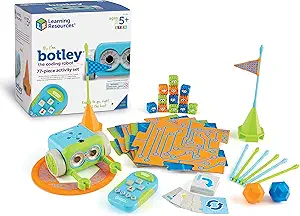 | Best for Creative Play and Problem Solving | Pieces: 77 | Ages: 5+ | Batteries: 5 AAA (not included) | VIEW ON AMAZON | See Our Full Breakdown |
| Thames & Kosmos My Robotic Pet: Coding Chameleon STEM Building Kit |  | Best for Older Kids and Robotics Enthusiasts | ASIN: B0DSCJ9XB6 | Recommended Age: 8+ (with adult help); 12+ for independent play | Model Length: 15 inches | VIEW ON AMAZON | See Our Full Breakdown |
| Makeblock mBot STEM Coding Robot Kit for Kids Ages 8-12 |  | Best Overall Entry-Level Robotics Kit | Age Range: 8-12 years | Build Time: ~15 minutes | Batteries Required: 4 AA batteries, 1 CR2025 (not included) | VIEW ON AMAZON | See Our Full Breakdown |
| Learning Resources Botley 2.0 The Coding Robot Activity Set |  | Best for Young Kids and Intro to Coding | Number of pieces: 78 | Includes: robot, remote, coding cards, obstacle pieces | Suitable for: kids ages 5 and up | VIEW ON AMAZON | See Our Full Breakdown |
| Playz Coding Learning Kit for Kids Age 8-12 |  | Best for Hands-On Computer Science Activities | Tools and Parts: 30+ | Subject Focus: Computer Science, STEM | Age Range: 8-12 years | VIEW ON AMAZON | See Our Full Breakdown |
More Details on Our Top Picks
Learning Resources Code & Go Robot Mouse
This robot mouse introduces early coding concepts through a tactile, screen-free setup that appeals to children as young as 4. Unlike the more complex Apitor STEM Coding Robot Toy, which offers multiple building modes, this set focuses on fundamental sequencing and problem-solving with simple push-button controls and coding cards. Its immediate feedback through lights and sounds makes it accessible for beginners, but the limited commands and the need for batteries (not included) can feel restrictive for advancing skills. The included activity guide adds value, making it ideal for parents and educators seeking an engaging, straightforward introduction to coding. Compared with other options, its simplicity is both a strength and a limitation, suited for early learners but not for those ready to explore more complex programming.
Pros:- Hands-on, screen-free coding experience for very young children
- Encourages problem-solving and logical thinking
- Includes activity guide for guided learning
Cons:- Requires 3 AAA batteries (not included)
- Limited to basic commands with push buttons
Best for: Parents of preschoolers or early learners seeking a tactile, screen-free introduction to coding concepts.
Not ideal for: Children older than 6 or those ready for more advanced programming, as it offers limited command options.
- Includes:Robot mouse, 30 double-sided coding cards, Activity Guide
- Batteries:3 AAA batteries required (not included)
- Ages:4+
- Features:Lights up, makes sounds, 2 speeds
Our verdict“Ideal for parents and educators introducing very young children to foundational coding skills without screens.”
Snap Circuits Jr. SC-100 Electronics Exploration Kit
Compared with the simpler Learning Resources Code & Go Robot Mouse, which targets early coding, the Snap Circuits Jr. Kit emphasizes electronic circuit building through over 100 projects. Its color-coded, snap-together parts make assembly accessible for kids age 8 and up, fostering creativity and practical engineering skills. However, it requires batteries (not always included) and the limited component count may restrict more complex projects for advanced young engineers. The absence of soldering makes it safe and easy, but some children may find the 29 parts insufficient once they master basic projects. This kit is perfect for children who want a tactile, multi-project experience, but it might not satisfy those seeking deeper electronic experimentation.
Pros:- No soldering or extra tools needed—easy to assemble
- Over 100 projects provide long-term engagement
- Color-coded parts simplify building for beginners
Cons:- Batteries required and not always included
- Limited to 29 parts, which may restrict project complexity
Best for: Kids aged 8+ interested in electronics, circuits, and hands-on STEM projects.
Not ideal for: Younger children under 8 or kids looking for coding-specific toys, since this is more about circuits than programming logic.
- ASIN:B00008BFZH
- Recommended Age:8 years and up
- Number of Projects:100+
- Parts Included:29 Snap Circuits parts
- Tools Required:None (no soldering)
- Batteries Required:Yes
Our verdict“Best suited for children curious about electronics and circuit design, offering a broad range of projects without complexity overload.”
Learning Resources Code & Go Robot Mouse Activity Set
This kit extends the basic coding experience by adding maze materials, walls, tunnels, and a cheese wedge, making it more comprehensive than the Code & Go Robot Mouse. It’s tailored for children aged 4+ and is ideal for classroom use, fostering critical thinking through matching coding cards and simple button controls. While it shares the same limited command set with the Code & Go Robot Mouse, the inclusion of maze components encourages more complex problem-solving scenarios. Its reliance on batteries (not included) and the basic programming approach keeps it accessible but less challenging for older or more advanced kids. This set offers an excellent balance of guided play and educational value for early learners, especially in group settings.
Pros:- Encourages early coding and problem-solving skills
- Includes maze grids, walls, tunnels, and activity guide
- Suitable for classroom and home learning
Cons:- Requires 3 AAA batteries (not included)
- Limited to basic programming concepts for young kids
Best for: Early childhood educators and parents seeking a classroom-ready coding activity with physical maze elements.
Not ideal for: Children beyond 6 or those wanting more advanced programming, as the coding commands are quite simple.
- Ages:4+
- Includes:Robot mouse, maze grids, walls, tunnels, coding cards, activity cards, activity guide
- Batteries required:3 AAA (not included)
Our verdict“Great for early learners in classroom settings who benefit from physical maze challenges coupled with simple coding play.”
Apitor STEM Coding Robot Toy 6-in-1 Building Kit for Boys 8-12
Compared to the simpler Learning Resources Code & Go Robot Mouse, the Apitor 6-in-1 Kit offers a broader experience with multiple robot models and app-controlled modes, aiming at kids aged 8-12 who crave more creativity and complexity. Its 480 colorful blocks and control module enable building various robot types, supporting both STEM learning and motor skills. The app modes—dual-motor, single-motor, gyro, and path—add layers of coding and control, but some assembly can be tricky for younger children or novices. Dependence on Bluetooth-compatible devices and the need for 3 AA batteries (not included) may limit accessibility for some users. This kit is best for children ready to explore multiple building styles and coding features, but it may be overwhelming for those seeking a straightforward robot experience.
Pros:- Versatile 6-in-1 building options with easy snap-together blocks
- App control with multiple modes for varied play
- Encourages STEM learning, creativity, and motor skills
Cons:- Requires 3 AA batteries (not included)
- Assembly may be challenging for younger children
Best for: Older children (8-12) who enjoy complex robot building, coding, and creative play with multiple models.
Not ideal for: Younger kids under 8 or beginners seeking simple, plug-and-play robots, as the assembly and app control require some patience.
- Number of Blocks:480
- Control Module:Includes 1 module with 2 high-speed motors
- LED Lights:2 multicolor LEDs
- App Control Modes:4 modes: dual-motor, single-motor, gyro, path
- Batteries Required:3 AA batteries (not included)
Our verdict“Perfect for tech-savvy children ready for complex robot building and multi-mode coding experiences, despite some setup challenges.”
BeAndge Robotics STEM Kits for Kids Science Robot Building Crafts Age 8-12
While the Learning Resources Code & Go Robot Mouse and Apitor Kit focus on building and programming specific robots, the BeAndge STEM Kit covers a wider range of projects—reptile robot, balance car, bubble machine, fiber lamp, and buzzer game—making it more diverse. Designed for children aged 8-12, it emphasizes hands-on science, engineering, and family bonding. Its straightforward assembly and detailed instructions make it accessible, but the need for additional items like batteries and bubble solution can add extra cost. Some projects may be a stretch for younger or less experienced children, and the limited number of projects might not sustain long-term engagement. This kit suits families or educators seeking a variety of STEM activities that foster creativity and collaborative learning.
Pros:- Encourages STEM learning and creativity across multiple projects
- Easy to assemble with clear instructions
- Promotes family bonding and shared learning experiences
Cons:- Requires additional items like batteries and bubble solution
- Some projects can be challenging for younger children
Best for: Families or educators looking for a multi-project STEM kit that promotes hands-on learning and family bonding.
Not ideal for: Children under 8 or those seeking a single, focused coding or robotics experience, as the projects are diverse but not deeply technical.
- Number of Projects:6
- Recommended Age:8-12
- Includes:Reptile robot, balance car, bubble machine, fiber lamp, buzzer wire game
- Requires (not included):Batteries, bubble solution
- Materials:Odorless, safe materials
Our verdict“Ideal for families wanting a variety of engaging STEM projects that foster teamwork and creativity, with some additional setup required.”
Learning Resources Coding Critters Scamper & Sneaker
The Coding Critters Scamper & Sneaker set stands out for offering a hands-on, screen-free introduction to coding concepts tailored for the youngest kids, ages 3-7. Unlike Botley the Coding Robot, which introduces more advanced programming skills, this set emphasizes storytelling and imaginative play, making it ideal for very early learners. Its simple directional cards and interactive pets make basic sequencing and problem-solving accessible without screens, fostering early STEM curiosity. However, it’s limited to very fundamental coding ideas, so older or more advanced children might find it too simple. The set’s strength lies in its ability to combine STEM with creative play, but its complexity ceiling is low. Best suited for parents or teachers seeking a gentle, introductory experience for preschoolers.
Pros:- Encourages early STEM and coding skills through hands-on, imaginative play
- Screen-free design is perfect for young children’s developmental needs
- Includes a storybook and accessories to enhance storytelling and role play
Cons:- Limited to very basic coding concepts, which may bore older kids
- Requires adult supervision for younger children due to small parts
Best for: Families or educators with preschool children who need a playful, screen-free way to spark interest in coding and storytelling.
Not ideal for: Older children or those seeking complex programming skills, as the set’s scope remains basic and primarily focused on early concepts.
- Includes:Scamper coding robot cat, Sneaker kitten, 22-piece playset, storybook, directional coding cards
- Recommended Age:3-7 years
- Type:Interactive coding toy
- Features:Screen-free, promotes sequencing, logic, problem-solving, storytelling
Our verdict“This set makes the most sense for parents and teachers seeking a gentle, engaging introduction to coding for preschoolers.”
Learning Resources Botley the Coding Robot
Botley the Coding Robot elevates screen-free coding by offering a comprehensive kit that introduces sequencing, loops, and if/then logic, making it suitable for children ages 5 and up. Compared with the simpler Coding Critters, Botley’s programmable features and obstacle course accessories provide a richer coding experience, especially as kids grow more confident. Its ability to program up to 80 steps and create loops makes it a versatile tool for classroom and homeschool settings. The limitation here is the 80-step cap, which might restrict more advanced learners, and the remote programmer’s functionality can feel limited for tech-savvy kids. Still, its all-in-one design makes it an engaging step up in screen-free coding. Ideal for families or educators seeking a scalable, logic-based coding experience.
Pros:- Screen-free coding teaches logic and sequencing without reliance on devices
- Includes a complete set of cards, tiles, and obstacles for varied activities
- Scales well from ages 5 to 12 with features like loops and conditional logic
Cons:- Limited to 80 programming steps, which may restrict more advanced projects
- Remote programmer may feel basic for older, more experienced coders
Best for: Kids aged 5 and older who are ready for more detailed programming and enjoy active, hands-on learning without screens.
Not ideal for: Children already familiar with basic coding concepts or those seeking very open-ended or advanced programming challenges.
- Recommended Age:5+ years
- Max Programming Steps:80
- Coding Features:Sequencing, loops, if/then logic
- Power Type:Screen-free (remote programmer)
- Includes:Botley robot, remote programmer, detachable arms, 40 coding cards, tiles, obstacles
Our verdict“This pick makes the most sense for children who want a structured, expandable coding experience without screens.”
TEACH TECH Mech-5 Mechanical Coding STEM Robot Building Kit
The Mech-5 Mechanical Coding STEM Robot kit is designed for children 10 and up who enjoy building and engineering, setting itself apart from simpler programmable robots like Botley. It offers a challenging, hands-on experience, requiring multiple hours of assembly to create a robot capable of throwing, lifting, and drawing, all controlled via a physical coding wheel. The detailed instructions support a genuine engineering process, fostering fine motor skills and patience. The main tradeoff is the extensive build time, which could be frustrating for less dedicated or impatient kids. Unlike Botley, which emphasizes quick play, Mech-5’s value lies in its detailed construction and mechanical focus. Best suited for mechanically inclined children eager to learn through building and coding.
Pros:- Teaches mechanical engineering and coding fundamentals without screens
- Challenging, mission-based actions develop patience and fine motor skills
- Detailed instructions support authentic building experience
Cons:- Requires multiple hours of assembly, which may deter less patient kids
- No pre-assembled or quick-start option, limiting immediate play
Best for: Older children or teens interested in mechanical engineering and hands-on STEM projects that involve detailed assembly.
Not ideal for: Younger children, or those seeking instant gratification or simple, ready-to-play coding toys, as this requires hours of building.
- ASIN:B07NVD43MD
- Recommended Age:10+ years
- Type:Mechanical coding robot building kit
- Assembly Required:Yes (step-by-step instructions included)
- Estimated Build Time:Multiple hours
- Subject:Mechanical engineering, coding basics
Our verdict“This kit is best for mechanically inclined kids who enjoy detailed construction and learning through building, rather than instant play.”
Learning Resources Botley The Coding Robot Activity Set – 77 Pieces
Botley the Coding Robot Activity Set offers a flexible, screen-free coding experience for children aged 5 and up with 77 pieces to build and customize obstacle courses. Compared to Botley the Coding Robot, which provides a more structured experience, this set emphasizes creativity and active problem-solving, making it ideal for children who enjoy physical activity and open-ended play. The remote programmer is simple to use, but some users find its functionality limited for more advanced programming. Additionally, the need for 5 AAA batteries and small parts can be a concern for parents of younger children. Nonetheless, it provides a broad platform for active learning and experimentation. Perfect for children who thrive on creative challenges and active play.
Pros:- Encourages active, creative problem-solving without screens
- Includes many accessories for diverse obstacle course designs
- Easy to set up and start coding right away
Cons:- Requires 5 AAA batteries not included, adding extra cost
- Limited remote programmer functionality for advanced coding
Best for: Kids aged 5 and older who love building, exploring, and problem-solving in physical, screen-free environments.
Not ideal for: Children seeking highly structured or advanced coding lessons, or those with younger siblings at risk from small parts.
- Pieces:77
- Ages:5+
- Batteries:5 AAA (not included)
Our verdict“This set is best for active, creative kids who enjoy building and exploring in open-ended play scenarios.”
Thames & Kosmos My Robotic Pet: Coding Chameleon STEM Building Kit
The My Robotic Pet: Coding Chameleon kit offers a sophisticated, screen-free robotics experience for children aged 8 and above, especially those interested in realistic movement and sensors. Unlike Botley or the Critters, which focus on basic coding or storytelling, this kit involves building a 15-inch robot that responds to gestures, changes colors, and fires its tongue, using sensors and RGB LEDs. The physical build and programming via action cards add a tactile, engaging layer of learning that appeals to kids interested in robotics and engineering. Its complexity and the need for adult help for younger children make it less suitable for complete beginners or very young kids. The manual and multiple play modes add depth, but the build process can be frustrating for beginners. Ideal for older kids who enjoy detailed assembly and realistic robotic movement.
Pros:- Realistic articulated movement with eyes, torso, and leg joints
- Screen-free programming with physical action cards
- Multiple play modes enhance replay value and learning depth
Cons:- Younger children (8-11) often need adult help to assemble
- Build complexity may frustrate beginners or impatient kids
Best for: Children 8+ who love robotics, sensors, and building complex, articulated models with guided manual instructions.
Not ideal for: Younger children or beginners seeking simple, quick-to-play coding toys, as this demands patience and adult assistance.
- ASIN:B0DSCJ9XB6
- Recommended Age:8+ (with adult help); 12+ for independent play
- Model Length:15 inches
- Sensors:Color sensor, infrared sensor
- Lighting:RGB LEDs
- Play Modes:Coding Mode, Wild Mode, Pet Mode
- Manual:48 pages
- Award:2026 Educational Toy of the Year
Our verdict“This kit is perfect for older kids eager to combine building, robotics, and programming in a hands-on, screen-free way.”
Makeblock mBot STEM Coding Robot Kit for Kids Ages 8-12
The Makeblock mBot stands out for its quick assembly and broad expandability, making it an ideal choice for beginners interested in robotics. Compared to the Learning Resources Botley 2.0, it offers more advanced features like line-following and obstacle-avoidance, which provide deeper hands-on coding experiences. Its metal construction ensures durability, and the support for over 100 electronic modules plus LEGO parts opens doors for future projects. However, the kit requires 4 AA batteries and a CR2025, which are not included, adding to the initial setup cost. While it’s perfect for kids starting to explore electronics and programming, it might feel limited for those seeking more complex robotics right away.
Pros:- Easy to assemble in about 15 minutes with clear instructions
- Supports Scratch to Arduino coding, offering a smooth learning curve
- Expandable with over 100 modules and LEGO parts for future projects
- Durable metal build with engaging line-follow and obstacle-avoidance features
Cons:- Batteries are not included, adding extra cost
- Basic features may feel limited for more experienced users
Best for: Parents or educators looking for an affordable, expandable robot kit to introduce kids to electronics and coding fundamentals.
Not ideal for: Children already familiar with robotics or advanced coders who need more complex features or programmable versatility beyond basic modes.
- Age Range:8-12 years
- Build Time:~15 minutes
- Batteries Required:4 AA batteries, 1 CR2025 (not included)
- Software:mBlock, 3 free Makeblock apps
- Compatibility:100+ electronic modules, LEGO parts
- Material:Metal
Our verdict“This kit is ideal for beginners and young children eager to explore robotics through simple, expandable projects.”
Learning Resources Botley 2.0 The Coding Robot Activity Set
Compared with the Makeblock mBot, the Botley 2.0 is more suited to very young children, focusing on basic coding concepts through remote-controlled play. Its inclusion of a programmable robot, remote, and various challenge cards makes it especially engaging for kids as young as 5, emphasizing problem-solving and planning skills in a tactile way. While it offers plenty of hands-on activities, it doesn’t support advanced programming or expandability like the mBot. Some parts may be small for the youngest children, and adult supervision is recommended to manage small components. For parents seeking an introduction to coding that emphasizes fun and early STEM skills, Botley 2.0 fits perfectly.
Pros:- Engages children with hands-on coding, lights, sounds, and music
- Includes a variety of challenges that promote logical thinking
- Simple remote control and coding cards make learning intuitive
Cons:- Requires adult supervision for children under 7
- Limited to beginner-level coding concepts
- Some small parts may pose a choking hazard for very young kids
Best for: Parents of preschool or early elementary children wanting a simple, engaging way to introduce basic coding and problem-solving.
Not ideal for: Older children or those with prior coding experience who need more complex or programmable robotics beyond remote control and basic challenges.
- Number of pieces:78
- Includes:robot, remote, coding cards, obstacle pieces
- Suitable for:kids ages 5 and up
- Features:lights, sounds, music
- Learning focus:problem-solving, planning
- Interaction:remote control and challenge cards
Our verdict“This robot set is perfect for introducing very young children to foundational coding skills through playful, guided activities.”
Playz Coding Learning Kit for Kids Age 8-12
The Playz Coding Learning Kit offers a creative approach to STEM learning, making it ideal for children who enjoy building and experimenting. Unlike the robotics focus of the Makeblock mBot, this kit emphasizes computer science concepts like binary, encryption, and coding logic through craft-based activities. Its array of over 30 tools and clear instructions make complex topics accessible and engaging, especially for kids who prefer conceptual understanding over mechanical building. However, it’s more suited to children comfortable with guided activities, and some projects may require extra materials or adult help. For kids interested in the “why” behind coding rather than just the “how,” this kit provides a distinctive, hands-on experience.
Pros:- Engages children with creative, hands-on activities in computer science
- Includes over 30 tools and step-by-step instructions
- Makes complex concepts like encryption accessible and fun
Cons:- May be too advanced for children under 8
- Some activities require additional materials or adult supervision
- Focuses more on theory and craft rather than robotics or programmable tech
Best for: Parents and educators seeking an interactive, craft-based introduction to core computer science concepts for children aged 8-12.
Not ideal for: Younger children or those looking for robotics or programmable electronics, as activities may be too abstract or advanced.
- Tools and Parts:30+
- Subject Focus:Computer Science, STEM
- Age Range:8-12 years
- Activities:binary necklaces, encryption devices
- Learning Style:hands-on, craft-based
- Ideal for:kids interested in theoretical aspects of coding
Our verdict“This kit is well-suited for curious kids who prefer conceptual STEM activities and want to understand the "why" behind coding.”
How We Picked
To determine the best coding toys for kids, we evaluated each product based on several key criteria: performance and functionality, ease of use for different age groups, build quality and durability, value for price, and potential for long-term engagement. We also considered how well each toy introduces core coding concepts and whether it can be expanded or upgraded over time. Ranking was guided by the overall balance of these factors, aiming to highlight options that offer the best combination of learning, fun, and durability for various age ranges and skill levels.Factors to Consider When Choosing Coding Toys For Kids
Choosing the right coding toy involves understanding your child’s current skills, interests, and learning style. It’s important to consider not just the features of each kit but also how it aligns with your educational goals and budget. The following factors can help clarify which toy will provide the best experience and value for your family.Age Appropriateness and Skill Level
Many coding toys are designed for specific age ranges, so selecting a kit that matches your child’s developmental stage is crucial. Toys that are too simple may bore older kids, while overly complex kits can frustrate beginners. Look for products that specify suitable ages and offer scalable difficulty levels to keep your child challenged without feeling overwhelmed.
Type of Coding Experience
Some toys focus on block-based coding, ideal for younger children or beginners, while others introduce text-based programming for more advanced users. Consider what kind of coding skills you want your child to develop and choose a kit that aligns with those goals. Robotics kits often combine hardware with programming, offering a more tangible understanding of coding concepts.
Ease of Use and Setup
User-friendly interfaces and straightforward setup can make a big difference in maintaining your child’s interest. Look for kits with clear instructions, minimal assembly time, and intuitive controls. Complex setups or confusing interfaces might discourage kids from exploring further, so balance complexity with accessibility.
Durability and Expandability
Children can be rough on toys, so durability is key to ensuring long-term use. Additionally, kits that can be expanded or upgraded offer more value, allowing your child to explore new projects as their skills grow. Consider whether the product supports additional modules, software updates, or compatible accessories.
Price and Value
While higher-priced kits often offer more features and durability, it’s important to assess whether they provide good value for the intended age and skill level. Budget options can be effective for beginners, but investing in a more comprehensive kit might pay off as your child’s interests deepen. Balance your budget with these factors to find the best overall fit.
Frequently Asked Questions
At what age can my child start using coding toys?
Most coding toys are designed for specific age ranges, typically starting from around age 5 or 6 for basic kits and up to 12 or older for more advanced robotics. For very young children, look for simple, colorful toys that introduce basic concepts through play. As kids grow, they can handle more complex programming and hardware integration, making it easier to find a toy that matches their developmental stage.
Are coding toys suitable for solo learning, or do they require adult supervision?
Many coding toys are designed for independent use, especially those aimed at older children who can follow instructions and troubleshoot minor issues. However, younger kids or more complex kits often benefit from adult supervision to ensure safety, help with setup, and foster learning. Consider your child’s maturity and experience when choosing a toy, and look for options with clear instructions and beginner-friendly interfaces.
Can I expand a coding toy as my child’s skills improve?
Yes, many kits are designed with expandability in mind. Some offer additional modules, software updates, or compatible accessories that extend the learning experience. Choosing a modular or upgradeable toy can provide ongoing engagement without needing a complete replacement, making it a smart investment for parents seeking long-term value.
What should I prioritize: affordability or advanced features?
It depends on your child’s current skills and your educational goals. For beginners or younger children, affordability combined with simplicity often leads to better engagement and less frustration. For older or more experienced kids, investing in a more advanced, feature-rich kit can stimulate growth and sustain their interest over time. Striking a balance between price and features is key to making a satisfying choice.
Are robotics kits better than electronics exploration sets?
Robotics kits tend to be more engaging because they combine hardware and programming, offering a hands-on experience that can be highly motivating. Electronics exploration sets focus more on understanding circuitry and hardware principles, which can be better suited for kids interested in engineering or hardware design. The best choice depends on whether your child prefers building robots or experimenting with circuits, but both types can effectively introduce coding concepts.
Conclusion
For parents seeking the best overall experience, the Learning Resources Code & Go Robot Mouse offers a balanced mix of simplicity and educational value. Those on a budget might prefer the Playz Coding Learning Kit for its affordability and straightforward approach. For advanced learners or older children, the Makeblock mBot provides more complex programming options and expandability. Beginners should look for kits like the Botley the Coding Robot with intuitive interfaces, while more experienced kids will benefit from comprehensive kits like the TEACH TECH Mech-5 or Apitor STEM Kit. Matching the toy to your child’s age, skills, and interests will ensure they stay motivated while developing essential coding skills.