For a VR gaming PC, I’d choose a cooler that keeps your processor steady during long sessions without creating more noise, fit issues, or maintenance than your build needs. The ARCTIC Liquid Freezer III Pro 360 A-RGB is my best overall pick for buyers prioritizing cooling capacity, while the Thermalright Peerless Assassin 120 SE offers a simpler air-cooling alternative and the MSI MPG CORELIQUID P13 360 adds a prominent LCD display. The main tradeoff is between a large radiator’s cooling headroom and an air cooler’s simpler installation and upkeep. Case clearance, CPU socket support, and RAM or graphics-card clearance can matter as much as cooler type. Read on for the full comparison and guidance on which option suits your VR build.

Get audio and creator gear delivered free with Prime
- Fast, free delivery on millions of items
- Prime Video, Amazon Music and more included
- Member-only deals all year
Complete the kit


Key Takeaways
- The ARCTIC Liquid Freezer III Pro 360 A-RGB leads for cooling-focused builds, but its 360 mm radiator needs a case that can fit it.
- The Peerless Assassin 120 SE is the straightforward value direction for buyers who want a dual-tower air cooler without an LCD or liquid-cooling setup.
- Several 360 mm AIOs split into different priorities: the MSI MPG CORELIQUID P13 and Thermalright FW360 SE V2 add LCDs, while the ASUS TUF Gaming LC III emphasizes an ARGB liquid-cooling build.
- Air cooling offers a simpler ownership path, with the Thermalright Vision MAX models adding display and lighting features without a radiator.
- Fit should narrow the shortlist before appearance does: radiator space, cooler height, socket support, and memory clearance can rule out otherwise appealing options.
| MSI MPG CORELIQUID P13 360 AIO ARGB CPU Liquid Cooler with 2.1-Inch LCD |  | Best for LCD Customization | Radiator size: 360 mm | Display: 2.1-inch LCD | Fans: Three 120 mm ARGB PWM fans | VIEW ON AMAZON | See Our Full Breakdown |
| ASUS TUF Gaming LC III 360 ARGB Liquid CPU Cooler |  | Best for Broad Platform Compatibility | Radiator dimensions: 397 × 120 × 27 mm | Radiator material: Aluminum | CPU plate material: Copper | VIEW ON AMAZON | See Our Full Breakdown |
| Thermalright Peerless Assassin 120 SE Dual-Tower CPU Cooler |  | Best Value Air-Cooling Pick | Cooling method: Air | Heat pipes: 6 × 6 mm AGHP | Fans: 2 × 120 mm PWM | VIEW ON AMAZON | See Our Full Breakdown |
| Minorsonic 360mm AIO CPU Cooler with Ceramic Bearing Pump and ARGB Fans | 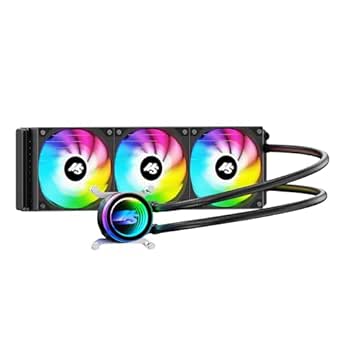 | Best for Simplified Fan Cabling | Radiator size: 360 mm | Pump speed: 3000 RPM | Fan count and size: Three 120 mm fans | VIEW ON AMAZON | See Our Full Breakdown |
| Thermalright Peerless Assassin 120 Vision MAX ARGB Black CPU Air Cooler |  | Best Air Cooler with a Large Display | Cooling method: Air | Design: Dual tower, dual fan | Display: 5-inch IPS LCD, 480 × 854 resolution | VIEW ON AMAZON | See Our Full Breakdown |
| Thermalright Assassin X 120R Digital ARGB Black CPU Cooler |  | Best Compact Display Air Cooler | Cooling method: Air | Dimensions: 120 × 71 × 151 mm | Heatsink material: Aluminum | VIEW ON AMAZON | See Our Full Breakdown |
| ASUS ROG Ryuo IV 360 ARGB Liquid CPU Cooler | 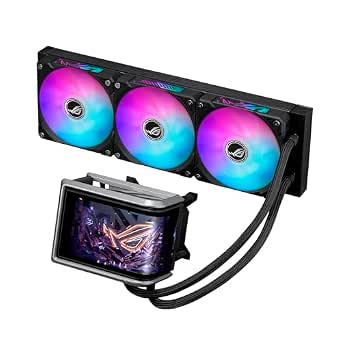 | Best Premium Display Build | Cooling type: 360 mm all-in-one liquid cooler | Pump: Asetek Emma Gen8 V2 | Display: 6.67-inch curved AMOLED, 2240 × 1080, 60 Hz | VIEW ON AMAZON | See Our Full Breakdown |
| ARCTIC Liquid Freezer III Pro 360 A-RGB Liquid CPU Cooler | 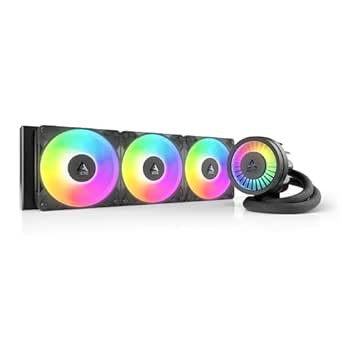 | Best Cooling-Focused 360 mm AIO | Cooling method: Liquid | Compatible sockets: Intel LGA1851, LGA1700; AMD AM4, AM5 | Maximum fan speed: 3000 rpm | VIEW ON AMAZON | See Our Full Breakdown |
| Thermalright Peerless Assassin 120 Vision MAX ARGB White CPU Air Cooler |  | Best Dual-Tower Air Cooler with LCD | Cooling method: Air | Dimensions: 125 × 135 × 164 mm | Display: 5-inch IPS LCD, 480 × 854 | VIEW ON AMAZON | See Our Full Breakdown |
| Thermalright FW360 SE ARGB V2 360mm AIO Liquid CPU Cooler with 2-Inch LCD |  | Best Compact-Screen 360 mm AIO | Cooling type: 360 mm AIO liquid CPU cooler | LCD: 2-inch, 320 × 320 | Radiator dimensions: 397 × 120 × 27 mm | VIEW ON AMAZON | See Our Full Breakdown |
| Thermalright Peerless Assassin 120 Vision MAX ARGB White CPU Air Cooler | | Best Air Cooler with an LCD Display | Cooler dimensions: 125 × 135 × 164 mm | Fan dimensions: 120 × 120 × 25 mm | Fan speed: 2150 RPM ±10% | VIEW ON AMAZON | See Our Full Breakdown |
| cpu cooler for vr gaming pc | Airflow | Compatible sockets | Fan speed | Noise level |
|---|---|---|---|---|
| MSI MPG CORELIQUID P13 360 AIO | 64.9 CFM | Intel LGA 1851, AMD AM5 | — | — |
| ASUS TUF Gaming LC III 360 ARG | 90.78 CFM | — | 650–2600 ± 10% RPM | 37.4 dB(A) |
| Thermalright Peerless Assassin | — | AMD AM4/AM5; Intel LGA 115X/1200/1700/17XX | 1550 RPM ±10% | ≤25.6 dB(A) |
| Minorsonic 360mm AIO CPU Coole | — | Intel LGA 1851/1700; AMD AM5/AM4 | — | 30 dB |
| Thermalright Peerless Assassin | 69 CFM | AMD AM4/AM5; Intel LGA1851/1700/1200/1150/1151/1155/1156 | 2150 RPM ±10% | — |
| Thermalright Assassin X 120R D | 70.84 CFM | — | 2000 RPM ±10% | Up to 29.8 dB(A) |
| ASUS ROG Ryuo IV 360 ARGB Liqu | 56.66 CFM | — | Up to 2000 rpm | — |
| ARCTIC Liquid Freezer III Pro | 77 CFM | Intel LGA1851, LGA1700; AMD AM4, AM5 | — | — |
| Thermalright Peerless Assassin | 69 CFM | AMD AM4/AM5; Intel LGA1851/1700/1150/1151/1155/1156/1200 | 2150 RPM ±10% | ≤27 dB(A) |
| Thermalright FW360 SE ARGB V2 | — | — | — | — |
| Thermalright Peerless Assassin | 69 CFM | AMD AM4/AM5; Intel LGA1851/1700/1150/1151/1155/1156/1200 | 2150 RPM ±10% | ≤27 dB(A) |
More Details on Our Top Picks
MSI MPG CORELIQUID P13 360 AIO ARGB CPU Liquid Cooler with 2.1-Inch LCD
For a VR gaming PC where a clean-looking build and at-a-glance system information matter, the MSI MPG CORELIQUID P13 pairs a 360 mm radiator with a 2.1-inch LCD for monitoring or custom visuals. Its hidden cable routing keeps the cooler head less cluttered than a display-equipped air option such as the Thermalright Peerless Assassin 120 Vision MAX, though that Thermalright avoids radiator placement altogether. Three ARGB PWM fans provide up to 64.9 CFM of airflow, and support for Intel LGA 1851 and AMD AM5 covers current platforms. The tradeoff is the space a 360 mm radiator needs: check case mounting and clearance before choosing it. The listed fan airflow also gives less performance context than a measured CPU-temperature result, so I would not rank it as a proven cooling leader on these details alone.
Pros:- 2.1-inch LCD supports system monitoring and custom visuals
- Hidden cable routing reduces visible wiring around the cooler head
- Supports Intel LGA 1851 and AMD AM5
- Three 120 mm ARGB PWM fans are rated for up to 64.9 CFM airflow
Cons:- Requires a case with suitable space and mounting points for a 360 mm radiator
- The listed airflow does not establish comparative CPU cooling performance
- Display features add complexity compared with a straightforward air cooler
Best for: VR builders with a 360 mm radiator mount who want system information or custom visuals on the pump head and support for AM5 or LGA 1851.
Not ideal for: Small-case builders or buyers prioritizing compact installation; the 360 mm radiator needs room, and an air cooler such as the Peerless Assassin 120 SE avoids radiator placement.
- Radiator size:360 mm
- Display:2.1-inch LCD
- Fans:Three 120 mm ARGB PWM fans
- Maximum fan speed:2050 rpm
- Airflow:64.9 CFM
- Compatible sockets:Intel LGA 1851, AMD AM5
- Warranty:5 years
Our verdict“Choose the MSI if you have room for a 360 mm radiator and want a tidy LCD-equipped build rather than a simpler air-cooling setup.”
ASUS TUF Gaming LC III 360 ARGB Liquid CPU Cooler
The ASUS TUF Gaming LC III 360 suits VR builders who want a 360 mm liquid cooler with broad socket support and a straightforward fan-control ecosystem. Its pre-installed fans can reduce assembly steps, while the 400 mm sleeved tubing gives some flexibility when routing the radiator. Compared with the MSI MPG CORELIQUID P13, this model lists higher fan airflow at 90.78 CFM and supports older Intel sockets as well as LGA 1851; the MSI counters with a pump-head LCD and hidden cable routing. ASUS also supports Aura Sync, useful for coordinating lighting across compatible parts. The main compromise is size, since a 397 mm radiator needs a case that can accommodate it, and the listed 37.4 dB(A) noise level may matter to builders who prefer a quieter system. I would favor the Peerless Assassin 120 SE for a simpler, radiator-free build.
Pros:- Three 120 mm fans come pre-installed
- Supports Intel LGA 1851, 1700, and 1200 plus AMD AM5 and AM4
- 400 mm reinforced sleeved tubing gives routing flexibility
- PWM fan control and Aura Sync support
Cons:- The 397 mm radiator requires a compatible case and mounting space
- Listed noise level is 37.4 dB(A)
- Lacks a display for system information or custom visuals
Best for: VR PC builders using a supported Intel or AMD socket who have room for a 360 mm radiator and want pre-installed fans with Aura Sync lighting control.
Not ideal for: Quiet-build planners or compact-case owners; the stated noise level is 37.4 dB(A), and the 397 mm radiator requires substantial mounting space.
- Radiator dimensions:397 × 120 × 27 mm
- Radiator material:Aluminum
- CPU plate material:Copper
- Tubing:400 mm sleeved rubber tube
- Fans:3 × 120 mm TUF Gaming MF-12 ARGB
- Fan speed:650–2600 ± 10% RPM
- Airflow:90.78 CFM
- Noise level:37.4 dB(A)
Our verdict“Pick the ASUS for a supported platform, pre-installed fans, and Aura Sync if your case can fit its 360 mm radiator.”
Thermalright Peerless Assassin 120 SE Dual-Tower CPU Cooler
The Thermalright Peerless Assassin 120 SE is the lineup’s straightforward air-cooling choice for VR builders who want to avoid radiator placement, pump hardware, and liquid-cooling connections. Its dual towers and six heat pipes work with two PWM fans, while the listed noise level is no more than 25.6 dB(A). Compared with the MSI MPG CORELIQUID P13 or ASUS TUF Gaming LC III 360, it gives up the convenience of a large radiator and the visual features of an LCD, but its 155 mm height can suit cases where a 360 mm radiator has nowhere to go. It is not a small cooler, though: the 125 × 135 mm footprint and height can interfere with case or memory clearance. AMD installation also requires the motherboard’s original backplate, so I would check parts and fit before ordering.
Pros:- Dual-tower design uses six 6 mm AGHP heat pipes
- Includes two 120 mm PWM fans
- Supports AMD AM4 and AM5 plus multiple Intel sockets
- Listed noise level is no more than 25.6 dB(A)
Cons:- Large dimensions may restrict case or memory clearance
- AMD installation requires the motherboard’s original backplate
- Has no LCD or listed ARGB lighting features
Best for: VR builders who want a no-radiator air cooler, support for AM4 or AM5 and several Intel sockets, and are willing to check case and memory clearance.
Not ideal for: Small-case builders, users with tall memory in the cooler’s path, or anyone seeking an LCD and ARGB-focused appearance.
- Cooling method:Air
- Heat pipes:6 × 6 mm AGHP
- Fans:2 × 120 mm PWM
- Fan speed:1550 RPM ±10%
- Maximum airflow:66.17 CFM
- Noise level:≤25.6 dB(A)
- Dimensions:125 × 135 × 155 mm
- Compatible sockets:AMD AM4/AM5; Intel LGA 115X/1200/1700/17XX
Our verdict“Choose the Peerless Assassin 120 SE if you prefer a substantial air cooler over a 360 mm AIO and have room for its dual-tower frame.”
Minorsonic 360mm AIO CPU Cooler with Ceramic Bearing Pump and ARGB Fans
The Minorsonic 360 mm AIO stands out for builders who want a full-size liquid cooler but would rather avoid separate fan and lighting leads for every fan. Its three 120 mm PWM ARGB fans daisy-chain through a single PWM and ARGB connection, which can make cable routing cleaner than the ASUS TUF Gaming LC III’s separately specified fan setup. The cooler lists a 3000 RPM ceramic bearing pump and support for AM4, AM5, LGA 1700, and LGA 1851, so it covers a useful range of VR gaming platforms. Compared with the MSI MPG CORELIQUID P13, it gives up the LCD and hidden pump-head cabling for simpler fan connections. The tradeoff is that the details provide no measured cooling results, and the 360 mm radiator still demands a compatible case.
Pros:- Three PWM ARGB fans daisy-chain through a single PWM and ARGB connection
- Ceramic bearing pump is specified at 3000 RPM
- Supports Intel LGA 1851/1700 and AMD AM5/AM4
- Fans adjust speed based on system temperature
Cons:- Requires space for a 360 mm radiator
- Product details provide no measured cooling performance
- No LCD is listed for system monitoring or custom visuals
Best for: VR builders with a 360 mm radiator mount who want ARGB lighting and a daisy-chain fan connection to simplify internal cabling.
Not ideal for: Compact-case owners or buyers who want documented comparative cooling results or a pump-head display.
- Radiator size:360 mm
- Pump speed:3000 RPM
- Fan count and size:Three 120 mm fans
- Maximum fan speed:1600 RPM
- Noise level:30 dB
- Power connector:4-pin
- Wattage:5 W
- Compatible sockets:Intel LGA 1851/1700; AMD AM5/AM4
Our verdict“Choose the Minorsonic if cleaner fan cabling matters more to you than a display or published cooling measurements.”
Thermalright Peerless Assassin 120 Vision MAX ARGB Black CPU Air Cooler
The Peerless Assassin 120 Vision MAX combines a dual-tower air cooler with a 5-inch IPS display, making it the distinctive option for VR builders who want system visuals without installing a 360 mm radiator. Its six copper heat pipes and two 120 mm fans provide the cooling hardware, while the screen can show monitoring information or custom backgrounds. Compared with the MSI MPG CORELIQUID P13, it trades a smaller 2.1-inch screen and liquid cooling for a larger display on an air cooler; compared with the Peerless Assassin 120 SE, it adds a visual feature but also more connection requirements. The 164 mm height and 9-pin motherboard USB header requirement deserve a compatibility check. It may accommodate tall RAM and GPU installations by design, but that does not remove the need to verify case and motherboard clearance.
Pros:- 5-inch IPS LCD supports system monitoring and custom backgrounds
- Six 6 mm copper heat pipes and two 120 mm fans
- Supports a broad range of AMD and Intel sockets, including LGA 1851
- Designed to accommodate tall RAM and GPU installations
Cons:- Display requires a 9-pin motherboard USB header
- At 164 mm tall, it needs suitable case clearance
- AMD installation requires the motherboard’s original backplate
Best for: VR builders who want a large system-information display on an air cooler and have a 9-pin motherboard USB header plus enough case clearance.
Not ideal for: Builders seeking the simplest installation, cases with limited cooler height, or motherboards without an available 9-pin USB header for the display.
- Cooling method:Air
- Design:Dual tower, dual fan
- Display:5-inch IPS LCD, 480 × 854 resolution
- Heat pipes:6 × 6 mm copper
- Dimensions:125 × 135 × 164 mm
- Fan speed:2150 RPM ±10%
- Airflow:69 CFM
- Compatible sockets:AMD AM4/AM5; Intel LGA1851/1700/1200/1150/1151/1155/1156
Our verdict“Pick this Thermalright if you want a large display without a radiator and can meet its USB-header and clearance requirements.”
Thermalright Assassin X 120R Digital ARGB Black CPU Cooler
The Assassin X 120R Digital suits a VR gaming build that needs a modest-footprint air cooler with a screen, rather than a large liquid loop. Its 151 mm height fits more cases than the taller Peerless Assassin 120 Vision MAX, though its single 120 mm fan and heatsink are a less substantial cooling setup than that dual-tower model. The PWM fan can ramp with CPU temperature, which is useful when game loads fluctuate, and its stated noise ceiling is 29.8 dB(A). The display adds a system-status feature, but it needs a free 9-pin USB header and TRCC software; that extra setup will not help buyers who only want straightforward cooling. AMD installation also depends on the motherboard’s original backplate, so check that it is available before starting.
Pros:- 151 mm height fits many cases that may not accommodate the taller Peerless Assassin 120 Vision MAX.
- PWM control adjusts fan speed in response to motherboard temperature.
- Supports a broad range of Intel sockets plus AMD AM4 and AM5.
- Digital display provides a visual way to show system information.
Cons:- Single-fan, single-tower design is less substantial than the Peerless Assassin 120 Vision MAX dual-tower setup.
- Display requires a 9-pin motherboard USB header and TRCC software.
- AMD installation requires the motherboard’s original backplate.
Best for: VR PC builders with a case that has limited cooler height who want a small system-information display and socket flexibility.
Not ideal for: Buyers seeking the stronger heatsink capacity of a dual-tower air cooler, or anyone without a spare motherboard USB header for the display.
- Cooling method:Air
- Dimensions:120 × 71 × 151 mm
- Heatsink material:Aluminum
- Fan size:120 × 120 × 25 mm
- Fan speed:2000 RPM ±10%
- Airflow:70.84 CFM
- Noise level:Up to 29.8 dB(A)
- Display connection:9-pin motherboard USB header
- Socket compatibility:Intel LGA 1150, 1151, 1155, 1156, 1200, 1700, 1851; AMD AM4, AM5
Our verdict“Choose this compact air cooler if your VR build needs a small display and a 151 mm cooler, but skip it if you want a more substantial heatsink or a display-free setup.”
ASUS ROG Ryuo IV 360 ARGB Liquid CPU Cooler
The ROG Ryuo IV 360 is aimed at VR builders who want a prominent display as much as they want a 360 mm liquid cooler. Its 6.67-inch curved AMOLED screen offers far more room for system information and custom visuals than the small LCD on the Thermalright FW360 SE ARGB V2. Daisy-chained fans and pre-applied thermal paste also reduce some assembly and cable-management work. That premium presentation comes with a substantial fit commitment: the radiator measures 399.5 × 120 × 30 mm, the tubes are 400 mm long, and the large screen needs clearance around the CPU area. The supplied figures list fan airflow at 56.66 CFM, so I would not choose it on the assumption that display size alone guarantees stronger cooling than the ARCTIC Liquid Freezer III Pro 360.
Pros:- Large curved 6.67-inch AMOLED display supports system information and custom visuals.
- Daisy-chained ARGB fans simplify cable management.
- Pre-applied thermal paste reduces a setup step.
- Six-year AIO cooler warranty is stated in the product data.
Cons:- Large display and 399.5 mm radiator demand careful case-clearance checks.
- The listed airflow is 56.66 CFM, so the specs do not establish a cooling advantage over the ARCTIC Liquid Freezer III Pro 360.
- Display features add setup and software needs beyond a basic cooler.
Best for: VR PC builders planning a spacious case and prioritizing a large, customizable hardware display alongside a 360 mm AIO.
Not ideal for: Compact-case builders or buyers who want cooling-focused value without paying for a large screen and its clearance demands.
- Cooling type:360 mm all-in-one liquid cooler
- Pump:Asetek Emma Gen8 V2
- Display:6.67-inch curved AMOLED, 2240 × 1080, 60 Hz
- Fan speed:Up to 2000 rpm
- Airflow:56.66 CFM
- Radiator dimensions:399.5 × 120 × 30 mm
- Tube length:400 mm
- Socket compatibility:Intel LGA 1851, 1700, 1200, 115X; AMD AM5, AM4
- Warranty:2 years for display; 6 years for AIO cooler
Our verdict“Pick the Ryuo IV 360 for a spacious VR build where its large AMOLED display is a central feature, not for a compact or cooling-first system.”
ARCTIC Liquid Freezer III Pro 360 A-RGB Liquid CPU Cooler
The ARCTIC Liquid Freezer III Pro 360 is the cooling-first choice in this group: its copper cold plate, offset mounting, and included Intel contact frame are designed around CPU heat transfer rather than a showpiece screen. The integrated VRM fan also directs airflow toward motherboard power components, a useful extra for a sustained gaming system. Compared with the display-led ASUS ROG Ryuo IV 360, this model puts more of its design into thermal hardware and less into visual customization. Its stated fan speed reaches 3000 rpm, but that figure alone does not tell you how loud the full cooler will be. The main tradeoff is fit: a 360 mm radiator needs a compatible case, and socket support is limited to Intel LGA1851/LGA1700 and AMD AM4/AM5.
Pros:- Offset copper cold plate is designed to improve contact at the CPU hotspot.
- Integrated PWM-controlled VRM fan adds airflow around motherboard power components.
- Hose sheathing integrates radiator fan cables for tidier routing.
- Six-year warranty is stated in the product data.
Cons:- Requires room for a 360 mm radiator.
- Socket support is narrower than the ASUS ROG Ryuo IV 360, which also lists LGA1200 and LGA115X.
- No display for system monitoring or custom visuals.
Best for: VR builders with a 360 mm radiator mount who want a feature-rich cooler centered on CPU and VRM heat management rather than an LCD.
Not ideal for: Owners of smaller cases, unsupported CPU sockets, or systems where a display and custom visuals matter more than cooling-focused features.
- Cooling method:Liquid
- Compatible sockets:Intel LGA1851, LGA1700; AMD AM4, AM5
- Maximum fan speed:3000 rpm
- Airflow:77 CFM
- Dimensions:15.7 × 4.7 × 2.9 in
- Materials:Copper, metal, plastic, rubber
- Weight:2020 g
- Warranty:6 years
Our verdict“Choose the Liquid Freezer III Pro 360 if your case and socket fit and you want cooling-focused hardware rather than a prominent display.”
Thermalright Peerless Assassin 120 Vision MAX ARGB White CPU Air Cooler
The white Peerless Assassin 120 Vision MAX pairs a substantial dual-tower air cooler with a 5-inch screen, making it a fit for VR builders who want system monitoring without installing an AIO. Its six copper heat pipes and two 120 mm fans give it a more substantial cooling layout than the single-tower Assassin X 120R Digital, while its stated noise level is no more than 27 dB(A). That size has a cost: at 164 mm tall, it needs more case clearance than the Assassin X’s 151 mm height. The display also uses a motherboard USB header, adding another connection to plan around. Buyers should check case height and memory-area clearance before choosing this air option; those with room gain a screen and cooling hardware without a radiator or pump.
Pros:- Dual-tower heatsink, two fans, and six copper heat pipes provide a more substantial air-cooling layout than the Assassin X 120R.
- 5-inch IPS LCD supports system monitoring and custom displays.
- Listed noise level is no more than 27 dB(A).
- Supports current AMD AM4/AM5 and a broad range of Intel sockets.
Cons:- 164 mm height can rule it out for cases with limited CPU-cooler clearance.
- Display connection requires a motherboard USB header.
- AMD installation requires the motherboard’s original backplate.
Best for: VR PC builders with a roomy case who prefer a dual-tower air cooler and want a built-in display for system information or custom visuals.
Not ideal for: Small-case builders or anyone who needs a shorter cooler, lacks a suitable motherboard USB header, or wants liquid cooling.
- Cooling method:Air
- Dimensions:125 × 135 × 164 mm
- Display:5-inch IPS LCD, 480 × 854
- Fan dimensions:120 × 120 × 25 mm
- Fan speed:2150 RPM ±10%
- Airflow:69 CFM
- Noise level:≤27 dB(A)
- Heat pipes:Six copper
- Compatible sockets:AMD AM4/AM5; Intel LGA1851/1700/1150/1151/1155/1156/1200
Our verdict“Choose this model for a roomy white-themed VR build that needs dual-tower air cooling and an LCD, but verify case height before buying.”
Thermalright FW360 SE ARGB V2 360mm AIO Liquid CPU Cooler with 2-Inch LCD
The FW360 SE ARGB V2 gives VR builders a 360 mm liquid cooler and a small status screen without the large display footprint of the ASUS ROG Ryuo IV 360. Its 2-inch, 320 × 320 LCD supports system status, images, and GIFs, while three PWM ARGB fans can be daisy-chained to reduce cable clutter. The radiator is listed at 397 × 120 × 27 mm, so a 360 mm mount is still required; the smaller screen does not make the radiator compact. The 3000 RPM pump and fans rated up to 2000 RPM provide the stated hardware details, but the listing gives conflicting warranty terms—five years in the description and three years in item details. I would confirm coverage before choosing it over a cooling-focused option such as the ARCTIC Liquid Freezer III Pro 360.
Pros:- 2-inch LCD supports system status, custom images, and GIFs.
- Three PWM ARGB fans can be daisy-chained to reduce cable clutter.
- Supports AMD AM4/AM5 and several Intel socket platforms.
- Radiator is listed at 27 mm thick.
Cons:- Requires a case with space for a 360 mm radiator.
- LCD control requires a motherboard USB 9-pin connection and Thermalright software.
- Warranty information conflicts between the description and item details.
Best for: VR builders with a 360 mm radiator mount who want customizable LCD visuals but prefer a smaller screen than the ASUS ROG Ryuo IV 360.
Not ideal for: Small-case owners, buyers who want to avoid software and USB-header setup, or anyone who needs clear warranty terms before purchase.
- Cooling type:360 mm AIO liquid CPU cooler
- LCD:2-inch, 320 × 320
- Radiator dimensions:397 × 120 × 27 mm
- Pump speed:3000 RPM ±10%
- Fans:3 × TL-M12Q 120 mm PWM ARGB
- Maximum fan speed:2000 RPM ±10%
- Maximum airflow:68.9 CFM
- Tube length:400 mm
- Compatibility:AMD AM5/AM4; Intel LGA1851/1700/1200/115X
Our verdict“Pick the FW360 SE ARGB V2 if a customizable small LCD matters and your case supports a 360 mm radiator, but verify warranty coverage first.”
Thermalright Peerless Assassin 120 Vision MAX ARGB White CPU Air Cooler
For a VR gaming PC where I want air cooling plus visible system readouts, this white dual-tower cooler is the standout choice. Its 5-inch IPS LCD can show monitoring data or custom backgrounds, adding a dashboard without taking up a case’s front-panel space. Two PWM fans and a 69 CFM airflow rating give it a more substantial cooling setup than the single-tower Thermalright Assassin X 120R Digital ARGB, while avoiding the radiator and pump of 360 mm liquid options such as the ASUS TUF Gaming LC III 360. The tradeoff is fit and setup: at 164 mm tall, it needs a case with adequate cooler clearance, and the screen needs a motherboard 9-pin USB connection. It’s a feature-rich air-cooling pick, not the simplest choice for a compact or cable-limited build.
Pros:- 5-inch IPS LCD supports system monitoring and customizable backgrounds
- Dual-tower heatsink and two PWM fans provide a more substantial cooling setup than a single-tower design
- Broad socket support includes AMD AM4/AM5 and several Intel LGA platforms
- Fan splitter lets both fans connect to one motherboard header
Cons:- 164 mm height rules it out for cases with less CPU-cooler clearance
- LCD requires a motherboard 9-pin USB connection
- AMD installation requires the motherboard’s original backplate
Best for: Builders of white-themed VR gaming PCs who want a large customizable system display, dual-fan air cooling, and a case with at least 164 mm of CPU-cooler clearance.
Not ideal for: Compact-case builders or anyone without an available motherboard 9-pin USB connection; AMD builders who have misplaced the motherboard’s original backplate should also skip it.
- Cooler dimensions:125 × 135 × 164 mm
- Fan dimensions:120 × 120 × 25 mm
- Fan speed:2150 RPM ±10%
- Airflow:69 CFM
- Noise level:≤27 dB(A)
- LCD screen:5-inch IPS, 480 × 854
- Fan and RGB connectors:4-pin PWM; 5V 3-pin ARGB
- Compatible sockets:AMD AM4/AM5; Intel LGA1851/1700/1150/1151/1155/1156/1200
- Material and bearing:Aluminum; S-FDB V2
Our verdict“Choose this white dual-tower cooler if your case fits its 164 mm height and you want a large customizable LCD without moving to a 360 mm liquid cooler.”

How We Picked
I ranked these coolers for the demands of a VR gaming PC: sustained CPU cooling, practical noise potential, installation and upkeep, physical compatibility, and the features that matter during a long gaming session. A cooler’s type or feature list alone does not establish how well it will perform on a particular processor, so I treated radiator size, tower design, and pump features as indicators to compare—not a substitute for checking independent performance data and your CPU’s power demands.
The ordering favors balanced fit for purpose over visual extras. The ARCTIC Liquid Freezer III Pro 360 leads for buyers with room for a 360 mm radiator and a cooling-first priority; the Peerless Assassin 120 SE ranks as a simpler air alternative. LCD-equipped and premium AIO models suit shoppers who value display features and build presentation, while compact or less elaborate air-cooling options make more sense for modest builds. I also distinguish the two identical Thermalright Peerless Assassin 120 Vision MAX ARGB White listings rather than treating them as separate designs.
| cpu cooler for vr gaming pc | Compatible sockets |
|---|---|
| MSI MPG CORELIQUID P13 360 AIO | Intel LGA 1851, AMD AM5 |
| ASUS TUF Gaming LC III 360 ARG | — |
| Thermalright Peerless Assassin | AMD AM4/AM5; Intel LGA 115X/1200/1700/17XX |
| Minorsonic 360mm AIO CPU Coole | Intel LGA 1851/1700; AMD AM5/AM4 |
| Thermalright Peerless Assassin | AMD AM4/AM5; Intel LGA1851/1700/1200/1150/1151/1155/1156 |
| Thermalright Assassin X 120R D | — |
| ASUS ROG Ryuo IV 360 ARGB Liqu | — |
| ARCTIC Liquid Freezer III Pro | Intel LGA1851, LGA1700; AMD AM4, AM5 |
| Thermalright Peerless Assassin | AMD AM4/AM5; Intel LGA1851/1700/1150/1151/1155/1156/1200 |
| Thermalright FW360 SE ARGB V2 | — |
| Thermalright Peerless Assassin | AMD AM4/AM5; Intel LGA1851/1700/1150/1151/1155/1156/1200 |
Factors to Consider When Choosing Cpu Cooler For Vr Gaming Pc
Choosing a CPU cooler for VR gaming starts with the whole system, not a single headline feature. Use these checks to avoid paying for cooling headroom your processor and case cannot use, or choosing a cooler that complicates an otherwise reliable build.
Match Cooling Capacity to Your CPU
Start with your exact processor model and its power behavior under sustained workloads, rather than assuming every VR PC needs a 360 mm AIO. A high-power CPU that also handles streaming or background tasks can benefit from more cooling headroom than a modest gaming chip. Cooler size alone does not tell you how quiet or effective a particular model will be, so compare independent thermal and noise measurements for your processor class when available. A large radiator may let fans run more gently, but only if the radiator and fans fit and airflow through the case is sound. For a lower-power CPU, a capable tower air cooler may avoid unnecessary pump complexity. Leave headroom for warm room temperatures and long sessions rather than choosing solely around a brief gaming load.
Check Case, Socket, and Memory Clearance
Before choosing between a tower cooler and an AIO, check the case manual for CPU cooler height and radiator support at the front, top, and side. A 360 mm radiator can conflict with motherboard heatsinks, memory, or a long graphics card, depending on where it is mounted. Tower coolers have a different set of constraints: their height, width, and fan position can interfere with the side panel or tall RAM. Confirm support for your motherboard socket from the cooler manufacturer, and check whether the required mounting hardware is included for your build. Do not rely on a case listing that only says it supports liquid cooling; verify the radiator thickness plus fan thickness at the intended location. A simple clearance check can prevent choosing a cooler that cannot be installed as planned.
Decide Whether an AIO’s Complexity Pays Off
An AIO can suit a powerful CPU, a radiator-friendly case, or a build where a clear motherboard area is part of the design. It also adds a pump, tubing, radiator, and more installation steps than a basic air cooler. Air coolers avoid those liquid-cooling components and are often easier to maintain, though they still need accessible mounting space and dust cleaning. Neither style guarantees silence: fan curves, pump behavior, case airflow, and the CPU’s heat output all affect noise. If reliability and a simpler build matter more than radiator placement or appearance, air cooling deserves serious attention. Choose an AIO because its capacity and layout fit your needs, not because liquid cooling is automatically better for VR.
Treat LCDs and RGB as Build Features, Not Cooling Proof
LCD panels and ARGB lighting can personalize a PC, but they do not establish how a cooler performs under sustained load. Displays may also bring extra software, cabling, or configuration steps, so consider whether you will use the screen after setup. If you want a clean, low-maintenance system, simpler lighting or no display may be a better fit. The LCD-equipped models in this roundup are useful distinctions for shoppers who value presentation, but compare their mounting needs and software requirements with the cooling-focused options. RGB components also need compatible headers or a controller if you want synchronized lighting. Set a feature budget only after the cooler meets your thermal and fit requirements.
Plan for VR Session Noise and Airflow
A headset can make fan noise less noticeable for some players, but noise still matters to anyone sharing the room or using a microphone. A cooler cannot compensate for a poorly ventilated case, so plan intake and exhaust airflow alongside the CPU cooler. Dust filters, room temperature, and nearby heat from a powerful graphics card can affect sustained temperatures. Tune fan curves gradually: an aggressive curve may add noise without much practical benefit, while an overly quiet setting can let temperatures climb. Check independent acoustic results alongside thermal measurements rather than treating fan count as a noise measure. For VR, a stable, comfortable system over a full session is more useful than a short-lived peak result.
Choose for the Whole Build, Not Just the CPU
VR gaming often places substantial demands on the graphics card, so do not spend the entire cooling budget on the CPU while leaving the case with poor airflow. Consider whether the processor will also be used for rendering, streaming, or other sustained workloads; those tasks can change the cooler you need. Think about upgrade plans too, since a future CPU may have different power and socket requirements. A larger cooler may offer more headroom, but it can also occupy space needed for other parts or complicate servicing. For a first build, clear installation instructions and accessible mounting can be more valuable than a display feature. Balance CPU cooling, GPU airflow, case fit, and the build’s actual workload before deciding.
Frequently Asked Questions
Do I need a 360 mm AIO for a VR gaming PC?
No. A 360 mm AIO is most relevant when your CPU produces substantial heat under sustained workloads and your case has room for the radiator. Many gaming-focused processors can be paired with a suitable air cooler, including options such as the Peerless Assassin 120 SE in this roundup. VR itself does not make every CPU require liquid cooling; processor model, workload, room temperature, and case airflow matter more. Check independent performance data for your CPU before buying. If the radiator creates a difficult fit, a capable air cooler may be the more practical choice.
Will an air cooler or an AIO be quieter during long VR sessions?
Neither cooler type is automatically quieter, because fan curves, pump noise, case airflow, and CPU heat all affect the result. An AIO’s larger radiator can spread heat across more surface area, but its pump adds another possible sound source. An air cooler has no pump, though its fans may need to work harder if the CPU or case runs hot. Look for independent noise measurements under comparable loads rather than judging by fan count or product category. A well-ventilated case and a measured fan curve can matter as much as the cooler itself.
How can I tell whether a 360 mm radiator will fit my case?
Check the case maker’s radiator support at the exact mounting location you plan to use, then compare it with the cooler’s radiator and fan dimensions. Radiator-plus-fan thickness can conflict with motherboard heatsinks, memory, or the graphics card even when a case lists 360 mm support. Also check whether the tubing can reach the intended position without sharp bends or awkward tension. A top mount and a front mount can have different clearance limits. If the case documentation is unclear, confirm the dimensions with the case and cooler manufacturers before ordering.
Are the LCD coolers worth choosing over simpler models?
An LCD makes sense if you value a customizable display or want the cooler to serve as a visible part of the build. It does not prove stronger cooling than a simpler model, so compare thermal and acoustic data separately. Screen features may also bring extra cables, software, or setup steps that are unnecessary for a system you want to keep simple. The MSI MPG CORELIQUID P13 and Thermalright FW360 SE V2 are display-oriented choices in this lineup, while the Peerless Assassin 120 SE keeps the focus on air cooling. Decide whether you will use the display regularly before making it a deciding feature.
What should I prioritize if my VR PC will also stream or render?
Streaming, rendering, and other sustained CPU workloads can keep the processor under load longer than gaming alone, so start with the CPU’s power behavior and reliable performance measurements. Then check that the cooler can handle those workloads without excessive noise in your particular case. A 360 mm AIO may suit a high-heat processor when the case supports it, while a strong dual-tower air cooler can be a simpler alternative for compatible builds. Make sure the case has enough airflow, since a CPU cooler cannot remove heat effectively from a poorly ventilated system. Choose for the combined workload rather than the VR headset alone.
Conclusion
For the strongest cooling-focused match in this roundup, I’d start with the ARCTIC Liquid Freezer III Pro 360 A-RGB, provided your case supports its radiator. For best value and simpler ownership, the Thermalright Peerless Assassin 120 SE is the air-cooling pick; it also makes sense for beginners who want to avoid pump and radiator setup. Buyers who want a polished display feature can look at the MSI MPG CORELIQUID P13 360 or Thermalright FW360 SE V2, while the ASUS ROG Ryuo IV 360 is the premium-leaning choice for shoppers focused on presentation. For a white-themed air-cooled build, the Peerless Assassin 120 Vision MAX ARGB White fits the brief, though the two identical listings are not separate cooler designs. My final filter is simple: confirm CPU needs and case clearance first, then choose between cooling headroom, easier upkeep, and display or lighting features.