Desk-mounted power strips bring outlets and charging ports within reach while clearing plugs from the floor, but the right choice depends on desk fit, outlet count, and how much USB charging you need. I’d put the Jgstkcity 65W four-USB-C model first for its combination of fast charging and stated surge protection. The VILONG 13-outlet dual-layer model suits a crowded workstation, while the Acozvin 10-foot model stands out when the nearest wall outlet is far away. The main tradeoffs are clamp compatibility, charging capacity, cord reach, and how much space the strip takes up. Read on for how all 15 options compare and which one fits your setup.

Get audio and creator gear delivered free with Prime
- Fast, free delivery on millions of items
- Prime Video, Amazon Music and more included
- Member-only deals all year
Complete the kit



Key Takeaways
- Charging and outlet capacity pull in different directions: Jgstkcity’s 65W four-USB-C model emphasizes device charging, while VILONG’s 13-outlet version prioritizes connecting more equipment.
- Desk-edge fit is a deciding factor, not a minor detail: several models specify a maximum tabletop thickness around 2.1 inches, so measuring your desk before choosing a clamp can prevent a poor fit.
- Cord length changes where a mounted strip can work: the Acozvin’s 10-foot cable offers more placement flexibility than the many 5- or 6-foot options.
- More outlets can mean a larger unit: dual-layer and 12- or 15-outlet designs suit equipment-heavy desks but may take up more edge space than compact clamp models.
- USB port count alone does not reveal charging performance: the roundup includes models with stated 20W, 30W, 40W, 45W, and 65W charging, so match the total output to your devices.




| deskmounted power strip | AC outlets | USB ports | Surge protection | Maximum current |
|---|---|---|---|---|
| Jgstkcity Desk Clamp Power Str | 5 | 4 USB-C and 2 USB-A | 1200 joules | 12A |
| 360° Mountable Surge Protector | 6 | 4: 2 USB-C and 2 USB-A | 1800 joules | 13A |
| CCCEI Wall Mount Power Strip w | 6 | 3: 2 USB-C and 1 USB-A | — | 10A |
| 6.5 FT Desk Clamp Power Strip | 5 | 6: 4 USB-C and 2 USB-A | — | — |
| Jgstkcity Desk Clamp Power Str | 5 | 8: 4 USB-C and 4 USB-A | — | 15A |
| TROND Compact Desk Clamp Power | 6 | 4 | — | 13 A |
| TROND Desk Clamp Power Strip w | 5 | 3 | 1,440 joules | 10 A |
| VILONG Dual Layer Desk Clamp P | 13 | 4, including 2 USB-C | 1,200 joules | 12 A |
| VILONG Dual Layer Desk Clamp P | 10 | 3 | 700 joules | 12 A |
| Jgstkcity Desk Clamp Power Str | 5 | — | 1,200 joules | — |
| Mifaso PD30W Desk Clamp Power | 4 | 2 USB-A, 1 USB-C | 1080J | — |
| Desk Clamp Power Strip 10FT | 9 | 8 | — | 15A |
| Jgstkcity Desk Clamp Power Str | 3 | — | — | — |
| 40W Under Desk Power Strip wit | 12 | 4 | 1200J | — |
| CCCEI Standing Desk Clamp Powe | 15 | 2 USB-A, 1 USB-C | 1200J | — |
More Details on Our Top Picks
Jgstkcity Desk Clamp Power Strip with USB-C and Surge Protection
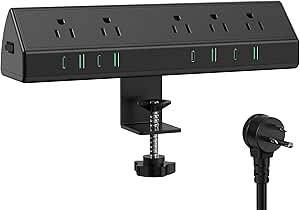
For a desk-edge mount that combines device charging with stated surge protection, this Jgstkcity is a strong fit. Its five AC outlets handle desk equipment, while four USB-C ports and two USB-A ports reduce the need for separate charging bricks. The 1200-joule rating adds a layer of surge protection that the CCCEI Wall Mount Power Strip does not specify, though CCCEI offers six AC outlets and a longer, 6-foot cord. This Jgstkcity’s clamp suits desk edges up to 1.96 inches, so measure before buying; it also needs clearance around the mounting area. The USB-C ports are rated at 20W each, but total USB output is limited to 40W, so several connected devices may share charging capacity rather than all receiving fast charging at once.
Pros:- Clamp mount places outlets and charging ports at the desk edge.
- Four USB-C and two USB-A ports support a mix of newer and older devices.
- 1200-joule surge protection is specified.
- Widely spaced AC outlets make plugs easier to fit side by side.
Cons:- Clamp fits desk edges only up to 1.96 inches thick.
- Total USB output is limited to 40W despite the four USB-C ports.
- Needs enough desk-edge clearance for the clamp and mounted unit.
Best for: Desk workers with several phones, earbuds, or other USB-C devices who want a clamp mount and specified surge protection.
Not ideal for: Owners of desks thicker than 1.96 inches, or users who need high USB charging output for several devices at once.
- AC outlets:5
- USB ports:4 USB-C and 2 USB-A
- USB-C output:20W each
- Total USB output:40W
- Surge protection:1200 joules
- Maximum current:12A
- Dimensions:11.5 × 1.9 inches
- Maximum clamp thickness:1.96 inches
- Material:Fireproof plastic
Our verdict“Choose this Jgstkcity if you want a desk-edge charging hub with multiple USB-C ports and stated surge protection, provided its clamp fits your desk.”
360° Mountable Surge Protector Power Strip with 4 USB Ports (2 USB-C), 6 ft Extension Cord, Flat Plug, White
This is the most adaptable mounting option in this group: its design supports installation under a desk, on a wall, or around furniture, rather than relying on a desk-edge clamp. That flexibility suits shared workspaces or desks where a clamp would obstruct the edge. It also supplies six AC outlets, four USB ports, and a stated 1800-joule surge rating. Compared with the Jgstkcity Desk Clamp Power Strip with USB-C and Surge Protection, it has one extra AC outlet and a higher listed surge rating, but only two USB-C ports and no clamp to keep the outlets directly at hand. The six-foot cord and flat plug help with placement behind furniture. Its 13A limit is not intended for high-power appliances, and overload protection can trip when too many demanding devices are connected.
Pros:- Mountable design offers under-desk, wall, and furniture placement options.
- Six AC outlets and four USB ports support a busy workstation.
- 1800-joule surge protection is specified.
- Flat plug and six-foot cord make placement easier behind furniture.
Cons:- Does not use a desk-edge clamp, so mounting and outlet access depend on installation location.
- 13A maximum current limits suitability for high-power equipment.
- Overload protection may trip when several demanding devices are connected.
Best for: People setting up a desk against a wall or beneath a surface who want multiple mounting choices, six outlets, and surge protection.
Not ideal for: Buyers who specifically want a clamp-mounted strip within easy reach at the desk edge, or who plan to run high-power equipment.
- AC outlets:6
- USB ports:4: 2 USB-C and 2 USB-A
- Maximum current:13A
- Surge protection:1800 joules
- Cord length:6 feet
- Dimensions:12.8 × 2.2 × 1.3 inches
- Voltage:125V
- Material:Acrylonitrile butadiene styrene and polycarbonate
- Plug type:Type B
Our verdict“Pick this model if flexible mounting and a six-foot reach matter more than having a clamp-mounted outlet strip at the desk edge.”
CCCEI Wall Mount Power Strip with USB Ports, 6ft Flat Plug Extension Cord
The CCCEI is a practical choice when the aim is to mount a power strip near a desk without adding a clamp to its edge. Its slim body and 90-degree flat plug suit tight spaces, while the six-foot cord gives more flexibility than the desk-clamped 6.5 FT Desk Clamp Power Strip, whose cord length is not specified in the provided details. CCCEI also has six AC outlets and three USB ports, including two 20W USB-C ports and a 15W USB-A port. That charging mix is clearly specified, but it has fewer USB ports than either Jgstkcity clamp option in this batch. Unlike the 360° Mountable Surge Protector, the product data does not state a surge-protection rating. Its 10A limit also makes it a less fitting choice for setups with several power-hungry devices.
Pros:- Slim design and 90-degree flat plug fit tight spaces near a desk.
- Six AC outlets accommodate a range of desk equipment.
- Two USB-C ports provide up to 20W each, with a 15W USB-A port as well.
- Six-foot cord allows flexible placement relative to the wall outlet.
Cons:- No surge-protection feature is specified in the product data.
- 10A maximum current is limiting for power-hungry setups.
- Three USB ports provide fewer charging connections than the Jgstkcity clamp models.
Best for: Home-office users who need a slim, wall-mounted strip with a six-foot cord and a couple of fast-charging USB-C ports.
Not ideal for: Buyers who require stated surge protection, more than three USB ports, or capacity for multiple high-power devices.
- AC outlets:6
- USB ports:3: 2 USB-C and 1 USB-A
- USB-C output:20W maximum per port
- USB-A output:15W maximum
- Maximum current:10A
- Cord length:6 feet
- Plug type:Type A, 2-pin North American
- Enclosure material:Acrylonitrile butadiene styrene
Our verdict“Choose CCCEI for a low-profile wall-mounted setup with a long cord, but skip it if surge protection or higher electrical capacity is a priority.”
6.5 FT Desk Clamp Power Strip with 5 AC Outlets & 6 USB Ports, PD 40W USB-C Fast Charging, Extension Cord with Multiple Outlets, Fits 2.1 in Top Edge, Black
With five AC outlets and six USB ports, this clamp-mounted strip gives a desk setup more direct charging connections than either Jgstkcity model in this batch. Its four USB-C and two USB-A ports suit a mix of newer and older devices, while 40W total USB output can serve everyday charging needs. The tradeoff is that the 40W is shared across the USB charging system, not 40W for every port. The clamp fits desk edges up to 2.1 inches, slightly thicker than the limit on the Jgstkcity Desk Clamp Power Strip with USB-C and Surge Protection. It also lists overload and short-circuit protection, but no surge-protection rating. The product title states a 6.5-foot cord, while the supplied spec details leave cord length unspecified, so check the listing if reach is a deciding factor.
Pros:- Six USB ports provide more charging connections than the other products in this batch.
- Four USB-C and two USB-A ports accommodate a mix of devices.
- Tool-free clamp mount fits desk edges up to 2.1 inches.
- Overload and short-circuit protection are specified.
Cons:- No surge-protection rating is provided.
- 40W total USB output is shared rather than available to every port.
- Cord length is stated in the title but not in the supplied technical specs.
Best for: Desk users who want many USB charging connections in a single clamp-mounted unit and have a desk edge no thicker than 2.1 inches.
Not ideal for: Buyers who need a stated surge rating, a clamp that fits thicker desks, or individually high-output USB charging across several ports.
- AC outlets:5
- USB ports:6: 4 USB-C and 2 USB-A
- Total USB output:40W
- USB-C output:20W per port
- Maximum clamp thickness:2.1 inches
- Cord length:6.5 feet (stated in product title)
- Protection:Overload and short-circuit protection
Our verdict“Choose this clamp strip if your priority is a high number of USB connections, not a specified surge rating or high shared charging output.”
Jgstkcity Desk Clamp Power Strip, 45W Fast Charging Station, 4 USB-C, 4 USB-A, Surge Protector, 1875W Extension Cord, ETL Listed
This Jgstkcity’s defining advantage is its eight USB ports: four USB-C and four USB-A let a desk serve newer phones alongside older accessories without extra adapters. It also adds five AC outlets, a desk clamp, and stated surge and overload protection, making it more balanced for mixed-device charging than the 6.5 FT Desk Clamp Power Strip, which has six USB ports but clearly lists 40W total USB output. The title here specifies 45W fast charging, though the supplied specs do not break down output by port. A 14AWG heavy-duty cord and 15A maximum current support a substantial desk setup, but the clamp limit is 1.96 inches and the North American plug restricts where it can be used. Despite its eight USB ports, the five AC outlets may not cover a workstation with many plugged-in peripherals.
Pros:- Eight USB ports cover both USB-C and USB-A devices.
- Desk clamp keeps the strip mounted at the work surface.
- Surge and overload protection are specified.
- 14AWG heavy-duty cord and 15A maximum current suit a substantial desk setup.
Cons:- Clamp is limited to desk edges up to 1.96 inches thick.
- Five AC outlets may be insufficient for equipment-heavy workstations.
- USB charging output details by port are not provided in the supplied specs.
Best for: North American desk users charging a mix of USB-C and USB-A devices who also want clamp mounting and stated surge protection.
Not ideal for: People with desk edges thicker than 1.96 inches, international users, or workstations that need more than five AC outlets.
- AC outlets:5
- USB ports:8: 4 USB-C and 4 USB-A
- Fast-charging output:45W (product title)
- Maximum current:15A
- Cord:14AWG heavy duty
- Mount type:Desk clamp
- Material:Polycarbonate
- Plug type:Type B, 3-pin North American
- Protection:Surge and overload protection
Our verdict“Pick this model for a desk with many mixed USB devices, but choose a higher-outlet option if AC connections are your main need.”
TROND Compact Desk Clamp Power Strip 5 ft, Fit 2.16″ Tabletop Edge, Black
I’d choose this TROND when desk-edge space is limited but I still want a mix of plug-in and USB charging. Its six AC outlets and four USB ports offer more connection options than the smaller TROND model with five outlets and three USB ports, while the compact 5.32-inch body keeps the unit relatively unobtrusive. The clamp fits edges up to 2.16 inches thick, giving it a little more desk compatibility than that other TROND. A flat plug can help where furniture sits close to the wall, and the clamp avoids permanent mounting. The tradeoff is modest power capacity: its 1,625W maximum and USB ports that are not suited to laptop charging make it better for everyday accessories than power-hungry equipment. Its five-foot cord may also limit placement.
Pros:- Six AC outlets and four USB ports provide flexible charging in a compact unit.
- Clamp fits desk edges up to 2.16 inches thick without permanent mounting.
- Flat plug can fit more easily behind desks placed near a wall.
- Surge protection adds a layer of protection for connected electronics.
Cons:- USB ports are not suitable for laptop charging.
- The 1,625W maximum may not suit high-power devices.
- Five-foot cord can restrict placement when the nearest outlet is farther away.
Best for: People with a compact home-office or dorm desk who need several outlets and USB charging for phones and small accessories.
Not ideal for: Laptop-heavy setups or users running high-draw equipment who need USB-C laptop charging or more than 1,625W of capacity.
- AC outlets:6
- USB ports:4
- Voltage:125 volts
- Maximum current:13 A
- Dimensions:5.32 × 1.73 inches
- Cord length:5 feet
- Maximum desk-edge thickness:2.16 inches
- Weight:348 g
Our verdict“Choose this compact TROND for a crowded desk with modest charging needs, but skip it if your setup depends on USB-C laptop power or high-wattage equipment.”
TROND Desk Clamp Power Strip with 5 AC Outlets and 3 USB Ports, Black
The strongest reason to pick this TROND over the compact TROND with six outlets is its emphasis on well-spaced AC sockets, which can make bulky power adapters easier to fit without blocking neighboring plugs. It has five outlets and three USB ports, so it gives up some connection count but keeps a useful mix for a simpler desk setup. The 1,440-joule surge rating is also higher than the 1,200-joule rating listed for the VILONG 13-outlet model, though the VILONG offers far more places to connect equipment. This TROND clamps to desktops up to 1.97 inches thick and has a six-foot flat extension cord. Its 10A limit is a constraint for demanding setups, and the product data does not specify other safety features beyond surge protection.
Pros:- Well-spaced AC outlets are more accommodating to bulky adapters.
- Three USB ports handle everyday accessory charging.
- 1,440-joule surge protection exceeds the listed rating of the VILONG 13-outlet model.
- Six-foot flat extension cord offers more reach than a five-foot cord.
Cons:- Five AC outlets and three USB ports provide less capacity than the TROND compact model.
- The 10A maximum current is limiting for higher-demand equipment.
- Clamp only fits desktops up to 1.97 inches thick.
Best for: Desk users with a few bulky adapters, such as monitor or printer power bricks, who want them separated and accessible at the edge.
Not ideal for: People with desks thicker than 1.97 inches or multi-device workstations that need a high outlet count or greater current capacity.
- AC outlets:5
- USB ports:3
- Voltage:125 V
- Maximum current:10 A
- Surge protection:1,440 joules
- Cord length:6 feet
- Maximum desk thickness:1.97 inches
- Dimensions:4.1 × 3.8 inches
Our verdict“Pick this TROND if adapter spacing matters more than outlet count, but choose a higher-capacity model for a crowded or power-hungry workstation.”
VILONG Dual Layer Desk Clamp Power Strip, 13 Outlets, 20W USB-C, 5FT Cord
For a desk crowded with peripherals, this VILONG’s 13 AC outlets and four USB ports make it the capacity leader among these five picks. Its dual-layer layout is intended to keep connections organized, and the two 20W USB-C ports add direct charging that the basic TROND models do not list. Compared with the other VILONG in this group, it provides three more AC outlets and a higher surge rating, but its clamp accepts thicker desk edges only up to 2.15 inches versus 1.6 inches for that model. The limits are practical: the five-foot cord may be short for some rooms, and its 12A maximum is not the highest stated capacity here. There are no individual outlet or USB switches listed, so it is less suited to users who want per-device control.
Pros:- Thirteen AC outlets offer the highest outlet count among the five products reviewed here.
- Four USB ports include two 20W USB-C ports for direct device charging.
- 1,200-joule surge protection is higher than the other VILONG model’s 700-joule rating.
- Clamp installation and a slim 45-degree plug help keep the setup close to the desk.
Cons:- Five-foot cord may not reach distant wall outlets.
- No individual outlet or USB switches are listed.
- The 12A maximum may constrain demanding equipment.
Best for: People managing a desk full of monitors, peripherals, chargers, and accessories who need many connection points in one clamp-mounted unit.
Not ideal for: Users who need a long reach to the wall outlet, individual port controls, or a power strip for high-draw equipment beyond its 12A limit.
- AC outlets:13
- USB ports:4, including 2 USB-C
- USB-C output:20 W
- Maximum current:12 A
- Surge protection:1,200 joules
- Cord length:5 feet
- Maximum clamp thickness:2.15 inches
- Material:Fire-resistant ABS plastic
Our verdict“Choose this VILONG when outlet capacity is the priority, but look elsewhere if you need per-port switching or a longer cord.”
VILONG Dual Layer Desk Clamp Power Strip, 20W USB-C, 700J Surge Protector
This VILONG is a better fit when cord reach and a narrow profile matter more than maximizing outlet count. Its six-foot cord gives it an extra foot over the 13-outlet VILONG, while the long, slim 8.7-inch body can sit along a desk edge without taking up much depth. It still offers 10 AC outlets and three USB ports, including a 20W USB-C port, so it can support a busy setup. The main compromise is surge protection: its 700-joule rating is lower than the other VILONG’s 1,200 joules and the TROND five-outlet model’s 1,440 joules. Clamp compatibility is also narrower, topping out at 1.6 inches. I’d favor it for a thin desk with a distant outlet, not for thicker desktops or buyers prioritizing the strongest stated surge rating.
Pros:- Six-foot cord offers more reach than the other VILONG’s five-foot cord.
- Ten AC outlets and three USB ports accommodate a substantial device setup.
- Slim 1.77-inch width helps keep the strip close to the desk edge.
- 20W USB-C port provides direct charging without a separate adapter.
Cons:- 700-joule surge rating is lower than the other VILONG and the TROND five-outlet model.
- Clamp only fits desks up to 1.6 inches thick.
- Three USB ports offer fewer charging connections than the other VILONG.
Best for: Users with a thin desk and a wall outlet farther away who want numerous AC connections without a bulky, deep unit.
Not ideal for: Owners of desk edges thicker than 1.6 inches or buyers who prioritize a higher listed surge-protection rating.
- AC outlets:10
- USB ports:3
- USB-C output:20 W
- Surge protection:700 joules
- Maximum current:12 A
- Cord length:6 feet
- Maximum desk thickness:1.6 inches
- Dimensions:8.7 × 1.77 inches
Our verdict“Pick this VILONG for a thin desk that needs a longer cord and many outlets, but choose its 13-outlet sibling for higher surge protection and more USB ports.”
Jgstkcity Desk Clamp Power Strip, 4 USB-C Ports, 65W, 1200J Surge Protection, Edge Mount, Black
This Jgstkcity makes the most sense for a desk where USB-C charging is central: it combines four USB-C ports with a stated 65W output, alongside five AC outlets. That is a different priority from the VILONG 13-outlet model, which offers much more AC capacity but lists 20W USB-C charging. For compatible devices, the higher USB-C output can reduce reliance on separate charging bricks; the product data does not clarify how power is shared across all four ports, so I would not assume each port supplies 65W at once. Its 1,200-joule surge protection matches the larger VILONG, while the six-foot cord gives it more reach than that model. The tradeoff is just five AC outlets, plus a stated need for at least 0.4 inches of clearance from the wall and a clamp limit of 1.96 inches.
Pros:- Four USB-C ports provide more USB-C connections than either VILONG model.
- Stated 65W USB-C output suits compatible higher-power charging needs.
- Five AC outlets preserve space for conventional plugs.
- Six-foot cable and 1,200-joule surge protection support a flexible desk setup.
Cons:- Five AC outlets are far fewer than the 10 or 13 on the VILONG models.
- Product data does not specify how 65W output is shared across the USB-C ports.
- Requires at least 0.4 inches of wall clearance and fits desks only up to 1.96 inches thick.
Best for: USB-C-focused desk users who want to charge compatible devices directly and keep several conventional AC connections within reach.
Not ideal for: Workstations with many AC-powered peripherals, desks with less than 0.4 inches of wall clearance, or desktops thicker than 1.96 inches.
- AC outlets:5
- USB-C ports:4
- USB-C power output:65 W
- Surge protection:1,200 joules
- Maximum power:1,875 W
- Cord length:6 feet
- Maximum clamp thickness:1.96 inches
- Wall clearance requirement:At least 0.4 inches
Our verdict“Choose this Jgstkcity for a USB-C-led desk setup, but pick a VILONG model if you need substantially more AC outlets.”
Mifaso PD30W Desk Clamp Power Strip with Surge Protector and Fast Charging
The Mifaso is a good fit when a desk setup needs a direct charging point for a laptop as well as outlets for peripherals. Its 30W USB-C Power Delivery is the standout: it can reduce the need for a separate low-wattage USB-C adapter, though buyers should check whether 30W suits their device. Compared with the Jgstkcity 40W Fast Charging Station, Mifaso offers less total USB charging power but includes four AC outlets with wide spacing for larger plugs. The clamp installs without tools and fits desk edges from 0.5 to 1.96 inches, giving it a useful range while still ruling out unusually thin or thick tops. Its 5-foot cord is shorter than the Acozvin’s 10-foot lead, and the 1875W limit makes this a poor match for several high-draw devices running together.
Pros:- 30W USB-C Power Delivery can charge compatible devices without a separate adapter
- Four AC outlets include spacing for bulky plugs
- Tool-free clamp fits desk edges from 0.5 to 1.96 inches
- 1080J surge protection and a 5-foot extension cord
Cons:- The 5-foot cord offers less placement flexibility than the Acozvin’s 10-foot cord
- 30W USB-C output may not meet the needs of higher-wattage laptops
- The 1875W/15A limit restricts simultaneous use of high-draw equipment
Best for: Laptop users who want a desk-edge mount, a 30W USB-C charging port, and room for bulky AC adapters.
Not ideal for: Owners of desks outside the 0.5-to-1.96-inch clamp range, or users who need a longer reach or more USB charging capacity.
- AC outlets:4
- USB ports:2 USB-A, 1 USB-C
- USB-C Power Delivery:30W
- Extension cord:5 ft
- Clamp range:0.5 to 1.96 inches
- Surge protection:1080J
- Maximum power:1875W/15A
- Dimensions:9.3 x 2.2 x 1.6 inches
Our verdict“Choose the Mifaso for a compact desk-edge charging hub with a useful 30W USB-C port, provided its clamp range and power limit fit your setup.”
Desk Clamp Power Strip 10FT, Acozvin 40W Total Fast Charging Station
The Acozvin suits desks that need lots of connections and sit far from a wall outlet. Its 10-foot flat cord gives it more routing reach than the Mifaso’s 5-foot cable or the Jgstkcity’s 6-foot lead, while the clamp keeps the power strip accessible at the desk edge. With 9 AC outlets and 8 USB ports, it can serve a crowded workspace with several phones, accessories, and peripherals. The two PD20W USB-C ports add faster charging for compatible devices, but the stated 40W total USB output is shared rather than 40W for each port. That makes it less compelling for simultaneous high-speed charging than its port count might suggest. This is also a dedicated desk-edge option, with a stated tabletop thickness limit of 1.7 inches, so it lacks the placement flexibility of an under-desk strip.
Pros:- Nine AC outlets and eight USB ports accommodate many devices
- 10-foot flat cord allows more flexible routing than the shorter-cord options
- Two PD20W USB-C ports support fast charging for compatible devices
- Clamp mount keeps connections within reach at the desk edge
Cons:- 40W total USB output is shared across charging ports
- Desk-edge mounting is the only stated installation method
- The stated 1.7-inch desk-edge limit rules out thicker tabletops
Best for: People with many desk peripherals who need a long cable run and a large mix of AC and USB connections.
Not ideal for: Users with desk edges thicker than 1.7 inches, or anyone expecting each USB-C port to deliver 20W while other ports are in use.
- AC outlets:9
- USB ports:8
- USB-C ports:4, including 2 PD20W ports
- Total fast-charging output:40W
- Maximum current:15A
- Extension cord:10 ft, flat
- Mounting:Desk-edge clamp
- Desk-edge thickness limit:Up to 1.7 inches
Our verdict“Pick the Acozvin when outlet count and long cable reach matter more than compact size or desk-independent mounting.”
Jgstkcity Desk Clamp Power Strip with 40W Fast Charging Station
Jgstkcity keeps the desk-mounted footprint focused on charging rather than maximizing AC outlets: it has 3 AC outlets, two PD 20W USB-C ports, and two QC3.0 USB-A ports. The 40W total USB output gives it an advantage over the Mifaso’s single 30W USB-C port when several compatible phones or accessories need charging. In exchange, the Mifaso provides one more AC outlet and explicitly calls out wide spacing for bulky plugs, so it is the more practical choice for power bricks. Jgstkcity’s 6-foot cord is a middle ground between the Mifaso and Acozvin, and its clamp fits desks up to 1.96 inches thick. The listed requirement for at least 0.4 inches of clearance from the wall may make installation awkward on desks pushed flush against a wall.
Pros:- 40W total USB charging across two PD20W USB-C and two QC3.0 USB-A ports
- 6-foot cord offers more reach than the Mifaso’s 5-foot cable
- Clamp accommodates desks up to 1.96 inches thick
- Surge protection is included
Cons:- Only three AC outlets, fewer than the Mifaso and Acozvin
- Needs at least 0.4 inches of clearance from the wall for mounting
- Requires a desk edge for installation
Best for: Desk users who prioritize multiple fast-charging USB devices over a high count of AC outlets.
Not ideal for: People with desks pushed close to a wall, or setups that need more than three AC outlets for bulky adapters.
- AC outlets:3
- USB-C ports:2 PD 20W
- USB-A ports:2 QC3.0, 3A
- Total USB output:40W
- Maximum desk thickness:1.96 inches
- Power cord:6 ft
- Voltage:100V–250V
- Power:1500W
Our verdict“Choose this Jgstkcity model for a desk-edge hub centered on multi-device USB charging, not for a workspace dominated by AC plugs.”
40W Under Desk Power Strip with Switch, 12 Outlets, 4 USB Ports, 6ft, Black
Unlike the clamp-mounted options here, this strip is designed to mount under a desk or behind furniture, keeping a large bank of connections out of sight. Its 12 outlets outnumber the Jgstkcity clamp model’s three and make it better suited to fixed workstations with monitors, chargers, and other peripherals. Four USB ports provide 40W total charging, including a 20W USB-C port, while the on/off switch offers a simple way to cut power to connected equipment. The tradeoff is access: compared with the Acozvin, which brings its outlets to the desk edge, this model puts connections below or behind the work surface. Its 12A rating also sits below the 15A desk-mounted options, so it is not the pick for a setup with multiple high-draw devices. The 6-foot cord and angled plug help with placement, but the installation still needs suitable mounting space.
Pros:- Twelve AC outlets suit a peripheral-heavy workstation
- Mountable design keeps the strip below or behind the desk
- 40W total USB output includes a 20W USB-C port
- On/off switch, 1200J surge protection, and a 6-foot cord
Cons:- Under-desk placement makes outlets less accessible than the Acozvin’s desk-edge mount
- 12A rating is lower than the 15A Acozvin and Mifaso
- Needs suitable mounting space behind or below furniture
Best for: Fixed desk or workstation owners who want many AC outlets mounted out of sight and a switch for convenient power control.
Not ideal for: People who frequently plug and unplug devices at the desktop, need a clamp-mounted strip, or run several high-draw devices.
- AC outlets:12
- USB ports:4
- USB-C Power Delivery:20W
- USB-A power:20W
- Total USB output:40W
- Current:12A
- Surge protection:1200J
- Cord length:6 ft
- Mounting and control:Mountable; on/off switch
Our verdict“Pick this model if you want a high outlet count hidden under the desk and do not need every connection within easy reach.”
CCCEI Standing Desk Clamp Power Strip with 15 Outlets, USB-A & USB-C Ports, Surge Protector, 6 FT Flat Plug, Black
The CCCEI stands out for its 15 AC outlets, the highest count among these five, making it a strong match for a standing desk with several monitors, chargers, and peripherals. Its clamp-mounted format keeps those connections attached to the desk rather than scattered across the floor. Compared with the Acozvin 10FT, CCCEI has more AC outlets but fewer USB ports and a shorter cord; the Acozvin is the better fit when USB charging variety and cable reach take priority. CCCEI includes two QC 3.0 USB-A ports and one PD 3.0 USB-C port, plus 1200J surge protection. Its 1500W maximum is lower than the Mifaso’s 1875W rating, and the clamp only fits desk edges up to 1.6 inches thick. That thickness limit can rule it out for many heavier work surfaces.
Pros:- Fifteen AC outlets provide the most outlet capacity in this group
- Clamp mount attaches the strip to the desk without drilling
- Includes two QC 3.0 USB-A ports and one PD 3.0 USB-C port
- 1200J surge protection and a 6-foot cable
Cons:- Clamp fits desk edges only up to 1.6 inches thick
- 1500W maximum is lower than the Mifaso’s 1875W limit
- Only one USB-C port and three USB ports total
Best for: Standing-desk owners with many AC-powered peripherals who want an attached outlet bank and a 6-foot flat cable.
Not ideal for: Users with desk edges thicker than 1.6 inches, or those who need a higher power limit or several USB-C ports.
- AC outlets:15
- USB ports:2 USB-A, 1 USB-C
- USB-A charging:QC 3.0, 5V/3A
- USB-C charging:PD 3.0, 5V/3A
- Cable length:6 ft
- Maximum power:125V/60Hz/12A/1500W
- Surge protection:1200J
- Dimensions:8.46 x 2 x 2 inches
- Material:ABS and fireproof plastic
Our verdict“Choose the CCCEI for a standing desk that needs the most AC outlets, provided the desk edge fits its 1.6-inch clamp limit.”

How We Picked
I compared these 15 desk-mounted power strips on the things that matter at a workstation: how they attach, how many AC outlets and USB ports they provide, the stated USB charging output, cord length, and whether surge protection is specified. I also weighed desk-edge compatibility and layout, since a high-capacity strip is of little use if its clamp does not fit or blocks the work area. Product claims such as wattage and surge-joule ratings are treated as stated specifications, not as a guarantee of real-world performance.
The ranking favors products that offer a useful balance of desk fit, charging, outlet access, and placement flexibility. Models with a clear specialty—such as extra outlets, a longer cord, or multiple USB-C ports—rank well for that need, but a narrow feature set or less information about fit limits their place as all-around picks. I separate compact, high-capacity, and charging-focused designs rather than treating the largest outlet count as an automatic win.
Factors to Consider When Choosing Deskmounted Power Strips
Before choosing a desk-mounted strip, I’d work outward from the desk and devices rather than starting with the biggest outlet count. A clamp has to fit the furniture, the cord has to reach a suitable wall outlet, and the USB output has to match what you plan to charge. These checks help avoid buying a feature-rich unit that creates a new problem at your workstation.
Measure the Desk Edge and Check the Clamp
Measure the desk’s thickness where you plan to attach the strip, including any lip, trim, or cable tray that could interfere with the clamp. Check the product’s stated maximum edge thickness and look for enough clear space on both sides of the mounting point. A clamp that fits the tabletop may still be awkward if a desk frame or support sits directly beneath it. Avoid tightening a clamp against a fragile or unusually shaped edge without checking how its pressure is distributed. If you use a standing desk, check that the mounted unit and its cable do not snag when the desk moves. A compact model may be the safer pick for narrow edges, while a dual-layer strip needs more room to stay accessible.
Choose Outlet Capacity for the Devices You Actually Plug In
Count the plugs on your desk, then account for their size: bulky adapters can cover neighboring sockets even when the printed outlet count looks generous. Include occasional devices, such as a desk lamp or phone charger, only if they will regularly stay connected. A 12-, 13-, or 15-outlet design can help with a crowded workstation, but it may occupy more desk-edge space than a simpler five-outlet model. Leave room for plugs to bend naturally rather than forcing cords into tight turns. Do not treat a large number of outlets as permission to exceed the strip’s stated electrical limits. If your setup is simple, fewer well-placed outlets may be easier to manage.
Match USB-C Output to Your Charging Needs
Look beyond the number of USB ports and check the stated total output and charging standard. A 20W port may suit smaller devices, while laptops and other power-hungry gear may need a charger with higher output or a separate power adapter. When a listing gives a combined wattage for several ports, that figure may be shared among connected devices rather than available to each port at once. Check the product details for per-port limits and how output changes when multiple devices charge together. Keep in mind that a USB-C socket does not by itself confirm fast charging for every phone or computer. If you mainly need USB-A ports or already own dedicated chargers, extra USB-C capacity may add little value.
Pick a Cord Length That Works With Your Desk Layout
Measure the route from the mounting point to the wall outlet, including the path around desk legs and along furniture edges. A cord that reaches only when pulled taut can put strain on the strip or get caught as you move a chair or adjust a standing desk. The Acozvin’s stated 10-foot cord offers more reach than the several 5- and 6-foot options in this group, but extra cable can create clutter if the outlet is nearby. Plan where surplus cord will sit before mounting the strip. A flat plug can help when a desk sits close to the wall, though it does not solve every clearance problem. Never use a cord length as a reason to daisy-chain power strips.
Treat Surge Protection as One Part of the Setup
Some products in this roundup specify surge protection, including stated ratings such as 700J or 1200J, while others emphasize outlet access or charging instead. A joule rating describes a product specification; it does not tell you how long protection will last under repeated surges or whether the strip suits every valuable device. Read the manufacturer’s documentation for protection details and any replacement guidance. For computers, storage devices, or other equipment where downtime matters, consider whether a UPS is a better fit than a power strip alone. Do not assume that a clamp mount, switch, or USB charging feature signals surge protection. Choose protection based on the devices and risks in your setup, not on one number in isolation.
Check Mounting Access, Cable Clearance, and Daily Use
Think about which outlets you will reach often and whether the mounted strip leaves enough room to insert and remove plugs. A multi-layer unit can keep many connections together, but adapters and cables may make lower sockets harder to access. Check whether the switch is easy to reach without knocking cables loose, especially if you plan to turn the strip off at the end of the day. Route cords so they do not cross a keyboard area, catch on a chair, or hang where they can be pulled. A standing desk adds another clearance check: the strip’s cord should move safely through the full height range. The neatest setup is not always the one with the most ports; it is the one you can use and maintain without rearranging your desk.
Frequently Asked Questions
How do I know whether a clamp power strip will fit my desk?
Measure the tabletop at the exact spot where you want to mount the strip, then compare that measurement with the product’s stated clamp limit. Check for a lip, bevel, cable tray, or support bar that could block the clamp even if the tabletop thickness is within range. Leave room to tighten the clamp and confirm that the strip will not collide with the wall or desk frame. If the listed fit range is unclear, ask the seller or manufacturer before ordering. A secure fit matters more than choosing a model with extra ports.
Can I charge a laptop from the USB-C ports on these desk-mounted strips?
It depends on the strip’s stated USB-C output and your laptop’s charging requirements. Some options list higher total charging figures, including 40W, 45W, and 65W, but a combined rating may be shared across connected devices. Check the laptop’s required input and the product’s per-port output details before relying on USB-C charging. If the strip cannot supply enough power, keep using the laptop’s dedicated adapter in an AC outlet. A USB-C port’s shape alone does not confirm that it can charge a laptop at full speed.
Is a longer cord worth choosing if I can mount the strip near my desk?
A longer cord is useful when the nearest wall outlet is far away or the cable must route around furniture. It can also make placement easier on a standing desk, provided the cable has enough slack through the desk’s full range of motion. If the wall outlet is close, extra length can become loose cable that needs to be managed. Measure the full route instead of estimating a straight-line distance. The Acozvin’s stated 10-foot cord is the standout for reach here, while shorter-cord models may suit a compact setup better.
Should I choose a power strip with more outlets or more USB-C charging?
Start by listing the devices that will remain plugged in, then separate equipment that uses AC adapters from devices you charge by USB. A high-outlet-count model, such as the 13-outlet VILONG or 15-outlet CCCEI, targets workstations with many mains-powered devices. A charging-focused option with several USB-C ports may reduce the need for separate phone or tablet adapters. Large plugs can block adjacent outlets, so the printed count may not match the number you can use comfortably. If you need both, check the strip’s layout and total capacity rather than choosing by port count alone.
Is surge protection enough to protect a computer and other desk equipment?
A surge-protected strip can provide a layer of protection when its specifications and instructions suit your setup, but it is not the same as backup power. A stated joule rating, such as 700J or 1200J, is one specification to compare and does not promise protection against every electrical event. Read the maker’s guidance on protection status, grounding, and replacement. If you need time to save work or keep equipment running during an outage, a UPS is designed for a different job. Use the strip’s surge feature as one factor in your decision, not as a substitute for matching protection to your equipment.
Conclusion
For most desks, I’d choose the Jgstkcity 65W four-USB-C model as the best overall balance of charging capacity and stated surge protection. For best value in everyday utility, the TROND model with five AC outlets and three USB ports is a straightforward choice when you do not need a large USB-C charging setup. The VILONG 13-outlet dual-layer strip is my premium-style pick for a workstation with many devices, while the compact TROND clamp model is the easiest starting point for buyers who want a simpler mounted strip. Choose the Acozvin 10-foot model when outlet reach is the main problem, or the VILONG or CCCEI high-outlet designs for equipment-heavy desks. Before deciding, confirm the clamp fit, cord route, and charging output against your own setup.
Halloween Picks
halloween
As an affiliate, we earn on qualifying purchases.