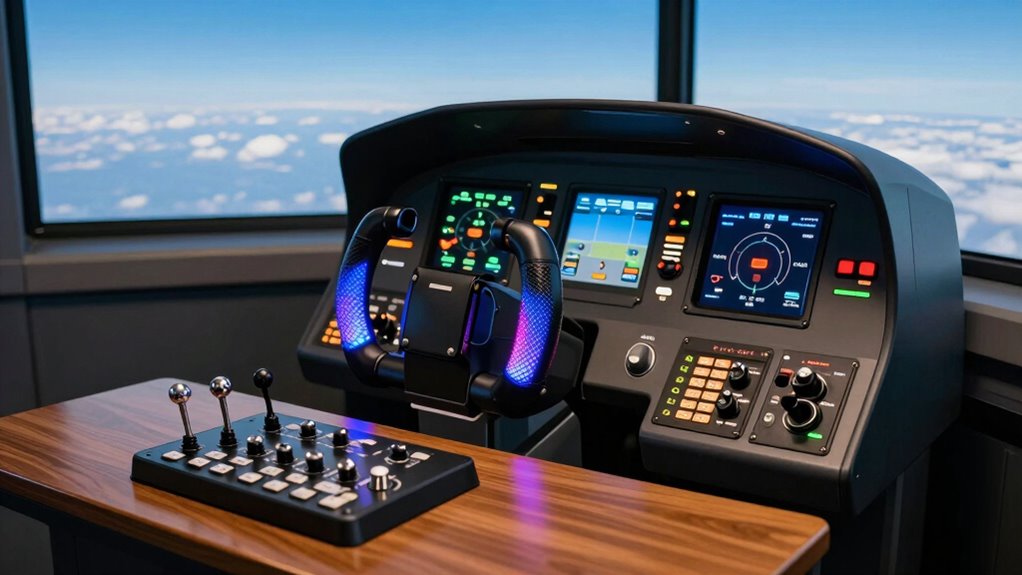

Starting with flight sim controls can feel overwhelming, especially for beginners. The right setup makes a huge difference in how quickly you learn and enjoy flying virtually. The Thrustmaster T-Flight Hotas X stands out as the best overall for its balance of affordability and functionality, while the Logitech G PRO Flight Yoke System offers a more realistic experience for those ready to invest. However, beginners often face tradeoffs between simplicity and realism, with some controllers being easier to set up but less immersive. Continue reading for a detailed breakdown of the best options to find the perfect fit for your flying journey.

Get audio and creator gear delivered free with Prime
- Fast, free delivery on millions of items
- Prime Video, Amazon Music and more included
- Member-only deals all year
Complete the kit


Key Takeaways
- The top picks balance ease of use with realistic control features, ideal for newcomers.
- Simpler, more compact controllers are better for limited space and casual flying, but may lack depth.
- Price varies significantly; budget options often sacrifice some realism, while premium models offer more features.
- Compatibility with your PC or console is critical; not all controllers work across all platforms.
- Build quality and comfort impact long-term usability, especially if you plan to fly frequently.
| Thrustmaster T-Flight Hotas X USB Flight Sim Stick & Throttle – PC | 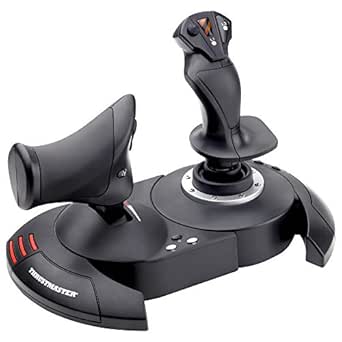 | Best Overall for Beginners on a Budget | Number of action buttons: 12 | Number of axes: 5 | Detachable throttle: Yes | VIEW ON AMAZON | See Our Full Breakdown |
| Logitech G X56 H.O.T.A.S Throttle and Joystick Flight Simulator Controller |  | Best for Tech-Savvy Beginners Wanting Customization | Control Surface Options: All control surfaces | Programmable Controls: 189 | Lighting: RGB backlighting | VIEW ON AMAZON | See Our Full Breakdown |
| Logitech G PRO Flight Yoke System |  | Best for Realistic Yoke Experience for Beginners | Connectivity: USB, PS/2 | Cable Length (Yoke): 5.9 ft (1.8m) | Cable Length (Throttle): 4.92 ft (1.5m) | VIEW ON AMAZON | See Our Full Breakdown |
| Honeycomb Alpha Flight Controls Yoke & Switch Panel |  | Best for Serious Beginners Wanting a Full Cockpit Feel | Rotation: 180° | Control Shaft: Solid steel with linear ball bearings | Switch Panel Features: Main, alternator, avionics, light switches, 5-position ignition | VIEW ON AMAZON | See Our Full Breakdown |
| Thrustmaster TFRP Precision Flight Sim Rudder Pedals – PS5, Xbox & PC | 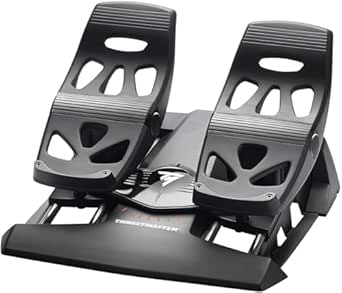 | Best for Serious Flight Enthusiasts Needing Precision | Compatibility: PS5, Xbox Series X|S, PC | Features: Self-centering, S.M.A.R.T. rail | Material: Aluminum rails | VIEW ON AMAZON | See Our Full Breakdown |
| Logitech G Saitek X52 Pro Flight Control System – Black/Silver |  | Best Overall for Realism and Programmability | Compatible Devices: PC | Controller Type: Joystick | Connectivity Technology: USB | VIEW ON AMAZON | See Our Full Breakdown |
| Logitech G Pro Flight Yoke System + Pro Flight Rudder Pedals Bundle |  | Best for Realistic Flight Control with Pedals and Yoke | Rudder Pedals: Self-centering with adjustable footrests | Yoke Controls: 14 buttons, 3-position mode switch, POV hat | Programmable Controls: At least 54 | VIEW ON AMAZON | See Our Full Breakdown |
| PXN 2113PRO PC Joystick USB Gaming Flight Simulator Controller Flight Stick |  | Best Budget-Friendly for Entry-Level Flight Sim Fans | Compatibility: Windows 7/8/10/11 | Vibration Function: Yes | Number of Buttons: 12 programmable | VIEW ON AMAZON | See Our Full Breakdown |
| Turtle Beach VelocityOne Flight Universal Control System for Xbox and Windows |  | Best for Versatile and Complete Flight Control | Compatibility: Xbox Series X/S, Xbox One, Windows 10 & 11 | Control Features: Yoke handle, throttle quadrant, trim wheel, rudder controls | Rotation: 180° yoke handle | VIEW ON AMAZON | See Our Full Breakdown |
| IFR-1 Compact All-in-one Cockpit for Flight Simulation |  | Best Space-Saving, All-in-One Cockpit | Compatibility: Microsoft Flight Simulator 2020/2024, X-Plane 11+ | Connectivity: USB-C to USB-A | Controls: Autopilot, FMS, radios, transponder, BARO, HDG, VORs | VIEW ON AMAZON | See Our Full Breakdown |
| flight sim controls for beginner | Compatibility |
|---|---|
| Thrustmaster T-Flight Hotas X | PC |
| Logitech G X56 H.O.T.A.S Throt | — |
| Logitech G PRO Flight Yoke Sys | Windows 7/8.1/10/11 |
| Honeycomb Alpha Flight Control | Microsoft Flight Simulator and other software |
| Thrustmaster TFRP Precision Fl | PS5, Xbox Series X|S, PC |
| Logitech G Saitek X52 Pro Flig | — |
| Logitech G Pro Flight Yoke Sys | Flight simulation setups |
| PXN 2113PRO PC Joystick USB Ga | Windows 7/8/10/11 |
| Turtle Beach VelocityOne Fligh | Xbox Series X/S, Xbox One, Windows 10 & 11 |
| IFR-1 Compact All-in-one Cockp | Microsoft Flight Simulator 2020/2024, X-Plane 11+ |
More Details on Our Top Picks
Thrustmaster T-Flight Hotas X USB Flight Sim Stick & Throttle – PC
The Thrustmaster T-Flight Hotas X stands out for its ergonomic design and fully programmable controls, making it a solid choice for newcomers who want a versatile setup without overwhelming complexity. Compared with the Logitech G PRO Flight Yoke System, it offers a more intuitive, joystick-style experience that’s easier for beginners to grasp. While it’s limited to PC and may require some initial configuration, its plug-and-play nature means you can get flying quickly. The detachable throttle adds flexibility, letting users customize their cockpit. However, the control set is less extensive than premium options, and some may find the setup process for optimal performance a bit fiddly. Overall, this pick makes the most sense for beginners who want a reliable, comfortable entry point at an affordable price.
Pros:- Ergonomic and comfortable for extended play sessions
- Fully programmable controls for customization
- Detachable throttle for flexible setup
- Plug-and-play for quick installation
Cons:- Limited to PC compatibility
- May require some setup for optimal configuration
Best for: Beginners seeking an ergonomic, fully programmable stick with quick setup on PC
Not ideal for: Advanced pilots or those wanting multi-platform compatibility and a full cockpit experience
- Number of action buttons:12
- Number of axes:5
- Detachable throttle:Yes
- Programmable controls:Yes
- Adjustable resistance:Yes
- Compatibility:PC
Our verdict“This controller is perfect for beginners who want an easy-to-use, customizable stick at an affordable price.”
Logitech G X56 H.O.T.A.S Throttle and Joystick Flight Simulator Controller
The Logitech G X56 H.O.T.A.S offers a highly detailed, customizable experience suited for beginners ready to invest in a premium setup. Its 189 programmable controls and RGB lighting make it stand out among less complex options like the Thrustmaster T-Flight. The dual throttles and hall-effect sensors provide precise, realistic control, which is ideal for those wanting to learn the nuances of flight simulation. However, its complex setup and multiple USB connections may be daunting for newcomers, and the higher price point could be a barrier for casual users. This makes it a better fit for those willing to dedicate time to configuration and willing to spend for advanced features.
Pros:- Highly customizable with 189 programmable controls
- RGB lighting enhances immersion
- Precise control via hall-effect sensors
- Dual throttles for realistic flight control
Cons:- Requires multiple USB ports and a compatible system
- Complex setup process can be challenging for beginners
- Premium price may be a barrier
Best for: Beginner enthusiasts who are comfortable with tech and want extensive customization
Not ideal for: Casual users or those with limited USB ports and system resources
- Control Surface Options:All control surfaces
- Programmable Controls:189
- Lighting:RGB backlighting
- Connectivity:2x USB
- System Compatibility:Windows 7-11
- Spring Options:4
Our verdict“Ideal for tech-savvy beginners ready to explore advanced control options and willing to invest in quality gear.”
Logitech G PRO Flight Yoke System
The Logitech G PRO Flight Yoke System offers a realistic flying experience with a sturdy yoke and multiple programmable controls, making it suitable for beginners aiming for authenticity. Unlike joystick-based options like the Thrustmaster T-Flight, the yoke provides a more accurate feel for pilots interested in fixed-wing aircraft. Its flexible mounting options and included throttle quadrant support customization and ease of use, though it requires software downloads for full functionality, which might be a hurdle for tech-averse users. Compatibility is limited to Windows, and the absence of pre-installed flight software means users need to set up their preferred programs. It’s ideal for beginners who prioritize realism over simplicity.
Pros:- Realistic and accurate yoke control
- Multiple programmable controls
- Flexible mounting with desk clamps
- Includes a throttle quadrant
Cons:- Requires software download for full features
- Limited to Windows systems
- No included software for flight sims
Best for: Beginners looking for a realistic, yoke-based control setup for fixed-wing flight simulation
Not ideal for: Casual gamers or those seeking joystick-style controls with simpler setup
- Connectivity:USB, PS/2
- Cable Length (Yoke):5.9 ft (1.8m)
- Cable Length (Throttle):4.92 ft (1.5m)
- Controls:14 buttons, POV Hat, 3-position switch
- Mounting:Desk clamps
- Compatibility:Windows 7/8.1/10/11
Our verdict“A great choice for beginners wanting authentic yoke controls with realistic feedback and customization options.”
Honeycomb Alpha Flight Controls Yoke & Switch Panel
The Honeycomb Alpha Flight Controls Yoke & Switch Panel delivers a highly realistic flying experience with smooth mechanics and an integrated switch panel featuring LED backlighting. It’s designed for those who want a comprehensive cockpit setup without the complexity of professional hardware. Its durable build and multiple mounting options make it suitable for dedicated flight sim enthusiasts, though the setup can require patience and space. The heavy-duty clamps and premium materials reflect a higher price point, which might deter casual users. Compared with simpler controllers like the Thrustmaster T-Flight, it emphasizes realism and durability, making it ideal for committed beginners aiming to develop authentic flying skills.
Pros:- Realistic flight control with smooth, responsive mechanisms
- Integrated switch panel with LED backlighting
- Multiple mounting options for versatile setup
- Compatible with major flight software
Cons:- Requires significant setup time
- Heavy clamps may not fit all tabletops
- Higher cost suitable for dedicated hobbyists
Best for: Serious beginners willing to invest in a full cockpit experience for immersive flight training
Not ideal for: Casual players or those with limited space and budget constraints
- Rotation:180°
- Control Shaft:Solid steel with linear ball bearings
- Switch Panel Features:Main, alternator, avionics, light switches, 5-position ignition
- Backlighting:Red LED
- Handle Switches:8-way round, two vertical, two horizontal 2-way rocker, 3 buttons, push-to-talk
- Mounting Options:Heavy-duty clamps or micro-suction pad
- Compatibility:Microsoft Flight Simulator and other software
Our verdict“Perfect for committed beginners seeking a durable, realistic yoke with comprehensive controls for immersive flight simulation.”
Thrustmaster TFRP Precision Flight Sim Rudder Pedals – PS5, Xbox & PC
The Thrustmaster TFRP rudder pedals provide a high level of realism with smooth, self-centering motion and a sturdy build, making them suitable for beginners who want realistic control over turns and yaw. Compared to basic pedals, they offer a longer travel range and aluminum rails for durability, ideal for those seeking precise, stable rudder input. However, their need for mounting and the focus on serious flight simulation might make them less accessible to casual users or those with limited space. While they are compatible with multiple platforms, their design caters more toward dedicated enthusiasts ready to complement their control setup with high-quality pedals.
Pros:- Realistic and precise control over yaw
- Smooth, friction-free motion with aluminum rails
- Long travel for accurate turns
- Compatible across multiple platforms
Cons:- May require mounting for stability
- Designed mainly for dedicated flight sim users
Best for: Beginners aiming for authentic, precise rudder control and willing to mount pedals securely
Not ideal for: Casual players or those not prepared to mount and calibrate pedals regularly
- Compatibility:PS5, Xbox Series X|S, PC
- Features:Self-centering, S.M.A.R.T. rail
- Material:Aluminum rails
- Control Range:Long travel
Our verdict“An excellent choice for beginners seeking high-precision rudder pedals to enhance realism and control accuracy.”
Logitech G Saitek X52 Pro Flight Control System – Black/Silver
The Logitech G Saitek X52 Pro stands out for delivering a highly realistic flying experience, with an LCD display and programmable controls that appeal to aspiring pilots. Compared with the simpler PXN 2113PRO, the X52 Pro offers more customization, but its complex setup and weight make it less beginner-friendly. It’s ideal for those committed to investing time in mastering controls, yet the heavier weight and system requirements could deter newcomers. Pros: Realistic flight simulation; Programmable controls and LCD display; Adjustable handle for comfort. Cons: Heavy at over 5 pounds; Requires Windows 7 or newer; Complex setup for beginners.
Verdict: This pick makes the most sense for beginners willing to handle a steeper learning curve for more immersive control.Pros:- Highly realistic flight feel with precise controls
- Programmable buttons and LCD display for customization
- Adjustable handle for ergonomic comfort
Cons:- Heavy and potentially cumbersome for extended use
- Requires Windows 7 or newer, limiting compatibility for some
Best for: Enthusiast beginners eager for realistic controls and customization
Not ideal for: Total newcomers who want a simple plug-and-play experience without setup hassles
- Compatible Devices:PC
- Controller Type:Joystick
- Connectivity Technology:USB
- Button Quantity:16
- Hardware Platform:PC
- Item Weight:5.1 pounds
Our verdict“Best suited for beginners committed to a detailed, immersive flight setup despite its complexity.”
Logitech G Pro Flight Yoke System + Pro Flight Rudder Pedals Bundle
This bundle offers a comprehensive control setup, combining a yoke with self-centering rudder pedals that mimic real aircraft handling. Compared to the simpler PXN joystick, this system provides more nuanced control, but the higher price and larger footprint make it less accessible for casual users. It’s perfect for those ready to invest in a full cockpit feel, though beginners should be aware of its setup complexity. Pros: Realistic control with pedals; Multiple programmable controls; Comfort adjustments with footrests. Cons: Higher price point; Requires space and time for setup; May be overwhelming for absolute beginners.
Verdict: Ideal for beginners seeking an authentic, full-control experience willing to handle a more involved setup.Pros:- Authentic control experience with pedals and yoke
- High level of customization with programmable controls
- Comfortable adjustable footrests
Cons:- Costly and takes up space
- Setup can be complex for newcomers
Best for: Beginners ready to invest in a full cockpit with pedals and yoke for immersive control
Not ideal for: Casual users or those with limited space and budget
- Rudder Pedals:Self-centering with adjustable footrests
- Yoke Controls:14 buttons, 3-position mode switch, POV hat
- Programmable Controls:At least 54
- Toe Brakes:Differential
- Compatibility:Flight simulation setups
- Item Weight:Variable depending on setup
Our verdict“A strong choice for beginners seeking immersive, realistic controls despite its higher price and complexity.”
PXN 2113PRO PC Joystick USB Gaming Flight Simulator Controller Flight Stick
The PXN 2113PRO provides a straightforward, easy-to-use experience with vibration feedback and multiple programmable buttons, making it ideal for beginners. Compared to the more elaborate Logitech Yoke bundle, it offers a simpler, more compact design at a lower cost, but without advanced customization or pedals. This makes it perfect for those new to flight sims who want a tactile, responsive stick without breaking the bank. Its limited compatibility and lack of force feedback are tradeoffs for simplicity. Pros: Realistic vibration feedback; Ergonomic, compact design; Multiple programmable buttons; Easy setup and calibration. Cons: No force feedback support; Limited to Windows; Lacks pedals or full cockpit features.
Verdict: Best for newcomers seeking an affordable, no-fuss flight stick that still delivers a realistic experience.Pros:- Affordable yet realistic vibration feedback
- Ergonomic design for comfortable use
- Multiple programmable buttons for customization
Cons:- No force feedback support limits realism
- Limited compatibility and features
Best for: Beginners on a budget looking for a tactile flight experience
Not ideal for: Users wanting full customization or pedals in their setup
- Compatibility:Windows 7/8/10/11
- Vibration Function:Yes
- Number of Buttons:12 programmable
- Control Axes:4 axes
- Hat Switch:8-Way
- Power-Grip Suction Cups:Yes
Our verdict“An excellent entry-level choice for newcomers wanting straightforward, tactile flight controls without extra complexity.”
Turtle Beach VelocityOne Flight Universal Control System for Xbox and Windows
The Turtle Beach VelocityOne offers a full flight control suite with a yoke, throttle, trim wheel, and rudder controls, designed for serious simulation. Compared with the simpler Logitech Yoke or PXN joystick, this system provides more comprehensive, customizable controls suitable for both Xbox and PC. However, its size and price may overwhelm beginners just starting out, and complex setup can be a hurdle. Still, it’s a compelling choice for those seeking a versatile system that adapts to different platforms and software. Pros: Fully featured, realistic control system; Customizable throttle and trim; Compatible with Xbox and PC; Realistic 180° yoke rotation. Cons: Price and size may intimidate beginners; Requires space for setup; Not ideal for casual users.
Verdict: Best suited for beginners ready to invest in a versatile, high-fidelity flight system that covers multiple platforms.Pros:- Realistic, full-featured control system
- Highly customizable throttle and controls
- Compatible with both Xbox and Windows
Cons:- Size and complexity may overwhelm newcomers
- Premium price point
Best for: Beginners seeking a comprehensive, multi-platform flight control system
Not ideal for: Those with limited space or low budget for complex setups
- Compatibility:Xbox Series X/S, Xbox One, Windows 10 & 11
- Control Features:Yoke handle, throttle quadrant, trim wheel, rudder controls
- Rotation:180° yoke handle
- Display:Full color flight management
- Axes:12 analog axes
- Mounting:Secure clamping system
Our verdict“Ideal for beginners ready to invest in a flexible, professional-grade flight setup.”
IFR-1 Compact All-in-one Cockpit for Flight Simulation
The IFR-1 offers a compact, integrated cockpit with tactile controls, LED-backlit buttons, and dual-axis rotary encoders, ideal for space-conscious users. Compared to larger setups like the VelocityOne, it provides a more streamlined, space-efficient solution for serious beginners or intermediate users. While it doesn’t support Xbox, its dedicated PC compatibility and realistic controls make it appealing for those who want tactile feedback without a bulky arrangement. The limited scope of controls and reliance on USB connection are tradeoffs. Pros: Space-saving design; Realistic tactile controls; LED-backlit buttons enhance usability; Compatible with popular flight sims. Cons: Not compatible with Xbox; Limited to PC; Requires USB for operation.
Verdict: Perfect for space-constrained beginners wanting a tactile cockpit experience on PC only.Pros:- Compact and space-efficient design
- Realistic tactile controls with LED-backlit buttons
- Compatible with major flight simulation software
Cons:- Limited to PC, no Xbox support
- Requires USB connection for operation
Best for: Beginners needing a space-efficient, tactile control system for PC flight sims
Not ideal for: Users wanting Xbox compatibility or extensive control options
- Compatibility:Microsoft Flight Simulator 2020/2024, X-Plane 11+
- Connectivity:USB-C to USB-A
- Controls:Autopilot, FMS, radios, transponder, BARO, HDG, VORs
- Design:Compact, space-saving cockpit
- Rotary Encoders:High-quality dual-axis
Our verdict“Excellent for beginners with limited space who want tactile controls on PC only.”

How We Picked
The products in this roundup were chosen based on a mix of performance, usability, build quality, and value specifically for beginners. We prioritized controllers that are intuitive to set up and operate, ensuring that newcomers can jump into flying without a steep learning curve. Compatibility with common flight sim software and platforms was also a key factor, along with durability and user comfort. Products were ranked by how well they balance these factors, with an eye toward affordability and future expandability. Our goal was to highlight options that offer the best starting points for those new to flight simulation, avoiding overly complex or expensive gear that might intimidate new users.Factors to Consider When Choosing Flight Sim Controls For Beginners
Choosing the right flight sim control for beginners involves understanding several key factors. The ideal controller should feel intuitive, offer enough realism to enhance learning, and fit within your budget. It’s also important to consider compatibility with your system and the types of aircraft you want to simulate. Balancing these aspects ensures you avoid costly mistakes and select gear that will grow with your skills. Here are some critical factors to keep in mind when making your choice.Ease of Use and Setup
For beginners, a controller that is straightforward to set up and operate is essential. Complex systems with many buttons and switches can be overwhelming at first, so look for models with clear labels and simple configurations. Some controllers come with pre-mapped controls, reducing initial frustration and helping you focus on flying instead of troubleshooting. Avoid overly complicated setups unless you’re prepared for a steep learning curve, as this can discourage ongoing engagement.
Realism and Control Fidelity
While ultra-realistic controls are appealing, they can also be intimidating for new users. Instead, seek a balance—controllers that provide a tangible flying feel without excessive complexity. Features like adjustable tension, smooth axes, and responsive pedals can improve the sense of immersion without overwhelming beginners. Remember, enhanced realism can be a double-edged sword if it complicates the learning process early on.
Compatibility and Platform Support
Not all flight sim controls work seamlessly with every system. Confirm whether a controller is compatible with your PC or console before purchasing. Some models are designed specifically for PC, while others support Xbox or PlayStation, or both. Compatibility issues can lead to frustration if you buy a controller that doesn’t work with your setup, so checking system requirements is a step not to overlook.
Size, Portability, and Space
Consider your available space and whether you want a portable setup. Compact controllers are easier to store and transport but might sacrifice some features. Larger yokes or full cockpit setups offer more realism but require dedicated space and a higher budget. For beginners, a balance between size and functionality often leads to the most satisfying experience without cluttering your gaming area.
Price and Future Growth
Entry-level controllers are more budget-friendly but may limit your experience as you advance. Think about whether the controller can be upgraded or expanded with additional modules, pedals, or yokes down the line. Spending a bit more upfront on a versatile model can save money later, allowing you to grow into more complex controls without replacing your entire setup.
Frequently Asked Questions
Can I use a regular game controller for flight sim beginners?
While a standard game controller can work for casual flying, it generally lacks the precision and realism that dedicated flight controls provide. A gamepad may be easier to set up and use initially, but it won’t offer the same immersive experience or control fidelity. For beginners who want to develop skills and enjoy a more authentic simulation, investing in a dedicated flight stick or yoke is usually worth the extra effort and cost.
Do I need pedals as a beginner in flight sim controls?
Pedals add a significant degree of realism and control, especially for aircraft that require yaw adjustments, like jets and propeller planes. However, they are not strictly necessary for starting out and can be added later as your skills improve. If space or budget is limited, you can begin with a stick or yoke and upgrade to pedals once you’re comfortable with basic controls.
Are USB flight controls compatible with all flight sim games?
Most modern USB flight controls are designed to be compatible across a wide range of flight simulation software, but compatibility isn’t universal. It’s wise to check the specific controller’s supported platforms and whether it works with your preferred game. Sometimes, additional drivers or software are required for full functionality, so reviewing user feedback can help ensure smooth integration.
What’s the best control setup for space-constrained rooms?
For limited space, compact controllers like the Thrustmaster T-Flight Hotas X or small yoke systems are ideal. They take up less room and are easier to store when not in use. Although these might lack some advanced features, they deliver decent control for beginners without cluttering your area. Consider modular setups or foldable pedals if you want to expand later without sacrificing space.
Should I prioritize affordability or advanced features as a beginner?
As a newcomer, focusing on affordability often makes sense to test your interest without a large upfront investment. However, choosing a slightly higher-quality controller can offer better comfort and durability, making your experience more enjoyable. The key is to balance initial cost with potential for growth, opting for a control that provides a good learning experience now and room to upgrade later.
Conclusion
For those just starting out, the Thrustmaster T-Flight Hotas X offers excellent value with straightforward controls and broad compatibility, making it the best choice for beginners on a budget. If you want a more realistic experience and are willing to invest, the Logitech G PRO Flight Yoke System suits those aiming for immersion. The Honeycomb Alpha Yoke & Switch Panel is ideal for enthusiasts ready to expand their setup, while casual pilots might prefer more compact, affordable options like the PXN 2113PRO. Ultimately, your choice depends on your space, budget, and how serious you are about flying—each option here helps you take the first step confidently.Fall Picks
fall essentials
As an affiliate, we earn on qualifying purchases.