
For a high-end VR-ready gaming PC with the strongest balance of headset performance and gaming speed, I’d start with the Stormcraft Phantom RTX 5080, which pairs a flagship-class graphics card with a Ryzen 7 9800X3D, 32GB of DDR5, and a 2TB SSD. The Skytech Ryzen 7 9850X3D RTX 5080 is another strong choice for buyers who want top-tier graphics, while the Stormcraft Valkyrie RTX 5070 Ti offers a more measured route to demanding VR play. The main tradeoff is how much graphics headroom you need versus the cost, heat, and power demands of a more powerful desktop. I also weigh processor performance, memory, storage, and the practical fit for different buyers. Read on for the full breakdown and the right match for your VR setup.

Get audio and creator gear delivered free with Prime
- Fast, free delivery on millions of items
- Prime Video, Amazon Music and more included
- Member-only deals all year
Complete the kit



Key Takeaways
- The two RTX 5080 systems lead this group for graphics headroom: the Stormcraft Phantom and Skytech both combine an RTX 5080 with 32GB of memory and 2TB of storage, while their Ryzen 7 9800X3D and 9850X3D processors distinguish their configurations.
- The RTX 5070 Ti options make a middle-ground case: the Stormcraft Valkyrie pairs it with a Ryzen 7 9800X3D, while MSI’s Aegis R2 AI uses an Intel Core Ultra 9 285, giving buyers different processor platforms at the same graphics tier.
- AMD graphics brings another route to VR performance: the Stormcraft Viper and Falcon use RX 9070 and RX 9070 XT cards with Ryzen 7 7800X3D processors, with the Falcon’s XT model marking the stronger graphics configuration.
- RTX 5060 and RTX 5060 Ti systems are the entry point in this selection: they can suit buyers with less demanding headsets or games, but provide less graphics headroom than the 5070 Ti and 5080 desktops.
- A higher-end CPU does not automatically make a PC the best VR pick: the CyberPowerPC i9-14900KF system has a powerful processor, but its RTX 5070 is a lower graphics tier than the RTX 5070 Ti and RTX 5080 alternatives.
| CyberPowerPC Gamer Xtreme VR Gaming Desktop with Intel Core i5-13400F and GeForce RTX 5060 | 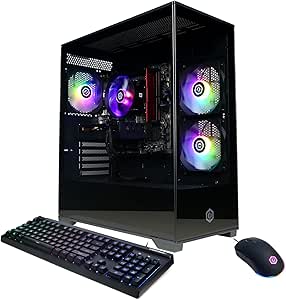 | Best Entry Point for VR | Processor: Intel Core i5-13400F, 10 cores, 2.5GHz | Graphics: NVIDIA GeForce RTX 5060, 8GB | Memory: 16GB DDR5, 6000MHz | VIEW ON AMAZON | See Our Full Breakdown |
| Stormcraft Phantom RTX 5080 Gaming PC with Ryzen 7 9800X3D, 32GB DDR5, 2TB SSD |  | Best for Maximum VR Graphics Headroom | Processor: AMD Ryzen 7 9800X3D, 8 cores, up to 5.2GHz | Graphics: RTX 5080, 16GB GDDR7 | Memory: 32GB DDR5, 6000MHz | VIEW ON AMAZON | See Our Full Breakdown |
| CyberPowerPC Gaming PC, Intel Core i9-14900KF, GeForce RTX 5070 12GB |  | Best for CPU-Heavy Gaming and Creation | Processor: Intel Core i9-14900KF, 24 cores, 3.2GHz | Graphics: NVIDIA GeForce RTX 5070, 12GB | Memory: 32GB DDR5, 6000MHz | VIEW ON AMAZON | See Our Full Breakdown |
| Stormcraft Valkyrie Gaming PC with Ryzen 7 9800X3D and RTX 5070 Ti |  | Best Balanced High-End VR Pick | Processor: AMD Ryzen 7 9800X3D, 4.7GHz | Graphics: RTX 5070 Ti | Memory: 32GB DDR5, 6000MHz | VIEW ON AMAZON | See Our Full Breakdown |
| CyberpowerPC Gamer Xtreme VR Gaming PC with Intel Core Ultra 5 225F and GeForce RTX 5060 8GB |  | Best RTX 5060 Configuration for a Larger Library | Processor: Intel Core Ultra 5 225F, 3.3GHz, up to 4.9GHz | Graphics: NVIDIA GeForce RTX 5060, 8GB | Memory: 32GB DDR5 | VIEW ON AMAZON | See Our Full Breakdown |
| MSI Aegis R2 AI Gaming Desktop with Intel Core Ultra 9 285 and GeForce RTX 5070 Ti |  | Best Balanced High-End VR Pick | Processor: Intel Core Ultra 9 285, 3.7GHz base, up to 5.7GHz | Graphics: NVIDIA GeForce RTX 5070 Ti, 16GB GDDR6 | Memory: 32GB DDR5 | VIEW ON AMAZON | See Our Full Breakdown |
| Stormcraft Viper AI Gaming PC with Ryzen 7 7800X3D and RX 9070 |  | Best AMD VR Value | Processor: AMD Ryzen 7 7800X3D, 8-core, 16-thread | Graphics: AMD Radeon RX 9070, 16GB GDDR6 | Memory: 32GB DDR5-6000 | VIEW ON AMAZON | See Our Full Breakdown |
| Skytech Gaming PC Desktop with Ryzen 7 9850X3D, RTX 5080, 32GB RAM, 2TB SSD |  | Best Premium VR Performance | Processor: AMD Ryzen 7 9850X3D, 4.7GHz, up to 5.6GHz | Graphics: NVIDIA GeForce RTX 5080, 16GB GDDR7 | Memory: 32GB DDR5-6000 RGB | VIEW ON AMAZON | See Our Full Breakdown |
| Stormcraft Falcon AI Gaming PC with Ryzen 7 7800X3D and RX 9070 XT |  | Best AMD High-FPS VR Pick | Processor: AMD Ryzen 7 7800X3D | Graphics: AMD RX 9070 XT, 16GB | Memory: 32GB DDR5-6000 | VIEW ON AMAZON | See Our Full Breakdown |
| MSI Codex Z2 Gaming Desktop with AMD R7-8700F and RTX 5060Ti |  | Best Entry Point to VR-Ready Gaming | Processor: AMD Ryzen 7 8700F | Graphics: NVIDIA GeForce RTX 5060 Ti | Memory: 16GB DDR5 | VIEW ON AMAZON | See Our Full Breakdown |
| high end vr ready gaming pc | Processor | Graphics | Memory | Storage |
|---|---|---|---|---|
| CyberPowerPC Gamer Xtreme VR G | Intel Core i5-13400F, 10 cores, 2.5GHz | NVIDIA GeForce RTX 5060, 8GB | 16GB DDR5, 6000MHz | 1TB PCIe 4.0 NVMe SSD |
| Stormcraft Phantom RTX 5080 Ga | AMD Ryzen 7 9800X3D, 8 cores, up to 5.2GHz | RTX 5080, 16GB GDDR7 | 32GB DDR5, 6000MHz | 2TB Gen4 NVMe SSD |
| CyberPowerPC Gaming PC | Intel Core i9-14900KF, 24 cores, 3.2GHz | NVIDIA GeForce RTX 5070, 12GB | 32GB DDR5, 6000MHz | 2TB PCIe 4.0 NVMe SSD |
| Stormcraft Valkyrie Gaming PC | AMD Ryzen 7 9800X3D, 4.7GHz | RTX 5070 Ti | 32GB DDR5, 6000MHz | 1TB NVMe SSD |
| CyberpowerPC Gamer Xtreme VR G | Intel Core Ultra 5 225F, 3.3GHz, up to 4.9GHz | NVIDIA GeForce RTX 5060, 8GB | 32GB DDR5 | 2TB PCIe 4.0 NVMe SSD |
| MSI Aegis R2 AI Gaming Desktop | Intel Core Ultra 9 285, 3.7GHz base, up to 5.7GHz | NVIDIA GeForce RTX 5070 Ti, 16GB GDDR6 | 32GB DDR5 | 2TB M.2 NVMe SSD |
| Stormcraft Viper AI Gaming PC | AMD Ryzen 7 7800X3D, 8-core, 16-thread | AMD Radeon RX 9070, 16GB GDDR6 | 32GB DDR5-6000 | 1TB NVMe SSD |
| Skytech Gaming PC Desktop with | AMD Ryzen 7 9850X3D, 4.7GHz, up to 5.6GHz | NVIDIA GeForce RTX 5080, 16GB GDDR7 | 32GB DDR5-6000 RGB | 2TB NVMe M.2 SSD |
| Stormcraft Falcon AI Gaming PC | AMD Ryzen 7 7800X3D | AMD RX 9070 XT, 16GB | 32GB DDR5-6000 | 1TB NVMe SSD |
| MSI Codex Z2 Gaming Desktop wi | AMD Ryzen 7 8700F | NVIDIA GeForce RTX 5060 Ti | 16GB DDR5 | 1TB NVMe SSD |
More Details on Our Top Picks
CyberPowerPC Gamer Xtreme VR Gaming Desktop with Intel Core i5-13400F and GeForce RTX 5060
I’d choose this CyberPowerPC for VR buyers who want a capable graphics card without stepping up to the more expensive, more powerful systems in this group. Its GeForce RTX 5060 8GB and 10-core Core i5-13400F provide a practical foundation for headset gaming, while the 1TB PCIe 4.0 SSD keeps game loads snappy. Compared with the similarly equipped CyberpowerPC Gamer Xtreme VR with the Core Ultra 5 225F, this model has half the memory and storage, so it suits a tighter game library better than heavy multitasking. The Stormcraft Valkyrie’s RTX 5070 Ti is a stronger choice for more demanding visual settings, but costs this pick its budget-minded role. 16GB of RAM is the main compromise, and cooling and upgrade details are not provided.
Pros:- GeForce RTX 5060 8GB provides a dedicated graphics foundation for VR gaming.
- 10-core Intel Core i5-13400F supports gaming and general multitasking.
- 1TB PCIe 4.0 NVMe SSD offers responsive loading.
- WiFi 6 and Bluetooth 5.3 provide modern wireless connectivity.
Cons:- 16GB RAM is less than the 32GB included with several higher-tier options in this lineup.
- 1TB storage may fill quickly with a large collection of VR games.
- Cooling design and upgrade options are not specified.
Best for: VR newcomers who want an RTX 5060 desktop for gaming and everyday use, and who do not need a large game library installed at once.
Not ideal for: VR players who multitask heavily, keep many large games installed, or want more graphics headroom for demanding headset settings.
- Processor:Intel Core i5-13400F, 10 cores, 2.5GHz
- Graphics:NVIDIA GeForce RTX 5060, 8GB
- Memory:16GB DDR5, 6000MHz
- Storage:1TB PCIe 4.0 NVMe SSD
- Motherboard:Intel B760 chipset
- Operating system:Windows 11 Home
- Connectivity:WiFi 6, Bluetooth 5.3, LAN
- Video outputs:1 HDMI, 2 DisplayPort
Our verdict“Choose this model for an RTX 5060 VR starter system, but pick the Core Ultra 5 CyberPowerPC if you want more memory and storage from the outset.”
Stormcraft Phantom RTX 5080 Gaming PC with Ryzen 7 9800X3D, 32GB DDR5, 2TB SSD
For buyers who want a high-end VR system with substantial graphics headroom, I’d rank the Stormcraft Phantom ahead of the RTX 5070 and RTX 5070 Ti machines here. Its RTX 5080 16GB GDDR7 is the key distinction: compared with the Stormcraft Valkyrie’s RTX 5070 Ti, it offers a more powerful graphics tier for demanding games and higher visual settings. The Ryzen 7 9800X3D, 32GB of DDR5, and 2TB SSD also make it well suited to gaming alongside other demanding tasks. A 360mm liquid cooler and 850W Gold power supply round out a high-performance build. The tradeoffs are its large case, limited upgrade details, and a configuration that may be more PC than buyers need if their VR library is less demanding.
Pros:- RTX 5080 with 16GB GDDR7 provides the strongest specified GPU in this five-PC group.
- Ryzen 7 9800X3D is a gaming-focused 8-core processor.
- 32GB DDR5 and a 2TB Gen4 NVMe SSD support multitasking and a larger installed library.
- 360mm AIO liquid cooling and an 850W Gold-certified power supply suit the high-performance components.
Cons:- The 18.5 x 9 x 16.9-inch case needs substantial setup space.
- Upgrade options are not detailed.
- Its high-end GPU and cooling configuration may be unnecessary for less demanding VR use.
Best for: VR enthusiasts seeking an RTX 5080 system for demanding games, high visual settings, and a broad installed game library.
Not ideal for: Buyers with limited desk or floor space, modest VR demands, or a preference for a less complex cooling setup.
- Processor:AMD Ryzen 7 9800X3D, 8 cores, up to 5.2GHz
- Graphics:RTX 5080, 16GB GDDR7
- Memory:32GB DDR5, 6000MHz
- Storage:2TB Gen4 NVMe SSD
- Motherboard:AMD B850 chipset
- Cooling:360mm AIO liquid cooling
- Power supply:850W Gold certified
- Dimensions:18.5 x 9 x 16.9 inches
Our verdict“Pick the Phantom if you want the most graphics headroom among these five, and have the room for its large liquid-cooled tower.”
CyberPowerPC Gaming PC, Intel Core i9-14900KF, GeForce RTX 5070 12GB
This CyberPowerPC pairs a 24-core Core i9-14900KF with an RTX 5070 12GB, making it the CPU-forward option in this group. I’d favor it over the Core i5-13400F CyberPowerPC when a VR setup also serves demanding creative or multitasking workloads; its 32GB memory and 2TB SSD further support that broader use. For graphics-led VR, though, the Stormcraft Valkyrie’s RTX 5070 Ti may be the more compelling match, while the Phantom’s RTX 5080 sits a tier higher still. This PC includes liquid CPU cooling, but the listing does not specify the cooler size or broader case airflow. WiFi 5 and Bluetooth 4.2 are also older connectivity standards than those on the two RTX 5060 CyberPowerPC systems.
Pros:- 24-core Intel Core i9-14900KF supports demanding CPU-heavy workloads.
- RTX 5070 with 12GB graphics memory is a step above the RTX 5060 models in this group.
- 32GB DDR5 and a 2TB PCIe 4.0 NVMe SSD provide room for multitasking and games.
- Liquid CPU cooling and a one-year parts-and-labor warranty are specified.
Cons:- The RTX 5070 is below the RTX 5070 Ti and RTX 5080 options for graphics-focused VR headroom.
- WiFi 5 and Bluetooth 4.2 are older wireless standards than WiFi 6 and Bluetooth 5.3 on the RTX 5060 CyberPowerPCs.
- The cooling configuration is not described in enough detail to judge its capacity.
Best for: VR gamers who also run CPU-intensive creative applications, compile workloads, or heavy multitasking on the same desktop.
Not ideal for: Buyers focused mainly on maximum VR graphics performance, or those who want newer wireless standards and detailed cooling specifications.
- Processor:Intel Core i9-14900KF, 24 cores, 3.2GHz
- Graphics:NVIDIA GeForce RTX 5070, 12GB
- Memory:32GB DDR5, 6000MHz
- Storage:2TB PCIe 4.0 NVMe SSD
- Motherboard:Intel Z790 chipset
- Cooling:Liquid CPU cooling
- Connectivity:WiFi 5, Bluetooth 4.2, LAN
- Video outputs:1 HDMI, 3 DisplayPort
Our verdict“Choose this CyberPowerPC if CPU-heavy work matters alongside VR, but prioritize the Stormcraft Valkyrie or Phantom for a stronger graphics tier.”
Stormcraft Valkyrie Gaming PC with Ryzen 7 9800X3D and RTX 5070 Ti
I’d put the Stormcraft Valkyrie in the middle of the performance range for buyers who want a high-end VR-focused balance rather than the most expensive graphics tier in this set. Its Ryzen 7 9800X3D and RTX 5070 Ti offer a stronger graphics configuration than either RTX 5060 CyberPowerPC, while stopping short of the Phantom’s RTX 5080. That makes it a natural fit for demanding gaming and creative use without choosing the largest GPU listed here. The 32GB DDR5 and 360mm ARGB liquid cooler support a capable, visually striking build, and the 850W Gold power supply is specified. The main compromise is storage: its 1TB SSD is half the Phantom’s capacity. Its large RGB tower may also be awkward in compact rooms.
Pros:- Ryzen 7 9800X3D and RTX 5070 Ti make a strong gaming-focused pairing.
- 32GB DDR5 at 6000MHz supports gaming and multitasking.
- 360mm ARGB AIO liquid cooler is specified.
- 850W 80 Plus Gold power supply is included in the listed configuration.
Cons:- The 1TB NVMe SSD provides less capacity than the 2TB Stormcraft Phantom and CyberPowerPC i9 system.
- Its RGB tempered-glass tower may need considerable space.
- Setup may be less straightforward for buyers unfamiliar with desktop PCs.
Best for: VR gamers seeking a high-end GPU and gaming-focused processor, with enough memory for multitasking and some creative work.
Not ideal for: Players with large installed libraries who want 2TB onboard, or buyers who need a compact tower.
- Processor:AMD Ryzen 7 9800X3D, 4.7GHz
- Graphics:RTX 5070 Ti
- Memory:32GB DDR5, 6000MHz
- Storage:1TB NVMe SSD
- Motherboard:B850 chipset
- Cooling:360mm ARGB AIO liquid cooler
- Power supply:850W 80 Plus Gold
- Operating system:Windows 11 Home
Our verdict“Pick the Valkyrie for a high-end VR balance between the RTX 5060 systems and the RTX 5080 Phantom, provided 1TB storage is enough.”
CyberpowerPC Gamer Xtreme VR Gaming PC with Intel Core Ultra 5 225F and GeForce RTX 5060 8GB
Among the two RTX 5060 CyberPowerPCs, I’d choose this Core Ultra 5 version for buyers who want more room for games and background tasks. It doubles the other model’s memory to 32GB DDR5 and storage to 2TB PCIe 4.0 SSD, while keeping the same 8GB RTX 5060 graphics tier. That makes it a more flexible everyday system, though the extra capacity does not turn it into a graphics peer of the Stormcraft Valkyrie with its RTX 5070 Ti. WiFi 6, Bluetooth 5.3, and listed HDMI 2.1 and DisplayPort 2.1 connections add practical convenience. I’d want more detail on cooling before choosing it for extended, intensive workloads, and its 35-pound tower is no compact setup.
Pros:- 32GB DDR5 provides more memory headroom than the other RTX 5060 CyberPowerPC in this batch.
- 2TB PCIe 4.0 NVMe SSD offers twice the listed capacity of that Core i5 model.
- WiFi 6 and Bluetooth 5.3 support current wireless connections.
- HDMI 2.1 and DisplayPort 2.1 are specified video connections.
Cons:- RTX 5060 8GB remains a lower graphics tier than the RTX 5070 Ti Valkyrie and RTX 5080 Phantom.
- The 35-pound tower needs a sturdy, roomy setup.
- Cooling details are not provided.
Best for: VR players who prefer an RTX 5060 system but want 32GB memory and 2TB storage for multitasking and a larger installed library.
Not ideal for: Buyers seeking the higher graphics ceiling of an RTX 5070 Ti or RTX 5080, or anyone needing a small, easy-to-move PC.
- Processor:Intel Core Ultra 5 225F, 3.3GHz, up to 4.9GHz
- Graphics:NVIDIA GeForce RTX 5060, 8GB
- Memory:32GB DDR5
- Storage:2TB PCIe 4.0 NVMe SSD
- Motherboard:Intel B860 chipset
- Power supply:600W 80 Plus Gold
- Connectivity:WiFi 6, Bluetooth 5.3, Ethernet
- Video connections:HDMI 2.1, DisplayPort 2.1
- Weight:35 pounds
Our verdict“Choose this model over the Core i5 CyberPowerPC if you want more memory and storage, but look to the Valkyrie for a substantial GPU step up.”
MSI Aegis R2 AI Gaming Desktop with Intel Core Ultra 9 285 and GeForce RTX 5070 Ti
The MSI Aegis R2 pairs an RTX 5070 Ti with 16GB of graphics memory and a Core Ultra 9 285, making it a strong fit for demanding VR games, streaming, and other CPU-heavy tasks. Its 32GB of DDR5 and 2TB SSD also leave more room for a VR library than the Stormcraft Falcon’s 1TB drive. Compared with the RTX 5080-powered Skytech, this system gives up some graphics headroom, but its stated configuration still targets high-end VR without relying on a flagship GPU.
The tradeoffs are practical: air cooling is less elaborate than the Falcon’s 360mm liquid setup, and the single HDMI port may limit convenient display connections. At 26.9 pounds, it is also better treated as a stationary tower than a portable rig. I’d put it ahead of the entry-level MSI Codex Z2 for buyers prioritizing VR performance and memory capacity.
Pros:- RTX 5070 Ti with 16GB graphics memory is suited to demanding VR workloads.
- 32GB DDR5 supports gaming alongside streaming and other applications.
- 2TB NVMe SSD offers more game-library space than the 1TB Stormcraft systems.
- Ten USB ports provide room for VR accessories and other peripherals.
Cons:- Single HDMI port can constrain display setups that depend on multiple HDMI connections.
- Air cooling is less elaborate than the 360mm liquid cooling in the Stormcraft Falcon.
- At 26.9 pounds, it is not a convenient choice for frequent transport.
Best for: VR players who want a high-end Nvidia GPU, 32GB of memory, and enough SSD space for a broad game library without moving to an RTX 5080 system.
Not ideal for: Buyers who need several HDMI connections, a lightweight PC to move often, or liquid cooling as part of their preferred build.
- Processor:Intel Core Ultra 9 285, 3.7GHz base, up to 5.7GHz
- Graphics:NVIDIA GeForce RTX 5070 Ti, 16GB GDDR6
- Memory:32GB DDR5
- Storage:2TB M.2 NVMe SSD
- Cooling:Air cooling
- Operating system:Windows 11 Home
- Ports:10 USB ports, 1 HDMI, HDMI and DisplayPort outputs
- Dimensions and weight:19.4 x 9.1 x 19 inches; 26.9 pounds
Our verdict“Choose the Aegis R2 if you want a well-equipped Nvidia-based VR tower with generous memory and storage, and can live with air cooling and one HDMI port.”
Stormcraft Viper AI Gaming PC with Ryzen 7 7800X3D and RX 9070
The Viper’s Ryzen 7 7800X3D and Radeon RX 9070 with 16GB GDDR6 give it a compelling AMD-focused foundation for VR gaming, while 32GB of DDR5-6000 keeps multitasking comfortable. It shares its processor and memory capacity with the Stormcraft Falcon, but the Falcon steps up to an RX 9070 XT and 360mm liquid cooling. That makes the Viper the less ambitious graphics choice in this pair, though its 1TB NVMe SSD still provides fast loading and room for an initial VR collection.
The listed 650W power supply and air cooler are worth weighing against the Falcon’s higher-capacity supply and liquid cooling. Product details also mention a 45-inch display size but do not clearly establish that a monitor is included, so I would verify the package contents before buying. I’d favor the Viper over the MSI Codex Z2 when 32GB memory and AMD graphics matter more than a lower-tier configuration.
Pros:- Ryzen 7 7800X3D with 3D V-Cache is a gaming-oriented processor.
- Radeon RX 9070 includes 16GB GDDR6 graphics memory.
- 32GB DDR5-6000 supports gaming and streaming workloads.
- Preassembled setup reduces the work involved in getting started.
Cons:- RX 9070 is a step below the RX 9070 XT in the Stormcraft Falcon.
- 1TB SSD offers less capacity than the 2TB MSI Aegis R2 and Skytech systems.
- 650W power supply and air cooling are less substantial on paper than the Falcon’s 850W supply and 360mm AIO.
Best for: AMD-focused VR gamers who want a 7800X3D processor, 32GB of memory, and a ready-assembled desktop for gaming and streaming.
Not ideal for: Buyers seeking the stronger RX 9070 XT tier, a clearly specified liquid-cooling setup, or confirmed included display peripherals.
- Processor:AMD Ryzen 7 7800X3D, 8-core, 16-thread
- Graphics:AMD Radeon RX 9070, 16GB GDDR6
- Memory:32GB DDR5-6000
- Storage:1TB NVMe SSD
- Motherboard:B850 chipset, AM5
- Power supply:650W
- Cooling:Air cooler
- Operating system:Windows 11 Home
- Connectivity:Bluetooth, USB 2.0, USB 3.0, USB Type-C, DisplayPort, 1 HDMI port
Our verdict“Pick the Viper for an AMD-based VR system centered on the 7800X3D and 32GB RAM, but choose the Falcon if you want its stronger listed GPU and cooling.”
Skytech Gaming PC Desktop with Ryzen 7 9850X3D, RTX 5080, 32GB RAM, 2TB SSD
For buyers seeking the most graphics headroom in this five-PC group, the Skytech’s RTX 5080 with 16GB GDDR7 is the clearest step up. Its Ryzen 7 9850X3D, 32GB DDR5-6000, and 2TB NVMe SSD make a strong match for demanding VR titles, creation workloads, and a large installed library. Compared with the MSI Aegis R2’s RTX 5070 Ti, the Skytech prioritizes a higher GPU tier and adds a 360mm AIO cooler; compared with the Stormcraft Falcon, it offers twice the listed SSD capacity.
That premium performance brings caveats. The graphics card brand may vary, which can affect the exact card and support experience, and the listed wireless is Wi-Fi 5 rather than the Falcon’s Wi-Fi 6E. No peripherals are specified, either. I’d choose this over the Viper or MSI Codex Z2 when graphics headroom matters more than keeping the system simpler or easier to justify for less demanding VR use.
Pros:- RTX 5080 with 16GB GDDR7 offers the strongest listed GPU tier in this group.
- Ryzen 7 9850X3D is paired with 32GB DDR5-6000.
- 2TB NVMe SSD provides more storage than the 1TB Stormcraft Viper and Falcon.
- 360mm AIO liquid CPU cooler is a more elaborate cooling setup than the air-cooled Viper.
Cons:- Graphics card brand may vary, leaving the exact card maker unspecified.
- Wi-Fi 5 is an older listed wireless standard than Wi-Fi 6E on the Stormcraft Falcon.
- Included monitor and other peripherals are not specified.
Best for: VR enthusiasts and creators who want an RTX 5080, 2TB of fast storage, and a high-end CPU for demanding games and workloads.
Not ideal for: Buyers who want a specifically identified graphics-card manufacturer, newer listed Wi-Fi connectivity, or a system with confirmed included peripherals.
- Processor:AMD Ryzen 7 9850X3D, 4.7GHz, up to 5.6GHz
- Graphics:NVIDIA GeForce RTX 5080, 16GB GDDR7
- Memory:32GB DDR5-6000 RGB
- Storage:2TB NVMe M.2 SSD
- Cooling:360mm AIO liquid CPU cooler with ARGB fans
- Operating system:Windows 11 Home 64-bit
- Wireless:Wi-Fi 5 (802.11ac)
- Case:King 95, black
- Warranty:1 year parts and labor
Our verdict“Choose the Skytech when you want this group’s strongest listed graphics tier and 2TB storage, and accept uncertainty about the specific GPU brand.”
Stormcraft Falcon AI Gaming PC with Ryzen 7 7800X3D and RX 9070 XT
The Falcon takes the Viper’s AMD gaming formula and raises the graphics tier to an RX 9070 XT with 16GB, while retaining the Ryzen 7 7800X3D and 32GB DDR5-6000. For VR buyers, that pairing gives the Falcon a stronger listed graphics setup than the Viper’s RX 9070. Its 360mm AIO and 850W power supply also distinguish it from the Viper’s air cooling and 650W supply. USB-C, Wi-Fi 6E, and Bluetooth 5.2 round out a more fully specified connection suite than the MSI Aegis R2’s listed ports.
The compromises are its 1TB SSD, which is half the capacity of the Skytech and Aegis R2, and the high-capacity power supply that may be more than some buyers need. Upgradeability details are limited, so future expansion is not clearly mapped out. I’d pick it over the Viper when the XT graphics tier and liquid cooling are priorities, but favor the Skytech for an RTX 5080 and 2TB drive.
Pros:- RX 9070 XT with 16GB is a graphics step above the Viper’s RX 9070.
- Ryzen 7 7800X3D and 32GB DDR5-6000 make a capable gaming-focused pairing.
- 360mm AIO cooling and an 850W power supply are specified.
- USB-C, Wi-Fi 6E, and Bluetooth 5.2 offer broad connectivity.
Cons:- 1TB SSD has less capacity than the 2TB MSI Aegis R2 and Skytech.
- 850W power supply may be more than buyers with modest expansion plans require.
- Upgradeability details are limited.
Best for: AMD VR gamers who want the RX 9070 XT, 7800X3D, liquid cooling, and modern connectivity in one assembled system.
Not ideal for: Players with a large VR library who want 2TB of storage built in, or buyers who need clear documentation of upgrade options.
- Processor:AMD Ryzen 7 7800X3D
- Graphics:AMD RX 9070 XT, 16GB
- Memory:32GB DDR5-6000
- Storage:1TB NVMe SSD
- Cooling:360mm AIO water cooling
- Power supply:850W
- Connectivity:USB-C, Wi-Fi 6E, Bluetooth 5.2
- Display output:DisplayPort and HDMI
- Warranty:1-year parts, 3-year labor, lifetime tech support
Our verdict“Choose the Falcon for an AMD-focused VR build with RX 9070 XT graphics and liquid cooling, but look to the Skytech if you want 2TB storage and an RTX 5080.”
MSI Codex Z2 Gaming Desktop with AMD R7-8700F and RTX 5060Ti
The Codex Z2 is the most restrained fit here for someone entering PC VR: it pairs an RTX 5060 Ti with a Ryzen 7 8700F and includes a VR-ready designation. Its four-fan air cooler and 10 USB ports give the headset and accessories useful connection room. Compared with the MSI Aegis R2, though, it has a lower listed graphics tier, 16GB rather than 32GB of RAM, and a 1TB rather than 2TB SSD. The Skytech and Stormcraft Falcon are more suitable for buyers seeking greater graphics headroom for demanding VR sessions.
That makes the Codex a sensible starting point, not the group’s high-end performance leader. The supplied details do not give a RAM speed or explain upgrade options, and its 16GB memory leaves less multitasking capacity than every other PC in this batch. I’d choose it over the stronger systems only when the goal is a more modest VR setup; buyers planning for heavier workloads should step up to the Aegis R2 or Falcon.
Pros:- RTX 5060 Ti graphics and a stated VR-ready designation provide a clear entry point for PC VR.
- Ryzen 7 8700F is paired with a discrete Nvidia graphics card.
- Ten USB ports offer connection capacity for a headset and accessories.
- Four-fan air cooler and customizable RGB lighting are included.
Cons:- 16GB RAM is half the capacity of the MSI Aegis R2 and the other PCs in this batch.
- 1TB SSD has less capacity than the 2TB Skytech and Aegis R2.
- Upgradeability details are not provided, making future expansion less certain.
Best for: First-time VR PC buyers who want a named Nvidia GPU, a VR-ready system, and multiple USB ports for headset accessories.
Not ideal for: Enthusiasts targeting demanding VR games, frequent streaming, or a large game library who would benefit from 32GB RAM and 2TB storage.
- Processor:AMD Ryzen 7 8700F
- Graphics:NVIDIA GeForce RTX 5060 Ti
- Memory:16GB DDR5
- Storage:1TB NVMe SSD
- Cooling:ARGB air cooler with four fans
- Operating system:Windows 11 Home
- Ports:10 USB ports, 1 HDMI, DisplayPort, Ethernet
- Dimensions and weight:16 x 8.38 x 19 inches; 21.3 pounds
Our verdict“Pick the Codex Z2 as a starting point for VR if you accept its 16GB RAM and 1TB drive, but choose a stronger system for more demanding use.”
How We Picked
I ranked these systems around the parts that most shape a VR gaming experience: graphics capability, processor balance, memory, and storage. VR headsets render separate views for each eye, so the graphics card’s ability to sustain demanding workloads carries particular weight. I also looked at whether the listed configuration offers useful headroom for newer games and higher-resolution headsets, rather than treating a strong processor name as proof of overall superiority.
The ranking favors balanced systems with higher-tier graphics and clearly stated supporting components. That puts the RTX 5080 builds first, followed by the RTX 5070 Ti and RX 9070 XT options, then the RTX 5070 and RX 9070 configurations, with RTX 5060 and 5060 Ti models serving buyers with more modest demands. Where specifications such as memory capacity or storage are not provided in the product name, I avoid assuming them. I also weigh the tradeoff between raw performance and buyer fit: a less powerful, simpler system can make more sense for an entry-level headset or a first gaming desktop.
| high end vr ready gaming pc | Motherboard | Operating system | Connectivity |
|---|---|---|---|
| CyberPowerPC Gamer Xtreme VR G | Intel B760 chipset | Windows 11 Home | WiFi 6, Bluetooth 5.3, LAN |
| Stormcraft Phantom RTX 5080 Ga | AMD B850 chipset | — | — |
| CyberPowerPC Gaming PC | Intel Z790 chipset | — | WiFi 5, Bluetooth 4.2, LAN |
| Stormcraft Valkyrie Gaming PC | B850 chipset | Windows 11 Home | — |
| CyberpowerPC Gamer Xtreme VR G | Intel B860 chipset | — | WiFi 6, Bluetooth 5.3, Ethernet |
| MSI Aegis R2 AI Gaming Desktop | — | Windows 11 Home | — |
| Stormcraft Viper AI Gaming PC | B850 chipset, AM5 | Windows 11 Home | Bluetooth, USB 2.0, USB 3.0, USB Type-C, DisplayPort, 1 HDMI port |
| Skytech Gaming PC Desktop with | — | Windows 11 Home 64-bit | — |
| Stormcraft Falcon AI Gaming PC | — | — | USB-C, Wi-Fi 6E, Bluetooth 5.2 |
| MSI Codex Z2 Gaming Desktop wi | — | Windows 11 Home | — |
Factors to Consider When Choosing High End Vr Ready Gaming Pc
Choosing a VR-ready desktop takes more than matching a PC to a headset’s minimum requirements. I’d compare the demands of the games you actually play, the headset’s resolution and refresh rate, and the system’s ability to stay comfortable and maintainable during long sessions. These broader checks can help you avoid paying for performance you won’t use—or buying a system that leaves little room to grow.
Match Graphics Headroom to Your Headset
A headset’s resolution, refresh rate, and rendering settings change how much work the graphics card must do. Higher-resolution displays and demanding simulation games generally call for more graphics headroom than lighter experiences. Check the headset maker’s current requirements and compare them with the games you expect to run; “VR-ready” is not a guarantee that every title will perform well at every setting. A common mistake is to buy only for today’s headset minimums, then upgrade to a more demanding headset later. In this lineup, the RTX 5080 systems offer the most graphics headroom, while the RTX 5060 models fit buyers with more modest demands. I’d put the graphics card ahead of a premium processor when the main use is VR gaming.
Look at Frame Consistency, Not Just Peak Performance
VR comfort depends on steady frame delivery as well as raw speed, since inconsistent performance can feel distracting through a headset. Background apps, streaming, and CPU-heavy games can all affect whether a system keeps pace. A strong processor can help in simulation titles and busy scenes, but it cannot make up for a graphics card that is working beyond its limits. That is why balanced combinations, such as the Phantom’s Ryzen 7 9800X3D and RTX 5080, are more persuasive than a high CPU tier paired with a lower graphics tier for a VR-focused buyer. Before choosing, check independent performance information for your specific headset and favorite games. Treat processor labels as one part of the picture, not the whole decision.
Check Memory and Storage for Your Actual Library
Memory and storage affect how comfortably a desktop handles games, updates, and other tasks, even though neither replaces graphics power. Large game libraries can fill a drive quickly, and frequent installs or captures may make additional capacity useful. The Phantom and Skytech list 32GB of RAM and a 2TB SSD, so their configurations give buyers a clear starting point for a substantial library. Several other product names do not specify those capacities, which means I would verify the exact listing before choosing or budgeting for upgrades. Avoid assuming that two systems with the same graphics card have the same memory or storage setup. Also check whether the desktop has accessible slots and drive bays if you expect to expand later.
Consider Cooling, Noise, and Room Setup
High-performance components can produce substantial heat, and a desktop’s cooling design affects sustained operation and the noise you hear nearby. A powerful PC placed in a cramped desk compartment or against a wall may have less room to move air. Before buying, check the case dimensions, airflow layout, cooling hardware, and the space available around your setup. Do not assume that a larger graphics card or a higher-wattage configuration will fit your existing desk without checking measurements. You should also confirm that the power supply is suited to the installed components, especially for a high-tier graphics card. These practical checks matter because a system that fits your room and stays comfortable to use is easier to live with than one chosen by specs alone.
Choose a Platform With a Realistic Upgrade Path
A prebuilt PC’s upgrade potential depends on more than the processor socket or graphics-card model. Motherboard layout, power-supply capacity, case clearance, cooling, and warranty terms can all limit what you can change later. Ask whether memory and storage can be added easily and whether a future graphics-card upgrade would require a new power supply. For buyers who prefer not to open a desktop, the most useful upgrade path may simply be choosing enough graphics and storage at the outset. A lower-tier system can still be a sensible purchase if its current configuration meets your needs and its limitations are clear. I’d compare the exact parts and support terms rather than relying on a general claim that a PC is upgradeable.
Pay for Performance You Can Use
The highest graphics tier makes the most sense when your headset, games, and settings can take advantage of it. Buyers focused on demanding VR titles or a future headset have a clearer reason to prioritize an RTX 5080 or a strong competing card than players using a lower-resolution setup for lighter games. A less expensive configuration may leave more room for a headset, tracking gear, or other parts of the setup if its performance fits your needs. One common mistake is spending extra on a high-end CPU while leaving the graphics card as the bottleneck for VR. Compare the whole system, including its listed memory and storage, rather than paying for a single headline component. The best fit is the desktop whose capacity matches your planned use, not necessarily the one with the most expensive-sounding specification.
Frequently Asked Questions
Is an RTX 5060 desktop enough for high-end VR gaming?
It can be a fit for lighter VR games, less demanding settings, or a headset with more modest resolution requirements, but it offers less graphics headroom than the RTX 5070 Ti and RTX 5080 systems here. The right answer depends on your headset and the specific games you play, not the “VR-ready” label alone. Check the headset maker’s recommendations and performance information for your most demanding titles before choosing. If you plan to upgrade to a higher-resolution headset or play graphics-heavy simulations, a higher graphics tier may give you more room. For a starter setup, the RTX 5060 models can still make sense when expectations are matched to their class.
Should I choose an RTX 5080 PC or an RTX 5070 Ti PC?
Choose based on how much graphics headroom your headset and games need, along with the rest of each system’s configuration. The Phantom and Skytech pair RTX 5080 graphics with 32GB of memory and a 2TB SSD, while the Valkyrie and MSI Aegis R2 AI use RTX 5070 Ti cards. The RTX 5080 tier is the stronger fit for demanding VR workloads or buyers planning for a higher-resolution headset, while a 5070 Ti system may be a more balanced choice for less demanding use. Compare the full specifications, cooling, and power supply rather than assuming the graphics card is the only difference. If your games do not use the extra graphics capacity, the higher tier may not be the best match for your setup.
Does a higher-end processor matter more than the graphics card for VR?
For most VR gaming decisions, I would prioritize the graphics card first, since it renders the headset’s views and has a direct role in graphics-heavy workloads. The processor still matters for simulation games, crowded scenes, background tasks, and maintaining balanced performance. This roundup shows why a processor label should not decide the ranking by itself: the CyberPowerPC with an i9-14900KF has a lower graphics tier than the RTX 5070 Ti and RTX 5080 options. Look for a balanced system that suits your games instead of choosing the desktop with the most impressive CPU name. If you also use the PC for processor-heavy work, that can shift the balance in favor of a stronger CPU.
How much memory and storage should I look for in a VR gaming PC?
Capacity needs depend on the games you install, whether you stream or create content, and how much multitasking you do. In this group, the Phantom and Skytech clearly list 32GB of memory and a 2TB SSD, making their starting configurations easier to compare for buyers with a large library. Several other product names leave those details unspecified, so verify the exact configuration before making a decision. Storage can often be expanded, but check available slots and the work involved; memory upgrades also depend on motherboard capacity and layout. A clear specification is more useful than assuming that systems in the same graphics tier ship with matching supporting parts.
What should I verify before buying a prebuilt PC for my VR setup?
Confirm that the specific desktop meets your headset’s requirements, then check the exact graphics card, memory, storage, power supply, and cooling configuration. Measure the case and make sure it fits your desk and has room for airflow. Review the ports and connectivity needed by your headset and accessories, since the product name alone does not establish that every connection will suit your setup. Read the warranty and support terms, and find out whether memory or storage upgrades affect them. These checks help prevent a mismatch that a strong headline specification cannot fix.
Conclusion
For the strongest all-around fit in this roundup, I’d choose the Stormcraft Phantom RTX 5080: its Ryzen 7 9800X3D, 32GB of DDR5, and 2TB SSD make it a well-rounded option for demanding VR play. My best premium alternative is the Skytech Ryzen 7 9850X3D RTX 5080, which also pairs top-tier graphics with 32GB of RAM and a 2TB SSD. For a more measured high-performance choice, the Stormcraft Valkyrie RTX 5070 Ti balances a strong graphics tier with a Ryzen 7 9800X3D. Buyers seeking best value should compare the RTX 5070 Ti and RX 9070 XT systems against their headset’s needs and the exact listed configuration, rather than paying automatically for an RTX 5080. For beginners or lighter VR use, the CyberPowerPC RTX 5060 desktops and MSI Codex Z2 RTX 5060 Ti are simpler entry points in this selection; for AMD graphics, the Stormcraft Falcon RX 9070 XT is the stronger pick over the Viper RX 9070. Choose the graphics tier that fits your headset and games, then verify the supporting parts before ordering.