
Keyboard shortcut pads are designed to streamline your workflow by providing quick access to essential commands for programs like Excel, Word, and PowerPoint. The best models combine large, clear key mappings with durable, non-slip surfaces—some are ideal for gaming, others for office work. The main tradeoffs involve size, versatility, and ease of use: larger pads offer more shortcuts but can be cumbersome, while compact options prioritize portability at the expense of comprehensive key mappings. Continue reading for a detailed breakdown of the top options in this category and how they compare.

Get audio and creator gear delivered free with Prime
- Fast, free delivery on millions of items
- Prime Video, Amazon Music and more included
- Member-only deals all year
Complete the kit


Key Takeaways
- Larger shortcut pads tend to offer more comprehensive key mappings but can be less portable.
- Non-slip, waterproof surfaces are common and valuable for durability and ease of cleaning.
- Specialized options, like CAD shortcut pads, cater to niche professional needs, often being smaller but more precise.
- Most high-quality models feature stitched edges for longevity, though this adds to the price.
- Portability varies widely; compact pads are best for on-the-go use, while XL options suit dedicated workspace setups.
| Pixiecube Excel Shortcut Keys Mouse Pad – Large XXL Gaming and Office Desk Mat |  | Best Overall for Excel Power Users | Dimensions: 35.4 x 15.7 inches | Thickness: 3mm | Material: Micro-weave fabric, natural rubber base | VIEW ON AMAZON | See Our Full Breakdown |
| Excel, Word, PowerPoint, Windows Mouse Pad – Large Non-Slip Waterproof Desk Mat with Keyboard Shortcuts |  | Best Value for Multi-Application Shortcut Reference | Dimensions: 27.6 x 11.8 inches | Material: Fabric top with waterproof coating | Features: Non-slip base, fade-resistant printing, reinforced stitched edges | VIEW ON AMAZON | See Our Full Breakdown |
| Excel Shortcuts Large Mouse Pad, 31.5 x 15.7 in with Stitched Edge |  | Best for Gaming and Office with Ample Space | Size: 31.5 x 15.7 inches | Material: Premium-textured lycra cloth | Edges: Stitched | VIEW ON AMAZON | See Our Full Breakdown |
| Secret Corner Excel & Word & Windows & PowerPoint Cheat Sheet Mousepad, Extra Large Office Desk Accessories, Non-Slip, 27.6″x11.8″ |  | Best for Multi-Program Office Efficiency | Size: 27.6 x 11.8 inches | Material: High-quality fabric with stitched edges | Features: Integrated shortcut cheat sheets, non-slip base, HD printing | VIEW ON AMAZON | See Our Full Breakdown |
| Pixiecube Excel Cheat Sheet Desk Pad | Extended Large XL Gaming Mousepad | Non-Slip Stitched Edge |  | Best for Excel Enthusiasts Seeking Vibrant Graphics | Dimensions: 31.5 x 11.8 inches | Surface Material: Micro-weave fabric | Base Material: Natural rubber | VIEW ON AMAZON | See Our Full Breakdown |
| Excel, Word, PowerPoint, Windows Mouse Pad – Large Gaming Office Desk Mat (XL 31.5 x 11.8 in), Non-Slip & Waterproof |  | Best Overall for Large Workspaces and Versatile Use | Size: 31.5 x 11.8 inches (800x300x3mm) | Material: Fabric top, waterproof surface | Features: Non-slip base, fade-resistant printing, reinforced stitched edges | VIEW ON AMAZON | See Our Full Breakdown |
| Secret Corner Excel Cheat Sheet Desk Pad, Mouse Pad with Keyboard Shortcuts, Waterproof Non-Slip Office Desk Mat, 27.6 x 11.8 Inches |  | Best Value for Focused Excel Users | Size: 27.6 x 11.8 inches | Material: Waterproof surface | Features: Non-slip rubber base, stitched edges | VIEW ON AMAZON | See Our Full Breakdown |
| Kinevolve Mouse Pad for Excel, Word, PowerPoint, Windows Shortcuts – Small Portable Desk Pad – Waterproof, Non-Slip, Stitched Edges |  | Best Compact for On-the-Go Professionals | Size: 11.8″ x 9.8″ | Material: Water-resistant fabric | Features: Non-slip rubber base, stitched edges | VIEW ON AMAZON | See Our Full Breakdown |
| Windows Shortcuts Mouse Pad, Extra Large Keyboard Shortcut Mat for PC System, Gaming Desk Mat Mousepad |  | Best for Windows System Users Needing Large Surface Area | Size: Extra Large | Compatibility: Windows System | Material: High-tech printed surface | VIEW ON AMAZON | See Our Full Breakdown |
| CAD Shortcut Mouse Pad, Small 260x210mm, Non-Slip Rubber Base, Stitched Edges | 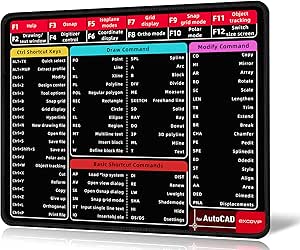 | Best Small, Focused Shortcut Pad for CAD Professionals | Size: 260 x 210 mm | Thickness: 2 mm | Material: Fabric surface with stitched edges, rubber base | VIEW ON AMAZON | See Our Full Breakdown |
| Mouse Pad for macOS Shortcuts – Small Desk Pad – 11.8″x9.8″ Portable Computer Mousepad – Waterproof, Non-Slip, Stitched Edges |  | Best Compact Shortcut Pad | Dimensions: 11.8″ x 9.8″ | Material: Micro-woven surface | Edges: Stitched | VIEW ON AMAZON | See Our Full Breakdown |
| keyboard shortcut pad | Material | Size | Features |
|---|---|---|---|
| Pixiecube Excel Shortcut Keys | Micro-weave fabric, natural rubber base | — | Stitched edges, water-resistant, stain-resistant, UV-resistant inks |
| Excel | Fabric top with waterproof coating | — | Non-slip base, fade-resistant printing, reinforced stitched edges |
| Excel Shortcuts Large Mouse Pa | Premium-textured lycra cloth | 31.5 x 15.7 inches | — |
| Secret Corner Excel & Word & W | High-quality fabric with stitched edges | 27.6 x 11.8 inches | Integrated shortcut cheat sheets, non-slip base, HD printing |
| Pixiecube Excel Cheat Sheet De | — | — | — |
| Excel | Fabric top, waterproof surface | 31.5 x 11.8 inches (800x300x3mm) | Non-slip base, fade-resistant printing, reinforced stitched edges |
| Secret Corner Excel Cheat Shee | Waterproof surface | 27.6 x 11.8 inches | Non-slip rubber base, stitched edges |
| Kinevolve Mouse Pad for Excel | Water-resistant fabric | 11.8" x 9.8" | Non-slip rubber base, stitched edges |
| Windows Shortcuts Mouse Pad | High-tech printed surface | Extra Large | — |
| CAD Shortcut Mouse Pad | Fabric surface with stitched edges, rubber base | 260 x 210 mm | — |
| Mouse Pad for macOS Shortcuts | Micro-woven surface | — | — |
More Details on Our Top Picks
Pixiecube Excel Shortcut Keys Mouse Pad – Large XXL Gaming and Office Desk Mat
This oversized desk mat stands out for its extensive collection of Excel shortcuts, formulas, and tricks, making it a top choice for heavy Excel users who want quick reference during intense data work. Its large 35.4 x 15.7 inches surface offers ample space for keyboard, mouse, and accessories, surpassing smaller options like the Secret Corner Cheat Sheet Mousepad in workspace. The cushioned, water-resistant surface combined with stitched edges ensures durability and comfort, but the size could be unwieldy for smaller desks or cluttered setups. Compared to the Pixiecube Excel Cheat Sheet Desk Pad, this model emphasizes a broader workspace over visual design, which might matter for those prioritizing aesthetics. Overall, it’s ideal for dedicated Excel users who need quick access to shortcuts without sacrificing workspace size, though less suited for casual or multi-purpose users.
Pros:- Extensive collection of Excel shortcuts, formulas, and tricks for fast reference
- Huge surface area supports keyboard, mouse, and accessories comfortably
- Durable stitched edges and water-resistant surface enhance longevity
- Vivid, fade-resistant printing adds visual appeal
Cons:- Size may be too large for limited desk space
- Design focused on Excel, less versatile for other applications
Best for: Excel power users who need a large, comprehensive reference surface while working or gaming
Not ideal for: Users with small desks or those seeking a more decorative or compact mouse pad
- Dimensions:35.4 x 15.7 inches
- Thickness:3mm
- Material:Micro-weave fabric, natural rubber base
- Features:Stitched edges, water-resistant, stain-resistant, UV-resistant inks
Our verdict“This pick makes the most sense for dedicated Excel users needing maximum workspace and quick shortcut access.”
Excel, Word, PowerPoint, Windows Mouse Pad – Large Non-Slip Waterproof Desk Mat with Keyboard Shortcuts
This large desk mat provides a practical solution for users who regularly switch between Office programs and Windows, with organized shortcuts for Excel, Word, PowerPoint, and Windows itself. Its 27.6 x 11.8 inches surface offers enough room for both keyboard and mouse, comparable to the Secret Corner Cheat Sheet Mousepad, but with a focus on a broader range of programs. The waterproof, spill-resistant material and non-slip base support durability and stability during intense work sessions, though its size may be excessive for smaller desks or minimal setups. Unlike dedicated Excel-only pads, this model balances multiple program shortcuts, making it suitable for general office workflows. It’s best for those who need quick access to multiple apps but less ideal for users seeking a more specialized or decorative pad.
Pros:- Organized shortcut references for multiple Office programs and Windows
- Large surface supports keyboard and mouse comfortably
- Waterproof and spill-resistant design for durability
- Non-slip base maintains stability during use
Cons:- Too large for compact desks or minimalist setups
- Limited to shortcut reference, less visually engaging
Best for: Office workers and students who use multiple productivity programs regularly
Not ideal for: Desk users with limited space or those seeking a purely gaming-focused mouse pad
- Dimensions:27.6 x 11.8 inches
- Material:Fabric top with waterproof coating
- Features:Non-slip base, fade-resistant printing, reinforced stitched edges
Our verdict“Ideal for multi-program users who want an organized, spill-resistant workspace without sacrificing stability.”
Excel Shortcuts Large Mouse Pad, 31.5 x 15.7 in with Stitched Edge
This oversized mouse pad, measuring 31.5 x 15.7 inches, offers a vast surface perfect for gaming, office work, or creative tasks, more expansive than the Pixiecube Excel Shortcut Keys Mouse Pad. Its durable stitched edges prevent fraying, while the non-slip rubber base keeps it securely in place. The water-resistant surface supports spills, but its large size might be overkill for users with limited desk space. The textured lycra cloth surface provides smooth tracking suitable for gaming, yet it can attract dust and debris, requiring more frequent cleaning. Compared to the Pixiecube Excel Shortcut Keys Mouse Pad, this model emphasizes a broad, versatile workspace that caters equally to gamers and professionals, but the size can be a drawback for smaller setups.
Pros:- Extensive surface area supports gaming and work activities
- Stitched edges prevent fraying and increase durability
- Non-slip rubber base for stability
- Water-resistant coating resists spills
Cons:- Size may be impractical for small desks
- Textile surface can attract dust and requires cleaning
Best for: Gamers and professionals needing a large, durable, multi-purpose mouse pad
Not ideal for: Users with tight desk space or those preferring a more compact or decorative pad
- Size:31.5 x 15.7 inches
- Material:Premium-textured lycra cloth
- Edges:Stitched
- Base:Non-slip rubber
- Water Resistance:Yes
Our verdict“Best suited for users who need a large, rugged surface for gaming or extensive work routines.”
Secret Corner Excel & Word & Windows & PowerPoint Cheat Sheet Mousepad, Extra Large Office Desk Accessories, Non-Slip, 27.6″x11.8″
This extra-large mousepad is designed for users who juggle multiple productivity tools, with integrated shortcut cheat sheets for Excel, Word, PowerPoint, and Windows. Its 27.6 x 11.8 inches size aligns with the Excel, Word, PowerPoint, Windows Mouse Pad, but adds the benefit of visual guides directly on the surface. The high-quality fabric with stitched edges ensures durability, and the non-slip bottom keeps it stable during intense use. While the cheat sheets are useful initially, they may become less visible over time with wear, and the limited color options reduce customization. Compared to purely shortcut-focused pads, this offers a broader functional approach but might be less appealing to users seeking minimalism or aesthetics.
Pros:- Large workspace supports multiple accessories and accessories
- Includes integrated shortcut cheat sheets for efficiency
- Stitched edges prevent fraying and increase lifespan
- Non-slip bottom enhances stability
Cons:- Cheat sheets may become less visible over time
- Limited color options and less visual customization
Best for: Office professionals and students who need quick references across multiple programs
Not ideal for: Desk setups with limited space or users wanting more decorative designs
- Size:27.6 x 11.8 inches
- Material:High-quality fabric with stitched edges
- Features:Integrated shortcut cheat sheets, non-slip base, HD printing
Our verdict“Perfect for multitaskers who want quick program references integrated into their workspace.”
Pixiecube Excel Cheat Sheet Desk Pad | Extended Large XL Gaming Mousepad | Non-Slip Stitched Edge
This 31.5 x 11.8-inch desk pad combines a comprehensive collection of Excel shortcuts and formulas with vibrant, durable printing, making it ideal for users who want quick reference alongside colorful visuals. Its large size comfortably fits a keyboard, mouse, and workspace, similar in size to the Excel Shortcuts Large Mouse Pad. The stitched edges prevent fraying, and the non-slip rubber base keeps it stable during demanding tasks. While its focus on Excel makes it less relevant for non-users, the bold graphics and water-stain resistance are definite advantages. Compared to the Pixiecube Excel Shortcut Keys Mouse Pad, this model emphasizes visual appeal and vibrant design, but the large size may be less practical for smaller desks or minimalist setups.
Pros:- Extensive Excel shortcuts and formulas for quick reference
- Large size supports full keyboard and mouse use
- Vivid, fade-resistant printing with bold graphics
- Stitched edges enhance durability
Cons:- Specific to Excel, less useful for non-users
- Size may not fit small desks
Best for: Excel enthusiasts who value colorful, detailed shortcut references with a lively aesthetic
Not ideal for: Users seeking a more subdued or multi-purpose desk pad without specific Excel focus
- Dimensions:31.5 x 11.8 inches
- Surface Material:Micro-weave fabric
- Base Material:Natural rubber
- Water Resistance:Yes
- Stain Resistance:Yes
- Edges:Stitched
Our verdict“Ideal for Excel fans wanting a colorful, comprehensive reference with a sizable workspace.”
Excel, Word, PowerPoint, Windows Mouse Pad – Large Gaming Office Desk Mat (XL 31.5 x 11.8 in), Non-Slip & Waterproof
This massive desk mat stands out for combining a high-quality mouse pad with a comprehensive shortcut reference surface, making it ideal for users who need quick access to multiple software shortcuts. Unlike smaller pads like the Kinevolve, its expansive size allows for full keyboard and mouse placement without crowding, which benefits power users with ample desk space. The waterproof surface and reinforced stitched edges boost durability and ease of cleaning, but it might be too bulky for compact desks or those preferring a minimalist setup. Its large footprint is perfect for multitasking environments, though it limits its suitability for users with limited space. Overall, this pick makes sense for professionals who want a dual-purpose workspace that combines comfort with productivity.Pros:- Large size provides ample space for mouse, keyboard, and accessories
- Waterproof surface simplifies cleanup and protects against spills
- Reinforced stitched edges enhance durability
- Easy access to multiple shortcut keys boosts productivity
Cons:- Size may be overwhelming for small desks or tight spaces
- Limited aesthetic appeal for those seeking a sleek, minimalist look
Best for: Power users and professionals with spacious desks who frequently multitask across multiple Microsoft Office apps.
Not ideal for: Users with small or cluttered desks who need a more compact solution or prefer minimal desk accessories.
- Size:31.5 x 11.8 inches (800x300x3mm)
- Material:Fabric top, waterproof surface
- Features:Non-slip base, fade-resistant printing, reinforced stitched edges
Our verdict“This large desk mat is best suited for users needing a spacious, durable, and versatile shortcut pad for extensive multitasking.”
Secret Corner Excel Cheat Sheet Desk Pad, Mouse Pad with Keyboard Shortcuts, Waterproof Non-Slip Office Desk Mat, 27.6 x 11.8 Inches
This desk pad offers a practical balance between size and utility, featuring a clear, printed reference for Excel shortcuts that can significantly improve workflow. Compared with the larger XL options like the first pick, it’s more manageable for medium-sized desks, though it sacrifices some workspace. Its waterproof surface and non-slip base ensure stability and durability, but the limited 30-day warranty might raise questions about long-term durability. The design is straightforward, appealing to users who primarily work in Excel and need quick access without extra frills. It’s an excellent choice for budget-conscious office workers who want to boost efficiency without sacrificing desk space.Pros:- Moderate size fits well on most desks
- Clear printed shortcuts enhance productivity
- Water-resistant surface simplifies maintenance
- Non-slip rubber base provides stability
Cons:- Limited warranty period of only 30 days
- Design may not appeal to users wanting a more stylish or versatile pad
Best for: Excel users and data analysts seeking an affordable, durable shortcut reference for daily tasks.
Not ideal for: Users who need shortcuts for multiple software or prefer highly aesthetic desk accessories, as its focus is specific and utilitarian.
- Size:27.6 x 11.8 inches
- Material:Waterproof surface
- Features:Non-slip rubber base, stitched edges
- Warranty:30 days
Our verdict“This desk pad is ideal for Excel-focused professionals seeking an affordable, stable, and easy-to-maintain shortcut reference.”
Kinevolve Mouse Pad for Excel, Word, PowerPoint, Windows Shortcuts – Small Portable Desk Pad – Waterproof, Non-Slip, Stitched Edges
This smaller mouse pad prioritizes portability and convenience, making it perfect for users who frequently switch locations or have limited desk space. Its size of just under 12 inches makes it more suitable for casual or mobile work, unlike the larger options such as the XL desk mats. The textured surface delivers precise control, which benefits both office work and gaming scenarios, while the waterproof and stitched features add to its durability. However, the limited surface area restricts extensive mouse movement and makes it less suitable for users who need a full workspace. This pick is ideal for students or professionals who value portability and quick reference without sacrificing control.Pros:- Compact, portable size fits easily into bags
- Textured surface offers precise control
- Water-resistant fabric and stitched edges boost durability
- Provides quick access to essential shortcuts
Cons:- Limited space for large mouse movements
- Print may fade over time with frequent use
Best for: Travelers, students, or mobile professionals needing a compact, durable shortcut pad for quick reference.
Not ideal for: Power users with extensive desk setups who require large workspace for multitasking or large mouse movements.
- Size:11.8″ x 9.8″
- Material:Water-resistant fabric
- Features:Non-slip rubber base, stitched edges
Our verdict“This small, durable pad is perfect for on-the-go users who need quick shortcut access within a compact, portable design.”
Windows Shortcuts Mouse Pad, Extra Large Keyboard Shortcut Mat for PC System, Gaming Desk Mat Mousepad
This extra-large mouse pad focuses solely on Windows shortcuts, making it a strong choice for users who primarily work within that environment. Its size surpasses many competitors like the Secret Corner and Excel-specific pads, providing a broad surface for comfortable mouse movements. The bright, high-quality printing enhances visibility, but the lack of anti-slip features raises stability concerns during vigorous use. Its design may not appeal to users seeking a neutral or minimalist aesthetic, but for Windows enthusiasts who want quick access to system commands in a spacious setup, this pad offers clear benefits. It’s less versatile for those needing shortcuts across multiple programs or a more refined look.Pros:- Large surface enhances mouse comfort
- Bright, high-quality printed shortcuts improve visibility
- Specifically tailored for Windows system commands
Cons:- No anti-slip features may reduce stability on certain surfaces
- Design may not suit minimalistic or aesthetic preferences
Best for: Windows users who prefer a large, dedicated workspace with quick access to system shortcuts.
Not ideal for: Mac users or those seeking a more aesthetic or multi-purpose shortcut pad, as it’s Windows-specific and visually bold.
- Size:Extra Large
- Compatibility:Windows System
- Material:High-tech printed surface
Our verdict“This oversized Windows shortcut pad benefits users who need a broad, clear workspace with quick system access, especially on larger desks.”
CAD Shortcut Mouse Pad, Small 260x210mm, Non-Slip Rubber Base, Stitched Edges
This compact mouse pad offers a highly specific utility, focusing on CAD users who need quick access to essential shortcuts within a small footprint. Its size makes it ideal for limited desk space or for use alongside larger setups, contrasting with the larger Excel or Windows pads. The stitched edges and rubber base ensure durability and stability, but the small surface restricts mouse movement, making it less suitable for tasks requiring extensive navigation. Its straightforward design makes it less attractive for general productivity or multitasking, but for dedicated CAD work, this pad improves efficiency without cluttering the workspace. It’s a targeted tool for specialized users who prioritize precision and compactness.Pros:- Small size fits well on tight desks
- Stitched edges increase durability
- Non-slip rubber base prevents shifting
- Helps streamline CAD workflows
Cons:- Limited surface area restricts mouse movement
- Design is too specialized for general use
Best for: CAD professionals or students who need a compact, durable shortcut pad for focused drawing and design work.
Not ideal for: General office workers or multitaskers seeking a large, versatile workspace or shortcuts for multiple applications.
- Size:260 x 210 mm
- Thickness:2 mm
- Material:Fabric surface with stitched edges, rubber base
Our verdict“This small, durable CAD shortcut pad is ideal for professionals who need quick access to CAD commands in a compact, stable form.”
Mouse Pad for macOS Shortcuts – Small Desk Pad – 11.8″x9.8″ Portable Computer Mousepad – Waterproof, Non-Slip, Stitched Edges
This mouse pad stands out for its focus on macOS users who need quick access to system shortcuts without sacrificing desk space. Its small size, measuring just 11.8″ x 9.8″, makes it highly portable and ideal for those who work on the go or have limited desk real estate. Compared with larger options like the Excel, Word, PowerPoint, Windows Mouse Pad—Large (27.6″ x 11.8″), this pad offers a concise, targeted shortcut guide, but at the expense of workspace for mouse movement during intensive tasks. The textured surface provides smooth, precise control suitable for both productivity and gaming, while waterproofing and stitched edges enhance durability. However, its macOS-only shortcuts limit flexibility for Windows users, and the compact size might not suit those who prefer larger mouse pads for extensive mouse movements.
Pros:- Highly portable and easy to carry in bags or laptop cases
- Includes comprehensive macOS shortcut guide to boost productivity
- Smooth, precise mouse control suitable for work and gaming
- Durable, waterproof, and non-slip base for stability
Cons:- Limited to macOS shortcuts, making it unsuitable for Windows users
- Small size may not meet needs of users requiring larger movement space
- Design may feel too specific for users without macOS devices
Best for: Mac users who want a portable, space-efficient shortcut reference for daily tasks and light gaming.
Not ideal for: Windows users or those needing a larger, more versatile mouse pad for extended work sessions.
- Dimensions:11.8″ x 9.8″
- Material:Micro-woven surface
- Edges:Stitched
- Base:Non-slip rubber
- Waterproof:Yes
- Print Quality:High-resolution, fade-resistant
Our verdict“This compact pad is perfect for macOS users seeking a portable, focused shortcut reference for everyday use.”

How We Picked
This roundup evaluates keyboard shortcut pads based on several key criteria: build quality, size and layout, ease of use, durability, and value for money. We prioritized products with clear, well-organized key mappings that enhance productivity. Non-slip bases and waterproof features were also important, as they contribute to long-term usability in busy environments. Our ranking reflects a balance between comprehensive functionality and practicality, aiming to recommend options suitable for a range of needs from casual users to professionals.| keyboard shortcut pad | Features |
|---|---|
| Pixiecube Excel Shortcut Keys | Stitched edges, water-resistant, stain-resistant, UV-resistant inks |
| Excel | Non-slip base, fade-resistant printing, reinforced stitched edges |
| Excel Shortcuts Large Mouse Pa | — |
| Secret Corner Excel & Word & W | Integrated shortcut cheat sheets, non-slip base, HD printing |
| Pixiecube Excel Cheat Sheet De | — |
| Excel | Non-slip base, fade-resistant printing, reinforced stitched edges |
| Secret Corner Excel Cheat Shee | Non-slip rubber base, stitched edges |
| Kinevolve Mouse Pad for Excel | Non-slip rubber base, stitched edges |
| Windows Shortcuts Mouse Pad | — |
| CAD Shortcut Mouse Pad | — |
| Mouse Pad for macOS Shortcuts | — |
Factors to Consider When Choosing Keyboard Shortcut Pads
Choosing the right keyboard shortcut pad depends on your specific workflow, workspace, and budget. It’s important to consider how large the pad should be, whether portability matters, and if additional features like waterproofing or custom layouts are worth the extra cost. Being aware of these factors can help prevent buying a product that doesn’t meet your needs or becomes a cluttered distraction.Size and Layout
Size is a primary consideration. Larger pads provide more shortcuts and clearer key labels, ideal for dedicated workspaces but less portable. Compact options are easier to carry and fit into smaller desks but may limit the number of shortcuts available. Consider your typical work environment to choose a size that balances convenience and functionality.
Ease of Use and Key Clarity
Look for models with well-organized, legible key labels. Some pads feature color coding or distinct layouts to differentiate functions, which can significantly speed up your workflow. Avoid overly cluttered designs that require extra effort to find the right shortcut, especially if you work quickly or in high-pressure situations.
Build Quality and Durability
Stitched edges, waterproof surfaces, and non-slip bases boost longevity and usability. These features help prevent wear and tear, especially in busy or cluttered environments. Investing in a well-made pad can save money over time, but be aware that premium materials often come with a higher price tag.
Specialized Features and Compatibility
Some shortcut pads cater to specific applications like CAD or macOS, offering tailored layouts that improve efficiency. Check compatibility with your operating system and software to ensure seamless integration. Niche features might be worth the extra cost if they address your particular workflow needs.
Price and Value
Higher-priced models tend to offer better build quality, more comprehensive shortcuts, and additional features. However, budget options can still deliver solid performance for casual users. Balance your budget with your needs: investing in a premium pad makes sense for heavy, professional use, while simpler models suit occasional tasks.
Frequently Asked Questions
Are keyboard shortcut pads compatible with all computers?
Most shortcut pads are designed to work with standard operating systems like Windows and macOS, often connecting via USB or Bluetooth. However, compatibility can vary—some specialized pads might have drivers or software requirements. Always check the product specifications to confirm it will integrate smoothly with your setup before purchasing.
Can I customize the shortcuts on these pads?
Many shortcut pads offer pre-mapped functions, but some models include software that allows you to customize key functions. Customization is especially useful if you work with niche applications or want to assign macros. Be aware that more advanced customization features often come with a learning curve and may require additional setup time.
Are larger shortcut pads worth the extra space?
Larger pads typically provide more shortcuts and clearer labels, which can significantly boost productivity if you frequently use many commands. However, they take up more desk space and may be less portable. Consider your workspace size and whether you need comprehensive access versus a minimal setup.
How durable are these shortcut pads over time?
Durability depends on the materials used: stitched edges, waterproof surfaces, and non-slip bases tend to last longer. Cheaper models might wear out faster, especially if used daily or in cluttered environments. Investing in higher-quality materials can extend the life of your shortcut pad considerably.
Is it better to buy a dedicated shortcut pad or a large mouse pad with shortcuts?
Dedicated shortcut pads are generally more optimized, with layouts tailored for specific programs and often better key clarity. Larger mouse pads with shortcut overlays can serve dual purposes but may lack the precision and clarity of purpose that dedicated pads provide. Your choice depends on whether you prioritize clarity and specialization or multi-functionality and space-saving design.
Conclusion
For users seeking the best overall experience, the Excel Shortcut Keys Mouse Pad from Pixiecube stands out due to its large size and versatile design. Those on a budget might prefer the Secret Corner Excel Cheat Sheet Desk Pad for its affordability and waterproof features. Professionals needing a specialized, durable option should consider the CAD Shortcut Mouse Pad for its precise layout and stitched edges. Beginners or casual users will find smaller, simpler models easier to manage, while power users will benefit from larger, feature-rich options that maximize shortcut accessibility.