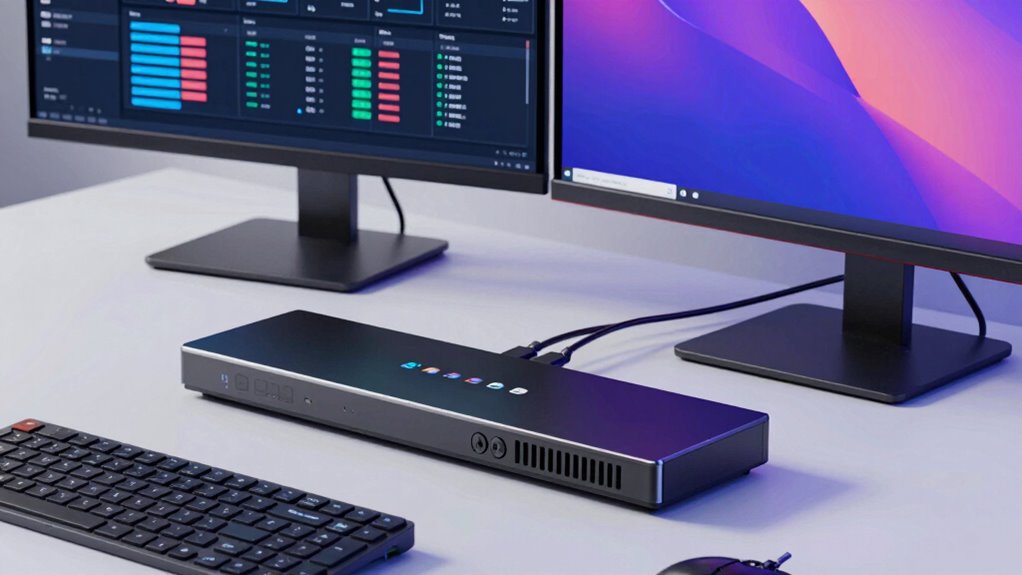

Searching for a kvm switch dual monitor solution? The best options allow seamless switching between two computers on two monitors, ideal for productivity and multitasking. The UGREEN 8K@60Hz HDMI DisplayPort KVM stands out for high resolution support, while the Heravo USB 3.0 HDMI KVM offers reliable performance at a competitive price. The main tradeoffs often involve balancing resolution, connection types, and ease of use. Keep reading for a detailed breakdown of the top models and what to consider before buying.

Get audio and creator gear delivered free with Prime
- Fast, free delivery on millions of items
- Prime Video, Amazon Music and more included
- Member-only deals all year
Complete the kit


Key Takeaways
- High-resolution support (4K and 8K) is a common focus, but it often comes with higher price tags.
- Compatibility with various connection types (HDMI, DisplayPort, USB-C) varies significantly, affecting setup flexibility.
- Hotkey switching and remote controls improve usability but may add complexity or cost.
- Build quality and cable management are key for long-term durability and neat setups, especially with dual monitors.
- Price ranges widely, with premium models offering better performance and features—choose based on your specific needs.
| UGREEN 8K@60Hz HDMI DisplayPort KVM Switch for 3 Monitors and 2 Computers |  | Best Overall for High-Resolution Multi-Monitor Setups | Number of Monitors: 3 | Number of Computers: 2 | DisplayPort Ports: 2 | VIEW ON AMAZON | See Our Full Breakdown |
| SUIDEK HDMI KVM Switch 2 Monitors 2 Computers – 4K@60Hz Aluminum |  | Best Value for Compact 4K Dual-Monitor Control | Number of Monitors: 2 | Number of Computers: 2 | Resolution Support: 4K@60Hz | VIEW ON AMAZON | See Our Full Breakdown |
| Heravo USB 3.0 HDMI KVM Switch 2 Monitors 2 Computers, 4K@60Hz Dual Monitor |  | Best for Easy Dual 4K Control with Remote Convenience | Number of Monitors: 2 | Number of Computers: 2 | Resolution Support: 4K@60Hz | VIEW ON AMAZON | See Our Full Breakdown |
| Unitek KVM Switch for Dual Monitors and Dual Computers with HDMI and DisplayPort | 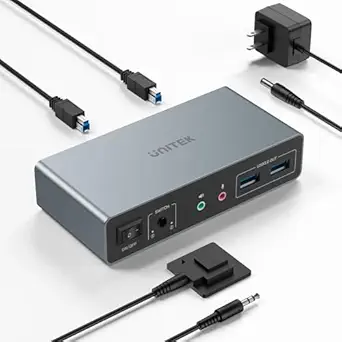 | Best for Versatile Multi-Interface Compatibility | Input Ports: 2 HDMI, 2 DisplayPort | Output Ports: 2 HDMI, 2 DisplayPort | Resolution Support: Up to 4K@60Hz | VIEW ON AMAZON | See Our Full Breakdown |
| 8K HDMI KVM Switch for Dual Monitors and Computers |  | Best for Ultra HD Gaming and Professional Use | Resolution Support: 8K@60Hz, 4K@120Hz | USB Ports: 4 USB 3.0 | Switching Modes: Button, Wired controller | VIEW ON AMAZON | See Our Full Breakdown |
| KVM Switch with DisplayPort EDID, Dual Monitors, 2 Computers, 4K 144Hz, Hotkey Switching |  | Best Overall for High-Resolution Dual Monitor Control | Number of Monitors: 2 | Number of Computers: 2 | Resolution Support: 4K@144Hz, 2560×1440@144Hz, 5120×1440@120Hz | VIEW ON AMAZON | See Our Full Breakdown |
| HDMI DP2.1 KVM Switch 2 Monitors 2 Computers, 8K@60Hz/4K@144Hz, with USB 3.0 Cables, Wired Controller, Power Adapter |  | Best for Ultra-High-Resolution, Plug-and-Play Dual Monitor Switching | Resolution Support: 8K@60Hz/4K@144Hz | Number of Monitors: 2 | Number of Computers: 2 | VIEW ON AMAZON | See Our Full Breakdown |
| HDMI KVM Switch for 2 Monitors and 2 Computers, Dual HDMI, USB 3.0 |  | Best for Simplicity and High-Resolution Dual Monitoring | Number of Monitors: 2 | Number of Computers: 2 | Resolution Support: Up to 8K@60Hz | VIEW ON AMAZON | See Our Full Breakdown |
| kvm switch dual monitor | Resolution Support | Number of Monitors | Number of Computers | USB Ports |
|---|---|---|---|---|
| UGREEN 8K@60Hz HDMI DisplayPor | — | 3 | 2 | — |
| SUIDEK HDMI KVM Switch 2 Monit | 4K@60Hz | 2 | 2 | 3 USB 3.0 |
| Heravo USB 3.0 HDMI KVM Switch | 4K@60Hz | 2 | 2 | 4 USB 3.0 |
| Unitek KVM Switch for Dual Mon | Up to 4K@60Hz | — | — | 4 USB 3.0 |
| 8K HDMI KVM Switch for Dual Mo | 8K@60Hz, 4K@120Hz | — | — | 4 USB 3.0 |
| KVM Switch with DisplayPort ED | 4K@144Hz, 2560×1440@144Hz, 5120×1440@120Hz | 2 | 2 | — |
| HDMI DP2.1 KVM Switch 2 Monito | 8K@60Hz/4K@144Hz | 2 | 2 | 4 USB 3.0 |
| HDMI KVM Switch for 2 Monitors | Up to 8K@60Hz | 2 | 2 | 2 USB 3.0 |
More Details on Our Top Picks
UGREEN 8K@60Hz HDMI DisplayPort KVM Switch for 3 Monitors and 2 Computers
This UGREEN model stands out for supporting an astonishing 8K@60Hz resolution across three monitors, making it the top choice for professionals who need ultra-high-definition displays, such as content creators and tech enthusiasts. Compared to the Heravo switch, it offers more display outputs and higher resolution support, but it also demands both computers support triple-monitor outputs, which can limit compatibility for some users. Its multi-mode display options and easy switching methods ensure flexibility, though the cable length limit and lack of hotkey switching can be inconvenient. Overall, this switch is best suited for users who prioritize maximum resolution and multi-display capability over simplicity or cable management.
Pros:- Supports stunning 8K@60Hz resolution for detailed visuals
- Allows sharing three monitors and multiple USB 3.0 devices between two computers
- Offers multiple display modes and switch options for flexibility
Cons:- Requires both computers to support triple-monitor output, limiting compatibility
- Cable length limited to 2 meters for 8K resolution, which can restrict placement options
- Lacks hotkey switching, making quick toggling less convenient
Best for: Power users who require 8K resolution and multiple monitor outputs for demanding creative or technical tasks
Not ideal for: Casual users or small office setups that don’t need ultra-high resolution or three-monitor support
- Number of Monitors:3
- Number of Computers:2
- DisplayPort Ports:2
- HDMI Ports:1
- Max Resolution:8K@60Hz
- Switching Methods:Button, Desktop Controller
Our verdict“This switch is ideal for professionals needing maximum resolution and multi-monitor power, with some tradeoffs in setup flexibility.”
SUIDEK HDMI KVM Switch 2 Monitors 2 Computers – 4K@60Hz Aluminum
Compared with the Heravo switch, the SUIDEK model offers a robust aluminum build and a straightforward 4K@60Hz support for two monitors, making it a solid choice for budget-conscious users needing reliable dual-monitor control. It excels in durability and ease of use with multiple switching options but falls short if you require higher resolutions or more advanced features like remote control. Its limited compatibility with laptops and lack of DisplayPort support mean it’s best for desktop setups. This pick is great for users who prioritize affordability and straightforward dual 4K display management over advanced features.
Pros:- Supports crisp 4K@60Hz resolution for clear visuals
- Durable aluminum construction for long-lasting use
- Easy switching via button or desktop controller
Cons:- Does not support dual-monitor output from laptops with specific graphics configurations
- Limited to 4K@60Hz, not suitable for higher refresh rate needs
- Requires specific HDMI cables and external power for optimal performance
Best for: Home office users or small business owners with desktop computers needing reliable 4K dual-monitor control
Not ideal for: Gamers or creators requiring higher refresh rates or DisplayPort support, or laptop users needing portable solutions
- Number of Monitors:2
- Number of Computers:2
- Resolution Support:4K@60Hz
- USB Ports:3 USB 3.0
- Material:Aluminum
- Switching Methods:Button, Desktop Controller
Our verdict“This switch is a reliable, budget-friendly option for desktop users needing straightforward dual 4K display control.”
Heravo USB 3.0 HDMI KVM Switch 2 Monitors 2 Computers, 4K@60Hz Dual Monitor
The Heravo switch makes a compelling case for users who want to control two computers with two 4K monitors seamlessly, with the added benefit of a wired remote for convenient switching. Its plug-and-play nature and four USB 3.0 ports support fast peripherals, matching well against the SUIDEK model in terms of ease of use. However, unlike the UGREEN unit, it doesn’t support ultra-high resolutions beyond 4K, and the need for additional HDMI cables can add to setup complexity. The remote control offers better convenience than button-only models but might be less flexible for fast toggling compared to hotkey options. This makes it ideal for users seeking straightforward dual-monitor control with remote switching.
Pros:- Supports dual 4K@60Hz for high-quality visuals
- Includes wired remote for simple switching
- Plug-and-play with no driver installation needed
Cons:- Requires additional HDMI cables for full setup
- Limited to two computers and monitors, less scalable
- Remote control may be less intuitive for frequent toggling
Best for: Home users or small offices needing easy, remote-controlled dual 4K monitor setups
Not ideal for: Power users requiring resolutions beyond 4K or those with complex multi-monitor configurations
- Number of Monitors:2
- Number of Computers:2
- Resolution Support:4K@60Hz
- USB Ports:4 USB 3.0
- Remote Control:Wired remote
- Switching Methods:Button, Wired remote
Our verdict“This switch is perfect for users who prioritize ease of setup and remote control over multi-monitor resolution extremes.”
Unitek KVM Switch for Dual Monitors and Dual Computers with HDMI and DisplayPort
Compared to the more straightforward Heravo or SUIDEK options, the Unitek switch offers greater flexibility with both HDMI and DisplayPort inputs and outputs, supporting a wide range of devices including gaming consoles and Linux systems. It’s a versatile choice for users with mixed equipment needing dual monitors at up to 4K@60Hz. However, its complexity means setup can be more involved, and it’s primarily designed for desktop environments, not portable or laptop-centric use. The inclusion of multiple input options makes it a strong candidate for multi-device environments but might be overkill for simple home-office tasks. This is best suited for users who need compatibility across various interfaces and multiple device types.
Pros:- Supports both HDMI and DisplayPort for broader device compatibility
- Handles dual 4K@60Hz displays reliably
- Includes multiple USB ports and remote control for flexible management
Cons:- Requires multiple cables and a power connection, increasing setup complexity
- Not optimized for portable or laptop use
- Designed mainly for desktop environments, less suited for mobility
Best for: Tech-savvy users managing multiple device types, including gaming consoles, Linux, and Windows PCs
Not ideal for: Casual users or those seeking a plug-and-play, portable solution for laptops
- Input Ports:2 HDMI, 2 DisplayPort
- Output Ports:2 HDMI, 2 DisplayPort
- Resolution Support:Up to 4K@60Hz
- USB Ports:4 USB 3.0
- Power Supply:5V 2A adapter
- Compatibility:Windows, Linux, Mac, PS4
Our verdict“This switch best serves users needing flexible, multi-interface connections across diverse devices with high-resolution dual-monitor support.”
8K HDMI KVM Switch for Dual Monitors and Computers
Standing out for supporting both 8K@60Hz and 4K@120Hz, this switch is tailored for users who need the highest resolutions for gaming, video editing, or professional multitasking, surpassing the other options in resolution support. Its dual-switching modes via button or wired remote add convenience, but it demands specific dual graphics cards for effective dual-monitor operation, which could limit compatibility for some setups. Unlike the UGREEN or Heravo models, it doesn’t support hotkey switching, and passive adapters may not transmit signals properly at such high resolutions. This switch is ideal for enthusiasts who prioritize cutting-edge visuals and high-speed data transfer, accepting the setup complexity involved.
Pros:- Supports ultra HD 8K@60Hz and 4K@120Hz for premium visuals
- Fast USB 3.0 transfer speeds up to 5 Gbps
- Multiple switching modes for flexibility
Cons:- Requires dual graphics cards for dual-monitor support, increasing cost
- Passive adapters may not transmit 8K signals reliably
- No hotkey switching for quick toggling
Best for: Gamers, video editors, or professionals with high-end graphics setups needing up to 8K visuals
Not ideal for: Average users or those with standard 4K setups, due to the complexity and hardware requirements
- Resolution Support:8K@60Hz, 4K@120Hz
- USB Ports:4 USB 3.0
- Switching Modes:Button, Wired controller
- Power Supply:12V power adapter
- Compatibility:Windows, Mac, Linux
Our verdict“This switch is geared toward high-end users demanding the ultimate resolution and performance, with setup requirements that reflect its premium status.”
KVM Switch with DisplayPort EDID, Dual Monitors, 2 Computers, 4K 144Hz, Hotkey Switching
This KVM switch stands out for supporting 4K resolution at 144Hz, making it ideal for users who need smooth visuals for gaming or professional work. Compared with the HDMI-only options, this model’s DisplayPort 1.4 support ensures better compatibility with high-refresh-rate monitors, though it requires compatible cables and graphics cards for optimal performance. Its multiple switching methods—hotkeys, mouse, push button, and remote—offer flexibility but can be overwhelming for beginners setting up their workspace. The built-in USB 3.0 hub adds convenience for peripheral sharing, yet setup complexity and reliance on compatible hardware may pose hurdles. This option is best suited for power users needing high refresh rates and resolution, who are comfortable with a more detailed configuration process.
Pros:- Supports 4K at 144Hz for smooth, sharp visuals
- Multiple switching options for convenience
- Includes a USB 3.0 hub for peripheral sharing
- Compatible with Windows, Linux, and Mac
Cons:- Requires compatible graphics cards and cables for optimal use
- Setup can be complex for beginners
Best for: Professionals or gamers who require high-resolution, high-refresh-rate dual monitor setups and flexible switching options.
Not ideal for: Casual users or those new to KVM switches, as setup can be complex and requires compatible hardware for full performance.
- Number of Monitors:2
- Number of Computers:2
- Resolution Support:4K@144Hz, 2560×1440@144Hz, 5120×1440@120Hz
- Switching Methods:Hotkeys, mouse, push button, remote
- USB Hub:Yes, USB 3.0
- Compatibility:Windows, Linux, Mac
Our verdict“This switch is perfect for power users who need top-tier display quality and flexible switching, accepting a steeper setup process.”
HDMI DP2.1 KVM Switch 2 Monitors 2 Computers, 8K@60Hz/4K@144Hz, with USB 3.0 Cables, Wired Controller, Power Adapter
Compared with the DisplayPort-focused option, this HDMI KVM switch excels in supporting 8K@60Hz and 4K@144Hz, making it a top choice for users with ultra-high-resolution displays. Its plug-and-play design with driver-free operation reduces setup complexity, unlike the more intricate configuration of the DisplayPort model. The inclusion of USB 3.0 ports facilitates fast peripheral sharing, and the wired remote control simplifies switching without needing keyboard hotkeys. However, it lacks hotkey switching, which could be limiting for advanced users who prefer keyboard shortcuts. This model suits professionals working with high-res content or creative workflows that demand maximum resolution and straightforward operation.
Pros:- Supports ultra-high resolutions up to 8K@60Hz
- Plug-and-play, driver-free setup
- Includes USB 3.0 ports for fast data transfer
- Easy switching via wired controller
Cons:- Lacks hotkey switching for keyboard shortcuts
- Requires high-quality HDMI cables for best performance
- Potential compatibility issues with certain HDMI devices
Best for: Creative professionals or high-end workstation users needing effortless, high-resolution dual monitor control with simple switching methods.
Not ideal for: Users seeking hotkey-based switching or those with limited HDMI port options, as it relies on HDMI connections and lacks hotkey support.
- Resolution Support:8K@60Hz/4K@144Hz
- Number of Monitors:2
- Number of Computers:2
- USB Ports:4 USB 3.0
- Switching Modes:Button and wired controller
- Compatibility:Driver-free, plug and play
Our verdict“This switch is ideal for users prioritizing maximum resolution and ease of use over advanced switching features like hotkeys.”
HDMI KVM Switch for 2 Monitors and 2 Computers, Dual HDMI, USB 3.0
This HDMI-based KVM switch offers a straightforward solution for sharing two monitors and peripherals between two computers, supporting resolutions up to 8K@60Hz. Unlike the DisplayPort and HDMI combo models, it relies solely on HDMI 2.1, simplifying connections if your hardware supports it. Its front panel button and wired remote provide easy switching, but notably, it does not support hotkey commands—potentially limiting for users who prefer keyboard shortcuts. The inclusion of dual USB 3.0 ports makes peripheral sharing seamless, though the power adapter, while necessary, adds a bit of clutter to the workspace. This device is best suited for users who prioritize simple setup and high resolution without the need for advanced switching modes.
Pros:- Supports up to 8K@60Hz resolution
- Simple front button and remote switching
- Shares multiple USB peripherals with ease
- Plug-and-play with minimal setup
Cons:- No hotkey switching support
- Requires compatible HDMI cables and hardware
- Power adapter may add desk clutter
Best for: Home office users or professionals who want a reliable, high-resolution dual monitor switch with easy, physical controls.
Not ideal for: Advanced users who prefer hotkey switching or need extensive USB ports beyond two, as this model’s features are more basic.
- Number of Monitors:2
- Number of Computers:2
- Resolution Support:Up to 8K@60Hz
- HDMI Version:HDMI 2.1
- USB Ports:2 USB 3.0
- Maximum USB Speed:5Gbps
Our verdict“This switch is best for users seeking a straightforward, high-resolution dual monitor setup with easy physical controls and minimal fuss.”

How We Picked
The products in this roundup were evaluated based on performance, connection versatility, build quality, ease of switching, and value for money. We prioritized models that support dual monitors with high resolutions, focusing on those with reliable switching mechanisms and broad compatibility. Our ranking reflects a balance between advanced features and user-friendly operation, ensuring options for different budgets and technical needs. Products with robust construction and consistent performance across multiple setups scored higher, while those with limited features or poor build quality were ranked lower.| kvm switch dual monitor | Switching Methods | Compatibility |
|---|---|---|
| UGREEN 8K@60Hz HDMI DisplayPor | Button, Desktop Controller | — |
| SUIDEK HDMI KVM Switch 2 Monit | Button, Desktop Controller | — |
| Heravo USB 3.0 HDMI KVM Switch | Button, Wired remote | — |
| Unitek KVM Switch for Dual Mon | — | Windows, Linux, Mac, PS4 |
| 8K HDMI KVM Switch for Dual Mo | — | Windows, Mac, Linux |
| KVM Switch with DisplayPort ED | Hotkeys, mouse, push button, remote | Windows, Linux, Mac |
| HDMI DP2.1 KVM Switch 2 Monito | — | Driver-free, plug and play |
| HDMI KVM Switch for 2 Monitors | — | — |
Factors to Consider When Choosing Kvm Switch Dual Monitor
Choosing a kvm switch dual monitor involves understanding several key factors beyond basic features. The right switch should fit your technical setup, budget, and usage style. Considering connection types, resolution support, and switching methods can prevent future compatibility issues. Additionally, balancing cost against features like build quality and ease of use ensures you get a solution that remains reliable over time. Here are some factors to keep in mind:Compatibility and Connection Types
Ensure the KVM switch supports the connection ports on your computers and monitors, whether HDMI, DisplayPort, or USB-C. Some switches offer multiple connection types, providing flexibility for different devices. Compatibility with your operating system and support for features like EDID or HDCP can also affect usability and performance. Choosing a model with versatile connections reduces the need for adapters and future-proofs your setup.
Resolution and Refresh Rate Support
High resolution (4K or 8K) support is vital if you work with detailed visuals or high-end gaming. Pay close attention to the supported refresh rates—144Hz and above are desirable for smooth motion. Cheaper models may only support lower resolutions or refresh rates, limiting display quality. Matching your monitors’ capabilities with the KVM switch ensures you get the best visual experience without bottlenecks.
Switching Mechanisms and Usability
Switching methods like hotkeys, remote controls, or physical buttons impact how easily you can toggle between computers. Hotkey switching is fast but may require keyboard remapping, while remote controls offer convenience at a higher cost. Consider how often you’ll switch and your comfort with these methods to choose an option that fits your workflow. Simpler switches may lack advanced features but excel in straightforward operation.
Build Quality and Cable Management
Durability matters, especially if your setup is permanent or heavily used. Look for sturdy materials and well-designed cable management options to keep your workspace tidy. Cheaper switches might use lower-quality plastics or flimsy connectors, leading to potential failure over time. Investing in a solid build prevents frustration and reduces maintenance needs.
Price and Future-Proofing
Prices vary based on features, resolution support, and build quality. While budget options can handle basic dual monitor setups, higher-end models support 8K resolutions, faster refresh rates, and more extensive connectivity. Think about your current needs and potential future upgrades—spending more upfront can avoid costly replacements later. Balance your budget with the features that matter most for your workflow.
Frequently Asked Questions
Will a dual-monitor KVM switch work with my existing setup?
Most dual-monitor KVM switches are compatible with standard HDMI or DisplayPort connections found on typical desktops and laptops. However, it’s essential to check the specific ports on your devices and the switch to ensure compatibility. If your monitors or computers use different connection types, adapters may be necessary. Confirming resolution support and refresh rates also helps avoid performance issues.
Can I switch seamlessly between two computers with high-resolution monitors?
Yes, but only if the KVM switch supports the required resolution and refresh rate. Higher resolutions like 4K and 8K demand more bandwidth, so select a switch explicitly supporting these standards. Features like hotkey switching or remote controls can also facilitate quick transitions, minimizing downtime. Be aware that some budget models might struggle with high bandwidth, leading to reduced image quality or lag.
Does a dual monitor KVM switch support audio and USB peripherals?
Many modern KVM switches include audio switching and USB hub functionality, allowing you to share keyboards, mice, and speakers across computers. However, features vary widely, so verify that the specific model supports your peripherals. Some switches may only support video signals, requiring separate audio or USB hubs for full functionality. Compatibility with your devices should be checked beforehand.
Is it better to buy a wired or wireless KVM switch?
Wired KVM switches generally offer more reliable connections, higher bandwidth, and support for higher resolutions. Wireless options are less common and may introduce latency or stability issues, especially with high-resolution displays. For professional workflows or demanding setups, a wired switch provides consistent performance and minimizes interference. Wireless models might appeal for minimal cabling but usually at the expense of stability.
How do I choose between HDMI and DisplayPort for my KVM switch?
Your choice depends on your monitors and computers’ ports and your resolution needs. DisplayPort often supports higher refresh rates and resolutions at a lower cost, making it ideal for gaming or professional use. HDMI is more common and offers broad compatibility with consumer devices. Check your monitor specifications and future compatibility plans to decide which connection type best suits your setup.
Conclusion
For most users seeking a reliable, all-around solution, the UGREEN 8K@60Hz HDMI DisplayPort KVM stands out as the best overall pick, supporting high resolutions and multiple connection options. Budget-conscious buyers will appreciate the Heravo USB 3.0 HDMI KVM for its value. Professionals and gamers needing ultra-high resolutions and high refresh rates should consider the HDMI DP2.1 KVM Switch. Beginners or those with simple setups may prefer models with straightforward switching features. Tailor your choice based on your current setup, future needs, and budget to ensure a smooth, efficient dual-monitor experience.
Halloween Picks
halloween
As an affiliate, we earn on qualifying purchases.