For most living room VR buyers, I’d start with the CyberPowerPC Gamer Xtreme VR with RTX 5060: its newer graphics platform, 32GB of memory, and 2TB SSD make it the strongest balance in this lineup. The MSI Codex Z2 is the premium pick for demanding games, while the RTX 5060 Ti CyberPowerPC is a good alternative if you want extra graphics headroom without stepping up to the MSI. The main tradeoffs are graphics performance, room for future games, and how much space and setup flexibility a desktop needs beside a TV. Older GTX 1660 Super and GTX 1070 systems may suit lighter VR use, but give up newer GPU features and performance. Read on for the full breakdown and guidance on choosing a PC that fits your headset, play space, and upgrade plans.

Get audio and creator gear delivered free with Prime
- Fast, free delivery on millions of items
- Prime Video, Amazon Music and more included
- Member-only deals all year
Complete the kit



Key Takeaways
- The RTX 5060 CyberPowerPC is the best overall fit here: its 32GB DDR5 memory and 2TB SSD give it a more complete everyday setup than the RTX 5060 Ti model’s 16GB memory.
- The MSI Codex Z2 is the clear premium option: its RTX 5070 offers the most graphics headroom in this group, but its higher performance may be more than casual VR players need.
- The two RTX 3050 STGAubron listings are near-duplicates: check the exact configuration before choosing, since the listed memory and storage details vary and neither has the same graphics headroom as the newer RTX systems.
- Older GTX systems make the most sense for lighter use: the GTX 1070 Volt and GTX 1660 Super CyberPowerPC and STGAubron options trail the newer RTX models for demanding VR and future-facing features.
- Memory and storage separate similarly named picks: the RTX 5060 CyberPowerPC pairs 32GB RAM with a 2TB SSD, while the RTX 5060 Ti version lists 16GB RAM; the latter’s GPU advantage does not automatically make it the better all-round choice.
| STGAubron Gaming Desktop PC with Intel Core i7 and GeForce RTX 3050 |  | Best for a Living Room Setup with Current Connectivity | Processor: Intel Core i7, up to 3.9 GHz; model unspecified | Graphics: GeForce RTX 3050 6GB | Memory: 16GB DDR3; maximum 32GB | VIEW ON AMAZON | See Our Full Breakdown |
| Volt X3 V1.2 Gaming PC Desktop Computer – Ryzen 5 2600, GTX 1070 8GB, 16GB DDR4, 512GB NVMe SSD |  | Best for a Visible, Living Room-Friendly Build | Processor: AMD Ryzen 5 2600, 6 cores/12 threads, up to 3.9 GHz | Graphics: NVIDIA GeForce GTX 1070 8GB GDDR5 | Memory: 16GB DDR4-3200, 2 x 8GB | VIEW ON AMAZON | See Our Full Breakdown |
| CyberpowerPC Gamer Xtreme VR Gaming PC, Intel Core Ultra 5 225F, RTX 5060 8GB, 32GB DDR5, 2TB SSD |  | Best Overall for Living Room VR | Processor: Intel Core Ultra 5 225F, 3.3GHz, up to 4.9GHz | Graphics: NVIDIA GeForce RTX 5060 8GB | Memory: 32GB DDR5; maximum 64GB | VIEW ON AMAZON | See Our Full Breakdown |
| CyberPowerPC Gamer Xtreme VR Gaming Desktop, Intel Core i5-10400F, GTX 1660 Super, 8GB DDR4, 500GB NVMe SSD |  | Best for Entry-Level VR Buyers Who Plan to Upgrade | Processor: Intel Core i5-10400F, 6 cores, 2.9 GHz | Graphics: NVIDIA GeForce GTX 1660 Super 6GB GDDR6 | Memory: 8GB DDR4 | VIEW ON AMAZON | See Our Full Breakdown |
| STGAubron Gaming Desktop PC with Intel Core i7, GTX 1660 Super, 16GB RAM, 512GB SSD |  | Best for Buyers Who Want Included Peripherals | Processor: Intel Core i7, up to 3.9 GHz; model unspecified | Graphics: NVIDIA GeForce GTX 1660 Super 6GB GDDR6 | Memory: 16GB DDR3 SDRAM; maximum 32GB | VIEW ON AMAZON | See Our Full Breakdown |
| MSI Codex Z2 Gaming Desktop, Ryzen 7 8700F, GeForce RTX 5070, 32GB DDR5, 2TB SSD |  | Best Overall for Demanding Living Room VR | Processor: AMD Ryzen 7 8700F, 8 cores and 16 threads, up to 5.0 GHz | Graphics: NVIDIA GeForce RTX 5070 | Memory: 32GB DDR5, 6000 MHz | VIEW ON AMAZON | See Our Full Breakdown |
| STGAubron Gaming Desktop PC with Intel Core i7, GeForce RTX 3050, 16GB DDR4 RAM, and 512GB SSD |  | Best Entry-Level VR Starter | Processor: Intel Core i7, up to 4.1 GHz | Graphics: GeForce RTX 3050 6GB | Memory: 16GB DDR4, 2666 MHz | VIEW ON AMAZON | See Our Full Breakdown |
| CyberPowerPC Gamer Xtreme VR Gaming Desktop, Intel Core Ultra 5 225F, GeForce RTX 5060 Ti 8GB, 16GB DDR5, 2TB SSD |  | Best for Storage and Future Memory Upgrades | Processor: Intel Core Ultra 5 225F, 3.3 GHz, 10 cores | Graphics: NVIDIA GeForce RTX 5060 Ti, 8GB | Memory: 16GB DDR5, 6400 MHz | VIEW ON AMAZON | See Our Full Breakdown |
| living room vr gaming pc | Processor | Graphics | Memory | Storage |
|---|---|---|---|---|
| STGAubron Gaming Desktop PC wi | Intel Core i7, up to 3.9 GHz; model unspecified | GeForce RTX 3050 6GB | 16GB DDR3; maximum 32GB | 512GB SSD |
| Volt X3 V1.2 Gaming PC Desktop | AMD Ryzen 5 2600, 6 cores/12 threads, up to 3.9 GHz | NVIDIA GeForce GTX 1070 8GB GDDR5 | 16GB DDR4-3200, 2 x 8GB | 512GB NVMe SSD |
| CyberpowerPC Gamer Xtreme VR G | Intel Core Ultra 5 225F, 3.3GHz, up to 4.9GHz | NVIDIA GeForce RTX 5060 8GB | 32GB DDR5; maximum 64GB | 2TB PCIe 4.0 NVMe SSD |
| CyberPowerPC Gamer Xtreme VR G | Intel Core i5-10400F, 6 cores, 2.9 GHz | NVIDIA GeForce GTX 1660 Super 6GB GDDR6 | 8GB DDR4 | 500GB PCIe NVMe SSD |
| STGAubron Gaming Desktop PC wi | Intel Core i7, up to 3.9 GHz; model unspecified | NVIDIA GeForce GTX 1660 Super 6GB GDDR6 | 16GB DDR3 SDRAM; maximum 32GB | 512GB SSD |
| MSI Codex Z2 Gaming Desktop | AMD Ryzen 7 8700F, 8 cores and 16 threads, up to 5.0 GHz | NVIDIA GeForce RTX 5070 | 32GB DDR5, 6000 MHz | 2TB M.2 NVMe SSD |
| STGAubron Gaming Desktop PC wi | Intel Core i7, up to 4.1 GHz | GeForce RTX 3050 6GB | 16GB DDR4, 2666 MHz | 512GB SSD |
| CyberPowerPC Gamer Xtreme VR G | Intel Core Ultra 5 225F, 3.3 GHz, 10 cores | NVIDIA GeForce RTX 5060 Ti, 8GB | 16GB DDR5, 6400 MHz | 2TB PCIe 4.0 NVMe SSD |
More Details on Our Top Picks
STGAubron Gaming Desktop PC with Intel Core i7 and GeForce RTX 3050
For a living room VR PC, this STGAubron’s GeForce RTX 3050 6GB and HDMI/DisplayPort outputs give it a more relevant graphics foundation than older GTX options such as the CyberPowerPC Gamer Xtreme with GTX 1660 Super. Wi-Fi 6 and Bluetooth 5.0 also make it easier to place near a TV without relying on older wireless standards, while the included keyboard and mouse help get a basic setup started. The tradeoff is the listed 16GB DDR3 memory, an unusual, older platform choice that makes this less appealing for demanding VR titles and future upgrades. The i7 model is unspecified, so I would not choose it based on the processor label alone. Its six RGB fans may also add visual activity in a shared room rather than keeping the PC discreet.
Pros:- GeForce RTX 3050 6GB is a newer graphics option than the GTX 1660 Super and GTX 1070 systems in this group.
- Wi-Fi 6, Bluetooth 5.0, HDMI, and DisplayPort support flexible placement and common display connections.
- Includes an RGB keyboard and mouse, reducing the number of setup accessories to source separately.
- Six fans are provided for airflow during gaming and other sustained workloads.
Cons:- 16GB DDR3 memory is an older specification and may limit upgrade appeal.
- The exact Intel Core i7 model is not identified, making processor capability hard to judge.
- A 512GB SSD can fill quickly with installed games and VR software.
Best for: Living room buyers seeking a ready-to-connect desktop for lighter VR use, casual gaming, and everyday PC tasks who value Wi-Fi 6.
Not ideal for: VR players planning demanding games or extensive upgrades; the unspecified i7 and DDR3 memory make performance and platform headroom less reassuring.
- Processor:Intel Core i7, up to 3.9 GHz; model unspecified
- Graphics:GeForce RTX 3050 6GB
- Memory:16GB DDR3; maximum 32GB
- Storage:512GB SSD
- Operating system:Windows 11 Home 64-bit
- Connectivity:Wi-Fi 6, Bluetooth 5.0, Ethernet
- Video outputs:HDMI, DisplayPort
- Dimensions:15.75 x 11.81 x 13.78 inches
Our verdict“Choose this STGAubron for a Wi-Fi-friendly living room PC and lighter VR workloads, but skip it if you want clearly specified, modern components for demanding play.”
Volt X3 V1.2 Gaming PC Desktop Computer – Ryzen 5 2600, GTX 1070 8GB, 16GB DDR4, 512GB NVMe SSD
The Volt X3 is the more distinctive choice for a living room where the PC will sit in view: its white case, glass panels, synchronized ARGB fans, and LCD status display make it feel designed to be shown rather than tucked away. For VR, its GTX 1070 has 8GB of graphics memory, more capacity than the 6GB GTX 1660 Super in the CyberPowerPC Gamer Xtreme, while the 16GB DDR4 dual-channel setup and NVMe drive provide a comparatively current memory and storage pairing. Still, the Ryzen 5 2600 and GTX 1070 are older parts, so I would not treat it as a strong choice for demanding new VR games. The 512GB drive also offers less room than the 2TB CyberpowerPC with RTX 5060. The glass styling and fan lighting may be distracting in a darkened room.
Pros:- GTX 1070 provides 8GB of graphics memory, more than the 6GB cards in the GTX 1660 Super options.
- 16GB DDR4-3200 dual-channel memory is a stronger modern baseline than the DDR3-equipped STGAubron systems.
- 512GB NVMe SSD provides responsive storage for system startup and game loading.
- Wi-Fi, Bluetooth, top-panel USB-C, and an LCD system monitor add practical living-room conveniences.
Cons:- Ryzen 5 2600 and GTX 1070 are older components and offer less headroom for demanding VR than the RTX 5060 CyberpowerPC.
- 512GB storage may be restrictive for a library of large games.
- Glass panels and synchronized ARGB lighting can be visually bright in a shared or darkened room.
Best for: Buyers who want a visually prominent white gaming tower for a shared living room and primarily play established or lighter VR titles.
Not ideal for: Players targeting demanding current VR games, quiet-room use, or a large game library without adding storage.
- Processor:AMD Ryzen 5 2600, 6 cores/12 threads, up to 3.9 GHz
- Graphics:NVIDIA GeForce GTX 1070 8GB GDDR5
- Memory:16GB DDR4-3200, 2 x 8GB
- Storage:512GB NVMe SSD
- Operating system:Windows 11 Pro 64-bit
- Connectivity:Wi-Fi, Bluetooth
- Video outputs:HDMI, DisplayPort
- Case and cooling:White glass-panel case, four ARGB fans, 120mm CPU cooler, LCD monitoring display
Our verdict“Pick the Volt X3 if case presentation and DDR4 memory matter more than newer graphics performance or roomy storage.”
CyberpowerPC Gamer Xtreme VR Gaming PC, Intel Core Ultra 5 225F, RTX 5060 8GB, 32GB DDR5, 2TB SSD
This CyberpowerPC has the best-balanced specification set here for a living room VR station: the RTX 5060 8GB, 32GB of DDR5, and 2TB PCIe 4.0 SSD give it more graphics, memory, and storage headroom than the older GTX 1070 and GTX 1660 Super desktops. That extra capacity matters when VR software, games, and background applications share the system, and the large drive leaves more room for a growing library before storage management becomes a chore. Wi-Fi 6 and Bluetooth 5.3 suit a room where running network cables may be inconvenient, while HDMI and DisplayPort support display flexibility. The tradeoff is size: at 35 pounds and nearly 20 inches tall, it needs a planned spot rather than an inconspicuous shelf. Its 8GB graphics memory also does not make it a high-end option for every demanding VR workload.
Pros:- RTX 5060 8GB is a newer graphics platform than the GTX 1070 and GTX 1660 Super options in this roundup.
- 32GB DDR5 memory supports VR gaming alongside launchers, browsers, and other background tasks.
- 2TB PCIe 4.0 NVMe SSD provides substantially more game-library space than the 512GB and 500GB alternatives.
- Wi-Fi 6, Bluetooth 5.3, HDMI, and multiple DisplayPort outputs suit flexible room placement and display connections.
Cons:- Large, 35-pound tower needs dedicated floor or desk space and is awkward for a compact living-room setup.
- The 8GB graphics memory may constrain demanding VR settings compared with higher-tier graphics cards.
- Air cooling and a 600W power supply leave less stated thermal and power headroom than a premium enthusiast system.
Best for: VR players who want a modern, balanced desktop for a living room, with substantial storage and memory for a broad game library.
Not ideal for: Buyers with a tight cabinet or compact TV stand, or those seeking maximum graphics headroom for the most demanding VR titles.
- Processor:Intel Core Ultra 5 225F, 3.3GHz, up to 4.9GHz
- Graphics:NVIDIA GeForce RTX 5060 8GB
- Memory:32GB DDR5; maximum 64GB
- Storage:2TB PCIe 4.0 NVMe SSD
- Operating system:Windows 11 Home
- Connectivity:Wi-Fi 6, Bluetooth 5.3, Gigabit Ethernet
- Video outputs:HDMI 2.1, DisplayPort 2.1
- Power supply:600W 80 Plus Gold
- Dimensions and weight:17.7 x 8.6 x 19.9 inches; 35 pounds
Our verdict“I’d choose this as the most balanced living room VR PC here if you have space for its full-size tower and do not need high-end graphics headroom.”
CyberPowerPC Gamer Xtreme VR Gaming Desktop, Intel Core i5-10400F, GTX 1660 Super, 8GB DDR4, 500GB NVMe SSD
This CyberPowerPC is the straightforward older-generation option for buyers who want dedicated graphics and a conventional tower without paying for newer platform features. Its GTX 1660 Super 6GB is a more substantial VR starting point than integrated graphics, and the 500GB NVMe SSD keeps loading and startup responsive. Compared with the Volt X3, it has less graphics memory and half the listed RAM, so it is the less capable out-of-box choice for multitasking and VR titles that are sensitive to memory capacity. The main catch is its 8GB DDR4: I would budget for a memory upgrade rather than treat the included configuration as a comfortable long-term VR setup. Windows 10 Home is also older than Windows 11 on the other PCs here, and the product information does not specify an upgrade path.
Pros:- GTX 1660 Super with 6GB GDDR6 provides dedicated graphics for gaming and lighter VR workloads.
- 500GB NVMe SSD offers faster storage behavior than a traditional hard drive.
- Includes Wi-Fi, Gigabit Ethernet, a keyboard, and a mouse for a basic living-room setup.
- Tempered glass side panel and RGB lighting provide visible case styling.
Cons:- 8GB DDR4 is a constrained starting point for modern gaming and multitasking, making a memory upgrade advisable.
- Windows 10 Home is older than the Windows 11 systems elsewhere in the roundup.
- 500GB storage is limited for several large games and VR applications.
Best for: First-time PC VR buyers who want a dedicated GPU and NVMe storage and are comfortable adding memory before heavier use.
Not ideal for: Buyers wanting a ready-for-demanding-VR configuration, newer wireless connectivity, or a large installed game collection.
- Processor:Intel Core i5-10400F, 6 cores, 2.9 GHz
- Graphics:NVIDIA GeForce GTX 1660 Super 6GB GDDR6
- Memory:8GB DDR4
- Storage:500GB PCIe NVMe SSD
- Operating system:Windows 10 Home 64-bit
- Connectivity:802.11ac Wi-Fi, Gigabit Ethernet
- Video outputs:1 HDMI, 1 DisplayPort
- Dimensions and weight:18.8 x 8.2 x 18.6 inches; 30 pounds
Our verdict“Choose this CyberPowerPC only if you want a basic dedicated-GPU starter and are prepared to upgrade its memory for VR use.”
STGAubron Gaming Desktop PC with Intel Core i7, GTX 1660 Super, 16GB RAM, 512GB SSD
This STGAubron packages a GTX 1660 Super 6GB with 16GB of memory and includes an RGB keyboard and mouse, making it a fuller starter bundle than the CyberPowerPC Gamer Xtreme with the same GPU family and only 8GB RAM. Six RGB fans and Wi-Fi plus Bluetooth 5.0 add convenience for a living room where you may prefer wireless accessories and a case that looks like a gaming PC. The key qualification is that its 16GB memory is DDR3, not the DDR4 found in the Volt X3, and the Intel Core i7 model is not identified. Those details make it harder to judge upgrade value and longer-term performance than a clearly specified modern platform. A 512GB SSD is also modest for a collection of VR games, so I’d pick this for an all-in-one basic setup rather than a demanding VR build.
Pros:- GTX 1660 Super 6GB is a dedicated graphics card and is shared with the CyberPowerPC GTX 1660 Super model.
- 16GB memory gives it a more usable out-of-box capacity than the 8GB CyberPowerPC configuration.
- RGB keyboard and mouse are included, along with Wi-Fi and Bluetooth 5.0.
- HDMI, DisplayPort, and DVI provide several display connection options.
Cons:- The 16GB RAM uses older DDR3 technology, unlike the DDR4 memory in the Volt X3 and CyberPowerPC option.
- The Intel Core i7 model is unspecified, so the processor’s generation and capability are unclear.
- 512GB SSD may fill quickly with VR software and large games.
Best for: Buyers setting up a living-room gaming PC from scratch who value included peripherals and expect to play lighter or older VR titles.
Not ideal for: VR players seeking modern memory, a clearly documented processor, or ample storage for a large game library.
- Processor:Intel Core i7, up to 3.9 GHz; model unspecified
- Graphics:NVIDIA GeForce GTX 1660 Super 6GB GDDR6
- Memory:16GB DDR3 SDRAM; maximum 32GB
- Storage:512GB SSD
- Operating system:Windows 11 Home 64-bit
- Connectivity:Wi-Fi 802.11n, Bluetooth 5.0, RJ-45 Ethernet
- Video outputs:HDMI, DisplayPort, DVI
- Cooling and accessories:Six RGB fans; RGB gaming keyboard and mouse
Our verdict“Pick this STGAubron for an accessory-complete starter setup, but favor a newer, clearly specified platform for regular demanding VR.”
MSI Codex Z2 Gaming Desktop, Ryzen 7 8700F, GeForce RTX 5070, 32GB DDR5, 2TB SSD
I rank the MSI Codex Z2 first for buyers who want a powerful living-room VR setup without needing an immediate memory or storage upgrade. Its RTX 5070, 8-core Ryzen 7 8700F, and 32GB of DDR5 give it more headroom on paper than the CyberPowerPC Gamer Xtreme VR with RTX 5060 Ti and 16GB RAM, especially for multitasking alongside games. The 2TB NVMe SSD also leaves more room for a VR library than the STGAubron RTX 3050’s 512GB drive. Four system fans and standard HDMI and DisplayPort outputs suit a tower intended for extended gaming sessions and a headset connection. The tradeoff is that this is a sizable case, and its two memory slots cap expansion at 96GB. I’d skip it if compact placement matters more than performance headroom.
Pros:- GeForce RTX 5070 provides the strongest graphics tier among these three picks.
- 32GB DDR5 supports gaming alongside streaming and other background tasks.
- 2TB NVMe SSD offers ample room for VR games and media.
- Four cooling fans and Wi-Fi 6, Bluetooth, HDMI, and DisplayPort support living-room use.
Cons:- The 16 x 8.38 x 19-inch tower may be awkward to fit in a media cabinet.
- Two memory slots limit expansion to 96GB.
- Windows 11 Home may not meet buyers’ Pro-edition requirements.
Best for: VR players who want a strong graphics card, 32GB of memory, and space for a sizeable game library without planning an early upgrade.
Not ideal for: Buyers with a tight entertainment-center shelf or anyone who needs Windows 11 Pro or more than 96GB of memory.
- Processor:AMD Ryzen 7 8700F, 8 cores and 16 threads, up to 5.0 GHz
- Graphics:NVIDIA GeForce RTX 5070
- Memory:32GB DDR5, 6000 MHz
- Maximum memory:96GB across two slots
- Storage:2TB M.2 NVMe SSD
- Operating system:Windows 11 Home
- Cooling:Air cooling with four system fans
- Connectivity:Wi-Fi 6, Bluetooth, Ethernet, HDMI, DisplayPort, USB Type-C
- Dimensions:16 x 8.38 x 19 inches
Our verdict“Choose the MSI Codex Z2 if you want the most capable, ready-to-play VR setup of these three and have room for a full-size tower.”
STGAubron Gaming Desktop PC with Intel Core i7, GeForce RTX 3050, 16GB DDR4 RAM, and 512GB SSD
The STGAubron RTX 3050 is the entry-level choice in this group for someone building a first VR setup around a dedicated graphics card rather than seeking maximum performance headroom. Its RTX 3050 6GB and 16GB of DDR4 are a more modest pairing than the MSI Codex Z2’s RTX 5070 and 32GB, so I’d favor the MSI for demanding games or heavier multitasking. The STGAubron’s appeal is convenience: it arrives with Windows 11 Home, an RGB keyboard and mouse, and Wi-Fi 6, so a new PC owner has fewer basics to source separately. That convenience comes with a 512GB SSD that can fill quickly with games, plus slower 2666 MHz memory and a 32GB maximum. I’d choose it for a simpler starter setup, not for buyers expecting extensive upgrade headroom.
Pros:- Dedicated GeForce RTX 3050 6GB graphics.
- Includes an RGB keyboard and mouse for a ready-to-start setup.
- Wi-Fi 6 and Bluetooth 5.2 provide wireless connectivity.
- Windows 11 Home is preinstalled.
Cons:- The 512GB SSD leaves limited space for a large VR game collection.
- 16GB of DDR4 at 2666 MHz is less capable than the MSI Codex Z2’s 32GB DDR5 setup.
- Maximum supported memory is 32GB.
Best for: First-time PC and VR buyers who want a dedicated GPU, included keyboard and mouse, and a straightforward setup for a modest game library.
Not ideal for: VR players targeting demanding games, large installed libraries, or substantial memory expansion; the GPU, 512GB SSD, and 32GB memory ceiling are limiting factors.
- Processor:Intel Core i7, up to 4.1 GHz
- Graphics:GeForce RTX 3050 6GB
- Memory:16GB DDR4, 2666 MHz
- Maximum supported memory:32GB
- Storage:512GB SSD
- Operating system:Windows 11 Home 64-bit
- Connectivity:Wi-Fi 6, Bluetooth 5.2, RJ-45
- Video outputs:HDMI, DisplayPort
- Included peripherals:RGB keyboard and mouse
Our verdict“Pick the STGAubron as a basic first VR PC if you value included peripherals and can accept modest graphics capability and limited storage.”
CyberPowerPC Gamer Xtreme VR Gaming Desktop, Intel Core Ultra 5 225F, GeForce RTX 5060 Ti 8GB, 16GB DDR5, 2TB SSD
The CyberPowerPC Gamer Xtreme VR takes a middle position between the MSI Codex Z2 and the STGAubron: its RTX 5060 Ti 8GB is a more substantial graphics option than the RTX 3050, while its 16GB of DDR5 falls short of the MSI’s 32GB. For a living-room VR library, the included 2TB PCIe 4.0 NVMe SSD is a practical advantage over the STGAubron’s 512GB drive, reducing the need to manage installations. Its four memory slots and 192GB ceiling offer room to expand beyond the included RAM, a more flexible upgrade path than the MSI’s two-slot design. That flexibility is not the same as being ready for every workload: buyers may want to add memory, and the full-size case still needs room near the display and headset connections. I’d choose it for storage and upgrade options, not as the strongest out-of-box system.
Pros:- GeForce RTX 5060 Ti with 8GB graphics memory sits above the STGAubron’s RTX 3050 tier.
- 2TB PCIe 4.0 NVMe SSD provides ample space for games and media.
- Four memory slots and support for up to 192GB allow substantial future memory expansion.
- Wi-Fi 6, Bluetooth 5.3, HDMI, DisplayPort, and included keyboard and mouse.
Cons:- 16GB of included DDR5 may be limiting for demanding games and multitasking compared with the MSI Codex Z2’s 32GB.
- The 17.72 x 8.58 x 19.88-inch case needs generous placement space.
- The supplied product details do not include performance benchmarks for evaluating specific VR titles.
Best for: Living-room VR buyers who want a capable midrange GPU, a large SSD, and room to add memory later.
Not ideal for: People who want 32GB of RAM from day one or need a compact PC; the included 16GB may need expansion for demanding workloads.
- Processor:Intel Core Ultra 5 225F, 3.3 GHz, 10 cores
- Graphics:NVIDIA GeForce RTX 5060 Ti, 8GB
- Memory:16GB DDR5, 6400 MHz
- Maximum memory:192GB across four slots
- Storage:2TB PCIe 4.0 NVMe SSD
- Operating system:Windows 11 Home
- Connectivity:Wi-Fi 6, Bluetooth 5.3, LAN
- Ports:1 USB-C 3.2, 5 USB-A 3.2, 2 USB-A 2.0, 1 HDMI, 2 DisplayPort
- Dimensions:17.72 x 8.58 x 19.88 inches
Our verdict“Choose the CyberPowerPC if you want a roomy 2TB game drive and a flexible memory upgrade path, and are comfortable starting with 16GB RAM.”
How We Picked
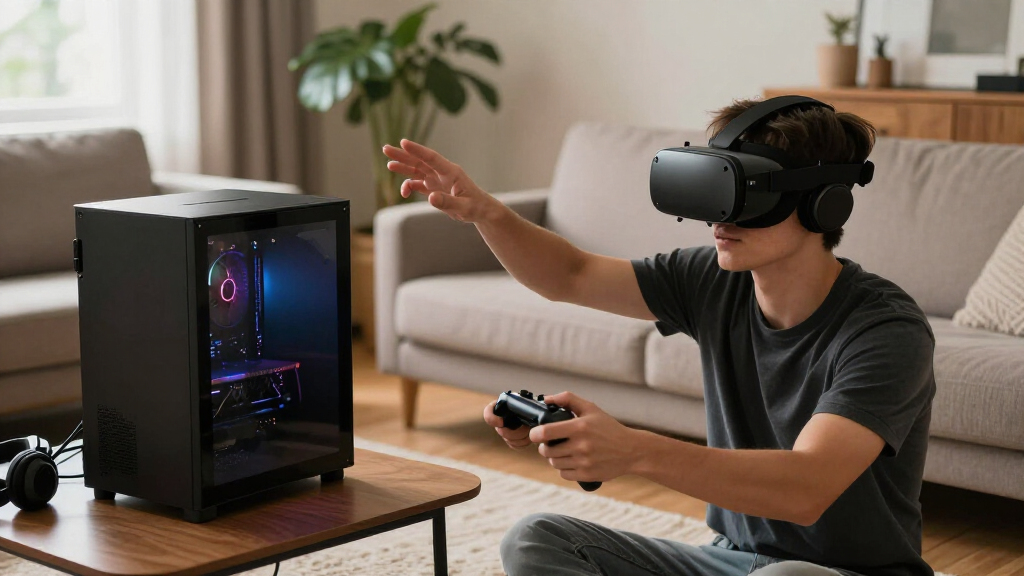
I ranked these PCs for the demands of living room VR, where graphics performance is only part of the decision. I weighed the listed GPU and processor, memory capacity, storage, and how well each configuration suits a headset connected to a PC in a shared space. Newer RTX graphics cards received stronger placement for their greater headroom in demanding games, while I treated older GTX configurations as potential fits for lighter play rather than equivalent alternatives.
The ranking favors balanced, ready-to-use configurations over one standout spec. That is why the RTX 5060 CyberPowerPC leads the RTX 5060 Ti model: it lists twice the memory while keeping the same 2TB storage capacity, a useful balance for gaming and multitasking. The MSI’s RTX 5070 ranks as the premium choice for graphics headroom, not the default for every buyer. I also accounted for meaningful gaps among the lower-tier options and avoided treating repeated or similar listings as distinct performance classes.
| living room vr gaming pc | Graphics | Operating system |
|---|---|---|
| STGAubron Gaming Desktop PC wi | GeForce RTX 3050 6GB | Windows 11 Home 64-bit |
| Volt X3 V1.2 Gaming PC Desktop | NVIDIA GeForce GTX 1070 8GB GDDR5 | Windows 11 Pro 64-bit |
| CyberpowerPC Gamer Xtreme VR G | NVIDIA GeForce RTX 5060 8GB | Windows 11 Home |
| CyberPowerPC Gamer Xtreme VR G | NVIDIA GeForce GTX 1660 Super 6GB GDDR6 | Windows 10 Home 64-bit |
| STGAubron Gaming Desktop PC wi | NVIDIA GeForce GTX 1660 Super 6GB GDDR6 | Windows 11 Home 64-bit |
| MSI Codex Z2 Gaming Desktop | NVIDIA GeForce RTX 5070 | Windows 11 Home |
| STGAubron Gaming Desktop PC wi | GeForce RTX 3050 6GB | Windows 11 Home 64-bit |
| CyberPowerPC Gamer Xtreme VR G | NVIDIA GeForce RTX 5060 Ti, 8GB | Windows 11 Home |
Factors to Consider When Choosing Living Room Vr Gaming Pc
Choosing a living room VR PC means planning for the whole setup, not just selecting the biggest graphics card. I’d match the computer to the headset, the games you play, the route between PC and play area, and the realities of sharing a room.
Match Graphics Power to Your Headset and Games
VR places different demands on a PC than a typical TV game because it must render a separate view for each eye at a steady pace. A headset’s resolution, refresh rate, and the games you play all affect how much GPU headroom you need. I’d check the headset maker’s current PC requirements and the requirements of the most demanding games on your list before choosing from a GPU tier. Do not assume that a label such as “VR ready” guarantees the experience you want across every headset or game. A stronger card can help with demanding titles and future upgrades, but it cannot fix poor room layout or an unreliable connection. For casual or lighter VR use, a lower-tier machine may be a more sensible match than paying for power you will rarely use.
Plan the PC-to-Headset Connection Before You Buy
A living room setup can place the PC several feet from the play area, making cable routing and wireless options part of the purchase decision. Wired PC VR needs a compatible connection and a safe cable path that avoids walkways, furniture, and moving players. Wireless PC VR depends on the headset’s support and a suitable network setup; a computer’s Wi-Fi listing alone does not guarantee smooth wireless play. Check the ports on both the PC and headset, then confirm what cable or adapter the headset requires. If the PC will sit near the TV but the play space is elsewhere, plan where the signal, power, and cable runs will go. A little layout planning can prevent a capable computer from becoming awkward to use.
Treat Memory and Storage as Part of the VR Experience
Memory and storage do not replace graphics power, but they shape how convenient a gaming PC feels after setup. More memory can leave room for games, launchers, voice chat, and background tasks without making the system feel cramped. A larger SSD can save frequent installs and deletions as a library grows, especially when games take up substantial space. Buyers comparing similar GPU models should check the full configuration rather than assuming the more expensive-sounding name has the better balance. Also confirm whether the computer has accessible memory and storage slots if you plan to upgrade later. For a shared family PC, capacity and flexibility may matter more than a small graphics-tier difference.
Check Size, Noise, and Airflow for a Shared Room
A desktop that fits under a desk may still be inconvenient beside a TV or in a cabinet. Measure the intended spot, leave room for ventilation, and check where the case draws in and exhausts air before placing it near furniture. VR games can keep a GPU working hard for long sessions, so blocked vents can contribute to heat and fan noise. That noise is more noticeable in a living room than in a separate gaming room, particularly during quiet scenes or when others are watching TV. RGB lighting may suit an open display, but a tucked-away machine benefits more from airflow and accessible ports. I’d choose a placement that keeps the PC cool while making headset connections easy to reach.
Pay for Headroom Only When Your Use Calls for It
A premium GPU makes sense when you expect to play demanding VR titles, use a high-resolution headset, or keep the PC for several years without replacing its graphics card. It is a less convincing choice if your library is light, your headset has modest requirements, or you mainly want occasional VR alongside ordinary TV gaming. A lower-tier PC can free up budget for a better headset, a dedicated router, or room setup improvements that make sessions more comfortable. Compare the full system, since a faster GPU paired with less memory may call for an upgrade sooner than a more balanced configuration. Ask what you would actually improve next: frame rate, storage capacity, or cable-free convenience. That answer helps determine whether premium hardware is a real benefit or just unused headroom.
Verify Upgrade Paths and Included Setup Details
Product names and listings can describe similar desktops while differing in memory, storage, wireless features, or included software. Before buying, confirm the exact configuration for the specific listing rather than relying on a family name or a separate seller’s description. Check whether Wi-Fi and Bluetooth are included if the PC will connect to a controller, headset accessories, or a wireless network. Look up available motherboard slots, power supply capacity, and case clearance if a later GPU or storage upgrade matters to you. Do not assume every component is easy to replace just because it is a desktop. A clear upgrade path can make a midrange system a better long-term fit than a more powerful but less flexible configuration.
Frequently Asked Questions
Is the RTX 3050 enough for a living room VR gaming PC?
It can suit lighter VR games and headsets whose requirements fit the card, but it offers less graphics headroom than the RTX 5060 and RTX 5070 options in this roundup. Check the headset maker’s requirements and the games you plan to play rather than relying on a broad “VR-ready” label. Demanding titles or higher-resolution headsets may call for reduced settings or a stronger GPU. If you want a system with more room for future VR games, the newer RTX choices are safer starting points. The RTX 3050 STGAubron listings make more sense when keeping the initial system modest matters more than maximum performance.
Should I pick the RTX 5060 or RTX 5060 Ti CyberPowerPC?
The RTX 5060 model lists 32GB of DDR5 memory and a 2TB SSD, while the RTX 5060 Ti model lists 16GB of DDR5 memory and the same storage capacity. The Ti card may appeal if your priority is additional graphics capability, but the lower listed memory is a real system-level tradeoff. For a balanced setup with fewer immediate capacity concerns, I favor the RTX 5060 configuration. Check the exact listing and whether memory can be upgraded before deciding, since configurations can vary. Your headset and target games should guide whether a GPU step-up matters more than having more memory from the start.
Can I use a living room VR PC wirelessly with my headset?
Possibly, but wireless play depends on the headset, its PC VR software, and the quality of the network between the PC and headset. A desktop listing that mentions Wi-Fi does not by itself guarantee a reliable wireless VR connection. Check the headset maker’s supported wireless methods and network guidance, then plan router placement and network traffic around the play area. A wired connection may be more predictable, but it requires a compatible cable and a safe route across the room. Decide how you want to connect before buying so you can budget for any needed cable, adapter, or network equipment.
Is a GTX 1660 Super or GTX 1070 PC still a reasonable VR choice?
These older graphics cards may remain suitable for lighter games and headsets whose requirements they meet, but they offer less headroom than the RTX 5060 and RTX 5070 systems here. Their age also makes it especially important to confirm the exact game and headset requirements rather than assuming all PC VR titles will run well. The Volt X3 lists a GTX 1070 with 8GB of graphics memory, while the CyberPowerPC and STGAubron GTX 1660 Super configurations differ in their listed system memory. I would choose one of these only when the games are modest and the system’s condition and configuration are clear. For a new, demanding VR library, I’d favor a newer RTX option.
What should I check if the PC will sit beside my living room TV?
Measure the case and the space around it, including clearance for power, display, network, and headset connections. Do not place the tower in a closed cabinet unless ventilation is adequate, because sustained VR gaming can produce heat and fan noise. Check that the PC has the video outputs your TV supports and that the headset’s connection can reach the play area safely. If you intend to play wirelessly, confirm the headset’s requirements and the network signal where you will stand. A short setup plan can reveal whether the best fit is a powerful desktop near the play space or a computer placed elsewhere with a planned cable or network route.
Conclusion
For most buyers, I recommend the CyberPowerPC Gamer Xtreme VR with RTX 5060 as the best overall choice: its 32GB memory and 2TB SSD make a balanced base for living room gaming and VR. The STGAubron RTX 3050 is the best value-oriented fit for lighter play, while buyers seeking premium graphics headroom should choose the MSI Codex Z2 with RTX 5070. For beginners, the RTX 5060 CyberPowerPC is the easiest starting point in this lineup to justify, thanks to its newer graphics tier and generous listed memory and storage. If you specifically want the RTX 5060 Ti, compare its 16GB memory against the RTX 5060 system’s 32GB before choosing; if you are considering the GTX 1070 or GTX 1660 Super machines, keep expectations to lighter VR use. Match the final choice to your headset, play space, and preferred connection method, then confirm the exact listing configuration before ordering.
Fall Picks

DJI Osmo Action 4 Essential Combo Waterproof 4K Action Camera
As an affiliate, we earn on qualifying purchases.