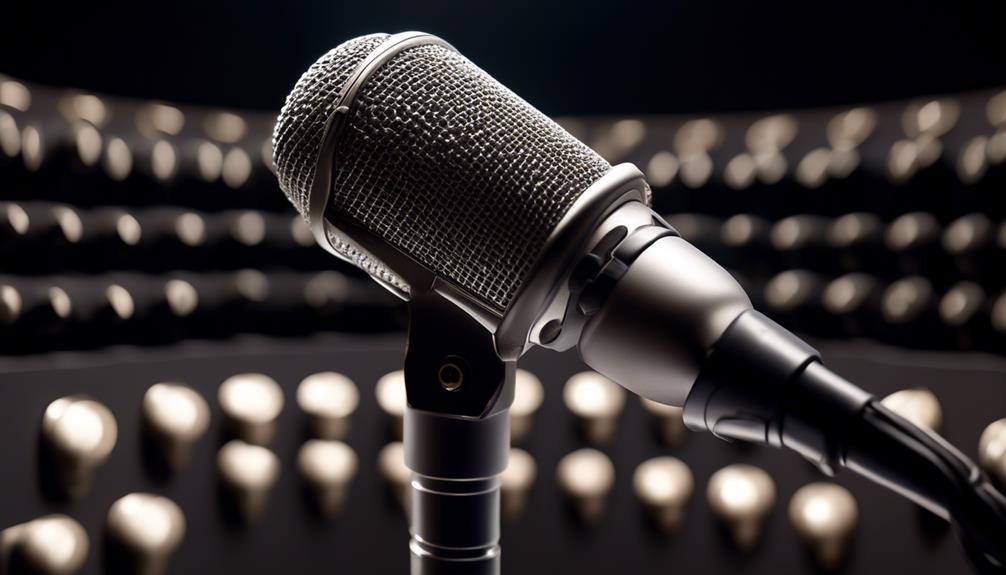
An omnidirectional mic can pick up voices from around the room, but the right choice depends on whether you need a conference speakerphone, a desktop recording mic, or a simple computer connection. My best overall pick is the EMEET M0 Plus, whose four-mic, 360-degree pickup is built for group calls. The conference speakerphone with USB hub stands out for buyers who want hub functionality alongside room pickup, while the Blue Yeti offers more recording-pattern flexibility. The main tradeoff is that broad pickup can capture more room noise, while compact boundary mics and multi-pattern desktop models suit different spaces and workflows. Read on for the full breakdown and guidance on matching a mic to your setup.

Get audio and creator gear delivered free with Prime
- Fast, free delivery on millions of items
- Prime Video, Amazon Music and more included
- Member-only deals all year
Complete the kit



Key Takeaways
- The EMEET M0 Plus is the strongest meeting-focused pick in this lineup because its four microphones and 360-degree pickup directly target group voice capture.
- The USB-hub conference speakerphone combines two jobs—room audio and hub functionality—while the EMEET is the more clearly specified choice for multi-mic pickup.
- The Blue Yeti and JLab Talk prioritize flexibility over dedicated conference-speakerphone features, with multiple pickup patterns for changing recording setups.
- The ATR4697-USB and CMTECK suit buyers seeking a simpler desktop or boundary-mic format, but they do not offer the same listed feature range as the multi-pattern options.
- Omnidirectional pickup is not noise rejection: broad room coverage can include keyboard sounds, nearby conversations, and room echo along with voices.
| Conference Speaker and Microphone with USB Hub, 360° Omnidirectional, Noise Reduction, Echo Cancellation for Business and Home Office |  | Best Overall for Wired Meetings | Microphone coverage: 360° omnidirectional | Microphone range: Up to 3 meters | Connectivity: USB wired | VIEW ON AMAZON | See Our Full Breakdown |
| EMEET M0 Plus Conference Speaker and Microphone, 4 Mics 360° Voice Pickup | 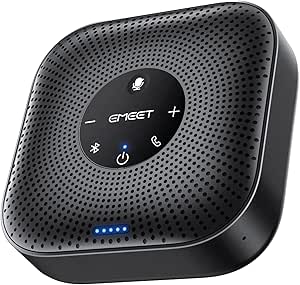 | Best Wireless Conference Pick | Microphone array: 4 microphones | Voice pickup: 360° | Connectivity: Bluetooth 5.0 and USB-C | VIEW ON AMAZON | See Our Full Breakdown |
| JLab Talk USB Microphone, USB-C Output, Cardioid, Omnidirectional, Stereo, Bidirectional, 96kHz/24BIT, Volume & Gain Control, Plug & Play |  | Best Multi-Pattern Mic for Creators | Pickup patterns: Cardioid, omnidirectional, stereo and bidirectional | Audio resolution: 96kHz/24-bit | Connectivity: USB with USB-C output | VIEW ON AMAZON | See Our Full Breakdown |
| TONOR Conference Microphone for PC, USB Microphone for Win & Mac, G11 |  | Best for Simple Tabletop Conferences | Polar pattern: Omnidirectional | Pickup distance: 11.5 ft | Connectivity: USB | VIEW ON AMAZON | See Our Full Breakdown |
| ANSTEN Conference USB Microphone, Omnidirectional Condenser PC Mic for Video Conferencing and Recording |  | Best Compact Plug-and-Play Pick | Polar pattern: Omnidirectional | Connectivity: USB Type-C | Form factor: Table microphone | VIEW ON AMAZON | See Our Full Breakdown |
| Audio-Technica ATR4697-USB Omnidirectional Condenser Boundary Microphone |  | Best for Straightforward Group Meetings | Microphone type: Condenser boundary microphone | Pickup pattern: Omnidirectional, 360° coverage | Connection: USB-C | VIEW ON AMAZON | See Our Full Breakdown |
| CMTECK Conference USB Microphone, Plug-and-Play Omnidirectional Desktop Mic |  | Best Compact Mic for Computer Calls | Microphone type: Boundary microphone | Pickup pattern: Omnidirectional, 360° | Specified pickup range: Up to 3 m (10 ft) | VIEW ON AMAZON | See Our Full Breakdown |
| Logitech Creators Blue Yeti USB Microphone, Blackout |  | Best for Creators Who Also Need Omni Mode | Microphone type: USB condenser microphone with tri-capsule array | Pickup patterns: Cardioid, omnidirectional, bidirectional, and stereo | Connection: USB | VIEW ON AMAZON | See Our Full Breakdown |
| omnidirectional mic | Connectivity | Controls |
|---|---|---|
| Conference Speaker and Microph | USB wired | — |
| EMEET M0 Plus Conference Speak | Bluetooth 5.0 and USB-C | — |
| JLab Talk USB Microphone | USB with USB-C output | Volume and gain |
| TONOR Conference Microphone fo | USB | Mute button with blue status indicator |
| ANSTEN Conference USB Micropho | USB Type-C | — |
| Audio-Technica ATR4697-USB Omn | — | — |
| CMTECK Conference USB Micropho | — | Built-in mute button and status indicator lights |
| Logitech Creators Blue Yeti US | — | Headphone volume, pattern selection, mute, and microphone gain |
More Details on Our Top Picks
Conference Speaker and Microphone with USB Hub, 360° Omnidirectional, Noise Reduction, Echo Cancellation for Business and Home Office
For a small meeting space where everyone needs to speak naturally, this speakerphone combines 360° pickup with a built-in speaker, echo cancellation and noise suppression. Its stated microphone range of up to 3 meters suits a table-sized group, and the USB hub can keep a peripheral connected without using another computer port. Compared with the EMEET M0 Plus, it gives up wireless connection and battery operation, but offers a straightforward wired setup and a useful hub. The TONOR G11 is a simpler microphone-only alternative; this model makes more sense when participants also need room playback. Its limits are the USB-only connection and a range that may not suit larger rooms; muting also requires the physical button.
Pros:- 360° microphone pickup with a stated range of up to 3 meters
- DSP-based echo cancellation and noise suppression
- Built-in USB hub adds a port for a peripheral
- Speakerphone design provides playback as well as microphone capture
Cons:- USB wired connection only, with no wireless option
- Pickup range may not cover larger rooms
- Microphone muting uses a physical button
Best for: Small home-office or business teams who want one wired device for 360° voice pickup and meeting-room playback.
Not ideal for: People who need wireless placement or coverage for a large conference room; its USB cable and 3-meter pickup range constrain both.
- Microphone coverage:360° omnidirectional
- Microphone range:Up to 3 meters
- Connectivity:USB wired
- Cable length:3 meters (9.8 ft)
- Audio processing:DSP, echo cancellation and noise suppression
- Additional feature:Built-in USB hub
- Compatibility:Windows 7–10, macOS, Zoom, Skype, Teams, WebEx, FaceTime and Google Voice
Our verdict“Choose this for a small team that wants a wired, all-in-one speakerphone with 360° pickup and a USB hub.”
EMEET M0 Plus Conference Speaker and Microphone, 4 Mics 360° Voice Pickup
The M0 Plus is the flexible conference-room choice here: its four-microphone array is designed to pick up voices from around the device, while Bluetooth 5.0 frees the table from a computer cable. USB-C remains available when a wired connection is preferable. The stated battery life of over 10 hours makes it more practical for calls away from a desk than the USB-only Conference Speaker and Microphone with USB Hub. It also supports linking two compatible EMEET speakerphones for meetings with up to 16 attendees, a scale the compact ANSTEN microphone is not designed to handle. The tradeoff is that this is a speakerphone, not a simple mic: buyers who need only a microphone may not need its speaker, battery, or linking features.
Pros:- Four-microphone array supports voice pickup from all directions
- Bluetooth 5.0 and USB-C connection options
- Stated talk time exceeds 10 hours per charge
- Two compatible units can be linked for meetings of up to 16 attendees
Cons:- Speakerphone features add complexity for buyers who only need a mic
- Daisy-chain expansion depends on a second compatible EMEET device
- Battery operation requires recharging for untethered use
Best for: Small meeting teams and mobile professionals who want wireless 360° pickup, room playback and the option to expand with a second compatible EMEET unit.
Not ideal for: Buyers seeking a basic, microphone-only desktop device or those who do not need Bluetooth, battery operation or speakerphone playback.
- Microphone array:4 microphones
- Voice pickup:360°
- Connectivity:Bluetooth 5.0 and USB-C
- Speaker output:3 W
- Talk time:Over 10 hours per charge
- Expansion:Daisy-chain two compatible EMEET speakerphones
- Stated meeting capacity:Up to 16 attendees when linked
- Audio features:Full duplex, VoiceIA noise filtering and echo reduction
Our verdict“Pick the M0 Plus for meetings that benefit from wireless 360° pickup, playback and room expansion.”
JLab Talk USB Microphone, USB-C Output, Cardioid, Omnidirectional, Stereo, Bidirectional, 96kHz/24BIT, Volume & Gain Control, Plug & Play
The JLab Talk suits creators who want an omnidirectional mode without giving up other recording options. Its four selectable patterns include omnidirectional, cardioid, stereo and bidirectional, so one mic can handle a group conversation or a more focused solo recording. The listed 96kHz/24-bit audio and onboard gain and volume controls give it more recording flexibility than the meeting-focused TONOR G11, which captures voices from all directions but lacks selectable patterns. That versatility has a cost in desk space: the JLab is a substantial desktop unit at 739 grams, while the compact ANSTEN is easier to move around. It is also a USB microphone, not a room speakerphone, and the supplied details do not list a stand, so check your setup before choosing it.
Pros:- Four pickup patterns, including omnidirectional, cardioid, stereo and bidirectional
- Listed 96kHz/24-bit recording capability
- Onboard gain and volume controls
- USB plug-and-play setup
Cons:- 739-gram desktop body takes up more space than compact conference microphones
- No microphone stand is listed in the provided product details
- Does not provide speakerphone playback
Best for: Podcasters, streamers and home creators who need selectable omnidirectional pickup alongside patterns for solo or two-person recording.
Not ideal for: Meeting hosts who need a speakerphone, or people with limited desk space or no suitable USB-C connection.
- Pickup patterns:Cardioid, omnidirectional, stereo and bidirectional
- Audio resolution:96kHz/24-bit
- Connectivity:USB with USB-C output
- Frequency range:20 Hz–20 kHz
- Signal-to-noise ratio:95 dB
- Controls:Volume and gain
- Weight:739 g
- Dimensions:9.25 × 7.68 × 7.68 inches
Our verdict“Choose the JLab Talk if you want an omnidirectional mode in a creator mic that can also switch to other pickup patterns.”
TONOR Conference Microphone for PC, USB Microphone for Win & Mac, G11
The G11 keeps its job narrow: it is a USB omnidirectional condenser microphone for capturing people around a meeting table, not a speakerphone. Its stated 11.5-foot pickup distance gives it a longer reach than the 3-meter specification of the Conference Speaker and Microphone with USB Hub, but it cannot play meeting audio back to the room. Plug-and-play operation, a mute button and a working-status light make it simple to manage during calls. The ANSTEN is another microphone-only option, but the G11’s metal construction, anti-slip base and shielded cable make its desktop placement more substantial. Its single channel and 78 dB signal-to-noise ratio are modest next to the JLab Talk’s listed 95 dB figure, so it is better suited to meetings than creator recording.
Pros:- Omnidirectional pickup with a stated distance of 11.5 feet
- USB plug-and-play setup for Windows and macOS
- Physical mute button and blue status indicator
- Metal body, anti-slip base and shielded cable
Cons:- Microphone only, with no built-in speaker
- Single-channel design offers no alternate pickup patterns
- Listed 78 dB signal-to-noise ratio trails the JLab Talk specification
Best for: Small or medium meeting groups who need a simple USB mic on the table for calls, training or remote interviews.
Not ideal for: People who need room playback, multi-pattern recording or a mic suited to high-detail creator audio.
- Polar pattern:Omnidirectional
- Pickup distance:11.5 ft
- Connectivity:USB
- Cable:1.8 m nylon-shielded cable
- Signal-to-noise ratio:78 dB
- Channels:1
- Weight:135 g
- Construction:Metal and nylon
- Controls:Mute button with blue status indicator
Our verdict“Choose the G11 for straightforward tabletop voice capture when you do not need a speakerphone or recording-pattern options.”
ANSTEN Conference USB Microphone, Omnidirectional Condenser PC Mic for Video Conferencing and Recording
The ANSTEN is a straightforward option for laptop users who want an omnidirectional table microphone without the extra speaker and meeting features of the EMEET M0 Plus. Its USB-C connection and plug-and-play setup suit video calls, online classes and basic recording, while a mute button offers quick control during a call. Compared with the TONOR G11, the ANSTEN is described as portable and includes noise reduction, though the supplied details do not give a pickup distance to compare with TONOR’s stated 11.5 feet. It is still a microphone only, so meeting participants need another device for playback. Compatibility is also narrower than the broad laptop-and-PC pitch may suggest: the listed exclusions include Linux, Android, Raspberry Pi and Xbox.
Pros:- Omnidirectional pickup for voices around the table
- USB-C plug-and-play connection
- Mute button provides quick call control
- Portable design with listed noise reduction
Cons:- Microphone only, with no speaker for meeting playback
- USB-C connection may not suit devices without a compatible port
- Listed as incompatible with Linux, Android, Raspberry Pi and Xbox
Best for: Laptop users who want a portable USB-C omnidirectional mic for video calls, online classes or simple voice recording.
Not ideal for: People who need a speakerphone, a stated long-distance pickup range, or compatibility with Linux, Android, Raspberry Pi or Xbox.
- Polar pattern:Omnidirectional
- Connectivity:USB Type-C
- Form factor:Table microphone
- Channels:1
- Signal-to-noise ratio:88 dB
- Power source:Corded electric
- Compatible platforms:Laptop and PC; described as compatible with Mac and Windows
- Listed material:Cotton
Our verdict“Pick the ANSTEN for portable, simple USB-C voice pickup, provided its platform limits and microphone-only design fit your setup.”
Audio-Technica ATR4697-USB Omnidirectional Condenser Boundary Microphone
I rank the ATR4697-USB as a practical choice when the main job is capturing several people around a table. Its 360-degree omnidirectional pickup and boundary-mic design suit shared meetings better than the Logitech Blue Yeti, which offers omni mode but is built for a wider mix of creator uses. The included USB-C connection and USB-A adapter also make this a flexible option across computers and compatible mobile devices. Compared with the CMTECK, the Audio-Technica lists broader device compatibility, while the CMTECK adds a clearly stated mute button and noise-reduction features. The tradeoff is simplicity: the ATR4697-USB has no listed mute control or extra pickup modes, and its 1.5 m cable may limit placement. Its open pickup can also capture surrounding room sound.
Pros:- Omnidirectional pattern captures voices around the table
- USB-C connector includes a USB-C-to-USB-A adapter
- Works with computers, tablets, smartphones, and other compatible devices
- Rugged construction is suited to regular meeting-room use
Cons:- No mute button or other onboard controls are listed
- The 1.5 m cable can restrict placement on larger tables
- A 360-degree pickup pattern can also capture unwanted room noise
Best for: Small teams and remote workers who need a simple 360-degree mic for meetings on USB-C or USB-A devices
Not ideal for: Streamers or podcasters who want onboard gain controls, multiple pickup patterns, or a mute button
- Microphone type:Condenser boundary microphone
- Pickup pattern:Omnidirectional, 360° coverage
- Connection:USB-C
- Adapter:USB-C to USB-A adapter included
- Cable length:1.5 m (4.9 ft)
- Compatible devices:Computers, tablets, smartphones, and other compatible devices
- Construction:Rugged construction
Our verdict“Choose the ATR4697-USB for uncomplicated group calls across compatible devices, but skip it if you need hands-on controls or creator-focused features.”
CMTECK Conference USB Microphone, Plug-and-Play Omnidirectional Desktop Mic
The CMTECK is my compact pick for buyers who want an uncomplicated desktop mic with a little more meeting control than the Audio-Technica ATR4697-USB. Its 360-degree pickup, stated for up to 10 feet, is aimed at small conference tables, and the built-in mute button with status light makes it easier to cut the mic quickly during a call. Plug-and-play support for Windows and macOS keeps setup simple, while the listing describes noise and echo cancellation. Those features make it more meeting-specific than the Logitech Blue Yeti, whose omni mode sits among several recording patterns. The tradeoffs are compatibility and flexibility: CMTECK lists no Android or Raspberry Pi support, and it is a USB microphone, not a speakerphone. Its broad pickup may still collect room sounds.
Pros:- Omnidirectional pickup is specified for a 10-foot range
- Mute button and status lights provide clear call control
- Plug-and-play operation is listed for Windows and macOS
- Compact design and 6-foot cable suit portable desk setups
Cons:- Not listed as compatible with Android or Raspberry Pi
- It is a microphone only, with no built-in speaker
- A fixed omnidirectional pattern offers less recording flexibility than the Blue Yeti
Best for: Windows and macOS users who need a portable, easy-to-mute microphone for small meetings and interviews
Not ideal for: Android or Raspberry Pi users, and anyone expecting a speakerphone or a mic for devices beyond the listed computer platforms
- Microphone type:Boundary microphone
- Pickup pattern:Omnidirectional, 360°
- Specified pickup range:Up to 3 m (10 ft)
- Connection:USB, Micro USB connector
- Cable length:1.8 m (6 ft)
- Compatibility:Windows and macOS; not compatible with Raspberry Pi or Android
- Controls:Built-in mute button and status indicator lights
- Dimensions:5.5 × 4.7 × 1.1 in
Our verdict“Pick the CMTECK for portable computer meetings where a quick mute button matters, but not for Android use or speakerphone functions.”
Logitech Creators Blue Yeti USB Microphone, Blackout
I see the Blue Yeti as the most versatile choice here, but not the most specialized omnidirectional meeting mic. Its four pickup patterns include omni for recording a group around a table, then cardioid for solo streaming or podcasting. That flexibility sets it apart from the fixed-pattern Audio-Technica ATR4697-USB and CMTECK, both of which focus more directly on shared meeting pickup. The onboard pattern, gain, headphone, and mute controls make adjustments accessible without relying solely on software, while Blue VO!CE adds creator-focused effects when used with Logitech software. The tradeoffs are a larger, more involved desktop setup and the need to download G HUB for full functionality. Omni mode also hears more of the surrounding room, so it may not suit noisy spaces.
Pros:- Omnidirectional mode is one of four selectable pickup patterns
- Onboard mute, gain, pattern, and headphone controls
- Tri-capsule array supports a range of recording setups
- Included stand and compatibility with a mic stand or boom arm allow flexible placement
Cons:- Larger and more involved than the compact CMTECK meeting mic
- Full Blue VO!CE functionality requires Logitech G HUB
- Omnidirectional mode can pick up unwanted room sound
Best for: Podcasters, streamers, and home creators who want omnidirectional group recording alongside solo and stereo options
Not ideal for: Meeting-only buyers who want a small boundary mic, or people recording in noisy rooms where broad pickup is a drawback
- Microphone type:USB condenser microphone with tri-capsule array
- Pickup patterns:Cardioid, omnidirectional, bidirectional, and stereo
- Connection:USB
- Frequency response:20 Hz–20 kHz
- Channels:2
- Impedance:16 ohms
- Controls:Headphone volume, pattern selection, mute, and microphone gain
- Included mounting:Desktop stand; also connects to a mic stand or boom arm
- Enclosure material:Metal
Our verdict“Choose the Blue Yeti if you need omni recording as part of a flexible creator setup, rather than a dedicated meeting-room mic.”

How We Picked
I ranked these options by how directly their listed features support omnidirectional voice pickup, then weighed their fit for common uses: group conferencing, desktop calls, and recording. For meeting use, I gave more weight to clear 360-degree pickup and conference-oriented design than to general recording features. That puts the EMEET M0 Plus first for its four-mic array, with the USB-hub speakerphone close behind for buyers who value its added connectivity. The Blue Yeti and JLab Talk rank for buyers who may switch between pickup patterns rather than leave a mic in omni mode.
I also considered connection simplicity, flexibility, and the tradeoffs implied by each design. A dedicated conference mic can be an easier match for shared calls, while a general USB recording mic can serve more roles but may not replace a speakerphone. Models with fewer listed details, including the TONOR G11, ANSTEN, and CMTECK, are positioned for straightforward setups rather than a claimed feature advantage over better-specified picks. The ranking reflects fit for the stated use, not a claim that one mic is best for every room.
| omnidirectional mic | Connectivity | Controls |
|---|---|---|
| Conference Speaker and Microph | USB wired | — |
| EMEET M0 Plus Conference Speak | Bluetooth 5.0 and USB-C | — |
| JLab Talk USB Microphone | USB with USB-C output | Volume and gain |
| TONOR Conference Microphone fo | USB | Mute button with blue status indicator |
| ANSTEN Conference USB Micropho | USB Type-C | — |
| Audio-Technica ATR4697-USB Omn | — | — |
| CMTECK Conference USB Micropho | — | Built-in mute button and status indicator lights |
| Logitech Creators Blue Yeti US | — | Headphone volume, pattern selection, mute, and microphone gain |
Factors to Consider When Choosing Omnidirectional Mic
Choosing an omnidirectional mic is less about maximizing pickup range and more about deciding what else the mic must handle. These factors help separate conference devices from recording microphones and avoid paying attention to specs that do not solve your actual setup problem.
Match the Mic to the Room, Not Just the Call
Omnidirectional pickup is useful when people sit around a table or move slightly during a discussion. In a noisy room, that same coverage can bring in typing, air conditioning, and voices outside the meeting. A quieter room may benefit more from a broad pickup pattern than an open office does. Before choosing, think about how many people need to speak and how far they sit from the mic. A tighter pickup pattern or a closer mic may be a better fit when background sound is hard to control.
Decide Whether You Need a Speakerphone
A USB microphone captures your voice, but it does not automatically provide a speaker for hearing other participants. Conference speakerphones combine microphone and playback functions, which can simplify a shared table setup. A desktop recording mic may be a better choice if you already use headphones or separate speakers. Check how calls will sound at your desk before buying a mic based only on its pickup pattern. The convenience of an all-in-one unit can matter more for meetings than a longer feature list.
Treat Noise Reduction as Different From Room Control
Noise reduction and echo cancellation can help with particular call problems, but they do not make every room quiet. Echo often comes from speaker sound being picked up again by the microphone, while background noise includes sounds such as fans and nearby conversations. A well-positioned mic and sensible speaker volume can help limit both problems. Avoid assuming that a noise-reduction label means an omnidirectional mic will ignore unwanted sounds. If your space is busy, room choice and distance from noise sources deserve attention too.
Choose One Pattern or Several
A dedicated omnidirectional mic keeps the decision simple when you mainly need room-wide coverage. Multi-pattern models make more sense when the same mic may be used for solo speaking, interviews, or group recordings. Extra patterns add flexibility, but they also create more settings to choose and manage. Consider whether those alternate modes match real tasks you expect to do, rather than treating a larger pattern list as an automatic advantage. For a fixed conference table, consistent omni pickup may be more useful than a broad range of recording options.
Check Connection and Placement Before You Buy
USB connection can make a mic easy to add to a computer, but the connection type and cable reach still need to suit the desk or meeting table. A boundary mic sits on a surface, while a taller desktop mic may take up more visible space and need a stable position. If a mic includes a hub, consider whether its ports solve a real connection problem in your setup. Also check that your computer and conferencing software can use the device as both input and output when that is needed. Small placement mismatches can undermine room coverage even when the pickup pattern looks right on paper.
Spend More for a Clear Need, Not a Longer Spec List
Added controls, multiple pickup patterns, and bundled connectivity are useful only when they fit your work. A premium multi-pattern mic may earn its place for someone who records different formats, but those features can go unused in routine calls. A basic plug-and-play mic may be enough for one-person meetings or a fixed computer station. Compare the features that change your daily workflow, such as group pickup or built-in playback, before weighing extras. A focused device can be a better match than a more versatile one if your use stays consistent.
Frequently Asked Questions
Is an omnidirectional mic a good choice for a group meeting?
It can work well when participants sit around one table and need to speak from different directions. The EMEET M0 Plus is the most explicitly group-focused option here, with four microphones and 360-degree voice pickup. Room noise can also reach an omnidirectional mic from every direction, so a quiet room and sensible placement still matter. For a large room, check the intended pickup area rather than assuming 360-degree coverage means unlimited distance. A small meeting space is often a better match for a compact conference mic.
Will an omnidirectional mic make my voice sound clearer in a noisy office?
Not by itself: omni pickup can capture background sounds along with speech. Noise reduction may help with some unwanted sound, but it is not a substitute for moving away from a fan, keyboard, or nearby conversation. If you usually speak alone, a directional pattern may help focus more on your voice. The JLab Talk and Blue Yeti offer other pickup patterns, giving them more options for that kind of setup. Choose broad pickup when shared coverage matters more than isolating one speaker.
Should I choose a conference speakerphone or a USB desktop microphone?
Choose a conference speakerphone if several people need to talk and hear callers through one shared device. A USB desktop microphone is a better fit when one person speaks at a computer, especially if headphones or separate speakers are already part of the setup. The conference speakerphone with USB hub adds connectivity, while the EMEET M0 Plus emphasizes multi-mic room pickup. General recording mics such as the Blue Yeti can cover more than meetings, but they are not the same kind of all-in-one call device. Start with the playback setup as well as the microphone input.
Does a USB omnidirectional mic work with any computer or meeting app?
USB models are designed for computer connection, but compatibility can still depend on the operating system, port, and conferencing software. Some products list support for Windows and Mac, while others may provide fewer details, so check the manufacturer’s compatibility information before buying. The mic may need to be selected as the input device in the computer or app settings. Conference speakerphones can also provide audio playback, but a standard USB mic may not. Confirm whether your setup needs microphone input only or both input and output.
Is a multi-pattern mic worth choosing if I mainly need omnidirectional pickup?
It can be worthwhile if you expect to record solo speech, interviews, or other formats where a different pickup pattern helps. The Blue Yeti and JLab Talk list multiple patterns, so they offer more flexibility than a mic intended mainly for conference calls. If your only task is capturing a group around a table, dedicated conference options may be simpler to place and use. Extra patterns do not automatically improve omni performance, and unused controls add little value. Match the pattern range to work you actually plan to do.
Conclusion
For most shared computer meetings, I’d choose the EMEET M0 Plus as best overall because its four-mic, 360-degree design is directly aimed at group pickup. The conference speakerphone with USB hub is my best value-style pick for buyers who also need added connectivity, while the Blue Yeti is the best premium-style choice for people who want multiple recording patterns beyond omni. Beginners who want a simple computer mic can start with the CMTECK plug-and-play model; buyers seeking a compact boundary format should look at the Audio-Technica ATR4697-USB. Choose the JLab Talk if pattern flexibility and desktop recording controls matter, and compare the TONOR G11 and ANSTEN for straightforward conference or video-call use. The best match is the one whose pickup style and playback setup suit your room—not simply the mic with the most listed features.
Fall Picks
fall essentials
As an affiliate, we earn on qualifying purchases.