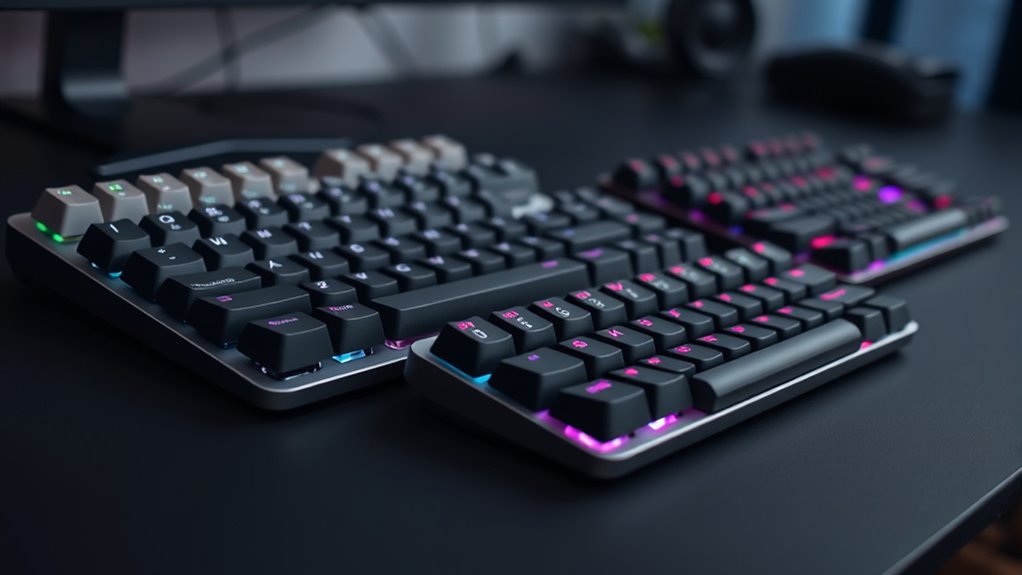

For those seeking a quiet mechanical keyboard that balances tactile feedback with office-friendly acoustics, the Keychron C2 Pro stands out as the best overall choice due to its hot-swappable silent switches and broad OS compatibility. If you prefer a premium modular experience, the be quiet! Dark Mount offers exceptional build quality and a detachable numpad, while the Cherry KC 200 MX remains the gold standard for pure office reliability with its legendary MX2A Silent Red switches. The primary tradeoff in this category is often between acoustic dampening and typing feel; some boards sacrifice tactile feedback for silence, while others use complex gasket structures to maintain a satisfying sound profile. This guide breaks down the top contenders to help you select the model that fits your specific workflow and noise constraints.

Get audio and creator gear delivered free with Prime
- Fast, free delivery on millions of items
- Prime Video, Amazon Music and more included
- Member-only deals all year
Complete the kit



Key Takeaways
- Gasket-mounted boards like the SOLAKAKA KI99 Pro and AULA F99 Pro offer superior sound dampening compared to traditional tray-mount designs, resulting in a softer, lower-pitched keystroke.
- True silent switches (like Cherry MX2A Silent Red) are fundamentally different from standard linear switches; they include internal dampeners that eliminate bottom-out noise, which is critical for shared office spaces.
- Hot-swappable capability has become a standard feature in mid-range quiet keyboards, allowing users to tune their noise profile by swapping switches without soldering.
- Wireless tri-mode connectivity (Bluetooth, 2.4GHz, Wired) is now expected in premium picks like the Keychron V6 Max, offering flexibility that wired-only office boards like the Cherry KC 200 MX lack.
- Gaming-focused quiet boards often prioritize RGB lighting over acoustic foam layers, whereas office-focused models prioritize sound-absorbing materials and minimalist aesthetics.
| Keychron C2 Pro Wired Mechanical Keyboard |  | Best for Gamers | Switch Type: Silent Red (Hot-Swappable) | Polling Rate: 8000 Hz | Connectivity: Wired USB | VIEW ON AMAZON | See Our Full Breakdown |
| be quiet! Dark Mount Mechanical Keyboard |  | Best Modular Design | Switch Type: Silent Tactile Black | Keycap Material: PBT Double-Shot | Connectivity: Wired USB-A to C | VIEW ON AMAZON | See Our Full Breakdown |
| AULA F99 Wireless Mechanical Keyboard |  | Best Multi-Device Value | Connectivity: BT5.0, 2.4GHz, USB-C | Switch Type: Linear (Hot-Swappable) | Battery Capacity: 8000mAh | VIEW ON AMAZON | See Our Full Breakdown |
| SOLAKAKA KI99 Pro Wireless Mechanical Keyboard |  | Best Acoustic Performance | Switch Type: Silent Linear (Pre-Lubed) | Structure: Gasket Mount with 5 Noise Layers | Battery Capacity: 10,000mAh | VIEW ON AMAZON | See Our Full Breakdown |
| Cherry KC 200 MX Wired Mechanical Office Keyboard |  | Best for Office Use | Switch Type: CHERRY MX2A Silent Red | Connectivity: Wired USB-A | Layout: Full-Size (104 Keys) | VIEW ON AMAZON | See Our Full Breakdown |
| Cherry Stream Keyboard |  | Best for Office Silence | Switch Type: SX Scissor Switches | Connectivity: Wired USB-A | Layout: Full-Size QWERTY | VIEW ON AMAZON | See Our Full Breakdown |
| SteelSeries Apex 3 RGB Gaming Keyboard |  | Best for Casual Gamers | Switch Type: Whisper Quiet Linear | Water Resistance: IP32 Rated | Lighting: 10-Zone RGB | VIEW ON AMAZON | See Our Full Breakdown |
| Redragon K556 RGB LED Backlit Wired Mechanical Gaming Keyboard |  | Best Value Mechanical Entry | Switch Type: Hot-Swappable Brown | Frame Material: Aluminum Alloy | Lighting: RGB with 20 Presets | VIEW ON AMAZON | See Our Full Breakdown |
| Keychron V6 Max Wireless Custom Mechanical Keyboard |  | Best Premium Wireless | Switch Type: Hot-Swap Silent Red Linear | Mount Structure: Gasket Mount | Connectivity: 2.4GHz, Bluetooth, USB-C | VIEW ON AMAZON | See Our Full Breakdown |
| AULA F99 Pro Wireless Mechanical Keyboard – Silent Version |  | Best Compact Wireless Value | Switch Type: Hot-Swap Silent Linear | Battery: 8000mAh Rechargeable | Layout: 96% Compact | VIEW ON AMAZON | See Our Full Breakdown |
| Keychron K8 Wireless Mechanical Keyboard (Silent Red Switch, TKL) |  | Best for Cross-Platform Professionals | Layout: TKL (87 Keys) | Switch Type: Keychron Silent K Pro Red (Linear) | Connectivity: Bluetooth 5.1, USB-C Wired | VIEW ON AMAZON | See Our Full Breakdown |
| Logitech G413 SE Full-Size Mechanical Gaming Keyboard |  | Best Durable Wired Option | Compatible Devices: PC | Connectivity Technology: USB 2.0 | Backlit Keyboard: Yes | VIEW ON AMAZON | See Our Full Breakdown |
| Keychron K10 Full-Size Wireless Mechanical Keyboard |  | Best for Numpad Users | Brand: Keychron | Model: K10 | Layout: Full-Size (104 Keys) | VIEW ON AMAZON | See Our Full Breakdown |
| quiet mechanical keyboard | Switch Type | Connectivity | Layout |
|---|---|---|---|
| Keychron C2 Pro Wired Mechanic | Silent Red (Hot-Swappable) | Wired USB | Full-Size (104 Keys) |
| be quiet! Dark Mount Mechanica | Silent Tactile Black | Wired USB-A to C | — |
| AULA F99 Wireless Mechanical K | Linear (Hot-Swappable) | BT5.0, 2.4GHz, USB-C | 99 Keys (96%) |
| SOLAKAKA KI99 Pro Wireless Mec | Silent Linear (Pre-Lubed) | BT5.0, 2.4G, USB-C | 96% (99 Keys) |
| Cherry KC 200 MX Wired Mechani | CHERRY MX2A Silent Red | Wired USB-A | Full-Size (104 Keys) |
| Cherry Stream Keyboard | SX Scissor Switches | Wired USB-A | Full-Size QWERTY |
| SteelSeries Apex 3 RGB Gaming | Whisper Quiet Linear | Wired USB | — |
| Redragon K556 RGB LED Backlit | Hot-Swappable Brown | Wired USB | 104-Key Full Size |
| Keychron V6 Max Wireless Custo | Hot-Swap Silent Red Linear | 2.4GHz, Bluetooth, USB-C | 100% Full Size |
| AULA F99 Pro Wireless Mechanic | Hot-Swap Silent Linear | BT 5.0, 2.4GHz, USB-C | 96% Compact |
| Keychron K8 Wireless Mechanica | Keychron Silent K Pro Red (Linear) | Bluetooth 5.1, USB-C Wired | TKL (87 Keys) |
| Logitech G413 SE Full-Size Mec | Tactile Mechanical | — | Full-Size |
| Keychron K10 Full-Size Wireles | Keychron Silent K Pro Red | Bluetooth 5.1, USB-C Wired | Full-Size (104 Keys) |
More Details on Our Top Picks
Keychron C2 Pro Wired Mechanical Keyboard
This keyboard stands out for its 8000 Hz polling rate, a feature rarely found in quiet mechanical boards. While most silent keyboards prioritize acoustics at the expense of latency, the Keychron C2 Pro bridges that gap effectively. The Silent Red switches are hot-swappable, allowing users to tune the sound profile further without soldering. Compared to the Cherry KC 200 MX, this model offers far more modern connectivity and customization, though it lacks the office-focused simplicity of the Cherry. The RGB backlighting is vivid but may distract those who prefer a minimalist workspace. It is a wired-only device, which limits portability but ensures stable, low-latency performance for competitive play.
Pros:- Ultra-fast 8000 Hz polling rate minimizes input lag
- Hot-swappable Silent Red switches allow for easy tuning
- Full compatibility with Mac, Windows, and Linux via QMK/VIA
Cons:- Wired-only connection restricts mobility and desk cleanliness
- ABS keycaps may develop a shiny texture faster than PBT alternatives
- Requires a high-performance PC to fully utilize the 8K polling rate
Best for: Competitive gamers who need silent switches but refuse to compromise on response time.
Not ideal for: Office workers or minimalists who find RGB lighting and gaming aesthetics distracting.
- Switch Type:Silent Red (Hot-Swappable)
- Polling Rate:8000 Hz
- Connectivity:Wired USB
- Layout:Full-Size (104 Keys)
- Backlighting:RGB
- Compatibility:Mac, Windows, Linux
- Keycap Material:ABS
Our verdict“Choose this if you need near-instant response times in a quiet package for gaming.”
be quiet! Dark Mount Mechanical Keyboard
The be quiet! Dark Mount redefines the quiet mechanical keyboard by offering modular components like a detachable numpad and media dock. This flexibility allows users to customize their desk footprint, unlike the fixed layout of the Keychron C2 Pro. The PBT double-shot keycaps and aluminum plate construction provide a premium, durable feel that resists wear better than plastic-heavy alternatives. However, the complex setup and lack of wireless options may deter those seeking a plug-and-play experience. The silent tactile switches offer a distinct keystroke that is quieter than standard tactiles but less smooth than linear switches. It is a tool for enthusiasts who want to build their ideal workspace piece by piece.
Pros:- Detachable numpad and media dock for customizable layouts
- Durable PBT double-shot keycaps and aluminum construction
- Magnetic, adjustable palm rest for ergonomic support
Cons:- Wired-only connectivity limits placement flexibility
- Complex modular setup may overwhelm casual users
- No wireless mode for multi-device switching
Best for: Customization enthusiasts who want to adjust keyboard size and add media controls.
Not ideal for: Users who prefer a simple, plug-and-play experience without modular assembly.
- Switch Type:Silent Tactile Black
- Keycap Material:PBT Double-Shot
- Connectivity:Wired USB-A to C
- Modularity:Detachable Numpad & Media Dock
- Palm Rest:Magnetic, Adjustable
- Backlighting:Per-key ARGB
- Housing Material:PA66 Nylon, Aluminum Plate
Our verdict“Ideal for those who treat their keyboard as a customizable piece of hardware rather than a simple accessory.”
AULA F99 Wireless Mechanical Keyboard
The AULA F99 offers a compelling blend of wireless versatility and hot-swappability at an accessible entry point. With support for Bluetooth, 2.4GHz, and USB-C, it connects to up to five devices, surpassing the single-device limitation of the Keychron C2 Pro. The 8000mAh battery ensures long periods between charges, making it suitable for mixed productivity and light gaming. However, the plastic construction and lack of advanced noise-dampening layers mean it may not be as acoustically refined as the SOLAKAKA KI99 Pro. It serves as a strong starting point for users entering the custom keyboard hobby who need wireless freedom without a high-end price tag.
Pros:- Tri-mode connectivity supports up to five devices simultaneously
- Large 8000mAh battery reduces charging frequency
- Hot-swappable switches allow for easy customization
Cons:- Plastic housing may feel less premium than aluminum alternatives
- Software setup can be confusing for non-technical users
- Lacks specialized noise-dampening layers found in higher-end models
Best for: Students and professionals who switch frequently between PC, tablet, and phone.
Not ideal for: Audiophiles seeking the absolute quietest typing experience with premium materials.
- Connectivity:BT5.0, 2.4GHz, USB-C
- Switch Type:Linear (Hot-Swappable)
- Battery Capacity:8000mAh
- Layout:99 Keys (96%)
- Backlighting:RGB
- Compatibility:PC, Tablet, Console, Smartphone
- Housing Material:Plastic
Our verdict“A versatile wireless option for multi-device users who want hot-swappable convenience.”
SOLAKAKA KI99 Pro Wireless Mechanical Keyboard
This model prioritizes sound engineering with a gasket structure and five noise-reducing layers, making it exceptionally quiet out of the box. Unlike the AULA F99, which relies primarily on switch choice for silence, the SOLAKAKA KI99 Pro dampens the chassis itself, resulting in a deeper, less hollow sound. The pre-lubed silent switches provide a smooth keystroke without the scratchiness often found in budget boards. While it lacks the extensive modularity of the be quiet! Dark Mount, its focus on acoustic refinement and a large 10,000mAh battery makes it a top contender for those who type for hours in quiet environments. The integrated control knob adds practical utility for media management.
Pros:- Gasket mount and five-layer dampening minimize chassis noise
- Pre-lubed silent switches offer smooth, consistent keystrokes
- Massive 10,000mAh battery supports extended wireless use
Cons:- Heavier weight may reduce portability compared to TKL boards
- Proprietary software may be less intuitive than open-source alternatives
- Limited availability compared to mainstream brands like Keychron
Best for: Remote workers and writers who demand the quietest possible typing experience.
Not ideal for: Gamers who need ultra-low latency and do not care about sound dampening.
- Switch Type:Silent Linear (Pre-Lubed)
- Structure:Gasket Mount with 5 Noise Layers
- Battery Capacity:10,000mAh
- Connectivity:BT5.0, 2.4G, USB-C
- Keycap Material:PBT
- Layout:96% (99 Keys)
- Special Features:Control Knob, RGB Lighting
Our verdict“The best choice for those who prioritize a deep, muted sound profile above all else.”
Cherry KC 200 MX Wired Mechanical Office Keyboard
The Cherry KC 200 MX is a no-nonsense tool designed for the professional environment. It features MX2A Silent Red switches, backed by decades of switch engineering expertise, ensuring reliability and a consistent linear feel. Unlike the SOLAKAKA KI99 Pro or Keychron C2 Pro, this keyboard lacks RGB lighting and hot-swappability, focusing instead on durability with an anodized metal plate and laser-etched keycaps. The inclusion of dedicated volume and calculator keys streamlines office workflows. It is not for hobbyists who want to mod their boards, but for businesses and individuals who need a robust, quiet keyboard that will last for years without requiring maintenance or software configuration.
Pros:- High-quality MX2A Silent Red switches with 50M keystroke lifespan
- Durable anodized metal plate and laser-etched keycaps
- Dedicated keys for calculator and volume control streamline office tasks
Cons:- No RGB lighting or advanced customization options
- Wired-only connection and lack of hot-swap sockets limit flexibility
- Basic aesthetic may not appeal to gamers or custom keyboard fans
Best for: Office professionals and enterprises needing reliable, quiet, and durable hardware.
Not ideal for: Enthusiasts who want to swap switches, customize lighting, or connect wirelessly.
- Switch Type:CHERRY MX2A Silent Red
- Connectivity:Wired USB-A
- Layout:Full-Size (104 Keys)
- Keycap Material:Laser-Etched Molded Plastic
- Plate Material:Anodized Aluminum
- Special Features:Volume & Calculator Keys
- Compatibility:Windows
Our verdict“A professional-grade, silent keyboard built for durability and office efficiency.”
Cherry Stream Keyboard
This keyboard stands out for its whisper-quiet scissor switches, which are engineered specifically for shared workspaces where clicky sounds are unacceptable. Unlike the Redragon K556, which relies on mechanical switches that inherently produce some noise even with damping foam, the Cherry Stream uses a low-profile scissor mechanism that minimizes acoustic resonance almost entirely. It is not a gaming peripheral; the typing feel is soft and shallow compared to the tactile feedback of mechanical boards like the Keychron V6 Max. However, for pure office productivity, its slim profile and stable metal plate offer a distraction-free environment. The tradeoff is the lack of customization; you cannot swap switches or adjust keycap height, making it a fixed tool rather than a hobbyist platform.
Pros:- Near-silent operation ideal for shared offices
- Stable build with metal plate prevents flex
- Low-profile design reduces wrist strain
- Dedicated multimedia keys for quick access
Cons:- No backlighting for low-light environments
- Wired-only connection limits desk flexibility
- Scissor switches lack the durability and feel of mechanical stems
Best for: Office workers in open-plan environments who prioritize absolute silence and low-profile ergonomics over typing feel.
Not ideal for: Gamers or typists who prefer the distinct tactile bump and deeper travel of mechanical switches.
- Switch Type:SX Scissor Switches
- Connectivity:Wired USB-A
- Layout:Full-Size QWERTY
- Design Profile:Slim/Low-Profile
- Stability:Rubber feet and metal plate
- Extra Keys:10 multimedia shortcuts
Our verdict“Choose this for a strictly silent office setup where reliability matters more than typing aesthetics.”
SteelSeries Apex 3 RGB Gaming Keyboard
The Apex 3 bridges the gap between gaming features and quiet operation, using whisper quiet switches that dampen sound without sacrificing the full mechanical feel. Compared to the Cherry Stream, this board offers significantly more personality with 10-zone RGB lighting and a magnetic wrist rest, catering to users who want a dedicated gaming station. While it lacks the hot-swappable convenience of the Redragon K556, its IP32 water resistance adds a layer of durability that is rare in this price bracket. The typing experience is linear and smooth, though less crisp than higher-end custom boards. It is an excellent entry point for those who want the gaming aesthetic without the noise complaints of traditional mechanical keyboards.
Pros:- IP32 water resistance protects against spills
- Magnetic wrist rest enhances long-session comfort
- Whisper quiet switches reduce noise significantly
- Wide device compatibility including consoles
Cons:- No wireless connectivity option
- Non-hot-swappable switches limit customization
- Plastic chassis feels less premium than aluminum builds
Best for: Casual gamers who want RGB aesthetics and spill resistance without the noise of traditional mechanical switches.
Not ideal for: Enthusiasts who want to modify their switches or keycaps, as the board is not hot-swappable.
- Switch Type:Whisper Quiet Linear
- Water Resistance:IP32 Rated
- Lighting:10-Zone RGB
- Accessories:Magnetic Wrist Rest
- Connectivity:Wired USB
- Compatibility:Windows, Mac, Xbox, PS
- Dimensions:17.52″ x 5.94″ x 1.57″
Our verdict“A solid choice for gamers who prioritize durability and quiet operation over moddability.”
Redragon K556 RGB LED Backlit Wired Mechanical Gaming Keyboard
This keyboard offers the rare combination of hot-swappable switches and a sturdy aluminum base at an accessible price point. While it lacks the dedicated silent switches of the SteelSeries Apex 3, the inclusion of noise-absorbing foam inside the chassis helps mitigate the inherent clack of mechanical switches. For those comparing it to the Keychron V6 Max, the K556 feels more industrial and less refined, but it provides the essential gateway to mechanical customization without a steep learning curve. The brown tactile switches are pre-installed, offering a middle ground between clicky and linear. It is wired-only, which restricts desk mobility, but the build quality justifies the tether for many users seeking a durable, mod-friendly board.
Pros:- Hot-swappable sockets allow easy switch changes
- Aluminum alloy frame provides excellent rigidity
- Internal foam dampening reduces hollow noise
- Extensive software support for macros and lighting
Cons:- Wired connection only
- Standard brown switches are not fully silent
- Software can be clunky compared to modern alternatives
Best for: Budget-conscious users who want to enter the mechanical keyboard hobby with hot-swap capability.
Not ideal for: Users who require wireless connectivity or a completely silent typing experience.
- Switch Type:Hot-Swappable Brown
- Frame Material:Aluminum Alloy
- Lighting:RGB with 20 Presets
- Noise Control:Internal Sound Foam
- Connectivity:Wired USB
- Layout:104-Key Full Size
Our verdict“The ideal starting point for tinkerers who want to customize their typing feel on a budget.”
Keychron V6 Max Wireless Custom Mechanical Keyboard
The V6 Max represents the current peak of consumer-friendly custom keyboards, featuring a gasket mount structure that delivers a soft, cushioned typing feel far superior to the rigid feel of the Redragon K556. Its K Pro Silent Red switches are pre-lubed and engineered for near-silent operation, outperforming the dampened mechanical approach of the SteelSeries Apex 3. With tri-mode connectivity and QMK firmware, it offers unmatched flexibility for professionals who switch between multiple devices. The PC plate and sound-dampening foam further refine the acoustic profile, producing a deep, satisfying thunk rather than a high-pitched clack. While the price reflects its premium status, the build quality, hot-swap convenience, and retro aesthetics make it a compelling long-term investment for discerning typists.
Pros:- Gasket mount provides superior typing comfort
- Tri-mode wireless with low-latency 2.4GHz
- QMK/VIA support for deep key remapping
- Pre-lubed silent switches for instant quietness
Cons:- Full-size layout takes up significant desk space
- Premium pricing compared to standard boards
- Heavy chassis limits portability
Best for: Professionals and enthusiasts who want a high-end, silent, wireless keyboard with full software customization.
Not ideal for: Budget shoppers, as this is a premium-tier product with advanced features many users will never utilize.
- Switch Type:Hot-Swap Silent Red Linear
- Mount Structure:Gasket Mount
- Connectivity:2.4GHz, Bluetooth, USB-C
- Firmware:QMK/VIA
- Keycaps:OSA Double-Shot PBT
- Layout:100% Full Size
Our verdict“The ultimate choice for those who want a silent, customizable, and premium wireless typing experience.”
AULA F99 Pro Wireless Mechanical Keyboard – Silent Version
This model excels by packing a 96% layout with a number pad into a more compact footprint than the full-size Keychron V6 Max, saving valuable desk real estate. It features pre-lubed silent switches and a gasket structure that rivals more expensive competitors, offering a smooth and quiet typing experience. While it lacks the open-source QMK firmware found in the Keychron, its proprietary software is generally sufficient for average users. The 8000mAh battery ensures weeks of usage, surpassing the endurance of many standard wireless boards. Compared to the wired Redragon K556, the F99 Pro offers the freedom of wireless connectivity with similar build quality, making it a smart choice for those who want a quiet, modern aesthetic without the clutter of cables.
Pros:- 96% layout saves space while keeping numpad
- 8000mAh battery offers extended wireless life
- Gasket mount reduces noise and typing fatigue
- Hot-swappable sockets for future customization
Cons:- Proprietary software lacks QMK flexibility
- White colorway shows dirt more easily
- Macro setup can be complex for beginners
Best for: Users who want a wireless, silent keyboard with a number pad but prefer a smaller footprint than full-size.
Not ideal for: Open-source enthusiasts who require QMK/VIA firmware for advanced macro programming.
- Switch Type:Hot-Swap Silent Linear
- Battery:8000mAh Rechargeable
- Layout:96% Compact
- Connectivity:BT 5.0, 2.4GHz, USB-C
- Structure:Gasket Mount
- Keycaps:PBT Double-Shot
Our verdict“A balanced wireless option that delivers quiet performance and space efficiency for everyday use.”
Keychron K8 Wireless Mechanical Keyboard (Silent Red Switch, TKL)
The Keychron K8 stands out as the definitive choice for users who switch between macOS and Windows daily. Unlike the Keychron K10, which demands significant desk real estate, this Tenkeyless layout frees up space for mouse movement while retaining the essential navigation keys. The Silent Red switches are factory pre-lubed, delivering a hushed typing experience that won’t disturb colleagues in shared offices. While it lacks the aluminum chassis found in some premium competitors, the plastic build keeps the weight manageable for portability. I find the Bluetooth 5.1 connectivity particularly reliable for pairing up to three devices, a feature the wired-only Logitech G413 SE simply cannot match. However, those craving vibrant RGB lighting will find the single-color white backlighting a disappointment compared to gaming-focused boards.
Pros:- Factory pre-lubed Silent Red switches minimize noise significantly
- Native macOS support with included Windows keycaps
- Bluetooth 5.1 allows switching between three devices instantly
- TKL layout balances functionality with desk space efficiency
Cons:- Plastic enclosure feels less durable than aluminum alternatives
- Single-color white backlighting lacks customization for gamers
Best for: Professionals who need seamless switching between Mac and Windows laptops without sacrificing desk space.
Not ideal for: Gamers who require numpads for complex inputs or users who prioritize heavy, aluminum builds.
- Layout:TKL (87 Keys)
- Switch Type:Keychron Silent K Pro Red (Linear)
- Connectivity:Bluetooth 5.1, USB-C Wired
- Polling Rate:1000 Hz (Wired)
- Backlight:White LED, Shine-through Keycaps
- Battery:Rechargeable
- Dimensions:14.1″ L x 4.84″ W x 1.65″ H
- Compatibility:Mac, Windows, iOS, Android
Our verdict“This is the ideal wireless companion for cross-platform workers who value silence and space efficiency.”
Logitech G413 SE Full-Size Mechanical Gaming Keyboard
The Logitech G413 SE takes a different approach to quietness, relying on tactile switches rather than linear silent ones. While not as hushed as the Keychron K8, its brushed aluminum top case provides a rigidity and premium feel that plastic boards like the Keychron K10 cannot replicate. This durability makes it a strong contender for gamers who prioritize structural integrity over wireless convenience. The PBT keycaps resist shine and wear far better than the ABS options often found in budget mechanical keyboards. However, the lack of wireless connectivity and Bluetooth support means it is tethered to a single device, limiting its flexibility for multi-device users. It serves best as a stationary powerhouse where connection stability is paramount.
Pros:- Brushed aluminum top case offers superior structural rigidity
- Durable PBT keycaps resist wear and heat over time
- Tactile switches provide distinct feedback for gaming
- Anti-ghosting ensures reliable multi-key inputs
Cons:- No wireless or Bluetooth connectivity options
- Tactile switches are louder than dedicated silent linear switches
- Limited to single-color backlighting
Best for: Gamers and writers who prefer a rigid, wired connection and value long-term durability over silence.
Not ideal for: Users who need to switch between multiple devices or require absolute silence in quiet environments.
- Compatible Devices:PC
- Connectivity Technology:USB 2.0
- Backlit Keyboard:Yes
- Backlighting Color Support:Single Color
- Language:English
- Layout:Full-Size
- Switch Type:Tactile Mechanical
Our verdict“Choose this for its robust build quality and tactile feedback if you prefer a wired, stationary setup.”
Keychron K10 Full-Size Wireless Mechanical Keyboard
If your workflow demands a number pad, the Keychron K10 delivers the same Silent Red switch experience as its smaller sibling, the Keychron K8, but with full-size functionality. This makes it superior for accountants, data analysts, or gamers who rely on numpad macros. Like the K8, it offers Bluetooth 5.1 and wired USB-C connectivity, providing flexibility that the wired-only Logitech G413 SE lacks. The tradeoff is obvious: the 104-key layout consumes substantial desk space, which can crowd mouse movement areas. Additionally, the plastic chassis may feel less premium compared to metal-bodied alternatives, but it keeps the weight reasonable for a board of this size. It is the go-to choice for those who refuse to compromise on layout completeness.
Pros:- Full 104-key layout includes a dedicated number pad
- Silent K Pro Red switches maintain a quiet office environment
- Bluetooth 5.1 supports seamless multitasking across three devices
- Includes extra keycaps for easy Mac/Windows layout switching
Cons:- Large footprint requires significant desk space
- Plastic enclosure lacks the premium feel of metal builds
Best for: Data entry professionals and gamers who require a full number pad without sacrificing wireless convenience.
Not ideal for: Users with small desks or those who prefer compact keyboards for better mouse ergonomics.
- Brand:Keychron
- Model:K10
- Layout:Full-Size (104 Keys)
- Switch Type:Keychron Silent K Pro Red
- Connectivity:Bluetooth 5.1, USB-C Wired
- Backlight:White LED
- Compatibility:Mac, Windows
- Hand Orientation:Ambidextrous
- Warranty:1 Year
Our verdict“This is the best silent wireless option for users who absolutely cannot function without a number pad.”

How We Picked
I evaluated these keyboards based on three primary criteria: acoustic performance, build quality, and versatility. Acoustic performance was judged not just by decibel levels, but by the character of the sound—whether it was a high-pitched click or a muted thud. I prioritized models with dedicated silent switches or significant internal dampening (such as silicone pads or foam layers) over those relying solely on switch type. Build quality was assessed by case material, mount type (gasket vs. tray), and keycap durability, as these factors influence both longevity and sound resonance. Versatility considered connectivity options, software customization, and compatibility across operating systems, ensuring the picks could adapt to various user environments.
The ranking logic favors a balance between silence and typing satisfaction. Products that offered silence at the cost of a mushy, unresponsive feel were ranked lower than those using advanced mounting structures to maintain tactile feedback. Premium picks were reserved for models with superior modularity and materials, while value picks needed to deliver 90% of the performance at a fraction of the cost. I excluded boards that required excessive modification to achieve a quiet profile, focusing instead on out-of-the-box solutions that respect the user’s time and budget.
Factors to Consider When Choosing Quiet Mechanical Keyboard
Choosing a quiet mechanical keyboard requires understanding the technology behind silence. It is not just about volume; it is about the frequency and texture of the sound. Here are the key factors to consider before making your purchase.
Understanding Silent Switches vs. Sound-Dampening Materials
Many buyers confuse quiet switches with silent switches. Quiet switches (like standard linear reds) are simply smoother and lack the tactile bump that creates a click. Silent switches (like Cherry MX2A Silent Red or Gateron Silent Browns) have internal silicone dampeners that absorb the impact of the stem hitting the bottom, eliminating the bottom-out noise entirely. While dampening materials like foam and silicone pads in the case help reduce hollow resonance, they cannot eliminate the mechanical noise of the switch itself. If your goal is to be inaudible in a library or shared office, you must choose a keyboard with dedicated silent switches. If you simply want to reduce the high-pitched clatter, a board with sound-dampening foam and standard linear switches may suffice and offer a better typing feel.
The Impact of Mounting Structure on Acoustics
The mounting structure of a mechanical keyboard significantly dictates its sound profile. Tray-mounted boards have a plate screwed directly to the case, which can create a hollow, pingy sound that is amplified by the plastic or metal chassis. In contrast, gasket-mounted boards suspend the plate between layers of silicone or foam, isolating it from the case. This isolation absorbs vibrations, resulting in a deeper, softer sound often described as ‘thocky.’ When comparing options, check if the keyboard uses gasket mounting, top-mounted, or tray-mount designs. For a quiet mechanical keyboard, gasket or tray-mount with heavy case weight is preferable to thin, hollow tray-mounts that resonate like a drum.
Keycap Material and Profile Considerations
The keycaps themselves play a role in the overall noise level. PBT keycaps are denser and thicker than ABS keycaps, which helps dampen the sound of the keystroke. ABS keycaps, while often smoother to the touch, are thinner and can produce a higher-pitched, plastic-heavy sound. Additionally, the profile matters; Cherry or OEM profiles are standard, but some low-profile keyboards offer a different acoustic experience due to shorter travel distance. However, low-profile switches often lack the internal dampening found in full-height silent switches. If silence is your priority, stick to full-height PBT keycaps paired with silent switches, as the extra material mass absorbs more vibration than the lightweight plastic of budget ABS sets.
Connectivity and Latency for Mixed Workflows
While silence is the primary goal, connectivity affects usability. Wired-only keyboards like the Cherry KC 200 MX offer zero latency and no battery anxiety, making them ideal for critical office tasks or gaming where responsiveness is paramount. Wireless tri-mode keyboards (Bluetooth, 2.4GHz, USB-C) offer desk cleanliness and multi-device switching, which is valuable for users working with tablets or phones. However, Bluetooth can introduce slight latency, which might frustrate gamers or fast typists. When choosing, assess your primary use case: if you type at high speeds or game, prioritize wired or 2.4GHz dongle connections. If you value a clean desk and switch between devices, tri-mode wireless is the superior convenience factor, provided the latency is acceptable for your tasks.
Software Customization and Macro Support
Quiet keyboards are often used in productivity environments, making software support a key differentiator. Some boards rely on proprietary software for remapping and macros, which can be bloated or incompatible with macOS. Open-source firmware (like QMK or VIA) is highly desirable because it allows for deep customization without vendor lock-in and often supports per-layer key remapping. The Keychron and AULA models in this roundup generally offer better software flexibility compared to rigid office boards like the Logitech or Cherry models. If you rely on complex macros for data entry or coding, prioritize keyboards with QMK/VIA support or robust, user-friendly proprietary apps that do not require constant background processes.
Frequently Asked Questions
Are silent mechanical keyboards actually quiet, or just less loud?
Silent mechanical keyboards are significantly quieter than standard mechanical keyboards, but they are not silent. The internal dampeners in switches like the Cherry MX2A Silent Red eliminate the sharp ‘clack’ of bottoming out, reducing the volume by roughly 30-50% compared to a standard clicky switch. However, you will still hear the sound of your fingers hitting the keycaps and the faint thud of the mechanism. Compared to a membrane keyboard, a silent mechanical keyboard will still have more acoustic presence due to the heavier key travel and larger case resonance. For most office environments, this reduction is sufficient to avoid disturbing colleagues, but it will not be invisible to someone sitting directly next to you in a silent library.
Do silent switches feel worse than standard linear or tactile switches?
Historically, silent switches felt ‘mushy’ because the dampening material interfered with the spring’s natural return. However, modern silent switches like the Cherry MX2A Silent Red and Gateron Silent Reds have improved this feel considerably, offering a smooth linear stroke that is very close to standard linear switches. The tradeoff is that you lose the tactile feedback of a bump, which some typists rely on for accuracy. If you miss the tactile confirmation, look for silent tactile switches, though these are rarer and often feel slightly inconsistent. For most users, the loss of tactile feedback is a small price to pay for the dramatic reduction in noise, especially if you use a gasket-mounted board that adds its own subtle cushioning.
Is hot-swappability necessary for a quiet keyboard?
Hot-swappability is not strictly necessary, but it is highly recommended for long-term satisfaction. Switches wear out over time, and the dampening material in silent switches can degrade, causing them to become louder or feel scratchy after several years of heavy use. With a hot-swap board, you can replace individual switches or the entire set without soldering, extending the keyboard’s lifespan indefinitely. It also allows you to experiment with different silent switch brands to find the exact sound profile you prefer. If you buy a non-hot-swap board, you are locked into the factory switches for the life of the product, which is a riskier investment given the evolving quality of switch dampeners.
Why do some quiet keyboards have RGB lighting if they are for offices?
RGB lighting is often included because gaming and office use cases overlap for many users. Manufacturers add RGB to appeal to gamers who want a quiet setup for late-night sessions, as well as to provide aesthetic appeal for streamers or enthusiasts. However, in a strict office environment, RGB can be a distraction. The best approach is to choose a keyboard where the lighting can be completely disabled via software or function keys. Models like the Keychron C2 Pro and AULA F99 allow for easy toggling of lights. If you prefer a minimalist look, you might lean toward the Cherry KC 200 MX or Logitech G413 SE, which offer more subdued or single-color backlighting that is less intrusive during the day.
Can I make a loud mechanical keyboard quiet by adding foam?
Adding foam to a loud mechanical keyboard can help reduce case resonance and hollow sounds, but it cannot eliminate the noise generated by the switches themselves. If you have clicky or loud tactile switches, the noise comes from the physical mechanism, not just the case. You can only significantly reduce noise by replacing the switches with silent variants (if the board is hot-swappable) or by using O-rings, though O-rings often make the typing feel mushy and do not stop the stem from hitting the bottom. The most effective method is to buy a keyboard designed with silent switches and a gasket mount from the start. Modifying a loud board is often more expensive and time-consuming than buying a dedicated quiet model.
Conclusion
Choosing the right quiet mechanical keyboard depends on your specific environment and budget. For the best overall balance of silence, build quality, and features, the Keychron C2 Pro is the top recommendation for most users, thanks to its hot-swappable silent switches and versatile compatibility. If you need a premium, modular office tool with a detachable numpad, the be quiet! Dark Mount is the superior choice for its build and acoustic engineering. For those on a budget who still want a wireless, quiet experience, the AULA F99 Pro offers exceptional value with its gasket structure and silent version options. Beginners or office workers seeking pure reliability with no frills should stick with the Cherry KC 200 MX for its proven track record and excellent silent switches. Finally, gamers who need low latency and RGB but want to keep noise down should consider the SteelSeries Apex 3 or Logitech G413 SE, provided they are comfortable with the lack of hot-swappability.
Fall Picks
fall essentials
As an affiliate, we earn on qualifying purchases.