
Screen privacy filters limit side-angle visibility, but the right choice depends on exact screen dimensions, attachment style, and whether you also want glare reduction. My best overall pick is the SightPro 24-Inch 16:9 Monitor Privacy Screen Filter with Anti-Glare Protection for pairing privacy with a useful screen finish. The SightPro Magnetic Privacy Screen for MacBook Air 13.6 Inch stands out for a compatible laptop’s removable fit, while the Mamol 21.5-Inch 2-Pack is a practical option when outfitting two matching displays. The main tradeoffs are screen clarity and brightness, precise fit versus flexibility, and single-screen convenience versus multi-pack value. Read on for the full breakdown and guidance on matching a filter to your device.

Get audio and creator gear delivered free with Prime
- Fast, free delivery on millions of items
- Prime Video, Amazon Music and more included
- Member-only deals all year
Complete the kit


Key Takeaways
- Exact aspect ratio matters: the list includes 16:9 monitor filters and 16:10 laptop filters, so screen diagonal alone is not enough to confirm fit.
- Anti-glare separates several SightPro options: the 24-inch and 23.8-inch monitor picks pair side-angle privacy with glare control, unlike options whose listings emphasize privacy alone.
- Magnetic attachment is device-specific: the MacBook Air 13.6-inch filter offers a removable approach for supported models, while the generic 14.1-inch filter targets a different screen size and ratio.
- Two-packs suit repeat installations: Mamol, Protescreen, and other multi-pack listings can make sense for matching workstations, but only if both screens have the stated dimensions and ratio.
- Monitor sizes cluster around 24 and 27 inches: measure the visible display and confirm the aspect ratio before choosing among several similarly sized filters.
| Magnetic Laptop Privacy Screen Filter, 14.1-Inch, 16:10 |  | Best for Removable Laptop Privacy | Compatible screens: 14-inch, 16:10 laptops | Filter dimensions: 11 15/16 × 7 1/2 inches (304 × 190 mm) | Diagonal: 14.1 inches (358.14 mm) | VIEW ON AMAZON | See Our Full Breakdown |
| Mamol 21.5-Inch Privacy Screen Filter for 16:9 Monitors, 2-Pack |  | Best Value for Two Desks | Quantity: 2 filters | Compatible screen size: 21.5 inches | Aspect ratio: 16:9 | VIEW ON AMAZON | See Our Full Breakdown |
| Protescreen 24-Inch Monitor Privacy Screen Filter, 2-Pack, 16:9 |  | Best Two-Pack for 24-Inch Displays | Quantity: 2 filters | Compatible displays: 24-inch desktop monitors | Aspect ratio: 16:9 | VIEW ON AMAZON | See Our Full Breakdown |
| SightPro 24-Inch 16:9 Monitor Privacy Screen Filter with Anti-Glare Protection |  | Best for a Single 24-Inch Office Monitor | Screen size: 24 inches | Aspect ratio: 16:9 | Filter dimensions: 20 15/16 × 11 13/16 inches (532 × 299 mm) | VIEW ON AMAZON | See Our Full Breakdown |
| SightPro 14-Inch 16:10 Laptop Privacy Screen Filter |  | Best Mounting Flexibility for Laptop Users | Compatible devices: Laptops | Screen size and aspect ratio: 14 inches, 16:10 | Filter diagonal: 14.1 inches (358.14 mm) | VIEW ON AMAZON | See Our Full Breakdown |
| SightPro Magnetic Privacy Screen for MacBook Air 13.6 Inch (2022-2026, M2-M5) |  | Best for MacBook Air Owners | Compatible device: MacBook Air 13.6-inch, 2022–2026, M2–M5 | Model numbers: A2681, A3113, A3240 | Attachment: Magnetic snap-on | VIEW ON AMAZON | See Our Full Breakdown |
| 2 Pack 27-Inch 16:9 Computer Privacy Screen Filter for Monitor | 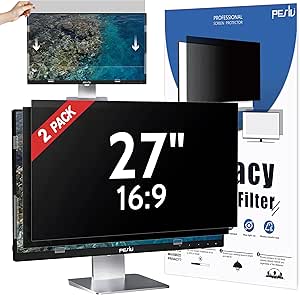 | Best 27-Inch Two-Pack | Screen size: 27 inches | Aspect ratio: 16:9 | Filter dimensions: 23.56 × 13.25 inches | VIEW ON AMAZON | See Our Full Breakdown |
| Amazon Basics Privacy Screen Filter for 24-Inch 16:9 Monitors | 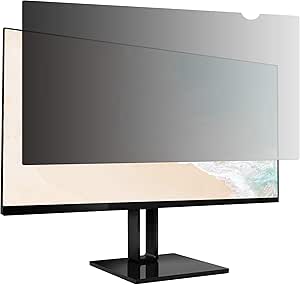 | Best for Straightforward 24-Inch Fit | Compatible screen size: 24 inches | Aspect ratio: 16:9 | Filter dimensions: 20.94 × 11.79 × 0.02 inches | VIEW ON AMAZON | See Our Full Breakdown |
| 27 Inch 16:9 Computer Privacy Screen Filter for Monitor – Privacy Shield and Anti-Glare Protector |  | Best Single 27-Inch Monitor Pick | Screen size: 27 inches | Aspect ratio: 16:9 | Filter dimensions: 23 9/16 × 13 1/4 inches | VIEW ON AMAZON | See Our Full Breakdown |
| 18.5 Inch Computer Monitor Privacy Screen (2 Pack) |  | Best for Smaller Dual-Monitor Setups | Screen size: 18.5 inches | Aspect ratio: 16:9 | Quantity: 2 filters | VIEW ON AMAZON | See Our Full Breakdown |
| 20-Inch Computer Privacy Screen Filter, 2-Pack, 16:9 |  | Best for Small-Desk Dual Monitors | Quantity: 2 filters | Compatible screen size: 20 inches | Aspect ratio: 16:9 | VIEW ON AMAZON | See Our Full Breakdown |
| Computer Privacy Screen Filter for 24 Inch 16:9 Monitor |  | Best Reversible Finish for 24-Inch Monitors | Compatible screen size: 24 inches | Aspect ratio: 16:9 | Filter dimensions: 20 15/16 × 11 13/16 inches (532 × 299 mm) | VIEW ON AMAZON | See Our Full Breakdown |
| SightPro 23.8-Inch Monitor Privacy Screen Filter with Anti-Glare |  | Best for Bright 23.8-Inch Workspaces | Screen size: 23.8 inches | Aspect ratio: 16:9 | Filter dimensions: 20.75 × 11.69 inches (528 × 297 mm) | VIEW ON AMAZON | See Our Full Breakdown |
| 27-Inch 16:9 Monitor Privacy Screen Filter | | Best for Large 27-Inch Displays | Compatible device: Desktop monitor | Screen size and aspect ratio: 27 inches; 16:9 | Compatible screen dimensions: 598 × 337 mm (23.5 × 13.3 inches) | VIEW ON AMAZON | See Our Full Breakdown |
| Magicmoon 2-Pack Privacy Screen Filters for 24-Inch 16:9 Monitors |  | Best Value Two-Pack for 24-Inch Monitors | Quantity: 2 filters | Compatible screen size: 24 inches | Aspect ratio: 16:9 | VIEW ON AMAZON | See Our Full Breakdown |
| screen privacy filter | Filter dimensions | Aspect ratio |
|---|---|---|
| Magnetic Laptop Privacy Screen | 11 15/16 × 7 1/2 inches (304 × 190 mm) | — |
| Mamol 21.5-Inch Privacy Screen | 18.75 × 10.56 inches (477 × 268 mm) | 16:9 |
| Protescreen 24-Inch Monitor Pr | 20 7/16 × 11 3/4 inches (532 × 299 mm) | 16:9 |
| SightPro 24-Inch 16:9 Monitor | 20 15/16 × 11 13/16 inches (532 × 299 mm) | 16:9 |
| SightPro 14-Inch 16:10 Laptop | 11 15/16 × 7 1/2 inches (304 × 190 mm) | — |
| SightPro Magnetic Privacy Scre | — | — |
| 2 Pack 27-Inch 16:9 Computer P | 23.56 × 13.25 inches | 16:9 |
| Amazon Basics Privacy Screen F | 20.94 × 11.79 × 0.02 inches | 16:9 |
| 27 Inch 16:9 Computer Privacy | 23 9/16 × 13 1/4 inches | 16:9 |
| 18.5 Inch Computer Monitor Pri | — | 16:9 |
| 20-Inch Computer Privacy Scree | — | 16:9 |
| Computer Privacy Screen Filter | 20 15/16 × 11 13/16 inches (532 × 299 mm) | 16:9 |
| SightPro 23.8-Inch Monitor Pri | 20.75 × 11.69 inches (528 × 297 mm) | 16:9 |
| 27-Inch 16:9 Monitor Privacy S | — | — |
| Magicmoon 2-Pack Privacy Scree | 20 15/16 × 11 13/16 inches (531 × 298 mm) | 16:9 |
More Details on Our Top Picks
Magnetic Laptop Privacy Screen Filter, 14.1-Inch, 16:10
For a 14-inch laptop that needs a privacy screen you can remove between work sessions, this magnetic model is a more flexible fit than the adhesive-mounted SightPro 14-Inch 16:10 Laptop Privacy Screen Filter. Its microlouver film darkens the display from the sides while keeping a straight-on view clear, and the magnetic attachment makes taking it off and putting it back less of a chore. It also adds scratch protection and UV and blue-light reduction, with a storage folder for keeping the filter protected when detached. The tradeoff is narrower usability: it is not optimized for touchscreens, and someone sitting directly behind you may still see the display. Match the screen’s width and height—not just its diagonal—before buying.
Pros:- Magnetic attachment supports quick removal and reattachment.
- Microlouver film dims side views while preserving a clear straight-on view.
- Adds scratch protection and UV and blue-light reduction.
- Includes a storage folder, webcam cover, and cleaning cloth.
Cons:- Not optimized for touchscreen use.
- Does not block views from directly behind the user.
- Requires a precise width-and-height match to the screen.
Best for: 14-inch, 16:10 laptop owners who want to remove and reattach a privacy filter regularly and can verify the panel dimensions.
Not ideal for: Touchscreen laptop users, or anyone who needs privacy from people seated directly behind them.
- Compatible screens:14-inch, 16:10 laptops
- Filter dimensions:11 15/16 × 7 1/2 inches (304 × 190 mm)
- Diagonal:14.1 inches (358.14 mm)
- Material:Microlouver film
- Attachment:Removable magnetic attachment
- Hardness:2H
- Finish:Glossy and matte
- Included accessories:Magnetic stickers, webcam cover, storage folder, cleaning cloth
Our verdict“Choose this for a dimension-matched 14-inch laptop when easy removal matters more than touchscreen use or rear-view privacy.”
Mamol 21.5-Inch Privacy Screen Filter for 16:9 Monitors, 2-Pack
The Mamol two-pack is aimed at buyers protecting two matching workstations, rather than someone outfitting one large monitor. Both filters use microlouver privacy and offer reversible glossy and matte surfaces, so each user can favor a clearer finish or more glare control. Unlike the single-filter SightPro 24-Inch 16:9 Monitor Privacy Screen Filter with Anti-Glare Protection, this set covers two 21.5-inch displays and includes both adhesive strips and slide-mount tabs. The tabs are useful only when a monitor has a raised bezel, though, and the filters must match the specified 18.75-by-10.56-inch screen area. The listed viewing limits make side peeking harder, but privacy filtering still darkens the image off-angle. This is the practical pick for shared offices with two compatible monitors, not for mixed-size displays.
Pros:- Two filters cover a pair of compatible monitors.
- Reversible glossy and matte surfaces let users choose between clarity and glare reduction.
- Includes adhesive strips and slide-mount tabs.
- Washable, reusable construction with scratch and fingerprint protection.
Cons:- Compatibility depends on the specified screen width and height, not diagonal size alone.
- Slide-mount tabs require a raised bezel.
- Privacy filtering darkens the display at wider viewing angles.
Best for: Small offices or households with two matching 21.5-inch, 16:9 monitors and users who want a choice of mounting method.
Not ideal for: Buyers with only one monitor, different-sized displays, or bezel-free screens if they plan to use the slide-mount tabs.
- Quantity:2 filters
- Compatible screen size:21.5 inches
- Aspect ratio:16:9
- Filter dimensions:18.75 × 10.56 inches (477 × 268 mm)
- Privacy viewing angle:Blocks visibility around 30°; screen blacks out near 60°
- Surface:Reversible glossy and matte
- Installation:Adhesive stickers or slide-mount tabs for raised bezels
- Included accessories:Installation guide, 4 adhesive strips, 4 slide-mount tabs, 2 cleaning cloths
Our verdict“Pick this two-pack for two matching 21.5-inch monitors; choose a single-filter option if you only need to cover one screen.”
Protescreen 24-Inch Monitor Privacy Screen Filter, 2-Pack, 16:9
For buyers with two standard 24-inch, 16:9 monitors, Protescreen pairs a narrow ±28° viewing angle with a reversible matte/glossy surface. That makes it a better match for a dual-monitor station than the single-filter SightPro 24-Inch 16:9 Monitor Privacy Screen Filter with Anti-Glare Protection, while retaining adhesive and removable slide-mount installation options. The matte side can help cut reflected light, and the 9H hardness rating is intended to help guard against scratches. The tradeoff is that off-angle privacy has a visible cost: the image darkens from the side, so a nearby colleague may need to shift position to view shared content. These filters are specifically sized, so confirm the panel measurements before ordering; a 24-inch label alone does not confirm fit.
Pros:- Two filters suit a dual-monitor setup with matching displays.
- ±28° viewing angle limits side visibility.
- Reversible matte and glossy surfaces offer different glare and clarity preferences.
- Includes adhesive and slide-mount options, plus cleaning accessories.
Cons:- Designed for 24-inch, 16:9 monitors, so other panel sizes may not fit.
- Side viewing becomes darker, which can hinder shared-screen viewing.
- Slide mounts may not suit monitors without a compatible bezel.
Best for: People setting up two matching 24-inch, 16:9 desktop monitors who want side-view privacy and reversible surface choices.
Not ideal for: Owners of non-24-inch or non-16:9 displays, and teams that frequently need several people to view a screen from different angles.
- Quantity:2 filters
- Compatible displays:24-inch desktop monitors
- Aspect ratio:16:9
- Filter dimensions:20 7/16 × 11 3/4 inches (532 × 299 mm)
- Viewing angle:±28°
- Blue-light reduction:Up to 92%
- Surface options:Reversible matte and glossy
- Installation:Adhesive strips or removable slide-mount tabs
- Screen hardness:9H
Our verdict“Choose Protescreen over a single-filter 24-inch option when you need two matched screens and accept darker off-angle viewing.”
SightPro 24-Inch 16:9 Monitor Privacy Screen Filter with Anti-Glare Protection
This SightPro is the straightforward single-screen choice for a 24-inch, 16:9 desktop monitor: its microlouver film dims side views while keeping the display clear when viewed head-on. Compared with the Protescreen 24-Inch Monitor Privacy Screen Filter, 2-Pack, it is better suited to one workstation than a dual-monitor purchase, and its supplied adhesive strips and slide tabs give buyers two mounting routes. The anti-glare and UV and blue-light reduction features add screen-comfort benefits beyond privacy, while the TAA and Section 889 compliance may matter for some procurement requirements. Its 2H hardness is lower than Protescreen’s listed 9H, so buyers prioritizing the stated hardness rating may prefer that alternative. Fit also depends on the actual display dimensions, and the filter cannot hide content from someone directly behind you.
Pros:- Microlouver film limits side viewing while retaining a clear straight-on view.
- Helps reduce glare, UV, and blue-light exposure.
- Includes adhesive strips and slide-mount tabs.
- TAA and Section 889 compliance is specified.
Cons:- The 2H hardness rating is lower than the 9H rating listed for the Protescreen two-pack.
- Slide-mount tabs are intended for monitors with a raised bezel.
- Does not block visibility from directly behind the user.
Best for: Office users outfitting one 24-inch, 16:9 monitor who want privacy, glare reduction, and documented TAA and Section 889 compliance.
Not ideal for: Dual-monitor buyers who need two filters in one package, or anyone who cannot confirm the monitor’s panel dimensions and bezel compatibility.
- Screen size:24 inches
- Aspect ratio:16:9
- Filter dimensions:20 15/16 × 11 13/16 inches (532 × 299 mm)
- Material:Microlouver film
- Hardness:2H
- Attachment options:Clear adhesive strips or slide-mount tabs for raised bezels
- Special features:Privacy protection, anti-glare, blue-light reduction
- Compliance:Section 889 and TAA compliant
Our verdict“Choose this single-filter option for a compatible 24-inch office monitor, especially when its stated compliance is relevant to procurement.”
SightPro 14-Inch 16:10 Laptop Privacy Screen Filter
For a 14.1-inch, 16:10 laptop, this SightPro gives buyers a choice between adhesive strips and slide-mount tabs rather than the magnetic attachment used by the Magnetic Laptop Privacy Screen Filter, 14.1-Inch, 16:10. That flexibility can suit a laptop that keeps the filter attached, while the reversible glossy and matte surfaces let users choose their preferred finish. Its listed 8H hardness is higher than the magnetic model’s 2H, and the filter also helps reduce glare, UV, and blue light. The tradeoff is convenience: removal is not magnetic, and the provided mounting choices may be less appealing to someone who frequently takes the filter on and off. As with the magnetic alternative, touchscreen use is not optimized and rear-positioned viewers may still see the screen. Check width and height closely before ordering.
Pros:- Offers adhesive strips and slide-mount tabs for installation flexibility.
- Reversible glossy and matte surfaces provide a finish choice.
- Helps limit side viewing and reduce glare, UV, and blue light.
- Listed 8H hardness provides a screen-protection feature.
Cons:- Not optimized for touchscreen laptops.
- Does not block visibility from directly behind the user.
- Requires matching the screen’s width and height, not only its diagonal.
Best for: 14-inch, 16:10 laptop owners who want adhesive or slide-mount installation and plan to leave the privacy filter in place.
Not ideal for: Touchscreen users or people who frequently remove and reattach their filter; the magnetic laptop option is better suited to repeated removal.
- Compatible devices:Laptops
- Screen size and aspect ratio:14 inches, 16:10
- Filter diagonal:14.1 inches (358.14 mm)
- Filter dimensions:11 15/16 × 7 1/2 inches (304 × 190 mm)
- Material:Microlouver film
- Hardness:8H
- Surface:Glossy and matte
- Attachment options:Adhesive strips or slide-mount tabs
- Compliance:Section 889 and TAA compliant
Our verdict“Pick this SightPro if you want a mounted 14-inch privacy filter with multiple attachment options; choose the magnetic alternative for frequent removal.”
SightPro Magnetic Privacy Screen for MacBook Air 13.6 Inch (2022-2026, M2-M5)
For a compatible MacBook Air, the magnetic snap-on attachment is the main reason to choose this filter: I can remove it quickly when sharing the screen, then reattach it for work in a café or other open space. It also filters UV and blue light, adding a benefit beyond blocking side views. Compared with the desk-focused Amazon Basics 24-Inch Privacy Screen Filter, this model is built around portable use and a specific laptop fit rather than a fixed monitor. That precision is also its biggest limitation: it fits only the listed 13.6-inch MacBook Air models, so it is not a flexible choice for a household with different devices. Its side-view protection does not hide content from someone directly behind me.
Pros:- Magnetic attachment makes removal and reattachment simple.
- Blocks side views in open workspaces and while traveling.
- Filters UV and blue light.
- Includes a storage folder and cleaning cloth.
Cons:- Compatibility is limited to specified 13.6-inch MacBook Air models.
- Does not block a direct view from behind the user.
Best for: MacBook Air 13.6-inch owners who move between shared offices, cafés, and private work areas and want a removable filter.
Not ideal for: People with other MacBook sizes or laptop brands, or anyone who needs protection from viewers directly behind them.
- Compatible device:MacBook Air 13.6-inch, 2022–2026, M2–M5
- Model numbers:A2681, A3113, A3240
- Attachment:Magnetic snap-on
- Protection:Side-view privacy, UV filtering, and blue-light filtering
- Included:Privacy screen, storage folder, and cleaning cloth
- Intended use:Travel and open workspaces
Our verdict“Choose this for quick, removable privacy on a compatible MacBook Air, but skip it if you need a universal fit or rear-view protection.”
2 Pack 27-Inch 16:9 Computer Privacy Screen Filter for Monitor
This Peslv set suits buyers outfitting two matching 27-inch monitors without mixing filter styles. Its stated ±30° side-view protection targets privacy from nearby coworkers, while the reversible matte and glossy surfaces let me favor glare control or a glossier viewing finish. The Amazon Basics 24-inch filter also offers reversible finishes, but this Peslv package adds a second filter and claims higher blue- and UV-light reduction. That value depends on owning two monitors with the exact 16:9 fit; a diagonal measurement alone cannot confirm compatibility. Installation has adhesive-strip and slide-tab options, though some mounting choices depend on the monitor bezel. The PET construction is rated 5H for hardness, but the double-sided finish still asks me to choose which surface better suits my lighting.
Pros:- Two filters cover a pair of matching monitors.
- ±30° privacy rating is suited to nearby side viewers.
- Reversible matte and glossy surfaces offer glare and finish choices.
- Includes adhesive strips, slide-mount tabs, and cleaning accessories.
Cons:- Designed for 27-inch 16:9 displays, not other aspect ratios.
- Some mounting options may not suit every bezel style.
- The two-filter package is less useful when only one screen needs a filter.
Best for: Home offices and small teams using two matching 27-inch 16:9 monitors who want consistent privacy and finish options.
Not ideal for: Owners of ultrawide or differently sized displays, or monitors whose bezel does not suit the preferred mounting method.
- Screen size:27 inches
- Aspect ratio:16:9
- Filter dimensions:23.56 × 13.25 inches
- Material:PET
- Hardness:5H
- Privacy angle:±30°
- Surface:Reversible matte and glossy
- Light filtering:Up to 92% blue light and 98% UV light
- Quantity:2 filters
Our verdict“Pick this two-pack for a matched pair of 27-inch 16:9 monitors; choose a single-screen filter if your display setup is mixed.”
Amazon Basics Privacy Screen Filter for 24-Inch 16:9 Monitors
The Amazon Basics filter is a straightforward pick when the monitor’s visible display area measures 20.94 × 11.79 inches. Its 60-degree viewing zone helps limit side visibility, and the reversible matte and glossy surfaces give me a choice between glare reduction and a glossier finish. Compared with the Peslv 27-Inch Two-Pack, this is a single filter for a smaller screen and claims less blue-light filtering, so it makes more sense for one 24-inch workstation than a dual-monitor setup. I also value having both adhesive strips and slide tabs, but the tabs require a raised bezel. Measuring the visible area matters more than relying on the monitor’s diagonal label: the wrong dimensions can leave the filter poorly fitted.
Pros:- Specified visible-area dimensions help confirm fit.
- Reversible matte and glossy sides adapt to different lighting preferences.
- Offers adhesive strips and slide-mount tabs.
- Filters blue light and helps protect against scratches.
Cons:- Slide tabs work only with screens that have a raised bezel.
- Requires careful measurement of the visible display area.
- Its stated blue-light filtering is lower than the Peslv 27-inch option.
Best for: People who need one filter for a 24-inch 16:9 monitor and can confirm the visible screen dimensions before ordering.
Not ideal for: Buyers with bezel-free screens who want to rely on slide tabs, or anyone whose monitor does not match the stated display area.
- Compatible screen size:24 inches
- Aspect ratio:16:9
- Filter dimensions:20.94 × 11.79 × 0.02 inches
- Viewing angle:60 degrees
- Blue-light filtering:40%
- Attachment:Adhesive strips or slide-mount tabs
- Surface finishes:Reversible glossy and matte
- Weight:3.36 ounces
- Model number:PFS440GH-24W9
Our verdict“Choose this for a single, dimension-matched 24-inch monitor when you want reversible finishes and flexible attachment methods.”
27 Inch 16:9 Computer Privacy Screen Filter for Monitor – Privacy Shield and Anti-Glare Protector
For one 27-inch monitor, this SightPro filter combines side-angle privacy with removable mounting choices, making it a practical fit for shared offices or a workstation that changes location. The microlouver film keeps the view clear from directly in front while limiting side views; like the Amazon Basics 24-inch model, it offers adhesive and slide-tab installation, but it is sized for a larger screen and also lists compatibility with flat and curved monitors. That broader screen-type claim does not remove the need to check dimensions: SightPro specifies a 27-inch 16:9 fit, so I would measure width and height rather than trust diagonal size alone. Its 2H hardness rating is modest next to the Peslv two-pack’s 5H rating, and it does not prevent someone behind me from seeing the display.
Pros:- Microlouver film limits side viewing while preserving a direct-on view.
- Includes adhesive strips and slide-mount tabs for removable installation.
- Glossy and matte surfaces provide finish options.
- Listed for use with flat and curved monitors.
Cons:- Requires precise width and height checks rather than diagonal-size matching alone.
- Does not block visibility from directly behind the user.
- The 2H hardness rating is lower than the Peslv 27-inch filter’s 5H rating.
Best for: Workers with one 27-inch 16:9 monitor who want removable side-view privacy and a choice of mounting method.
Not ideal for: People who need a harder-rated surface, protection from viewers behind them, or a filter for a screen outside the stated dimensions.
- Screen size:27 inches
- Aspect ratio:16:9
- Filter dimensions:23 9/16 × 13 1/4 inches
- Material:Microlouver film
- Hardness:2H
- Surface:Glossy and matte
- Attachment:Adhesive strips or slide-mount tabs
- Monitor type:Listed for flat and curved monitors
- Quantity:1 filter
Our verdict“Choose this single-screen SightPro option for a measured 27-inch 16:9 monitor when removable side privacy matters more than a higher hardness rating.”
18.5 Inch Computer Monitor Privacy Screen (2 Pack)
This 18.5-inch two-pack is aimed at buyers who need privacy on two smaller 16:9 monitors, rather than the larger displays covered by the Peslv and SightPro 27-inch filters. Its micro-louver design reduces side viewing, while the dual-sided matte and glossy finish lets me choose between glare reduction and a different viewing finish. Blue-light filtering and scratch resistance add everyday screen protection, but the supplied details do not state a viewing angle, dimensions, or specific installation hardware. That makes fit verification less straightforward than with the Amazon Basics filter, which lists its visible display area and attachment options. Careful alignment is also needed during installation, and the 18.5-inch size leaves little room for flexibility if the monitors differ.
Pros:- Two filters cover a pair of matching monitors.
- Micro-louver technology reduces side viewing.
- Matte and glossy sides let users choose a finish.
- Blue-light filtering and scratch resistance support routine use.
Cons:- Made specifically for 18.5-inch monitors and may not fit other sizes.
- Careful alignment is needed during installation.
- The supplied product details do not specify viewing angle or filter dimensions.
Best for: Small offices or home setups with two matching 18.5-inch 16:9 monitors that need side-view privacy.
Not ideal for: Buyers with only one monitor, screens of another size, or anyone who needs a published viewing angle and detailed fit dimensions before buying.
- Screen size:18.5 inches
- Aspect ratio:16:9
- Quantity:2 filters
- Privacy technology:Micro-louver
- Surface:Dual-sided matte and glossy
- Light filtering:Blue-light filter
- Surface protection:Scratch-resistant
Our verdict“Choose this two-pack for a matched pair of 18.5-inch monitors, but look elsewhere if you need detailed fit measurements or a single filter.”
20-Inch Computer Privacy Screen Filter, 2-Pack, 16:9
This two-pack is a practical match for buyers outfitting two 20-inch 16:9 monitors without sourcing filters separately. Its 60° viewing angle limits side visibility, while the matte screen surface helps tame reflections in bright offices. The stated 95% blue-light reduction is a prominent feature, though buyers should weigh that claim alongside the more directly relevant privacy and fit details. Compared with the Magicmoon 2-Pack Privacy Screen Filters for 24-Inch 16:9 Monitors, this set is sized for smaller displays and claims greater blue-light reduction; Magicmoon, in turn, suits larger 24-inch screens. Adhesive strips offer a fixed fit, while slide-mount tabs make removal easier. The main tradeoff is strict sizing: confirm the visible screen area, since a 20-inch diagonal alone does not guarantee a match. Side darkening can also interfere with showing work to someone seated nearby.
Pros:- Two filters cover a matched pair of monitors.
- 60° viewing angle helps limit side viewing.
- Matte surface reduces reflections.
- Adhesive strips and slide-mount tabs support fixed or removable installation.
Cons:- Compatibility depends on matching the 20-inch 16:9 screen dimensions.
- Privacy darkening can make side-by-side screen sharing harder.
- The stated blue-light reduction may matter less to buyers focused mainly on privacy.
Best for: People equipping a pair of 20-inch 16:9 desktop monitors who want removable installation options and a matte viewing surface.
Not ideal for: Owners of other monitor sizes or anyone who frequently shares their screen with colleagues seated off-center.
- Quantity:2 filters
- Compatible screen size:20 inches
- Aspect ratio:16:9
- Visible screen dimensions:17.36 × 9.76 inches
- Viewing angle:60°
- Blue-light reduction:95% (claimed)
- Material and hardness:PET; 9H
- Installation:Adhesive strips or slide-mount tabs
Our verdict“Choose this set for two correctly sized 20-inch monitors when a matte finish and flexible mounting matter more than easy screen sharing.”
Computer Privacy Screen Filter for 24 Inch 16:9 Monitor
This filter’s clearest advantage is its reversible matte and glossy finish: buyers can choose a less reflective surface or a glossier presentation depending on their workspace. Its 24-inch 16:9 sizing puts it in the same category as the Magicmoon 2-Pack Privacy Screen Filters for 24-Inch 16:9 Monitors, but this is a single filter with no stated blue-light reduction or hardness specification. The privacy effect comes from darkening the display at side angles, which can help in open offices, while adhesive strips and slide-mount tabs give some flexibility in how it is attached. The tradeoff is that the filter can lower perceived brightness and is described as unsuitable for dimly lit spaces. Measure the actual screen area before ordering; matching the diagonal size alone may not be enough to prevent a poor fit.
Pros:- Reversible matte and glossy sides offer a choice of finish.
- Side-angle darkening adds privacy in open work areas.
- Adhesive strips and slide-mount tabs provide two attachment approaches.
Cons:- Can reduce perceived screen brightness.
- Not suited to dimly lit workspaces.
- Requires careful measurement for a reliable fit.
Best for: 24-inch 16:9 monitor owners who want one filter and the option to switch between matte and glossy viewing surfaces.
Not ideal for: People working in dim rooms, buyers who need a two-monitor pack, or anyone unwilling to verify screen width and height before purchase.
- Compatible screen size:24 inches
- Aspect ratio:16:9
- Filter dimensions:20 15/16 × 11 13/16 inches (532 × 299 mm)
- Finish:Reversible matte and glossy
- Privacy function:Darkens display when viewed from side angles
- Installation:Adhesive strips or slide-mount tabs
Our verdict“Pick this single-screen option if reversible finishes matter and your 24-inch monitor is used in a well-lit workspace.”
SightPro 23.8-Inch Monitor Privacy Screen Filter with Anti-Glare
The SightPro is a strong fit for buyers whose monitor measures 23.8 inches and whose main nuisance is a combination of shoulder-surfing and reflections. Its matte microlouver film keeps the display clear from straight on while obscuring side views, and the anti-glare surface is a useful distinction from options that offer a reversible glossy side. Compared with the Computer Privacy Screen Filter for 24 Inch 16:9 Monitor, this model specifies microlouver construction and anti-glare treatment, but it is sized for a 23.8-inch display rather than a generic 24-inch label. It includes both adhesive strips and slide-mount tabs, though the tabs need a raised bezel. The stated 2H hardness is lower than the 9H rating listed for the 20-inch two-pack, so careful handling matters. Measure width and height, not just diagonal size.
Pros:- Microlouver design obscures side views while keeping a straight-on view clear.
- Matte finish helps reduce glare.
- Adhesive strips and removable tabs accommodate different bezel setups.
- Lists UV and blue-light filtering among its features.
Cons:- Does not block viewing from directly behind the user.
- Slide-mount tabs are intended for displays with raised bezels.
- 2H hardness is a more modest protection rating than the 9H listed for the 20-inch two-pack.
Best for: People with a compatible 23.8-inch desktop monitor who work under bright lighting and want a matte anti-glare privacy filter.
Not ideal for: Owners of monitors without matching dimensions, people needing privacy from directly behind, or users expecting a more scratch-resistant 9H surface.
- Screen size:23.8 inches
- Aspect ratio:16:9
- Filter dimensions:20.75 × 11.69 inches (528 × 297 mm)
- Material:Microlouver film
- Screen surface:Anti-glare matte
- Hardness:2H
- Attachment options:Clear adhesive strips or slide-mount tabs
- Package contents:Privacy filter, two sets of adhesive strips, two sets of slide-mount tabs, microfiber cloth
Our verdict“Choose the SightPro for a dimension-matched 23.8-inch monitor in a bright workspace, especially if matte glare control is a priority.”
27-Inch 16:9 Monitor Privacy Screen Filter
For a large desktop display, this filter prioritizes 27-inch 16:9 fit and gives buyers a choice between glossy and matte viewing surfaces. The stated compatible area—23.5 × 13.3 inches—is more useful than the diagonal label alone when checking whether it will cover a monitor correctly. Like the SightPro 23.8-Inch Monitor Privacy Screen Filter with Anti-Glare, it offers side-view privacy and a matte option, but this model targets a substantially larger screen and does not list the SightPro’s microlouver material or UV and blue-light filtering features. A larger filter can make a privacy setup possible on a main workstation display, though the screen darkens with it installed and the product is not suited to dim rooms. It also excludes curved screens, and the listing says it is not water resistant.
Pros:- Sized for a large 27-inch 16:9 monitor.
- Matte or glossy finish allows a surface choice.
- Adhesive strips and slide-mount tabs offer alternative installation methods.
- Matte side can help reduce glare.
Cons:- Not compatible with curved screens.
- The installed filter darkens the display and is unsuitable for dim workspaces.
- Not water resistant.
Best for: Owners of flat 27-inch 16:9 monitors who need side-angle privacy on a large display and want a choice of matte or glossy finish.
Not ideal for: People with curved monitors, dim workspaces, or a preference for keeping the display as bright as possible.
- Compatible device:Desktop monitor
- Screen size and aspect ratio:27 inches; 16:9
- Compatible screen dimensions:598 × 337 mm (23.5 × 13.3 inches)
- Screen surface:Glossy or matte
- Hardness:3H
- Water resistance:Not water resistant
- Installation options:Double-sided adhesive strips or slide-mount tabs for raised bezels
- Unit count:1
Our verdict“This is the large-screen pick for a flat, dimension-matched 27-inch monitor used in a well-lit room.”
Magicmoon 2-Pack Privacy Screen Filters for 24-Inch 16:9 Monitors
Magicmoon’s main appeal is straightforward: two filters for 24-inch 16:9 monitors, making it a convenient match for a dual-display desk or a spare screen. It offers adhesive strips and slide-mount tabs, plus glossy and matte surfaces, so buyers have some choice in installation and finish. The stated 30–60° viewing angle describes a range rather than the single 60° figure listed for the 20-inch two-pack; its 30% blue-light reduction claim is also more modest than that product’s stated 95%. Compared with the Computer Privacy Screen Filter for 24 Inch 16:9 Monitor, Magicmoon includes a second filter and quantified blue-light reduction, but touchscreen users should skip it: it is explicitly not compatible. Measure the visible screen area carefully, and remember that people within the viewing angle may still see the display.
Pros:- Two filters suit a dual-monitor setup.
- Matte and glossy surfaces provide finish options.
- Adhesive strips and slide-mount tabs support different installation preferences.
- Lists 30% blue-light reduction.
Cons:- Not compatible with touchscreens.
- People within the stated 30–60° viewing-angle range may still see the screen.
- Requires checking screen width and height for fit.
Best for: Dual-monitor users with two compatible 24-inch 16:9 displays who want matching filters and flexible mounting.
Not ideal for: Touchscreen monitor owners, buyers needing stronger privacy from every nearby angle, or anyone whose screen dimensions do not match the listed filter size.
- Quantity:2 filters
- Compatible screen size:24 inches
- Aspect ratio:16:9
- Filter dimensions:20 15/16 × 11 13/16 inches (531 × 298 mm)
- Viewing angle:Approximately 30–60°
- Blue-light reduction:30%
- Hardness and surface:3H; glossy and matte
- Touchscreen compatibility:No
Our verdict“Choose Magicmoon for a matched pair of non-touch 24-inch monitors when having two filters matters more than a stronger blue-light reduction claim.”
How We Picked
I ranked these screen privacy filters by how clearly their listed dimensions, aspect ratios, and device compatibility help a buyer make a confident match. I also weighed practical differences that shape daily use: attachment style, stated anti-glare features, single- versus multi-screen coverage, and how specifically each listing identifies its intended display. A filter that fits reliably is more useful than one with attractive extras that do not match the screen.
The order favors options with a clear use case and a helpful combination of privacy and usability, followed by choices suited to narrower needs such as a particular laptop, monitor size, or multi-screen setup. Similar products are separated by the information available in their names: a named anti-glare finish or exact device fit gives buyers a more defined reason to choose, while broadly described filters may offer less certainty before purchase. I do not infer unlisted performance claims, and I treat fit confirmation as a higher priority than pack size or extra features.
Factors to Consider When Choosing Screen Privacy Filters
Before choosing a filter, treat it as a fit-and-use decision rather than a simple screen-size purchase. These checks help avoid common mismatches and clarify when extra features or a multi-pack are genuinely useful.
Match the visible display, not just the device name
Screen measurements in product names usually refer to the diagonal, but two displays with the same diagonal can have different proportions. Check the visible panel width and height, then compare the aspect ratio listed for the filter. A 16:9 monitor filter is not a substitute for a 16:10 laptop filter just because the diagonal appears close. Also distinguish the active display area from the laptop lid or monitor frame. When a listing names a specific model, confirm the exact model year or generation rather than relying on a family name. This extra check can prevent edge gaps, overhang, or a filter that covers part of the usable screen.
Choose attachment style around how often you move the screen
A filter that stays installed can suit a fixed desktop, while a removable magnetic option is more convenient for a laptop that travels or is shared. Removable designs can be easier to take off for private work or a different viewing setup, but their fit depends on device compatibility and how the screen is constructed. Adhesive or tab-based mounting may suit a display that rarely moves, though it can be less convenient if you frequently remove the filter. Before buying, check what attachment parts are included and whether they work with your bezel or screen surface. Do not assume every magnetic filter will attach to every laptop. Match the mounting method to your routine, not just the convenience promised in a product name.
Balance privacy with brightness and image clarity
Privacy filters restrict off-angle viewing by limiting what people beside you can see, but that added privacy can also change how the display looks from your own seat. A screen that is already dim may feel less comfortable with a filter installed, particularly in a bright office. Anti-glare labeling may appeal if reflections are a regular problem, but it should not be treated as a guarantee of a particular visual result. Think about your usual brightness, lighting, and viewing position before paying for a finish you may not need. If color-critical work matters, check whether the maker gives relevant clarity or color information rather than assuming the filter will leave the image unchanged. The best compromise depends on your workspace and how much privacy you need.
Decide whether a multi-pack is actually useful
Two-pack filters can be a practical fit for paired monitors, a home and office setup, or replacement coverage, but only when both displays match the listed dimensions and aspect ratio. A pack does not solve a sizing mismatch; two incorrectly sized filters simply repeat the problem. Check whether the package includes identical filters and whether you need the same privacy setup at each workstation. For a single screen, a multi-pack may leave an unused filter that is difficult to store without scratches. Compare the convenience of having a spare against the effort of keeping it clean and protected. Buy by the number of compatible displays you have, not by the number of pieces alone.
Prioritize your viewing environment
A filter is most useful when people can approach your screen from the sides, such as at a shared desk, in a clinic, or during travel. If your monitor faces a wall and no one passes behind you, a privacy filter may add less value than improving desk placement. Consider whether you mainly need protection from side views or also want help with reflections, since those are different problems. A larger monitor in an open office may call for a clearly specified filter with the right aspect ratio, while a laptop used in changing locations may benefit more from removability. Check where coworkers or passengers sit relative to your display. Choosing around the likely viewing angles can keep you from buying a feature that does not address your actual exposure.
Frequently Asked Questions
How can I tell whether a privacy filter fits my screen?
Check the display’s visible diagonal, width, height, and aspect ratio, then compare those figures with the filter listing. The diagonal alone is not enough: this roundup includes both 16:9 monitor filters and 16:10 laptop filters. If the product names a specific laptop model, match the full model and generation to your device. Avoid measuring the outer bezel, since the filter is meant to cover the active screen area. When dimensions or compatibility remain unclear, confirm them with the manufacturer before ordering.
Will a screen privacy filter make my display look darker?
A privacy filter can reduce the amount of light reaching your eyes, so the screen may appear dimmer or less clear than it does without a filter. The effect can feel stronger in a bright room or on a display that already runs at low brightness. Product names that mention anti-glare describe an additional intended benefit, but they do not establish how a particular display will look after installation. Consider your normal brightness and whether you rely on accurate color before choosing. If possible, check the maker’s specifications for clarity or light transmission rather than assuming all filters behave alike.
Should I choose a magnetic filter or a fixed attachment?
Choose based on how often you remove the filter and whether your device supports the mounting method. A magnetic option can be convenient for a compatible laptop that travels or is sometimes used without privacy protection. A fixed attachment may make more sense on a desktop monitor that stays in one place. Check how the filter attaches, what parts are included, and whether your bezel or screen construction allows that method. The named MacBook Air option in this roundup is aimed at particular models, so its attachment approach should not be generalized to other laptops.
Is a two-pack a better choice than buying one filter?
A two-pack makes sense when you have two displays with matching dimensions and aspect ratios, or when a spare has a clear use. It can be a poor fit for a single-monitor setup if the extra filter will sit unused or be hard to store safely. Check that both pieces in the pack are the same size and intended for your screens. Several listings here specify two filters, but their screen sizes differ, so pack count does not make them interchangeable. Confirm compatibility for each display before choosing a multi-pack.
Should I choose a privacy filter with anti-glare protection?
Choose an anti-glare option if reflections regularly interfere with your work and the listing clearly identifies that feature. Privacy and glare control address different viewing problems, so one does not automatically replace the other. If reflections are rare, a filter focused on privacy may be sufficient and may keep your choice simpler. This roundup includes named anti-glare options from SightPro as well as filters whose names emphasize privacy or size. Compare the stated features with your workspace lighting instead of paying attention to the label alone.
Conclusion
For the broadest mix of privacy and glare control, I would start with the SightPro 24-Inch 16:9 Monitor Privacy Screen Filter with Anti-Glare Protection as the best overall pick, provided your monitor matches its dimensions. The best value for a two-screen setup is the Mamol 21.5-inch 2-pack when both displays are the specified size and ratio; the Protescreen 24-inch 2-pack is another fit for matching larger monitors. For a premium-feeling, device-specific choice, the SightPro magnetic MacBook Air 13.6-inch filter is the standout for supported models, while the SightPro 14-inch 16:10 filter suits buyers who need that laptop format. Beginners should start with a clearly specified filter that matches their screen exactly, such as the Amazon Basics 24-inch 16:9 option, rather than choosing by diagonal alone. For other specific needs, compare the 27-inch filters for larger displays and the 18.5- or 20-inch two-packs for smaller matching monitors; confirm each screen’s measurements before deciding.