
Finding the right Wi Fi mesh system for a homeoffice can be challenging. The best models offer extensive coverage, fast speeds, and the ability to handle multiple devices without lag. The Tenda AX3000 Nova MX12 stands out for its coverage of up to 7,000 sq. ft. and support for over 160 devices, making it ideal for large setups. Meanwhile, the NETGEAR Orbi 770 Series WiFi 7 offers cutting-edge WiFi 7 technology for future-proofing, perfect for high-demand environments. A common tradeoff is balancing coverage and speed with budget—more coverage often means a higher price. Keep reading for a detailed comparison to find the best fit for your homeoffice needs.

Get audio and creator gear delivered free with Prime
- Fast, free delivery on millions of items
- Prime Video, Amazon Music and more included
- Member-only deals all year
Complete the kit


Key Takeaways
- The highest coverage models like Tenda AX3000 excel in large homeoffices but may come at a higher cost.
- WiFi 6 systems, such as TP-Link Deco X15, offer a strong mix of speed and future-proofing for most homeoffice setups.
- WiFi 7 systems like NETGEAR Orbi 770 provide the latest technology but come with a premium price tag.
- Ease of setup and management varies; beginner-friendly systems tend to sacrifice some advanced features.
- Price and device support are key considerations—more devices and higher speeds often require higher-tier systems.
| Tenda AX3000 WiFi 6 Mesh System Nova MX12 – Whole Home Coverage up to 7,000 sq. ft., Dual-Band WiFi Mesh Network for 160+ Devices, Fast & Stable, Replaces Wireless Router (3-Pack) |  | Best Overall for Large, Demanding Home Offices | WiFi Standard: Wi-Fi 6 (802.11ax) | Total Speed: 2976Mbps | Coverage: up to 7,000 sq. ft. | VIEW ON AMAZON | See Our Full Breakdown |
| TP-Link Deco S4 2-Pack Whole Home Mesh WiFi System |  | Best Value for Mid-Sized Homes and Budget-Conscious Users | Coverage: up to 3,800 sq.ft. | Speed: AC1900 | Number of Units: 2 | VIEW ON AMAZON | See Our Full Breakdown |
| eero 6+ Mesh Wi-Fi System – Supports Internet Plans Up to 1 Gbps, Coverage up to 4,500 sq ft, Connects 75+ Devices, 3-Pack |  | Best for Smart Homes with Moderate Speed Needs | Coverage: up to 4,500 sq ft | Supported speeds: up to 1 Gbps | Number of devices: 75+ | VIEW ON AMAZON | See Our Full Breakdown |
| NETGEAR Orbi 770 Series WiFi 7 Mesh System, 3 Pack |  | Best for Large, High-Speed, Future-Proof Homes | Coverage: up to 8,000 sq ft | Number of Units: 3 (1 router + 2 satellites) | WiFi Technology: WiFi 7 | VIEW ON AMAZON | See Our Full Breakdown |
| Deco 7 Dual-Band WiFi 7 Mesh System with 4 Streams and 5 Gbps |  | Best for Advanced Users Wanting Speed and Extensive Coverage | Wi-Fi Standard: Wi-Fi 7 | Speed: up to 5 Gbps | Coverage: up to 6,600 sq ft | VIEW ON AMAZON | See Our Full Breakdown |
| Tenda Nova Mesh WiFi System MW6 – 2 Pack, Covers up to 2400 sq.ft, AC1200 Dual-Band Whole Home WiFi Mesh Network for 90 Devices |  | Best for Easy Coverage in Medium Homes | Coverage: up to 2400 sq.ft | Number of units: 2 | WiFi standard: AC1200 | VIEW ON AMAZON | See Our Full Breakdown |
| TP-Link Deco W4500 Wi-Fi 6 Mesh Router System (Renewed) | 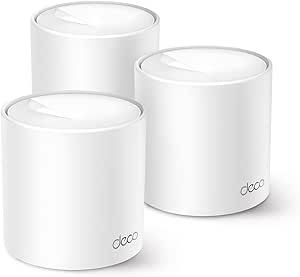 | Best for High-Speed Large Homes with Wi-Fi 6 | Speed: Up to 1,500 Mbps | Coverage: Up to 5,600 sq.ft. | Number of devices: Up to 120 | VIEW ON AMAZON | See Our Full Breakdown |
| Tenda Nova Mesh WiFi System MW6 – Covers up to 4-6 Bedroom Houses – AC1200 Whole Home WiFi Mesh System – 3-Pack |  | Best for Larger Homes on a Budget | Coverage: up to 3500 sq.ft. | Number of units: 3 | WiFi standard: AC1200 | VIEW ON AMAZON | See Our Full Breakdown |
| Tenda Nova Mesh WiFi System MW5G – Covers up to 3500 sq.ft – AC1200 Whole Home WiFi Mesh System – 3-Pack |  | Best for Basic Whole-Home Coverage with MU-MIMO | Coverage: up to 3500 sq.ft. | Number of units: 3 | WiFi standard: AC1200 | VIEW ON AMAZON | See Our Full Breakdown |
| TP-Link Deco X15 Dual-Band AX1500 WiFi 6 Mesh Wi-Fi System (3-Pack) |  | Best for Future-Ready, Large-Scale Homes | WiFi Standard: WiFi 6 (AX1500) | Coverage: up to 5,600 sq.ft. | Maximum Speed: 1,201 Mbps on 5 GHz, 300 Mbps on 2.4 GHz | VIEW ON AMAZON | See Our Full Breakdown |
| TP-Link Deco X15 Dual-Band AX1500 WiFi 6 Mesh Wi-Fi System 2-Pack |  | Best Overall for Balanced Performance and Ease of Use | Wi-Fi Standard: WiFi 6 (AX1500) | Bands: Dual-band | Max Speed: 1,201 Mbps on 5 GHz and 300 Mbps on 2.4 GHz | VIEW ON AMAZON | See Our Full Breakdown |
| TP-Link Deco S4 Mesh AC1900 WiFi System (3-Pack) |  | Best for Large Homes Needing Extensive Coverage | WiFi Standard: AC1900 | Coverage Area: Up to 5,500 sq ft | Number of Units: 3 | VIEW ON AMAZON | See Our Full Breakdown |
| NETGEAR Orbi 370 Series WiFi 7 Mesh System, 3 Pack |  | Best for Future-Proof High-Speed Home Offices | Coverage: 6,000 sq ft | Number of Units: 3 | WiFi Technology: WiFi 7 | VIEW ON AMAZON | See Our Full Breakdown |
| TP-Link Deco X55 AX3000 WiFi 6 Mesh System (3-Pack) |  | Best for Large, Device-Dense Home Offices | Wi-Fi Standard: Wi-Fi 6 (AX3000) | Coverage: Up to 6,500 sq ft | Device Capacity: Up to 150 devices | VIEW ON AMAZON | See Our Full Breakdown |
| wi fi mesh systems for homeoffice | Coverage | Number of Units |
|---|---|---|
| Tenda AX3000 WiFi 6 Mesh Syste | up to 7,000 sq. ft. | 3 |
| TP-Link Deco S4 2-Pack Whole H | up to 3,800 sq.ft. | 2 |
| eero 6+ Mesh Wi-Fi System | up to 4,500 sq ft | 3 |
| NETGEAR Orbi 770 Series WiFi 7 | up to 8,000 sq ft | 3 (1 router + 2 satellites) |
| Deco 7 Dual-Band WiFi 7 Mesh S | up to 6,600 sq ft | — |
| Tenda Nova Mesh WiFi System MW | up to 2400 sq.ft | 2 |
| TP-Link Deco W4500 Wi-Fi 6 Mes | Up to 5,600 sq.ft. | 3 |
| Tenda Nova Mesh WiFi System MW | up to 3500 sq.ft. | 3 |
| Tenda Nova Mesh WiFi System MW | up to 3500 sq.ft. | 3 |
| TP-Link Deco X15 Dual-Band AX1 | up to 5,600 sq.ft. | 3 |
| TP-Link Deco X15 Dual-Band AX1 | Up to 3,900 sq. ft. | 2 |
| TP-Link Deco S4 Mesh AC1900 Wi | — | 3 |
| NETGEAR Orbi 370 Series WiFi 7 | 6,000 sq ft | 3 |
| TP-Link Deco X55 AX3000 WiFi 6 | Up to 6,500 sq ft | — |
More Details on Our Top Picks
Tenda AX3000 WiFi 6 Mesh System Nova MX12 – Whole Home Coverage up to 7,000 sq. ft., Dual-Band WiFi Mesh Network for 160+ Devices, Fast & Stable, Replaces Wireless Router (3-Pack)
The Tenda AX3000 Nova MX12 stands out for its impressive coverage—up to 7,000 sq. ft.—making it ideal for large home offices or multi-room setups where dead zones can cause disruptions. Unlike the TP-Link Deco S4, which offers solid coverage but fewer advanced features, the MX12 supports Wi-Fi 6, supporting over 160 devices with speeds up to 2976Mbps, ensuring smooth streaming and video calls. Its easy setup via app and web interface makes it accessible for those who want reliable connectivity without technical fuss. However, this system’s need for multiple units can increase overall cost, and firmware updates are less automated. This mesh system is best suited for tech-savvy users with demanding network needs in large spaces.
Pros:- Extensive coverage up to 7,000 sq. ft. across three units
- Supports over 160 devices with Wi-Fi 6 technology
- Easy to set up and manage via app or web GUI
- Seamless mesh eliminates dead zones
Cons:- Requires multiple units, increasing cost
- Firmware updates are manual and can be cumbersome
Best for: Large home offices or homes with extensive device needs where coverage and speed are priorities.
Not ideal for: Small apartments or users on a tight budget, due to its higher price and multiple unit requirement.
- WiFi Standard:Wi-Fi 6 (802.11ax)
- Total Speed:2976Mbps
- Coverage:up to 7,000 sq. ft.
- Number of Devices Supported:160+
- Bands:Dual-band (2.4G and 5G)
- Technology:MU-MIMO, OFDMA
- Setup:App and web GUI
- Number of Units:3
Our verdict“This system is ideal for large, device-heavy home offices needing maximum coverage and speed, despite higher upfront costs.”
TP-Link Deco S4 2-Pack Whole Home Mesh WiFi System
Compared with the eero 6+, which offers gigabit speeds and a built-in smart home hub, the TP-Link Deco S4 provides a more affordable solution for smaller to medium-sized homes. With coverage up to 3,800 sq.ft., it supports fast AC1900 speeds, making it suitable for streaming and multiple device use. The Deco app simplifies setup, and seamless roaming creates a unified network for users. Its limitation lies in requiring a modem for most ISPs, which can add complexity and cost. While lacking Wi-Fi 6 support, the Deco S4’s affordability and ease of use make it attractive for typical home office setups that don’t demand ultra-high speeds. This system is best for users seeking reliable WiFi coverage without overspending.
Pros:- Easy setup with the Deco app
- Seamless roaming for a unified network
- Strong WiFi coverage for medium-sized homes
- Supports multiple devices with decent speeds
Cons:- Requires a separate modem, which adds setup complexity
- Limited to 2 units, restricting coverage in larger homes
- No Wi-Fi 6 support for future-proofing
Best for: Small to medium home offices or users who need reliable WiFi at a reasonable price.
Not ideal for: Large homes or high-demand users needing Wi-Fi 6 speeds and extensive device support.
- Coverage:up to 3,800 sq.ft.
- Speed:AC1900
- Number of Units:2
- Ethernet Ports:2 per unit
- Supports Wired Backhaul:Yes
- Compatibility:All major ISPs
Our verdict“This mesh system offers dependable coverage for smaller spaces at a budget-friendly price, suitable for typical home office needs.”
eero 6+ Mesh Wi-Fi System – Supports Internet Plans Up to 1 Gbps, Coverage up to 4,500 sq ft, Connects 75+ Devices, 3-Pack
The eero 6+ excels in providing reliable Wi-Fi 6 coverage up to 4,500 sq. ft., making it well-suited for homes with moderate to high device counts. Its built-in smart home hub supports Zigbee and Thread, adding smart home integration with minimal fuss. Compared to the NETGEAR Orbi 770, which aims for ultra-high speeds, the eero 6+ emphasizes simplicity, security, and automatic updates—beneficial for users who prefer a hands-off experience. However, its maximum speed of 1 Gbps may fall short for heavy streaming or large file transfers in high-demand environments. The need for a compatible internet plan and optional subscription for advanced management can be drawbacks for some. This system is best suited for users wanting a balanced mix of coverage, smart home features, and ease of use.
Pros:- Supports gigabit internet plans and Wi-Fi 6
- Built-in smart home hub for Zigbee and Thread
- Large coverage area with 3 units
- Easy setup with the eero app
Cons:- Limited to 1 Gbps speeds, not ideal for ultra-fast plans
- Subscription required for advanced network features
- Price premium for smart home integration
Best for: Homeowners with smart home devices and moderate internet speed needs.
Not ideal for: Heavy gamers or professionals needing ultra-high bandwidth for large data transfers.
- Coverage:up to 4,500 sq ft
- Supported speeds:up to 1 Gbps
- Number of devices:75+
- Number of units:3
- Wi-Fi standard:Wi-Fi 6 (802.11ax)
- Ethernet ports:2 gigabit ports
- Additional features:Smart home hub
Our verdict“This mesh system balances coverage and smart home features well for typical home office setups, with some limitations on maximum speeds.”
NETGEAR Orbi 770 Series WiFi 7 Mesh System, 3 Pack
The NETGEAR Orbi 770 Series delivers cutting-edge WiFi 7 technology, supporting speeds up to 11 Gbps across a vast 8,000 sq. ft. area. Its three-unit setup—one router and two satellites—makes it perfect for large homes or multi-room home offices that demand high bandwidth and device support. In comparison to the Deco 7 with Wi-Fi 7, the Orbi 770 emphasizes a more user-friendly app interface and robust security features like NETGEAR Armor. The high price may be a deterrent for smaller setups, and coverage can fluctuate based on home layout. Nonetheless, it provides significant future-proofing and speed for users who want the best in mesh Wi-Fi technology. This system is best for large households or professional setups requiring ultra-fast, reliable connections.
Pros:- Supports WiFi 7 with up to 11 Gbps speeds
- Coverage up to 8,000 sq ft with 3 units
- Advanced security features with Armor and WPA3
- Works with any internet provider
Cons:- High cost for many users
- Coverage can vary depending on layout
- Requires subscription for full security features
Best for: Large homes, high-demand users, or those wanting the latest WiFi 7 technology.
Not ideal for: Budget-conscious users or small spaces where such extensive coverage isn’t necessary.
- Coverage:up to 8,000 sq ft
- Number of Units:3 (1 router + 2 satellites)
- WiFi Technology:WiFi 7
- Speed:up to 11 Gbps
- Supported Devices:up to 100
- Additional Coverage per Satellite:up to 2,750 sq ft
- Security:WPA3, Armor
Our verdict“This mesh system suits large, tech-forward homes or offices demanding fastest speeds and extensive coverage, despite its premium price.”
Deco 7 Dual-Band WiFi 7 Mesh System with 4 Streams and 5 Gbps
The Deco 7 offers lightning-fast Wi-Fi 7 speeds up to 5 Gbps, supporting over 150 devices across a broad 6,600 sq. ft. area. Its 4 streams and support for wired and wireless backhaul facilitate stable, high-speed connections ideal for gaming, streaming, and large file transfers. Compared with the NETGEAR Orbi 770, which emphasizes ultra-high speeds for large households, the Deco 7 leans toward a balance of speed and ease of expansion. Its advanced features, including TP-Link HomeShield security and VPN support, are attractive but may be complex for less technical users. The need for at least two units for backhaul and the separate modem requirement are additional tradeoffs. This is well-suited for tech-savvy users seeking fast, reliable Wi-Fi with future-proof capabilities.
Pros:- Fast Wi-Fi 7 speeds up to 5 Gbps
- Supports over 150 devices with four streams
- Extensive coverage up to 6,600 sq ft
- Features TP-Link HomeShield security
Cons:- Requires a separate modem for internet connection
- Advanced setup may be complex for non-technical users
- Backhaul requires at least two units for optimal performance
Best for: Power users, gamers, or professionals needing high speeds and large coverage with advanced security.
Not ideal for: Casual users or those with minimal device needs who might find the features unnecessary or complex.
- Wi-Fi Standard:Wi-Fi 7
- Speed:up to 5 Gbps
- Coverage:up to 6,600 sq ft
- Number of Devices Supported:over 150
- Number of Streams:4
- Ethernet:2.5G Ethernet
- Backhaul:Wireless and wired
Our verdict“This mesh system serves demanding users who prioritize speed, security, and coverage in a future-ready setup, despite its complexity and cost.”
Tenda Nova Mesh WiFi System MW6 – 2 Pack, Covers up to 2400 sq.ft, AC1200 Dual-Band Whole Home WiFi Mesh Network for 90 Devices
The Tenda Nova MW6 2-pack stands out for its straightforward setup and reliable performance across a moderate 2400 sq.ft. area. Compared to the larger coverage of the TP-Link Deco W4500, it’s better suited for medium-sized homes rather than sprawling properties. Its dual-band AC1200 speeds ensure decent browsing, but may fall short for high-bandwidth tasks like streaming 4K or gaming. The app-based setup simplifies installation, yet reliance on an app may deter users preferring traditional configurations. While it supports up to 90 devices, its coverage limit makes it less ideal for very large or multi-story homes. The absence of Ethernet ports in the description suggests limited wired options, which could be a drawback for users needing stable wired connections. Best suited for homeowners seeking reliable WiFi coverage without complex features.Pros:- Easy to set up and manage via the Tenda app
- Provides seamless coverage with roaming capability
- Supports multiple devices simultaneously
Cons:- Limited to 2400 sq.ft coverage per 2-pack
- No mention of Ethernet ports for wired connectivity
- Dependent on app, which may not appeal to all users
Best for: Small to medium homes needing quick, hassle-free setup with solid device support
Not ideal for: Large, multi-story homes or users needing Wi-Fi 6 support for future-proofing
- Coverage:up to 2400 sq.ft
- Number of units:2
- WiFi standard:AC1200
- Bands:Dual-Band
- Device support:up to 90 devices
- Encryption:WPA2-PSK
Our verdict“A practical choice for small to medium homes prioritizing ease of use over advanced features.”
TP-Link Deco W4500 Wi-Fi 6 Mesh Router System (Renewed)
The TP-Link Deco W4500 excels in delivering fast Wi-Fi 6 speeds across up to 5,600 sq.ft., making it ideal for large homes with demanding bandwidth needs. Compared with the Tenda Nova MW6, it supports more devices (up to 120) and offers a significant speed boost, especially for gamers or streaming enthusiasts. Its Wi-Fi 6 technology with OFDMA and MU-MIMO enhances efficiency, but as a renewed product, it might carry a limited warranty, which could concern risk-averse buyers. The three-unit setup ensures robust whole-home coverage, yet it requires compatible devices to fully leverage Wi-Fi 6 benefits. The need for a compatible modem remains, and some users might find the security features basic unless opting for paid upgrades. Best for large households or tech-savvy users seeking future-proofed, high-performance Wi-Fi.Pros:- Supports Wi-Fi 6 speeds for high performance
- Coverage up to 5,600 sq.ft. with 3 units
- Supports up to 120 devices with seamless mesh
Cons:- Renewed product may have limited warranty
- Requires compatible devices to fully benefit from Wi-Fi 6
- Needs a separate modem for internet connection
Best for: Large homes with multiple high-bandwidth devices needing fast, reliable Wi-Fi 6 connectivity
Not ideal for: Users with small spaces or simpler internet needs who won’t utilize Wi-Fi 6 features
- Speed:Up to 1,500 Mbps
- Coverage:Up to 5,600 sq.ft.
- Number of devices:Up to 120
- Technology:Wi-Fi 6, OFDMA, MU-MIMO
- Number of units:3
- Security:Basic with optional upgrades
Our verdict“A compelling option for large households seeking a future-ready, high-speed mesh system with extensive coverage.”
Tenda Nova Mesh WiFi System MW6 – Covers up to 4-6 Bedroom Houses – AC1200 Whole Home WiFi Mesh System – 3-Pack
The Tenda Nova MW6 3-pack offers broad coverage up to 3500 sq.ft., making it suitable for larger homes with multiple bedrooms. It provides solid dual-band AC1200 speeds, supporting up to 90 devices, which is adequate for typical home office tasks and streaming. Compared with the TP-Link Deco X15, it lacks Wi-Fi 6 support, but its straightforward setup via app remains a plus for less tech-savvy users. Its MU-MIMO and Beamforming improve signal strength, yet the coverage might fall short for very sprawling or multi-story homes. The reliance on app-based management could be frustrating for users preferring traditional setups. It’s an affordable, reliable choice for homeowners who want good coverage without premium features. Best for budget-conscious homeowners needing extensive WiFi for larger homes.Pros:- Provides extensive coverage suitable for larger homes
- Supports multiple devices with decent speed
- Easy to set up and manage via mobile app
Cons:- Limited to AC1200 speeds, not ideal for high bandwidth needs
- No Wi-Fi 6 support for future-proofing
- Coverage may be insufficient for very large or multi-story homes
Best for: Homeowners with large houses seeking reliable Wi-Fi without high costs or Wi-Fi 6 features
Not ideal for: Tech enthusiasts wanting the latest Wi-Fi 6 technology or for homes larger than 3500 sq.ft.
- Coverage:up to 3500 sq.ft.
- Number of units:3
- WiFi standard:AC1200
- Bands:Dual-Band
- Technology:MU-MIMO, Beamforming
- Device support:up to 90 devices
Our verdict“A solid, budget-friendly mesh system suited for larger homes who prioritize coverage over speed or future-proofing.”
Tenda Nova Mesh WiFi System MW5G – Covers up to 3500 sq.ft – AC1200 Whole Home WiFi Mesh System – 3-Pack
The Tenda Nova MW5G provides reliable Wi-Fi coverage up to 3500 sq.ft., supporting up to 80 devices with dual-band AC1200 speeds. It’s a suitable choice for users who want straightforward, secure Wi-Fi with MU-MIMO and Beamforming, ensuring stable connections for typical home office needs. Compared to the TP-Link Deco S4, it might lack some advanced security features, but its simple setup via the Tenda app makes it accessible for less tech-savvy homeowners. Its coverage and device support are sufficient for small to medium-sized homes, yet it doesn’t support Wi-Fi 6, which limits future performance potential. The absence of Ethernet backhaul options may be a drawback for those needing wired stability. Best for households seeking basic, dependable Wi-Fi coverage without extra bells and whistles.Pros:- Provides stable, whole-home WiFi coverage
- Supports multiple devices effectively
- Easy to install and manage via mobile app
Cons:- Limited to AC1200 speeds, not suitable for high bandwidth tasks
- No Wi-Fi 6 support for future-proofing
- Lacks Ethernet backhaul options
Best for: Homeowners needing reliable coverage for moderate-sized homes with basic device needs
Not ideal for: Power users or those wanting Wi-Fi 6 features for future upgrades
- Coverage:up to 3500 sq.ft.
- Number of units:3
- WiFi standard:AC1200
- Bands:Dual-Band
- Technology:MU-MIMO, Beamforming
- Device support:up to 80 devices
Our verdict“A dependable, budget-friendly mesh system for basic home Wi-Fi needs in moderate-sized homes.”
TP-Link Deco X15 Dual-Band AX1500 WiFi 6 Mesh Wi-Fi System (3-Pack)
The TP-Link Deco X15 offers a compelling balance of speed, coverage, and security, supporting large homes up to 5,600 sq.ft. with Wi-Fi 6 technology. It’s ideal for those who want seamless streaming, gaming, and smart home device integration, especially when compared to older AC1200 systems like the Tenda Nova MW6. The inclusion of wired Ethernet backhaul enhances stability, while its advanced security features with TP-Link HomeShield add peace of mind. Setup via the Deco app is straightforward, but the free security features are basic, and some users might encounter connectivity hiccups with many devices. Its support for up to 120 devices makes it a versatile choice for busy households. Best for homeowners seeking robust, future-proof Wi-Fi with extensive coverage and security.Pros:- Supports Wi-Fi 6 for faster, more efficient connections
- Large coverage area suitable for big homes
- Includes Ethernet backhaul for improved stability
Cons:- Requires a modem for internet connection
- Basic security features without paid upgrades
- Some users report connectivity issues with numerous devices
Best for: Large, tech-savvy homes with many devices and high bandwidth demands
Not ideal for: Small households or users with limited budget who don’t need Wi-Fi 6 or extensive coverage
- WiFi Standard:WiFi 6 (AX1500)
- Coverage:up to 5,600 sq.ft.
- Maximum Speed:1,201 Mbps on 5 GHz, 300 Mbps on 2.4 GHz
- Number of units:3
- Ethernet Ports:2 per unit, 6 total
- Device support:Up to 120 devices
Our verdict“A highly capable, future-proof mesh system for large homes with numerous devices and high performance needs.”
TP-Link Deco X15 Dual-Band AX1500 WiFi 6 Mesh Wi-Fi System 2-Pack
The TP-Link Deco X15 stands out for offering a well-rounded WiFi 6 experience with reliable coverage up to 3,900 sq. ft. and support for 120 devices, making it ideal for medium to large home offices. Compared to the NETGEAR Orbi 370 Series, which covers more area and supports WiFi 7, the Deco X15 is simpler to set up and manage through the Deco app, though it doesn’t match WiFi 7 speeds or extensive coverage. Its dual-band design and AI-driven mesh technology ensure smooth performance across multiple devices, but it requires a separate modem for most ISPs and has only two Ethernet ports per unit, which might limit wired connections in busy home office setups. This model is best for users seeking a straightforward, secure, and expandable WiFi 6 system without the complexity or higher price of WiFi 7 options.
Pros:- Easy to set up and manage via the Deco app
- Supports extensive device connectivity with up to 120 devices
- Provides whole-home coverage with seamless WiFi 6 performance
- Includes advanced security features with TP-Link HomeShield
Cons:- Requires a separate modem for most ISPs
- Limited Ethernet ports per unit (2 each)
Best for: Small to medium-sized home office users who want reliable, secure WiFi with easy management.
Not ideal for: Power users who need ultra-fast speeds for gaming or 4K streaming that surpass WiFi 6 capabilities.
- Wi-Fi Standard:WiFi 6 (AX1500)
- Bands:Dual-band
- Max Speed:1,201 Mbps on 5 GHz and 300 Mbps on 2.4 GHz
- Coverage:Up to 3,900 sq. ft.
- Number of Units:2
- Ethernet Ports:4 (2 per unit)
- Device Support:Up to 120 devices
- Security:TP-Link HomeShield
Our verdict“This is a reliable, user-friendly choice for those needing solid WiFi 6 coverage in a home office setting without high-speed gaming or streaming demands.”
TP-Link Deco S4 Mesh AC1900 WiFi System (3-Pack)
The TP-Link Deco S4 Mesh AC1900 delivers broad coverage up to 5,500 sq. ft., making it a solid choice for bigger homes with home offices spread out over multiple rooms. Its support for up to 100 devices and single network name simplifies management, especially compared to the Tenda Nova MW6, which offers similar coverage but with slightly lower speeds. The S4 supports wired Ethernet backhaul, improving stability in complex layouts, yet it lacks advanced security features beyond parental controls, which might be a concern for security-focused users. Setup is straightforward with the Deco app, but users should be aware that a modem is needed for most ISPs. This system fits well for those prioritizing large coverage and ease of use without the latest WiFi 6 or WiFi 7 tech.
Pros:- Provides extensive coverage with seamless mesh WiFi
- Supports up to 100 devices with fast speeds
- Easy setup with user-friendly app and voice control
- Supports wired Ethernet backhaul for stable connections
Cons:- Requires a modem for most ISPs
- No mention of advanced security beyond parental controls
Best for: Homeowners with large properties and extensive home office arrangements needing reliable, seamless WiFi coverage.
Not ideal for: Power users seeking the highest possible speeds or advanced security features for sensitive data.
- WiFi Standard:AC1900
- Coverage Area:Up to 5,500 sq ft
- Number of Units:3
- Ethernet Ports per Unit:2
- Total Ethernet Ports:6
- Supports Wired Ethernet Backhaul:Yes
Our verdict“This system is well-suited for large, multi-room home offices where coverage and simplicity are priorities over cutting-edge WiFi tech.”
NETGEAR Orbi 370 Series WiFi 7 Mesh System, 3 Pack
The NETGEAR Orbi 370 Series harnesses WiFi 7 technology to deliver up to 6,000 sq. ft. of coverage with speeds reaching 5 Gbps, making it ideal for demanding home office setups that rely on fast, stable connections. Its support for multiple devices and compatibility with all WiFi generations ensures longevity and future-proofing. Compared to the TP-Link Deco X15, which emphasizes ease and security, the Orbi 370 emphasizes speed and expanded coverage at a higher price point, but it requires a subscription for NETGEAR Armor security after the initial trial. Its advanced features make it a strong choice for high-bandwidth tasks like video conferencing, large file transfers, or multiple smart devices, but WiFi 7 may be overkill if your internet plan doesn’t support such speeds.
Pros:- Extensive coverage up to 6,000 sq ft with a 3-pack
- Supports WiFi 7 speeds up to 5 Gbps for demanding tasks
- Easy setup and compatible with any internet provider
- Supports multiple devices simultaneously without slowdowns
Cons:- Requires subscription for NETGEAR Armor security after trial
- WiFi 7 technology may be more than needed for basic browsing
- Coverage can vary based on home layout
Best for: Tech-savvy professionals and power users needing the fastest, most reliable WiFi in a large home office environment.
Not ideal for: Casual users or those on limited internet plans who won’t fully utilize WiFi 7 speeds or extensive coverage.
- Coverage:6,000 sq ft
- Number of Units:3
- WiFi Technology:WiFi 7
- Maximum Speed:Up to 5 Gbps
- Compatibility:WiFi 5 and WiFi 6 devices
- Expandable Coverage:Up to 2,000 sq ft. per satellite
Our verdict“Ideal for users seeking future-proof speed and coverage, especially in large, high-demand home office environments.”
TP-Link Deco X55 AX3000 WiFi 6 Mesh System (3-Pack)
The TP-Link Deco X55 offers a high-capacity WiFi 6 mesh setup supporting up to 150 devices, making it suitable for busy home offices with many connected gadgets. Its coverage of up to 6,500 sq. ft. exceeds many competitors, with reliable performance across multiple rooms. Compared to the TP-Link Deco S4, which supports fewer devices and has lower speeds, the X55 delivers faster speeds and more wired ports, ideal for users with wired device needs. Security is bolstered by TP-Link HomeShield, but no additional high-end security features are included. Its easy setup through the Deco app makes it accessible for users of all levels, but it still requires a modem for most ISPs. This pick is most fitting for those with large, device-rich home offices demanding high performance and wired options.
Pros:- Supports up to 150 devices with reliable WiFi 6 performance
- Extensive coverage up to 6,500 sq ft
- Multiple Gigabit Ethernet ports for wired connections
- Easy management via Deco app with security features
Cons:- Requires a modem for most ISPs
- No mention of advanced enterprise security features
Best for: Large home offices with many smart devices and a need for high-speed, reliable WiFi coverage.
Not ideal for: Minimalist setups or users with modest internet needs who don’t need support for 150 devices.
- Wi-Fi Standard:Wi-Fi 6 (AX3000)
- Coverage:Up to 6,500 sq ft
- Device Capacity:Up to 150 devices
- Ethernet Ports:3 per unit, 6 total
- Mesh Technology:AI-Driven Mesh
- Security:TP-Link HomeShield
Our verdict“This system is best suited for large, device-heavy home offices that need robust coverage and wired connectivity options.”

How We Picked
These products were evaluated based on performance, coverage, ease of setup, build quality, and value for money. Systems needed to reliably support a typical homeoffice environment with multiple devices, fast internet speeds, and stable connectivity. We prioritized models that balance affordability with advanced features, focusing on user experience and longevity. The ranking reflects how well each system meets the needs of remote workers, considering both technical specs and practical usability.Factors to Consider When Choosing Wi Fi Mesh Systems For Homeoffice
Choosing the right Wi Fi mesh system for your homeoffice involves more than just reading specs. You should consider coverage area to ensure you eliminate dead zones, especially if your workspace spans multiple rooms or floors. Speed capabilities matter if you handle large files or stream high-resolution content regularly. Compatibility with your existing internet plan and devices can influence performance, so check for WiFi standards like WiFi 6 or WiFi 7. Ease of setup and management features are also critical, particularly if you prefer a hassle-free experience. Lastly, consider your budget and future-proofing needs—paying more upfront can save headaches later.Coverage and Scalability
Ensuring your mesh system covers the entire homeoffice area is essential. Larger spaces or multi-story homes demand systems with extensive coverage, like the Tenda AX3000, which supports up to 7,000 sq. ft. However, more coverage usually means a higher price and potentially more devices to manage. Consider whether you need a system that allows easy expansion with additional nodes, especially if your workspace grows or changes. Avoid systems that advertise large coverage but lack the ability to add more units seamlessly, as this can limit flexibility over time.
Speed and Device Support
For a homeoffice handling video calls, large file transfers, or online collaboration, speed is vital. WiFi 6 systems like the Deco X15 offer strong performance with lower latency and better handling of multiple devices—crucial for a busy work environment. WiFi 7 models, such as the Orbi 770, push performance even further but come at a premium. Be wary of systems that support many devices but are limited in speed, as this mismatch can cause bottlenecks during peak usage. Balance your current needs with future growth to choose a system that won’t become obsolete quickly.
Ease of Setup and Management
Intuitive setup processes and user-friendly management interfaces can save significant time and frustration. Some systems, like the TP-Link Deco series, focus on simplicity with app-based controls that guide you through installation. Others offer advanced features like customizable network settings or parental controls, which can be beneficial but add complexity. Consider your comfort level with networking technology—if you prefer a plug-and-play solution, prioritize systems with straightforward apps and setup procedures. Remember, a complicated system can lead to misconfigurations that impair performance.
Price and Future-Proofing
While budget options may seem appealing, they often lack the bandwidth, device support, or coverage you need in a busy homeoffice. Investing in a higher-tier system like WiFi 6 or WiFi 7 models can provide longer-term value, supporting faster internet plans and more devices as your needs grow. Evaluate whether the added cost aligns with your current and future requirements. Sometimes, spending more on a system with the latest standards can save money and upgrade hassle down the line, especially if your work depends on reliable, high-speed connectivity.
Additional Features and Compatibility
Features like mesh expansion, integrated security, and smart home integration can enhance your homeoffice experience. Check if the system supports your existing internet plan and hardware, and whether it offers options like Ethernet backhaul for better stability. Compatibility with smart assistants or network monitoring tools can also be advantageous. Be cautious of systems that offer many features but lack solid performance or support, as extras are useless if the core connectivity isn’t reliable. Prioritize systems that balance advanced features with proven performance.
Frequently Asked Questions
Will a mesh system improve my Wi Fi signal in a large homeoffice?
Yes, a mesh system is designed to extend Wi Fi coverage seamlessly across larger areas, reducing dead zones and providing a stable connection in every corner of your homeoffice. Unlike traditional routers, mesh units communicate with each other to maintain strong signals over distance, which is especially useful if your workspace spans multiple rooms or floors. Choosing a system with adequate coverage and additional nodes can significantly enhance your remote work experience by ensuring consistent internet speeds and reliability.
Is WiFi 6 necessary for my homeoffice, or is WiFi 5 sufficient?
WiFi 6 offers notable improvements in speed, latency, and device handling compared to WiFi 5, making it a better choice for busy homeoffices with many connected devices. If your internet plan supports high-speed connections or you frequently transfer large files, WiFi 6 systems will provide a more responsive experience. While WiFi 5 can still work well for basic tasks, future-proofing with WiFi 6 ensures compatibility with upcoming tech and reduces the need for upgrades soon. Consider your current needs and future plans when choosing between the two standards.
Should I prioritize coverage or speed when selecting a mesh system?
The decision depends on your specific workspace layout and usage. If you have a large, multi-room or multi-floor homeoffice, prioritizing coverage ensures you eliminate dead zones. Conversely, if your work involves high-bandwidth tasks like video editing or streaming, speed becomes critical. Many systems offer a balance—look for models that support high speeds over the entire coverage area. For most remote workers, a system that offers reliable, fast coverage across your entire workspace will provide the best overall experience.
Can I add more nodes to my existing mesh system later?
Most modern mesh systems are designed with expandability in mind, allowing you to add more nodes as needed. However, compatibility depends on the brand and model—adding nodes from a different manufacturer or incompatible series can cause issues. It’s best to choose a system known for straightforward expansion, like TP-Link Deco or Netgear Orbi, if you anticipate future growth. Confirming that the system supports additional units before purchase can save you time and ensure seamless integration down the line.
Is it worth paying extra for WiFi 7 mesh systems now?
WiFi 7 promises significant performance gains, including higher speeds, lower latency, and better handling of multiple devices, which can benefit demanding homeoffices. However, the technology is still emerging, and compatible devices and internet plans are limited. If your current setup works well, investing in WiFi 7 might be premature. But if you aim for a future-proof setup and handle intensive online tasks, paying more now could extend the lifespan of your network and provide a competitive edge as the technology becomes more mainstream.
Conclusion
For most homeoffices, the TP-Link Deco X15 offers a balanced mix of speed, coverage, and ease of use, making it an excellent choice for those new to mesh systems. The Tenda AX3000 Nova MX12 is ideal for larger spaces needing extensive coverage, despite a higher price. If you’re looking for the latest tech and maximum future-proofing, the NETGEAR Orbi 770 Series WiFi 7 stands out but at a premium. Budget-conscious users or those with smaller setups will find the TP-Link Deco S4 or Tenda Nova MW6 to be reliable, affordable options. Ultimately, your choice should reflect your coverage needs, internet activities, and budget constraints.
Halloween Picks
halloween
As an affiliate, we earn on qualifying purchases.