
A wired gaming headset for PCVR needs to stay comfortable during movement, connect cleanly to your PC or headset, and keep its cable from getting in the way. I rank the Logitech G PRO X as the strongest all-around pick in this lineup for buyers who want a more feature-rich PC headset, while the Razer BlackShark V2 X models offer simpler 3.5 mm flexibility and the Razer Kraken V4 X adds USB connectivity. The tradeoff is between connection convenience, comfort and microphone features—not every gaming headset is designed with VR movement in mind. I also compare value-oriented choices from JBL and Turtle Beach, plus the lightweight Logitech G335. Read on for the full breakdown and a guide to matching a wired headset to your PCVR setup.

Get audio and creator gear delivered free with Prime
- Fast, free delivery on millions of items
- Prime Video, Amazon Music and more included
- Member-only deals all year
Complete the kit


Key Takeaways
- The Logitech G PRO X is the most feature-focused PC pick in this group, while its wired design and fit should be checked against your VR headset before buying.
- Razer’s BlackShark V2 X appears in several color and platform variants; confirm the exact connection and compatibility listing rather than assuming the names indicate different core designs.
- The Kraken V4 X stands apart with USB-C and USB Type-A connectivity, which can suit a PC setup that favors USB over a 3.5 mm jack.
- The Logitech G335 prioritizes a lightweight, straightforward design; its black and white listings are color choices, not separate headset roles.
- JBL Quantum 100M2 and Turtle Beach Recon 50 focus on simple wired gaming use, but PCVR buyers still need to check mic placement, cable routing and how the connector works with their setup.
| Razer BlackShark V2 X Wired PlayStation Gaming Headset, Black |  | Best for Passive Isolation | Connection: Wired, 3.5 mm jack | Driver size: 50 mm | Microphone: Bendable HyperClear cardioid | VIEW ON AMAZON | See Our Full Breakdown |
| JBL Quantum 100M2 Wired Gaming Headset – Detachable Mic (White) |  | Best for VR Setup Flexibility | Connection: Wired, 3.5 mm jack | Driver size: 40 mm dynamic drivers | Microphone: Detachable directional boom mic with mute | VIEW ON AMAZON | See Our Full Breakdown |
| Logitech G PRO X Wired Gaming Headset, Black | 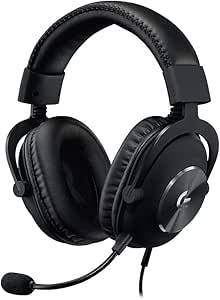 | Best for PC Audio Controls | Connection: Wired; 2 m PC cable and 1.5 m mobile cable included | Driver size: 50 mm PRO-G | Impedance: 35 ohm | VIEW ON AMAZON | See Our Full Breakdown |
| Turtle Beach Recon 50 Wired Multiplatform Gaming Headset for PC, PS5, Xbox |  | Best Simple Starter Pick | Connection: Wired | Speakers: 40 mm | Microphone: Removable and adjustable | VIEW ON AMAZON | See Our Full Breakdown |
| Logitech G335 Wired Gaming Headset (with Flip to Mute Microphone) – Black |  | Best for Lightweight, Simple Sessions | Connection: 3.5 mm audio jack | Driver size: 40 mm | Weight: 240 g | VIEW ON AMAZON | See Our Full Breakdown |
| Logitech G335 Wired Gaming Headset with Flip-to-Mute Microphone – White |  | Best for Lightweight Comfort | Brand: Logitech | Model: G335 | Color: White | VIEW ON AMAZON | See Our Full Breakdown |
| Logitech G432 Wired Gaming Headset, Black |  | Best for Positional Audio | Brand: Logitech G | Model: G432 | Drivers: 50 mm | VIEW ON AMAZON | See Our Full Breakdown |
| Razer BlackShark V2 X Wired Gaming Headset for PlayStation, White |  | Best for Passive Isolation | Brand: Razer | Model: BlackShark V2 X | Color: White | VIEW ON AMAZON | See Our Full Breakdown |
| Razer Kraken V4 X Wired USB-C & Type A Gaming Headset, Black | 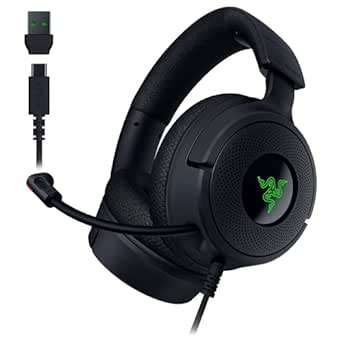 | Best USB-Connected Pick | Brand: Razer | Drivers: TriForce 40 mm | Surround sound: 7.1 surround | VIEW ON AMAZON | See Our Full Breakdown |
| Razer BlackShark V2 X Gaming Headset for PC, 3.5mm Audio Jack, White |  | Best for PC-Ready Surround | Brand: Razer | Drivers: TriForce 50 mm | Sound technology: 7.1 surround sound | VIEW ON AMAZON | See Our Full Breakdown |
| Razer BlackShark V2 X Gaming Headset |  | Best Lightweight Pick | Driver size: 50 mm | Weight: 240 g | Connection: 3.5 mm audio jack | VIEW ON AMAZON | See Our Full Breakdown |
| JBL Quantum 100M2 Wired Gaming Headset with Detachable Microphone, Black |  | Best for a Detachable Mic | Type: Wired over-ear gaming headset | Connection: 3.5 mm jack | Audio: JBL QuantumSound Signature | VIEW ON AMAZON | See Our Full Breakdown |
| wired gaming headset for pcvr | Microphone | Connection | Weight |
|---|---|---|---|
| Razer BlackShark V2 X Wired Pl | Bendable HyperClear cardioid | Wired, 3.5 mm jack | 240 g |
| JBL Quantum 100M2 Wired Gaming | Detachable directional boom mic with mute | Wired, 3.5 mm jack | 220 g |
| Logitech G PRO X Wired Gaming | Detachable with Blue VO!CE technology | Wired; 2 m PC cable and 1.5 m mobile cable included | — |
| Turtle Beach Recon 50 Wired Mu | Removable and adjustable | Wired | — |
| Logitech G335 Wired Gaming Hea | Flip to mute | 3.5 mm audio jack | 240 g |
| Logitech G335 Wired Gaming Hea | Flip-to-mute | — | 240 g (8.5 oz) |
| Logitech G432 Wired Gaming Hea | 6 mm flip-to-mute boom mic | — | — |
| Razer BlackShark V2 X Wired Ga | Bendable cardioid | — | 240 g |
| Razer Kraken V4 X Wired USB-C | Retractable HyperClear cardioid | — | — |
| Razer BlackShark V2 X Gaming H | Bendable HyperClear cardioid mic | — | 240 g |
| Razer BlackShark V2 X Gaming H | Razer HyperClear cardioid | 3.5 mm audio jack | 240 g |
| JBL Quantum 100M2 Wired Gaming | Detachable directional microphone with mute | 3.5 mm jack | — |
More Details on Our Top Picks
Razer BlackShark V2 X Wired PlayStation Gaming Headset, Black
The BlackShark V2 X is a strong fit for PCVR players who want a straightforward 3.5 mm connection and earcups that help reduce room noise without electronics. Its 50 mm drivers and bendable cardioid mic give it a more communication-focused setup than the lighter, simpler Turtle Beach Recon 50, while the closed earcups can help keep game audio present in a noisy space. At 240 g, it is light enough for longer sessions, though headset comfort can vary with the fit of a VR headset and facial interface. The tradeoff is a fixed cable and passive isolation that depends on a good seal; unlike the JBL Quantum 100M2, its microphone is not described as detachable. Check that your PCVR setup has a compatible 3.5 mm audio connection.
Pros:- 50 mm drivers are tuned for clear highs and powerful lows.
- Bendable cardioid microphone is suited to focused voice pickup.
- Lightweight 240 g design with memory foam cushions.
- 3.5 mm connection works with compatible platforms beyond PlayStation.
Cons:- Fixed wired connection limits movement around a VR setup.
- Passive isolation depends on the earcups sealing well.
- The microphone is not listed as detachable.
Best for: PCVR players with a 3.5 mm headset connection who want lightweight closed earcups and a bendable mic for multiplayer chat.
Not ideal for: Players who need a detachable microphone, wireless movement, or a headset connection that bypasses their VR system’s 3.5 mm port.
- Connection:Wired, 3.5 mm jack
- Driver size:50 mm
- Microphone:Bendable HyperClear cardioid
- Noise control:Passive noise cancellation
- Weight:240 g
- Impedance:32 ohm
- Sensitivity:100 dB
- Compatibility:PlayStation 5 and other platforms with a 3.5 mm jack
Our verdict“Choose the BlackShark V2 X if you want a lightweight, closed-back-style 3.5 mm headset and your PCVR fit allows its earcups to seal comfortably.”
JBL Quantum 100M2 Wired Gaming Headset – Detachable Mic (White)
The JBL Quantum 100M2 earns its place for PCVR buyers who value a mic they can remove when it gets in the way of a headset or facial interface. Its detachable directional boom mic and universal 3.5 mm plug make it more adaptable to changing play setups than the fixed-mic Razer BlackShark V2 X. At 220 g, it is also the lightest of these five options, which can help reduce added weight during longer sessions. JBL lists VR compatibility, but the 40 mm drivers and Windows Sonic support do not guarantee spatial audio on every PCVR configuration; Windows Sonic is specified for Windows 10 and Xbox One. It remains a wired headset, and its one-year warranty is shorter than Razer’s stated two years.
Pros:- Detachable directional microphone can be removed when not needed.
- At 220 g, it is the lightest option in this group.
- Universal 3.5 mm connection is listed for VR and multiple platforms.
- Memory-foam ear cushions support longer play sessions.
Cons:- Wired connection still tethers the headset to the audio source.
- Windows Sonic compatibility is specified for Windows 10 and Xbox One, not every PCVR setup.
- One-year warranty is shorter than the Razer BlackShark V2 X’s stated two years.
Best for: PCVR players who want a light 3.5 mm headset with a removable boom mic for sessions where mic clearance matters.
Not ideal for: Buyers seeking wireless freedom, or players who expect Windows Sonic support to work across every VR platform without checking their audio setup.
- Connection:Wired, 3.5 mm jack
- Driver size:40 mm dynamic drivers
- Microphone:Detachable directional boom mic with mute
- Weight:220 g
- Spatial sound:Windows Sonic compatibility for Windows 10 and Xbox One
- Compatibility:PC, PlayStation, Xbox, Nintendo Switch, mobile, Mac, and VR
- Color:White
- Warranty:1 year
Our verdict“Pick the Quantum 100M2 if low weight and a removable mic matter more to your PCVR setup than platform-wide spatial-audio features.”
Logitech G PRO X Wired Gaming Headset, Black
For PCVR players who want more control over voice and surround processing, the Logitech G PRO X is the most PC-focused pick here. Its USB sound card, Blue VO!CE microphone processing, and customizable 7.1 surround sound offer options the simpler 3.5 mm JBL Quantum 100M2 does not list. That flexibility is most useful when the headset is connected to a Windows PC and Logitech G HUB can manage the features; it is less compelling if your VR system routes audio through a standalone headset or another device. The detachable mic, alternate ear cushions, and included case add practical flexibility, while the steel-and-aluminum frame is built for repeated use. The tradeoffs are software dependence and a wired connection that can complicate movement in VR.
Pros:- Blue VO!CE processing and customizable 7.1 surround add PC-side audio controls.
- Detachable microphone and included USB sound card support a flexible desk setup.
- Steel headband and aluminum forks provide a sturdy frame.
- Includes a protective case and leatherette or velour ear cushions.
Cons:- Key processing and surround features require Windows, Logitech G HUB, and the USB sound card.
- Wired connection can restrict movement during PCVR play.
- The listing does not specify a fixed warranty duration.
Best for: PCVR players using a Windows PC who want adjustable voice processing and surround features through the included USB sound card.
Not ideal for: Standalone-VR users or buyers who want plug-and-play features without Logitech G HUB, a USB sound card, or a PC connection.
- Connection:Wired; 2 m PC cable and 1.5 m mobile cable included
- Driver size:50 mm PRO-G
- Impedance:35 ohm
- Surround sound:Customizable 7.1
- Microphone:Detachable with Blue VO!CE technology
- Construction:Aluminum forks and steel headband
- Included accessories:USB external sound card, protective case, ear cushions, and Y splitter
- Ear placement:Over-ear
Our verdict“Choose the G PRO X if your PCVR audio runs through a Windows PC and you will use its software-driven controls rather than just a basic analog connection.”
Turtle Beach Recon 50 Wired Multiplatform Gaming Headset for PC, PS5, Xbox
The Turtle Beach Recon 50 is the no-frills choice for PCVR players who want a basic wired headset with familiar physical controls. Its in-line volume and mic-mute controls make quick adjustments easier than reaching for software, while the included PC splitter cable helps connect separate audio and mic ports. Compared with the Logitech G PRO X, the Recon 50 gives up USB sound-card processing, customizable surround, and a more substantial metal frame; in return, its setup is simpler. The removable, adjustable mic is useful when voice chat is not needed, though the product data itself flags microphone quality as a limitation for demanding voice use. As with the other wired options, cable routing and earcup fit matter around a VR headset.
Pros:- In-line volume and mic-mute controls allow quick adjustments.
- Included PC splitter supports computers with separate audio and microphone ports.
- Removable, adjustable microphone can be taken off when unused.
- Lightweight design and adjustable headband support extended play.
Cons:- Microphone quality may fall short for professional voice use.
- 40 mm speakers and the basic wired setup offer fewer listed audio controls than the Logitech G PRO X.
- Cable can restrict movement and needs routing around a VR setup.
Best for: PCVR beginners who want a simple analog headset with in-line controls and an included splitter for a PC with separate audio and mic ports.
Not ideal for: Players who prioritize advanced mic processing, premium build materials, or a microphone intended for professional voice work.
- Connection:Wired
- Speakers:40 mm
- Microphone:Removable and adjustable
- Controls:In-line volume and microphone mute
- PC accessory:Splitter cable included
- Headband:Adjustable
- Ear cushions:Leatherette
- Compatibility:PC, PS5, and Xbox
Our verdict“The Recon 50 makes sense for a first PCVR headset when straightforward controls and PC port compatibility matter more than advanced audio processing.”
Logitech G335 Wired Gaming Headset (with Flip to Mute Microphone) – Black
The Logitech G335 suits PCVR players who prefer simple stereo audio and a lightweight fit over software-driven tuning. Its suspension headband, soft memory-foam pads, and flip-to-mute mic make everyday use uncomplicated compared with the Logitech G PRO X, which adds a USB sound card and PC software features. Both headsets weigh 240 g according to the supplied data, so the G335’s appeal is its simpler 3.5 mm setup rather than a weight advantage over the Razer BlackShark V2 X. The analog connection is handy across compatible devices, but sound can vary by source, and the listed fit may not suit every head size. For PCVR, check that the earcups sit comfortably alongside your headset and that the cable can be managed safely.
Pros:- Suspension headband and memory-foam ear pads support comfortable extended wear.
- Flip-to-mute microphone makes voice muting quick and visible.
- 3.5 mm jack offers broad compatibility with listed devices.
- 40 mm drivers provide straightforward stereo playback without software setup.
Cons:- Wired-only connection limits movement in a VR play area.
- No listed surround or microphone-processing features compared with the Logitech G PRO X.
- Fit may not suit all head sizes, and audio quality can vary by connected device.
Best for: PCVR players who want a lightweight-feeling, easy-to-connect stereo headset with a quick physical mic mute.
Not ideal for: Buyers who need adjustable surround or voice processing, a detachable mic, or a fit known to accommodate a wide range of head sizes.
- Connection:3.5 mm audio jack
- Driver size:40 mm
- Weight:240 g
- Microphone:Flip to mute
- Headband:Suspension headband
- Ear pads:Soft memory foam
- Compatibility:PC, laptop, gaming consoles, and mobile devices
- Color options:Multiple vibrant colors
Our verdict“Choose the G335 for uncomplicated 3.5 mm stereo and a flip-to-mute mic, provided its fit works with your VR headset.”
Logitech G335 Wired Gaming Headset with Flip-to-Mute Microphone – White
At 240 g, the Logitech G335 is the comfort-first option here: its suspension headband and memory-foam ear pads keep weight down for longer PCVR sessions, where a headset is already competing with the VR headset for space and comfort. Its 3.5 mm plug is simple to connect to compatible PC audio, and the flip-to-mute mic makes quick voice-chat muting straightforward. Compared with the Logitech G432, it gives up 50 mm drivers and DTS Headphone:X processing in favor of a lighter, simpler stereo setup. That makes the G335 a sensible pick if you value low bulk over software-based positional audio. The tradeoff is that it has no advanced surround feature, and its cable still limits movement; check that your PCVR setup accommodates a wired headset cable alongside the VR connection.
Pros:- Light 240 g design with suspension headband and memory-foam ear pads
- 3.5 mm connection offers simple plug-and-play compatibility with supported devices
- Flip-to-mute microphone is easy to silence during voice chat
- Discord Certified for voice communication
Cons:- Stereo sound lacks the DTS or 7.1 surround options offered by some alternatives
- Wired connection can add cable management challenges to a PCVR setup
- 3.5 mm use depends on a compatible headset jack or audio adapter
Best for: PCVR players who prioritize a lightweight headset, straightforward 3.5 mm setup, and quick microphone muting over virtual surround features.
Not ideal for: Players seeking software-based positional audio or a wireless setup, or whose PCVR arrangement makes an additional headset cable awkward.
- Brand:Logitech
- Model:G335
- Color:White
- Weight:240 g (8.5 oz)
- Drivers:40 mm neodymium
- Connectivity:Wired 3.5 mm audio jack
- Microphone:Flip-to-mute
- Warranty:1-year limited
Our verdict“Choose the G335 if low weight and uncomplicated stereo audio matter more to your PCVR sessions than surround processing.”
Logitech G432 Wired Gaming Headset, Black
The G432 is the strongest fit in this group for PCVR players who want software-based positional sound: its 50 mm drivers pair with DTS Headphone:X 2.0 to create a more spatial presentation than the G335’s straightforward stereo setup. It connects by USB DAC or 3.5 mm, so PC users can choose the USB route for the software feature or use analog connection where appropriate. The flip-to-mute boom mic and rotating over-ear cups add practical gaming convenience. Unlike the USB-only Razer Kraken V4 X, the G432 also offers a 3.5 mm connection, though its DTS processing requires Logitech G HUB. That software dependency is a real PCVR caveat: console compatibility does not mean every platform gets the same surround experience, and extra cables can complicate a headset-and-VR setup.
Pros:- 50 mm drivers and DTS Headphone:X 2.0 offer a spatial-audio option on compatible PC setups
- USB DAC and 3.5 mm connectivity provide two connection routes
- Flip-to-mute 6 mm boom microphone is convenient for voice chat
- Rotating leatherette ear cups can make storage and handling easier
Cons:- DTS Headphone:X 2.0 requires Logitech G HUB software
- Surround features are not available in the same way across all listed platforms
- USB DAC or analog cable adds another wire to manage alongside PCVR equipment
Best for: PCVR players who want larger drivers and software-enabled positional audio, and are comfortable using Logitech G HUB on a compatible PC.
Not ideal for: Buyers who want a software-free setup, rely on console surround features, or need to keep cabling to a minimum around their VR headset.
- Brand:Logitech G
- Model:G432
- Drivers:50 mm
- Surround sound:DTS Headphone:X 2.0
- Microphone:6 mm flip-to-mute boom mic
- Connectivity:USB DAC or 3.5 mm cable
- Ear placement:Over-ear
- Earpad material:Leatherette
- Model number:981-000769
Our verdict“Pick the G432 if PC-based positional audio is your priority and you accept the software and cable setup it requires.”
Razer BlackShark V2 X Wired Gaming Headset for PlayStation, White
This PlayStation-oriented BlackShark V2 X makes sense for PCVR buyers who want a light, closed-back headset with a simple analog connection. Its 240 g frame, memory-foam cushions, and passive noise isolation can help reduce room distractions without adding active noise-cancelling electronics. The bendable cardioid mic is also easy to position for chat. Compared with the Logitech G335, this Razer lists 50 mm drivers and passive isolation, while the G335 emphasizes a suspension headband and flip-to-mute control. The G432 is a better match if you want a USB DAC and DTS processing; this model keeps the connection simpler with a 3.5 mm jack. The tradeoff is that isolation is passive, not active, and a wired cable still needs room to move safely during VR play.
Pros:- 240 g weight and memory-foam cushions support a lighter over-ear fit
- Passive isolation helps limit some ambient room noise
- 50 mm drivers and bendable cardioid microphone suit gaming and voice chat
- 3.5 mm jack supports compatible platforms without a dedicated USB DAC
Cons:- Passive isolation does not actively cancel surrounding noise
- Analog wired connection can complicate cable management during VR movement
- The listed feature set does not include the G432’s USB DAC and DTS processing
Best for: PCVR players using a compatible 3.5 mm audio connection who want a lightweight closed-back headset to reduce ordinary room noise.
Not ideal for: Buyers who need active noise cancellation, USB audio features, or software-based surround sound for PC.
- Brand:Razer
- Model:BlackShark V2 X
- Color:White
- Weight:240 g
- Drivers:50 mm
- Frequency response:20 Hz–20,000 Hz
- Impedance:32 ohm
- Connectivity:Wired 3.5 mm jack
- Microphone:Bendable cardioid
Our verdict“Choose this BlackShark V2 X if you want a lightweight, passively isolating analog headset and do not need active cancellation or PC surround software.”
Razer Kraken V4 X Wired USB-C & Type A Gaming Headset, Black
The Kraken V4 X is the clearest choice here if you want a USB connection rather than the analog 3.5 mm setups used by the Logitech G335 and Razer BlackShark V2 X. Its convertible USB-C and USB-A cable gives compatible PCVR systems more port flexibility, while 7.1 surround sound and TriForce 40 mm drivers target an immersive game mix. The retractable HyperClear cardioid mic stows away when it is not needed, a tidier approach than the G432’s fixed boom. Hybrid fabric and leatherette memory-foam cushions add comfort, and RGB lighting is included. The tradeoffs are a USB-only connection and a potentially bulky fit; a PC or VR setup without a suitable USB port cannot use it directly. Confirm port access and cable routing before choosing it.
Pros:- Convertible USB-C and USB-A cable provides connection flexibility across compatible devices
- 7.1 surround sound and TriForce 40 mm drivers are aimed at immersive gaming audio
- Retractable cardioid microphone stows away when not in voice chat
- Hybrid fabric and leatherette memory-foam cushions offer a mixed-material fit
Cons:- USB-only connectivity excludes systems that provide only a compatible 3.5 mm audio jack
- Bulk may bother players seeking a more compact headset for use alongside VR hardware
- RGB lighting adds visual effects that may not matter to buyers focused on PCVR audio
Best for: PCVR players with an available USB-A or USB-C port who want USB audio, surround sound, and a retractable microphone.
Not ideal for: Players who need a 3.5 mm analog connection, prefer a compact headset, or cannot route a USB cable comfortably around their VR equipment.
- Brand:Razer
- Drivers:TriForce 40 mm
- Surround sound:7.1 surround
- Microphone:Retractable HyperClear cardioid
- Connectivity:Convertible USB Type-C and Type-A cable
- Cushions:Hybrid fabric and leatherette memory foam
- Lighting:Razer Chroma RGB
Our verdict“Choose the Kraken V4 X if your PCVR setup has a free USB port and you prefer USB features over analog simplicity.”
Razer BlackShark V2 X Gaming Headset for PC, 3.5mm Audio Jack, White
This PC-focused BlackShark V2 X combines a 3.5 mm connection with listed 7.1 surround sound, making it a more feature-led analog option than the stereo Logitech G335. Its 50 mm TriForce drivers, bendable HyperClear cardioid mic, and passive noise-isolating ear cups cover the main gaming basics without requiring a USB DAC like the Logitech G432. The distinction is that the surround feature is tied to Windows 10 64-bit, so it is less flexible for buyers who move between operating systems or platforms. Its 240 g weight helps keep bulk down, but PCVR still adds a separate wire to manage, and passive isolation will not remove noise as active cancellation would. I’d favor it over the G335 when surround processing matters more than flip-to-mute convenience.
Pros:- 50 mm TriForce drivers and listed 7.1 surround sound target positional gaming audio
- 3.5 mm audio jack keeps the connection simple on compatible PCs
- 240 g design with noise-isolating ear cups
- Bendable HyperClear cardioid microphone can be positioned for voice chat
Cons:- Surround sound requires Windows 10 64-bit according to the product data
- Passive isolation does not actively cancel environmental noise
- 3.5 mm cable adds another cord to manage during PCVR play
Best for: Windows 10 64-bit PCVR players who want a 3.5 mm headset with listed 7.1 surround sound and a lightweight frame.
Not ideal for: Buyers on other operating systems who need the surround feature, or players who want USB connectivity, active noise cancellation, or a flip-to-mute mic.
- Brand:Razer
- Drivers:TriForce 50 mm
- Sound technology:7.1 surround sound
- Connectivity:3.5 mm audio jack
- Weight:240 g
- Microphone:Bendable HyperClear cardioid mic
- Platform compatibility:PC, Mac, PS4, Xbox One, Nintendo Switch
- Surround requirement:Windows 10 64-bit
Our verdict“Pick this BlackShark V2 X over the G335 if you use a compatible Windows PC and want listed surround sound through an analog connection.”
Razer BlackShark V2 X Gaming Headset
The Razer BlackShark V2 X earns this spot for PCVR players who want a light headset and a straightforward 3.5 mm connection. At 240 g, it is the lighter-feeling choice on paper compared with the JBL Quantum 100M2, whose listed strengths focus more on its detachable mic and fabric cushions. Its closed earcups and foam padding help limit outside noise, while the cardioid mic is suited to voice chat. The 50 mm drivers and software-enabled 7.1 audio add PC features, but that surround mode is limited to Windows 10 64-bit; a standard jack connection alone does not promise the same processing on other systems. The tradeoff is a fixed microphone and platform-specific surround support, so I’d favor it over the JBL when low weight matters more than mic removal.
Pros:- 240 g weight makes it a lightweight option for longer gaming sessions.
- Closed earcups and foam cushions help reduce outside sound.
- 50 mm drivers and Windows 10 64-bit software-enabled 7.1 surround sound.
- 3.5 mm connection supports a broad range of listed gaming platforms.
Cons:- 7.1 surround sound is limited to Windows 10 64-bit.
- The cardioid microphone is not listed as detachable.
- Xbox One may require a separately purchased stereo adapter.
Best for: PCVR players who prioritize a lightweight over-ear headset, noise isolation, and a simple 3.5 mm connection for Windows 10 gaming.
Not ideal for: Players who want a detachable microphone or surround processing across several operating systems; its mic is not described as detachable and 7.1 support is limited to Windows 10 64-bit.
- Driver size:50 mm
- Weight:240 g
- Connection:3.5 mm audio jack
- Ear placement:Over-ear
- Microphone:Razer HyperClear cardioid
- Surround sound:Software-enabled 7.1 on Windows 10 64-bit
- Compatibility:PC, Mac, PS4, Xbox One, Nintendo Switch
- Warranty:2 years
Our verdict“Choose the BlackShark V2 X if low weight and closed-ear isolation matter more to your PCVR setup than a detachable mic or broader surround support.”
JBL Quantum 100M2 Wired Gaming Headset with Detachable Microphone, Black
The JBL Quantum 100M2 is the more flexible mic choice in this pair: its directional microphone detaches and includes mute, which is handy when switching between voice chat and solo play. That gives it an advantage over the Razer BlackShark V2 X, whose cardioid mic is not listed as removable. JBL’s breathable fabric cushions with memory foam offer a comfort-focused alternative to the Razer’s lightweight, closed-ear design, though the provided data does not give a weight for direct comparison. For PCVR, its 3.5 mm connection and listed VR compatibility make it a relevant wired option, while Windows Sonic support is specified only for Windows 10 PCs and Xbox One. I’d pick it for mic flexibility and broad device compatibility, not for universal spatial audio or freedom from cable movement.
Pros:- Detachable directional microphone includes a mute function.
- Breathable fabric ear cushions use memory foam padding.
- 3.5 mm connection and listed compatibility include VR, PC, consoles, mobile, and Mac.
- Supports Windows Sonic spatial sound on Windows 10 PCs and Xbox One.
Cons:- The wired connection can restrict movement during VR play.
- Windows Sonic support is specified only for Windows 10 PCs and Xbox One.
- No headset weight is provided for buyers comparing comfort by heft.
Best for: PCVR players who want a detachable, mute-enabled microphone and a 3.5 mm headset listed for use with VR and other gaming or mobile devices.
Not ideal for: Buyers who need spatial sound support specified across operating systems, or who want to avoid cable movement during active VR play.
- Type:Wired over-ear gaming headset
- Connection:3.5 mm jack
- Audio:JBL QuantumSound Signature
- Microphone:Detachable directional microphone with mute
- Spatial sound:Windows Sonic on Windows 10 PCs and Xbox One
- Ear cushions:Breathable fabric with memory foam padding
- Compatible platforms:PC, PlayStation, Xbox, Nintendo Switch, mobile, Mac, and VR
- Color:Black
Our verdict“Choose the JBL Quantum 100M2 if a removable mute-enabled mic and broad listed compatibility matter more than lightweight specifications or wider spatial-sound support.”

How We Picked
I ranked these headsets around the needs that matter when a PCVR session adds movement to ordinary PC gaming: connection compatibility, cable practicality, comfort potential, microphone usability, and the likelihood that setup will be straightforward. A wired connection can avoid charging another device, but it can also snag or pull when the wearer turns. That makes connector type and cable routing relevant to the ranking, not just audio features.
The Logitech G PRO X leads for buyers seeking a more PC-focused feature set, while the Razer Kraken V4 X earns a distinct place for USB-C and USB-A flexibility. The BlackShark V2 X variants offer a simpler 3.5 mm route, and the G335, JBL Quantum 100M2 and Turtle Beach Recon 50 serve buyers who value uncomplicated wired use. I treat near-identical color listings as variants rather than separate performance tiers, and I give no headset an automatic advantage for a feature that may not suit every VR connection or fit.
Factors to Consider When Choosing Wired Gaming Headset For Pcvr
PCVR changes the headset decision: a cable that feels unobtrusive at a desk may catch on a chair, tug during a turn, or conflict with the headset’s own fit. I would check the physical setup first, then weigh sound, mic and comfort features against how often you play and whether you need a headset that also works for non-VR gaming.
Match the connector to your PCVR audio path
Start by identifying where game audio will come from: the PC, the VR headset, or a separate audio interface. A 3.5 mm headset may connect directly to a compatible jack, while a USB model such as the Kraken V4 X calls for an available USB port and compatible routing. Some VR headsets do not provide the same audio connections as a desktop PC, so check the headset manual rather than assuming a plug will fit. Adapters can solve connector mismatches, but they may add weight or a loose connection near the wearer. Choose the shortest, least complicated signal path that fits your setup. For shared use, confirm whether you can switch between VR and desktop audio without repeatedly changing system settings.
Plan for cable movement before choosing wired
A wired headset removes battery charging from the equation, but PCVR makes cable placement a safety and comfort concern. Route the lead away from your arms and the VR headset’s tracking area, and check whether it exits from a position that will brush your shoulder. Avoid stretching the cord across a walking path or relying on a connector that can be pulled sharply when you turn. A cable clip or overhead management system can help, but it cannot make a short or poorly routed cable comfortable. If your play area requires frequent movement, compare the convenience of wired audio with a wireless alternative before committing. For seated VR, cable management is usually easier, so a wired model may be a more natural fit.
Check fit with the VR headset, not just on its own
Over-ear cups and a VR headset strap compete for space around the same area, so comfort on a desk setup does not guarantee comfort in VR. Pay attention to clamping force, ear-cup depth, pad material and how the headset band sits alongside your VR head strap. Glasses wearers should check whether the cups can accommodate frames without pressing them into the sides of the head. A lighter headset may reduce fatigue, but a secure fit matters when turning quickly. If possible, buy from a seller with a clear return policy and test the fit with the VR headset powered off first. Do not assume a product’s general gaming label means its shape will suit every VR headset.
Decide how much microphone you actually need
For solo VR games, voice-chat quality may matter less than comfort and predictable audio connection. Multiplayer players, streamers and people who use voice commands should give microphone position, muting controls and connection compatibility more weight. A detachable mic can make a headset more convenient for media use, while a flip-to-mute design offers a quick physical control if it remains easy to reach under a VR visor. Check whether the mic can sit near your mouth without hitting the headset or obstructing movement. Also confirm that the PC recognizes the microphone when audio is routed through an adapter or VR device. Buying extra mic features you will not use can add complexity without improving your play.
Prioritize comfort over virtual surround claims
Spatial audio in PCVR is often handled by the game, PC software or VR platform, so a headset’s surround-sound branding may not be the deciding factor. Stereo clarity and a comfortable fit can matter more during long sessions, especially when the VR system already provides positional audio processing. Check whether any included software requires a PC connection that your VR audio path will not use. Virtual surround can be useful for desktop gaming, but it may not carry over when audio is routed through another device. A straightforward headset with a suitable fit may serve PCVR better than a model chosen only for its processing features. Treat audio claims as setup-dependent rather than guaranteed improvements.
Pay for useful versatility, not duplicate listings
Several entries here are color or platform-specific versions of the same product family, so a different listing does not automatically mean a different PCVR experience. Compare the exact connector, included microphone and stated platform support before choosing between variants. Paying more makes sense when a feature solves a real problem, such as USB connectivity for a PC without a convenient audio jack or a microphone you will use regularly. It makes less sense to pay for features that depend on software you will not run in VR. If the headset will also serve desktop gaming, prioritize controls and compatibility that work across both uses. For a dedicated VR setup, spend more attention on fit and cable routing than on color or branding.
Frequently Asked Questions
Can I connect a wired gaming headset directly to my PCVR headset?
It depends on the VR headset’s audio outputs and the gaming headset’s connector. A 3.5 mm model needs a compatible headphone jack, while a USB headset needs a supported USB connection and the right audio routing. Some VR headsets handle sound internally or offer limited ports, so check the manufacturer’s instructions before ordering. If an adapter is needed, verify that it supports microphone input as well as headphone audio. A direct connection is usually simpler than adding an adapter chain.
Is a 3.5 mm headset or a USB headset a better choice for PCVR?
Neither connection is automatically better; the right choice depends on your PC and VR audio path. A 3.5 mm headset can be easy to move between compatible devices, while USB may suit a PC setup that routes audio through USB and avoids an occupied analog jack. USB compatibility with the VR headset itself is not guaranteed, so check which device will receive the connection. Also consider whether you want to use the headset’s software features, which may depend on a direct PC connection. Choose the connector that works with the actual device you will plug into, not just the one that sounds more advanced.
Will a wired headset cable interfere with room-scale VR?
It can, particularly if the cable hangs near your arms or crosses the area where you move. Before playing, route the wire behind you or use a cable-management method suited to your room, then turn and reach in every direction while stationary to check for pulling. Keep the lead clear of walkways and avoid attaching it so tightly that it tugs on the headset. Seated play is generally easier to manage than room-scale movement. If you cannot route the cable safely, a wireless headset may be a better match even if wired audio avoids charging.
Should I choose a detachable microphone or a flip-to-mute microphone?
Choose based on how often you switch between voice chat and other listening. A detachable microphone can keep the headset less cluttered when you use it for music or solo play, but it can be misplaced and may need to be reattached between sessions. Flip-to-mute is convenient for quick voice control, provided the mic and control remain reachable alongside your VR headset. For multiplayer VR, easy muting can be more useful than removing the mic entirely. Check that the microphone works through your intended PC or VR connection, since an adapter can change which inputs are available.
Are the BlackShark V2 X and G335 color versions different PCVR choices?
The black and white listings in this roundup are presented as color or platform variants, not as separate performance tiers. What matters for PCVR is the exact connector, stated device compatibility and any included accessories shown on the specific listing. The product name may also include a platform label, so do not infer PC support from another version’s title alone. Compare the details for the exact variant you plan to buy. If its connection and fit suit your setup, color alone should not decide the purchase.
Conclusion
For the best overall, I would start with the Logitech G PRO X if you want the most PC-focused feature set in this group and its fit and connection suit your VR rig. The best value direction is a straightforward 3.5 mm option such as the BlackShark V2 X or JBL Quantum 100M2, chosen by connector fit and mic preference rather than color. For a USB-focused setup, the Kraken V4 X is the distinctive pick, while the best beginner-friendly route is the uncomplicated G335 or Recon 50 for buyers who want simple wired gaming use. If your priority is a detachable mic, look at the JBL Quantum 100M2; if movement and cable safety are the main concern, first check whether wired audio suits your play space at all. I would make the final choice by confirming the connection and testing headset fit alongside the VR head strap.
Halloween Picks

Fun Costumes 5.5ft Mary the Unhappily Ever After Bride Animatronic Halloween Decoration

Spirit Halloween 54-Inch Sitting Scarecrow Animatronic

Govee Outdoor Halloween Projector Light, 3D Dynamic Visual Holiday Decor
As an affiliate, we earn on qualifying purchases.