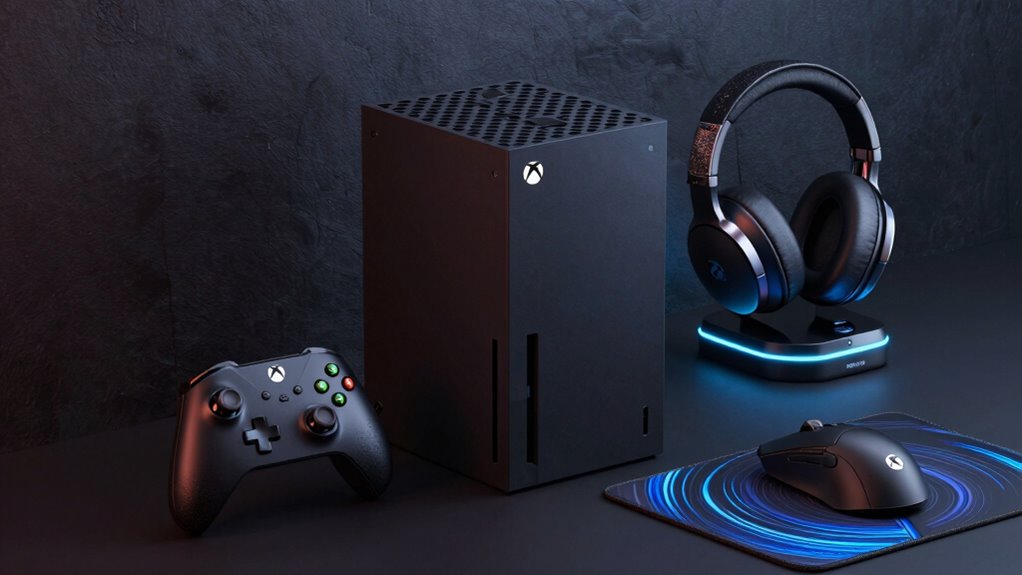

Finding the right accessories for your Xbox Series X can significantly boost your gaming experience. The best overall pick, the GameSir G7 Pro Wireless Controller, offers premium feel and responsiveness. For cooling, the MENEEA 5-in-1 Cooling Fan & Charging Stand stands out for combining cooling and charging in one. However, tradeoffs include higher costs for premium controllers and the need for compatibility checks for cooling fans. Continue reading for a detailed breakdown of the top options and what suits different gamer needs best.

Get audio and creator gear delivered free with Prime
- Fast, free delivery on millions of items
- Prime Video, Amazon Music and more included
- Member-only deals all year
Complete the kit


Key Takeaways
- The top controllers prioritize both responsiveness and ergonomic comfort, but premium models come at a higher price point.
- Cooling accessories vary from simple fans to multi-functional stands, with tradeoffs in noise levels and compatibility.
- Remote controls are straightforward but can differ in features like voice control and app integration.
- Many accessories aim to combine multiple functions, saving space but often adding complexity or cost.
- Choosing accessories depends heavily on your gaming habits, whether you value performance, cooling, or convenience.
| GameSir G7 Pro Wireless Controller – Zenless Zone Zero Edition (Xbox Series X|S, Xbox One, PC) |  | Best Overall Xbox Series X Controller for Customization | Compatibility: Xbox Series X|S, Xbox One, Windows PC | Connection: 2.4G wireless / wired | Polling Rate: Up to 1000Hz (PC only) | VIEW ON AMAZON | See Our Full Breakdown |
| Media Remote Control for Xbox One & Xbox Series X|S (Black) |  | Best Media Remote for Simplified Entertainment Control | Compatibility: Xbox One, Xbox Series X|S | Color: Black | Setup: Plug and play | VIEW ON AMAZON | See Our Full Breakdown |
| G-STORY Cooling Fan for Xbox Series X with Auto 3-Speed, Temp Display, RGB |  | Best Cooling Fan with Temperature Display for Xbox Series X | Temperature Display: LED | Fan Speeds: 1500/1750/2000 RPM | Modes: Automatic, Manual | VIEW ON AMAZON | See Our Full Breakdown |
| Auto Cooling Fan for Xbox Series X with LED Display and 9 RGB Light Modes |  | Best RGB Cooling Fan with USB Hub and Headset Mount | Power Connector Type: 4-Pin | Cooling Method: Forced air | Temperature Display: Real-time LED, switchable between °F and °C | VIEW ON AMAZON | See Our Full Breakdown |
| MENEEA 5-in-1 Cooling Fan & Charging Stand for Xbox Series X |  | Best Multi-Function Stand with Cooling, Charging, and Storage | Compatibility: Xbox Series X only | Cooling Fan: Side-mounted, button-controlled | Battery Capacity: 2 x 1400mAh rechargeable batteries | VIEW ON AMAZON | See Our Full Breakdown |
| MENEEA Cooling Fan with Dust Proof Cover for Xbox Series X |  | Best Multifunctional Accessory for Cooling and Organization | Compatibility: Xbox Series X | Fan Speeds: 3 gears (orange low, blue medium, green high) | Controls: Touch switches for fan and lights | VIEW ON AMAZON | See Our Full Breakdown |
| GameSir G7 Pro Controller for Xbox Series X|S, Xbox One, PC & Android – Black | 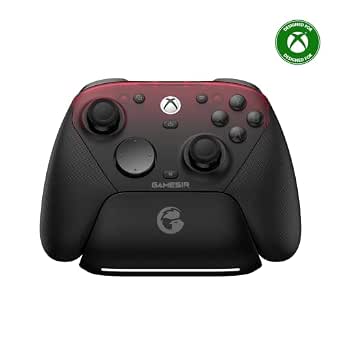 | Best Versatile Controller with Deep Customization | Connectivity: Wired (Xbox), Wired & 2.4G (PC), Bluetooth (Android) | Sticks: TMR (Mag-Res) sticks | Triggers: Hall Effect analog triggers with Micro Switch trigger stops | VIEW ON AMAZON | See Our Full Breakdown |
| RGB Cooling Fan Charging Station for Xbox Series X |  | Best All-in-One Charging, Cooling, and Organization Hub | Compatible Console: Xbox Series X | Cooling Fans: Dual rear suction fans | Fan Speeds: 3 adjustable with LED indicator | VIEW ON AMAZON | See Our Full Breakdown |
| Xbox Series X 1TB Gaming Console with Wireless Controller – Carbon Black |  | Best Overall Powerhouse for Next-Gen Gaming | Storage: 1TB custom NVMe SSD | Processing Power: 12 teraflops | Resolution: True 4K, HDR | VIEW ON AMAZON | See Our Full Breakdown |
| xbox series x accessorie | Compatibility |
|---|---|
| GameSir G7 Pro Wireless Contro | Xbox Series X|S, Xbox One, Windows PC |
| Media Remote Control for Xbox | Xbox One, Xbox Series X|S |
| G-STORY Cooling Fan for Xbox S | Xbox Series X |
| Auto Cooling Fan for Xbox Seri | — |
| MENEEA 5-in-1 Cooling Fan & Ch | Xbox Series X only |
| MENEEA Cooling Fan with Dust P | Xbox Series X |
| GameSir G7 Pro Controller for | — |
| RGB Cooling Fan Charging Stati | — |
| Xbox Series X 1TB Gaming Conso | — |
More Details on Our Top Picks
GameSir G7 Pro Wireless Controller – Zenless Zone Zero Edition (Xbox Series X|S, Xbox One, PC)
The GameSir G7 Pro Zenless Zone Zero Edition stands out for its advanced features like Mag-Res TMR joysticks, which virtually eliminate stick drift—an issue common in many controllers. Unlike the standard Xbox controller, this model offers extensive customization through the GameSir Nexus app, including remappable buttons and gyro settings, making it ideal for gamers who want a personalized experience. The inclusion of a 1200mAh battery with a smart charging station adds convenience, but the 1000Hz polling rate is exclusive to PC, limiting its responsiveness on consoles. The magnetic faceplate and extra D-pads are appealing for collectors or those who enjoy aesthetics, though they might be unnecessary for casual players. Compared to simpler options like the Xbox Elite Series 2, this controller balances high-end features with a more approachable price point, but the special edition design may not appeal to everyone.
Pros:- Virtually eliminates stick drift with Mag-Res TMR joysticks
- Highly customizable via the Nexus app, including remappable buttons
- Includes a smart charging station and swappable faceplate for personalization
- Officially licensed and supports stable 2.4G wireless connection
Cons:- 1000Hz polling rate only available on PC, not Xbox consoles
- Special edition design may not suit all aesthetic preferences
- Relatively complex setup for users unfamiliar with customization
Best for: Competitive gamers and customization enthusiasts who want a high-tech controller for PC and console use
Not ideal for: Casual gamers seeking a straightforward, no-fuss controller without extra customization features
- Compatibility:Xbox Series X|S, Xbox One, Windows PC
- Connection:2.4G wireless / wired
- Polling Rate:Up to 1000Hz (PC only)
- Joysticks:Mag-Res TMR (anti-drift)
- Triggers:Hall Effect analog with micro trigger stops
- Battery:1200mAh with smart auto start-stop charging station
- Extra Buttons:4 remappable (R5/L5 mini bumpers, R4/L4 lockable back buttons)
- Faceplate:Magnetic, swappable with extra D-pads
Our verdict“This controller is perfect for gamers who want top-tier customization and anti-drift features, especially on PC.”
Media Remote Control for Xbox One & Xbox Series X|S (Black)
The Media Remote Control offers a straightforward way to navigate your Xbox and connected entertainment devices, making it ideal for those who prioritize media control over gaming. Its plug-and-play setup means no pairing or complicated configuration, unlike some universal remotes that require setup. The motion-activated backlighting enhances usability in dim rooms, though its functionality for TV control depends heavily on your specific TV model and settings, which can be inconsistent. The soft rubberized texture makes it comfortable to hold, but batteries are not included, adding a minor inconvenience. Compared with gaming-focused controllers, this remote streamlines media navigation but lacks the versatility for gaming use. It’s best suited for users who primarily want a dedicated device for TV and streaming control rather than gaming features.
Pros:- Plug-and-play setup with no configuration required
- Motion-activated backlight for use in the dark
- Controls TV, Blu-ray, and streaming apps easily
- Secure battery cover with attached hook design
Cons:- TV control functionality depends on TV model and settings
- Batteries not included, requiring additional purchase
- Limited to basic media functions, lacking gaming controls
Best for: Home entertainment enthusiasts who want an easy, dedicated remote for Xbox media and streaming apps
Not ideal for: Gamers seeking a controller for gameplay, as this remote offers limited gaming controls
- Compatibility:Xbox One, Xbox Series X|S
- Color:Black
- Setup:Plug and play
- Backlighting:Motion-activated
- Battery Cover:Attached hook design
- Warranty:Free replacement within warranty period
Our verdict“This remote offers an uncomplicated, effective solution for controlling your media and streaming apps on Xbox, ideal for casual entertainment use.”
G-STORY Cooling Fan for Xbox Series X with Auto 3-Speed, Temp Display, RGB
The G-STORY Cooling Fan emphasizes effective cooling with its LED temperature display and adjustable fan speeds, making it suitable for users concerned about overheating during extended gaming sessions. Its easy-to-install, lightweight design means minimal fuss, but it’s limited strictly to Xbox Series X, unlike some multi-platform cooling options. The manual mode, controlled via a small button, can be less convenient than automatic settings, especially if you forget to adjust it. Compared with simpler cooling stands, this model offers the added benefit of real-time temperature monitoring, which helps prevent thermal throttling. However, the plastic build might feel less durable over time, and the fan’s noise level varies with speed, which could be distracting for some players.
Pros:- LED temperature display helps monitor overheating
- Effective cooling with three adjustable fan speeds
- Lightweight, easy to install
- Supports automatic and manual modes for flexibility
Cons:- Limited to Xbox Series X, not compatible with other consoles
- Manual mode requires manual adjustment, which may be inconvenient
- Plastic construction may feel less durable
Best for: Serious Xbox Series X owners who want to monitor and control their console’s temperature actively
Not ideal for: Casual players or those using other consoles, as this is designed solely for Series X
- Temperature Display:LED
- Fan Speeds:1500/1750/2000 RPM
- Modes:Automatic, Manual
- Color Indicators:Green, Blue, Red
- Power Source:Xbox console
- Compatibility:Xbox Series X
Our verdict“This cooling fan is a practical choice for dedicated Series X owners seeking real-time temperature management and adjustable cooling performance.”
Auto Cooling Fan for Xbox Series X with LED Display and 9 RGB Light Modes
The Auto Cooling Fan elevates standard cooling with its real-time LED temperature display and 9 RGB lighting modes, making it a visually appealing accessory for Xbox Series X owners who enjoy personalized aesthetics. Its automatic fan speed adjustment based on temperature ensures effective cooling without manual intervention, but it’s only compatible with Series X, limiting versatility. The built-in USB 2.0 hub supports charging controllers and headsets, adding convenience, while the dedicated headset mount with anti-slip silicone pads keeps your gaming setup organized. The plastic build, however, might raise concerns about long-term durability, and some users may find the RGB effects distracting during gameplay. Compared to simpler cooling stands, this model offers more flair but at the expense of a slightly higher price and limited compatibility.
Pros:- Real-time LED temperature display with °F/°C toggle
- 9 RGB lighting presets for customization
- Built-in USB 2.0 hub for charging controllers and headsets
- Includes a headset mount with anti-slip silicone pads
Cons:- Limited to Xbox Series X, no multi-platform compatibility
- Plastic construction may feel less durable over time
- RGB effects could be distracting during intense gaming
Best for: Aesthetic-conscious Xbox Series X owners who want cooling with customizable RGB lighting and charging convenience
Not ideal for: Players using multiple consoles or seeking a budget-friendly cooling solution, as it’s Xbox Series X-specific and more costly
- Power Connector Type:4-Pin
- Cooling Method:Forced air
- Temperature Display:Real-time LED, switchable between °F and °C
- RGB Lighting:9 presets including dynamic effects
- USB Hub:2.0, 5V/2A
- Extra Features:Headset mount with anti-slip silicone pads
Our verdict“This cooling fan is ideal for players who value aesthetic customization and integrated charging features for their Series X.”
MENEEA 5-in-1 Cooling Fan & Charging Stand for Xbox Series X
The MENEEA 5-in-1 stand combines cooling, charging, storage, and organization into one compact unit, making it a versatile addition for dedicated Series X users. Its side-mounted cooling fan effectively cools the console, similar to the fan in the G-STORY model, but with the added benefit of dual controller charging docks and a game disc storage compartment. Unlike standalone cooling fans, this stand consolidates multiple functions, reducing clutter and saving space. The two rechargeable batteries eliminate the need for disposable batteries, a significant cost-saving. However, the USB ports do not support data transfer, limiting their utility, and it’s incompatible with Xbox One, so versatility across platforms is limited. The charger’s functionality drops when the console enters sleep mode, which could be inconvenient during long gaming sessions.
Pros:- Multi-function design: cooling, charging, headset stand, and disc storage
- Effective side-mounted cooling fan with adjustable speed
- Includes two rechargeable batteries, reducing ongoing costs
- LED indicators clearly show charging status
Cons:- Extended USB port does not support data transfer
- Not compatible with Xbox One or other consoles
- Charger stops when the console is off, only charges during sleep mode
Best for: Dedicated Xbox Series X owners seeking a space-saving, multi-functional accessory with charging and storage
Not ideal for: Casual gamers or those with limited space who prefer simple cooling or charging solutions without added features
- Compatibility:Xbox Series X only
- Cooling Fan:Side-mounted, button-controlled
- Battery Capacity:2 x 1400mAh rechargeable batteries
- Charging:Dual controller charging dock, Type-C snap-down
- Storage:10 game disc slots
- USB Ports:2 (no data transmission on extended port)
Our verdict“This stand is an excellent choice for Xbox Series X owners wanting an all-in-one solution to keep their setup organized and cool.”
MENEEA Cooling Fan with Dust Proof Cover for Xbox Series X
This MENEEA Cooling Fan stands out for combining cooling, dust protection, lighting, and USB expansion into a single compact device. Unlike the G-STORY RGB Cooling Fan, which focuses solely on cooling with RGB effects, MENEEA offers a more versatile setup, especially with its dust covers and multiple USB ports. However, the dust cover must be removed during operation to maximize cooling efficiency, which could be inconvenient. Its three adjustable fan speeds ensure quiet operation while managing heat effectively. The colorful light strip adds aesthetic value but doesn’t impact performance. The inclusion of dust plugs and replacement covers makes it suitable for dust-prone environments. Tradeoffs include the USB 2.0 port supporting only charging and the need to remove dust covers during active cooling. This model is ideal for gamers who want a blend of cooling, dust protection, and customization, particularly in dusty or cluttered setups.
Pros:- Multi-function design combining cooling, dust protection, lighting, and USB expansion
- Three adjustable fan speeds with low noise operation
- Customizable colorful light strip with independent touch control
Cons:- USB 2.0 port supports charging only, not data transfer
- Dust cover must be removed during console operation for best cooling
Best for: Gamers seeking a comprehensive accessory that manages temperature, dust, and aesthetics in a single device
Not ideal for: Players who prefer a dedicated cooling solution without additional features or minimal setup hassle
- Compatibility:Xbox Series X
- Fan Speeds:3 gears (orange low, blue medium, green high)
- Controls:Touch switches for fan and lights
- Light Strip:6 monochrome colors + 1 mixed color
- USB Ports:1x USB 3.0 (data), 1x USB 2.0 (charging)
- Included Accessories:2 dust cover sets, 1 silicone dust plug set
Our verdict“This pick appeals most to users wanting an all-in-one accessory that enhances cooling, organization, and aesthetics simultaneously.”
GameSir G7 Pro Controller for Xbox Series X|S, Xbox One, PC & Android – Black
The GameSir G7 Pro offers exceptional versatility, supporting wired Xbox, PC, and Bluetooth Android connections, making it a flexible choice compared to the wired-only Xbox Elite Series 2. Its drift-resistant TMR sticks and Hall Effect triggers provide smoother, more precise control, especially when compared with standard controllers that lack such features. The 1000Hz polling rate on PC ensures ultra-responsive gameplay, but the absence of wireless Xbox support limits its convenience for console-only players. The built-in gyro aiming enhances FPS precision on PC but isn’t available for Xbox or Android. Deep customization through the Nexus app makes it ideal for serious gamers, yet its wired connection for Xbox could be a drawback for those seeking wireless freedom. This controller is best suited for gamers who want a high level of customization across multiple platforms, especially on PC.
Pros:- Tri-mode connectivity supporting wired Xbox, PC, and Bluetooth Android
- Drift-resistant TMR sticks and Hall Effect triggers for smooth gameplay
- Deep customization via GameSir Nexus app and 1000Hz polling rate on PC
Cons:- Gyro aiming is limited to PC only, not supported on Xbox or Android
- Wired connection required for Xbox use, lacking wireless Xbox support
Best for: Players who prioritize multi-platform compatibility and in-depth customization, mainly on PC and Android devices
Not ideal for: Casual console players who prefer wireless controllers with minimal setup or those who only game on Xbox
- Connectivity:Wired (Xbox), Wired & 2.4G (PC), Bluetooth (Android)
- Sticks:TMR (Mag-Res) sticks
- Triggers:Hall Effect analog triggers with Micro Switch trigger stops
- Polling Rate:1000Hz on PC
- Audio Jack:3.5mm
- Battery:1200mAh
- Extra Buttons:L5/R5 bumpers + lockable back buttons
Our verdict“This controller is ideal for gamers seeking extensive customization and responsive control across PC and Android, with some compromise on wireless Xbox connectivity.”
RGB Cooling Fan Charging Station for Xbox Series X
This RGB Cooling Fan Charging Station offers a compelling combination of cooling, charging, storage, and lighting, making it a strong alternative to standalone accessories like the MENEEA Fan. Its dual rear fans with adjustable speeds help keep the console cool while the built-in dual controller charger simplifies charging needs, unlike the MENEEA which only offers USB charging ports. The customizable RGB lighting and multiple game card slots add aesthetic and organizational value, but it only works with official Xbox controllers, unlike universal docks. The fan’s effectiveness depends on correct installation, and it doesn’t include rechargeable batteries. The space-saving vertical design helps keep setups tidy, yet its dependency on official controllers limits flexibility. This station suits players who want a centralized hub for charging, cooling, and storage in a sleek package.
Pros:- All-in-one device combining cooling, charging, storage, and RGB lighting
- Fast dual controller charging in about 3.5 hours
- Built-in safety protections against overcurrent, overvoltage, and overheating
Cons:- Only compatible with official Xbox controllers and rechargeable batteries
- Battery packs are not included, requiring extra purchase
- Fan operation depends on precise installation to function correctly
Best for: Xbox Series X owners who want to streamline charging, cooling, and game storage in one device
Not ideal for: Players using third-party controllers or seeking a purely cooling-focused accessory without organizational features
- Compatible Console:Xbox Series X
- Cooling Fans:Dual rear suction fans
- Fan Speeds:3 adjustable with LED indicator
- Controller Charging:2 controllers simultaneously in ~3.5 hours
- RGB Lighting Effects:15 (with memory mode)
- Game Card Slots:8
- Expansion Card Slots:2
Our verdict“This charging and cooling station is perfect for gamers who want a tidy, multi-functional hub for their Xbox setup, provided they use official controllers.”
Xbox Series X 1TB Gaming Console with Wireless Controller – Carbon Black
The Xbox Series X stands out as the most powerful console in this lineup, with 12 teraflops of processing power and support for true 4K gaming at up to 120 FPS. Compared with accessories like the MENEEA Fan or the RGB Cooling Fan Charging Station, it delivers the core gaming experience without additional peripherals. Its custom 1TB NVMe SSD ensures lightning-fast load times and seamless Quick Resume, surpassing standard storage solutions. The design maintains a sleek aesthetic in Carbon Black, and backward compatibility across four generations of Xbox offers extensive game access. The included wireless controller features ergonomic improvements and a dedicated Share button, but it requires AA batteries, which could be inconvenient. Overall, this console makes the most sense for players prioritizing raw performance and game library access over accessory add-ons.
Pros:- Exceptional 12 teraflops of processing power for next-gen gaming
- Supports true 4K resolution at up to 120 FPS
- Fast 1TB NVMe SSD reduces load times with Quick Resume
Cons:- Game Pass subscription sold separately, adding to total cost
- Storage expansion cards are expensive and optional
- Controller requires AA batteries instead of built-in rechargeable
Best for: Serious gamers who want the best performance and backward compatibility in an Xbox console, with minimal fuss
Not ideal for: Casual players or those seeking a console with bundled rechargeable controllers or extensive accessory options
- Storage:1TB custom NVMe SSD
- Processing Power:12 teraflops
- Resolution:True 4K, HDR
- Frame Rate:Up to 120 FPS
- Color:Carbon Black
- Ray Tracing:Hardware-accelerated
- Audio:3D Spatial Sound with Dolby Atmos
Our verdict“This console is best for dedicated gamers seeking top-tier performance, game variety, and backward compatibility, with minimal need for accessories.”

How We Picked
The products in this roundup were evaluated based on performance, build quality, ease of use, compatibility, and value for money. We prioritized accessories that enhance the gaming experience without adding unnecessary complexity or cost. Additional considerations included durability, user feedback, and innovative features. Our goal was to identify options that serve different needs—whether for serious gamers, casual players, or those seeking convenience—while maintaining high quality and reliability. The ranking reflects a balance of these factors to help readers find the best fit for their setup and budget.| xbox series x accessorie | Compatibility |
|---|---|
| GameSir G7 Pro Wireless Contro | Xbox Series X|S, Xbox One, Windows PC |
| Media Remote Control for Xbox | Xbox One, Xbox Series X|S |
| G-STORY Cooling Fan for Xbox S | Xbox Series X |
| Auto Cooling Fan for Xbox Seri | — |
| MENEEA 5-in-1 Cooling Fan & Ch | Xbox Series X only |
| MENEEA Cooling Fan with Dust P | Xbox Series X |
| GameSir G7 Pro Controller for | — |
| RGB Cooling Fan Charging Stati | — |
| Xbox Series X 1TB Gaming Conso | — |
Factors to Consider When Choosing Xbox Series X Accessories
When choosing Xbox Series X accessories, it’s important to consider how each piece will fit into your gaming routine. The right accessories can improve comfort, performance, and convenience, but buying the wrong ones might lead to frustration or wasted money. Here are some key factors to keep in mind to make an informed purchase.Compatibility and Ecosystem
Ensuring that accessories are fully compatible with the Xbox Series X is essential. Some controllers and cooling fans may also work with Xbox One or PC, offering versatility. Incompatibility can lead to connectivity issues or limited functionality. Always verify the product specifications and compatibility lists before buying to avoid disappointment, especially if you own multiple devices or plan to upgrade in the future.
Performance and Responsiveness
For controllers, responsiveness, latency, and ergonomics directly impact gaming quality. High-performance controllers, such as those with low latency and textured grips, benefit competitive gamers or those who spend long sessions gaming. Cheaper options may feel less precise or comfortable, so consider your gaming style and how much you’re willing to invest for better performance.
Cooling and Maintenance
Keeping your console cool can prevent overheating and prolong lifespan, especially during extended gaming sessions. Cooling fans range from basic models to those with RGB lighting and auto-speed adjustments. Think about noise levels and whether additional features like dust covers are worth the extra cost. Also, ensure that cooling accessories do not obstruct vents or interfere with console operation.
Ease of Use and Setup
Some accessories, like remote controls or multi-function stands, are designed for quick setup and straightforward operation. Others might require more configuration or cable management. If you prefer plug-and-play solutions, prioritize products with clear instructions and minimal setup. For tech-savvy users, more advanced options could offer customization but may involve a learning curve.
Value and Cost Breakdown
Balancing cost against features is key. High-end controllers and multi-functional accessories can be expensive but offer superior durability and features. Cheaper alternatives might save money upfront but could lack longevity or reliability. Consider how often you’ll use the accessory and whether investing more upfront pays off in the long run. Look for products that offer good warranties and customer support as part of their value proposition.
Frequently Asked Questions
Can I use any Xbox controller with the Series X?
Most Xbox controllers designed for Xbox One are compatible with the Series X, especially those with Bluetooth support. However, newer controllers specifically made for Series X often include enhanced features like improved latency and ergonomics. It’s advisable to check the product specifications to ensure full compatibility and access to features like share buttons and textured grips that optimize gameplay on the new console.
Are cooling fans necessary for all Xbox Series X owners?
Cooling fans can help maintain optimal temperatures, especially if you game for long sessions or notice your console heating up. While not mandatory for casual players, they provide peace of mind and potential longevity benefits for heavy users. Keep in mind that some cooling solutions can generate noise or interfere with airflow if not chosen carefully, so select a model suited to your environment and usage habits.
Do I need a special remote for Xbox Series X?
While the standard Xbox remote works fine for media playback, some third-party remotes offer extra features such as voice control, backlit keys, and app integration. These can enhance the entertainment experience, especially if you use your console for streaming. However, compatibility with the Series X should be verified, and budget options may lack advanced features found in premium models.
Is it worth upgrading to a premium controller?
Upgrading to a premium controller can improve comfort, responsiveness, and durability, which benefits competitive or extended gaming sessions. They often include features like customizable buttons and better build quality. However, the cost may be prohibitive for casual players, so weigh how much value you place on these enhancements relative to your gaming habits and budget.
What should I prioritize: cooling or additional controllers?
Prioritizing depends on your gaming style. If overheating has been an issue or you play for long stretches, investing in a cooling solution might be more beneficial. Conversely, if you want to expand your multiplayer options or replace an aging controller, then a new, high-quality controller could have a bigger impact. Consider your most pressing needs and how each accessory complements your overall setup.
Conclusion
For the casual gamer or newcomers, the Media Remote Control offers simple media control, while the MENEEA Cooling Fan & Charging Stand suits those seeking convenience and cooling in one. Serious gamers aiming for performance should consider the GameSir G7 Pro Wireless Controller for precision, or the GameSir G7 Pro Controller for versatile compatibility. Budget-conscious users will find value in basic cooling fans and third-party remotes, while premium buyers should look at high-end controllers and multi-functional stands. Ultimately, selecting the right accessory depends on your gaming style, setup, and budget—choose what enhances your gaming experience most effectively.
Halloween Picks
halloween
As an affiliate, we earn on qualifying purchases.