For most Nintendo Switch 2 owners, the AHGEIIY Portable USB-C Dock for Nintendo Switch 2, Switch, Steam Deck, and MacBook is the best overall pick because it is built around portable docking, while the AVerMedia GC313 CORE GO stands out for charging-focused play and the TECKNET 5-in-1 offers a familiar multiport setup. The main tradeoff is between a compact dock made for gaming and a general-purpose hub with more everyday connections. USB-C hubs can differ in video support, power delivery, port selection, and how reliably they suit a console setup. Check that a hub’s claimed features match your intended screen and charger rather than assuming every USB-C port works the same way. Read on for the full breakdown and guidance on choosing the right fit.

Get audio and creator gear delivered free with Prime
- Fast, free delivery on millions of items
- Prime Video, Amazon Music and more included
- Member-only deals all year
Complete the kit


Key Takeaways
- Portable docking is the clearest console-first advantage: AHGEIIY’s Switch 2-oriented dock takes the lead for buyers who want a travel-friendly setup, rather than a hub designed mainly for computers.
- The AVerMedia is the charging-focused standout: its 100W GaN charging feature gives it a distinct role for buyers who want power delivery built into the hub.
- The TECKNET favors familiar everyday connectivity: its 5-in-1 design, HDMI, and 100W PD suit people splitting time between a console and other USB-C devices.
- More ports do not automatically mean a better Switch dock: SABRENT’s seven-port layout and Unitek’s computer-switching function target broader desk setups, so buyers should match their extra features to actual use.
- Display claims need a setup check: products listing 4K output are not interchangeable guarantees of console compatibility; confirm the hub, power source, cable, and display meet your intended use.
| AHGEIIY Portable USB-C Dock for Nintendo Switch 2, Switch, Steam Deck, and MacBook | 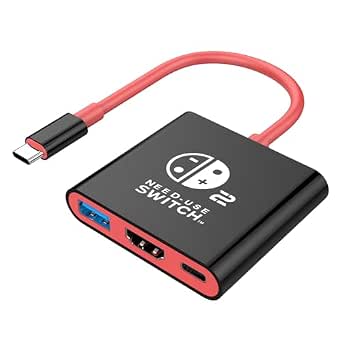 | Best Compact Travel Pick | Ports: HDMI, USB 3.0, USB-C Power Delivery | Maximum video output: Up to 4K at 60Hz on compatible devices; Nintendo Switch limited to 1080p | Maximum Power Delivery: 100W | VIEW LATEST PRICE | See Our Full Breakdown |
| Unitek 20Gbps Bidirectional USB-C Switch for Two Computers |  | Best for Shared Desk Setups | Switching modes: 2 inputs to 1 output or 1 input to 2 outputs | Maximum display output: Up to 8K at 60Hz or 4K at 144Hz | Data transfer rate: Up to 20Gbps | VIEW LATEST PRICE | See Our Full Breakdown |
| AHGEIIY Portable Docking Station for Nintendo Switch and Steam Deck |  | Best Simple Console Dock | Ports: HDMI 2.0, USB 3.0, USB-C PD | USB data transfer rate: Up to 5Gbps | Maximum video output: Up to 4K at 60Hz on compatible devices; Nintendo Switch up to 1080p at 60Hz | VIEW LATEST PRICE | See Our Full Breakdown |
| TECKNET 5-in-1 USB-C Hub with 4K HDMI and 100W PD |  | Best for Extra USB Accessories | Ports: 4K HDMI, USB-C PD input, 2 × USB-A 3.0, 1 × USB-C 3.0 data | Maximum HDMI output: Up to 4K at 60Hz | Power delivery output: Up to 85W from a 100W source | VIEW LATEST PRICE | See Our Full Breakdown |
| 4-in-1 Dual USB-C Display Hub with 4K@60Hz Output |  | Best for USB-C Display Setups | Brand: Arsandyn | Hardware interface: USB Type-C | Total ports: 3 | VIEW LATEST PRICE | See Our Full Breakdown |
| AVerMedia GC313 CORE GO 100W GaN USB-C Charging Hub and Dock |  | Best for Charging and TV Play | Model: GC313-BL | Ports: 2 USB-C, 1 USB-A, 1 HDMI | HDMI output: Up to 4K at 60 Hz | VIEW LATEST PRICE | See Our Full Breakdown |
| SABRENT OmniPort C7 7-Port USB-C Hub |  | Best for USB-C Peripheral Expansion | Ports: 7 USB-C | Data transfer rate: Up to 10Gbps | Power input: USB-C PD 3.0, up to 100W | VIEW LATEST PRICE | See Our Full Breakdown |
| USB-C hubs for Nintendo Switch 2 | Ports |
|---|---|
| AHGEIIY Portable USB-C Dock fo | HDMI, USB 3.0, USB-C Power Delivery |
| Unitek 20Gbps Bidirectional US | — |
| AHGEIIY Portable Docking Stati | HDMI 2.0, USB 3.0, USB-C PD |
| TECKNET 5-in-1 USB-C Hub with | 4K HDMI, USB-C PD input, 2 × USB-A 3.0, 1 × USB-C 3.0 data |
| 4-in-1 Dual USB-C Display Hub | — |
| AVerMedia GC313 CORE GO 100W G | 2 USB-C, 1 USB-A, 1 HDMI |
| SABRENT OmniPort C7 7-Port USB | 7 USB-C |
More Details on Our Top Picks
AHGEIIY Portable USB-C Dock for Nintendo Switch 2, Switch, Steam Deck, and MacBook
At just 39 g, this AHGEIIY dock is the easiest pick here to pack for handheld-to-TV play. It combines HDMI, a USB 3.0 port, and USB-C Power Delivery in a small adapter, so it can connect a compatible device to a screen while allowing charging. Compared with the larger TECKNET 5-in-1 hub, it gives up extra USB ports but takes up less space in a travel kit. Its 4K at 60Hz capability applies to compatible devices; Nintendo Switch output is limited to 1080p. Switch use requires external power, and the charger and cables are not included, so buyers need to supply the rest of the setup. The Nintendo Switch Lite is unsupported, and video requires USB-C DP Alt Mode.
Pros:- Lightweight 39 g design is easy to carry with a handheld console.
- Combines HDMI, USB 3.0, and USB-C PD in one compact adapter.
- Supports up to 4K at 60Hz on compatible devices.
- Works with a range of USB-C devices that support DP Alt Mode.
Cons:- Nintendo Switch video output is limited to 1080p.
- Requires an external power source for Switch use.
- Wall charger and HDMI and USB-C cables are not included.
Best for: Switch 2 and Steam Deck owners who want a lightweight dock for travel and already have a compatible charger and HDMI cable.
Not ideal for: Nintendo Switch Lite owners or buyers who need several USB accessories connected at once; this dock has only one USB 3.0 port and requires separately supplied power and cables.
- Ports:HDMI, USB 3.0, USB-C Power Delivery
- Maximum video output:Up to 4K at 60Hz on compatible devices; Nintendo Switch limited to 1080p
- Maximum Power Delivery:100W
- Weight:39 g (1.4 oz)
- Compatible devices:Nintendo Switch 2, Nintendo Switch, Steam Deck, ROG Ally, Legion Go, MacBook, iPad Pro, and other DP Alt Mode USB-C devices
- Power requirement:External power required for Switch or Samsung DeX use
- Not compatible with:Nintendo Switch Lite
- Included accessories:Wall charger, HDMI cable, and USB-C charging cable not included
Our verdict“Choose this AHGEIIY dock if a minimal travel setup matters more than extra ports and you already own the required power and video cables.”
Unitek 20Gbps Bidirectional USB-C Switch for Two Computers
The Unitek is a USB-C switch, not a console dock: its strength is routing a compatible display, dock, or peripheral between two computers, or sharing one computer with two outputs. That makes it a specialized choice for a desk where a Switch 2 setup sits alongside a computer, rather than a straightforward way to add ports to the console. Compared with the AHGEIIY Portable USB-C Dock, it offers bidirectional switching and much faster stated data transfer, but it does not provide the same simple, console-focused HDMI-and-USB arrangement. Its 8K at 60Hz and 4K at 144Hz limits depend on compatible connected devices; DP Alt Mode is required for video. External power is required, and Thunderbolt configurations have display limits. Dell docks are unsupported, as are docks with pigtails longer than 50 cm.
Pros:- Supports switching between two inputs and one output, or one input and two outputs.
- Offers up to 20Gbps data transfer and up to 100W Power Delivery.
- Supports up to 8K at 60Hz or 4K at 144Hz with compatible equipment.
- Aluminum construction and included USB4 cables and USB-C adapter.
Cons:- Requires an external power supply and compatible USB-C connections.
- Video requires DisplayPort Alt Mode, and Thunderbolt setups have display limits.
- Does not support Dell docking stations or docks with pigtails longer than 50 cm.
Best for: Desk users who want to switch a compatible USB-C display, dock, or peripheral between a Switch 2 setup and another computer.
Not ideal for: Buyers seeking a simple, portable Switch 2-to-TV adapter; this is a powered switching device with compatibility conditions, not a basic console dock.
- Switching modes:2 inputs to 1 output or 1 input to 2 outputs
- Maximum display output:Up to 8K at 60Hz or 4K at 144Hz
- Data transfer rate:Up to 20Gbps
- Power Delivery:Up to 100W
- Dimensions:2.61 × 2.26 × 0.59 inches
- Material:Aluminum
- Video requirement:Connected USB-C devices must support DisplayPort Alt Mode
- Power requirement:External power supply required
- Compatibility limits:Not compatible with Dell docking stations; dock pigtail must be no longer than 50 cm
Our verdict“Pick the Unitek only if you need to share a compatible USB-C display or dock between devices; for direct Switch 2-to-TV docking, choose a purpose-built hub instead.”
AHGEIIY Portable Docking Station for Nintendo Switch and Steam Deck
This AHGEIIY dock keeps its job simple: connect a compatible handheld to a TV, monitor, or projector through HDMI while charging. Its HDMI 2.0, USB 3.0, and USB-C PD ports give it a practical mix for console play, with up to 5Gbps data transfer for a connected USB accessory. Compared with the AHGEIIY Portable USB-C Dock, it has similar core connectivity and charging support, but the supplied data does not specify a weight, so the other model is the clearer choice when minimizing carry weight is the priority. Switch output tops out at 1080p at 60Hz; the 4K at 60Hz capability applies to compatible devices and displays. External power and an HDMI cable are required, and Switch Lite is not supported.
Pros:- Provides HDMI, USB 3.0, and USB-C PD in one compact dock.
- Allows charging while connected to a display.
- Supports up to 4K at 60Hz on compatible devices and displays.
- Plug-and-play operation simplifies basic console-to-screen setup.
Cons:- Nintendo Switch output is limited to 1080p at 60Hz.
- Requires an external power source and HDMI cable.
- Nintendo Switch Lite is not supported.
Best for: Switch and Switch OLED owners who want a straightforward HDMI dock for TV play and have a suitable power adapter and HDMI cable.
Not ideal for: Switch Lite owners or buyers who want a complete, ready-to-connect kit; this dock requires external power and a separately supplied HDMI cable.
- Ports:HDMI 2.0, USB 3.0, USB-C PD
- USB data transfer rate:Up to 5Gbps
- Maximum video output:Up to 4K at 60Hz on compatible devices; Nintendo Switch up to 1080p at 60Hz
- Power Delivery:Up to 100W
- Compatible devices:Nintendo Switch, Nintendo Switch OLED, Steam Deck, and USB-C devices supporting DP Alt Mode
- Power requirement:External power source required; original Switch charger or a wall charger over 39W recommended
- Not compatible with:Nintendo Switch Lite
- Color:Blue
Our verdict“Choose this model for basic Switch-to-screen docking if you already have power and HDMI covered and do not need more than one USB accessory port.”
TECKNET 5-in-1 USB-C Hub with 4K HDMI and 100W PD
The TECKNET is the most useful pick in this group when a Switch 2 setup needs more than a display connection: it adds two USB-A ports and one USB-C data port alongside HDMI and power input. That extra connectivity separates it from the smaller AHGEIIY Portable Docking Station, which has just one USB 3.0 port. The tradeoff is a larger body—6.89 × 3.54 × 0.75 inches—and a less direct power arrangement: a 100W source can provide up to 85W output through the hub. Its HDMI supports up to 4K at 60Hz on a DP Alt Mode-compatible host, though Switch 2 output depends on the console and setup. The USB-C PD port handles charging only, while the USB-C data port does not carry video or charge devices.
Pros:- Adds two USB-A 3.0 ports and one USB-C 3.0 data port.
- Combines HDMI, USB expansion, and pass-through charging.
- Supports HDMI output up to 4K at 60Hz on compatible hosts.
- Aluminum enclosure is designed to dissipate heat.
Cons:- Larger than the AHGEIIY compact docks, making it less suited to pocket carry.
- Provides up to 85W output from a 100W power source rather than the full input rating.
- USB-C PD is for charging only, while the USB-C data port does not support charging or video.
Best for: Switch 2 owners building a desk setup with multiple USB accessories who also want HDMI and pass-through power in one hub.
Not ideal for: Travelers prioritizing the smallest possible adapter or buyers who expect the USB-C ports to handle both charging and data; their roles are separate.
- Ports:4K HDMI, USB-C PD input, 2 × USB-A 3.0, 1 × USB-C 3.0 data
- Maximum HDMI output:Up to 4K at 60Hz
- Power delivery output:Up to 85W from a 100W source
- Data transfer rate:Up to 5Gbps
- Compatibility:USB-C and Thunderbolt 3/4 devices; host must support DisplayPort Alt Mode for video
- Enclosure material:Aluminum
- Dimensions:6.89 × 3.54 × 0.75 inches
- Warranty:18 months
Our verdict“Choose the TECKNET if extra USB connections matter more than a pocket-sized form and you are comfortable with separate charging and data ports.”
4-in-1 Dual USB-C Display Hub with 4K@60Hz Output
This Arsandyn hub is the most specialized option here: it targets USB-C video connections and dual-screen use on compatible devices, rather than the familiar HDMI-first layout of the AHGEIIY docks or TECKNET hub. That makes it a possible fit for Switch 2 setups built around compatible USB-C displays or AR glasses, but the listing does not spell out the exact port layout beyond USB-C and three total ports. It supports up to 100W PD input and states up to 5Gbps data transfer in its description, while its specifications also list 480Mbps—a meaningful inconsistency for anyone choosing it as a data hub. Video and multi-display behavior depend on host support, including DP Alt Mode, and a compatible PD charger may be separate.
Pros:- Designed to support dual-screen USB-C video output on compatible devices.
- Accepts up to 100W PD power input.
- Compact aluminum-alloy housing suits portable setups.
- Plug-and-play operation on supported devices.
Cons:- Video requires a host USB-C port with DisplayPort Alt Mode.
- Data-rate information conflicts: the description says up to 5Gbps, while specifications list 480Mbps.
- Multi-display performance depends on the host and setup, and a compatible PD charger may be sold separately.
Best for: Switch 2 owners using compatible USB-C monitors or AR glasses who want a compact hub with power input and can confirm their display setup supports the required video features.
Not ideal for: Buyers seeking a clearly specified, HDMI-based console dock or dependable high-speed data rates; the port details and transfer-rate figures are inconsistent.
- Brand:Arsandyn
- Hardware interface:USB Type-C
- Total ports:3
- Video output:Up to 4K at 60Hz
- Power Delivery input:Up to 100W
- USB data rate:Description: up to 5Gbps; specifications: 480Mbps
- Compatible devices:AR glasses, laptops, Switch 2, tablets, and portable monitors
- Material:Aluminum alloy
Our verdict“Consider this hub for a verified USB-C monitor or AR-glasses setup, but choose an HDMI-based dock if you want a more clearly defined Switch-to-TV connection.”
AVerMedia GC313 CORE GO 100W GaN USB-C Charging Hub and Dock
The AVerMedia GC313 CORE GO is the stronger fit when a Switch 2 setup needs HDMI output and charging in one compact accessory. Its 4K at 60 Hz HDMI output, USB expansion, and included 100 W charger make it more ready for a TV or monitor than the SABRENT OmniPort C7, which focuses on USB-C data ports and has no listed HDMI output. The included 2 m braided cable also gives more room to place the dock near a screen. The tradeoff is a less clear port-count listing: the detailed specs name two USB-C and one USB-A port, while another line says two USB ports. Its stated 240 V input may also restrict use with some power systems, so check local compatibility before buying.
Pros:- Combines HDMI video, charging, and data expansion in one unit.
- 4K at 60 Hz output supports use with compatible TVs and monitors.
- Includes a 100 W charger and a 2 m braided USB-C cable.
- Supports charging up to three devices at once, according to the product description.
Cons:- The listed 240 V input may not suit some regional power systems.
- Port-count details conflict: the detailed list gives three ports, while another spec says two USB ports.
- At 1 lb, it is heavier than a very small travel adapter.
Best for: Switch 2 owners who want HDMI video, device charging, and a few data connections in one travel-friendly setup, especially those who also use a Steam Deck or tablet.
Not ideal for: Buyers who need a clearly documented, high-count USB-C hub or who cannot confirm that the stated 240 V input works with their power system.
- Model:GC313-BL
- Ports:2 USB-C, 1 USB-A, 1 HDMI
- HDMI output:Up to 4K at 60 Hz
- Maximum wattage:100 W
- Input voltage:240 V
- Weight:1 lb
- Included:USB-C charger, 2 m braided USB-C to USB-C cable, changeable AC plug, quick start guide
- Warranty:2 years
Our verdict“Choose the AVerMedia if HDMI play and an included charging setup matter more than having a large number of clearly specified USB ports.”
SABRENT OmniPort C7 7-Port USB-C Hub
The SABRENT OmniPort C7 is the choice here for connecting several USB-C accessories, not for turning a Switch 2 into a TV dock. Its seven USB-C ports and data speeds up to 10Gbps offer far more port capacity than the AVerMedia GC313 CORE GO, but the listed connections do not include HDMI. That makes the AVerMedia the better match for screen output, while the C7 suits a desk setup built around data accessories. Individual port switches let you disable or power-cycle devices without unplugging them. The hub accepts up to 100 W USB-C PD input, but the power adapter is sold separately, and per-port support is listed at BC1.2 up to 5V/3A. I would not treat it as a standalone Switch 2 dock or assume it supplies the console’s full docked setup.
Pros:- Seven USB-C ports provide substantial peripheral expansion.
- Supports data transfer speeds up to 10Gbps.
- Individual switches and blue indicators give control over each port.
- Compact 3.07 oz body and included 10Gbps USB-C cable.
Cons:- No HDMI output is listed, so it does not replace a video dock.
- Power adapter is not included; powered use requires a separate USB-C PD charger.
- Per-port power support is listed as BC1.2 up to 5V/3A, which may not suit higher-draw devices.
Best for: Players who already have a separate video dock and need many USB-C data connections for accessories, storage, or other compatible devices.
Not ideal for: Switch 2 owners seeking a single hub for TV output, or buyers who need an included power adapter and a ready-to-use powered setup.
- Ports:7 USB-C
- Data transfer rate:Up to 10Gbps
- Power input:USB-C PD 3.0, up to 100W
- Per-port power support:BC1.2 up to 5V/3A
- Port controls:Individual power switch and blue LED per port
- Compatibility:Windows, macOS, Linux, iPadOS, Android
- Dimensions:5.02 × 1.71 × 0.75 in
- Weight:3.07 oz
- Warranty:1 year; extendable to 2 years with free registration
Our verdict“Pick the OmniPort C7 for switched, high-speed USB-C expansion alongside a separate Switch 2 video dock, not as an all-in-one TV-play hub.”
How We Picked
I ranked these seven products by how clearly their listed features fit a Nintendo Switch 2 setup: console-oriented docking, display connectivity, power delivery, portability, and useful port selection. I also weighed whether a hub’s main function serves a typical console owner or a narrower desk workflow. A dedicated portable dock ranks ahead of general-purpose hubs when its design aligns more directly with gaming use, while charging capacity or extra ports earn value only for buyers who need them.
The order also reflects tradeoffs, not port counts alone. I placed options with a distinct advantage for everyday Switch 2 use above products whose strongest features are computer switching or broad peripheral expansion. Because product names and feature listings alone cannot confirm every console, charger, cable, and display combination, I treat compatibility and video claims as details buyers should verify before purchase.
Factors to Consider When Choosing Best USB-C Hubs For Nintendo Switch 2
Choosing a USB-C hub for Switch 2 is less about finding the hub with the most ports and more about matching its design to your play setup. I would start with how you plan to use the console, then check power and display details before comparing extra connections.
Choose a console dock or a general-purpose hub
A portable console dock and a computer hub solve different problems, even when both connect over USB-C. A console-first model prioritizes a compact setup that can travel with the system, while a general-purpose hub may devote space to peripherals or computer workflows. Decide whether the hub will live beside a TV, travel in a bag, or move between a console and laptop. Buying a larger hub for ports you rarely use adds bulk without improving the gaming setup. Conversely, a compact dock may feel limiting if you regularly connect several devices at a desk. Match the product’s primary purpose to where and how you play.
Check the complete video chain
A hub’s HDMI label is only one part of a working display setup. The console, hub, cable, power source, and screen all need to support the mode you want, so confirm the details for the exact combination rather than relying on a headline resolution. A listing that mentions 4K output does not by itself prove that every console output mode is supported. Think about the display you already own and whether you need a particular refresh rate before choosing a hub. If you only play on the console’s own screen, HDMI capabilities may have little value to you. This check can prevent paying extra for a feature your display setup cannot use.
Treat power delivery as a system requirement
Power delivery figures describe a hub’s charging capability, not necessarily the power that reaches the console in every setup. Some of a charger’s output may be used by the hub and connected devices, and chargers and cables can affect results. Check the hub’s stated power requirements and the console maker’s guidance before substituting a third-party power adapter. A high-wattage specification is more useful to someone who also charges a laptop or other devices than to a buyer seeking a simple travel dock. Avoid assuming that any USB-C charger will provide the same behavior. Choosing power equipment as a matched set can reduce uncertainty.
Count useful ports, not advertised ports
Make a short list of the devices you will connect at the same time, such as a display, wired controller accessory, storage device, or charging cable. Then check which ports are available and whether any share a connection or serve only a specific function. A seven-port hub can be a better fit for a crowded desk, but its extra connections may not help a player who wants a small setup. A computer-switching feature is valuable only if you actually alternate peripherals between computers. Port labels and data speeds matter more than a large total count. Prioritizing the connections you will use keeps the hub simpler and easier to place.
Balance portability against heat, cables, and placement
Compact hubs are easier to pack, but their cable length and port arrangement can shape where they sit near a console or screen. Check whether the attached cable reaches your intended position and whether plugged-in accessories will crowd nearby ports. A hub that hangs from a USB-C connection may put strain on the port, so a short cable or stable placement can matter in a fixed setup. Larger desktop hubs may be tidier when several peripherals stay connected, even if they are less convenient to carry. Consider airflow and access to the hub’s ports rather than hiding it behind a display. The right size is the one that fits your real play space, not just your bag.
Pay extra only for a feature you will use
Specialized functions can be worthwhile when they solve a regular problem: high-power charging, computer switching, or many peripheral connections. They are poor reasons to choose a hub if your setup does not need them. Compare a product’s core role with your routine before focusing on the largest specification. A beginner may benefit more from a straightforward console-oriented dock than from a hub with several modes to configure. Someone who uses one desk for both a console and computer may value versatility more than portability. The strongest choice is the one whose extra features have a clear job in your setup.
Frequently Asked Questions
Can I assume any USB-C hub with HDMI will work with Nintendo Switch 2?
No. USB-C describes the connector, not a guarantee that a hub supports the console’s video and power requirements. Check the product’s compatibility information and the details of its HDMI output, then compare them with your display and cable. A hub advertised for laptops may not be designed around a console docking setup. If the listing is vague, seek confirmation from the manufacturer before relying on it for TV play.
Should I choose a 4K@60Hz hub if my TV is not 4K?
Not automatically. A higher-resolution output claim may matter if you plan to use a compatible display later, but it does not guarantee a better experience on a screen that cannot use that mode. Check the refresh rate and supported modes as well as resolution, since those details describe different aspects of video output. Also verify that the console and the rest of the connection chain support your target mode. If your current setup has no need for the feature, prioritize reliable compatibility and useful ports instead.
Do I need a hub with 100W power delivery for Switch 2?
Not necessarily. A 100W specification can be useful when the same hub also serves a laptop or other power-hungry device, but it does not mean the console needs or receives 100W. The charger, cable, hub, and connected devices all affect how power is distributed. Follow the console maker’s power guidance and check the hub’s own requirements before selecting an adapter. For a dedicated console setup, a simpler power arrangement may make more sense than paying for unused capacity.
Is a portable dock a better choice than a seven-port hub for travel?
Usually, a compact dock is easier to pack and better suited to a minimal console kit, while a seven-port hub can add unnecessary bulk if you only need display and charging connections. The exception is a travel setup that includes several USB accessories or doubles as a work kit. Check the product’s dimensions, attached cable, and power needs before deciding, since a small hub can still require extra equipment. For a desk with many permanently connected devices, the broader port selection may be more useful than portability.
When does a USB-C hub with computer switching make sense for a Switch 2 owner?
It makes sense when your desk workflow regularly moves shared peripherals between computers and those switching features match the devices you use. A computer switch is not the same thing as a console-focused dock, so do not choose one just because it has USB-C in its name. Confirm which devices can be switched and whether the hub provides the display and power connections needed for your console setup. If the main goal is connecting Switch 2 to a screen, a portable dock or straightforward HDMI hub is a more direct fit. The switching model is best treated as a desk-workflow pick, not the default console choice.
Conclusion
For most players, I would start with the AHGEIIY Portable USB-C Dock for Nintendo Switch 2, Switch, Steam Deck, and MacBook as the best overall because its portable-dock role most directly matches a console setup. The TECKNET 5-in-1 is my best value-style pick for buyers who want familiar everyday connections alongside HDMI and power delivery, while the AVerMedia GC313 CORE GO is the best premium-style choice for people who specifically want its charging-focused GaN design. Beginners should favor the AHGEIIY portable dock’s straightforward console-first purpose over feature-heavy hubs. For a desk with many peripherals, consider the SABRENT OmniPort C7; for shared computer peripherals, the Unitek has a more specialized role. Choose the model that fits your display, power setup, and actual port needs, and verify compatibility details before buying.