For shoppers comparing Black Friday audio interfaces, the MOTU M4 is my best overall pick for its flexible four-input, four-output layout, while the MOTU M2 stands out for a simpler two-input setup and the Audient iD14 MKII for its Class-A preamps and studio-focused controls. The right choice depends less on a headline recording resolution and more on how many microphones, instruments, and outputs your sessions actually need. Bundles can cover useful starter gear, but a standalone interface may be a better fit if you already own a mic and headphones. Premium Universal Audio models bring a different workflow and feature set from straightforward USB interfaces, so buyers should match the extra capability to their recording plans. Read on for how the 15 options compare and which one fits your needs.

Get audio and creator gear delivered free with Prime
- Fast, free delivery on millions of items
- Prime Video, Amazon Music and more included
- Member-only deals all year
Complete the kit


Key Takeaways
MOTU M4 leads for flexible home-studio growth: its 4×4 I/O gives more room for multiple sources and routing than the two-input MOTU M2 or entry-level Solo models.
The MOTU M2 is the clearest two-input all-rounder: it keeps the setup compact while offering a more versatile connection layout than the basic M-Track Solo.
Audient’s iD14 MKII and iD4 MKII prioritize preamp-focused recording: choose the iD14 for two mic preamps, or the iD4 if one microphone input is enough.
Scarlett bundles are about getting started with fewer separate purchases: the Solo bundle suits a one-mic setup, while the 2i2 bundle adds a second input and includes an AT2020 microphone.
Universal Audio Apollo Twin models serve a different buyer: they target users seeking a premium studio workflow, while the less costly and simpler USB interfaces here make more sense for basic recording needs.
| Focusrite Scarlett 18i16 4th Gen USB-C Audio Interface |  | Best for Expanding Multitrack Studios | Connectivity: USB-C | Inputs / outputs: 18 inputs / 16 outputs | Mic preamps: 4 | VIEW LATEST PRICE | See Our Full Breakdown |
| Audient iD14 MKII USB-C Audio Interface with 2 Class-A Microphone Preamps |  | Best for a Durable Desktop Recording Setup | Connectivity: USB-C | Mic preamps: 2 Class-A | Channels: 4 | VIEW LATEST PRICE | See Our Full Breakdown |
| M-Audio M-Track Solo USB Audio Interface |  | Best Entry-Level Pick for Simple Recording | Audio resolution: 48 kHz | Inputs: One XLR/Line combo input with phantom power; one switchable Line/Instrument input | Headphone output: 1/8-inch | VIEW LATEST PRICE | See Our Full Breakdown |
| Focusrite Scarlett Solo 3rd Gen USB-C Audio Interface |  | Best for Solo Vocal and Instrument Recording | Connectivity: USB | Channels: 2 | Audio inputs: XLR microphone, instrument | VIEW LATEST PRICE | See Our Full Breakdown |
| PIYONE Q2 2×2 USB-C Audio Interface, 24-bit/192 kHz, Alloy Red |  | Best Compact Two-Input USB-C Option | Connectivity: USB-C | Inputs: 2 XLR/TRS combo inputs | Channels: 2 | VIEW LATEST PRICE | See Our Full Breakdown |
| Focusrite Scarlett Solo USB-C Audio Interface (4th Gen) Bundle with Polsen HPC-A30 Headphones, Pop Filter, and XLR Cable |  | Best Starter Bundle | Interface: Focusrite Scarlett Solo, 4th Generation | Connectivity: USB-C | Channels: 2-in / 2-out | VIEW LATEST PRICE | See Our Full Breakdown |
| Universal Audio Apollo Twin X Duo USB Heritage Edition Audio Interface |  | Best for UAD Plugin Tracking | Connectivity: USB 3 | I/O configuration: 10×6 | Audio conversion: 24-bit / 192 kHz | VIEW LATEST PRICE | See Our Full Breakdown |
| Focusrite Scarlett 2i2 4th Gen USB Audio Interface Bundle with Audio-Technica AT2020 Mic, Headphones, Stand, Pop Filter, and XLR Cable |  | Best Complete Vocal Recording Kit | Interface: Focusrite Scarlett 2i2, 4th Generation | Connectivity: USB-C | Channels: 2-in / 2-out | VIEW LATEST PRICE | See Our Full Breakdown |
| Audient iD4 MKII USB-C Audio Interface with Class A Microphone Preamp |  | Best Compact Desktop Build | Connectivity: USB-C | Channels: 2 | Microphone preamp: Class A | VIEW LATEST PRICE | See Our Full Breakdown |
| MOTU M2 USB-C Audio Interface |  | Best Straightforward 2-In/2-Out | Connectivity: USB-C | Channels: 2-in / 2-out | Preamps: 2 | VIEW LATEST PRICE | See Our Full Breakdown |
| MOTU M2 2×2 USB-C Audio Interface with XLR-XLR Cable Bundle |  | Best for Metering and Low-Latency Recording | Connectivity: USB-C | Inputs/outputs: 2×2 | DAC technology: ESS Sabre32 Ultra | VIEW LATEST PRICE | See Our Full Breakdown |
| Focusrite Scarlett 2i2 USB-C Audio Interface (4th Gen) Bundle with Polsen HPC-A30 Headphones, Pop Filter, and XLR Cable |  | Best Ready-to-Record Bundle | Model: Scarlett 2i2, 4th Generation | Connectivity: USB-C | Inputs/outputs: 2-in/2-out | VIEW LATEST PRICE | See Our Full Breakdown |
| M-Audio M-Track Duo USB Audio Interface |  | Best Straightforward Starter Interface | Inputs: Two combo XLR/line/instrument inputs | Preamps: Crystal preamps with phantom power | Audio resolution: 48 kHz | VIEW LATEST PRICE | See Our Full Breakdown |
| Universal Audio Apollo Twin X DUO Gen 2 Audio Interface |  | Best Premium DSP Recording Interface | Connectivity: Thunderbolt 3 | Preamps: Two Unison mic preamps | DSP: DUO Core | VIEW LATEST PRICE | See Our Full Breakdown |
| MOTU M4 4×4 USB-C Audio Interface | 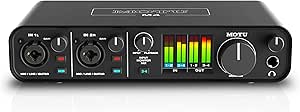 | Best for Growing Home Studios | Inputs/outputs: 4-in/4-out | Microphone preamps: 2 | Connectivity: USB-C | VIEW LATEST PRICE | See Our Full Breakdown |
| Black Friday audio interface | Connectivity | Channels |
|---|---|---|
| Focusrite Scarlett 18i16 4th G | USB-C | — |
| Audient iD14 MKII USB-C Audio | USB-C | 4 |
| M-Audio M-Track Solo USB Audio | — | — |
| Focusrite Scarlett Solo 3rd Ge | USB | 2 |
| PIYONE Q2 2×2 USB-C Audio Inte | USB-C | 2 |
| Focusrite Scarlett Solo USB-C | USB-C | 2-in / 2-out |
| Universal Audio Apollo Twin X | USB 3 | — |
| Focusrite Scarlett 2i2 4th Gen | USB-C | 2-in / 2-out |
| Audient iD4 MKII USB-C Audio I | USB-C | 2 |
| MOTU M2 USB-C Audio Interface | USB-C | 2-in / 2-out |
| MOTU M2 2×2 USB-C Audio Interf | USB-C | — |
| Focusrite Scarlett 2i2 USB-C A | USB-C | — |
| M-Audio M-Track Duo USB Audio | — | — |
| Universal Audio Apollo Twin X | Thunderbolt 3 | 32 |
| MOTU M4 4×4 USB-C Audio Interf | USB-C | — |
More Details on Our Top Picks
Focusrite Scarlett 18i16 4th Gen USB-C Audio Interface
For a Black Friday upgrade aimed at a growing studio, the Scarlett 18i16 4th Gen offers room to connect far more than a singer and one instrument. Its 18 inputs and 16 outputs, four mic preamps, and ADAT and S/PDIF connections suit multitrack sessions, external converters, and outboard gear. Compared with the Audient iD14 MKII, it is a much better fit for larger routing needs, while the Audient takes up less space for a modest recording setup. Auto Gain and Clip Safe can help keep sessions moving when recording several sources, and the included software adds useful starting tools. The tradeoff is scale: this interface needs external power, costs more in desk space, and offers unnecessary connections for a simple home vocal rig.
Pros:- 18 inputs and 16 outputs support complex recording and routing setups
- Four mic preamps provide more simultaneous microphone connections than the smaller interfaces here
- ADAT and S/PDIF digital I/O allow system expansion
- Auto Gain and Clip Safe help manage recording levels
Cons:- Requires an external power supply, adding desktop clutter
- Its larger footprint and channel count are excessive for basic home recording
- A bigger feature set can mean more setup and routing than a beginner needs
Best for: Home-studio owners and small production rooms recording several sources at once or planning to add ADAT-equipped gear
Not ideal for: Solo vocalists and guitarists who need only one or two inputs and want a compact, bus-powered setup
- Connectivity:USB-C
- Inputs / outputs:18 inputs / 16 outputs
- Mic preamps:4
- Digital I/O:ADAT, S/PDIF, MIDI
- Conversion:24-bit / 192 kHz
- Dynamic range:122 dB
- Gain:69 dB
- Dimensions and weight:6.66 × 9.43 × 2.38 in; 3.8 lb
- Included software:Pro Tools Intro+, Ableton Live Lite, Cubase LE, Hitmaker Expansion
Our verdict“Choose the Scarlett 18i16 if your Black Friday upgrade needs to handle multitrack recording and future expansion, not just a mic and guitar.”
Audient iD14 MKII USB-C Audio Interface with 2 Class-A Microphone Preamps
The Audient iD14 MKII is the more focused desktop pick for people who value two mic inputs and a solid-feeling housing over a large connection count. Its Class-A preamps, two headphone outputs, and monitor mix and panning functions suit a small recording space where two people may need to listen at once. Compared with the Focusrite Scarlett 18i16, it gives up extensive routing and digital expansion, but takes a simpler approach for a compact setup. The all-metal housing is another point in its favor for a permanent desk installation. Buyers should note that its maximum sample rate is listed as 96 kHz, below the Scarlett Solo’s 192 kHz, and the supplied specifications give conflicting weight figures. It is a poor match for anyone needing many simultaneous inputs or broad OS support beyond the listed Mac and iOS compatibility.
Pros:- Two Class-A microphone preamps suit small vocal and instrument sessions
- Two headphone outputs support shared monitoring
- Monitor mix and panning functions provide hands-on listening control
- All-metal housing is suited to a permanent desktop setup
Cons:- Maximum listed sample rate of 96 kHz is lower than the 192 kHz specification of several alternatives
- Only two microphone preamps limit simultaneous recording
- The supplied weight specifications conflict
Best for: Home recordists who want two Class-A mic preamps, dual headphone outputs, and a durable interface for a fixed desktop setup
Not ideal for: Multitrack studios needing more than two mic preamps, or Windows users relying on the supplied compatibility details
- Connectivity:USB-C
- Mic preamps:2 Class-A
- Channels:4
- Maximum sample rate:96 kHz
- Headphone outputs:2
- Housing:All metal
- Dimensions:173 × 120 × 62 mm
- Included cable:1 m USB-C cable
- Listed operating systems:Mac, iOS
Our verdict“Pick the iD14 MKII for a sturdy, two-preamp desktop setup with shared headphone monitoring, but not for high channel counts or 192 kHz recording.”
M-Audio M-Track Solo USB Audio Interface
The M-Audio M-Track Solo keeps a first recording setup straightforward: it is USB-powered, has one combo mic input with phantom power, and adds a switchable Line/Instrument input for a guitar, bass, or keyboard. Its zero-latency direct monitoring lets a performer hear the input without depending on software playback. Compared with the Focusrite Scarlett Solo 3rd Gen, the M-Track Solo records at 48 kHz rather than 192 kHz, but its simple connections and bundled Ableton Live Lite and MPC Beats make the basics accessible. The compact design is useful for a small desk or travel bag. The limits are clear: it offers only one mic preamp, a 1/8-inch headphone jack, and less recording headroom than more advanced choices in this roundup.
Pros:- USB-powered design avoids a separate power supply
- Combo input includes phantom power for condenser microphones
- Switchable Line/Instrument input accommodates a range of sources
- Zero-latency direct monitoring and included recording software support a basic starter setup
Cons:- 48 kHz recording is more limited than the 192 kHz capability of the Scarlett Solo 3rd Gen
- Only one combo microphone input is available
- The 1/8-inch headphone output may require an adapter for common 1/4-inch headphones
Best for: First-time podcasters, streamers, and musicians recording one microphone plus an instrument on a Mac or PC
Not ideal for: Users recording multiple microphones, working at higher sample rates, or using 1/4-inch headphones without an adapter
- Audio resolution:48 kHz
- Inputs:One XLR/Line combo input with phantom power; one switchable Line/Instrument input
- Headphone output:1/8-inch
- Main outputs:Stereo RCA
- Monitoring:Zero-latency direct monitoring with USB/Direct switch
- Power:USB-powered
- Supported software:Ableton Live Lite, MPC Beats
- Compatible computers:Mac, PC
Our verdict“Choose the M-Track Solo for a simple, portable first interface when one mic input and 48 kHz recording meet your needs.”
Focusrite Scarlett Solo 3rd Gen USB-C Audio Interface
For a singer-songwriter who records one vocal and one guitar or bass, the Scarlett Solo 3rd Gen balances a small footprint with recording features that go beyond the M-Track Solo’s entry-level approach. Its 24-bit/192 kHz converters and switchable Air mode give the single mic preamp added flexibility, while the high-headroom instrument input is made for direct guitar or bass recording. Compared with the Audient iD14 MKII, the Solo has just one mic preamp, but it is the simpler match when sessions rarely require two microphones. Balanced outputs suit studio monitors, and USB power keeps the setup uncluttered. The main compromise is fixed: a second singer or two-mic podcast will need a different interface. The bundled software also requires registration and download, and its USB-C wording should not be confused with the listed USB connectivity.
Pros:- 24-bit/192 kHz recording supports high-resolution sessions
- Switchable Air mode offers an alternate mic-preamp sound
- High-headroom instrument input suits guitar and bass
- Balanced outputs and USB power make a tidy monitor setup
Cons:- Only one microphone preamp limits simultaneous vocal recording
- Bundled software requires registration and download
- Product data lists USB connectivity rather than USB-C
Best for: Solo musicians recording vocals alongside direct guitar or bass on a compact Mac, PC, or iOS setup
Not ideal for: Two-microphone podcasts, duos recording separate vocal tracks, or buyers who need more than one mic preamp
- Connectivity:USB
- Channels:2
- Audio inputs:XLR microphone, instrument
- Maximum sample rate:192 kHz
- Bit depth:24-bit
- Air mode:Switchable
- Dimensions:1.71 × 5.65 × 3.77 in
- Weight:12.32 oz
- Compatibility:Mac OS, Windows OS, iOS
Our verdict“Choose the Scarlett Solo 3rd Gen for one-person vocal-and-instrument sessions; move to the Audient iD14 MKII if two mic preamps matter more.”
PIYONE Q2 2×2 USB-C Audio Interface, 24-bit/192 kHz, Alloy Red
The PIYONE Q2 aims at portable recording with two XLR/TRS combo inputs, USB bus power, and direct monitoring in a two-channel format. That gives it a practical edge over the M-Audio M-Track Solo when a session needs two connected sources, while its 24-bit/192 kHz specification is higher than the M-Audio’s 48 kHz recording rate. The Q2 also lists 48V phantom power, Hi-Z support, and loopback, a useful mix for creators recording microphones, instruments, or computer audio. Its alloy-red finish makes it visually distinct, but the available data leaves a compatibility question: it lists PC, Mac, and iOS as compatible while naming Windows as the operating system. The 3.5 mm headphone jack and two-input limit also make this less suited to studios with standard 1/4-inch headphones or expanding channel needs.
Pros:- Two XLR/TRS combo inputs accept microphones and instruments
- 24-bit/192 kHz recording specification exceeds the M-Track Solo’s 48 kHz rate
- USB bus power and direct monitoring suit portable sessions
- Loopback and 48V phantom power broaden its creator and microphone use
Cons:- Two input channels leave little room for larger sessions
- The 3.5 mm headphone jack may not suit headphones with 1/4-inch plugs
- Compatibility details are inconsistent: several devices are listed, but the operating system specification names Windows
Best for: Mobile creators and musicians who want two combo inputs, USB bus power, and direct monitoring in a compact two-channel interface
Not ideal for: Buyers needing more than two inputs, a 1/4-inch headphone connection, or clearly specified support across their operating system
- Connectivity:USB-C
- Inputs:2 XLR/TRS combo inputs
- Channels:2
- Resolution:24-bit / 192 kHz
- Phantom power:48V
- Monitoring:Direct monitoring; loopback
- Headphone jack:3.5 mm
- Power:USB bus-powered
- Weight:0.74 kg
Our verdict“Pick the PIYONE Q2 for a portable two-source setup if its listed operating-system support matches your device and the 3.5 mm headphone jack fits your gear.”
Focusrite Scarlett Solo USB-C Audio Interface (4th Gen) Bundle with Polsen HPC-A30 Headphones, Pop Filter, and XLR Cable
For a Black Friday setup that covers the basics in one package, I’d shortlist the Scarlett Solo 4th Gen Bundle. Its interface records at up to 24-bit/192 kHz, while the included headphones, pop filter, and XLR cable help a solo vocalist start recording without piecing together accessories. The software bundle adds Pro Tools Artist, Ableton Live Lite, and Hitmaker Expansion. Compared with the Scarlett 2i2 4th Gen Bundle, this Solo package has fewer input options and does not include a microphone, so it suits a single mic or instrument more than a two-person session. Its main tradeoff is the two-channel limit; it also depends on a computer for its full recording workflow. I’d rank it as the more focused starter choice, not the more expandable one.
Pros:- Includes headphones, pop filter, and XLR cable for a more complete starter setup
- 24-bit/192 kHz recording with a stated 120 dB dynamic range
- Includes Pro Tools Artist, Ableton Live Lite, and Hitmaker Expansion
- Easy Start support helps new users set up a computer-based recording workflow
Cons:- Two input channels limit simultaneous recording options
- No microphone is included, despite the other recording accessories
- Full recording use depends on a computer
Best for: First-time solo singers, podcasters, or musicians who already own a microphone and want headphones and basic recording accessories in the box.
Not ideal for: Duos, interview hosts recording two microphones, or musicians who need to capture several instruments at once; the interface is limited to two input channels and the bundle lacks a microphone.
- Interface:Focusrite Scarlett Solo, 4th Generation
- Connectivity:USB-C
- Channels:2-in / 2-out
- Recording format:24-bit / 192 kHz
- Dynamic range:120 dB
- Included accessories:Polsen HPC-A30 headphones, pop filter, XLR-XLR cable
- Included software:Pro Tools Artist, Ableton Live Lite, Hitmaker Expansion
- Weight:1.65 kg
Our verdict“Choose this bundle if you’re starting a solo computer-based recording setup and want the core accessories included, but pick the Scarlett 2i2 bundle if you need a microphone or more input flexibility.”
Universal Audio Apollo Twin X Duo USB Heritage Edition Audio Interface
The Apollo Twin X Duo is the specialist pick here: its appeal is not a larger input count, but DUO Core processing that runs UAD plug-ins for near-zero-latency tracking and Unison preamp emulations. The included Heritage Edition collection—covering LA-2A, 1176, 610 B, and Pultec tools—gives producers a processing-oriented workflow that the MOTU M2 and Scarlett bundles do not provide in the same way. That focus comes with real constraints. The supplied product data lists Windows compatibility, USB 3, and external power, so buyers should check their computer and connection setup before choosing it. It also offers only two Unison preamp inputs, making the 10×6 channel count less useful for expanding mic recording than the headline might suggest. I’d put it ahead of simpler interfaces for plugin-led tracking, not for straightforward value or portability.
Pros:- DUO Core processing supports real-time UAD plug-in tracking
- Unison technology provides preamp emulations for tracking
- Heritage Edition includes LA-2A, 1176, 610 B, and Pultec plug-ins
- 10×6 USB 3 configuration offers more total I/O than the 2-in/2-out Scarlett Solo
Cons:- Product data lists Windows compatibility only
- Requires external power and a computer
- Limited to two Unison preamp inputs
Best for: Windows-based producers who want to track vocals or instruments through UAD plug-ins and Unison preamp emulations with low monitoring latency.
Not ideal for: Mac users, mobile recording setups, or bands needing several microphone inputs; the listed compatibility is Windows-only and there are only two Unison preamp inputs.
- Connectivity:USB 3
- I/O configuration:10×6
- Audio conversion:24-bit / 192 kHz
- Processing:UAD 2 DUO Core
- Preamp technology:Unison
- Supported software formats:VST, Audio Units, AAX
- Operating system:Windows
- Included plugins:Heritage Edition Bundle, including LA-2A, 1176, 610 B, and Pultec
Our verdict“Pick the Apollo Twin X Duo if your Windows workflow centers on UAD plug-in tracking, but choose a simpler interface such as the MOTU M2 if you want a more direct 2-in/2-out setup.”
Focusrite Scarlett 2i2 4th Gen USB Audio Interface Bundle with Audio-Technica AT2020 Mic, Headphones, Stand, Pop Filter, and XLR Cable
Among these five picks, this is the most ready-to-record option for someone who does not yet own a microphone: the bundle pairs the Scarlett 2i2 4th Gen with an Audio-Technica AT2020, headphones, stand, pop filter, and a 25-foot XLR cable. That combination makes it a stronger first-purchase package than the Scarlett Solo bundle, which includes headphones and accessories but no mic. The interface records at 24-bit/192 kHz and lists 69 dB of gain, while Pro Tools Artist and Ableton Live Lite give new users software options. The tradeoff is that this remains a two-input interface, so it will not grow into a multi-mic band setup like the Scarlett 18i16. Its listed 13.2-pound bundle weight also makes it less appealing for frequent travel.
Pros:- Includes an Audio-Technica AT2020 condenser microphone and essential mic accessories
- 24-bit/192 kHz recording with a stated 120 dB dynamic range
- 69 dB gain range and ultra-low-latency monitoring support
- Includes Pro Tools Artist, Ableton Live Lite, and Hitmaker Expansion
Cons:- Two input channels restrict larger ensemble recording
- Listed bundle weight of 13.2 pounds is cumbersome for frequent travel
- Requires a computer and is not a standalone recorder
Best for: New vocalists, home-studio creators, and podcasters who need a microphone, monitoring headphones, and basic mic accessories alongside a two-input interface.
Not ideal for: Traveling musicians or groups recording several microphones at once; the full bundle is relatively heavy and the interface is limited to two input channels.
- Interface:Focusrite Scarlett 2i2, 4th Generation
- Connectivity:USB-C
- Channels:2-in / 2-out
- Recording format:24-bit / 192 kHz
- Dynamic range:120 dB
- Gain range:69 dB
- Included microphone:Audio-Technica AT2020
- Included accessories:Headphones, mic stand, pop filter, 25-foot XLR cable
- Compatible operating systems:Windows, macOS
Our verdict“Choose this kit if you need a mic and recording accessories as well as an interface; if you already own a microphone, the Scarlett Solo bundle is the more focused package.”
Audient iD4 MKII USB-C Audio Interface with Class A Microphone Preamp
The Audient iD4 MKII stands apart from the bundled Focusrite options by prioritizing a sturdy desktop interface and monitoring flexibility over included recording gear. Its Class A mic preamp, all-metal housing, and two headphone outputs suit a compact home setup where durability and shared monitoring matter more than a bundled microphone or software suite. The monitor mix and panning functions also give it a practical advantage over a bare-bones interface for balancing input against playback. Its ceiling is 96 kHz, below the 192 kHz specification on the Scarlett Solo, Scarlett 2i2, and MOTU M2. Like those models, it is still a two-channel choice, so the smaller footprint does not solve multi-mic recording needs. I’d favor it for a tidy, durable desktop station, not for buyers seeking an all-in-one Black Friday starter kit.
Pros:- Class A microphone preamp
- All-metal housing in a compact desktop form
- Two headphone outputs for shared listening
- Monitor mix and panning functions support flexible monitoring
Cons:- Maximum sample rate is 96 kHz, below the 192 kHz options in this group
- Two-channel design limits simultaneous recording
- Does not include a microphone, headphones, or the broad software bundles supplied with the Scarlett kits
Best for: Home recordists who want a compact, metal-bodied interface with a Class A mic preamp and two headphone outputs for collaborative monitoring.
Not ideal for: Buyers seeking a complete microphone-and-accessory bundle, 192 kHz recording, or more than two channels; this interface is sold as a focused desktop unit.
- Connectivity:USB-C
- Channels:2
- Microphone preamp:Class A
- Maximum sample rate:96 kHz
- Headphone outputs:2
- Housing:All-metal
- Dimensions:133 × 120 × 40.7 mm
- Weight:740 g
Our verdict“Choose the iD4 MKII for a durable, compact desktop setup with two headphone outputs, but opt for a Scarlett bundle if you need recording accessories or a higher listed sample rate.”
MOTU M2 USB-C Audio Interface
The MOTU M2 is the no-bundle pick for buyers who want a simple, capable interface rather than a box of recording accessories. It gives you two preamps, hardware monitoring, and recording up to 24-bit/192 kHz, making it a practical match for one microphone and one instrument or two simultaneous sources. Compared with the Audient iD4 MKII, it offers a higher listed maximum sample rate; compared with the Scarlett Solo bundle, it does not supply headphones, a pop filter, or an XLR cable. That means the M2 makes more sense when you already have the rest of your setup. The stated supported operating system is Windows, so buyers on macOS or iOS should confirm compatibility before purchase rather than assume it from the USB-C connection. Its 2-in/2-out layout also rules out larger recording sessions.
Pros:- Two preamps support two simultaneous input sources
- Hardware monitoring for direct input monitoring
- Supports 24-bit/192 kHz recording
- Includes more than 6 GB of free content
Cons:- Limited to 2-in/2-out recording
- Supplied operating-system specification lists Windows only
- No microphone, headphones, or recording accessories are included
Best for: Musicians who already own a mic and headphones and want a compact 2-in/2-out interface with two preamps and hardware monitoring.
Not ideal for: Buyers who need a complete starter bundle, several simultaneous inputs, or clearly confirmed support for macOS or iOS based on the supplied product data.
- Connectivity:USB-C
- Channels:2-in / 2-out
- Preamps:2
- Monitoring:Hardware monitoring
- Recording format:24-bit / 192 kHz
- Dimensions:7.5 × 4.25 × 1.75 in
- Weight:612 g
- Operating system listed:Windows
- Included content:More than 6 GB of free content
Our verdict“Choose the MOTU M2 if you already own your recording gear and want a straightforward two-input interface, but verify OS support and pick a bundle if you need accessories.”
MOTU M2 2×2 USB-C Audio Interface with XLR-XLR Cable Bundle
For Black Friday shoppers comparing compact two-input interfaces, the MOTU M2 pairs high-resolution conversion with unusually clear visual feedback: its full-color LCD meters make it easier to spot clipping and set recording levels without relying only on software. The stated 2.5 ms round-trip latency at 96 kHz also suits performers who want responsive computer-based monitoring. Compared with the M-Audio M-Track Duo, the M2 offers a higher maximum sample rate and more detailed metering; the M-Track Duo is the simpler pick if 48 kHz support and basic monitoring meet your needs. The M2’s limits are practical ones: it has only two inputs and two outputs, and it needs a computer to operate. Its included XLR cable and entry-level music software help make the bundle usable sooner, but this is not a standalone recorder or an expandable multichannel hub.
Pros:- Full-color LCD meters provide clear gain and level feedback
- Specified 2.5 ms round-trip latency at 96 kHz supports responsive monitoring
- ESS Sabre32 Ultra DAC and 120 dB dynamic range
- Includes an XLR cable and MOTU Performer Lite and Ableton Live Lite
Cons:- Two inputs and two outputs restrict larger recording sessions
- Requires a computer and does not operate as a standalone interface
Best for: Solo musicians and podcasters who record one or two sources at a time and want clear hardware meters and low-latency computer monitoring.
Not ideal for: Bands recording several microphones at once or anyone needing standalone operation; its two-input layout and computer dependence are limiting.
- Connectivity:USB-C
- Inputs/outputs:2×2
- DAC technology:ESS Sabre32 Ultra
- Dynamic range:120 dB
- Maximum sample rate:192 kHz
- Round-trip latency:2.5 ms at 96 kHz
- Included software:MOTU Performer Lite, Ableton Live Lite
- Included accessory:XLR-XLR cable
Our verdict“Choose the MOTU M2 if clear onboard metering and low-latency recording matter more than extra inputs or standalone use.”
Focusrite Scarlett 2i2 USB-C Audio Interface (4th Gen) Bundle with Polsen HPC-A30 Headphones, Pop Filter, and XLR Cable
This Scarlett bundle is a practical Black Friday choice for a new home-recording setup: the 2-in/2-out interface comes with headphones, a pop filter, an XLR cable, and a USB-C-to-USB-A cable, reducing the number of separate items a buyer needs to source. Its Auto Gain and Clip Safe features can help beginners set levels and avoid clipping, while up to 69 dB of mic preamp gain gives more room for quieter microphones. Compared with the MOTU M2, the Scarlett emphasizes guided recording features and a fuller accessory bundle, while the M2 calls out its LCD metering and low-latency performance. The included Polsen headphones are entry-level, so I would treat them as a starter pair rather than a lasting studio-monitoring choice. The interface also needs a computer for its full feature set; standalone monitoring does not make it a self-contained recorder.
Pros:- Auto Gain and Clip Safe help reduce setup errors and clipped takes
- Up to 69 dB of microphone preamp gain
- Includes headphones, pop filter, XLR cable, and USB-C-to-USB-A cable
- Comes with Pro Tools Artist, Ableton Live Lite, and Hitmaker Expansion
Cons:- Included Polsen headphones are entry-level
- Two inputs limit recording several microphones or instruments at once
- Full functionality requires a computer despite standalone monitoring
Best for: First-time home-recording musicians, streamers, and podcasters who need a two-input interface plus basic recording accessories in one bundle.
Not ideal for: Buyers who already own suitable headphones and accessories, or those seeking premium headphones, multiple mic inputs, or a fully standalone recording setup.
- Model:Scarlett 2i2, 4th Generation
- Connectivity:USB-C
- Inputs/outputs:2-in/2-out
- Maximum sample rate:192 kHz
- Bit depth:24-bit
- Dynamic range:120 dB
- Microphone preamp gain:Up to 69 dB
- Included bundle items:Polsen HPC-A30 headphones, pop filter, XLR-XLR cable, USB-C-to-USB-A cable
- Included software:Pro Tools Artist, Ableton Live Lite, Hitmaker Expansion
Our verdict“Pick this Scarlett bundle if you are building a basic recording setup and value included accessories and guided level-setting features.”
M-Audio M-Track Duo USB Audio Interface
The M-Audio M-Track Duo keeps the essentials uncomplicated: two combo inputs accept microphones, line-level sources, or instruments, and phantom power supports condenser microphones. Its USB-powered design and direct-monitoring balance control are useful for a simple laptop recording setup, letting a performer blend the direct input with computer playback to avoid distracting delay. Compared with the higher-resolution MOTU M2 and Focusrite Scarlett 2i2, this model is limited to 48 kHz and offers fewer advanced recording conveniences, but its straightforward feature set may suit a first interface better than paying for functions a beginner will not use. The tradeoffs are real: there is no higher sample-rate support listed, and iOS use requires a separate Lightning to USB 3 Camera Adapter. Buyers should also check their headphones, since the listed headphone output is 1/4-inch.
Pros:- Two combo inputs accept microphones, instruments, and line-level sources
- Phantom power supports condenser microphones
- USB-powered compact design suits laptop recording
- Direct monitoring includes a USB/Direct balance control
Cons:- Maximum listed audio resolution is 48 kHz, below the MOTU M2 and Scarlett 2i2
- iOS use requires a separate Lightning to USB 3 Camera Adapter
- The 1/4-inch headphone output may require an adapter for some headphones
Best for: New musicians recording a microphone and instrument on a Mac or PC who want two flexible inputs and basic direct monitoring.
Not ideal for: Producers who need high sample rates, advanced metering, or a simple iOS connection without extra adapters.
- Inputs:Two combo XLR/line/instrument inputs
- Preamps:Crystal preamps with phantom power
- Audio resolution:48 kHz
- Outputs:Stereo 1/4-inch outputs and 1/4-inch headphone output
- Monitoring:Zero-latency direct monitoring with USB/Direct balance switch
- Power:USB-powered
- Compatibility:Mac, PC, and iOS; iOS requires Lightning to USB 3 Camera Adapter
- Included software:Ableton Live Lite, MPC Beats
Our verdict“Choose the M-Track Duo for basic two-source recording on a Mac or PC if 48 kHz support meets your needs.”
Universal Audio Apollo Twin X DUO Gen 2 Audio Interface
The Apollo Twin X DUO Gen 2 is the premium, software-centered choice in this group. Its dual Unison preamps and DUO Core DSP are designed to run UAD plug-ins during recording, giving producers a hardware-assisted route to classic preamp and studio-processing sounds. It also includes Apollo Monitor Correction powered by Sonarworks, a notable advantage for people mixing in rooms where speaker response is less predictable. Compared with the MOTU M4, the Apollo puts more emphasis on UAD processing and monitoring tools than on flexible physical I/O: the supplied data lists XLR input and 32 channels, but only two physical input channels are noted. That mismatch makes it a poor fit for multi-mic sessions. A Thunderbolt 3 computer and reliance on the UAD ecosystem also make it less convenient than USB-C alternatives for buyers seeking a simple plug-and-record setup.
Pros:- Dual Unison preamps and DUO Core DSP support real-time UAD plug-in workflows
- Access to a broad UAD DSP and Native plug-in library
- Apollo Monitor Correction powered by Sonarworks supports room-aware mixing
- Supports sample rates up to 192 kHz
Cons:- Requires a computer with Thunderbolt 3 connectivity
- Only two physical input channels are listed despite 32-channel support
- Full value depends on working within the UAD software ecosystem
Best for: Producers with a Thunderbolt 3 computer who want UAD plug-in processing while tracking and monitor correction for mixing.
Not ideal for: Budget-conscious beginners, users without Thunderbolt 3, or musicians needing several physical inputs for ensemble recording.
- Connectivity:Thunderbolt 3
- Preamps:Two Unison mic preamps
- DSP:DUO Core
- Channels:32
- Physical input channels:Two
- Maximum sample rate:192 kHz
- Monitor correction:Apollo Monitor Correction powered by Sonarworks
- Compatibility:Windows and macOS
Our verdict“Choose the Apollo Twin X DUO Gen 2 if you already have Thunderbolt 3 and want DSP-assisted UAD recording more than extra physical inputs.”
MOTU M4 4×4 USB-C Audio Interface
The MOTU M4 is the most flexible USB-C pick here for a small studio that expects to connect more than a microphone and instrument. Its 4-in/4-out layout adds room for extra sources and routing compared with the two-input MOTU M2, while MIDI I/O supports keyboards and other MIDI gear without a separate interface. Loopback is a useful fit for streaming or remote interviews when computer audio needs to join a recording. The LCD and low-latency monitoring also support practical level control as sessions get busier. The tradeoff is that its two microphone preamps do not make all four inputs mic-ready, so it is not a four-microphone recording solution. Buyers who only record one or two sources may find the M2 simpler; the M4 makes more sense when the extra connections and loopback have a clear use.
Pros:- 4-in/4-out layout provides more connection flexibility than the MOTU M2
- MIDI I/O connects keyboards and other MIDI equipment
- Loopback supports streaming and recording computer audio
- LCD screen and low-latency monitoring aid level control
Cons:- Only two microphone preamps are listed, limiting simultaneous mic recording
- More connections may be unnecessary for simple one- or two-source setups
- Listed OS support includes older Windows, macOS, and iOS versions
Best for: Home-studio musicians and streamers who need more routing than a 2×2 interface, plus MIDI connectivity and loopback.
Not ideal for: Anyone recording more than two microphones at once or a solo creator who will not use the additional inputs, outputs, or MIDI I/O.
- Inputs/outputs:4-in/4-out
- Microphone preamps:2
- Connectivity:USB-C
- MIDI I/O:Yes
- Maximum sample rate:192 kHz
- Monitoring:Low-latency
- Loopback:Yes
- Dimensions:4.25 × 8.25 × 1.75 in (D × W × H)
- Weight:16 oz
Our verdict“Pick the MOTU M4 if your home studio needs extra routing, MIDI, or loopback, but not more than two microphone preamps.”
How We Picked
I ranked these interfaces by how well their core setup fits a real recording workflow: the number of mic and instrument inputs, output flexibility, ease of setup, and room to grow. I also weighed preamp features and monitoring or routing options against the needs of the buyer each model serves. A larger input count earns its place only when it solves a practical problem; extra connections are not a benefit for someone recording one voice at a time.
Bundles were judged on whether their included gear creates a useful starting setup, not on the number of items in the box. That is why a standalone model can rank above a bundle when its interface itself offers stronger versatility, while bundles remain appealing to first-time buyers who need a microphone or headphones. Premium models rank for the specialized workflows they serve, not as automatic upgrades for every home studio. This is a feature-based comparison, not a claim of hands-on testing, and Black Friday availability or bundle contents can vary.
| Black Friday audio interface | Connectivity |
|---|---|
| Focusrite Scarlett 18i16 4th G | USB-C |
| Audient iD14 MKII USB-C Audio | USB-C |
| M-Audio M-Track Solo USB Audio | — |
| Focusrite Scarlett Solo 3rd Ge | USB |
| PIYONE Q2 2×2 USB-C Audio Inte | USB-C |
| Focusrite Scarlett Solo USB-C | USB-C |
| Universal Audio Apollo Twin X | USB 3 |
| Focusrite Scarlett 2i2 4th Gen | USB-C |
| Audient iD4 MKII USB-C Audio I | USB-C |
| MOTU M2 USB-C Audio Interface | USB-C |
| MOTU M2 2×2 USB-C Audio Interf | USB-C |
| Focusrite Scarlett 2i2 USB-C A | USB-C |
| M-Audio M-Track Duo USB Audio | — |
| Universal Audio Apollo Twin X | Thunderbolt 3 |
| MOTU M4 4×4 USB-C Audio Interf | USB-C |
Factors to Consider When Choosing Black Friday Audio Interfaces
Before choosing among these Black Friday audio interfaces, I would start with the setup you plan to record and the equipment you already own. The right interface is the one that supports your sessions without paying for unused inputs or buying duplicate accessories.
Count simultaneous sources, not people in the room
Input needs depend on how many sources must be recorded at the same time, not simply how many musicians are present. A singer who records one vocal and one guitar separately may be comfortable with a two-input interface, while a live drum recording can need several mic inputs at once. Check which connections are microphone inputs and which are instrument or line inputs; an advertised channel count does not always mean every channel accepts a mic. Leave some headroom if you expect to add a second vocalist or an external preamp later. Buying far more inputs than your sessions call for can add cost and complexity without improving a single-mic recording. For this lineup, that distinction separates the Solo and M-Track Solo from four-input choices such as the Scarlett 18i16 or MOTU M4.
Match outputs to your monitoring and routing plans
Outputs matter when you need more than one pair of speakers or want a separate headphone mix for a performer. A simple voiceover setup may need only a main monitor pair and a headphone connection, while a small production room could benefit from additional line outputs for outboard gear or alternate monitoring. Count the physical outputs you need and check whether the interface supports the routing your software workflow requires. More outputs do not automatically create independent headphone mixes, so confirm that detail before buying. If you expect to connect hardware synths, effects, or several monitor pairs, a model with broader I/O can prevent an early replacement. If you work entirely in headphones, extra outputs may be wasted capacity.
Choose a bundle only when its contents fill real gaps
A bundle can simplify a first recording setup, but included accessories are useful only if they suit your needs. Check whether you need the microphone, headphones, cable, and pop filter, and whether the bundle names a specific mic model rather than using a generic accessory description. If you already own a microphone, a bundle centered on another mic may duplicate equipment instead of saving effort. A standalone interface also gives you more freedom to choose a microphone matched to vocals, instruments, or room conditions. Compare the bundle’s complete contents with the separate items you would actually buy; do not treat a longer accessory list as proof of better value. This is especially relevant when comparing the Scarlett Solo and 2i2 bundle configurations in this roundup.
Treat preamps and workflow features as practical tools
Preamp design matters most when it affects the gain range, noise performance, or recording workflow you need. A single-preamp interface can be entirely adequate for solo recording, while two preamps make simultaneous vocal-and-instrument capture easier. Features such as front-panel metering, direct monitoring, and accessible controls can reduce setup friction during a session. Before choosing on a specification alone, check whether the controls fit your preferred recording method and whether your computer and software support the interface’s connection and driver requirements. A premium feature set is easier to justify when it solves a recurring studio task, not simply because the model sits higher in a product family. If your needs are basic, a simpler interface can be easier to operate and maintain.
Plan for compatibility and the life of the setup
USB-C describes a connector, not a guarantee that every interface works identically with every computer, tablet, or phone. Check the manufacturer’s compatibility notes, power requirements, and included cables before committing, especially if you plan to record away from a desktop. Consider how the interface will fit your desk, whether its controls are easy to reach, and whether you need to transport it regularly. Think about the equipment you may add next: a second microphone, external instruments, or another monitor pair can change the value of a compact model. Black Friday promotions may make a larger interface tempting, but a bigger unit is not a bargain if it adds connections you will never use. Choose for the next realistic step in your setup rather than a hypothetical studio build.
Frequently Asked Questions
Is a two-input interface enough for recording vocals and guitar?
It is enough if you want to capture the vocal and guitar at the same time and the interface provides two suitable inputs. Check whether both inputs can accept the source types you plan to connect, since a mic input and an instrument input serve different roles. If you record each part separately, even a one-mic model may cover your current workflow. For simultaneous stereo instruments or a second microphone later, two inputs can become limiting. In this roundup, the MOTU M2 and Scarlett 2i2 are more flexible starting points than the Solo models.
Should I choose a bundled Scarlett or buy an interface and microphone separately?
A bundle is a sensible choice when its specific microphone and accessories match what you need and you do not already own them. It can simplify a first setup, but the listed extras may not suit every voice, room, or recording purpose. Compare the exact bundle contents with the microphone, headphones, and cables you would choose on your own. If you already have a mic or want to select one for a particular use, a standalone interface leaves more room to customize. Among these options, the Solo bundle targets a basic one-mic setup, while the 2i2 bundle includes an AT2020 and two-input recording.
When is it worth choosing a four-input interface over a two-input model?
Pay attention to simultaneous recording needs: four inputs can help with multiple microphones, stereo instruments, or a small group recording together. They can also leave room for connected hardware, depending on the model’s input types and routing. If you usually record one source at a time, a two-input interface may be easier to place and operate without sacrificing anything you use. Check the exact mix of mic, instrument, and line connections rather than relying on the total channel count. The MOTU M4 and Scarlett 18i16 offer more capacity than the M2, but that capacity is useful only if your setup can put it to work.
Are the Universal Audio Apollo Twin models a good choice for a first interface?
They can suit a beginner who already knows they want the Apollo workflow and has checked the system and software requirements. For someone learning basic recording, their premium positioning may add complexity and capabilities that are not yet needed. A simpler Scarlett, MOTU, or M-Audio model can make it easier to focus on microphone placement, levels, and recording software. Compare the two Apollo Twin generations by their exact features and compatibility rather than assuming that a newer generation is automatically the right fit. If the added workflow features will not change how you record, a more straightforward interface is likely the more practical starting point.
What should I verify before ordering an interface during Black Friday?
Confirm the exact model generation, included accessories, and connection requirements on the listing, since similar names can refer to different configurations. Check that your computer or mobile device is supported and that you have the needed cable, port, and power arrangement. Look at whether the package includes a microphone or headphones only if those items are part of your plan. Review the return terms and seller information, particularly for bundles with several separate components. A Black Friday offer is useful only when the interface fits your setup and the listed package contains what you expect.
Conclusion
For the broadest fit across home-studio tasks, I recommend the MOTU M4 as best overall: its four-in, four-out layout offers more room to expand than the two-input models. The MOTU M2 is my best value-style pick for buyers who want a capable two-input setup without stepping up to a larger interface, while the Audient iD14 MKII is the best preamp-focused choice for someone who will use its two Class-A mic preamps. Beginners recording one source at a time can start with the M-Audio M-Track Solo or choose a Scarlett Solo bundle if its included mic and accessories fill real gaps. For a premium studio workflow, compare the Universal Audio Apollo Twin X options against your computer, software, and recording needs before paying for features you may not use. If you need more simultaneous connections, look at the Scarlett 18i16 or MOTU M4; if you need a starter mic setup, compare the Scarlett 2i2 bundle with buying components separately.