For Black Friday podcast microphones, my best overall pick is the Shure MV7+ USB-C and XLR for its flexible connection options and podcast-focused design. The FIFINE AmpliTank K688CT stands out for buyers who want a dynamic mic and boom arm in one kit, while the Sennheiser Profile suits a simpler USB desktop setup. The main choice is between a dynamic mic that can help manage room noise, a condenser that can capture more room detail, and a bundle that supplies more gear but may involve more setup. I compare all 15 options by their recording workflow, included equipment, flexibility, and likely fit for different rooms and experience levels. Read on for the full breakdown and a guide to choosing the right Black Friday microphone for your podcast.

Get audio and creator gear delivered free with Prime
- Fast, free delivery on millions of items
- Prime Video, Amazon Music and more included
- Member-only deals all year
Complete the kit


Key Takeaways
- The Shure MV7+ USB-C and XLR ranks first because it pairs a straightforward USB route with the option to connect through XLR as a podcast setup grows; the separately listed version without a stand may suit buyers who already have mounting gear.
- The FIFINE AmpliTank K688CT and FIFINE AM8T put more setup pieces in the box, making them more useful for buyers who need a boom arm as well as a dynamic microphone.
- Dynamic USB/XLR microphones dominate the practical podcast picks, while condenser options such as the MAONO A04 and Sennheiser Profile make more sense when the room is quiet and the user wants a different recording character.
- Two-person bundles solve a different problem from single-mic recommendations: they offer multiple microphones and shared gear, but call for more attention to connection needs, desk space, and setup complexity.
- Wireless models stand apart for movement, not studio flexibility: the ZealSound K66 and MAONO PD500W address cable-free use, while XLR models such as the Shure MV7X depend on a separate compatible audio interface.
| Shure MV7+ USB-C and XLR Dynamic Podcast Microphone with Stand, Black |  | Best Overall | Microphone type: Dynamic | Connectivity: USB-C, XLR | Polar pattern: Unidirectional | VIEW LATEST PRICE | See Our Full Breakdown |
| FIFINE AmpliTank K688CT Podcast Microphone Kit with Boom Arm, USB/XLR Dynamic Microphone | 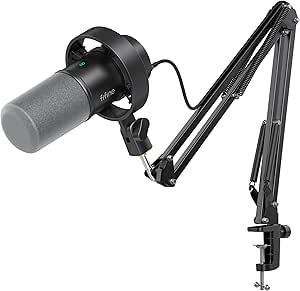 | Best Value Kit | Microphone type: Dynamic | Connectivity: USB, XLR | Polar pattern: Cardioid (unidirectional) | VIEW LATEST PRICE | See Our Full Breakdown |
| MAONO A04 USB Condenser Microphone Kit |  | Best Beginner Condenser Kit | Microphone type: 16 mm electret condenser | Connectivity: USB, USB Type-C | Audio resolution: 192 kHz/24-bit | VIEW LATEST PRICE | See Our Full Breakdown |
| FIFINE AmpliGame AM8T USB/XLR Dynamic Gaming Microphone Kit with Boom Arm |  | Best for Streaming and Podcasting | Microphone type: Dynamic | Connectivity: USB, XLR | Polar pattern: Unidirectional (cardioid) | VIEW LATEST PRICE | See Our Full Breakdown |
| NEEWER DM04 USB/XLR RGB Dynamic Microphone with AI Noise Cancellation |  | Best for Desktop Control and Connectivity | Microphone type: Dynamic | Connectivity: USB-C and XLR | Polar pattern: Cardioid (unidirectional) | VIEW LATEST PRICE | See Our Full Breakdown |
| Sennheiser Profile USB Cardioid Condenser Microphone with Table Stand |  | Best USB Desk Mic for Solo Podcasts | Connectivity: USB-C | Microphone type: Cardioid condenser | Polar pattern: Unidirectional | VIEW LATEST PRICE | See Our Full Breakdown |
| Podcast Equipment Bundle for Two with Audio Interface, Voice Changer, and Condenser Microphones |  | Best Feature-Packed Starter Bundle for Two | Connectivity: Bluetooth and USB | Microphone connection: XLR | Microphones: Two condenser microphones | VIEW LATEST PRICE | See Our Full Breakdown |
| Shure MV7X XLR Dynamic Podcast and Recording Microphone, Black |  | Best XLR Pick for Noisy Rooms | Connectivity: XLR | Microphone type: Dynamic | Polar pattern: Unidirectional (cardioid) | VIEW LATEST PRICE | See Our Full Breakdown |
| ZealSound K66 Dual Wireless Podcast Microphones for PC and Mobile Devices |  | Best Wireless Two-Speaker Setup | Microphones: Two wireless condenser microphones | Wireless connection: 2.4 GHz receiver | Audio resolution: 48 kHz/24-bit | VIEW LATEST PRICE | See Our Full Breakdown |
| Sktome V8S Podcast Equipment Bundle for Two with BM-800 Microphones |  | Best Boom-Arm Bundle for Two Beginners | Model: V8S | Microphones: Two BM-800 condenser microphones | Connectivity: USB | VIEW LATEST PRICE | See Our Full Breakdown |
| FIFINE AmpliGame AM8 USB/XLR Dynamic Microphone for Gaming and Streaming |  | Best Value for a Flexible Starter Setup | Microphone type: Dynamic | Polar pattern: Unidirectional cardioid | Connectivity: USB, XLR | VIEW LATEST PRICE | See Our Full Breakdown |
| MAONO PD500W Hybrid Wireless Dynamic Podcast Microphone |  | Best for Wireless Recording and Backup Capture | Microphone type: Dynamic | Connectivity: 2.4 GHz wireless, USB Type-C, XLR | Internal recording: 32 GB storage, 32-bit float | VIEW LATEST PRICE | See Our Full Breakdown |
| Shure MV6 Gen 2 USB-C Microphone for Gaming and Streaming, Black |  | Best for Beginners Who Want Guided Voice Processing | Model: MV6G2-K | Connectivity: USB-C | Form factor: Desktop | VIEW LATEST PRICE | See Our Full Breakdown |
| TONOR TD510 Air H+ Dynamic Podcast Microphone with Boom Arm |  | Best Complete Desk Kit with a Boom Arm | Microphone type: Dynamic | Polar pattern: Cardioid | Connectivity: USB, XLR | VIEW LATEST PRICE | See Our Full Breakdown |
| Shure MV7+ USB-C and XLR Dynamic Podcast Microphone, Black |  | Best Premium Hybrid Upgrade | Microphone type: Dynamic | Connectivity: USB-C, XLR | Polar pattern: Unidirectional | VIEW LATEST PRICE | See Our Full Breakdown |
| Black Friday podcast microphone | Connectivity | Microphone type | Polar pattern |
|---|---|---|---|
| Shure MV7+ USB-C and XLR Dynam | USB-C, XLR | Dynamic | Unidirectional |
| FIFINE AmpliTank K688CT Podcas | USB, XLR | Dynamic | Cardioid (unidirectional) |
| MAONO A04 USB Condenser Microp | USB, USB Type-C | 16 mm electret condenser | Cardioid |
| FIFINE AmpliGame AM8T USB/XLR | USB, XLR | Dynamic | Unidirectional (cardioid) |
| NEEWER DM04 USB/XLR RGB Dynami | USB-C and XLR | Dynamic | Cardioid (unidirectional) |
| Sennheiser Profile USB Cardioi | USB-C | Cardioid condenser | Unidirectional |
| Podcast Equipment Bundle for T | Bluetooth and USB | — | — |
| Shure MV7X XLR Dynamic Podcast | XLR | Dynamic | Unidirectional (cardioid) |
| ZealSound K66 Dual Wireless Po | — | — | — |
| Sktome V8S Podcast Equipment B | USB | — | Unidirectional |
| FIFINE AmpliGame AM8 USB/XLR D | USB, XLR | Dynamic | Unidirectional cardioid |
| MAONO PD500W Hybrid Wireless D | 2.4 GHz wireless, USB Type-C, XLR | Dynamic | — |
| Shure MV6 Gen 2 USB-C Micropho | USB-C | — | — |
| TONOR TD510 Air H+ Dynamic Pod | USB, XLR | Dynamic | Cardioid |
| Shure MV7+ USB-C and XLR Dynam | USB-C, XLR | Dynamic | Unidirectional |
More Details on Our Top Picks
Shure MV7+ USB-C and XLR Dynamic Podcast Microphone with Stand, Black
For a podcast setup that may grow from a single USB connection into an XLR recording chain, the Shure MV7+ is the most adaptable pick here. Its USB-C and XLR outputs support that change without replacing the microphone, while Auto Level Mode can help keep vocal volume more consistent when speaking distance varies. Voice isolation, real-time noise reduction, and a digital pop filter address common home-recording distractions; the touch panel also puts mute within easy reach. Compared with the FIFINE AmpliTank K688CT, the MV7+ offers more automated vocal processing, while the FIFINE includes a boom arm and shock mount. The tradeoff is that the Shure is a heavier, cord-powered setup and its listed operating-system compatibility is narrower, so buyers seeking a full desk kit or broader stated compatibility may prefer another option.
Pros:- USB-C and XLR connections support both simple computer recording and an upgraded audio chain.
- Voice isolation, real-time noise reduction, and a digital pop filter target common vocal-recording distractions.
- Auto Level Mode adjusts gain based on voice volume and distance.
- LED touch panel provides level monitoring and tap-to-mute control.
Cons:- The included stand does not offer the boom-arm setup supplied with the FIFINE AmpliTank K688CT.
- At 3.6 lb, it is a relatively heavy choice for frequent repositioning or travel.
- The listed compatible operating systems are Windows 10 and macOS 12.
Best for: Podcasters who want a voice-focused USB microphone now and the option to connect to an XLR mixer or interface later.
Not ideal for: Buyers who need a complete boom-arm kit out of the box, a lightweight travel microphone, or compatibility beyond the listed Windows 10 and macOS 12 systems.
- Microphone type:Dynamic
- Connectivity:USB-C, XLR
- Polar pattern:Unidirectional
- Frequency response:50 Hz
- Signal-to-noise ratio:65 dB
- Special features:LED touch panel, mute function, Auto Level Mode, real-time denoiser, digital pop filter
- Included:Stand
- Weight:3.6 lb
Our verdict“Choose the MV7+ for a flexible, voice-focused podcast setup with automatic level and noise tools, but skip it if a complete boom-arm kit matters more.”
FIFINE AmpliTank K688CT Podcast Microphone Kit with Boom Arm, USB/XLR Dynamic Microphone
The FIFINE AmpliTank K688CT makes sense for buyers who want the main desk hardware in one box: a dynamic microphone, metal boom arm, shock mount, and windscreen. In USB mode, gain, mute, and headphone monitoring controls are on the microphone, which makes routine recording adjustments easier without opening software. Its USB and XLR connections also leave room to move from a computer directly to a mixer or interface. Compared with the Shure MV7+, this kit puts more emphasis on included mounting gear than automated vocal processing; the Shure offers Auto Level Mode and real-time noise reduction, while the K688CT lists no comparable features. The main catch is that the controls work only over USB, so XLR users need to manage levels through external equipment. Check desk thickness too: the clamp is specified for desks under two inches.
Pros:- USB and XLR connectivity accommodate both computer recording and external audio gear.
- Includes a metal boom arm, windscreen, and shock mount.
- USB mode provides mute, gain, and headphone monitoring controls.
- Cardioid pickup pattern focuses capture toward the speaker.
Cons:- Microphone controls are unavailable in XLR mode.
- The desk clamp is specified for desks under two inches thick.
- Unlike the Shure MV7+, the listed feature set does not include automatic level adjustment or real-time noise reduction.
Best for: First-time podcasters building a fixed desk setup who want a boom arm and basic USB controls included.
Not ideal for: Creators who need microphone-mounted controls while recording through XLR, or whose desk is two inches thick or more.
- Microphone type:Dynamic
- Connectivity:USB, XLR
- Polar pattern:Cardioid (unidirectional)
- Frequency range:50 Hz–16 kHz
- Signal-to-noise ratio:80 dB
- Maximum SPL:120 dB
- Included accessories:Metal boom arm, windscreen, shock mount
- Desk clamp compatibility:Desks under 2 inches thick
Our verdict“Pick the K688CT if an included boom arm and practical USB controls matter more than automated vocal processing.”
MAONO A04 USB Condenser Microphone Kit
The MAONO A04 is the clearest choice in this group for a beginner who wants a USB condenser and a broad set of recording accessories in one kit. Its 16 mm capsule and 192 kHz/24-bit audio support are paired with an adjustable arm, shock mount, pop filter, and foam windscreen, so a new creator can assemble a desk recording position without sourcing each part separately. USB connection avoids the external interface required by XLR microphones such as the FIFINE AmpliTank K688CT in XLR mode. That simplicity comes with a different sound-capture tradeoff: this is a condenser rather than a dynamic mic, so it may suit a controlled room better than a noisy one. It also lacks XLR, is not compatible with Xbox, and the clamp only fits desks under 2.1 inches thick.
Pros:- Plug-and-play USB connection does not require an external sound card or extra drivers.
- Includes an adjustable scissor arm, shock mount, pop filter, and foam windscreen.
- Supports 192 kHz/24-bit audio.
- Compatible with many laptops, computers, Macs, PS4, PS5, and mobile phones.
Cons:- USB-only connectivity does not provide the XLR upgrade path available with the FIFINE AmpliTank K688CT.
- Not compatible with Xbox.
- The desk clamp fits desktops less than 2.1 inches thick.
Best for: New podcasters recording at a desk in a reasonably quiet room who want a USB condenser with mounting and pop-filter accessories included.
Not ideal for: Xbox users, creators in noisy rooms seeking a dynamic microphone, or anyone who wants to connect directly to an XLR mixer.
- Microphone type:16 mm electret condenser
- Connectivity:USB, USB Type-C
- Audio resolution:192 kHz/24-bit
- Polar pattern:Cardioid
- Frequency range:30 Hz–16 kHz
- Signal-to-noise ratio:70 dB
- Included accessories:Adjustable scissor arm stand, metal shock mount, pop filter, foam windscreen
- Compatibility:Most laptops, PCs, Macs, PS4, PS5, and mobile phones; not Xbox
Our verdict“Choose the A04 for a straightforward USB condenser kit and included recording accessories, provided your room is quiet and your device is compatible.”
FIFINE AmpliGame AM8T USB/XLR Dynamic Gaming Microphone Kit with Boom Arm
For creators who split their desk time between podcasting and streaming, the FIFINE AmpliGame AM8T pairs a dynamic cardioid mic with an included boom arm and useful USB controls. The mute button, gain adjustment, and headphone monitoring make it easy to manage a live session without relying on the recording app, while its customizable RGB lighting can be turned off when a more restrained look suits the show. It also offers XLR for a later move to external audio gear. Compared with the FIFINE AmpliTank K688CT, the AM8T foregrounds customizable lighting and gaming-focused controls; the K688CT includes a shock mount and lists a 50 Hz–16 kHz range. The AM8T’s XLR cable is not included, and its clamp is limited to desks up to two inches thick, so check the desk and accessory needs before choosing it.
Pros:- USB and XLR connections support computer recording and a future external audio setup.
- Includes an adjustable boom arm, desk clamp, windscreen, and USB cable.
- Onboard mute, gain, and headphone monitoring controls suit live sessions.
- RGB lighting is customizable and can be turned off.
Cons:- An XLR cable is not included.
- The desk clamp fits desktops up to two inches thick.
- Unlike the FIFINE AmpliTank K688CT, the listed included accessories do not include a shock mount.
Best for: Video podcasters and streamers who want an included boom arm, on-mic monitoring controls, and optional RGB lighting.
Not ideal for: Audio-first buyers who want a shock mount included, need an XLR cable in the box, or have a desk thicker than two inches.
- Microphone type:Dynamic
- Connectivity:USB, XLR
- Polar pattern:Unidirectional (cardioid)
- Frequency range:50 Hz–16 kHz
- Signal-to-noise ratio:80 dB
- Special features:Controllable RGB lighting, mute button, gain control, headphone jack and volume control
- Included accessories:Boom arm stand, C-clamp, 8.2 ft USB-to-USB-C cable, windscreen
- Desk clamp capacity:Fits desktops up to 2 inches thick
Our verdict“Choose the AM8T for a streaming-friendly dynamic mic with a boom arm and USB controls, but plan to supply an XLR cable if you switch connections.”
NEEWER DM04 USB/XLR RGB Dynamic Microphone with AI Noise Cancellation
The NEEWER DM04 stands out for buyers who want a compact desktop microphone with controls and connections suited to more than one recording setup. USB-C and XLR provide flexibility, and the listing also describes simultaneous USB and XLR output, a useful distinction for creators who want computer connectivity alongside external gear. App controls for gain, EQ, low-cut, treble, and noise cancellation give it a wider adjustment toolkit than the FIFINE AmpliGame AM8T, whose appeal leans more toward included boom-arm positioning and customizable RGB. The DM04 also has one-touch mute and real-time headphone monitoring. Its desktop base takes up space rather than lifting the mic off the desk on an arm, though the included pole offers some height. Buyers should also note that its many controls and app features may be more than a basic recording setup needs.
Pros:- USB-C and XLR connectivity, with simultaneous output listed as supported.
- App offers gain, EQ, low-cut, treble, noise cancellation, and RGB controls.
- One-touch mute, physical gain and headphone-volume controls, and a 3.5 mm monitoring output.
- Cardioid pickup pattern and AI noise cancellation target background and off-axis sound.
Cons:- Desktop base and pole occupy desk space compared with the included boom-arm setup on the FIFINE AmpliGame AM8T.
- The number of app adjustments may be unnecessary for buyers seeking a simple USB microphone.
- The listed frequency response is 20 Hz–20 kHz.
Best for: Desktop podcasters who want USB-C and XLR options, app-based sound adjustments, and headphone monitoring in one microphone.
Not ideal for: Creators with limited desk space who need a boom arm in the box, or buyers who prefer a simple plug-and-record setup with few adjustments.
- Microphone type:Dynamic
- Connectivity:USB-C and XLR
- Polar pattern:Cardioid (unidirectional)
- Sampling:192 kHz/24-bit
- Frequency response:20 Hz–20 kHz
- Signal-to-noise ratio:90 dB
- Maximum SPL:130 dB
- Headphone output:3.5 mm
- Compatible operating systems:Windows, Mac, Android, iOS
Our verdict“Pick the DM04 if you want a desktop dynamic mic with broad app controls and flexible outputs, and have space for its base.”
Sennheiser Profile USB Cardioid Condenser Microphone with Table Stand
The Sennheiser Profile is a straightforward pick for a solo host who wants a desk-ready microphone without adding an interface or software setup. Its USB-C connection and onboard gain, mix, and volume controls make it easier to manage a recording session from the mic itself, while the headphone jack lets you monitor audio as you speak. The compact stand and adjustable tilt suit a small podcast desk better than a boom-arm bundle such as the Sktome V8S.
The tradeoff is its single-channel, cardioid condenser design: it is aimed at one speaker and can pick up more room sound than the dynamic Shure MV7X. Choose it for a simple solo setup in a reasonably quiet space; skip it if you need two voices or stronger room-noise rejection.
Pros:- USB-C plug-and-play connection avoids a separate audio interface.
- Onboard gain, mix, volume, and mute controls make adjustments accessible during recording.
- Headphone jack supports direct audio monitoring.
- Metal body, adjustable tilt, and included compact table stand suit a tidy desktop setup.
Cons:- Single-channel design is intended for one speaker at a time.
- Unidirectional condenser pickup is less suited to untreated or noisy rooms than the dynamic Shure MV7X.
- The included table stand offers less positioning flexibility than a boom arm.
Best for: Solo podcasters who want plug-and-play USB-C recording, desk placement, and hands-on monitoring and level controls.
Not ideal for: Two-host shows or people recording in a noisy room who need multiple microphone inputs or the room-noise handling of a dynamic mic.
- Connectivity:USB-C
- Microphone type:Cardioid condenser
- Polar pattern:Unidirectional
- Compatible devices:PC, tablet, mobile device
- Controls and monitoring:Mute button, gain, mix, and volume controls; headphone jack
- Construction:Metal
- Weight:350 g
- Power:USB-powered
Our verdict“Choose the Sennheiser Profile for a controlled-space solo podcast when simple USB-C operation matters more than multi-speaker recording or dynamic-mic room rejection.”
Podcast Equipment Bundle for Two with Audio Interface, Voice Changer, and Condenser Microphones
This bundle is aimed at creators who want to put two people on mic without piecing together stands, cables, and a mixer separately. It includes two condenser microphones, boom arms, shock mounts, pop filters, and an audio interface with noise reduction, instrument input, sound effects, and four voice modes. Compared with the ZealSound K66, this kit is more of a tabletop recording and effects package than a wireless two-mic setup; the K66 is the clearer fit when cordless placement matters.
The extra features bring compromises: the listing calls for charging before first use or after long storage, and driver setup may require help from the seller. Its voice effects can suit casual streams, but buyers focused on clean, consistent spoken-word recording may prefer a simpler mic such as the Sennheiser Profile. Pick this for a two-person starter setup with room to experiment, not for a streamlined professional workflow.
Pros:- Includes two microphones and accessories for recording two speakers.
- Audio interface adds noise reduction, instrument input, and sound-effect controls.
- Four voice variations and ten sound effects offer options for casual livestreams.
- Supports connection to computers and smartphones.
Cons:- Driver installation may require contacting the seller if automatic setup fails.
- The battery may need charging before use, adding a setup step.
- Effects-focused controls may be unnecessary for clean, straightforward podcast recording.
Best for: Two-person podcast or livestream beginners who want microphones, boom arms, an interface, and playful audio effects in one kit.
Not ideal for: Hosts seeking a simple, dependable plug-and-play recording chain or a wireless setup that can be moved around without cables.
- Connectivity:Bluetooth and USB
- Microphone connection:XLR
- Microphones:Two condenser microphones
- Channels:2
- Pickup pattern:Unidirectional
- Included accessories:Audio interface, two boom arms, two shock mounts, two pop filters, two foam covers, two XLR cables, USB cable, two audio cables, and earphone
- Voice variations:Four: female, male, child, and monster
- Sound effects:10
Our verdict“Choose this bundle if you want an all-in-one two-person kit with creative effects, but favor the ZealSound K66 for a simpler wireless shared-device setup.”
Shure MV7X XLR Dynamic Podcast and Recording Microphone, Black
The Shure MV7X makes the most sense for a podcaster building around an XLR interface or mixer, especially when the recording space is less than quiet. Its dynamic cardioid capsule and voice-isolation design help focus capture on the speaker, while the integrated shock mount helps limit vibration reaching the mic. Compared with the USB-ready Sennheiser Profile, it asks for more equipment and setup, but it is better suited to a dedicated voice chain than a compact plug-and-play desk rig.
The core compromise is clear: XLR-only connectivity means this microphone cannot connect directly to a computer or phone without compatible audio hardware. It also records one channel, so a two-host show needs another mic and the appropriate inputs. The all-metal body and adjustable yoke support durable studio placement, but this is not the flexible, self-contained choice for a beginner who wants to record immediately.
Pros:- Dynamic cardioid pickup and voice-isolation design suit spoken-word recording in less controlled rooms.
- Integrated shock mount helps reduce unwanted vibration.
- All-metal construction is suited to a fixed studio setup.
- Adjustable yoke and included 3/8-inch adapter work with many stands and boom arms.
Cons:- XLR output requires a compatible audio interface or mixer.
- Single-channel microphone means a co-host needs a separate mic and input.
- Corded connection limits placement compared with the wireless ZealSound K66.
Best for: Podcasters with an XLR interface or mixer who record in a room where background sound and desk vibration are concerns.
Not ideal for: USB-only beginners, mobile creators, or anyone who wants to connect a microphone directly to a computer without extra audio hardware.
- Connectivity:XLR
- Microphone type:Dynamic
- Polar pattern:Unidirectional (cardioid)
- Frequency range:50–16,000 Hz
- Signal-to-noise ratio:72 dB
- Channels:1
- Construction:All-metal
- Mounting accessory:Adjustable yoke mount and 3/8-inch adapter
Our verdict“Choose the MV7X if you already have XLR recording hardware and want a focused dynamic mic for spoken-word recording; skip it if you need direct USB connection.”
ZealSound K66 Dual Wireless Podcast Microphones for PC and Mobile Devices
The ZealSound K66 stands apart from single-mic picks such as the Sennheiser Profile by putting two wireless microphones on one receiver, so co-hosts can record to one compatible device without a separate mixer. Individual gain, echo, and mute controls give each speaker some control over their own signal, and the headphone jack supports monitoring. Its USB-C and Lightning adapters also make it a more mobile-friendly two-person option than the XLR-only Shure MV7X.
There are important limits behind that convenience: both mics must be in wireless mode to work together on one device, while wired use supports only one mic per device. Bluetooth is for music input, not microphone audio, so it is not a general Bluetooth mic system. The kit suits remote or flexible co-host recording, but buyers who prioritize a traditional wired studio chain should look at the Shure instead.
Pros:- Two microphones connect wirelessly to one device through the receiver.
- Independent gain, echo, and mute controls let speakers adjust their own mic.
- Headphone monitoring includes independent volume control.
- Can operate while charging if a recording runs longer than the battery allows.
Cons:- Both microphones must use wireless mode to work together on one device.
- Wired operation supports only one microphone per device.
- Bluetooth supports music input, not microphone audio.
Best for: Co-hosts who want to record two speakers to one compatible PC, phone, or tablet without an audio mixer.
Not ideal for: Creators who need two wired microphones on one device, XLR studio connections, or Bluetooth transmission of microphone audio.
- Microphones:Two wireless condenser microphones
- Wireless connection:2.4 GHz receiver
- Audio resolution:48 kHz/24-bit
- Pickup pattern:Cardioid
- Battery life:Up to 16 hours
- Recharge time:Approximately 3 hours
- Monitoring:3.5 mm headphone jack with independent volume control
- Connections and compatibility:USB cable with USB-C and Lightning adapters; PC, Mac, PS4/PS5, iPhone, iPad, USB-C Android devices, and tablets
Our verdict“Choose the K66 for convenient two-speaker recording across compatible mobile and computer devices, but not for a wired studio workflow.”
Sktome V8S Podcast Equipment Bundle for Two with BM-800 Microphones
The Sktome V8S gives two new hosts a ready-made desktop arrangement: two BM-800 condenser microphones, boom arms, shock holders, wind screens, and a sound board with effects and voice-changing modes. That makes it more furniture-ready than the Sennheiser Profile, which is a single USB mic with a small table stand, and a wired alternative to the ZealSound K66 for creators who do not need wireless placement. The included arms can help put each mic near its speaker without taking up the same desk space as tabletop stands.
The audio path is a compromise: the microphones use 3.5 mm connections, rather than the direct USB simplicity of the Profile or XLR workflow of the Shure MV7X. The kit also requires charging after purchase. Its effects and accessories suit casual two-person streaming, but buyers focused on a clean, minimal recording setup may find the bundle’s extra controls and connections more work than they need.
Pros:- Includes two condenser microphones and two boom arms for a shared desk setup.
- Sound board offers voice-changing modes and sound effects.
- Unidirectional pickup is intended for voice recording.
- Bundle includes shock holders, wind screens, foam covers, and earphones.
Cons:- 3.5 mm microphone connections are less direct than the USB-C Sennheiser Profile or XLR Shure MV7X.
- The listing says charging is required after purchase.
- The included sound board and multiple cables add setup complexity for straightforward podcast recording.
Best for: Two-person podcast or gaming-stream beginners who want boom arms, microphones, and sound effects included in one package.
Not ideal for: Creators who want direct USB-C recording, a conventional XLR studio chain, or a low-complexity setup with few cables.
- Model:V8S
- Microphones:Two BM-800 condenser microphones
- Connectivity:USB
- Connector type:3.5 mm jack
- Polar pattern:Unidirectional
- Signal-to-noise ratio:78 dB
- Compatible devices:Gaming console, laptop
- Included accessories:Sound board, two boom arms, two earphones, two shock holders, two wind screens, two foam covers, XLR-to-3.5 mm cables, USB charging cable, and 3.5 mm audio cables
Our verdict“Choose the Sktome V8S if two beginners want boom arms and playful sound-board features in one kit, but favor a direct USB mic for simpler recording.”
FIFINE AmpliGame AM8 USB/XLR Dynamic Microphone for Gaming and Streaming
The FIFINE AmpliGame AM8 is a practical pick for a first podcast microphone when you want to start over USB and keep an XLR upgrade open. In USB mode, its tap-to-mute, headphone monitoring, and onboard gain control make it easier to record without adding a separate mixer. Its cardioid dynamic capsule favors close speech and can help reduce sounds arriving from the sides, though the recommended 2–6-inch distance means it needs to sit near your mouth. Compared with the more feature-rich MAONO PD500W, the AM8 gives up wireless recording and onboard backup capture, but its simpler setup may suit a solo desk-based creator better. The tradeoff is that RGB and USB controls stop working in XLR mode, and the XLR cable is not included.
Pros:- USB and XLR connections support both direct-to-computer recording and future interface setups.
- USB tap-to-mute and an LED reminder make it easier to avoid recording unwanted speech.
- Cardioid dynamic pickup helps limit some off-axis room noise.
- Built-in 3/8-inch and 5/8-inch stand threads fit common microphone stands.
Cons:- XLR cable is not included.
- RGB lighting and onboard controls are unavailable in XLR mode.
- Close 2–6-inch positioning can feel restrictive without a boom arm.
Best for: New solo podcasters who want USB controls now and the option to move to an XLR interface later.
Not ideal for: Creators who need wireless recording, onboard backup files, or to speak from farther than a few inches away.
- Microphone type:Dynamic
- Polar pattern:Unidirectional cardioid
- Connectivity:USB, XLR
- Frequency response:50 Hz–16 kHz
- Channels:1
- USB-mode features:Tap-to-mute, headphone monitoring, gain and monitoring-volume controls, RGB lighting
- Stand threads:3/8 inch and 5/8 inch
Our verdict“Choose the AM8 for an affordable USB-first setup with an XLR path, but skip it if you need wireless features or XLR controls.”
MAONO PD500W Hybrid Wireless Dynamic Podcast Microphone
The MAONO PD500W earns a distinct place for podcasters who want more than a direct USB connection. Its 2.4 GHz wireless, USB, and XLR options let the same microphone fit a mobile conversation, a computer-based show, or an interface setup. The standout safeguard is 32 GB of internal 32-bit float recording, which can provide a backup when a wireless link or recording workflow causes trouble. It also supports two microphones on one receiver, a useful fit for a two-person show without a separate receiver per speaker. Compared with the simpler FIFINE AmpliGame AM8, the PD500W adds far more recording flexibility, but that brings more setup decisions, and some sound processing depends on the Maono Link app. Its receiver is limited to two microphones.
Pros:- Wireless, USB, and XLR connectivity cover mobile and studio-style recording setups.
- 32 GB internal storage with 32-bit float recording offers a local backup option.
- One receiver supports up to two microphones.
- All-metal construction and integrated air-suspended isolation help manage handling noise.
Cons:- The receiver supports no more than two microphones.
- Some EQ and dynamics processing features require the Maono Link app.
- Wireless operation adds charging and receiver management to the recording setup.
Best for: Interview podcasters and mobile creators who want wireless freedom, local backup recording, and support for two microphones.
Not ideal for: Solo creators seeking a straightforward plug-in desktop mic, or larger panels needing more than two wireless microphones on one receiver.
- Microphone type:Dynamic
- Connectivity:2.4 GHz wireless, USB Type-C, XLR
- Internal recording:32 GB storage, 32-bit float
- Audio resolution:24-bit/48 kHz
- Maximum SPL:147 dB
- Battery:3200 mAh; rated for up to 60 hours
- Receiver support:Up to two microphones
- Noise reduction:Three adjustable levels; AI-powered noise reduction
- Software processing:Maono Link EQ, compressor, limiter, and auto gain control
Our verdict“Pick the PD500W when wireless recording and onboard backup matter more than keeping a podcast setup simple.”
Shure MV6 Gen 2 USB-C Microphone for Gaming and Streaming, Black
The Shure MV6 Gen 2 is the most straightforward choice here for a creator who wants a desktop USB-C mic with voice cleanup built into the workflow. Voice Isolation, adjustable denoising, and plosive control target common speech problems, while Auto Level Mode can help keep changing speaking volume more consistent. The included stand and cable reduce the number of setup pieces compared with the TONOR TD510 Air H+, which bundles a boom arm and adds USB/XLR flexibility but asks buyers to choose among more connection and enhancement options. The MV6 Gen 2 keeps things simpler, but it is USB-C only, so it cannot move to an XLR interface like the TD510 or the Shure MV7+. Setup also calls for the MOTIV app for firmware and sound controls, and recording is single-channel.
Pros:- USB-C connection and included desktop stand support a compact computer-based setup.
- Voice Isolation and adjustable denoising help manage background sound.
- Digital plosive control can reduce disruptive bursts of air in speech.
- Auto Level Mode and five-band EQ offer ways to shape and steady the voice.
Cons:- USB-C-only connectivity does not support an XLR interface.
- Initial setup requires the MOTIV app for firmware and performance adjustments.
- Single-channel recording does not suit multichannel capture needs.
Best for: First-time podcasters and streamers recording at a computer who want a desktop stand and app-based speech adjustments.
Not ideal for: Creators planning to use an XLR interface, record multiple channels, or avoid installing companion software.
- Model:MV6G2-K
- Connectivity:USB-C
- Form factor:Desktop
- Channels:1
- Voice features:Voice Isolation, adjustable Real-time Denoiser, Digital Popper Stopper, Auto Level Mode
- EQ:5-band
- Included:Desktop stand, USB-C cable
- Dimensions:12.15 x 8.45 x 2.85 inches
Our verdict“Choose the MV6 Gen 2 for app-assisted speech cleanup in a simple USB-C desktop setup, not for an XLR upgrade path.”
TONOR TD510 Air H+ Dynamic Podcast Microphone with Boom Arm
The TONOR TD510 Air H+ stands out for buyers who want a boom arm in the box rather than a desktop stand alone. Its USB and XLR outputs cover both direct computer recording and a later sound-card setup, while tap mute and separate microphone and headphone volume controls keep common adjustments close at hand. Three enhancement modes offer a more guided way to shape speech than the simpler FIFINE AmpliGame AM8, and AI noise reduction adds another option for handling background sound. That convenience comes with limits: the TD510 is not compatible with Xbox, and an XLR cable is not supplied. Its 850 g weight and relatively large listed dimensions also make the included arm a more fitting match than a small desktop stand.
Pros:- USB and XLR connectivity suit both direct computer use and sound-card setups.
- Included boom arm helps position the microphone close to the speaker.
- Three audio enhancement modes and AI noise reduction offer speech-shaping options.
- Tap mute, headphone monitoring, and separate mic and headphone volume controls support quick adjustments.
Cons:- Not compatible with Xbox.
- XLR cable is not included.
- At 850 g with substantial listed dimensions, it is less suited to a small desktop setup.
Best for: Computer and PS4/PS5 podcasters who want a USB/XLR mic, monitoring controls, and a boom arm in the package.
Not ideal for: Xbox users, buyers who already need an XLR cable included, or creators who want a compact tabletop microphone.
- Microphone type:Dynamic
- Polar pattern:Cardioid
- Connectivity:USB, XLR
- Audio enhancement modes:Bass Roll-off, Vocal Clarity, Mid-Range Emphasis
- Noise reduction:AI noise reduction
- Monitoring and controls:3.5 mm headphone jack, mic and headphone volume controls, tap mute
- Compatibility:Computers, PS4, PS5; XLR connection to sound cards; not Xbox
- Weight:850 g
- Included accessory:Boom arm
Our verdict“Choose the TD510 Air H+ for a bundled boom-arm setup with USB/XLR flexibility, provided Xbox support is not a requirement.”
Shure MV7+ USB-C and XLR Dynamic Podcast Microphone, Black
The Shure MV7+ is the premium-minded pick for a podcaster who wants one microphone to bridge computer recording and an XLR-based studio setup. Its USB-C and XLR connectivity makes that upgrade path clearer than the USB-only Shure MV6 Gen 2, while the MV7+ adds a customizable LED touch panel for level monitoring and tap-to-mute. Automatic gain adjustment and real-time noise reduction can help keep speech controlled without constant manual correction; built-in reverb offers an additional effect when the recording calls for it. The tradeoff is that this remains a single-channel, corded microphone, and its listed compatibility focuses on personal computers running Windows 10 or macOS 12. Buyers seeking a basic desktop USB mic may find the MV6 Gen 2’s included stand-oriented setup more direct.
Pros:- USB-C and XLR connections support computer recording and interface-based setups.
- Automatic gain adjustment helps manage changes in speaking distance and volume.
- Real-time noise reduction and Voice Isolation support cleaner speech capture.
- LED touch panel provides level monitoring and tap-to-mute.
Cons:- Requires a corded power connection.
- Single-channel design does not support multichannel recording.
- Listed operating-system compatibility is limited to Windows 10 and macOS 12.
Best for: Established solo podcasters who want USB-C convenience now and XLR connectivity for a more developed recording setup later.
Not ideal for: Buyers seeking a simple USB-only desktop kit, wireless recording, or a microphone for multichannel production.
- Microphone type:Dynamic
- Connectivity:USB-C, XLR
- Polar pattern:Unidirectional
- Frequency response:50 Hz–16 kHz
- Channels:1
- Controls and processing:Customizable LED touch panel, tap-to-mute, automatic gain adjustment, real-time noise reduction, reverb
- Material:Metal
- Power source:Corded electric
- Supported operating systems:Windows 10, macOS 12
Our verdict“Pick the MV7+ if you want a premium USB/XLR microphone with onboard controls and a clear path to interface recording.”
How We Picked
I ranked these microphones by how well their design fits common podcast setups: solo or two-person recording, USB simplicity or XLR expansion, and use in a quiet or less-controlled room. I also weighed what comes in the box, including stands, boom arms, interfaces, and bundles, because missing equipment can change the real setup effort. Product type mattered too: dynamic and condenser microphones have different room and placement needs, so I treated those differences as buying factors rather than assuming one design suits everyone.
The order favors useful flexibility and a clear path from first recording to a more developed setup. That puts the Shure MV7+ USB-C and XLR first, with the K688CT and other bundled dynamic options appealing to buyers who prioritize included mounting gear. Standalone XLR microphones, wireless models, and multi-person kits have more specific strengths, so they rank according to how well they serve those needs—not because one format is universally better. Black Friday timing does not change the ranking: I compare fit, usability, and setup value rather than relying on temporary deal claims.
| Black Friday podcast microphone | Polar pattern |
|---|---|
| Shure MV7+ USB-C and XLR Dynam | Unidirectional |
| FIFINE AmpliTank K688CT Podcas | Cardioid (unidirectional) |
| MAONO A04 USB Condenser Microp | Cardioid |
| FIFINE AmpliGame AM8T USB/XLR | Unidirectional (cardioid) |
| NEEWER DM04 USB/XLR RGB Dynami | Cardioid (unidirectional) |
| Sennheiser Profile USB Cardioi | Unidirectional |
| Podcast Equipment Bundle for T | — |
| Shure MV7X XLR Dynamic Podcast | Unidirectional (cardioid) |
| ZealSound K66 Dual Wireless Po | — |
| Sktome V8S Podcast Equipment B | Unidirectional |
| FIFINE AmpliGame AM8 USB/XLR D | Unidirectional cardioid |
| MAONO PD500W Hybrid Wireless D | — |
| Shure MV6 Gen 2 USB-C Micropho | — |
| TONOR TD510 Air H+ Dynamic Pod | Cardioid |
| Shure MV7+ USB-C and XLR Dynam | Unidirectional |
Factors to Consider When Choosing Black Friday Podcast Microphones
Before choosing from this list, I would match the microphone to the room and recording routine, then check what else the setup needs. A microphone that seems like a good deal can still mean extra purchases or a workflow that does not suit the show.
Choose for the Room, Not Just the Voice
Room sound can affect a recording as much as the microphone itself. A dynamic mic is often the more forgiving choice in a lived-in room because it is commonly used close to the speaker, reducing how much distant sound reaches the recording. A condenser may suit a quieter, more controlled space, but it can pick up more of the room and nearby noise. Neither label makes a microphone automatically better for speech; placement, speaking distance, and the room still matter. Before buying, listen for fan noise, reflections, and traffic at the spot where you plan to record. If you cannot change the room, prioritize a close-working setup and budget time for positioning rather than expecting software features to fix every problem.
Decide Whether USB or XLR Fits Your Next Few Years
USB is a direct path to a computer or compatible device, which can make a first recording session simpler. XLR connects through an audio interface or mixer, adding equipment and setup steps but giving a show more room to expand its signal chain. Hybrid USB/XLR microphones offer both routes, but the XLR connection is not a complete recording system by itself. A common mistake is buying an XLR microphone before checking the cost, inputs, and compatibility of an interface. If you record alone and want minimal setup, direct USB may be all you need. If you expect multiple microphones or want interface-based controls, compare the whole system rather than the mic alone.
Count Every Piece of the Setup
Included accessories can matter more than an extra feature on a spec sheet. A microphone bundle with a boom arm may save a separate mounting decision, while a desktop stand may be easier to place but occupy valuable desk space. Check whether the package includes a pop filter, cables, interface, or other parts your recording plan actually requires. Bundles for two people can reduce the number of separate purchases, yet they also bring more gear to connect and store. Do not assume every included item suits your desk or recording position; mounting compatibility and reach matter. I would list what is already at home before comparing kits so the value reflects useful equipment, not simply a larger box.
Match the Microphone Count to the Show
A solo podcast usually benefits more from a reliable single-mic setup than from a bundle built for multiple speakers. For co-hosts in one room, confirm how each microphone reaches the computer or interface and whether the system supports separate tracks if that matters to your editing. Two microphones connected as one mixed input can limit control over each speaker after recording. Wireless models can help when a host needs to move, but check device compatibility and how the kit handles receivers and connections before committing. Guests joining remotely may not need a second physical microphone at all. Buy for the actual recording format, not for a hypothetical future show that may never need the extra equipment.
Treat Noise Processing as Support, Not a Room Fix
Noise-cancellation or voice-processing features can reduce some unwanted sound, but they cannot replace good placement or a quiet recording environment. Processing may also change how a voice sounds, so check whether it can be adjusted or bypassed if you prefer a more natural recording. A common mistake is choosing software features over the connection type and accessories that determine whether the microphone fits the setup. For spoken-word recording, consistent distance and careful gain settings can be more useful than piling on effects. If you record in changing environments, look for controls that make it easy to adapt rather than relying on a single preset. Think of processing as a finishing aid, not a guarantee of studio sound.
Set a Black Friday Buying Limit Before Browsing
Black Friday promotions can make a feature-packed bundle feel like a better choice even when much of its gear will go unused. Decide what the recording setup must do first, then compare the total equipment needed to make it work. Paying more can make sense for hybrid connectivity, a better-matched mounting kit, or support for a growing show; it is harder to justify if those options will sit unused. Also check return terms and device compatibility before purchase, since a microphone that cannot connect to your intended phone or computer is not useful value. Compare models on the same practical needs rather than treating a temporary promotion as proof of a better fit. That approach keeps the purchase focused on recording, not on collecting features.
Frequently Asked Questions
Should I choose the Shure MV7+ or the Shure MV7X for a first podcast setup?
I would choose the MV7+ if direct USB recording matters or you want USB and XLR routes in one microphone. The MV7X is a more specific fit for a setup already built around XLR, since it needs a compatible interface or mixer to connect to a computer. That makes the MV7X less convenient as a standalone first purchase, even if its XLR-only design suits an existing recording chain. Check what cables and mounting hardware each listing includes before deciding. The better choice depends on the system you already own, not just the microphone name.
Is a dynamic microphone always better for podcasting in a noisy room?
No microphone type can remove a noisy room on its own. Dynamic models are often a practical choice for close-miked speech in less-controlled spaces, but placement and speaking distance still affect what gets recorded. A condenser can work well in a quiet room, while room reflections or a nearby fan may be more obvious in an untreated space. Before choosing, test the intended recording spot and move the mic close enough for comfortable speech without blocking the speaker. Noise processing can help with some sounds, but it should not be the only plan for handling a loud room.
Do I need an audio interface for a USB/XLR podcast microphone?
You can use the USB connection directly when the microphone supports it and your device is compatible. The XLR connection requires an audio interface, mixer, or other suitable input device; an XLR cable alone does not connect the microphone to a computer as a complete recording setup. An interface becomes useful when you want to connect more than one XLR microphone or manage a broader recording chain. If you plan to record only one speaker and value simplicity, USB may be enough. Check the exact connection options before buying, especially when comparing hybrid models with XLR-only picks such as the MV7X.
Are two-microphone podcast bundles a good choice for co-hosts?
They can be a practical starting point when two people record in the same space and the package includes the equipment they need. The key question is how both microphones connect and whether the recording setup keeps each voice on a separate track. A bundle can include more gear than a simple solo setup, which means more connections, desk space, and setup decisions. Check device compatibility and whether an included interface or control unit supports your intended recording software. If one co-host joins remotely, a second physical mic may not be necessary.
Is a wireless podcast microphone worth choosing over USB or XLR?
Wireless is most useful when you need freedom to move or want to avoid a microphone cable between the speaker and recording device. For a seated podcast, a wired USB or XLR setup may be simpler because it avoids receiver placement and wireless connection checks. Before choosing a wireless kit, confirm compatibility with your computer or mobile device and understand how its receiver connects. Also consider how you will manage charging and interruptions during a longer session. The ZealSound K66 and MAONO PD500W address different wireless needs, so compare the actual use case rather than assuming wireless is a general upgrade.
Conclusion
For most solo podcasters, I would start with the Shure MV7+ USB-C and XLR as the best overall choice because it supports both a simple USB workflow and a later XLR setup. For best value in an all-in-one mounting kit, the FIFINE AmpliTank K688CT is a strong fit; beginners who want a direct desktop USB route can look at the Sennheiser Profile or MAONO A04, depending on room conditions. My best premium pick is the Shure MV7+ for buyers who want the flexibility of both connection types, while the Shure MV7X is better for someone who already owns an XLR interface. For two-person recording, compare the bundled kits by their connection layout, and for movement, consider the wireless ZealSound K66 or MAONO PD500W. Choose the microphone that fits the room, recording format, and equipment you already have—not the package with the most features.