My pick for the best Radeon graphics card overall is the ASRock Radeon RX 9070 XT Steel Legend Dark 16GB, which combines a current high-performance GPU with 16GB of memory. The RX 9070 XT models from PowerColor, XFX, and ASUS are strong alternatives if you prefer a different cooler or board design, while the RX 9060 XT 16GB cards suit buyers who want a more moderate performance tier with ample memory. The lineup also includes older RX 6000 cards and lower-tier RX 7600 options, but their appeal depends on workload, system fit, and the capabilities of the specific model. Choosing well means balancing performance, VRAM, card dimensions, power needs, and how long you expect to keep the GPU. Read on for my full breakdown and guidance on which Radeon card best fits your build.

Get audio and creator gear delivered free with Prime
- Fast, free delivery on millions of items
- Prime Video, Amazon Music and more included
- Member-only deals all year
Complete the kit


Key Takeaways
- The RX 9070 XT group leads this roundup: four 16GB cards from ASRock, PowerColor, XFX, and ASUS give buyers several board-design choices in the highest performance tier represented here.
- RX 9060 XT cards offer a distinct middle ground: all four listed options have 16GB, making them a more memory-capable step above the RX 7600 models without moving to the RX 9070 XT tier.
- The RX 7600 cards share an 8GB limit: their appeal is a more modest GPU class, but buyers should weigh that memory capacity against the demands of newer games and higher resolutions.
- Older RX 6900 XT and RX 6950 XT models need careful comparison: their 16GB capacity remains useful, but generation, card condition, power requirements, and seller support matter when choosing them over newer options.
- Board design can decide between cards with the same GPU: dimensions, cooler layout, factory overclock, and case clearance can make one RX 9070 XT or RX 9060 XT a better fit than another.
| ASRock Radeon RX 9070 XT Steel Legend Dark 16GB Graphics Card |  | Best Overall | GPU: AMD Radeon RX 9070 XT | Architecture: AMD RDNA 4 | Memory: 16GB GDDR6, 256-bit | VIEW LATEST PRICE | See Our Full Breakdown |
| XFX Swift AMD Radeon RX 9060 XT OC White Gaming Graphics Card, 16GB GDDR6 | 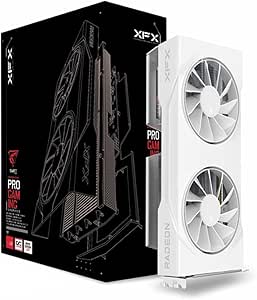 | Best for White Builds | GPU: AMD Radeon RX 9060 XT | Architecture: AMD RDNA 4 | Memory: 16GB GDDR6 | VIEW LATEST PRICE | See Our Full Breakdown |
| XFX Speedster SWFT210 Radeon RX 7600 Graphics Card, 8GB GDDR6 |  | Best Entry-Level Pick | GPU: AMD Radeon RX 7600 | Architecture: AMD RDNA 3 | Memory: 8GB GDDR6 | VIEW LATEST PRICE | See Our Full Breakdown |
| ASRock Radeon RX 9070 Challenger OC 16GB Graphics Card |  | Best Slot-Conscious RX 9070 | GPU: AMD Radeon RX 9070 | Architecture: AMD RDNA 4 | Compute units: 56 | VIEW LATEST PRICE | See Our Full Breakdown |
| PowerColor Reaper AMD Radeon RX 9070 XT 16GB GDDR6 Graphics Card |  | Best Compact RX 9070 XT | GPU: AMD Radeon RX 9070 XT | Memory: 16GB GDDR6 | GPU clock: 2400 MHz | VIEW LATEST PRICE | See Our Full Breakdown |
| ASRock Radeon RX 7600 Challenger Pro OC 8GB Graphics Card |  | Best Triple-Fan RX 7600 | GPU: AMD Radeon RX 7600 | Architecture: AMD RDNA 3 | Memory: 8GB GDDR6 | VIEW LATEST PRICE | See Our Full Breakdown |
| ASRock Radeon RX 9060 XT Challenger Pro 16GB OC Graphics Card |  | Best for VRAM Headroom | GPU: AMD Radeon RX 9060 XT | Architecture: AMD RDNA 4 | Memory: 16GB GDDR6 | VIEW LATEST PRICE | See Our Full Breakdown |
| XFX Swift AMD Radeon RX 9070 XT Graphics Card, 16GB GDDR6, Triple Fan |  | Best for High-End Gaming | GPU: AMD Radeon RX 9070 XT | Memory: 16GB GDDR6 | Boost clock: Up to 2970 MHz | VIEW LATEST PRICE | See Our Full Breakdown |
| AMD Radeon RX 6950 XT 16GB GDDR6 Graphics Card |  | Best for Wide Memory Bus | GPU: AMD Radeon RX 6950 XT | Memory: 16GB GDDR6 | Memory bus: 256-bit | VIEW LATEST PRICE | See Our Full Breakdown |
| ASUS Dual Radeon RX 9060 XT 16GB GDDR6 Graphics Card |  | Best Compact RX 9060 XT | GPU: AMD Radeon RX 9060 XT | Memory: 16GB GDDR6 | Boost clock: Up to 3250 MHz in OC mode; up to 3230 MHz in Default mode | VIEW LATEST PRICE | See Our Full Breakdown |
| ASUS TUF Gaming Radeon RX 6900 XT OC Edition 16GB Graphics Card |  | Best for Durable Cooling | GPU: AMD Radeon RX 6900 XT | Memory: 16GB GDDR6 | Memory clock speed: 2340 MHz | VIEW LATEST PRICE | See Our Full Breakdown |
| ASUS Prime Radeon RX 9070 XT OC Edition 16GB GDDR6 Graphics Card |  | Best for Quiet-Mode Flexibility | GPU: AMD Radeon RX 9070 XT | Memory: 16GB GDDR6 | Boost clock: Up to 3030 MHz (OC mode); up to 3010 MHz (default mode) | VIEW LATEST PRICE | See Our Full Breakdown |
| ASRock Radeon RX 7700 XT Challenger 12GB OC Graphics Card |  | Best Midrange Balance | GPU: AMD Radeon RX 7700 XT | Architecture: AMD RDNA 3 | Compute units: 54 | VIEW LATEST PRICE | See Our Full Breakdown |
| GIGABYTE Radeon RX 7600 GAMING OC 8G Graphics Card |  | Best Entry-Level Triple-Fan Pick | GPU: AMD Radeon RX 7600 | Memory: 8GB GDDR6 | Memory interface: 128-bit | VIEW LATEST PRICE | See Our Full Breakdown |
| GIGABYTE Radeon RX 6900 XT Gaming OC 16G Graphics Card |  | Best for Flexible Display Connections | GPU: AMD Radeon RX 6900 XT | Memory: 16GB GDDR6 | Memory interface: 256-bit | VIEW LATEST PRICE | See Our Full Breakdown |
| Radeon graphics card | GPU | Memory | Boost clock | Cooling |
|---|---|---|---|---|
| ASRock Radeon RX 9070 XT Steel | AMD Radeon RX 9070 XT | 16GB GDDR6, 256-bit | Up to 2970 MHz | — |
| XFX Swift AMD Radeon RX 9060 X | AMD Radeon RX 9060 XT | 16GB GDDR6 | Up to 3320 MHz | 3 fans |
| XFX Speedster SWFT210 Radeon R | AMD Radeon RX 7600 | 8GB GDDR6 | Up to 2655 MHz | Dual-fan |
| ASRock Radeon RX 9070 Challeng | AMD Radeon RX 9070 | 16GB GDDR6, 256-bit | Up to 2520 MHz | Triple fans with 0dB silent mode |
| PowerColor Reaper AMD Radeon R | AMD Radeon RX 9070 XT | 16GB GDDR6 | — | 3 fans |
| ASRock Radeon RX 7600 Challeng | AMD Radeon RX 7600 | 8GB GDDR6 | Up to 2695 MHz | Triple fans with 0dB operation at low temperatures |
| ASRock Radeon RX 9060 XT Chall | AMD Radeon RX 9060 XT | 16GB GDDR6 | Up to 3290 MHz | — |
| XFX Swift AMD Radeon RX 9070 X | AMD Radeon RX 9070 XT | 16GB GDDR6 | Up to 2970 MHz | Triple fan |
| AMD Radeon RX 6950 XT 16GB GDD | AMD Radeon RX 6950 XT | 16GB GDDR6 | Up to 2310 MHz | — |
| ASUS Dual Radeon RX 9060 XT 16 | AMD Radeon RX 9060 XT | 16GB GDDR6 | Up to 3250 MHz in OC mode; up to 3230 MHz in Default mode | 2 Axial-tech fans with 0dB technology |
| ASUS TUF Gaming Radeon RX 6900 | AMD Radeon RX 6900 XT | 16GB GDDR6 | — | 3 fans; Axial-tech design |
| ASUS Prime Radeon RX 9070 XT O | AMD Radeon RX 9070 XT | 16GB GDDR6 | Up to 3030 MHz (OC mode); up to 3010 MHz (default mode) | — |
| ASRock Radeon RX 7700 XT Chall | AMD Radeon RX 7700 XT | 12GB GDDR6 | Up to 2584 MHz | Dual fans with fan-stop at low temperatures |
| GIGABYTE Radeon RX 7600 GAMING | AMD Radeon RX 7600 | 8GB GDDR6 | — | WINDFORCE, three fans |
| GIGABYTE Radeon RX 6900 XT Gam | AMD Radeon RX 6900 XT | 16GB GDDR6 | Up to 2285 MHz | WINDFORCE 3X with alternate spinning fans |
More Details on Our Top Picks
ASRock Radeon RX 9070 XT Steel Legend Dark 16GB Graphics Card
I’d put the Steel Legend Dark RX 9070 XT first for buyers seeking a strong all-around Radeon card without giving up memory capacity or modern display connections. Its 16GB of GDDR6, 256-bit bus, and RDNA 4 features suit demanding games and graphics work, while the listed boost clock reaches 2970 MHz. Compared with the ASRock RX 9070 Challenger OC, this XT model has the higher-tier GPU, but its nearly three-slot build asks more of your case. The triple-fan cooler, heatpipes, and reinforced metal construction are aimed at sustained operation; they also make this a substantial card rather than a compact upgrade. I’d choose it for a roomy desktop with two 8-pin leads, not a small-form-factor build.
Pros:- 16GB GDDR6 and a 256-bit memory bus suit demanding games and content work.
- Triple-fan cooling pairs with heatpipes and an airflow-focused fin design.
- Metal frame and backplate add structural reinforcement.
- Three DisplayPort 2.1a outputs and HDMI 2.1b support current display setups.
Cons:- The 2.9-slot design can crowd smaller cases and nearby expansion slots.
- Requires two 8-pin power connectors.
- May not fit or work with some built-in computer systems.
Best for: Desktop gamers and creators who want an RX 9070 XT, 16GB of memory, and DisplayPort 2.1a in a case with room for a 2.9-slot card.
Not ideal for: Small-case builders or owners of prebuilt systems with limited clearance or no two 8-pin power connections.
- GPU:AMD Radeon RX 9070 XT
- Architecture:AMD RDNA 4
- Memory:16GB GDDR6, 256-bit
- Boost clock:Up to 2970 MHz
- Compute units:64
- Interface:PCIe 5.0
- Video outputs:3x DisplayPort 2.1a, 1x HDMI 2.1b
- Cooling and size:Triple-fan; 2.9-slot; 298 x 131 x 58 mm
- Power connectors:2x 8-pin
Our verdict“Choose the Steel Legend Dark for a high-tier, feature-rich Radeon build if your case and power supply can accommodate its substantial size and connectors.”
XFX Swift AMD Radeon RX 9060 XT OC White Gaming Graphics Card, 16GB GDDR6
The XFX Swift RX 9060 XT OC White is the clearest fit here for a coordinated white gaming PC that still needs 16GB of VRAM. Its RDNA 4 GPU sits below the RX 9070 and RX 9070 XT cards in this group, so I’d favor it for buyers who value a distinctive build and a generous memory allotment over stepping up to the higher-tier models. The three-fan cooler and listed boost clock up to 3320 MHz give it a more substantial setup than the dual-fan XFX Speedster SWFT210 RX 7600, while the 16GB capacity is a major difference from that card’s 8GB. It supports up to 3840 × 2160, but the listing does not specify newer output standards or detailed power requirements, so verify system fit before buying.
Pros:- 16GB GDDR6 provides more memory capacity than the RX 7600 option in this roundup.
- White finish suits coordinated light-colored PC builds.
- Three-fan cooling design.
- HDMI and two DisplayPort outputs support multiple display connections.
Cons:- Sits below the RX 9070 and RX 9070 XT models in this lineup.
- Its 10.63-inch length may not fit shorter cases.
- The supplied product data does not specify output versions or power requirements.
Best for: Builders planning a white-themed desktop who want an RDNA 4 card with 16GB of memory and three-fan cooling.
Not ideal for: Buyers seeking the highest-tier performance in this group, a compact card, or clearly specified advanced display connections.
- GPU:AMD Radeon RX 9060 XT
- Architecture:AMD RDNA 4
- Memory:16GB GDDR6
- Game clock:Up to 2780 MHz
- Boost clock:Up to 3320 MHz
- Cooling:3 fans
- Outputs:HDMI, 2x DisplayPort
- Maximum resolution:3840 x 2160
- Dimensions:10.63 x 4.88 inches
Our verdict“Pick this XFX for a white build that needs 16GB and triple-fan cooling, but choose an RX 9070-series card if higher-tier GPU positioning matters more.”
XFX Speedster SWFT210 Radeon RX 7600 Graphics Card, 8GB GDDR6
The XFX Speedster SWFT210 RX 7600 is the entry-level choice in this batch: an RDNA 3 card with 8GB of GDDR6 and a dual-fan cooler, rather than the 16GB memory and newer RDNA 4 architecture found in the RX 9060 XT and RX 9070-series picks. That makes it a more straightforward fit for buyers building around a more modest GPU tier, especially when four display outputs are useful. Its listed boost clock reaches 2655 MHz, and the three DisplayPort connections give it an advantage in multi-monitor setups over models with fewer specified outputs. The tradeoff is memory capacity: compared with the XFX Swift RX 9060 XT OC White, this card has half as much VRAM. I’d skip it for workloads or games where that gap is a priority.
Pros:- Dual-fan cooling keeps the design simpler than the triple-fan cards in this batch.
- Three DisplayPort outputs plus HDMI offer useful display flexibility.
- Boost clock is listed up to 2655 MHz.
- Includes a stated 3-year manufacturer warranty.
Cons:- 8GB of memory is less than the 16GB offered by the RX 9060 XT and RX 9070-series picks.
- Uses RDNA 3 rather than the newer RDNA 4 architecture in several alternatives.
- Requires a desktop PCI-Express x16 interface.
Best for: Desktop builders seeking an RDNA 3 Radeon card for a more modest gaming setup or a multi-monitor workspace.
Not ideal for: Buyers who need 16GB of VRAM, newer RDNA 4 features, or a card for a system without a PCIe x16 slot.
- GPU:AMD Radeon RX 7600
- Architecture:AMD RDNA 3
- Memory:8GB GDDR6
- Boost clock:Up to 2655 MHz
- Memory clock:18 GHz
- Cooling:Dual-fan
- Video outputs:1x HDMI, 3x DisplayPort
- Interface:PCI-Express x16
- Warranty:3-year manufacturer warranty
Our verdict“Choose the SWFT210 if an RDNA 3 card with four display outputs fits your build better than the 16GB capacity of the newer options.”
ASRock Radeon RX 9070 Challenger OC 16GB Graphics Card
The ASRock RX 9070 Challenger OC is a sensible step down from the RX 9070 XT models when you want RDNA 4 and 16GB of GDDR6 without moving to the highest-tier GPU in this group. Its 2.5-slot design is slimmer than the Steel Legend Dark RX 9070 XT at 2.9 slots, which can make case planning easier, although this is still a full-size card. The factory overclock reaches a listed 2520 MHz boost, and triple fans with a 0dB silent mode offer a quiet-fan behavior when the card is idle or lightly loaded. The tradeoff is clear: it has 56 compute units, compared with 64 on the Steel Legend XT, and still needs two 8-pin connectors plus a recommended 700W power supply. I’d choose it for a capable but less top-tier Radeon build.
Pros:- 16GB GDDR6 on a 256-bit bus.
- Factory-overclocked, with boost clock listed up to 2520 MHz.
- Triple-fan cooling includes a 0dB silent mode.
- 2.5-slot format is slimmer than the Steel Legend Dark RX 9070 XT.
Cons:- Has 56 compute units, fewer than the 64 in the Steel Legend Dark RX 9070 XT.
- Requires two 8-pin power connectors and a recommended 700W power supply.
- Still needs case-clearance checks as a 290 mm-long, 2.5-slot card.
Best for: PC gamers who want an RDNA 4 RX 9070 with 16GB memory and a 2.5-slot cooler instead of an RX 9070 XT.
Not ideal for: Buyers seeking the higher-tier RX 9070 XT GPU, or systems that cannot provide two 8-pin connectors and the recommended power supply capacity.
- GPU:AMD Radeon RX 9070
- Architecture:AMD RDNA 4
- Compute units:56
- Memory:16GB GDDR6, 256-bit
- Game clock:2070 MHz
- Boost clock:Up to 2520 MHz
- Cooling:Triple fans with 0dB silent mode
- Power:2x 8-pin; 700W recommended PSU
- Dimensions and slot size:290 x 123 x 51 mm; 2.5-slot
Our verdict“Choose the Challenger OC if you want an RX 9070 with 16GB and a somewhat slimmer cooler, not the higher-tier GPU of the XT cards.”
PowerColor Reaper AMD Radeon RX 9070 XT 16GB GDDR6 Graphics Card
The PowerColor Reaper RX 9070 XT pairs the same GPU tier and 16GB memory capacity as the ASRock Steel Legend Dark RX 9070 XT with a notably thinner listed profile: 41 mm, versus the Steel Legend’s 58 mm. That makes the Reaper a useful option for builders with tighter expansion-slot clearance, even though its 289 mm length still calls for a case check. It has three fans, HDMI 2.1, and three DisplayPort 2.1 outputs, while the ASRock offers specified DisplayPort 2.1a and HDMI 2.1b connections. The product data lists a 2400 MHz GPU clock and a minimum 750W system power supply, so buyers should confirm PSU capacity before installation. I’d favor it for a slim RX 9070 XT layout, not a low-power system.
Pros:- RX 9070 XT GPU paired with 16GB GDDR6.
- 41 mm thickness is slimmer than the Steel Legend Dark’s listed 58 mm.
- Three fans and support for HDMI 2.1 and DisplayPort 2.1.
- Three DisplayPort outputs allow several monitor connections.
Cons:- Requires a minimum 750W system power supply and two 8-pin PCIe connectors.
- Its 289 mm length may still limit case compatibility.
- Listed GPU clock is 2400 MHz; product data does not provide a boost clock for comparison.
Best for: Builders who want an RX 9070 XT and 16GB of memory but need a thinner card profile than the Steel Legend Dark.
Not ideal for: Owners of systems with less than a 750W power supply or without two 8-pin PCIe power connectors.
- GPU:AMD Radeon RX 9070 XT
- Memory:16GB GDDR6
- GPU clock:2400 MHz
- Memory clock:20 GHz
- Interface:PCI Express x16
- Video outputs:1x HDMI 2.1, 3x DisplayPort 2.1
- Cooling:3 fans
- Power:2x 8-pin PCIe; minimum 750W system power
- Dimensions:289 x 111 x 41 mm
Our verdict“Pick the Reaper if you want an RX 9070 XT in a thinner profile and your system can meet its 750W power recommendation.”
ASRock Radeon RX 7600 Challenger Pro OC 8GB Graphics Card
The RX 7600 makes this ASRock a sensible pick for buyers building a mainstream gaming PC, and its triple-fan cooler with 0dB operation is a distinguishing feature among the more modest cards here. Compared with the XFX Speedster SWFT210 Radeon RX 7600, this model is longer and uses 2.5 slots, so its extra cooling hardware comes at a real space cost. Its 8GB of GDDR6 and 128-bit bus suit buyers focused on current, less memory-intensive gaming, but leave less room for demanding textures and newer workloads than the 16GB RX 9060 XT cards in this roundup. Four display outputs add flexibility for multi-monitor setups. I’d skip it if your case is short or you want more memory headroom.
Pros:- Triple-fan cooling with fan-stop operation at low temperatures
- Supports up to four displays through three DisplayPort outputs and HDMI
- Metal backplate adds rigidity to the long card
- Supports ray tracing and AMD FSR in compatible software
Cons:- 303 mm length and 2.5-slot thickness limit case compatibility
- 8GB of memory offers less headroom than the 16GB RX 9060 XT models
- Needs one 8-pin power connector and a recommended 550W power supply
Best for: Mainstream gamers with a roomy mid-tower case who want a quieter RX 7600 and several display connections.
Not ideal for: Small-form-factor builders and gamers targeting memory-heavy games or workloads that benefit from 16GB of VRAM.
- GPU:AMD Radeon RX 7600
- Architecture:AMD RDNA 3
- Memory:8GB GDDR6
- Memory interface:128-bit
- Boost clock:Up to 2695 MHz
- Cooling:Triple fans with 0dB operation at low temperatures
- Video outputs:3 x DisplayPort 1.4a with DSC; 1 x HDMI 2.1
- Dimensions and slot size:303 x 131 x 45 mm; 2.5 slots
- Recommended power supply:550W
Our verdict“Choose this RX 7600 if quiet low-load operation and four display outputs matter more than compact dimensions or extra VRAM.”
ASRock Radeon RX 9060 XT Challenger Pro 16GB OC Graphics Card
For buyers who want a current-generation Radeon with room for larger game assets and creative projects, the 16GB of GDDR6 is the main reason to pick this RX 9060 XT. It offers twice the memory of the ASRock Radeon RX 7600 Challenger Pro OC, giving it more headroom for demanding textures and applications without stepping up to the RX 9070 XT class. The RDNA 4 GPU, factory overclock, and DisplayPort 2.1a and HDMI 2.1b outputs also make it a more up-to-date feature set than that RX 7600. Its triple-fan cooler can stop at low loads, though the 2.5-slot card still needs a case with suitable clearance. I’d compare it with the ASUS Dual RX 9060 XT if a shorter card or quieter BIOS profile matters more.
Pros:- 16GB of GDDR6 provides more memory capacity than the RX 7600 options
- RDNA 4 architecture with a factory overclock up to 3290 MHz
- Triple-fan cooling includes 0dB fan-stop operation
- DisplayPort 2.1a and HDMI 2.1b connections
Cons:- 2.5-slot thickness needs more than two expansion slots
- Requires a 550W recommended power supply and one 8-pin connector
- Three display outputs offer less multi-monitor capacity than the RX 7600 Challenger Pro
Best for: Gamers and creators who want 16GB of VRAM in an RX 9060 XT and have room for a 2.5-slot triple-fan card.
Not ideal for: Builders with tight case clearance or buyers who prefer a dual-fan card with a selectable Quiet and Performance BIOS.
- GPU:AMD Radeon RX 9060 XT
- Architecture:AMD RDNA 4
- Memory:16GB GDDR6
- Memory bus and speed:128-bit; 20 Gbps
- Game clock:2700 MHz
- Boost clock:Up to 3290 MHz
- Interface:PCIe 5.0 x16
- Video outputs:2 x DisplayPort 2.1a; 1 x HDMI 2.1b
- Dimensions and slot size:290 x 123 x 41 mm; 2.5 slots
Our verdict“Pick this ASRock if you want 16GB RX 9060 XT performance and cooling, and your case can accommodate its 2.5-slot design.”
XFX Swift AMD Radeon RX 9070 XT Graphics Card, 16GB GDDR6, Triple Fan
The Radeon RX 9070 XT gives this XFX a higher-end role than the RX 9060 XT and RX 7600 cards in this group. Its 16GB of GDDR6 and boost clock up to 2970 MHz make it the pick for buyers seeking a stronger GPU tier without moving to a different brand. Triple-fan cooling is suited to a performance-focused card, while HDMI and three DisplayPort connections support a flexible display setup. Compared with the ASRock RX 9060 XT Challenger Pro, the XFX belongs to a higher model class, but the supplied product data lists fewer details about its power needs, physical dimensions, and architecture. That makes case and power-supply planning less certain from this listing alone. I’d favor it over the RX 9060 XT when the RX 9070 XT designation is the priority.
Pros:- RX 9070 XT GPU with boost clock up to 2970 MHz
- 16GB of GDDR6 memory
- Triple-fan cooling design
- HDMI and three DisplayPort outputs
Cons:- Product data does not specify dimensions or slot thickness
- Power connector and recommended power supply are not listed
- The supplied specifications do not identify its architecture or memory bus
Best for: PC gamers seeking an RX 9070 XT with 16GB of memory, triple-fan cooling, and three DisplayPort outputs.
Not ideal for: Builders who need confirmed card dimensions, power requirements, or a detailed compatibility profile before buying.
- GPU:AMD Radeon RX 9070 XT
- Memory:16GB GDDR6
- Boost clock:Up to 2970 MHz
- Memory clock speed:20 GHz
- Interface:PCI Express x16
- Cooling:Triple fan
- Video outputs:HDMI; 3 x DisplayPort
- Maximum resolution:7680 x 4320
- Warranty:3 years
Our verdict“Choose the XFX Swift if you want an RX 9070 XT with 16GB and triple-fan cooling, and can confirm its fit and power needs before purchase.”
AMD Radeon RX 6950 XT 16GB GDDR6 Graphics Card
The RX 6950 XT stands apart from the newer RX 9060 XT models with a 256-bit memory bus and 16GB of GDDR6. That wider bus is the defining spec here, while FidelityFX Super Resolution, FreeSync, and Radeon Anti-Lag cover familiar gaming and display features. It’s an older Radeon generation than the RDNA 4 ASRock and ASUS RX 9060 XT cards, so buyers should weigh its listed specifications rather than assume newer features or performance. The product data gives a 4K maximum resolution, but also lists just one HDMI output and one fan, a less flexible setup than the multi-output, triple-fan cards in this roundup. Its recommended 850W power supply is another substantial system requirement. I’d choose it only when the bus width and 16GB capacity suit your priorities.
Pros:- 16GB GDDR6 paired with a 256-bit memory bus
- Supports resolutions up to 3840 x 2160
- Includes FreeSync, FidelityFX Super Resolution, and Radeon Anti-Lag
Cons:- Recommended power supply is 850W
- Listed with a single fan, unlike the triple-fan RX 9070 XT and RX 9060 XT cards
- Product data lists only an HDMI video output
Best for: Experienced PC builders who specifically want a 16GB Radeon with a 256-bit memory bus and have an 850W-capable system.
Not ideal for: Buyers seeking newer RDNA 4 features, multiple display connections, or a lower recommended power supply requirement.
- GPU:AMD Radeon RX 6950 XT
- Memory:16GB GDDR6
- Memory bus:256-bit
- Memory speed:Up to 18 Gbps
- Boost clock:Up to 2310 MHz
- Interface:PCI-Express x16
- Video output:HDMI
- Recommended power supply:850W
- Number of fans:1
Our verdict“Consider this RX 6950 XT if its 256-bit bus and 16GB capacity fit your build, but skip it if power draw and display flexibility lead your checklist.”
ASUS Dual Radeon RX 9060 XT 16GB GDDR6 Graphics Card
Among the two RX 9060 XT cards here, the ASUS Dual is the better fit for builders prioritizing a shorter, dual-fan design over the ASRock Challenger Pro’s triple-fan setup. Its listed dimensions are 8 x 4.7 inches, and the Quiet and Performance BIOS profiles let buyers choose between those operating approaches. The card still occupies 2.5 slots, so “compact” describes its length and cooler layout—not a true slim, two-slot build. Like the ASRock, it carries 16GB of GDDR6 and modern DisplayPort 2.1a and HDMI 2.1b outputs. The ASUS listing gives a slightly lower maximum boost clock than the ASRock’s 3290 MHz figure, but adds a selectable BIOS and documented weight and warranty. I’d pick it when fit and control matter more than the ASRock’s extra fan.
Pros:- Short 8-inch length compared with the 290 mm ASRock RX 9060 XT
- Dual BIOS switch offers Quiet and Performance profiles
- 0dB technology supports quieter operation during light gaming
- 16GB GDDR6 with DisplayPort 2.1a and HDMI 2.1b outputs
Cons:- 2.5-slot thickness still exceeds a two-slot allowance
- Two fans rather than the triple-fan cooling on the ASRock RX 9060 XT
- Listed boost clock is below the ASRock Challenger Pro’s maximum
Best for: Small-case builders who want an RX 9060 XT with 16GB of memory, a shorter dual-fan layout, and selectable BIOS profiles.
Not ideal for: Builders needing a true two-slot card or buyers who prefer a triple-fan cooling arrangement.
- GPU:AMD Radeon RX 9060 XT
- Memory:16GB GDDR6
- Boost clock:Up to 3250 MHz in OC mode; up to 3230 MHz in Default mode
- Game clock:Up to 2640 MHz in OC mode; up to 2620 MHz in Default mode
- Cooling:2 Axial-tech fans with 0dB technology
- Video outputs:2 x DisplayPort 2.1a; HDMI 2.1b
- Dimensions and slot thickness:8 x 4.7 inches; 2.5 slots
- Weight:1.3 pounds
- Warranty:3 years
Our verdict“Choose the ASUS Dual for a shorter RX 9060 XT with useful BIOS options, provided your case has 2.5 slots of clearance.”
ASUS TUF Gaming Radeon RX 6900 XT OC Edition 16GB Graphics Card
The ASUS TUF RX 6900 XT OC is the durability-focused choice among these two RX 6900 XT cards. Its aluminum shroud, reinforced frame, and vented backplate are designed to withstand long-term use while helping hot air escape, and the three Axial-tech fans use dual ball bearings. Compared with the GIGABYTE Radeon RX 6900 XT Gaming OC 16G, this model emphasizes sturdy construction and cooling details rather than listing dual BIOS and a broader mix of display outputs. Both offer 16GB of GDDR6 for demanding games, but this ASUS is a substantial card at 12.6 inches long and 1.7 kg, so check case clearance before choosing it. GPU Tweak II adds tools for tuning and monitoring, though the supplied specifications do not state power requirements or card thickness. I’d favor it for a roomy desktop where build strength matters more than compact fit.
Pros:- 16GB of GDDR6 memory for demanding games and graphics workloads
- Three Axial-tech fans with dual ball bearings
- Vented backplate and reinforced frame support cooling and durability
- GPU Tweak II provides tuning, thermal controls, and system monitoring
Cons:- 12.6-inch length and 1.7 kg weight call for careful case and support checks
- Power requirements and card thickness are not specified in the supplied data
Best for: Desktop builders with a spacious case who want a 16GB RX 6900 XT and a reinforced cooler assembly.
Not ideal for: Small-case builders or buyers who need confirmed thickness and power requirements before checking component fit.
- GPU:AMD Radeon RX 6900 XT
- Memory:16GB GDDR6
- Memory clock speed:2340 MHz
- Interface:PCI Express x16
- Video outputs:DisplayPort, HDMI
- Cooling:3 fans; Axial-tech design
- Dimensions:12.6 x 5.52 inches
- Weight:1.7 kg
- Warranty:3 years
Our verdict“Choose this RX 6900 XT if you have room for its large frame and prioritize reinforced construction and detailed cooling hardware.”
ASUS Prime Radeon RX 9070 XT OC Edition 16GB GDDR6 Graphics Card
The ASUS Prime RX 9070 XT OC pairs a current-generation GPU with practical ways to adjust noise and performance. Its dual BIOS lets builders choose Quiet or Performance profiles, while 0dB fan operation can stop the fans during light gaming; that quiet behavior is not specified for heavier play. A phase-change thermal pad and three Axial-tech fans handle cooling in a 2.5-slot design. Compared with the older ASUS TUF RX 6900 XT OC, this card lists PCIe 5.0 and newer DisplayPort 2.1a and HDMI 2.1b outputs, making it the more up-to-date platform option in this batch. It still measures 12.3 inches long, so the slimmer slot profile does not make it a small-card choice. I’d pick it for a builder who values selectable acoustics and modern connections, not a compact system.
Pros:- 16GB GDDR6 memory and RX 9070 XT GPU
- Dual BIOS offers Quiet and Performance profiles
- 0dB fan operation supports quieter use during light gaming
- Three DisplayPort 2.1a outputs and HDMI 2.1b
Cons:- 2.5-slot design and 12.3-inch length require case clearance
- Quiet fan-stop behavior is specified for light gaming, not sustained load
Best for: PC builders seeking an RX 9070 XT with selectable BIOS profiles, quiet fan behavior at light loads, and current display connections.
Not ideal for: Small-form-factor builders or buyers expecting silent cooling during sustained heavy gaming.
- GPU:AMD Radeon RX 9070 XT
- Memory:16GB GDDR6
- Boost clock:Up to 3030 MHz (OC mode); up to 3010 MHz (default mode)
- Game clock:Up to 2480 MHz (OC mode); up to 2460 MHz (default mode)
- Interface:PCIe 5.0, PCI-Express x16
- Video outputs:3 x DisplayPort 2.1a, 1 x HDMI 2.1b
- Slot design:2.5-slot
- Dimensions:12.3 x 5.1 inches
- Warranty:3 years
Our verdict“Pick this card if you want an RX 9070 XT with flexible noise profiles and modern outputs, and have room for its long cooler.”
ASRock Radeon RX 7700 XT Challenger 12GB OC Graphics Card
The ASRock RX 7700 XT Challenger sits between the 8GB RX 7600 options and the 16GB high-end cards in this roundup. Its 12GB of GDDR6 and 48MB Infinity Cache give it more memory headroom than the GIGABYTE RX 7600 Gaming OC, while the RX 7700 XT is the more performance-oriented GPU tier. The compact 10.5-inch dual-fan design is also easier to fit than the large ASUS and GIGABYTE RX 6900 XT models. Fan-stop operation can keep the card quiet when temperatures are low, but this is not a high-end triple-fan cooler. Builders should also plan for two 8-pin power connectors and verify their case and power supply, especially in prebuilt systems. This is the sensible middle ground for buyers who want more than an entry-level Radeon without moving to a large flagship card.
Pros:- 12GB GDDR6 and 48MB Infinity Cache
- 10.5-inch length fits more builds than the RX 6900 XT cards here
- Dual-fan cooling includes fan-stop operation at low temperatures
- Three DisplayPort outputs and HDMI 2.1
Cons:- Requires two 8-pin power connectors
- 12GB memory is less capacity than the 16GB cards in this roundup
- Prebuilt system compatibility and case clearance need checking
Best for: Mainstream gaming PC builders who want more GPU and memory headroom than an RX 7600 while keeping a relatively short card.
Not ideal for: Owners of prebuilts with limited power connectors or buyers seeking a 16GB card for heavier memory demands.
- GPU:AMD Radeon RX 7700 XT
- Architecture:AMD RDNA 3
- Compute units:54
- Memory:12GB GDDR6
- Memory bus:192-bit
- Boost clock:Up to 2584 MHz
- Cooling:Dual fans with fan-stop at low temperatures
- Power connectors:2 x 8-pin
- Dimensions:10.5 x 5.1 x 2.0 inches
Our verdict“Choose the RX 7700 XT Challenger for a compact midrange step up from the RX 7600, provided your power supply has two 8-pin connectors.”
GIGABYTE Radeon RX 7600 GAMING OC 8G Graphics Card
The GIGABYTE RX 7600 Gaming OC is the entry-level choice here, trading the higher GPU tiers and larger memory pools of the RX 7700 XT and RX 9070 XT models for a simpler 8GB configuration. Its WINDFORCE triple-fan cooler gives it more cooling hardware than the dual-fan ASRock RX 7700 XT Challenger, although that does not change the RX 7600’s lower place in the lineup. The 128-bit memory interface and 8GB capacity suit buyers building for lighter gaming workloads, but leave less room for memory-heavy games than the 12GB or 16GB alternatives. HDMI 2.1 and DisplayPort 2.1 provide newer display connections, and RGB Fusion adds lighting customization. At 11.1 inches, it is not especially short for an entry-level card, so measure the case before buying.
Pros:- WINDFORCE cooling system uses three fans
- HDMI 2.1 and DisplayPort 2.1 outputs
- Metal backplate and RGB Fusion lighting
- PCI Express 4.0 interface
Cons:- 8GB memory and a 128-bit interface offer less headroom than the RX 7700 XT Challenger
- 11.1-inch length may not suit compact cases
Best for: Entry-level Radeon buyers building a desktop for lighter gaming who want three-fan cooling and modern display outputs.
Not ideal for: Players targeting demanding games with high memory use or buyers wanting the greater capacity of the 12GB RX 7700 XT or 16GB cards.
- GPU:AMD Radeon RX 7600
- Memory:8GB GDDR6
- Memory interface:128-bit
- Memory clock speed:18000 MHz
- Interface:PCI Express 4.0
- Cooling:WINDFORCE, three fans
- Video outputs:1 x HDMI 2.1, 2 x DisplayPort 2.1
- Dimensions:11.1 x 4.53 inches
- Model:GV-R76GAMING OC-8GD
Our verdict“Choose this RX 7600 for a straightforward entry-level gaming build with triple-fan cooling, but move up to the RX 7700 XT if you need more memory headroom.”
GIGABYTE Radeon RX 6900 XT Gaming OC 16G Graphics Card
The GIGABYTE RX 6900 XT Gaming OC pairs the same GPU and 16GB memory capacity as the ASUS TUF RX 6900 XT, but its standout distinction is a useful four-port layout: two DisplayPort 1.4a and two HDMI 2.1 connections. That mix can simplify setups with multiple HDMI displays; the ASUS TUF RX 6900 XT description lists DisplayPort and HDMI without specifying a port count. WINDFORCE 3X cooling uses alternate spinning fans, and dual BIOS adds a choice of operating profiles. The listed boost and game clocks are lower than the ASUS model’s stated 2340 MHz memory clock, though those figures describe different clock measures and should not be treated as directly equivalent. This is still a large desktop card, and its PCIe x16 connection rules out systems without a compatible expansion slot. I’d choose it for port flexibility and BIOS options, not compact builds.
Pros:- 16GB GDDR6 memory with a 256-bit interface
- Four video outputs: two DisplayPort 1.4a and two HDMI 2.1
- WINDFORCE 3X cooling with alternate spinning fans
- Dual BIOS and metal backplate
Cons:- Requires a desktop system with a compatible PCI-Express x16 slot
- Dimensions and weight are not provided in the supplied specifications
- DisplayPort 1.4a is an older version than the RX 9070 XT ASUS card’s DisplayPort 2.1a
Best for: Desktop gamers using a mix of HDMI and DisplayPort screens who want an RX 6900 XT with dual BIOS.
Not ideal for: Small-system builders or buyers who need a compact card or a model with fully specified dimensions and weight.
- GPU:AMD Radeon RX 6900 XT
- Memory:16GB GDDR6
- Memory interface:256-bit
- Memory clock speed:16000 MHz
- Boost clock:Up to 2285 MHz
- Game clock:Up to 2050 MHz
- Cooling:WINDFORCE 3X with alternate spinning fans
- Outputs:2 x DisplayPort 1.4a, 2 x HDMI 2.1
- Features:Dual BIOS, RGB Fusion 2.0, metal backplate
Our verdict“Pick this RX 6900 XT if its four-output mix and dual BIOS suit your desktop, and skip it if you need a compact or fully dimensioned option.”
How We Picked
I grouped the cards by GPU tier and generation, then compared the factors that change the buying decision: expected performance class, VRAM capacity, cooling design, board size, factory overclocking, and compatibility needs. Within the newer lineup, the RX 9070 XT models rank ahead for buyers prioritizing higher-tier gaming performance; the RX 9060 XT options follow as a more measured 16GB alternative, while RX 7600 models serve builds with more modest performance needs. The older RX 6900 XT and RX 6950 XT cards remain relevant to some buyers, but their age makes platform condition, power draw, and availability more important parts of the decision.
Because several entries use the same GPU, I do not treat a different cooler or brand name as proof of a large performance gap. I rank those cards by the practical differences buyers can verify—dimensions, fan arrangement, factory settings, and intended fit—rather than assuming one board is faster without comparable test data. A card’s place in this guide reflects its fit for the stated buyer, not a claim that every model will perform identically in every PC.
| Radeon graphics card | Interface |
|---|---|
| ASRock Radeon RX 9070 XT Steel | PCIe 5.0 |
| XFX Swift AMD Radeon RX 9060 X | — |
| XFX Speedster SWFT210 Radeon R | PCI-Express x16 |
| ASRock Radeon RX 9070 Challeng | — |
| PowerColor Reaper AMD Radeon R | PCI Express x16 |
| ASRock Radeon RX 7600 Challeng | — |
| ASRock Radeon RX 9060 XT Chall | PCIe 5.0 x16 |
| XFX Swift AMD Radeon RX 9070 X | PCI Express x16 |
| AMD Radeon RX 6950 XT 16GB GDD | PCI-Express x16 |
| ASUS Dual Radeon RX 9060 XT 16 | — |
| ASUS TUF Gaming Radeon RX 6900 | PCI Express x16 |
| ASUS Prime Radeon RX 9070 XT O | PCIe 5.0, PCI-Express x16 |
| ASRock Radeon RX 7700 XT Chall | — |
| GIGABYTE Radeon RX 7600 GAMING | PCI Express 4.0 |
| GIGABYTE Radeon RX 6900 XT Gam | — |
Factors to Consider When Choosing Best Radeon Graphics Cards
Before choosing a Radeon card, match the GPU tier to your screen, games, and PC rather than shopping by model name alone. These broader checks can prevent an oversized card, an unsuitable power setup, or a memory limit from undermining an otherwise capable choice.
Match GPU Tier to Resolution and Frame-Rate Goals
Start with the resolution and refresh rate you actually use, then decide whether you value higher settings or steadier frame rates more. The RX 9070 XT tier sits above the RX 9060 XT and RX 7600 options in this roundup, but that extra capability only pays off if your games and display can use it. At lower resolutions, the CPU may limit frame rates before a faster GPU reaches its potential. At higher resolutions, graphics settings and game demands can make GPU headroom more valuable. Avoid choosing by a single advertised performance number; results vary by game, settings, and system. If you are unsure, compare benchmarks for the specific games you play at your target resolution.
Treat VRAM as Capacity, Not a Performance Guarantee
Memory capacity affects how comfortably a card handles large textures, demanding settings, and some creative workloads, but it does not make two GPUs equally fast. This list makes the distinction clear: RX 9060 XT, RX 9070 XT, and several older RX 6000 models have 16GB, while the RX 7600 entries have 8GB. A buyer should weigh capacity alongside GPU class, memory bandwidth, and the intended workload. Do not pay for a larger memory figure alone if the card’s overall performance does not suit your games. Conversely, a modest-capacity card may require lower texture settings sooner as software demands grow. Check the requirements of the titles and applications you rely on, not just the card label.
Check Card Dimensions and Case Clearance Before Ordering
Cards using the same GPU can have different lengths, thicknesses, and cooler designs, so model family alone does not tell you whether a card fits. Measure the space from the expansion slots to the nearest obstruction, and check how many slots the cooler occupies. Also account for front-mounted radiators, drive cages, and nearby cables. A larger cooler may help manage heat and fan noise, but it can block neighboring slots or complicate a compact build. Compare the manufacturer’s listed dimensions with your case specifications before deciding between board partners. This check is especially useful when comparing triple-fan designs with shorter or dual-fan alternatives.
Plan for Power, Cooling, and the Rest of the System
A GPU choice affects more than the graphics slot: the power supply, connectors, case airflow, and CPU all shape the finished experience. Check the exact card’s recommended power supply and connector layout, then compare those requirements with your existing unit rather than relying on wattage alone. Higher-tier cards can place greater demands on cooling and power delivery than entry-level options. Restricted airflow may lead to warmer operation or louder fans, even when the card fits physically. A very fast GPU can also be held back by an older CPU in some games. If a build needs several upgrades just to support one card, include those costs and constraints in the decision.
Compare Board Designs Without Assuming the GPU Changes
Board partners can alter cooler size, fan count, factory clocks, lighting, and physical appearance, while the underlying GPU tier stays the same. Those differences matter for fit, noise preferences, and the look of a build; they do not automatically make one version a better performer. For cards sharing the RX 9070 XT or RX 9060 XT name, compare dimensions, warranty terms, power connectors, and the exact factory specification. A larger cooler can be useful in a warm or noise-sensitive setup, but it may be a poor match for a compact case. Choose the board that suits your system and priorities rather than paying extra for cosmetic features you will not use.
Weigh Older-Generation Cards Against Newer Alternatives
The RX 6900 XT and RX 6950 XT bring 16GB of memory, but buyers should compare their actual condition and support arrangements with newer models before choosing one. Older stock or second-hand cards may have different warranty coverage, usage history, and return options from a newly sold product. Power needs, cooler condition, and availability of replacement support also deserve attention. A newer card may offer a more straightforward purchase and updated platform features, while an older card could still suit someone focused on a specific workload or a well-supported existing build. Do not infer value from a model name alone. Check the seller, warranty, and current benchmark results for the exact games you play.
Frequently Asked Questions
Should I choose an RX 9070 XT or an RX 9060 XT with 16GB?
Choose by performance needs rather than memory capacity, since both tiers in this roundup offer 16GB but target different levels of GPU capability. The RX 9070 XT group is the stronger fit when you want more graphics headroom for demanding games or higher settings. The RX 9060 XT models make more sense when you want a step below that tier and your display or games do not call for the faster option. Check benchmarks for your specific titles and resolution before deciding. Also compare card size and power requirements, because board designs differ even within a GPU family.
Is an 8GB RX 7600 still a sensible choice for a new gaming PC?
It can be a sensible fit for a build aimed at moderate graphics demands, but its 8GB capacity is the clearest limitation among the newer cards in this roundup. Think about the games you play, your preferred texture settings, and whether you plan to move to a higher-resolution display. An 8GB card may ask you to reduce settings sooner in memory-heavy games than the 16GB alternatives listed here. That does not make it unsuitable for every player, but it narrows the situations where it is the best match. Compare current game benchmarks and your system budget before choosing it over an RX 9060 XT.
Are the RX 6900 XT and RX 6950 XT worth considering over newer Radeon cards?
They can be worth considering when the exact card, condition, support, and workload make sense, but their 16GB capacity alone is not enough to settle the choice. These are older-generation options, so compare current game performance and power requirements with the newer RX 9070 XT and RX 9060 XT cards. If buying used or older stock, check warranty coverage, return terms, and whether the card has signs of heavy wear. A newer model may offer a simpler purchase and more current platform features. Base the decision on the complete package rather than assuming an older high-tier name beats a newer card.
How do I choose between different brands of the same Radeon GPU?
When the underlying GPU is the same, focus on the exact board’s dimensions, cooler, power connectors, factory settings, warranty, and seller support. A triple-fan card may suit a roomy case, while a shorter design can be easier to fit around other components. Cooler design can affect temperatures and fan behavior, but it does not prove a large frame-rate difference by itself. Check manufacturer specifications and independent comparisons for the precise models you are considering. If their performance is close, the best match is usually the one that fits your case and support preferences.
What should I check before replacing my current graphics card?
Confirm that the new card fits your case, that your power supply supports its requirements and connectors, and that the rest of your system can make use of the upgrade. Measure clearance around the card slot, including space needed for thicker coolers and nearby cables. Check the power supply’s age and model, not just its stated wattage. Consider whether your CPU could limit performance in the games you play, especially at lower resolutions. Finally, compare expected performance in your own workload so you can tell whether the upgrade addresses a real limitation.
Conclusion
For most buyers seeking the strongest all-around fit in this list, I recommend the ASRock Radeon RX 9070 XT Steel Legend Dark 16GB as the best overall pick. The RX 9060 XT 16GB cards are my value-oriented choice for buyers who want a current 16GB option without moving up to the RX 9070 XT tier; compare their dimensions and board features to find the right match. For a premium performance focus, choose among the RX 9070 XT models from PowerColor, XFX, ASUS, and ASRock based on case fit, cooling design, and support rather than brand alone. Beginners should start by checking case clearance and power requirements, then consider an RX 9060 XT or RX 7600 according to their performance goals and game demands. For specific needs, the RX 7600 8GB cards suit more modest builds, while the older RX 6900 XT and RX 6950 XT models are best reserved for buyers who can verify condition, support, and workload fit. Match the card to your system and display first; that decision matters more than picking a particular board style.