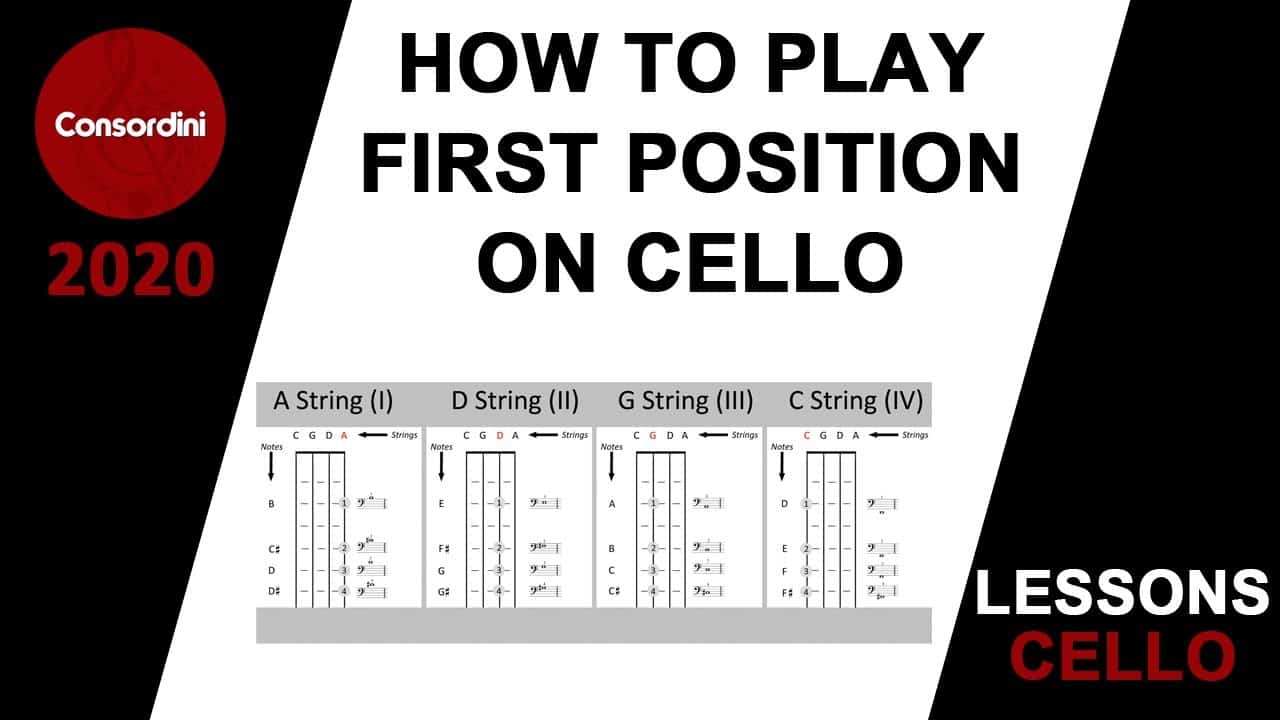

How to Play First Position on Cello
Learning where first position is the essential starting place of learning to actually play melodies on the cello – after all, it’s the first one! Why it’s called first position is that it makes playing in the keys of the open strings really easy – no finger extensions or shifting needed. Subsequent positions are named based off how many scale degrees up your first finger will go. So there are low and high second position, low and high third, and then fourth position is where your index finger is at the point on the neck right above the thumb, if the thumb is down at the base of the neck.
Going down a half step is called half position, though mostly you will extend your first finger back to get those notes. Before we begin, we have to identify a key concept in playing musical instruments: muscle memory. That is what must be made to have a good hand position. The notes on a cello in first position are a little wide compared to merely opening the fingers from a fist position. However, that is where we will start: with a relaxed hand that opens from a fist.
From this, you can adjust based on your ear where the notes should go. That is why it’s helpful to have a piano nearby – or an online piano – so that you can reference your intonation and hone the muscle memory for where your fingers go. When you place your fingers on the strings, here are the rules. It should be the tip of your fingers on the strings, not too much pad and also not on the fingernail. You shouldn’t have to press, and if it’s impossible to not be bending the tip of your finger to play, you will need to develop strength in your fingers to come down directly from the tip to the string.
Place your thumb opposite your middle finger, but do not press! Just rest the thumb there. You will get everything you need to press the string down from your arm weight. Hold the elbow up about the same angle as the right arm, about 30 or 40 degrees up from your waist. Finally, remember to keep space in your hand, as though a ball could go there, and try to find a way to easily play all the fingered notes without moving your hand around too much. After all, if your hand has to move significantly every note, how will you ever play quickly?
Start by practicing chromatically, that is, just putting each finger down and getting it in tune. Start on the D string, finding an E on the piano (the white key to the right of the group of two black keys), and matching that to your first finger on the cello.
When you think you start to get it, put your arm down and try to bring it right back up into position. This will be how you train the muscle memory.
Once you are fairly comfortable with the notes, try them on every string. Each string poses unique challenges as they are different thicknesses and angles away from you.
Adapt both hands as needed to account for this. Experiment with how pressure difference affects tone. Once you are ready, try a D major one octave scale!
This will be your starting point for hearing major scales, if you do not already have the theory training. Starting on the open D string, play 0 1 3 4 and then the same pattern on the open A string 0 1 3 4.
This will give you a D major scale! In the video, we go over some other scales you can try right away, and in the future, we will go over playing major and minor scales in every key.

ZealSound Podcast Microphone for PC, Noise Cancellation USB Mic with Gain, Volume Adjustment & Mute Button, Monitoring & Echo, for YouTube, TikTok, Podcasting, Streaming, iPhone, iPad, Android, Mac
- Studio-Quality Sound: Clear, broadcast-level audio with rich detail
- Noise Reduction Mode: Reduces background noise for cleaner recordings
- Plug-and-Play Compatibility: Works instantly with PC, Mac, and mobile devices
As an affiliate, we earn on qualifying purchases.