By 2025, NPUs will become a key feature in enterprise PCs, helping you boost AI performance and efficiency. They are designed to work seamlessly with CPUs and GPUs, enabling faster processing of complex tasks like data analytics, cybersecurity, and automation. With edge acceleration and on-device AI, these chips will reduce latency and improve decision-making. If you want to understand how this shift will impact your organization, there’s more to explore below.
Key Takeaways
- Increasing integration of NPUs as standard components in enterprise PCs to enhance AI processing capabilities by 2025.
- Growing emphasis on seamless hardware architectures combining NPUs, CPUs, and GPUs for optimized AI workloads.
- Rising adoption driven by remote work, edge computing needs, and demand for real-time AI insights.
- Simplified AI development and deployment with dedicated NPU accelerators, reducing time-to-market.
- Strategic focus on edge acceleration and security, making NPU integration vital for future-proof enterprise systems.
As enterprise PCs become more data-intensive, Neural Processing Units (NPUs) are emerging as essential components that boost performance and efficiency. You’ll notice that as organizations handle larger datasets and more complex AI workloads, the need for specialized hardware accelerators grows. NPUs excel at edge acceleration, enabling you to process AI tasks directly on devices rather than relying solely on cloud infrastructure. This shift reduces latency, conserves bandwidth, and enhances real-time decision-making, which is critical for enterprise applications like predictive analytics, cybersecurity, and automated workflows.
Integrating NPUs into enterprise PCs isn’t just about adding another chip; it’s about seamless AI hardware integration that transforms how your systems operate. When NPUs are embedded into your hardware ecosystem, they work alongside CPUs and GPUs, creating a balanced architecture optimized for AI workloads. This integration allows your enterprise to leverage AI models more efficiently, accelerating tasks such as image recognition, natural language processing, and anomaly detection without overburdening traditional processors. As a result, you experience faster processing times, lower energy consumption, and improved overall system performance.
Seamless NPU integration optimizes AI workflows, boosting speed, efficiency, and system performance across enterprise hardware.
In 2025, adoption trends indicate that more enterprise PCs will come equipped with NPUs as standard features. Vendors recognize that AI-driven insights are no longer optional but essential for maintaining competitive advantages. You’ll see increased emphasis on AI hardware integration during system design, making NPUs a core component in new hardware configurations. This trend is driven by the need for scalable, on-device AI capabilities, especially as remote work and edge computing continue to expand. Enterprises are seeking solutions that enable faster data processing at the source, which NPUs are uniquely equipped to provide.
Moreover, the deployment of NPUs in enterprise PCs simplifies AI development and deployment pipelines. With dedicated hardware accelerators, your teams can develop and run complex models faster, reducing time-to-market for AI applications. As AI models evolve, NPUs offer the flexibility to adapt and scale, ensuring your infrastructure remains future-proof. This trend towards AI hardware integration also encourages more robust security measures, as processing data locally minimizes exposure to vulnerabilities during transmission.
Ultimately, the rise of NPUs in enterprise PCs signifies a shift toward smarter, more autonomous systems. You’ll benefit from enhanced edge acceleration capabilities that bring AI closer to the data source, empowering your organization to make faster, more informed decisions. As adoption accelerates in 2025, integrating NPUs will become a strategic priority, enabling you to harness AI’s full potential efficiently and securely within your enterprise infrastructure.
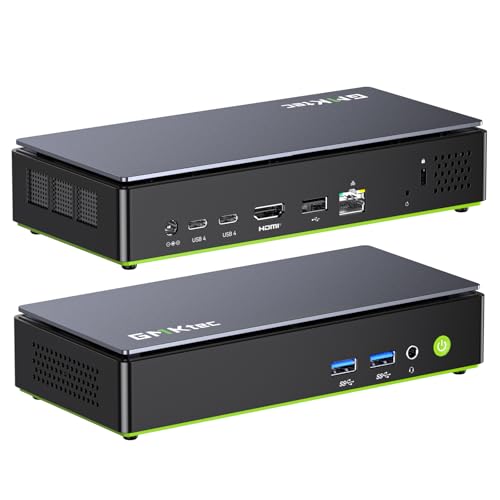
GMKtec AI Mini PC Desktop Computer Intel Core Ultra 7 Processor 256V (8C/8T Turbo Boost 4.8 GHz), NPU: 47 Tops – GPU: 64 Tops, Intel ARC 140V, 16GB LPDDR5X 8533 MT/s, 1TB SSD, 5GbE LAN NIC, Dual USB4
POWERFUL AI PERFORMANCE – Powered by the Intel Core Ultra 7 256V (Base 2.2GHz | Boost 4.80GHz) fabricated…
As an affiliate, we earn on qualifying purchases.
As an affiliate, we earn on qualifying purchases.
Frequently Asked Questions
How Do NPUS Differ From Traditional CPUS in Enterprise PCS?
You’ll find that NPUs differ from traditional CPUs because they’re designed specifically for AI acceleration, handling machine learning tasks more efficiently. They consume less power, boosting power efficiency, and speed up AI workloads that would slow down CPUs. By offloading AI processing, NPUs free up CPU resources, making enterprise PCs faster and more capable of managing complex data tasks seamlessly.
What Security Concerns Are Associated With Integrating NPUS?
You should be aware that integrating NPUs raises security concerns like data privacy risks and insider threats. Since NPUs handle sensitive data and advanced processing, there’s a chance malicious actors could exploit vulnerabilities or access confidential information. To protect your enterprise, make certain robust security measures, regularly update firmware, and monitor for unusual activity. Addressing these concerns helps maintain data integrity and prevents insider threats from compromising your system.
Which Industries Will Benefit Most From NPU Adoption?
You’ll find industries like healthcare AI and manufacturing automation benefit most from NPU adoption. Healthcare AI enhances diagnostics and patient monitoring with faster, more secure data processing, improving outcomes. Manufacturing automation uses NPUs to optimize robotics and quality control, boosting efficiency and reducing errors. By integrating NPUs, these sectors can achieve real-time analytics, smarter decision-making, and increased operational agility, giving them a competitive edge in their respective fields.
Are NPUS Compatible With Existing Enterprise PC Hardware?
You might wonder if NPUs fit seamlessly into your existing enterprise PC setup. The good news is, many NPUs are designed for hardware compatibility, often integrating with legacy hardware through adaptable interfaces. While some older systems may require upgrades, most modern enterprise PCs can support NPUs without major overhauls. This compatibility guarantees you stay ahead, boosting performance without the need for complete hardware replacements.
What Is the Cost Impact of Deploying NPUS Across a Business?
Deploying NPUs across your business impacts your costs through a detailed cost analysis, which considers vendor pricing and integration expenses. You might face higher upfront costs for hardware upgrades and licensing, but these can be offset by improved processing efficiency and reduced operational expenses over time. Carefully evaluate vendor pricing and compare options to optimize your investment, ensuring that the benefits of NPUs outweigh the initial costs.

youyeetoo AI Accelerator Card up to 64TOPS, PCIe Gen3 x16, Based on 16 x G-oogle Coral Edge TPU Processor, Enabling AI-Based Real-time Decision Process at Edge(CRL-G116U-P3DF)
※The AI accelerator Support up to 8~16 x G-oogle Coral Edge TPU M.2 modules(CRL-G18U-P3DF have 8 edge TPU…
As an affiliate, we earn on qualifying purchases.
As an affiliate, we earn on qualifying purchases.
Conclusion
As you watch these trends unfold, it’s clear NPUs will reshape enterprise PCs by 2025. But what’s next? Will they unseal unprecedented performance or introduce unforeseen challenges? One thing’s certain: staying ahead means paying close attention to how these innovations evolve. The future of enterprise computing hangs in the balance—ready to surprise you. Are you prepared to embrace what’s coming next? The answer might just redefine your entire approach.
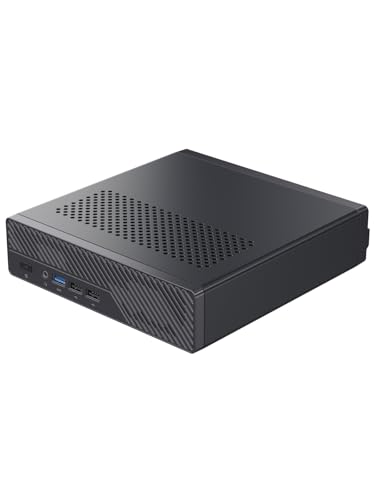
MINISFORUM MS-R1 ARM Mini Workstation with UEFI Boot CIX CP8180(12C/12T, up to 2.6GHz), 45 Tops, 64GB ECC LPDDR5 NO SSD Mini PC, PCIe x16 Slot, 2X 10GbE LAN, HDMI/2xUSB-C Triple Display, VM & Docker
【ARM Processor Performance】The MINISFORUM MS-R1 Mini Workstation is powered by the CIX CP8180, a brand-new ARM chip from…
As an affiliate, we earn on qualifying purchases.
As an affiliate, we earn on qualifying purchases.

Advancements in AI and IoT for Chip Manufacturing and Defect Prevention (River Publishers Rapids Series on Intelligence in Chips)
As an affiliate, we earn on qualifying purchases.
As an affiliate, we earn on qualifying purchases.