For most players, I’d start with the Xbox Series X Disc Gaming Console: it pairs strong home-console performance with disc support, while the Nintendo Switch 2 stands out for handheld and shared play. The Xbox Series S 1TB is a more compact digital option, and the PlayStation Portal suits PS5 owners who want to play remotely around the home. Choosing among the best gaming consoles and accessories comes down to more than hardware: game libraries, disc versus digital access, portability, and whether an accessory solves a real setup need all matter. I compare those tradeoffs across consoles, controllers, headsets, and starter gear below.

Get audio and creator gear delivered free with Prime
- Fast, free delivery on millions of items
- Prime Video, Amazon Music and more included
- Member-only deals all year
Complete the kit


Key Takeaways
- Xbox Series X is the strongest all-around home-console pick here because it combines a 1TB SSD with a disc drive, giving buyers both digital and physical game options.
- Switch 2 and PlayStation Portal solve different portability problems: Switch 2 is a standalone hybrid system, while Portal streams games from a PS5 and depends on that console and a suitable network.
- Xbox Series S favors a smaller, digital-first setup; its lack of a disc drive is a meaningful tradeoff for buyers with existing physical games.
- Accessories have narrower roles than consoles: the DualSense adds a spare PS5 controller, Astro A50 targets a premium multi-platform headset setup, and the Orzly bundle groups basic PC peripherals.
- The retro console stick needs the most scrutiny before purchase, since compatibility, included game details, and setup support matter more than a long feature list for a plug-in device.
| Nintendo Switch 2 System |  | Best Overall for Flexible Play | Platform: Nintendo Switch 2 | Screen: 7.9-inch 1080p LCD touchscreen | Play modes: TV, tabletop, and handheld | VIEW LATEST PRICE | See Our Full Breakdown |
| Xbox Series S Digital Gaming Console, 1TB SSD |  | Best Value Digital Console | Storage: 1TB custom NVMe SSD | Maximum frame rate: Up to 120 FPS with supported content and display | Disc support: Digital games only; does not play physical discs | VIEW LATEST PRICE | See Our Full Breakdown |
| Manba One Wireless Gaming Controller with Interactive Screen and Charging Dock |  | Best Customizable Multi-Platform Controller | Compatible platforms: Nintendo Switch, Switch 2, iOS, Android, and Windows PC | Connection modes: Wired, Bluetooth, and wireless dongle | Display: 2-inch interactive screen | VIEW LATEST PRICE | See Our Full Breakdown |
| PlayStation Portal Remote Player | 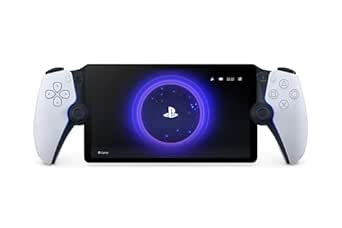 | Best PS5 Remote-Play Accessory | Compatible device: PlayStation 5 | Connectivity: Wi-Fi | Screen: 8-inch LCD | VIEW LATEST PRICE | See Our Full Breakdown |
| Xbox Series X Disc Gaming Console, 1TB SSD | 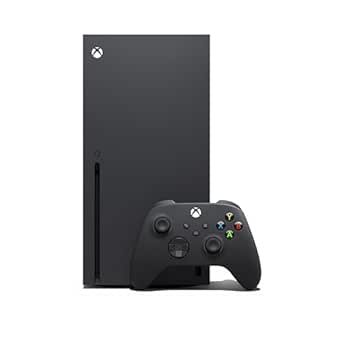 | Best Premium Xbox Console | Storage: 1TB custom NVMe SSD | Disc drive: Built-in; plays physical game discs and 4K UHD Blu-ray movies | Resolution: Up to 4K | VIEW LATEST PRICE | See Our Full Breakdown |
| Sony PlayStation 5 Disc Edition Console Bundle with Extra DualSense Controller and Media Remote (Renewed) | 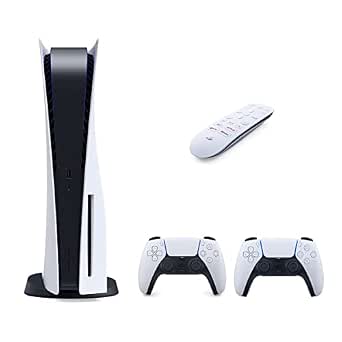 | Best PS5 Bundle for Shared Play | Platform: PlayStation 5 | Model number: CFI-1100A | Storage capacity: 825 GB | VIEW LATEST PRICE | See Our Full Breakdown |
| Orzly Hornet RX-250 4-in-1 Gaming Bundle |  | Best Starter Keyboard-and-Mouse Bundle | Bundle contents: Keyboard, mouse, headset, and mouse pad | Connectivity: Wired | Keyboard: Full-size QWERTY membrane, 104 keys | VIEW LATEST PRICE | See Our Full Breakdown |
| Hsoigc DF-M03 Retro Gaming Console Stick |  | Best for Casual Retro Game Nights | Model: DF-M03 | Emulators: 23 built-in | Advertised game library: Over 20,000 games | VIEW LATEST PRICE | See Our Full Breakdown |
| PlayStation DualSense Wireless Controller – Cosmic Red |  | Best PS5 Controller Upgrade | Color: Cosmic Red | Connectivity: Bluetooth and USB Type-C | Feedback: Haptic feedback | VIEW LATEST PRICE | See Our Full Breakdown |
| Logitech G Astro A50 Multi-Platform Wireless Gaming Headset with Base Station, Black |  | Best Premium Multi-System Headset | Connectivity: 2.4 GHz wireless, Bluetooth, and USB-C | Compatible platforms: Xbox, PS5, PC/Mac, Nintendo Switch, and Switch 2 | Driver size: 40 mm PRO-G GRAPHENE | VIEW LATEST PRICE | See Our Full Breakdown |
| gaming consoles and accessorie | Connectivity |
|---|---|
| Nintendo Switch 2 System | Wi-Fi |
| Xbox Series S Digital Gaming C | — |
| Manba One Wireless Gaming Cont | — |
| PlayStation Portal Remote Play | Wi-Fi |
| Xbox Series X Disc Gaming Cons | — |
| Sony PlayStation 5 Disc Editio | HDMI |
| Orzly Hornet RX-250 4-in-1 Gam | Wired |
| Hsoigc DF-M03 Retro Gaming Con | — |
| PlayStation DualSense Wireless | Bluetooth and USB Type-C |
| Logitech G Astro A50 Multi-Pla | 2.4 GHz wireless, Bluetooth, and USB-C |
More Details on Our Top Picks
Nintendo Switch 2 System
I’d put the Nintendo Switch 2 first for players who want one system for the TV, the couch, and trips away from home. Its 7.9-inch 1080p touchscreen gives handheld sessions more room than a phone-sized display, while the dock supports up to 4K output with compatible games and TVs. Compared with the Xbox Series S, the Switch 2 is less focused on a compact, digital-only home setup and more useful when play needs to move between rooms or leave the house.
It also supports compatible original Switch games, though compatibility is not universal. The tradeoff is that some extras cost separately: expandable storage requires a microSD Express card, and online features require internet and a Nintendo Switch Online membership. I’d choose it for versatility, not for buyers who want every older game or accessory to work without checking first.
Pros:- Supports TV, tabletop, and handheld play
- Large 7.9-inch 1080p touchscreen
- 256 GB of internal storage with microSD Express expansion support
- Joy-Con 2 controllers offer magnetic attachment and mouse controls in compatible games
Cons:- Some original Nintendo Switch games may be unsupported or only partially compatible
- Online features require internet access and a Nintendo Switch Online membership
- Camera and microSD Express cards are sold separately
Best for: Players and families who want to switch between handheld, tabletop, and TV gaming on one system.
Not ideal for: Buyers who need guaranteed compatibility with every original Switch game or want online features without a paid membership.
- Platform:Nintendo Switch 2
- Screen:7.9-inch 1080p LCD touchscreen
- Play modes:TV, tabletop, and handheld
- Internal storage:256 GB
- Expandable storage:microSD Express cards, sold separately
- Video output:Up to 4K; up to 120 fps with compatible games and TVs
- Connectivity:Wi-Fi
- Included:Console, Joy-Con 2 controllers, AC adapter, USB-C charging cable, dock, Joy-Con 2 grip, two straps, and Ultra High Speed HDMI cable
Our verdict“I recommend the Switch 2 to buyers who value handheld flexibility as much as play on a TV.”
Xbox Series S Digital Gaming Console, 1TB SSD
The Xbox Series S is my pick for a streamlined digital setup: it keeps the footprint compact, provides a 1TB SSD, and supports Quick Resume for switching among games. Its library reaches across four Xbox generations of digital titles, making it a practical choice for players who already own compatible downloads. Compared with the disc-based Xbox Series X, the Series S gives up physical media and some processing power, but its digital-only design can suit a smaller entertainment space and a library built around downloads.
Supported games and displays can reach up to 120 FPS, with Dolby Vision, Dolby Atmos, and 3D Spatial Sound support. Those capabilities depend on compatible content and equipment, and the console does not play discs at all. I’d skip it if you rely on a collection of physical games or want a built-in 4K UHD Blu-ray player; games and Game Pass are also separate purchases.
Pros:- Compact, all-digital design
- 1TB SSD and Quick Resume support
- Supports up to 120 FPS with compatible games and displays
- Backward compatibility with digital games across four Xbox generations
Cons:- Cannot play physical game discs
- Games and Game Pass are sold separately
- Performance and frame-rate features depend on supported content and display
Best for: Players with a download-based Xbox library who want a compact console and quick switching between games.
Not ideal for: Disc collectors and buyers who want a console that also plays physical games or 4K UHD Blu-ray movies.
- Storage:1TB custom NVMe SSD
- Maximum frame rate:Up to 120 FPS with supported content and display
- Disc support:Digital games only; does not play physical discs
- Backward compatibility:Xbox Series X|S, Xbox One, Xbox 360, and Original Xbox digital games
- Processing power:4 teraflops
- Audio and video:Dolby Vision, Dolby Atmos, and 3D Spatial Sound support
- Included accessories:Xbox Wireless Controller, high-speed HDMI cable, power cable, and two AA batteries
Our verdict“I’d choose the Series S for a compact, download-first Xbox setup, but not for physical media.”
Manba One Wireless Gaming Controller with Interactive Screen and Charging Dock
I’d pick the Manba One for players who want to tune a controller across Switch, mobile, and Windows PC without relying on a companion app. Its 2-inch interactive screen handles control, lighting, vibration, and joystick settings on the device, while four programmable back keys offer extra inputs for games that benefit from them. Compared with the included Joy-Con 2 controllers for the Nintendo Switch 2, this is a more configurable controller with a charging dock, but it is a separate accessory rather than a direct replacement for every Joy-Con use.
Hall effect sticks and triggers, motion sensing, and wired, Bluetooth, or dongle connections add flexibility. The limits matter: it does not support Switch 2 wake-up and won’t work with Xbox, PlayStation, or GeForce Now. At 630 g, it is also a heavier option than a small travel controller. I’d choose it for cross-device customization, not for someone who needs broad console compatibility.
Pros:- On-controller screen adjusts settings without an app
- Hall effect sticks and triggers
- Four programmable back keys and saved configurations
- Charging dock and wireless receiver are included
Cons:- Does not support Switch 2 wake-up
- Not compatible with Xbox, PlayStation, or GeForce Now
- At 630 g, it may feel heavy for long sessions or portable use
Best for: Switch, Switch 2, mobile, and PC players who want on-controller customization and programmable rear buttons.
Not ideal for: Xbox or PlayStation owners, GeForce Now users, and Switch 2 players who expect the controller to wake the console.
- Compatible platforms:Nintendo Switch, Switch 2, iOS, Android, and Windows PC
- Connection modes:Wired, Bluetooth, and wireless dongle
- Display:2-inch interactive screen
- Battery capacity:1800 mAh
- Controls:16 buttons and 4 programmable back keys
- Sensors:6-axis gyroscope
- Polling rate:800 Hz or higher when wired
- Weight and dimensions:630 g; 7.28 x 3.5 x 1.61 inches
Our verdict“I’d choose the Manba One for configurable play across supported devices, provided its platform limits fit your setup.”
PlayStation Portal Remote Player
The PlayStation Portal makes the most sense for PS5 owners who want to play compatible games away from the television without buying a separate console. Its 8-inch 1080p screen and built-in controls bring remote play into a dedicated handheld format, with haptic feedback and adaptive triggers available in supported games. Compared with the Nintendo Switch 2, the Portal is not a standalone hybrid system: it depends on a PS5 and a Wi-Fi connection for console remote play.
Cloud streaming for select games is available with a PlayStation Plus Premium membership, offering another route for some players, but it does not remove the network dependence. Streaming quality can vary with Wi-Fi conditions, and games that require particular peripherals or features may not work as expected. I’d choose the Portal as a second screen for an existing PS5 setup, not as a first console or a portable system for offline play.
Pros:- Streams compatible PS5 games over Wi-Fi
- 8-inch 1080p screen supports up to 60 fps
- Supports haptic feedback and adaptive triggers in compatible games
- Cloud streaming is available for select games with PlayStation Plus Premium
Cons:- Requires a PS5 console for remote play, plus a PlayStation Network account and broadband internet
- Streaming quality depends on network conditions
- Some games and peripheral-dependent features are not compatible
Best for: PS5 owners with reliable broadband Wi-Fi who want to play compatible games in another room or away from the TV.
Not ideal for: Buyers without a PS5, players with unreliable Wi-Fi, and anyone seeking an offline or standalone handheld console.
- Compatible device:PlayStation 5
- Connectivity:Wi-Fi
- Screen:8-inch LCD
- Resolution:1080p
- Maximum frame rate:60 fps
- Controller features:Built-in controls with supported DualSense features
- Power source:Battery powered
- Dimensions and weight:14 x 3.88 x 6 inches; 2.6 pounds
Our verdict“I’d buy the Portal as a dedicated remote-play screen for a PS5, not as a replacement console.”
Xbox Series X Disc Gaming Console, 1TB SSD
I’d rank the Xbox Series X as the premium Xbox pick for buyers who want strong performance without giving up physical media. Its 12-teraflop processor, 1TB custom SSD, and support for up to 4K and 120 FPS in compatible games give it more graphical headroom than the digital-only Xbox Series S. Quick Resume also helps players move among multiple games without starting each session from scratch.
The built-in disc drive is a real point of difference: it plays physical games and 4K UHD Blu-ray movies, while backward compatibility covers four Xbox generations. The tradeoff is that the headline resolution and frame-rate limits require supported games and a compatible display; games, Game Pass, and storage expansion cards are separate. I’d choose this over the Series S for discs and higher performance, but not if a compact all-digital console better matches your setup.
Pros:- Built-in disc drive plays physical games and 4K UHD Blu-ray movies
- Custom 1TB SSD supports fast loading and Quick Resume
- Up to 4K resolution and 120 FPS with supported content and display
- Backward compatibility spans four Xbox generations
Cons:- Games, Game Pass, and storage expansion cards are sold separately
- 4K at up to 120 FPS requires compatible content and a compatible display
- Its performance and disc drive may be unnecessary for download-only players
Best for: Xbox players who want physical game discs, 4K UHD Blu-ray playback, and higher-performance hardware for a compatible display.
Not ideal for: Download-only players seeking a compact console, or buyers who don’t need disc playback or the Series X performance tier.
- Storage:1TB custom NVMe SSD
- Disc drive:Built-in; plays physical game discs and 4K UHD Blu-ray movies
- Resolution:Up to 4K
- Frame rate:Up to 120 FPS with supported content and display
- Processing power:12 teraflops
- Audio:3D Spatial Sound with Dolby Atmos
- Backward compatibility:Xbox Series X|S, Xbox One, Xbox 360, and Original Xbox games
- Included accessories:Xbox Wireless Controller, ultra-high-speed HDMI cable, power cable, and two AA batteries
Our verdict“I’d choose the Series X over the Series S when disc support and higher-end Xbox performance matter.”
Sony PlayStation 5 Disc Edition Console Bundle with Extra DualSense Controller and Media Remote (Renewed)
This renewed PS5 Disc Edition bundle earns its place by including two useful extras: an additional DualSense controller for local multiplayer and a Media Remote for navigating shows and movies. Compared with the Xbox Series X Disc Gaming Console, it pairs 4K gaming with PlayStation’s controller features and a ready-to-use second gamepad, while the disc drive offers flexibility for physical games and media. The 825 GB storage is a tighter fit than the 1TB Xbox options, so large libraries may require managing installations. The main tradeoff is condition: this is a pre-owned or refurbished unit, not a new console. Professional inspection and a 90-day limited warranty provide some reassurance, but buyers seeking a factory-new purchase should choose another listing.
Pros:- Includes an extra DualSense controller for two-player gaming
- Media Remote adds convenient control for supported PS5 media use
- Supports 4K resolution and disc-based games
- Professionally inspected and tested with a 90-day limited warranty
Cons:- Renewed condition may show prior use and is not equivalent to buying new
- 825 GB storage offers less capacity than the 1TB Xbox Series X and Series S options
- Warranty coverage is limited to 90 days
Best for: PS5 shoppers who want a second controller for local multiplayer and a remote for living-room media use
Not ideal for: Buyers who require a new console, want more than 825 GB of built-in storage, or prefer the Xbox ecosystem
- Platform:PlayStation 5
- Model number:CFI-1100A
- Storage capacity:825 GB
- Resolution:4K
- Connectivity:HDMI
- Included accessories:Extra DualSense controller and PS5 Media Remote
- Condition:Renewed
- Warranty:90-day limited warranty
Our verdict“Choose this renewed PS5 bundle if a second controller and disc drive matter more than new condition or 1TB storage.”
Orzly Hornet RX-250 4-in-1 Gaming Bundle
The Orzly Hornet RX-250 is a straightforward way to equip a desk setup: one box supplies a keyboard, mouse, headset, and mouse pad, with compatibility spanning PS5, Xbox consoles, Steam Deck, and computers. Its anti-ghosting and 19-key rollover help the membrane keyboard register multiple inputs, while four mouse DPI settings let players adjust cursor speed without replacing the mouse. Compared with the Logitech G Astro A50, this bundle is a broader entry-level kit rather than a premium audio upgrade; the headset is wired stereo, not a multi-system wireless model. That keeps the setup simple, but cables limit placement and the membrane keyboard will not suit players seeking a mechanical feel. It makes the most sense for someone building a basic gaming station, not upgrading individual high-end peripherals.
Pros:- Combines four useful desk accessories in one bundle
- Keyboard includes RGB backlighting, anti-ghosting, and 19-key rollover
- Ambidextrous mouse offers four selectable DPI levels
- Works with a wide range of consoles and computer platforms
Cons:- Membrane keyboard lacks the distinct feel and response of a mechanical model
- Wired connections restrict placement and add cable clutter
- Stereo headset is less feature-rich than the Logitech G Astro A50
Best for: New PC or console desk players who need a complete wired keyboard, mouse, headset, and pad setup in one purchase
Not ideal for: Players who want a mechanical keyboard, wireless peripherals, or premium headset audio and multi-system switching
- Bundle contents:Keyboard, mouse, headset, and mouse pad
- Connectivity:Wired
- Keyboard:Full-size QWERTY membrane, 104 keys
- Keyboard features:RGB backlighting, 19-key rollover, anti-ghosting
- Mouse weight:90 g
- Mouse DPI levels:1200, 1600, 2400, and 3200
- Headset:Stereo with foldable microphone
- Compatibility:PS5, PS4, Xbox Series X/S, Xbox One, Steam Deck, ROG Ally, PC, and Mac
- Warranty:One-year replacement warranty
Our verdict“Pick the Orzly bundle for a convenient wired starter setup, but skip it if you want premium or wireless peripherals.”
Hsoigc DF-M03 Retro Gaming Console Stick
The Hsoigc DF-M03 targets a different kind of play from the Nintendo Switch 2: it is an HDMI-connected retro stick with two wireless controllers and a large preloaded library, rather than a current-generation system built around new releases. Its plug-and-play setup and no-internet requirement can suit casual sessions or a spare television, while support for saving progress gives longer games more continuity. The listing claims over 20,000 games and 23 emulators, but buyers should not assume every title or emulation result will meet their expectations. Resolution details also conflict, describing both 4K output and 1080P quality, so display performance is less clearly specified than on established consoles. The controllers need four AAA batteries each, which are not included. This is best treated as a casual retro option, not a substitute for a modern console library.
Pros:- Includes two 2.4GHz wireless controllers
- Plug-and-play operation does not require an internet connection
- Advertises 23 emulators and a library of over 20,000 games
- Supports saving game progress
Cons:- Four AAA batteries per controller are required and not included
- Resolution description is inconsistent between 4K output and 1080P quality
- A large advertised library does not guarantee every game will suit the buyer
Best for: Casual players seeking an HDMI retro-game stick with two wireless controllers for a spare TV or occasional group play
Not ideal for: Buyers who want current releases, clearly documented image quality, or controllers ready to use without purchasing batteries
- Model:DF-M03
- Emulators:23 built-in
- Advertised game library:Over 20,000 games
- Storage:64GB TF card
- Video output:HDMI; listing cites 4K output and 1080P HD quality
- Controllers:Two 2.4GHz wireless controllers
- Controller range:Up to 12 meters
- Controller batteries:Four AAA batteries per controller, not included
- Warranty:2-year manufacturer warranty
Our verdict“Choose this stick for casual retro sessions and simple setup, not as an alternative to the Switch 2 or other modern consoles.”
PlayStation DualSense Wireless Controller – Cosmic Red
This Cosmic Red DualSense is the direct choice for PS5 players who need a replacement or a second controller without buying another full console bundle. Its haptic feedback and adaptive triggers can make supported games feel more responsive through vibration and changing trigger resistance, features that distinguish it from a basic gamepad. Compared with the extra DualSense included in the renewed PS5 bundle, this is a standalone controller, so it makes sense when the console is already covered. Bluetooth and USB-C connections also extend its use to Windows, Mac, Android, and iOS, though the product data does not promise identical feature support across those devices. It lacks the interactive screen and charging dock listed for the Manba One controller, making this a more focused choice for PS5 play than for buyers seeking extra onboard controls.
Pros:- Haptic feedback and adaptive triggers add supported in-game sensations
- Connects through Bluetooth or USB-C
- Compatible with PS5, Windows PC, Mac, Android, and iOS
- Built-in microphone, 3.5 mm headset jack, and dedicated mute button
Cons:- Adds little value for buyers who already have enough DualSense controllers
- Cross-platform compatibility does not establish that every feature works the same on each device
- Does not include the interactive screen or charging dock listed for the Manba One controller
Best for: PS5 owners who need a replacement or second controller and want haptics and adaptive triggers in a distinctive color
Not ideal for: Players who want a controller with an interactive screen, charging dock, or a clearly specified battery-life advantage
- Color:Cosmic Red
- Connectivity:Bluetooth and USB Type-C
- Feedback:Haptic feedback
- Trigger features:Adaptive triggers
- Microphone:Built-in
- Headset jack:3.5 mm
- Mute control:Dedicated mute button
- Compatible devices:PlayStation 5, Windows PC, Mac, Android, and iOS
Our verdict“Buy this DualSense for PS5-focused play and a versatile backup, but choose a feature-rich alternative if a dock or extra controls matter more.”
Logitech G Astro A50 Multi-Platform Wireless Gaming Headset with Base Station, Black
The Logitech G Astro A50 is the most capable audio-focused pick in this group for players who move between several systems. Its base station can connect to three systems, and an on-ear control lets the listener switch without rebuilding the setup; Bluetooth dual-device mixing can add mobile audio alongside game sound. That gives it a wider role than the wired stereo headset in the Orzly Hornet RX-250 bundle, which is better suited to buyers who need a full starter kit. The tradeoff is a more involved setup centered on the base station, plus battery life listed as up to 24 hours in one detail and under 24 hours in another. Console audio is also specified as under 16-bit/48 kHz, a limitation for buyers focused on audio format specifications. Its strengths are flexibility and convenience, not simplicity.
Pros:- Base station supports connections to three systems with on-ear switching
- Bluetooth dual-device mixing combines mobile audio with game sound
- Includes a magnetic charging base station
- Compatible with Xbox, PS5, PC/Mac, and Nintendo Switch/Switch 2
Cons:- Battery-life details conflict, listing up to 24 hours and under 24 hours
- Console audio is listed as under 16-bit/48 kHz
- Base-station setup is more involved than a basic wired headset such as the Orzly Hornet RX-250
Best for: Players who regularly switch among console, PC, and other systems and want wireless game audio with Bluetooth mixing
Not ideal for: Budget-focused buyers, players who only use one system, or listeners prioritizing the highest stated console audio format
- Connectivity:2.4 GHz wireless, Bluetooth, and USB-C
- Compatible platforms:Xbox, PS5, PC/Mac, Nintendo Switch, and Switch 2
- Driver size:40 mm PRO-G GRAPHENE
- Microphone:48 kHz full-bandwidth boom microphone
- Battery life:Up to 24 hours; product details also list under 24 hours
- Weight:363 g
- Included:Base station, ear cushions, headband, and user manual
- Warranty:1-year limited hardware warranty
Our verdict“Choose the Astro A50 if multi-system switching and mixed Bluetooth audio justify a more involved headset setup.”
How We Picked
I ranked these products by how directly they meet common gaming needs: a capable main console, an alternative for portable play, a remote-play device, or a useful accessory. For consoles, I weighed game access, storage, disc support, flexibility of use, and how much existing hardware or network infrastructure a buyer needs. For accessories, I focused on compatibility, the specific problem each item solves, and whether its format suits a complete setup or an upgrade.
The order favors products with broad usefulness and clear roles, rather than treating every accessory as a substitute for a console. That puts the Xbox Series X first as a flexible home system, with Switch 2 and Xbox Series S close behind for distinct play styles. More specialized or dependent products rank lower: Portal requires a PS5, the renewed PS5 bundle calls for added condition checks, and the retro stick’s details warrant careful verification. I also account for tradeoffs such as digital-only libraries, peripheral fit, and the value of buying a standalone accessory only when it matches your current platform.
Factors to Consider When Choosing Best Gaming Consoles And Accessories
Before choosing, decide what role the purchase needs to fill. A console, a remote-play screen, and a headset can all improve a gaming setup, but they solve different problems and depend on different equipment.
Choose the game library before the hardware
Start with the games you actually want to play and the people you want to play them with. Console performance matters less if your preferred titles, friends, or existing subscriptions are tied to another platform. Check whether games you own carry over, whether multiplayer access requires a separate service, and whether the system supports the play style you expect. A common mistake is buying around headline hardware features before checking platform exclusives and account compatibility. If several people share the system, also check for local multiplayer options and the cost of extra controllers. I’d treat library fit as the first filter, then compare hardware within the systems that remain.
Think through discs, downloads, and storage
A disc drive gives you another way to buy and play games, but a disc-based console may still require downloads and storage for updates. Digital-only systems can make a cleaner setup, yet they limit you to digital purchases and whatever access rules apply to your account. Estimate how many large games you keep installed at once, especially if you share a console or switch between several titles. Storage expansion can add cost and may have compatibility requirements, so check the system’s supported options before buying. Avoid assuming that a 1TB drive will hold every game you want indefinitely; installed libraries grow and change. Choose physical or digital based on how you acquire and share games, not just on convenience.
Separate portable play from remote play
A handheld console runs games on its own, while a remote-play device streams from another system. That distinction affects whether you can play away from your home console, what network quality you need, and whether another player can use the main TV. Before buying a remote player, confirm that you own the required console and that your home network can support stable streaming in the rooms where you plan to play. For a true travel device, check battery expectations, offline play support, game compatibility, and how comfortable it is to carry. Buyers often mistake a handheld-looking screen for a self-contained console. Match the device to where the game runs, not just to its size.
Buy accessories for a specific setup gap
Accessories are most useful when they address a clear limitation: an extra controller for local multiplayer, a headset for private audio, or a keyboard-and-mouse bundle for a PC setup. Check platform compatibility before purchase, including connection type, supported features, and whether wireless operation needs a dedicated base or adapter. A controller marketed for several systems may not offer identical functions on each one, so verify support for the games and devices you use. Bundles can be convenient, but a bundle is not automatically a better fit than selecting each peripheral separately. Think about desk space, charging, comfort, and cable management as part of the setup. If you only need one component, paying for a package of extras can leave unused gear behind.
Balance performance against your display and room
A powerful console is most useful when the display can make use of its output and your room suits the system’s size and sound. Check your television or monitor’s resolution, refresh-rate support, available ports, and whether you need a separate audio connection. If the screen is older or mainly used for casual play, a higher-spec console may not change your experience as much as a better controller or headset. Small shelves and shared living spaces also make console footprint, ventilation, and cable access practical concerns. Leave space for airflow rather than placing a system in a closed cabinet. Match the hardware to the screen and space you already have before paying for capability you may not use.
Check condition, support, and included items
Renewed and bundled products deserve a closer inspection of what is included and how returns or warranty support work. Confirm the exact console model, controller count, cables, and any advertised media accessories rather than relying on a broad bundle title. For retro plug-in systems, verify supported displays, controller pairing, save features, and the source and licensing of included games. A vague compatibility claim can turn a simple setup into troubleshooting. Accessories with charging docks or base stations also need suitable space and power connections. I’d compare the full contents and support terms before treating a bundle as a ready-to-play solution.
Frequently Asked Questions
Should I choose the Xbox Series X or Xbox Series S if I already own disc games?
The Xbox Series X Disc Gaming Console is the better fit if you want to use compatible physical games, since the Series S is digital-only. Your existing library may still depend on the specific game and account, so check compatibility rather than assuming every disc will work. The Series S can suit buyers who are comfortable purchasing digitally and prefer a smaller console. Also compare storage needs and the display you use, since both influence how satisfying the system will be day to day. If physical game access is a priority, the disc-equipped model is the simpler choice.
Can I use PlayStation Portal without owning a PS5?
The PlayStation Portal is a remote player, not a standalone console, so it is designed to stream play from a compatible PS5 setup. It does not replace the console that runs the games. Before choosing it, check your home network quality and confirm that your intended play locations have reliable connectivity. It makes more sense when the PS5 is already part of your household and the TV is often in use. If you need games to run directly on a portable device, compare it with a dedicated handheld system instead.
Is the Nintendo Switch 2 a better choice than a home console for a family?
It can be a better match when portability and shared play matter more than choosing a single home-console ecosystem. A hybrid system can move between handheld use and a shared screen, which may suit households with different schedules. The best fit still depends on the games your family wants and how many controllers you need for local play. Compare the cost of additional controllers and the supported multiplayer options before deciding. If everyone mainly plays demanding games on a large TV, a dedicated home console may fit that routine better.
Is the renewed PS5 bundle a sensible choice for a first console?
It may suit a buyer who wants a PS5 Disc Edition plus an extra DualSense controller and media remote in one package, but the renewed condition calls for more checking than a standard new purchase. Read the seller’s condition description and confirm the return window, warranty coverage, and exact contents. Verify that the included accessories are useful to you; a second controller helps local play, while a media remote may be unnecessary for some setups. Also check the disc model and console condition details rather than relying on the bundle name alone. Buyers who prefer the clearest warranty and condition expectations may want a new console instead.
Which accessory should I buy first if my console setup feels incomplete?
Choose based on the problem you notice most often rather than buying several accessories at once. If another person needs to play locally, an extra controller is the direct fix; if you need private audio or clearer communication, a headset may matter more. A remote player only helps if you already own the required console and want to play away from its screen. For PC users starting from scratch, a bundle can cover basic peripherals, but check each item’s compatibility and build suitability. I’d confirm the platform, connection method, and space available before choosing a specialized accessory.
Conclusion
For the best overall home setup, I’d choose the Xbox Series X Disc Gaming Console for its mix of performance, 1TB storage, and physical-game support. The best value-oriented console choice is the Xbox Series S 1TB for digital-first players who want a compact system and do not need a disc drive. For beginners and households that value flexible play, Nintendo Switch 2 is the more adaptable starting point. The premium accessory pick is the Logitech G Astro A50 for buyers building a multi-platform audio setup, while the DualSense is the focused choice for adding a PS5 controller. Choose PlayStation Portal only if you already have a PS5 and want remote play; for basic PC peripherals, consider the Orzly bundle, and verify details carefully before opting for the retro console stick. The best fit depends on your game library and setup—not on buying the most gear.