
The best Netgear networking products depend on whether you need stronger WiFi, wired connections, broader coverage, or a way to connect a device without built-in WiFi. I rank the Nighthawk Tri-Band WiFi 7 Router as the best overall choice for buyers seeking a modern standalone router, while the Orbi 770 Series 3-Pack stands out for whole-home mesh coverage and the GS108 for straightforward wired expansion. The main tradeoffs are newer WiFi standards versus simpler needs, single-router performance versus mesh coverage, and plug-and-play convenience versus managed features such as PoE+. Read on for the full comparison, including switches, adapters, and powerline networking options.

Get audio and creator gear delivered free with Prime
- Fast, free delivery on millions of items
- Prime Video, Amazon Music and more included
- Member-only deals all year
Complete the kit


Key Takeaways
- Router choice depends on coverage as much as WiFi generation: the Nighthawk WiFi 7 models serve one-router setups, while the Orbi 770 and Orbi 370 3-packs are designed to extend coverage across multiple rooms.
- The Orbi 770 and Orbi 370 solve similar coverage problems at different levels: the 770 uses tri-band WiFi 7, while the 370 is a simpler WiFi 7 mesh option with a stated coverage area of up to 6,000 square feet.
- Netgear’s switch lineup separates by management, port count, and power: GS108 and GS308 are simple eight-port unmanaged options, while GS308EP adds smart management and PoE+.
- Five-port Easy Smart switches suit targeted network control: GS105Ev2 and GS305E add management features in a compact format, but they are not substitutes for the GS308EP when PoE+ is needed.
- Not every connection problem calls for a new router: the A7500 USB adapter upgrades a compatible computer’s WiFi, while the PLP2000 kit can carry a wired connection over household electrical wiring when running Ethernet is impractical.
| NETGEAR GS108MX 8-Port Gigabit Ethernet Unmanaged Switch |  | Best for Multi-Gig Wired Expansion | Ports: 8 x 1 Gbps Ethernet and 1 x 10G/Multi-Gig Ethernet | Switch type: Unmanaged | Interface: RJ45 | VIEW LATEST PRICE | See Our Full Breakdown |
| NETGEAR Nighthawk Tri-Band WiFi 7 Router |  | Best Standalone WiFi 7 Router | WiFi standard: WiFi 7 | Bands: 2.4 GHz, 5 GHz, and 6 GHz | Maximum speed: Up to 9.3 Gbps | VIEW LATEST PRICE | See Our Full Breakdown |
| NETGEAR GS105Ev2 5-Port Gigabit Easy Smart Managed Switch |  | Best Compact Managed Switch | Model: GS105E-200NAS | Number of ports: 5 | Port speed: 1 Gbps | VIEW LATEST PRICE | See Our Full Breakdown |
| NETGEAR Nighthawk R6700AX WiFi 6 Dual-Band Router |  | Best for Straightforward WiFi 6 | Model: R6700AX | WiFi generation: WiFi 6 (802.11ax) | Frequency bands: Dual-band, 2.4 GHz and 5 GHz | VIEW LATEST PRICE | See Our Full Breakdown |
| NETGEAR Orbi 770 Series WiFi 7 Tri-Band Mesh System, 3-Pack |  | Best for Large-Home Mesh Coverage | WiFi generation: WiFi 7 | Frequency band: Tri-band | Maximum data transfer rate: 11 Gbps | VIEW LATEST PRICE | See Our Full Breakdown |
| NETGEAR Nighthawk AX1800 WiFi 6 USB 3.0 Adapter (A7500) |  | Best for Upgrading a Windows PC | Model: A7500-100PAS | Wireless standard: WiFi 6 (AX1800), dual-band | Maximum data rate: Up to 1.8 Gbps | VIEW LATEST PRICE | See Our Full Breakdown |
| NETGEAR Nighthawk AX3000 WiFi 6 Router (RAX36) |  | Best WiFi 6 Router for a Modest Home | Model: RAX36 | WiFi standard: WiFi 6 (802.11ax) | Wireless speed: Up to 3 Gbps (AX3000) | VIEW LATEST PRICE | See Our Full Breakdown |
| NETGEAR Powerline Ethernet Adapter Kit PLP2000, 2-Pack, 2000 Mbps |  | Best for Wired Connections in Hard-to-Reach Rooms | Model: PLP2000 | Pack size: 2 adapters | Maximum speed: Up to 2000 Mbps | VIEW LATEST PRICE | See Our Full Breakdown |
| NETGEAR Nighthawk RS300 Tri-Band WiFi 7 Router, Up to 9.3 Gbps, 2,500 Sq. Ft. Coverage, Certified Refurbished | | Best Refurbished Premium WiFi 7 Pick | Model: RS300 | Condition: Certified refurbished | WiFi generation: WiFi 7 | VIEW LATEST PRICE | See Our Full Breakdown |
| NETGEAR Nighthawk RS90 Dual-Band WiFi 7 Router |  | Best WiFi 7 Upgrade for Everyday Homes | WiFi generation: WiFi 7 | Frequency bands: Dual-band, 2.4 GHz and 5 GHz | Maximum data rate: 3.6 Gbps | VIEW LATEST PRICE | See Our Full Breakdown |
| NETGEAR GS308EP 8-Port Gigabit Ethernet PoE+ Smart Managed Switch |  | Best for PoE Devices | Ports: 8 Gigabit Ethernet ports | PoE+: Supported on all 8 ports | Total PoE power budget: 62W | VIEW LATEST PRICE | See Our Full Breakdown |
| NETGEAR GS108 8-Port Gigabit Ethernet Unmanaged Switch |  | Best for Simple Wired Expansion | Ports: 8 Gigabit Ethernet ports | Interface: RJ45 | Switch type: Unmanaged, desktop | VIEW LATEST PRICE | See Our Full Breakdown |
| NETGEAR GS308 8-Port Gigabit Ethernet Unmanaged Network Switch | 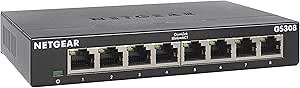 | Best Compact Unmanaged Switch | Ports: 8 | Data transfer rate: 1 Gbps | Interface: RJ45 | VIEW LATEST PRICE | See Our Full Breakdown |
| NETGEAR GS305E 5-Port Gigabit Easy Smart Managed Switch |  | Best for Small Managed Networks | Ports: 5 Gigabit Ethernet ports | Data transfer rate: 1000 megabits per second | Interface: RJ45 | VIEW LATEST PRICE | See Our Full Breakdown |
| NETGEAR Orbi 370 Series WiFi 7 Mesh System, 3-Pack, Up to 6,000 sq. ft. |  | Best for Whole-Home WiFi 7 Coverage | WiFi generation: WiFi 7 | Frequency bands: Dual-band | Maximum data transfer rate: Up to 5 Gbps | VIEW LATEST PRICE | See Our Full Breakdown |
More Details on Our Top Picks
NETGEAR GS108MX 8-Port Gigabit Ethernet Unmanaged Switch
I’d choose the GS108MX when a wired network needs more Gigabit connections but also needs a faster link to a router, server, or another switch. Its eight 1 Gbps ports handle everyday wired devices, while the extra 10G/Multi-Gig port can prevent a high-speed uplink from becoming the bottleneck. Compared with the GS108, this model adds that faster port; the tradeoff is that it still has no management controls and only one Multi-Gig connection. For VLANs or traffic prioritization, the managed GS105Ev2 is a better fit, though it has fewer ports and no listed Multi-Gig port. The fanless metal housing keeps operation quiet, but its larger footprint may not suit a tight desk or cabinet.
Pros:- Eight Gigabit ports connect multiple wired devices.
- One 10G/Multi-Gig port supports a faster uplink than the GS108 provides.
- Fanless metal design runs silently.
- Supports desktop or wall-mount placement with plug-and-play setup.
Cons:- Unmanaged operation provides no configuration or traffic-control options.
- Only one port supports 10G/Multi-Gig connections.
- Its listed dimensions make it less compact than a small desktop switch.
Best for: Home offices and small workgroups that need several Gigabit wired connections plus one faster Multi-Gig uplink.
Not ideal for: Network users who need VLANs, traffic controls, or multiple Multi-Gig connections; this is an unmanaged switch with only one 10G/Multi-Gig port.
- Ports:8 x 1 Gbps Ethernet and 1 x 10G/Multi-Gig Ethernet
- Switch type:Unmanaged
- Interface:RJ45
- Layer:Layer 1
- Case material:Metal
- Mounting:Desktop or wall mount
- Cooling:Fanless
- Dimensions:11.81 x 7.68 x 3.07 inches
Our verdict“Choose the GS108MX for straightforward wired expansion when one Multi-Gig uplink matters more than management features.”
NETGEAR Nighthawk Tri-Band WiFi 7 Router
For buyers replacing a standalone router, I’d favor this tri-band WiFi 7 model when fast wireless and multi-gig wired connections matter more than mesh coverage. Its 6 GHz band adds a newer wireless lane for compatible devices, and the 2.5 Gig WAN and LAN ports give fast internet service or wired equipment room to benefit. Compared with the Nighthawk R6700AX, it offers a newer WiFi generation, a third band, and higher listed capacity, but costs the simpler router’s main advantage: straightforward needs require less capability. This Nighthawk covers up to 2,500 square feet, far less than the three-unit Orbi 770 system’s stated area, so large or awkward homes may need mesh instead. It also requires a separate modem or gateway, and Armor protection moves to a subscription after its trial.
Pros:- Tri-band WiFi 7 includes a 6 GHz band for compatible devices.
- 2.5 Gig WAN and LAN ports support faster wired links than the R6700AX’s Gigabit ports.
- App-based setup and management simplify network administration.
- Listed capacity reaches up to 100 devices.
Cons:- Requires a separate modem or gateway.
- Coverage is limited to a stated maximum of 2,500 sq. ft. and can fall with walls or interference.
- NETGEAR Armor requires a subscription after the 30-day trial.
Best for: Households with a separate modem, WiFi 7-capable devices, and a need for multi-gig wired ports in a single-router setup.
Not ideal for: People seeking whole-home coverage across a large or multi-floor home, or buyers who need a modem built into the router.
- WiFi standard:WiFi 7
- Bands:2.4 GHz, 5 GHz, and 6 GHz
- Maximum speed:Up to 9.3 Gbps
- Coverage:Up to 2,500 sq. ft.
- Device capacity:Up to 100 devices
- WAN port:One 2.5 Gig Ethernet port
- LAN ports:Two 2.5 Gig Ethernet ports and two 1 Gig Ethernet ports
- Setup and management:NETGEAR Nighthawk app for iOS and Android
- Security:Built-in security features, automatic firmware updates, and 30-day NETGEAR Armor trial
Our verdict“Pick this router for a fast, multi-gig WiFi 7 upgrade in a home that does not need mesh-style coverage.”
NETGEAR GS105Ev2 5-Port Gigabit Easy Smart Managed Switch
The GS105Ev2 is my pick for a small wired network where basic control matters as much as adding ports. Its five Gigabit connections suit a desk, office corner, or compact equipment setup, while VLANs, QoS, and port monitoring let an owner separate traffic or give selected devices priority. That makes it more flexible than the plug-and-play GS108MX, but the comparison also shows its limit: the GS105Ev2 has fewer ports and no listed 10G/Multi-Gig uplink. If the goal is simply to connect many devices with no configuration, an unmanaged switch is a more direct choice. Its fanless, mountable design keeps it unobtrusive, though the plastic case and stated U.S. and Canada regional compatibility may not suit every installation.
Pros:- VLAN, QoS, and port-monitoring options add control absent from unmanaged switches.
- Five auto-negotiating Gigabit RJ45 ports suit a compact wired setup.
- Fanless operation avoids switch noise.
- Desktop and wall-mount placement options help with tight spaces.
Cons:- Five ports provide less expansion room than the GS108MX’s eight Gigabit ports.
- No 10G/Multi-Gig port is listed.
- Designed for use in the U.S. and Canada only.
Best for: Small-office owners and technically comfortable home users who need VLANs, traffic prioritization, or port monitoring in a compact switch.
Not ideal for: Buyers who want maximum port count, a Multi-Gig uplink, or a switch that avoids any configuration work.
- Model:GS105E-200NAS
- Number of ports:5
- Port speed:1 Gbps
- Interface:RJ45
- Switch type:Managed
- Mounting:Desktop or wall mount
- Case material:Plastic
- Dimensions:3.7 x 3.9 x 1.06 inches
- Regional compatibility:U.S. and Canada
Our verdict“Choose the GS105Ev2 when compact size and basic network management matter more than port count or Multi-Gig speed.”
NETGEAR Nighthawk R6700AX WiFi 6 Dual-Band Router
I’d point buyers with a modest home network toward the R6700AX rather than paying for capabilities they may not use. It provides WiFi 6 at up to 1.8 Gbps, four Gigabit LAN ports, and app-guided setup, making it a practical step up for homes with several wired devices and a separate modem. Compared with the Nighthawk Tri-Band WiFi 7 Router, it has fewer bands, lower listed speed, and a smaller device limit, but its simpler dual-band design better matches coverage up to 1,500 square feet and up to 20 devices. The tradeoff is limited headroom for a busy household or newer WiFi 7 clients. It also cannot replace a modem, and walls and interference can reduce its stated coverage.
Pros:- WiFi 6 supports wireless speeds up to 1.8 Gbps.
- Four Gigabit LAN ports connect wired devices directly.
- App-guided setup and web management give buyers two setup options.
- WPA3, guest networking, and automatic firmware updates are listed security features.
Cons:- Requires a separate modem or gateway.
- Dual-band WiFi 6 offers less capacity than the tri-band WiFi 7 Nighthawk.
- Coverage is stated at up to 1,500 sq. ft. and may be reduced by walls or interference.
Best for: Small households with a separate modem, a handful of wired devices, and up to 20 connected devices across a modest coverage area.
Not ideal for: Large homes, households with many demanding connected devices, or buyers who want WiFi 7 and multi-gig Ethernet ports.
- Model:R6700AX
- WiFi generation:WiFi 6 (802.11ax)
- Frequency bands:Dual-band, 2.4 GHz and 5 GHz
- Maximum WiFi speed:1.8 Gbps
- Coverage:Up to 1,500 sq. ft.
- Connected devices:Up to 20
- Ethernet ports:Four 1 Gigabit LAN ports and one 1 Gigabit WAN port
- Security:WPA2, WPA3, automatic firmware updates, and guest network
- Internet connection requirement:Separate modem or gateway with an RJ45 Ethernet port
Our verdict“Choose the R6700AX for a basic WiFi 6 home network when its device capacity and coverage match your needs.”
NETGEAR Orbi 770 Series WiFi 7 Tri-Band Mesh System, 3-Pack
When a single router struggles to reach distant rooms, I’d choose the Orbi 770 three-pack over the standalone Nighthawk models. Its router-and-two-satellite layout is rated for up to 8,000 square feet and 100 devices, giving buyers multiple access points rather than relying on one central unit. Tri-band WiFi 7 and a stated maximum of 11 Gbps make it the most coverage-focused option here; the standalone Nighthawk WiFi 7 router is a simpler fit for smaller homes, but its stated coverage is much lower. The Orbi’s strengths come with tradeoffs: it is a three-unit system to place and manage, and its U.S.-only designation limits where it fits. NETGEAR Armor also requires a subscription after the included 30-day trial.
Pros:- Router and two satellites are rated to cover up to 8,000 sq. ft.
- Tri-band WiFi 7 supports a stated maximum speed of 11 Gbps.
- Listed capacity supports up to 100 devices.
- Orbi app guides setup and network management.
Cons:- Three units require more placement space than a standalone router.
- NETGEAR Armor requires a separate subscription after the 30-day trial.
- Made for use in the U.S. only.
Best for: Owners of large or multi-floor U.S. homes who need mesh coverage for many devices and have WiFi 7-capable equipment.
Not ideal for: Apartment residents or buyers with compact homes who do not need multiple access points, or customers outside the U.S.
- WiFi generation:WiFi 7
- Frequency band:Tri-band
- Maximum data transfer rate:11 Gbps
- Coverage:Up to 8,000 sq. ft.
- Supported devices:Up to 100
- Pack size:3-pack: router and two satellites
- LAN port bandwidth:2,500 Mbps
- Number of ports:7
- Security protocol:WPA3
Our verdict“Choose the Orbi 770 three-pack when broad mesh coverage matters more than the simplicity of a single-router setup.”
NETGEAR Nighthawk AX1800 WiFi 6 USB 3.0 Adapter (A7500)
I’d choose the A7500 to add WiFi 6 to a compatible desktop or notebook without replacing its internal network hardware. Its USB 3.0 connection makes setup straightforward, while the flexible antenna lets you adjust placement instead of leaving the adapter fixed against the computer. It supports WPA3 and works with both WiFi 5 and WiFi 6 routers, so it can also connect to an existing network while preparing a PC for a newer one. Unlike the Nighthawk RAX36, this adapter does not create or expand a household WiFi network; it upgrades one computer’s connection. That narrow role is also its main limit: it requires Windows 10 or 11 and occupies a USB port, and its advertised AX1800 rate depends on compatible devices and network conditions.
Pros:- Adds WiFi 6 connectivity to compatible Windows computers
- Flexible antenna allows adjustment of signal placement
- Supports WPA3 security
- Works with WiFi 5 and WiFi 6 routers and mesh systems
Cons:- Compatible only with Windows 10 and 11
- Uses a USB port and protrudes from the computer
- Does not extend or provide WiFi for other household devices
Best for: Windows 10 or 11 PC owners whose computer lacks WiFi 6 and who want a USB-based upgrade without opening the case
Not ideal for: Mac or Linux users, and anyone seeking a router to improve WiFi for multiple devices
- Model:A7500-100PAS
- Wireless standard:WiFi 6 (AX1800), dual-band
- Maximum data rate:Up to 1.8 Gbps
- Interface:USB 3.0
- Compatible operating systems:Windows 10 and 11 (32-bit and 64-bit)
- Security:WPA3
- Dimensions:6.1 × 3.8 × 1.8 in
Our verdict“Choose the A7500 for a simple WiFi 6 upgrade to one compatible Windows PC, not as a substitute for a router.”
NETGEAR Nighthawk AX3000 WiFi 6 Router (RAX36)
The RAX36 is a sensible router pick for a household that wants WiFi 6 without stepping up to a WiFi 7 model. Its advertised AX3000 speeds, coverage of up to 2,000 square feet, and capacity for up to 25 devices suit many homes with everyday streaming, browsing, and connected devices. Four gigabit Ethernet ports also make wired connections available for equipment such as a desktop or console. Compared with the Nighthawk RS90, the RAX36 has a lower stated device capacity and older WiFi generation, but it avoids paying for WiFi 7 features that a modest network may not use. The main catch is that it is a router only: a separate cable modem is needed for internet service, and the stated coverage and speed are not guarantees through walls or interference.
Pros:- WiFi 6 with advertised wireless speeds up to 3 Gbps
- Stated coverage up to 2,000 square feet
- Four gigabit Ethernet ports for wired devices
- WPA3 security and a 1.7 GHz quad-core processor
Cons:- Requires a separate cable modem for internet service
- WiFi 6 is an older generation than the RS90 and RS300 WiFi 7 routers
- Stated capacity is up to 25 devices, below the RS90’s up-to-50-device capacity
Best for: Households with up to about 25 connected devices that want a WiFi 6 router and already have, or plan to use, a separate cable modem
Not ideal for: People who need a modem and router in one device, or homes seeking WiFi 7 and higher device capacity
- Model:RAX36
- WiFi standard:WiFi 6 (802.11ax)
- Wireless speed:Up to 3 Gbps (AX3000)
- Frequency band:Dual-band
- Coverage:Up to 2,000 sq. ft.
- Device capacity:Up to 25 devices
- Ethernet ports:4 × 1 Gbps
- Modem:Not built in; separate cable modem required
Our verdict“Pick the RAX36 if WiFi 6 and four wired ports fit your home better than the newer WiFi 7 features of the RS90.”
NETGEAR Powerline Ethernet Adapter Kit PLP2000, 2-Pack, 2000 Mbps
The PLP2000 kit suits a specific problem: getting a wired network connection to another room when running Ethernet cable is inconvenient. The two adapters use a home’s existing electrical wiring, so a smart TV or game console can connect by Ethernet without relying on a WiFi signal reaching that spot. Its noise-filtered pass-through outlet also leaves a power socket available. Compared with the Nighthawk RS90, this kit does not provide WiFi or replace a router; it is a way to carry a wired connection over electrical wiring. The advertised 2000 Mbps is a maximum, not a guaranteed real-world speed, and results depend on the home’s wiring and electrical conditions. It is made for use in the US only, so it is a poor fit for buyers outside that market.
Pros:- Carries a wired network connection over existing electrical wiring
- Includes a noise-filtered pass-through power outlet
- Plug-and-play setup requires no software installation
- Two RJ-45 ports are available across the kit as specified
Cons:- Does not provide WiFi
- Performance depends on the home’s electrical wiring and conditions
- Made for use in the US only
Best for: US households that need a wired connection for a TV or console in a room where WiFi is weak and Ethernet cable runs are impractical
Not ideal for: Buyers who need WiFi coverage, live outside the US, or cannot connect the adapters through suitable household wiring
- Model:PLP2000
- Pack size:2 adapters
- Maximum speed:Up to 2000 Mbps
- Technology:HomePlug AV2, MIMO with Beamforming
- Ethernet ports:2 RJ-45 ports
- Pass-through outlet:Noise-filtered power outlet
- Setup:Plug and play; no software installation required
- Compatibility:Made for use in the US only
Our verdict“Choose the PLP2000 when a remote device needs Ethernet and WiFi coverage or a new cable run is not the right solution.”
NETGEAR Nighthawk RS300 Tri-Band WiFi 7 Router, Up to 9.3 Gbps, 2,500 Sq. Ft. Coverage, Certified Refurbished
The RS300 has the strongest stated wireless capacity in this group: its tri-band WiFi 7 design includes 6 GHz support, advertises speeds up to 9.3 Gbps, and lists coverage up to 2,500 square feet for as many as 100 devices. That makes it a better match than the dual-band RS90 for a busy home with compatible WiFi 7 devices and a reason to use the additional band. Its two 2.5 Gigabit LAN ports also provide more multi-gig wired capacity than the RS90’s single 2.5 Gigabit WAN port. The tradeoff is meaningful: this unit is certified refurbished, carries a 90-day limited warranty, and is still only a router, not a modem. Buyers who prefer a new unit or want a longer warranty may favor the RS90 instead.
Pros:- Tri-band WiFi 7 includes the 6 GHz band
- Advertised speeds up to 9.3 Gbps and capacity for up to 100 devices
- Two 2.5 Gigabit LAN ports support multi-gig wired devices
- Includes WPA3, guest network, MU-MIMO, OFDMA, and VPN features
Cons:- Certified refurbished condition may not suit buyers seeking a new unit
- 90-day limited warranty is shorter than some buyers may prefer
- Router only; a compatible modem is needed for internet service
Best for: Buyers comfortable with a certified refurbished router who have WiFi 7 devices, many connected devices, and a need for tri-band or multi-gig wired connections
Not ideal for: Shoppers who want a new router, a longer warranty, a built-in modem, or a network that does not need WiFi 7 capacity
- Model:RS300
- Condition:Certified refurbished
- WiFi generation:WiFi 7
- Frequency bands:Tri-band, including 6 GHz
- Maximum wireless speed:Up to 9.3 Gbps
- Coverage:Up to 2,500 sq. ft.
- Device capacity:Up to 100 devices
- Ethernet LAN ports:2 × 2.5 Gigabit and 2 × 1 Gigabit
- Warranty:90-day limited warranty
Our verdict“Choose the refurbished RS300 over the RS90 when tri-band WiFi 7 capacity and two multi-gig LAN ports matter more than a new-unit preference.”
NETGEAR Nighthawk RS90 Dual-Band WiFi 7 Router
The RS90 is a more restrained WiFi 7 choice than the tri-band RS300: it supports two bands and advertises speeds up to 3.6 Gbps, with coverage up to 2,000 square feet and support for up to 50 devices. That combination suits a connected home that wants a current router without needing the RS300’s 6 GHz band, higher stated capacity, or two multi-gig LAN ports. The RS90 instead offers a 2.5 Gigabit WAN port alongside four gigabit LAN ports, plus app-based management. It connects to an existing modem or gateway, so it is not a one-box internet solution. The NETGEAR Armor security service also requires a subscription after its 30-day trial, and actual coverage and speeds can fall below advertised figures due to walls, interference, and device limits.
Pros:- WiFi 7 with advertised speeds up to 3.6 Gbps
- Supports up to 50 devices with MU-MIMO and OFDMA
- 2.5 Gigabit WAN port plus four gigabit LAN ports
- Nighthawk app management and WPA2/WPA3 security
Cons:- Requires a separate modem or gateway with an Ethernet port
- NETGEAR Armor requires a subscription after its 30-day trial
- Dual-band design lacks the RS300’s 6 GHz band and multi-gig LAN ports
Best for: Households replacing an existing modem-connected router that want WiFi 7, app management, and support for up to 50 devices
Not ideal for: Buyers who need a built-in modem, tri-band 6 GHz WiFi, or multiple 2.5 Gigabit LAN ports
- WiFi generation:WiFi 7
- Frequency bands:Dual-band, 2.4 GHz and 5 GHz
- Maximum data rate:3.6 Gbps
- Coverage:Up to 2,000 sq. ft.
- Maximum connected devices:Up to 50
- WAN port:1 × 2.5 Gigabit Ethernet
- LAN ports:4 × 1 Gigabit Ethernet
- Processor:Quad-core 2.0 GHz
- Management:NETGEAR Nighthawk app
Our verdict“Pick the RS90 for a straightforward WiFi 7 upgrade with a 2.5 Gigabit WAN port, but choose the RS300 if tri-band or multi-gig LAN is the priority.”
NETGEAR GS308EP 8-Port Gigabit Ethernet PoE+ Smart Managed Switch
I’d choose the GS308EP when wired devices need power as well as network access. Its eight Gigabit ports each support PoE+, so it can connect devices such as cameras, VoIP phones, and access points without separate power adapters. The 62W total power budget is the main constraint: it is shared across the switch, so a setup with several power-hungry devices may outgrow it. Unlike the plug-and-play GS108 and GS308, this model adds VLAN, QoS, port monitoring, and security controls for more deliberate network management. That added control makes it a better fit for a small office or camera setup, but also more switch than a basic wired expansion needs. Its fanless metal case keeps operation quiet, with desktop or wall-mount placement.
Pros:- Eight Gigabit ports provide PoE+ for compatible devices.
- 62W total PoE budget can power a modest group of network devices.
- VLAN, QoS, port monitoring, and security controls offer more oversight than an unmanaged switch.
- Fanless metal design supports quiet desktop or wall-mounted placement.
Cons:- The 62W power budget is shared across all eight ports.
- Management features add complexity that basic home networks may not need.
Best for: Small offices and home security setups connecting several PoE cameras, phones, or access points that also need basic network management.
Not ideal for: Buyers who only need extra wired ports, or anyone powering multiple high-draw devices that may exceed the shared 62W PoE budget.
- Ports:8 Gigabit Ethernet ports
- PoE+:Supported on all 8 ports
- Total PoE power budget:62W
- Data transfer rate:16 Gbps
- Management:VLAN, QoS, port monitoring, and security controls
- Cooling:Fanless
- Mounting:Desktop or wall mount
- Warranty:3-year limited hardware warranty
Our verdict“Choose the GS308EP for a managed small network with PoE devices, but pick the GS108 or GS308 if you only need simple wired connections.”
NETGEAR GS108 8-Port Gigabit Ethernet Unmanaged Switch
The GS108 is the straightforward choice when a router needs more wired ports and network management is not part of the job. Its eight Gigabit RJ45 ports and plug-and-play setup suit computers and other Ethernet devices without VLAN or QoS configuration. Compared with the GS308E, it gives up managed controls; compared with the similarly simple GS308, its listed dimensions are larger, so I’d check placement before choosing it for a crowded desk. The metal case supports desktop or wall mounting, and the fanless design avoids adding fan noise. Its stated regional compatibility is limited to the United States and Canada, which rules it out for buyers elsewhere. This is a practical fit for a basic wired network, not a switch for PoE devices or traffic segmentation.
Pros:- Eight Gigabit Ethernet ports expand wired connections from a router.
- Plug-and-play operation avoids management setup.
- Fanless metal case supports silent use and desktop or wall mounting.
- IEEE 802.3az Energy Efficient Ethernet helps limit power use.
Cons:- Unmanaged design lacks VLAN, QoS, and port-monitoring controls.
- Does not provide PoE for cameras, phones, or access points.
- Regional compatibility is specified for the United States and Canada only.
Best for: U.S. and Canadian home users or small offices that need up to eight extra wired Gigabit connections without configuration.
Not ideal for: Buyers outside the United States and Canada, or users who need PoE, VLANs, QoS, or port monitoring.
- Ports:8 Gigabit Ethernet ports
- Interface:RJ45
- Switch type:Unmanaged, desktop
- Case:Metal
- Mounting:Desktop or wall mount
- Maximum power:2.8 W
- Weight:1.7 lb
- Regional compatibility:United States and Canada
Our verdict“Pick the GS108 for simple eight-port wired expansion in the U.S. or Canada; choose the GS308E if you need managed network controls.”
NETGEAR GS308 8-Port Gigabit Ethernet Unmanaged Network Switch
I’d favor the GS308 when eight wired connections are useful but desk or shelf space is limited. It keeps setup simple with plug-and-play Gigabit Ethernet, and its compact metal enclosure can sit on a desktop or mount on a wall. Compared with the larger-listed GS108, the GS308’s stated dimensions make it easier to fit into a tight workspace. It remains an unmanaged switch, though, so buyers who want VLANs, QoS, or port monitoring should step up to the GS308EP or consider the five-port GS305E for managed connections. There’s no PoE, either; connected devices need their own power. For a home or small office that simply needs more Ethernet sockets, the GS308 keeps the job uncomplicated, but its listed regional compatibility is U.S. and Canada only.
Pros:- Eight Gigabit ports add wired capacity without configuration.
- Compact metal enclosure suits crowded desktops and shelves.
- Fanless design supports silent operation.
- Desktop and wall-mount options make placement flexible.
Cons:- Unmanaged operation does not provide VLAN, QoS, or port-monitoring features.
- No PoE support, so connected devices need separate power.
- Designed for use in the United States and Canada.
Best for: Home users and small offices in the U.S. or Canada that need eight quiet wired connections in a compact space.
Not ideal for: Network administrators who need traffic controls, or buyers connecting PoE devices or using the switch outside its stated region.
- Ports:8
- Data transfer rate:1 Gbps
- Interface:RJ45
- Case material:Metal
- Mounting:Desktop or wall mount
- Dimensions:6.22 × 4.02 × 1.02 in
- Weight:13.76 oz
- Warranty:NETGEAR limited 3-year hardware warranty
Our verdict“Choose the GS308 for compact, silent eight-port expansion; choose the GS308EP if you need PoE or managed controls.”
NETGEAR GS305E 5-Port Gigabit Easy Smart Managed Switch
The GS305E makes sense when a few devices need more than basic connectivity, but a larger managed switch would be unnecessary. Its five Gigabit ports pair with web-based VLAN, QoS, port monitoring, and IGMP snooping, giving a small home or office more ways to organize traffic than the unmanaged GS308. The tradeoff is capacity: you get five ports rather than eight, and there is no PoE. For a compact network with an existing router and a handful of wired devices, that smaller footprint can be an advantage; for a camera installation or a growing wired setup, the PoE-capable GS308EP or an eight-port model is a better match. The GS305E is fanless and mountable, but it does not replace a router or provide internet access on its own.
Pros:- VLAN, QoS, port monitoring, and IGMP snooping provide useful small-network controls.
- Five Gigabit ports suit a compact wired setup.
- Fanless metal case supports silent desktop or wall-mounted use.
- Small dimensions help it fit where an eight-port switch may be cumbersome.
Cons:- Only five ports are available.
- Does not provide PoE.
- Requires an existing router and is specified for the United States and Canada.
Best for: Home users or small-office operators with an existing router who want basic traffic controls for a handful of wired devices.
Not ideal for: Buyers needing more than five wired ports, PoE for cameras or access points, or a switch that can act as a router.
- Ports:5 Gigabit Ethernet ports
- Data transfer rate:1000 megabits per second
- Interface:RJ45
- Management:VLAN, QoS, port monitoring, and IGMP snooping
- Power over Ethernet:Not supported
- Dimensions:3.9 × 3.7 × 1.1 inches
- Mounting:Desktop or wall mount
- Warranty:Limited 3-year hardware warranty
Our verdict“Choose the GS305E for managed features on a small wired network, but select the GS308EP when PoE or more ports matter.”
NETGEAR Orbi 370 Series WiFi 7 Mesh System, 3-Pack, Up to 6,000 sq. ft.
The Orbi 370 three-pack is the clear fit in this group for buyers whose main problem is Wi-Fi coverage rather than a shortage of Ethernet ports. A router and two satellites are rated for up to 6,000 sq. ft. and up to 70 connected devices, while the dual-band WiFi 7 system lists speeds up to 5 Gbps. App-guided setup is more approachable than building coverage from separate access points, and compatibility with WiFi 6 and WiFi 5 devices helps households keep existing gear online. Compared with the single-router Nighthawk WiFi 7 options, the Orbi’s satellites target larger or harder-to-cover homes; its dual-band design differs from the tri-band Orbi 770. Coverage and speeds vary with layout, placement, devices, and internet service. Armor is a 30-day trial, then requires a separate subscription, and this model is for U.S. use only.
Pros:- Router-and-two-satellite setup is rated to cover up to 6,000 sq. ft.
- WiFi 7 supports newer devices while remaining compatible with WiFi 6 and WiFi 5.
- Listed capacity supports up to 70 connected devices.
- App-guided setup and WPA3/WPA2-PSK security simplify management.
Cons:- Dual-band configuration is a different fit from the tri-band Orbi 770 Series.
- NETGEAR Armor requires a separate subscription after its 30-day trial.
- Coverage and real-world speeds depend on home layout, satellite placement, devices, and internet plan.
- Specified for U.S. use only.
Best for: U.S. households with a larger or coverage-challenged home, multiple connected devices, and a cable or fiber plan up to 2.5 Gbps.
Not ideal for: Buyers in other regions, smaller homes served by a single router, or shoppers who want tri-band mesh or ongoing Armor security without a separate subscription.
- WiFi generation:WiFi 7
- Frequency bands:Dual-band
- Maximum data transfer rate:Up to 5 Gbps
- Coverage:Up to 6,000 sq. ft.
- Pack configuration:Router and two satellites
- Maximum connected devices:Up to 70
- LAN port bandwidth:2.5 Gbps
- Security protocols:WPA3, WPA2-PSK
- Region compatibility:U.S. only
Our verdict“Choose the Orbi 370 three-pack for app-managed WiFi 7 coverage across a larger U.S. home, but compare the tri-band Orbi 770 if you want that configuration.”
How We Picked
I compared these 15 products by the job they are meant to do: provide WiFi, extend coverage, add wired ports, supply network power, improve a computer’s wireless connection, or carry a connection over electrical wiring. For routers and mesh systems, I weighed WiFi generation, band configuration, stated coverage where provided, and whether the design fits a single access point or a multi-node home. For switches, I prioritized port count, management options, and PoE+ capability, since those features change what a buyer can connect and control.
The ranking reflects usefulness across common home and small-office needs, not a claim that one device can replace another. Broadly capable routers and mesh systems rank ahead of specialist accessories, while simpler switches remain strong choices for buyers who need only more wired ports. I also accounted for meaningful tradeoffs: WiFi 7 may be unnecessary for older devices, managed switches require more setup than unmanaged ones, and powerline performance depends on a home’s electrical wiring. The RS300 is a certified refurbished listing, so its condition and warranty terms deserve extra attention compared with new products.
Factors to Consider When Choosing Best Netgear Networking Products
Start with the network problem you want to solve, then choose the product type before comparing models. A faster router cannot reliably fix a distant-room dead zone on its own, and a mesh system does not add wired ports in the same way a switch does. These distinctions can prevent buying more hardware than the problem calls for.
Choose Between a Router and a Mesh System
A router is usually the simpler fit when one central location can reach the rooms and devices that matter. Mesh systems make more sense when the signal must cover separated floors or far ends of a home, since multiple units can spread access points around the space. Do not treat a stated coverage area as a guarantee: walls, layout, interference, and node placement all affect real results. A three-pack also needs a sensible placement plan; putting satellite units in already weak-signal spots can limit the benefit. Compare the Orbi 770 and Orbi 370 by their band configuration and intended capability, not pack size alone. If only one room has poor reception, first check whether relocating the router or adding a wired access point could solve it with less equipment.
Match WiFi Generation to Your Devices and Internet Plan
WiFi 7 is most useful when you have compatible devices and want room for newer hardware, but the label alone does not promise a faster internet connection. Your internet plan, device capabilities, router placement, and local wireless congestion also shape results. WiFi 6 models such as the R6700AX and RAX36 may be a more practical match for households whose devices do not support WiFi 7. Tri-band models can offer more wireless capacity than dual-band options, particularly in busy homes, but the advantage varies with connected devices and network traffic. Avoid replacing a router solely because its generation is older if coverage and throughput already meet your needs. Check whether your modem and service plan support the connection speed you expect to use.
Decide Whether a Switch Needs Management or PoE+
An unmanaged switch is the straightforward choice when the goal is simply to connect more wired devices. Easy Smart models add settings that can help organize or control a small network, but those options bring setup work that a basic home network may not need. PoE+ matters when compatible devices, such as certain access points or cameras, need power through their Ethernet cable. The GS308EP is the pick among these switches that combines eight ports with smart management and PoE+, while the GS108 and GS308 keep the job simpler. Check the number of devices you expect to connect and leave room for growth rather than buying only for today’s count. Also verify that the switch’s port speed and power capacity fit the equipment you intend to attach.
Use an Adapter or Powerline Kit for a Specific Connection Problem
The A7500 is a USB WiFi adapter for a compatible computer, not a replacement for a home router or a way to improve every device on the network. It can make sense when a desktop lacks suitable wireless hardware or needs a wireless upgrade without opening the case. The PLP2000 kit takes a different route by carrying network connectivity over electrical wiring, which can help where a direct Ethernet run is inconvenient. Powerline results can vary across circuits and building wiring, so treat its listed speed as a theoretical ceiling rather than a promise. If possible, check the return terms and test placement before committing to this approach. When stable performance matters most, a direct Ethernet cable remains the more predictable option.
Weigh Refurbished Hardware and Future Expansion
A refurbished product can provide access to a higher-tier feature set, but condition, included accessories, return rights, and warranty coverage matter as much as the model name. The certified refurbished RS300 should be compared with new WiFi 7 options only after checking those terms. For any router or mesh purchase, think about how long you plan to keep it and whether future devices are likely to support its newer features. A more capable model may be worthwhile for a home with many active devices, but it can be wasted on a small network with modest demands. Expansion also means checking compatibility: do not assume that separate mesh products or networking components will work together just because they share a brand. Choose around your current layout and likely next step, rather than paying for capacity you cannot use.
Frequently Asked Questions
Should I choose an Orbi mesh system or a Nighthawk router for a large home?
I would start with the shape of the coverage problem. A Nighthawk router is a more direct fit when one central location can serve the home, while an Orbi 3-pack is built to distribute coverage through multiple units. The Orbi 770 offers tri-band WiFi 7, whereas the Orbi 370 is a WiFi 7 mesh option with stated coverage up to 6,000 square feet. Actual coverage varies with building materials, layout, and node placement, so neither a pack size nor a coverage figure guarantees a result. If you can connect mesh units by Ethernet, check the product documentation to confirm the setup supports your preferred arrangement.
Is WiFi 7 worth choosing over one of the Netgear WiFi 6 routers?
WiFi 7 is a stronger fit when your devices support it, you expect to upgrade soon, or your network has enough simultaneous activity to benefit from newer wireless capabilities. A WiFi 6 router may make more sense if your current devices are mostly WiFi 6 or older and your internet plan is not the bottleneck. The Nighthawk WiFi 7 options include both dual-band and tri-band designs, so the generation is only one part of the comparison. A newer standard cannot improve a weak broadband connection or compensate for poor router placement. Check the wireless capabilities of your main devices before paying for features they cannot use.
When should I buy a managed switch instead of an unmanaged Netgear switch?
Choose an unmanaged switch when you only need extra Ethernet connections and prefer a simple, low-maintenance setup. The GS105Ev2 and GS305E are Easy Smart choices for buyers who want some network controls in a five-port format. The GS308EP is a better match if smart management and PoE+ are both needed for compatible equipment. Management features are not automatically useful in every home; they add options that may take time to configure. Before choosing, list which devices need power over Ethernet and which network settings you actually expect to change.
Can the PLP2000 replace Ethernet cable for a wired device?
The PLP2000 can provide a wired network connection using a home’s electrical wiring, which can be handy when running a long Ethernet cable is difficult. Its performance depends on the wiring, circuits, and electrical conditions in the home, so the advertised speed should not be treated as a guaranteed real-world result. It may be a useful alternative for a device that needs a more direct connection than WiFi can provide, but it is less predictable than a dedicated Ethernet run. Check whether both adapters can plug directly into suitable outlets and follow the manufacturer’s placement guidance. If you need consistently low latency or maximum throughput, test the powerline kit before relying on it for a critical connection.
What should I check before buying the certified refurbished Nighthawk RS300?
Check the seller’s description for what “certified refurbished” means, including the inspection process, included accessories, warranty coverage, and return period. Those details affect the ownership decision and can differ from buying a new RS300. Compare its tri-band WiFi 7 design with the new Nighthawk dual-band WiFi 7 option and ask whether the extra band and listed coverage fit your device load and home layout. Also confirm that the router works with your modem and internet service. If support terms are unclear or you prefer a new-product warranty, a new model is the more straightforward choice.
Conclusion
For most buyers seeking one capable standalone router, I recommend the Nighthawk Tri-Band WiFi 7 Router as the best overall pick in this lineup. The GS108 is my best value-style choice for adding eight wired connections without management overhead, while the Orbi 770 Series 3-Pack is the best premium fit for homes that need mesh coverage and tri-band WiFi 7. Beginners who only want more Ethernet ports should start with the unmanaged GS308 or GS108, rather than paying for switch management they may not use. For specific needs, choose the GS308EP for managed PoE+, the A7500 for a compatible computer’s WiFi, or the PLP2000 when electrical wiring offers a practical alternative to a long cable. If broader home coverage matters more than premium mesh features, compare the Orbi 370 against the 770; the best choice is the one that matches your layout, devices, and willingness to configure the network.
Halloween Picks
halloween
As an affiliate, we earn on qualifying purchases.