Portable podcast recording mixers range from simple creator bundles to dedicated recorders built for several in-person guests. I rank the Zoom PodTrak P4 as the best overall for its podcast-focused, multi-person recording workflow, while the MAONO E2 Gen2 stands out for creators who want an interface-style mixer and the Movo PodPro for phone-centered recording. The main tradeoff is between a mixer that is easy to carry and use, and a more complete setup with inputs and controls for multiple voices. Bundled microphones and arms can simplify setup, but they do not automatically make a unit more portable or better suited to your recording style. Read on for the full breakdown and guidance on choosing the right mixer for your setup.

Get audio and creator gear delivered free with Prime
- Fast, free delivery on millions of items
- Prime Video, Amazon Music and more included
- Member-only deals all year
Complete the kit

Key Takeaways
- The Zoom PodTrak P4 leads for multi-person podcasting because a dedicated recorder workflow is a closer match for on-location interviews than a basic creator bundle.
- The MAONO E2 Gen2 is the interface-style alternative for creators who want a compact mixer to connect with a computer or compatible recording setup.
- The Movo PodPro prioritizes phone recording, making it a more targeted choice for iPhone and Android creators than bundles built around a desk setup.
- Several G10 and entry-level bundle options include microphones and accessories, but a package’s contents do not tell you how easily it handles multiple guests or field recording.
- Guest count and recording destination matter more than visual extras: RGB lighting or a boom arm may add convenience or style, while input layout and device compatibility shape the actual workflow.
| G10 Podcast Equipment Bundle with Audio Mixer, Microphone, and Boom Arm |  | Best All-in-One Starter Bundle | Channels: 2 | Connectivity: 3.5 mm, 6.35 mm, XLR/48V MIC, Bluetooth, Type-C | Power: Battery powered; 5 V | VIEW LATEST PRICE | See Our Full Breakdown |
| MAONO E2 Gen2 Podcast Audio Interface and Mixer |  | Best for XLR Mic Flexibility | Inputs: 2 XLR combo inputs | Channels: 10 | Maximum preamp gain: 60 dB | VIEW LATEST PRICE | See Our Full Breakdown |
| MAONO Podcast Equipment Bundle with Audio Mixer and 3.5 mm Microphone |  | Best for Multi-Device Streaming | Channels: 9 | Connectivity: USB Type-C, auxiliary, Bluetooth | Power source: Battery powered | VIEW LATEST PRICE | See Our Full Breakdown |
| 4-Person Podcast Equipment Bundle with M100 Audio Mixer and Dynamic Microphones |  | Best for Four-Person Field Recording | Audio channels: 4 | Included microphones: 4 dynamic microphones | Connectivity: Bluetooth, USB, XLR, dual 3.5 mm microphone inputs | VIEW LATEST PRICE | See Our Full Breakdown |
| ALSO GO F998 Podcast Equipment Bundle with BM800 Microphone | 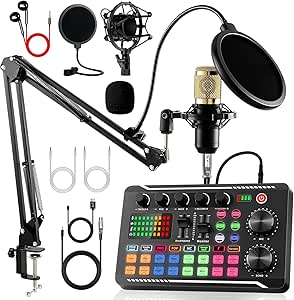 | Best Compact Effects Bundle | Model: F998; listing also references P99 | Channels: 2 | Connectivity: Bluetooth, USB; 3.5 mm connector | VIEW LATEST PRICE | See Our Full Breakdown |
| TENLAMP G10 Creator Audio Mixer Bundle with Microphone |  | Best for Built-In Voice Effects | Channels: 2 | Connectivity: Auxiliary, Bluetooth, USB | Power: Battery powered | VIEW LATEST PRICE | See Our Full Breakdown |
| Movo PodPro Portable Podcast Equipment Bundle for iPhone and Android |  | Best Two-Person Portable Bundle | Interface: MDX-2 dual-channel USB | Microphones: Two CastMic XLR dynamic microphones | Microphone pattern: Cardioid | VIEW LATEST PRICE | See Our Full Breakdown |
| OZMI Podcast Equipment Bundle with RGB Audio Mixer, Microphone, Headphones and Boom Arm |  | Best Creator-Style Desktop Bundle | Channels: 1 | Included components: RGB audio mixer, 3.5 mm condenser microphone, monitoring headphones, boom arm, pop filter | Connectivity: Bluetooth, USB, OTG/PC, 3.5 mm AUX | VIEW LATEST PRICE | See Our Full Breakdown |
| Zoom PodTrak P4 Portable Podcast Recorder |  | Best Overall for Multi-Person Podcasts | Microphone inputs: Four XLR inputs with phantom power | Headphone outputs: Four, each with individual volume control | Recording: Multitrack WAV | VIEW LATEST PRICE | See Our Full Breakdown |
| portable podcast recording mixer | Connectivity | Channels | Dimensions | Weight |
|---|---|---|---|---|
| G10 Podcast Equipment Bundle w | 3.5 mm, 6.35 mm, XLR/48V MIC, Bluetooth, Type-C | 2 | 11.73 × 5.51 × 8.58 in | 4.6 lb |
| MAONO E2 Gen2 Podcast Audio In | AUX, Bluetooth, USB-C, XLR | 10 | 9.64 × 6.18 × 2.16 in | 0.89 kg |
| MAONO Podcast Equipment Bundle | USB Type-C, auxiliary, Bluetooth | 9 | 9.44 × 5.11 × 1.65 in | 1.3 kg |
| 4-Person Podcast Equipment Bun | Bluetooth, USB, XLR, dual 3.5 mm microphone inputs | — | — | — |
| ALSO GO F998 Podcast Equipment | Bluetooth, USB; 3.5 mm connector | 2 | 4.52 × 1.77 × 7.4 in | — |
| TENLAMP G10 Creator Audio Mixe | Auxiliary, Bluetooth, USB | 2 | 10.9 × 2.28 × 7.67 inches | 4.2 pounds |
| Movo PodPro Portable Podcast E | — | — | — | 5.76 kg |
| OZMI Podcast Equipment Bundle | Bluetooth, USB, OTG/PC, 3.5 mm AUX | 1 | — | — |
| Zoom PodTrak P4 Portable Podca | — | — | 6.1 × 4.41 × 1.85 inches | 130 g |
More Details on Our Top Picks
G10 Podcast Equipment Bundle with Audio Mixer, Microphone, and Boom Arm
I’d choose this bundle when getting a basic portable recording setup together matters more than upgrading individual components. It includes a mixer, a 3.5 mm condenser microphone, and a boom arm, while noise reduction, tone controls, voice effects, and built-in sound pads give new creators tools for shaping a stream or casual podcast. Compared with the MAONO E2 Gen2, the G10 supplies the microphone and arm, but the MAONO offers two XLR combo inputs and up to 60 dB of preamp gain—a better fit for recording with more demanding microphones. The G10’s battery-powered design and computer and mobile connections add flexibility, though its included mic’s 3.5 mm connection limits upgrade options. The listing also conflicts on the number of preset reverb modes, so I wouldn’t choose it for a specific effect count.
Pros:- Includes a mixer, 3.5 mm condenser microphone, and boom arm.
- Offers noise reduction plus adjustable tone and voice effects.
- Battery power and computer and mobile connections support flexible setups.
Cons:- The included 3.5 mm microphone is less suitable for buyers who want a conventional XLR mic upgrade path.
- The reverb-mode count is inconsistent in the listing.
Best for: First-time solo podcasters and mobile streamers who want a mixer, microphone, and boom arm in one package.
Not ideal for: Hosts planning to use XLR microphones or build a two-mic setup; the included microphone is 3.5 mm and the mixer is listed as two-channel.
- Channels:2
- Connectivity:3.5 mm, 6.35 mm, XLR/48V MIC, Bluetooth, Type-C
- Power:Battery powered; 5 V
- Audio inputs:XLR, TRS, 3.5 mm
- Outputs:TRS, USB Type-C, XLR
- Built-in effects:12 sound effects; reverb-mode count varies in listing
- Dimensions:11.73 × 5.51 × 8.58 in
- Weight:4.6 lb
Our verdict“Choose the G10 for a ready-to-start solo setup, but pick the MAONO E2 Gen2 if XLR microphone support and preamp gain matter more.”
MAONO E2 Gen2 Podcast Audio Interface and Mixer
For a portable setup built around proper microphones rather than an included starter mic, I’d put the MAONO E2 Gen2 ahead of the all-in-one bundles. Its two XLR combo inputs and preamps with up to 60 dB of gain suit dynamic microphones, while loopback helps route computer audio into a stream without an extra mixer. An onboard battery rated for up to eight hours supports recording away from a desk, and the eight customizable sound buttons can store short cues. Compared with the G10 bundle, it asks you to supply microphones and stands, but gives you a clearer path to a two-mic XLR setup. The tradeoff is that its battery is a finite session resource, and it does not charge a connected phone or provide power delivery, so mobile creators should plan for separate device power.
Pros:- Two XLR combo inputs with up to 60 dB of preamp gain.
- Loopback and multiple connection types support streaming and recording workflows.
- Built-in battery is rated for up to eight hours.
- Eight customizable sound buttons can store recordings up to 20 seconds each.
Cons:- Microphones and stands are not included.
- Battery runtime is limited to up to eight hours.
- Does not provide phone charging or power delivery.
Best for: Two-host podcasters and streamers who already own XLR microphones and need loopback, portable battery operation, and customizable cue buttons.
Not ideal for: New creators seeking a complete mic-and-stand kit, or phone-based recordists expecting the mixer to charge their device.
- Inputs:2 XLR combo inputs
- Channels:10
- Maximum preamp gain:60 dB
- Maximum sample rate:48 kHz
- Connectivity:AUX, Bluetooth, USB-C, XLR
- Battery:1500 mA; rated for up to 8 hours
- Sound effect buttons:8; up to 20 seconds per button
- Dimensions:9.64 × 6.18 × 2.16 in
- Weight:0.89 kg
Our verdict“Pick the E2 Gen2 if you have XLR microphones and want a portable, stream-friendly interface; choose a bundle like the G10 if you need a microphone included.”
MAONO Podcast Equipment Bundle with Audio Mixer and 3.5 mm Microphone
This MAONO bundle makes the most sense for creators who want to send a show to several devices or platforms without assembling a separate collection of accessories. The package includes a 3.5 mm condenser microphone, tripod, windscreen, cables, and a mixer with sound and voice effects, tone controls, noise reduction, and real-time monitoring. Its listed support for up to two people, four devices, and four streaming platforms gives it a broader routing pitch than the G10 bundle, which is more straightforward as a basic mic-and-arm starter kit. That flexibility comes with limits: the microphone input does not support phantom power, so this isn’t the right base for many XLR condenser mics. A 6.35 mm-to-3.5 mm adapter for instruments is also absent, and some phones need an OTG adapter.
Pros:- Includes a condenser microphone, tripod, windscreen, and connecting cables.
- Provides sound effects, voice effects, reverb, tone controls, and real-time monitoring.
- Compatible with Windows, macOS, iOS, Android, computers, phones, and tablets.
- Listing describes support for up to two people, four devices, and four streaming platforms.
Cons:- Microphone input does not support phantom power.
- A 6.35 mm-to-3.5 mm instrument adapter is not included.
- Some phones without a 3.5 mm jack may need an OTG adapter.
Best for: Mobile-first podcasters and streamers who want an included mic kit and plan to connect multiple devices or distribute across platforms.
Not ideal for: Creators using phantom-powered microphones or instruments who need a mixer with the required power support or adapter included.
- Channels:9
- Connectivity:USB Type-C, auxiliary, Bluetooth
- Power source:Battery powered
- Microphone input:3.5 mm; phantom power not supported
- Outputs:1/4-inch, XLR, 3.5 mm audio, USB Type-C
- Compatibility:Windows, macOS, iOS, Android, PC, smartphones, and tablets
- Dimensions:9.44 × 5.11 × 1.65 in
- Weight:1.3 kg
- Included items:Microphone, tripod, windscreen, mixer, cables, and manual
Our verdict“Choose this MAONO bundle for a flexible, accessory-rich mobile streaming setup, but skip it if your microphones require phantom power.”
4-Person Podcast Equipment Bundle with M100 Audio Mixer and Dynamic Microphones
When the recording plan involves a group, this bundle has a practical advantage over every two-mic-oriented option here: it supplies four dynamic microphones, a four-channel mixer, desktop stands, earphones, and cables. Separate channel volume and mute controls help a host manage uneven talkers, while the rechargeable 4000 mAh battery supports sessions away from a fixed power setup. By comparison, the MAONO E2 Gen2 has two XLR combo inputs and better-defined preamp specifications, but it doesn’t arrive with four microphones and group accessories. The M100’s effects, Bluetooth playback, and device compatibility add flexibility, yet the listing gives no clear microphone input or preamp-gain details, so I’d be cautious about choosing it for advanced mic matching. Its listed dimensions also don’t clarify whether they describe the mixer or the full kit.
Pros:- Includes four dynamic microphones and group-recording accessories.
- Four channels have separate volume and mute controls.
- Rechargeable 4000 mAh battery supports portable sessions.
- Offers noise reduction, audio effects, and Bluetooth playback.
Cons:- Microphones are specified as dynamic, limiting suitability for buyers seeking condenser microphones.
- The listing does not provide preamp-gain details.
- Listed dimensions do not identify which component they describe.
Best for: Small production teams and roundtable hosts who need four microphones, separate channel controls, and a rechargeable mixer in one package.
Not ideal for: Solo creators seeking a compact, well-documented interface or buyers who need confirmed preamp specifications for a particular microphone setup.
- Audio channels:4
- Included microphones:4 dynamic microphones
- Connectivity:Bluetooth, USB, XLR, dual 3.5 mm microphone inputs
- Battery:4000 mAh rechargeable lithium-ion
- Mixer controls and effects:Per-channel volume and mute, EQ, reverb, pitch correction, loopback, side chain, voice changer, sound pads
- Compatibility:Windows, iOS, Android; PC, laptop, smartphone, tablet
- Included accessories:Desktop stands, monitor earphones, shock mounts, foam covers, splitters, and cables
- Listed dimensions:3 × 5 × 6 in; component not specified
Our verdict“Choose the M100 bundle for a ready-made four-person recording setup, but favor the MAONO E2 Gen2 for clearer input and preamp specifications.”
ALSO GO F998 Podcast Equipment Bundle with BM800 Microphone
The ALSO GO F998 stands out for buyers who want a small mixer and a broad set of vocal and background effects in a bundle. The package includes a BM800-style super-cardioid condenser microphone, boom arm, shock mount, pop filter, foam cap, earphone, and cables, while its 16 background effects and seven recording modes give casual streams plenty of sound-shaping options. Its listed mixer dimensions are more compact than the G10 bundle’s, but the G10 includes a clearer microphone-and-boom-arm starter package and explicitly lists battery-powered operation. This ALSO GO listing instead names corded electric power while also listing a battery, so I wouldn’t rely on it for a battery-only field session without confirming the setup. The model references also conflict between F998 and P99, which makes checking the exact unit worthwhile before buying.
Pros:- Bundle includes a microphone, boom arm, shock mount, pop filter, earphone, and cables.
- Offers 16 background effects, seven recording modes, and four voice-changer modes.
- Supports USB, 3.5 mm, and Bluetooth connections with listed computer and mobile platforms.
- Compact listed mixer dimensions suit a space-conscious desk setup.
Cons:- Listing gives conflicting model references, naming both F998 and P99.
- Power details are unclear: the listing says corded electric and also lists a battery.
- Two channels make it a less natural fit for larger multi-mic shows.
Best for: Solo streamers and beginner podcasters who want a compact effects mixer with a microphone and mounting accessories for a desk setup.
Not ideal for: Creators who need dependable battery-only portability, a clearly specified model, or a straightforward path to a multi-microphone show.
- Model:F998; listing also references P99
- Channels:2
- Connectivity:Bluetooth, USB; 3.5 mm connector
- Included microphone:BM800 studio condenser; super-cardioid
- Sound options:16 background effects, 7 recording modes, 4 voice-changer modes
- Included components:Mixer, microphone, boom arm, shock mount, pop filter, foam cap, earphone, and cables
- Power:Corded electric listed; one lithium-ion battery also included
- Dimensions:4.52 × 1.77 × 7.4 in
Our verdict“Pick the ALSO GO for a compact effects-focused desk bundle, but choose the G10 if clearly stated battery operation is a priority.”
TENLAMP G10 Creator Audio Mixer Bundle with Microphone
The TENLAMP G10 suits creators who want a ready-to-start, effects-focused setup rather than a mixer built around multiple microphone channels. Its included condenser microphone and accessories reduce the number of separate pieces to source, while noise reduction, voice styles, and real-time tone controls make it easier to shape a stream or spoken recording on the fly. Battery power and connections for computers, phones, and tablets also give it more location flexibility than a desktop-only kit. Compared with the Zoom PodTrak P4, the TENLAMP emphasizes voice effects and a bundled mic, not multitrack recording or four-person sessions. Its two-channel specification is modest, and the listed frequency figure of 60 hertz leaves limited information about its recording range. I’d choose it for casual solo creation, not a growing interview show.
Pros:- Includes a condenser microphone and recording accessories.
- Provides noise reduction and real-time bass, treble, reverb, and pitch controls.
- Built-in voice styles and sound effects support live creator content.
- Works with computers, phones, and tablets and is battery powered.
Cons:- Two-channel design is less suited to multi-guest podcast recording than the Zoom PodTrak P4.
- The listed 60-hertz frequency specification offers little useful detail about its full audio range.
- Software update support date is listed as unknown.
Best for: Solo streamers and beginner podcasters who want a bundled microphone, mobile compatibility, and hands-on voice effects.
Not ideal for: Interview hosts who need several XLR microphones, multitrack recording, or clearly specified audio performance.
- Channels:2
- Connectivity:Auxiliary, Bluetooth, USB
- Power:Battery powered
- Audio input:TRS / XLR
- Output connectors:3.5 mm TRS, 6.35 mm TRS, OTG/Type-C
- Dimensions:10.9 × 2.28 × 7.67 inches
- Weight:4.2 pounds
- Compatible systems:Windows, Mac, iOS, Android
Our verdict“Choose the TENLAMP G10 for a portable, effects-rich starter bundle, but pick the Zoom PodTrak P4 for serious multi-mic podcast sessions.”
Movo PodPro Portable Podcast Equipment Bundle for iPhone and Android
The Movo PodPro is the most complete pick here for recording two people away from a desk: it pairs a dual-channel interface with two cardioid XLR dynamic microphones, headphones, stands, cables, and a travel case. Two headphone outputs let both speakers monitor independently, while the included phone and computer cables simplify connecting to different recording devices. Its built-in battery adds genuine portability, though runtime falls from up to eight hours to three hours with phantom power enabled. Compared with the Zoom PodTrak P4, the Movo arrives with more of the two-person mic kit but lacks the P4’s four microphone inputs, four headphone outputs, and multitrack recorder. The listed maximum sample rate of 16 kHz is also a major limitation for buyers seeking higher-resolution recording. I’d shortlist it for simple two-person mobile sessions, after checking that specification against the intended workflow.
Pros:- Includes two cardioid XLR microphones and two pairs of headphones.
- Dual-channel interface has two headphone outputs and a built-in battery.
- Included USB-A, USB-C, and Lightning cables support several recording devices.
- Travel case, tabletop stands, and XLR cables make the kit ready for mobile sessions.
Cons:- Listed maximum sample rate is 16 kHz, limiting its fit for higher-resolution recording.
- Battery life drops to three hours when phantom power is enabled.
- At 5.76 kg, the complete bundle is a substantial load for frequent travel.
Best for: Two-person interview or co-host teams who need microphones, headphones, stands, cables, and phone connections in one portable kit.
Not ideal for: Creators who need higher sample rates, longer sessions with phantom power, or room to expand beyond two microphones.
- Interface:MDX-2 dual-channel USB
- Microphones:Two CastMic XLR dynamic microphones
- Microphone pattern:Cardioid
- Inputs and outputs:Two XLR inputs, two headphone outputs, stereo 1/4-inch outputs
- Phantom power:48 V
- Battery life:Up to 8 hours; 3 hours with phantom power enabled
- Maximum sample rate:16 kHz
- Weight:5.76 kg
- Compatible devices:Laptop, personal computer, smartphone, tablet
Our verdict“Choose the Movo PodPro when a two-person mobile show needs a complete mic-and-monitoring kit, but verify that its listed 16 kHz ceiling fits your recording needs.”
OZMI Podcast Equipment Bundle with RGB Audio Mixer, Microphone, Headphones and Boom Arm
OZMI is aimed at a creator who wants a visible, all-in-one streaming station, not a flexible multi-mic podcast recorder. The bundle includes a condenser microphone, monitoring headphones, boom arm, and pop filter, while the mixer adds pitch and voice effects, sound pads, ducking, loopback, and Bluetooth or AUX accompaniment. Those controls can make a solo stream more interactive without adding separate gear. Compared with the TENLAMP G10, OZMI supplies a boom arm and headphones and lists more creator controls, but its single-channel layout is a firm limit for interviews with multiple mic inputs. Some features also depend on compatible devices or supported stereo music sources. Its rechargeable battery and mobile connections help with setup flexibility, yet this bundle makes more sense for a fixed creator corner than for recording a group on the move.
Pros:- Bundle includes a condenser microphone, monitoring headphones, boom arm, and pop filter.
- Offers pitch effects, voice-changing modes, sound pads, ducking, and loopback.
- Adjustable accompaniment and monitoring faders have visible level scales.
- Rechargeable battery and Bluetooth, USB, OTG/PC, and AUX connections support varied setups.
Cons:- Single-channel design does not suit multi-microphone interviews.
- Some features depend on compatible devices or supported stereo music sources.
- The listed XLR input and 3.5 mm microphone may require buyers to check connection compatibility.
Best for: Solo streamers and beginner creators building a compact desk setup who want a mic, headphones, boom arm, and live effects together.
Not ideal for: Podcast hosts recording co-hosts or guests on separate microphones, since the mixer is listed as single-channel.
- Channels:1
- Included components:RGB audio mixer, 3.5 mm condenser microphone, monitoring headphones, boom arm, pop filter
- Connectivity:Bluetooth, USB, OTG/PC, 3.5 mm AUX
- Battery capacity:3600 mAh
- Pitch effects:12 settings
- Preset modes:6
- Voice changer modes:4
- Custom sound pads:4
Our verdict“Pick OZMI for a solo creator’s effects-heavy desk bundle, but choose the Zoom PodTrak P4 or Movo PodPro for multi-person recording.”
Zoom PodTrak P4 Portable Podcast Recorder
The Zoom PodTrak P4 ranks first for podcast recording because it combines four XLR mic inputs, four individually controlled headphone outputs, and multitrack WAV recording in a compact battery-powered unit. That layout lets a host record a small panel while giving each person a headphone level they can adjust independently. For remote interviews, its TRRS phone connection and USB link use automatic Mix-Minus to reduce call echo, and programmable sound pads provide a quick way to trigger cues. Unlike the Movo PodPro, the P4 is a recorder as well as an interface, and it supports four microphones rather than two; unlike the TENLAMP G10, it prioritizes dependable podcast workflow over voice-changing effects and bundled microphones. The tradeoff is short battery life—up to 3.5 hours—and the need to supply two AA batteries. Its 2-in/2-out USB interface is also less expansive than its standalone recording features suggest.
Pros:- Four XLR inputs with phantom power accommodate a small group of microphones.
- Four headphone outputs have individual volume controls.
- Multitrack WAV recording and programmable sound pads support a standalone podcast workflow.
- Automatic Mix-Minus supports phone and USB remote interviews.
Cons:- Battery life is listed at up to 3.5 hours.
- Portable operation requires two AA batteries.
- USB audio interface mode is limited to 2-in/2-out.
Best for: Podcast hosts recording up to four people who need independent headphone controls, multitrack files, and phone or USB remote interviews.
Not ideal for: Creators seeking an all-in-one microphone bundle, extended battery sessions, or a USB interface with more than 2-in/2-out routing.
- Microphone inputs:Four XLR inputs with phantom power
- Headphone outputs:Four, each with individual volume control
- Recording:Multitrack WAV
- Remote interview connections:TRRS phone jack and USB
- USB audio interface:2-in/2-out
- Sound pads:Four programmable pads
- Power:Two AA batteries; up to 3.5 hours
- Dimensions:6.1 × 4.41 × 1.85 inches
- Weight:130 g
Our verdict“Choose the PodTrak P4 for portable, multi-person podcast recording with remote-call support; skip it if you need included microphones or longer battery runtime.”
How We Picked
I ranked these portable podcast recording mixers by how well their stated design and bundled components match real recording setups: solo creators, phone-first recording, computer-based production, and interviews with several people. I gave more weight to a podcast-focused recording workflow, useful input capacity, and practical connection options than to accessories or appearance alone. Portability also means more than a small mixer: a setup can become cumbersome when microphones, stands, headphones, cables, or a computer must travel with it.
The order reflects the gap between a dedicated recording tool and a bundle that supplies basic gear but may require buyers to verify compatibility and workflow details. That puts the Zoom PodTrak P4 first for podcast-specific use, with the MAONO E2 Gen2 and Movo PodPro serving distinct interface and mobile needs. Bundles such as the four-person M100 package can make sense when their included microphones fit the plan, while entry-level G10, MAONO, ALSO GO, TENLAMP, and OZMI packages rank lower because buyers should weigh the complete setup—not just the mixer or included extras—against their needs.
Factors to Consider When Choosing Portable Podcast Recording Mixers
Before choosing a model, I would map the recording session you actually plan to make. A small device can still be the wrong travel companion if it needs a computer, a stack of accessories, or extra adapters to work with your phone. These factors help separate a genuinely useful portable setup from a bundle that only looks complete on paper.
Match Input Capacity to Your Guest Plan
Start by counting people who need separate microphones, not just the number of guests you expect most often. A two-person show may work well with a compact interface, while rotating interviews or roundtable sessions call for more input capacity and clearly assigned controls. Buying too many inputs can add size and setup complexity you rarely use, but choosing too few can force awkward microphone sharing. Check whether each microphone connection suits the microphones you own or plan to use. Also look for a clear path to monitor each voice, since a recording that cannot be checked during the session is harder to troubleshoot later. For changing guest counts, a flexible recorder can be a better travel choice than a larger bundle tied to one fixed setup.
Decide Where the Recording Will Happen
A mixer that connects to a phone is not automatically a standalone recorder, and a computer interface may depend on a laptop throughout the session. Decide whether you want to record to a phone, computer, memory card, or another device before comparing models. Standalone recording can reduce the equipment you need to carry, while computer-based recording may fit a workflow that already relies on editing software and a laptop. Phone-first creators should check their device’s port, operating-system support, and any adapter needs before buying. A setup that requires an unexpected hub or power source can erase the convenience of a small mixer. Treat compatibility as a whole-chain question: mixer, microphone, cable, recording device, and app all need to work together.
Count the Whole Travel Kit, Not Just the Mixer
Portable is a system-level quality, not a label that can be judged from the mixer alone. A bundled boom arm may help at a home desk, yet it adds bulk and is rarely as useful on a café table or at a remote interview. A compact mixer can also require separate headphones, stands, cables, and a power supply, so estimate what must fit in your bag. Bundles are most helpful when their included parts match your recording setting and connect without extra purchases. They are less appealing when they add accessories you will leave at home. For location work, favor a short, repeatable setup and pack only the pieces needed for the session.
Choose Controls for Your Recording Experience
Beginners often benefit more from obvious level controls and a straightforward monitoring path than from a long feature list. Before choosing a mixer, ask how you will set microphone levels, hear the conversation, and tell whether recording is underway. A creator bundle can provide a quick entry point, but a collection of effects or visual controls may add little if basic gain and monitoring remain confusing. More experienced users may prefer flexible routing, but that flexibility is only useful when it supports a specific production task. A simpler layout can reduce mistakes during a live interview, especially when one person is both host and operator. Choose the control scheme you can manage while keeping the conversation moving.
Separate Useful Bundle Contents From Marketing Extras
Included microphones, headphones, and stands can lower setup friction, but their presence does not establish sound quality or compatibility with future gear. Check the microphone connection type and whether the mixer supports the microphone’s power requirements before treating a bundle as ready to use. A package with multiple microphones may be a sensible fit for a group show, while a solo creator may carry unnecessary weight. RGB lighting can suit a video-oriented desk setup, but it does not improve portability or solve recording needs. Compare the cost of replacing or supplementing the included parts with the value of buying a mixer that better matches your workflow. The best bundle is the one that removes specific setup gaps, not the one with the longest accessory list.
Plan for Power, Monitoring, and Backup
Field recording exposes practical needs that a home desk can hide: access to power, background noise, and a way to catch problems before the session ends. Check how the mixer is powered and whether its power arrangement suits the places you record. Headphone monitoring helps catch muted microphones, poor levels, or unwanted noise while there is still time to fix them. If a device records to a separate medium, plan how you will manage files and move them into your editing workflow. For important interviews, consider a backup recording path rather than assuming one device or connection cannot fail. These checks may add a few minutes of preparation, but they can matter more than onboard effects or decorative features.
Frequently Asked Questions
Can I record a podcast with these mixers without bringing a laptop?
Some portable podcast setups can record without a computer, while interface-style models may rely on a connected phone or computer and compatible recording software. Check whether the exact model records audio internally or only sends audio to another device. Then confirm what storage, power, and monitoring accessories the standalone workflow requires. A phone-connected setup is still dependent on that phone’s compatibility and battery. If laptop-free recording is your priority, choose based on the full recording path rather than the word “portable.”
Which type of mixer should I choose for interviews with several guests?
Choose by the number of separate microphones you need to connect at once, then check whether the controls let you manage those voices clearly. A four-person bundle such as the M100 package is aimed at group recording, while the Zoom PodTrak P4 is the roundup’s strongest dedicated podcast-recorder pick. The right fit still depends on connection details and how you intend to record. Count the host as well as guests, and leave room for an occasional extra participant if that is part of your format. Do not assume that a bundle containing several microphones provides the same flexibility as a mixer with a suitable input layout.
Is a phone-compatible mixer a good choice for recording away from home?
It can be a strong choice when your phone is already the center of your recording and publishing workflow. The Movo PodPro is the most directly phone-oriented option in this lineup, but you should still check compatibility with your particular iPhone or Android device. Confirm the needed adapter, app support, and power arrangement before relying on it for an interview. Phone recording can reduce what you carry, though managing levels and monitoring may be less convenient than a dedicated recorder workflow. If you regularly record multiple guests, verify the input and monitoring setup before favoring phone compatibility alone.
Should I buy a bundle with microphones or choose the mixer first?
A bundle makes sense when its microphones and accessories fit your recording plan and save you from sourcing compatible parts separately. If you already own microphones, buying around your existing gear can avoid duplicate accessories and let you focus on the mixer workflow. Check connection type, power needs, and how many microphone inputs are available before assuming everything in a package works together. A boom arm may suit a fixed home studio but add little value for location recording. For travel, compare the weight and setup time of the complete kit, not only the mixer.
When is it worth choosing a dedicated podcast recorder over a creator bundle?
A dedicated recorder is a better fit when podcast sessions, especially interviews, are the main job and you want controls and recording features centered on that workflow. The Zoom PodTrak P4 is the clearest choice here for that use, while bundles such as the G10 or OZMI options may appeal when a microphone and desk accessories are part of the need. A creator bundle can be convenient for a simple setup, but it may not offer the same recording path or guest flexibility. Compare the time saved during setup with the controls you need during a session. If you record in varied locations, favor a dependable, manageable workflow over extra accessories you will not carry.
Conclusion
For most people seeking a portable podcast recording mixer, I would start with the Zoom PodTrak P4 as the best overall because its dedicated podcast-recorder focus best matches interviews and multi-person sessions. The best value depends on what you already own: the MAONO E2 Gen2 is a sensible interface-style pick when you need that connection workflow, while an included-mic bundle can be more practical if you are starting without gear. For beginners who want a packaged setup, compare the G10, MAONO, and TENLAMP bundles by compatibility and the accessories you will actually use; do not choose on bundle size alone. The Movo PodPro is best for phone-first recording, and the four-person M100 package suits buyers planning group sessions. Choose OZMI for a setup where RGB and desk accessories matter, or ALSO GO when its bundle components match your needs. My final advice: pick the recording destination and guest count first, then choose the smallest complete kit that supports both.