
For seamless wireless VR, the Linksys Atlas Max 6E stands out as the best overall dedicated router for VR streaming, offering stable tri-band performance that keeps headsets isolated from household traffic. If you prefer a compact, plug-and-play solution specifically designed for Meta Quest, the PC-VR Streaming Air Link WiFi6 Router is a strong alternative that simplifies setup significantly. The main tradeoff in this category is between the raw speed of high-end Wi-Fi 7 routers like the ASUS ROG Rapture GT-BE98 Pro and the cost-effective reliability of Wi-Fi 6E models. Most users face the challenge of interference from smart home devices, which these dedicated units mitigate by dedicating a specific band exclusively to your headset. Continue reading to see how these nine options stack up in terms of latency, range, and ease of configuration for your specific VR setup.

Get audio and creator gear delivered free with Prime
- Fast, free delivery on millions of items
- Prime Video, Amazon Music and more included
- Member-only deals all year
Complete the kit


Key Takeaways
- Wi-Fi 6E tri-band routers offer the best balance of price and performance for most users, providing a dedicated 6GHz band that is largely free from interference from older devices.
- Dedicated VR routers with pre-configured settings, like the PC-VR Streaming Air Link, reduce setup friction but often lack the advanced customization and range of mainstream gaming routers.
- Wi-Fi 7 is currently overkill for single-headset VR streaming due to hardware limitations in current headsets, making it a poor value proposition unless you also need multi-gigabit wired speeds for other tasks.
- Latency consistency matters more than peak bandwidth; routers with dedicated gaming ports or QoS features that prioritize UDP traffic provide a smoother experience than those with higher theoretical maximum speeds.
- Mesh systems are generally inferior to single high-performance routers for VR unless the node is placed in the same room as the play area, as backhaul congestion can introduce micro-stutters.
| Linksys Atlas Max 6E Tri-Band Mesh Wi-Fi 6E System (AX8400) |  | Best for Whole-Home Coverage | Wi-Fi Generation: Wi-Fi 6E | Network Type: Tri-Band | Max Data Rate: 8.4 Gbps | VIEW ON AMAZON | See Our Full Breakdown |
| PC-VR Streaming Air Link WiFi6 VR Router Compatible with Meta Quest 3S/3/2 |  | Best Dedicated VR Router | Wi-Fi Generation: Wi-Fi 6 | Network Type: Point-to-Point | Max Speed: 1500 Mbps | VIEW ON AMAZON | See Our Full Breakdown |
| ASUS RT-AX82U AX5400 Dual-Band WiFi 6 Gaming Router (Renewed) | 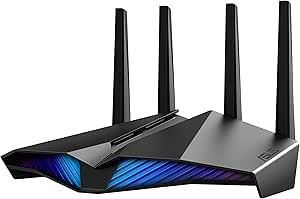 | Best Budget Gaming Router | Wi-Fi Generation: Wi-Fi 6 | Network Type: Dual-Band | Max Data Rate: 5400 Mbps | VIEW ON AMAZON | See Our Full Breakdown |
| ASUS ROG Rapture GT-BE98 Pro Quad-Band WiFi 7 Gaming Router (Renewed) |  | Best Premium Performance | Wi-Fi Generation: WiFi 7 | Network Type: Quad-Band | Max Data Rate: 30 Gbps | VIEW ON AMAZON | See Our Full Breakdown |
| GL.iNet GL-BE6500 Flint 3e Wi-Fi 7 Router |  | Best for Tech-Savvy Users | Wi-Fi Generation: WiFi 7 | Network Type: Dual-Band | Max Speed: 6.5 Gbps | VIEW ON AMAZON | See Our Full Breakdown |
| GL.iNet GL-BE9300 Flint 3 Tri-Band Wi-Fi 7 Router |  | Best for Privacy-Conscious Streamers | Wi-Fi Standard: Wi-Fi 7 (802.11be) | Max Wireless Speed: 9 Gbps | Ports: 5 x 2.5G Ethernet | VIEW ON AMAZON | See Our Full Breakdown |
| ASUS ROG Strix GS-BE12000 WiFi 7 Gaming Router |  | Best for High-End Gaming & VR | Wi-Fi Standard: Wi-Fi 7 (802.11be) | Max Wireless Speed: 12,000 Mbps | Ports: 8 x 2.5G Ethernet (1 WAN, 7 LAN) | VIEW ON AMAZON | See Our Full Breakdown |
| ASUS ROG Rapture GT-BE98 Pro WiFi 7 Gaming Router | | Best Premium Performance | Wi-Fi Standard: Wi-Fi 7 (802.11be) | Max Wireless Speed: 30 Gbps | Ports: 2 x 10G, 4 x 2.5G, 2 x 1G | VIEW ON AMAZON | See Our Full Breakdown |
| TP-Link Archer AXE75 AXE5400 Tri-Band WiFi 6E Router |  | Best Budget-Friendly 6E Option | Wi-Fi Standard: Wi-Fi 6E (802.11ax) | Max Wireless Speed: 5,400 Mbps | Ports: 1 x 2.5G WAN, 4 x 1G LAN | VIEW ON AMAZON | See Our Full Breakdown |
| dedicated router for vr streaming | Ports | Security | Wi-Fi Generation | Network Type |
|---|---|---|---|---|
| Linksys Atlas Max 6E Tri-Band | 4 Ethernet | WPA3 | Wi-Fi 6E | Tri-Band |
| PC-VR Streaming Air Link WiFi6 | — | — | Wi-Fi 6 | Point-to-Point |
| ASUS RT-AX82U AX5400 Dual-Band | 4 Ethernet | WPA3 | Wi-Fi 6 | Dual-Band |
| ASUS ROG Rapture GT-BE98 Pro Q | 2x 10G, 4x 2.5G | WPA3 | WiFi 7 | Quad-Band |
| GL.iNet GL-BE6500 Flint 3e Wi- | 5 Ethernet (2.5G LAN) | — | WiFi 7 | Dual-Band |
| GL.iNet GL-BE9300 Flint 3 Tri- | 5 x 2.5G Ethernet | WPA3, AdGuard Home | — | — |
| ASUS ROG Strix GS-BE12000 WiFi | 8 x 2.5G Ethernet (1 WAN, 7 LAN) | WPA3, AiProtection Pro | — | — |
| ASUS ROG Rapture GT-BE98 Pro W | 2 x 10G, 4 x 2.5G, 2 x 1G | WPA3, AiProtection Pro | — | — |
| TP-Link Archer AXE75 AXE5400 T | 1 x 2.5G WAN, 4 x 1G LAN | WPA3, HomeShield | — | — |
More Details on Our Top Picks
Linksys Atlas Max 6E Tri-Band Mesh Wi-Fi 6E System (AX8400)
This system stands out for its ability to dedicate a specific band to VR traffic, which is critical for maintaining low latency. Unlike the ASUS RT-AX82U, which is a single unit, the Atlas Max uses mesh technology to eliminate dead zones, ensuring your headset maintains a strong signal even if you move around a larger play area. The Qualcomm chipset provides the stability needed for heavy data loads, making it feel almost wired. However, the tradeoff is complexity and cost; you are buying a full home network, not just a streaming tool. If your main goal is a simple, isolated connection between PC and headset, this is overkill compared to the Puppis S1 Lite. It requires 6E-compatible devices to truly shine, so older headsets won’t benefit from the fastest band.
Pros:- Dedicated 5GHz band for gaming minimizes interference from other devices
- Wi-Fi 6E support offers ultra-low latency on the 6GHz band
- Mesh capability ensures consistent signal strength throughout the home
- High device capacity handles smart home gadgets without impacting VR
Cons:- Requires Wi-Fi 6E compatible devices to access the fastest speeds
- Single pack may not cover very large homes without adding nodes
- More expensive and complex to set up than dedicated streaming routers
Best for: Users with large homes who need seamless VR coverage across multiple rooms and already have Wi-Fi 6E capable headsets.
Not ideal for: Gamers in small apartments or those using older VR headsets that lack 6E support, as the extra coverage and bands are wasted.
- Wi-Fi Generation:Wi-Fi 6E
- Network Type:Tri-Band
- Max Data Rate:8.4 Gbps
- Security:WPA3
- Ports:4 Ethernet
- Coverage:Home-wide Mesh
- Chipset:Qualcomm
Our verdict“Choose this if you need a high-performance whole-home mesh network that also excels at VR streaming.”
PC-VR Streaming Air Link WiFi6 VR Router Compatible with Meta Quest 3S/3/2
This is the most focused option in the lineup because it is designed solely for the PC-to-Headset link. Unlike the Linksys Atlas Max, which tries to handle your entire home’s internet, the Puppis S1 Lite creates a private, isolated lane for VR data. The PrismXR Desktop App offers diagnostic tools that general-purpose routers lack, helping you troubleshoot latency issues quickly. It is plug-and-play, meaning you don’t need to configure complex QoS settings. The drawback is its limited scope; it has only one LAN port and minimal routing features. You cannot use this as your main household router. It is strictly a companion device for VR, making it less versatile than the ASUS RT-AX82U, but far more effective for its specific single task.
Pros:- Creates a dedicated, interference-free link between PC and VR headset
- One-click setup eliminates complex router configuration
- Specialized diagnostic app helps resolve streaming issues
- Compact size fits easily on a desk near the PC
Cons:- Cannot function as a primary home router
- Limited to a single LAN port for wired connections
- Slower overall throughput compared to tri-band or quad-band systems
Best for: VR enthusiasts who want a simple, dedicated wireless solution to replace their Link Cable without configuring a complex network.
Not ideal for: Users who need a primary home router, as this device lacks the ports and routing capabilities to manage general internet traffic.
- Wi-Fi Generation:Wi-Fi 6
- Network Type:Point-to-Point
- Max Speed:1500 Mbps
- LAN Port:1 Gigabit
- Frequency:5 GHz / 2.4 GHz
- Compatibility:Meta Quest, Pico, Steam Deck
- Software:PrismXR App
Our verdict“The ideal choice for gamers who want a hassle-free, dedicated wireless connection specifically for VR streaming.”
ASUS RT-AX82U AX5400 Dual-Band WiFi 6 Gaming Router (Renewed)
This renewed unit offers a compelling balance of performance and price for those who need a standard router that can also handle VR. Compared to the ASUS ROG Rapture GT-BE98 Pro, it lacks the extreme throughput and 10G ports, but it provides sufficient WiFi 6 speeds for most wireless VR streaming needs. The Dedicated Gaming Port prioritizes traffic, which helps reduce stutter when other devices are active. However, being a dual-band router means it has less headroom than tri-band options like the Linksys Atlas. If your household has many heavy users, the 2.4GHz band might get congested, impacting your VR experience. It is a solid entry-level choice for gamers who want to upgrade from old WiFi 5 routers without investing in the newest standards.
Pros:- Dedicated gaming port prioritizes VR traffic over other devices
- Wi-Fi 6 technology provides significant speed improvements over older routers
- AiMesh support allows for future expansion if coverage issues arise
- Renewed condition offers a lower entry point for premium features
Cons:- Dual-band design offers less bandwidth headroom than tri-band models
- Renewed status comes with a shorter warranty period
- Lacks the 160MHz channel support on all bands found in higher-end models
Best for: Budget-conscious gamers who need a reliable WiFi 6 router for VR and general use but do not require tri-band isolation.
Not ideal for: Heavy users with many bandwidth-hungry devices who need the extra lane provided by tri-band or quad-band routers.
- Wi-Fi Generation:Wi-Fi 6
- Network Type:Dual-Band
- Max Data Rate:5400 Mbps
- Ports:4 Ethernet
- Security:WPA3
- Features:AiMesh, Mobile Game Mode
- Condition:Renewed
Our verdict“A cost-effective entry into WiFi 6 gaming that handles VR streaming well for smaller households.”
ASUS ROG Rapture GT-BE98 Pro Quad-Band WiFi 7 Gaming Router (Renewed)
This router is a monster in terms of raw capability, featuring WiFi 7 and 30 Gbps speeds. It is significantly more powerful than the ASUS RT-AX82U or the GL.iNet Flint 3e, offering quad-band architecture that can dedicate an entire band to your VR headset with zero competition. The dual 10G ports are ideal if you want to hardwire your PC for maximum stability. However, this power comes at a premium cost and physical footprint. It is overkill for a single user streaming to one headset. You are paying for future-proofing and extreme redundancy. If you don’t have WiFi 7 devices yet, you won’t see the full benefits immediately, making the Linksys Atlas Max a more practical choice for current tech.
Pros:- WiFi 7 support with 320MHz channels for future-proofing
- Quad-band design allows for extreme traffic isolation
- Dual 10G and quad 2.5G ports for massive wired throughput
- Triple-Level Game Acceleration optimizes end-to-end connectivity
Cons:- Sold as renewed with a limited 90-day warranty
- Physically large and requires significant desk or rack space
- Premium price point is hard to justify for single-headset use
Best for: Enthusiasts who want the absolute best wireless technology available and have a budget for premium hardware.
Not ideal for: Casual VR users or those on a budget, as the advanced features are unnecessary for basic streaming needs.
- Wi-Fi Generation:WiFi 7
- Network Type:Quad-Band
- Max Data Rate:30 Gbps
- Ports:2x 10G, 4x 2.5G
- Security:WPA3
- Features:Triple-Level Game Acceleration
- Condition:Renewed
Our verdict“The ultimate choice for enthusiasts who demand top-tier specs and have the budget to match.”
GL.iNet GL-BE6500 Flint 3e Wi-Fi 7 Router
The GL.iNet Flint 3e appeals to those who want WiFi 7 performance without the massive footprint of the ASUS ROG Rapture. It offers 6.5 Gbps speeds and supports Multi-Link Operation (MLO), which can improve reliability by bonding bands. However, it is a dual-band router, meaning it lacks the dedicated third band found in the Linksys Atlas Max to fully isolate VR traffic from the rest of the home. The real tradeoff here is usability; GL.iNet devices often require more technical know-how to configure plugins and security tools like AdGuard Home. If you prefer a polished, app-driven experience like the Puppis S1 Lite, this might feel too DIY. It is a strong performer, but it demands more attention to setup to get the best VR results.
Pros:- WiFi 7 technology with MLO for improved connection stability
- Built-in AdGuard Home for network-wide ad blocking
- Compact form factor compared to high-end gaming routers
- Strong security features including parental controls
Cons:- Dual-band design limits ability to isolate VR traffic completely
- Requires technical knowledge for optimal configuration
- Software ecosystem is less polished than major consumer brands
Best for: Tech-savvy users who want to experiment with WiFi 7 and advanced network controls like ad-blocking and VPNs.
Not ideal for: Beginners who want a plug-and-play experience, as the interface and setup are more complex than mainstream alternatives.
- Wi-Fi Generation:WiFi 7
- Network Type:Dual-Band
- Max Speed:6.5 Gbps
- Ports:5 Ethernet (2.5G LAN)
- RAM:1 GB DDR4
- Features:MLO, AdGuard Home
- Coverage:2,500 sq ft
Our verdict“A powerful, feature-rich option for users who enjoy tweaking their network settings for maximum efficiency.”
GL.iNet GL-BE9300 Flint 3 Tri-Band Wi-Fi 7 Router
This router stands out because it integrates high-speed VPNs directly into the hardware, a feature rarely seen in consumer-focused VR routers. While the ASUS ROG Strix GS-BE12000 prioritizes raw gaming acceleration and RGB aesthetics, the Flint 3 focuses on network control, offering WireGuard and OpenVPN speeds up to 680Mbps. This is critical for VR users who stream from a home server but want to bypass ISP throttling or protect their data without running a separate VPN box. The inclusion of AdGuard Home also helps reduce background noise from ad trackers that can subtly interfere with network latency. However, the software interface is more technical than mainstream options, requiring a bit more setup knowledge. It lacks the dedicated gaming ports found on ASUS models, relying instead on software-based prioritization which may not be as intuitive for beginners.
Pros:- Hardware-accelerated WireGuard and OpenVPN speeds up to 680Mbps
- Built-in AdGuard Home support for network-wide ad and tracker blocking
- Tri-band Wi-Fi 7 with MLO for reduced latency in dense environments
- OpenWrt-based firmware allows for deep customization and plugin installation
Cons:- Interface is more technical and less user-friendly than consumer-focused brands
- Lacks dedicated hardware gaming ports or RGB aesthetic features
- Requires manual firmware updates for optimal performance upon setup
Best for: Tech-savvy VR users who run local streaming servers and require built-in VPN protection and ad-blocking without extra hardware.
Not ideal for: Beginners who want a simple ‘plug-and-play’ experience with dedicated gaming ports and visual RGB feedback.
- Wi-Fi Standard:Wi-Fi 7 (802.11be)
- Max Wireless Speed:9 Gbps
- Ports:5 x 2.5G Ethernet
- RAM:1 GB DDR4
- Coverage:Up to 2,000 sq. ft.
- VPN Support:OpenVPN, WireGuard
- Security:WPA3, AdGuard Home
Our verdict“Choose this if you value network privacy and control over flashy gaming features, and don’t mind a slightly steeper learning curve.”
ASUS ROG Strix GS-BE12000 WiFi 7 Gaming Router
The ROG Strix GS-BE12000 is engineered specifically to handle the bursty, low-latency demands of VR streaming. Unlike the TP-Link Archer AXE75, which is a solid general-purpose router, this ASUS model features Triple-Level Game Acceleration that prioritizes VR traffic from your PC to the headset. With eight 2.5G ports, it offers vastly more wired connectivity than most competitors, allowing you to hardwire both your PC and the router’s connection to a switch for maximum stability. The 2GB of RAM ensures the router won’t choke when managing dozens of smart home devices alongside your VR stream. The tradeoff is its size and cost; it is a large, aggressive-looking device that might clash with minimalist setups. It is overkill for users who only have one VR headset and a few other devices, but for serious enthusiasts, the dedicated game optimization features justify the premium.
Pros:- Dedicated Triple-Level Game Acceleration for minimized VR latency
- Extensive wired connectivity with eight 2.5G Ethernet ports
- High-performance hardware with 2GB RAM and quad-core CPU
- Robust security suite with AiProtection Pro and WPA3 encryption
Cons:- Large physical footprint may not fit in tight spaces
- Premium price point reflects high-end gaming features not needed by casual users
- RGB lighting and aggressive styling may not appeal to minimalist interiors
Best for: Serious VR gamers who need extensive wired connectivity and dedicated software tools to prioritize VR traffic over other network activity.
Not ideal for: Users with small apartments or limited budgets who do not need eight Ethernet ports or advanced game acceleration features.
- Wi-Fi Standard:Wi-Fi 7 (802.11be)
- Max Wireless Speed:12,000 Mbps
- Ports:8 x 2.5G Ethernet (1 WAN, 7 LAN)
- RAM:2 GB
- CPU:Quad-core 2.0GHz
- Coverage:Up to 3,000 sq. ft.
- Security:WPA3, AiProtection Pro
Our verdict“This is the definitive choice for serious VR gamers who want dedicated hardware and software tools to guarantee the lowest possible latency.”
ASUS ROG Rapture GT-BE98 Pro WiFi 7 Gaming Router
For those who want the absolute ceiling of wireless performance, the GT-BE98 Pro is unmatched. It pushes throughput to 30 Gbps using quad-band technology and dual 6GHz bands, far exceeding the capabilities of the ASUS ROG Strix GS-BE12000. This router is designed for massive homes and heavy network loads, featuring dual 10G ports that allow for future-proofing against multi-gigabit internet plans. The Multi-Link Operation (MLO) technology ensures that your VR headset maintains a stable connection even in congested environments by bonding multiple bands simultaneously. However, this extreme performance comes with extreme complexity and cost. It is physically large and requires significant configuration to unlock its full potential. For the average VR user with a standard gigabit internet plan, the extra bands and 10G ports are unnecessary overhead that adds to the price without improving the actual VR experience.
Pros:- Quad-band Wi-Fi 7 delivering up to 30 Gbps aggregate speed
- Dual 10G Ethernet ports for future-proofing high-speed internet
- Advanced MLO technology for stable, low-latency VR streaming
- Extensive coverage area up to 3,500 sq. ft.
Cons:- Extremely high price point for most home users
- Overkill performance for standard VR streaming needs
- Complex setup and configuration required to maximize features
Best for: Enthusiasts with multi-gigabit internet plans and large homes who demand the highest possible throughput and future-proofing.
Not ideal for: Average VR users with standard internet speeds who do not need quad-band support or 10G wired connections.
- Wi-Fi Standard:Wi-Fi 7 (802.11be)
- Max Wireless Speed:30 Gbps
- Ports:2 x 10G, 4 x 2.5G, 2 x 1G
- RAM:2 GB
- Coverage:Up to 3,500 sq. ft.
- Antennas:8 Fixed
- Security:WPA3, AiProtection Pro
Our verdict“Buy this only if you have multi-gigabit internet and want the most powerful consumer router available, regardless of cost.”
TP-Link Archer AXE75 AXE5400 Tri-Band WiFi 6E Router
The Archer AXE75 offers the best entry point into 6GHz wireless networking without the steep price tag of Wi-Fi 7 models. While it lacks the raw speed and advanced MLO features of the GL.iNet Flint 3, it provides a dedicated 6GHz band that is crucial for VR streaming because it is less crowded than 2.4GHz and 5GHz bands. This dedicated band allows Meta Quest headsets to connect cleanly, reducing interference from neighboring networks. The router includes a 2.5G WAN port, ensuring your wired connection to the modem is not a bottleneck. However, it uses older Wi-Fi 6E technology, meaning it misses out on the latest latency improvements found in Wi-Fi 7. Additionally, some advanced security features are locked behind a subscription, which adds recurring costs. It is the sensible choice for those upgrading from Wi-Fi 5 who want reliable VR performance without overspending.
Pros:- Dedicated 6GHz band reduces interference for smoother VR streaming
- Includes 2.5G WAN port for high-speed internet connections
- EasyMesh compatibility allows for simple whole-home coverage expansion
- More affordable than Wi-Fi 7 alternatives while still offering modern speeds
Cons:- Uses older Wi-Fi 6E standard, lacking Wi-Fi 7 latency improvements
- Advanced HomeShield security features require a paid subscription
- Limited LAN ports compared to gaming-focused competitors
Best for: VR users upgrading from Wi-Fi 5 who want a dedicated 6GHz band for clean VR streams without paying for Wi-Fi 7.
Not ideal for: Power users who need multi-gigabit LAN ports or the absolute lowest latency provided by Wi-Fi 7 technology.
- Wi-Fi Standard:Wi-Fi 6E (802.11ax)
- Max Wireless Speed:5,400 Mbps
- Ports:1 x 2.5G WAN, 4 x 1G LAN
- RAM:512 MB
- CPU:1.0 GHz Dual-Core
- Mesh Support:EasyMesh Compatible
- Security:WPA3, HomeShield
Our verdict“A cost-effective upgrade that provides the clean 6GHz connection needed for good VR streaming without the premium price of Wi-Fi 7.”

How We Picked
I evaluated these routers based on their ability to maintain consistent low-latency connections for wireless VR streaming, prioritizing features that reduce jitter and packet loss over raw throughput numbers. The primary criteria included the availability of a dedicated 6GHz band (Wi-Fi 6E/7), the quality of Quality of Service (QoS) implementations for gaming traffic, and the ease of isolating the headset from other network devices. I also considered physical design factors, such as whether the router supports wired backhaul options that can complement wireless VR setups, and the reputation of the brand for firmware stability, which is critical for long-term reliability in a gaming context.
Rankings were determined by balancing performance potential against practical usability for VR-specific tasks. Products that required complex manual configuration to achieve stable VR performance were ranked lower than those with optimized out-of-the-box settings or dedicated gaming modes. While Wi-Fi 7 models offer future-proofing, they were penalized in the ranking if their cost did not translate to a tangible improvement in current VR streaming stability compared to mature Wi-Fi 6E options.
| dedicated router for vr streaming | Wi-Fi Generation | Network Type | Security |
|---|---|---|---|
| Linksys Atlas Max 6E Tri-Band | Wi-Fi 6E | Tri-Band | WPA3 |
| PC-VR Streaming Air Link WiFi6 | Wi-Fi 6 | Point-to-Point | — |
| ASUS RT-AX82U AX5400 Dual-Band | Wi-Fi 6 | Dual-Band | WPA3 |
| ASUS ROG Rapture GT-BE98 Pro Q | WiFi 7 | Quad-Band | WPA3 |
| GL.iNet GL-BE6500 Flint 3e Wi- | WiFi 7 | Dual-Band | — |
| GL.iNet GL-BE9300 Flint 3 Tri- | — | — | WPA3, AdGuard Home |
| ASUS ROG Strix GS-BE12000 WiFi | — | — | WPA3, AiProtection Pro |
| ASUS ROG Rapture GT-BE98 Pro W | — | — | WPA3, AiProtection Pro |
| TP-Link Archer AXE75 AXE5400 T | — | — | WPA3, HomeShield |
Factors to Consider When Choosing Dedicated Router For Vr Streaming
Choosing the right router for wireless VR involves more than just picking the fastest model. You need to understand how wireless protocols interact with headset hardware and home environments. The following factors will help you match a router to your specific needs, budget, and technical comfort level.The Importance of the 6GHz Band
The 6GHz band is the single most important feature for a dedicated VR router. Unlike 2.4GHz and 5GHz, the 6GHz spectrum is currently uncluttered by most smart home devices, neighbors’ Wi-Fi, and legacy electronics. This lack of interference means your headset gets a clean, dedicated lane for data transmission, which directly translates to fewer dropped frames and less stutter. If you are upgrading from a Wi-Fi 5 or dual-band Wi-Fi 6 router, moving to a Wi-Fi 6E or 7 model with a 6GHz band will likely provide the most noticeable improvement in your experience. I recommend prioritizing this feature above all else unless your budget is extremely tight.
Latency vs. Throughput
VR streaming is sensitive to latency (ping) and jitter (variation in latency) far more than it is to raw bandwidth. A router that promises 10 Gbps speeds but has inconsistent packet delivery will result in a worse VR experience than a router delivering steady 1 Gbps speeds with minimal variance. Look for routers with robust Quality of Service (QoS) settings that allow you to prioritize UDP traffic or assign your headset’s MAC address to a high-priority queue. This ensures that even when someone else in the house is downloading a large file, your VR headset’s data packets are processed first, keeping the motion-to-photon latency low and consistent.
Dedicated Hardware vs. Software Configuration
There is a tradeoff between buying a router designed specifically for VR out of the box and buying a high-performance gaming router that requires manual tuning. Dedicated VR routers often come with pre-configured settings, specific SSIDs for the headset, and simplified interfaces, which is ideal for users who want a plug-and-play experience. In contrast, mainstream gaming routers offer more control, better antennas, and superior range, but they require you to dive into the settings menu to disable features like airtime fairness or adjust channel widths. If you are not comfortable with network administration, the convenience of a dedicated VR router may outweigh the potential performance gains of a complex gaming router.
Wired Backhaul and PC Connection
No wireless connection is truly wireless if your PC is struggling to get data to the router. For the best VR streaming results, your PC must be connected to the router via an Ethernet cable. A dedicated router should therefore have at least one high-speed Ethernet port (2.5G or 10G) to handle the data flow from your PC to the router without becoming a bottleneck. If your PC only has a standard 1G port, a router with multi-gig ports is still useful for future-proofing, but it won’t improve your current VR performance. Always ensure your PC’s connection to the router is wired; Wi-Fi from PC to router adds unnecessary latency and instability to the chain.
Range and Physical Placement
Higher frequency bands like 6GHz have shorter range and poorer penetration through walls compared to 5GHz or 2.4GHz. This means the placement of your router is critical. For a dedicated VR router, you should aim to have the router in the same room as your play area, ideally with a clear line of sight to the headset’s location. If your home layout prevents this, a mesh system might seem appealing, but be cautious: mesh backhaul can introduce latency if nodes are too far apart. In many cases, a single powerful router placed centrally or directly in the VR room is more reliable for VR than a sprawling mesh network where the signal hops between nodes.
Frequently Asked Questions
Do I really need a Wi-Fi 7 router for VR streaming in 2027?
For the vast majority of users, no. Current VR headsets, including the Meta Quest 3 and 3S, utilize Wi-Fi 6E capabilities and do not yet fully support the advanced features of Wi-Fi 7, such as Multi-Link Operation (MLO) in a way that benefits VR streaming. While Wi-Fi 7 routers offer higher theoretical speeds and better congestion handling, the bottleneck for VR is usually the headset’s Wi-Fi radio or the PC’s encoding/decoding power, not the router’s maximum bandwidth. You will likely see better value and similar performance from a high-quality Wi-Fi 6E router, saving you money that can be better spent on PC upgrades or accessories.Can I use my existing mesh Wi-Fi system for wireless VR?
You can, but it is rarely recommended for high-fidelity wireless PCVR. Mesh systems often introduce additional latency because data packets must hop between nodes, and the backhaul connection (the link between nodes) can become congested if it is wireless. If you must use a mesh system, ensure the node serving your headset is connected to the main router via an Ethernet cable (wired backhaul) and is located in the same room as your play area. Even then, a single dedicated router is typically more stable for VR because it eliminates the complexity and potential points of failure inherent in a mesh network.What is the difference between 80MHz and 160MHz channel width for VR?
Channel width determines how much data the router can send at once. A 160MHz channel offers double the bandwidth of an 80MHz channel, which can help with high-bitrate VR streams. However, 160MHz channels are more susceptible to interference and are often unavailable in the 5GHz band in many regions. On the 6GHz band, 160MHz is usually clean and available, so I recommend setting your router to use a 160MHz channel on the 6GHz band for your VR headset. If you experience instability or interference, dropping to 80MHz can sometimes provide a more consistent, albeit slower, connection that prevents stuttering.Why does my VR headset disconnect when I move away from the router?
This is typically a range issue caused by the physical limitations of the 6GHz band, which does not penetrate walls well. If your play area is separated from the router by a wall, the signal strength may drop below the threshold needed for stable streaming. To fix this, try relocating the router to the same room as the play area, or use an Ethernet cable to connect a second access point or mesh node closer to the headset. Adjusting the router’s transmit power to ‘High’ may also help, but be aware that this can increase interference with neighboring networks. If the issue persists, consider a router with stronger external antennas or a dedicated VR router designed for better range management.Is a dedicated VR router better than a high-end gaming router?
It depends on your technical comfort level. A dedicated VR router, like the PC-VR Streaming Air Link, is designed with simplicity in mind, offering pre-configured settings that optimize the connection for headsets like the Meta Quest. This is ideal if you want a hassle-free setup and don’t want to tweak QoS settings or channel widths. A high-end gaming router, such as the ASUS ROG series, offers superior hardware, better range, and more features, but requires manual configuration to achieve similar VR-specific optimizations. If you are willing to spend time in the admin panel, a gaming router will usually offer better overall performance and longevity; if you want it to just work, go with the dedicated VR router.Conclusion
Selecting the right dedicated router for VR streaming comes down to balancing your budget, technical expertise, and current hardware. For most users seeking a reliable, high-performance upgrade, the Linksys Atlas Max 6E is the best overall choice, providing the clean 6GHz band and stability needed for smooth wireless VR without the excessive cost of Wi-Fi 7. If you prioritize ease of use and want a solution specifically tailored for Meta Quest headsets with minimal setup, the PC-VR Streaming Air Link WiFi6 Router is the best value option, removing the guesswork from configuration. For enthusiasts who want the absolute best hardware regardless of price and plan to upgrade to Wi-Fi 7 headsets in the future, the ASUS ROG Rapture GT-BE98 Pro stands as the best premium pick, offering unparalleled speed and feature depth. Beginners who are unsure about networking settings should stick with the dedicated VR router to avoid common pitfalls, while advanced users will appreciate the customization options of the ASUS and TP-Link models.