A 4-bay network attached storage (NAS) gives you room to combine shared files, backups, and media storage, but the right choice depends on how much you value software simplicity, hardware flexibility, and included drives. I’d put the Synology DS925+ forward as the best overall starting point for buyers who want a well-rounded NAS platform, while the UGREEN NAS DXP4800 Plus stands out for hardware flexibility and the BUFFALO TeraStation Essentials 2025 for buyers who want drives included. The key tradeoff is between a guided, appliance-like experience and more hands-on control over hardware and setup. Drive compatibility, network speed, and the cost of filling all four bays can matter as much as the NAS itself. Continue reading for the full breakdown and help matching each model to your setup.

Get audio and creator gear delivered free with Prime
- Fast, free delivery on millions of items
- Prime Video, Amazon Music and more included
- Member-only deals all year
Complete the kit


Key Takeaways
- The roundup splits between polished NAS platforms and hardware-first systems: Synology models are the natural shortlist for buyers who value a guided file-sharing and backup experience, while UGREEN and ACEMAGIC models suit people who want more hardware flexibility.
- The DS925+ is the strongest all-around fit in this group: it is the recommendation for buyers seeking a capable four-bay platform, while the DS423 and DS425+ make more sense when their feature set better matches a simpler or more current setup.
- The DXP4800 family offers choices within the same brand: the DXP4800 Pro, DXP4800 GT, and DXP4800 Plus should be compared by their specific hardware and connectivity needs, not treated as interchangeable names.
- Included drives change the buying decision: BUFFALO’s 16TB configuration is a ready-to-use option, whereas most diskless models require a separate drive budget and time to install and configure disks.
- Four bays offer capacity flexibility, not automatic protection: RAID choices can help maintain availability after a drive failure, but they do not replace a separate backup for accidental deletion, device damage, or other data loss.
| TERRAMASTER F4-425 4-Bay NAS, Intel Quad-Core CPU, 4GB RAM, Diskless |  | Best for Quiet, Straightforward Media Storage | Drive bays: 4 | Processor: Intel x86 quad-core | Memory: 4GB RAM | VIEW ON AMAZON | See Our Full Breakdown |
| Yxk Zero1 Pro 4-Bay Diskless NAS for Private Cloud and Home Media |  | Best for First-Time NAS Owners | Processor: Intel N100 | Memory: 8GB DDR4 | Drive bays: 4 SATA 3.0 bays | VIEW ON AMAZON | See Our Full Breakdown |
| UGREEN NAS DXP4800 Pro 4-Bay |  | Best for Power Users and Virtualization | Processor: Intel Core i3-1315U, 6 cores, 8 threads, up to 4.5GHz | Memory: 8GB DDR5, expandable to 96GB | Network ports: 10GbE + 2.5GbE | VIEW ON AMAZON | See Our Full Breakdown |
| UGREEN NAS DH4300 Plus 4-Bay Network Attached Storage |  | Best for Photo Backups and Shared Media | Drive bays: 4 | Maximum storage: Up to 128TB | Memory: 8GB LPDDR4X | VIEW ON AMAZON | See Our Full Breakdown |
| ACEMAGIC N3A 4-Bay NAS Mini PC |  | Best for Flexible NAS Operating Systems | Drive bays: 4 x 3.5-inch HDD bays | M.2 slots: 2 x PCIe 3.0 NVMe | Maximum storage: Up to 136TB | VIEW ON AMAZON | See Our Full Breakdown |
| BUFFALO TeraStation Essentials 2025 4-Bay Value Desktop NAS 16TB (4x4TB) with Hard Drives Included | 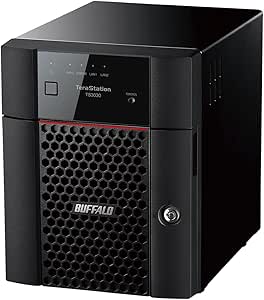 | Best Ready-to-Run Value | Drive bays: 4 | Included drives: 4 × 4TB | Usable capacity in RAID 5: 12TB | VIEW ON AMAZON | See Our Full Breakdown |
| Synology DS425+ 4-Bay Diskless NAS |  | Best for a Polished Home or Small-Office Platform | Drive bays: 4 | Drive configuration: Diskless | Networking: 2.5GbE | VIEW ON AMAZON | See Our Full Breakdown |
| Synology DS423 4-Bay Diskless NAS for File Sharing, Backup, Photos, and Video Surveillance |  | Best for Shared Files and Home Backups | Drive bays: 4 | Storage configuration: Diskless | Maximum IP cameras: 30; camera licenses sold separately | VIEW ON AMAZON | See Our Full Breakdown |
| UGREEN NAS DXP4800 GT 4-Bay Network Attached Storage |  | Best for High-Speed Networking and Virtualization | Drive bays: 4 | Processor: AMD Ryzen Embedded R2514, 4 cores / 8 threads, up to 3.70GHz | Memory: 8GB DDR4, expandable to 64GB | VIEW ON AMAZON | See Our Full Breakdown |
| UGREEN NASync DXP4800 Plus 4-Bay NAS |  | Best Feature-Rich All-Rounder | Drive bays: 4 | Maximum storage capacity: Up to 144TB | Processor: Intel 5-core CPU | VIEW ON AMAZON | See Our Full Breakdown |
| Synology DiskStation DS925+ 4-Bay NAS (Diskless) |  | Best for Expandable Synology Workflows | Drive bays: 4 | Drive configuration: Diskless | Maximum drives with expansion: 9 | VIEW ON AMAZON | See Our Full Breakdown |
| network attached storage 4 bay | Drive bays | Memory | Warranty |
|---|---|---|---|
| TERRAMASTER F4-425 4-Bay NAS | 4 | 4GB RAM | — |
| Yxk Zero1 Pro 4-Bay Diskless N | 4 SATA 3.0 bays | 8GB DDR4 | — |
| UGREEN NAS DXP4800 Pro 4-Bay | — | 8GB DDR5, expandable to 96GB | 2 years |
| UGREEN NAS DH4300 Plus 4-Bay N | 4 | 8GB LPDDR4X | — |
| ACEMAGIC N3A 4-Bay NAS Mini PC | 4 x 3.5-inch HDD bays | 8GB DDR4 | 3 years |
| BUFFALO TeraStation Essentials | 4 | — | 3 years, including hard drive coverage |
| Synology DS425+ 4-Bay Diskless | 4 | — | 3 years |
| Synology DS423 4-Bay Diskless | 4 | — | 2 years |
| UGREEN NAS DXP4800 GT 4-Bay Ne | 4 | 8GB DDR4, expandable to 64GB | — |
| UGREEN NASync DXP4800 Plus 4-B | 4 | 8GB DDR5 | 2 years |
| Synology DiskStation DS925+ 4- | 4 | — | 3 years |
More Details on Our Top Picks
TERRAMASTER F4-425 4-Bay NAS, Intel Quad-Core CPU, 4GB RAM, Diskless
The TERRAMASTER F4-425 is a good fit when the main job is centralizing files and media, rather than running a demanding home server. Its 2.5GbE connection can speed up transfers over compatible network equipment, while 4K H.265 decoding suits a media library. The stated 21dB(A) operating noise and compact, lightweight enclosure may also make it easier to place in a shared room than a larger, more performance-focused unit like the UGREEN NAS DXP4800 Pro.
The tradeoff is its 4GB of RAM and more modest feature set compared with the Yxk Zero1 Pro, which has 8GB of memory, dual 2.5GbE ports, and M.2 slots. This TerraMaster is diskless, so drive costs and setup are separate, and its plastic enclosure is less substantial than the UGREEN Pro’s aluminum chassis. I’d choose it for quieter everyday storage, not for heavy multitasking or an expandable server build.
Pros:- 2.5GbE supports faster transfers than standard gigabit Ethernet on a compatible network
- 4K H.265 decoding supports local media playback
- Tool-free drive trays make drive installation simpler
- Supports up to 120TB and TRAID/TRAID+ storage arrays
Cons:- Diskless design means buyers must source and install drives separately
- 4GB of RAM is less suited to heavier multitasking than the Yxk Zero1 Pro’s 8GB
- Plastic enclosure feels less robust than aluminum-chassis alternatives
Best for: Home users who want a compact, quieter four-bay NAS for backups and a 4K media library, and already have compatible network equipment.
Not ideal for: Power users planning to run several containers or virtualized workloads, or buyers who want drives included and a more substantial chassis.
- Drive bays:4
- Processor:Intel x86 quad-core
- Memory:4GB RAM
- Network:2.5GbE
- Maximum storage:120TB (4 x 30TB)
- Operating noise:21dB(A)
- Drive status:Diskless
- Dimensions:8.74 x 7.05 x 6.06 in (D x W x H)
Our verdict“Choose the F4-425 for quieter, everyday media and backup storage, but look to the Yxk Zero1 Pro or UGREEN DXP4800 Pro for more memory and server flexibility.”
Yxk Zero1 Pro 4-Bay Diskless NAS for Private Cloud and Home Media
The Yxk Zero1 Pro is the most approachable pick here for buyers who want a private cloud without starting from scratch. Guided app setup and remote access for its included services lower the setup burden, while AI photo organization gives phone backups a more useful browsing layer. It also leaves room to grow: four SATA bays plus two NVMe slots support a stated 144TB combined raw capacity, and the dual 2.5GbE ports can help on a suitable network.
Compared with the TERRAMASTER F4-425, the Yxk offers twice the listed memory, two network ports, and M.2 expansion, but its broad feature list also means more compatibility choices for the buyer to manage. Docker support is useful for people who want to experiment, not a substitute for the UGREEN DXP4800 Pro’s stronger processor and VM support. Drives are not included, and the advertised capacity is raw, before formatting and RAID.
Pros:- Guided app setup and remote access make initial use more approachable
- Four SATA bays and two NVMe slots provide multiple expansion options
- Dual 2.5GbE ports support link aggregation on compatible equipment
- AI photo tools and Docker support add home-server flexibility
Cons:- No HDDs or SSDs are included, so storage must be sourced separately
- 144TB is combined raw capacity before formatting and RAID
- RAID and link aggregation benefits depend on suitable drives and network equipment
Best for: NAS newcomers who want guided setup, phone-photo backups, remote access, and room to add SSDs as their home storage needs grow.
Not ideal for: Buyers who want a ready-to-use storage bundle or who need a high-performance system for virtual machines and sustained heavy workloads.
- Processor:Intel N100
- Memory:8GB DDR4
- Drive bays:4 SATA 3.0 bays
- M.2 slots:2 NVMe slots, up to 2 x 8TB SSDs
- Maximum raw capacity:144TB combined
- Supported RAID:RAID 0, 1, and 5
- Network:2 x 2.5GbE with link aggregation support
- Video output:4K HDMI
Our verdict“Pick the Zero1 Pro for guided home-cloud setup and flexible expansion, but choose the UGREEN DXP4800 Pro if demanding compute and VM support matter more.”
UGREEN NAS DXP4800 Pro 4-Bay
The UGREEN NAS DXP4800 Pro is the performance-led choice in this group. Its Intel Core i3-1315U, 8GB of DDR5 memory, and upgrade path to 96GB give it more headroom for Docker, virtual machines, and concurrent tasks than the TERRAMASTER F4-425. The 10GbE plus 2.5GbE ports are a meaningful advantage for large transfers when the rest of the network can keep up; they are less useful on a basic gigabit setup.
Expansion is another reason to choose it: two PCIe 4.0 M.2 slots and RAID 0, 1, 5, and 10 provide options beyond a simple four-drive array. Compared with the Yxk Zero1 Pro, this model offers a stronger processor and explicit VM support, but demands more from the buyer’s budget, network, and technical skills. Drives are not included, and casual backup users may never benefit from its extra compute capacity.
Pros:- Intel Core i3-1315U processor supports demanding multitasking
- Dual 10GbE and 2.5GbE ports enable high-speed networking on compatible equipment
- RAM can be expanded from 8GB to 96GB
- Docker, virtual machines, and two PCIe 4.0 M.2 slots support advanced use
Cons:- Diskless configuration requires separate drive purchases
- Its performance features may go unused in a basic home-backup setup
- Advanced features and networking call for more technical setup than the TERRAMASTER F4-425
Best for: Technically confident home-lab users and small teams running containers or virtual machines and moving large files over a 10GbE-capable network.
Not ideal for: Casual home users who only need basic backups and media sharing, or anyone whose network and workloads cannot use its faster ports and expandable memory.
- Processor:Intel Core i3-1315U, 6 cores, 8 threads, up to 4.5GHz
- Memory:8GB DDR5, expandable to 96GB
- Network ports:10GbE + 2.5GbE
- Maximum storage:Up to 144TB with 4 HDDs and 2 M.2 SSDs
- M.2 slots:2 x PCIe 4.0
- RAID modes:0, 1, 5, 10
- Operating system:UGOS Pro
- Warranty:2 years
Our verdict“Choose the DXP4800 Pro when you need a four-bay NAS to serve as a capable home lab or VM host, not just a place for backups.”
UGREEN NAS DH4300 Plus 4-Bay Network Attached Storage
The UGREEN NAS DH4300 Plus is aimed at households that want shared storage with useful photo and media features, without paying for the compute focus of the DXP4800 Pro. Automatic photo and video backups with AI-powered organization can make a growing family library easier to manage, while 2.5GbE offers faster wired transfers than gigabit on compatible equipment. Its 4K HDMI output also gives it a direct-display option that the TERRAMASTER F4-425’s listed specs do not provide.
This is still a diskless, wired-only NAS: there is no Wi-Fi, and the stated lack of virtual-machine support rules it out for buyers building a flexible lab server. Docker is supported, but the DH4300 Plus is better suited to a focused backup-and-media role than the UGREEN DXP4800 Pro, which has 10GbE and VM support. Choose this model for household access and photo organization, not advanced computing.
Pros:- Automatic photo and video backups include AI-powered album organization
- 2.5GbE supports faster wired transfers on a compatible network
- 4K HDMI output supports a direct display connection
- Diskless design lets buyers choose their own compatible drives
Cons:- Drives are not included
- Wired Ethernet only, with no Wi-Fi connectivity
- Does not support virtual machines, unlike the UGREEN DXP4800 Pro
Best for: Households that want automatic phone-photo backups, shared media, and wired access to local storage across several devices.
Not ideal for: Buyers who need Wi-Fi, virtual machines, or high-end networking for a home lab or heavy transfer workloads.
- Drive bays:4
- Maximum storage:Up to 128TB
- Memory:8GB LPDDR4X
- Network:2.5GbE
- Read speed:312MB/s
- Connectivity:Ethernet, HDMI, SATA, USB
- Wireless connectivity:No Wi-Fi
- Supported applications:Docker; no virtual machines
Our verdict“Choose the DH4300 Plus for household photo backups and shared media, but pick the DXP4800 Pro for virtualization and faster networking.”
ACEMAGIC N3A 4-Bay NAS Mini PC
The ACEMAGIC N3A suits buyers who want a four-bay storage base but prefer choosing their own NAS software. Support for TrueNAS, Unraid, and Windows 11 Pro gives it a more open-ended role than the app-led Yxk Zero1 Pro, especially for users already familiar with self-managed systems. Four 3.5-inch bays, two NVMe slots, and up to 136TB of stated storage offer room for a mixed HDD-and-SSD setup. It also includes a 128GB PCIe 3.0 SSD for system storage, though the data drives and additional SSDs remain separate purchases.
Dual 2.5G and 1G LAN ports allow options for link aggregation or network redundancy, but those benefits depend on compatible equipment and configuration. Compared with the UGREEN DXP4800 Pro, the N3A has less listed memory and does not specify 10GbE; its appeal is operating-system choice, not maximum compute or network speed. Buyers wanting a guided, tightly packaged experience may find the Yxk easier to approach.
Pros:- Supports TrueNAS, Unraid, and Windows 11 Pro
- Four 3.5-inch bays plus two M.2 NVMe slots provide mixed-drive flexibility
- Includes a 128GB PCIe 3.0 SSD for system storage
- Dual 2.5G and 1G Ethernet ports support link aggregation or redundancy
Cons:- HDDs and additional SSDs must be purchased separately
- 8GB DDR4 is less expandable on paper than the DXP4800 Pro’s stated 96GB ceiling
- Choice of operating systems adds setup and maintenance work for less experienced users
Best for: Self-hosting enthusiasts who want a four-bay NAS mini PC that can run TrueNAS or Unraid and who are comfortable configuring their own system.
Not ideal for: Beginners seeking a guided, turnkey NAS experience, or users who need listed 10GbE networking or included HDD storage.
- Drive bays:4 x 3.5-inch HDD bays
- M.2 slots:2 x PCIe 3.0 NVMe
- Maximum storage:Up to 136TB
- Memory:8GB DDR4
- Pre-installed storage:128GB PCIe 3.0 SSD
- Ethernet:Dual 2.5G + 1G LAN
- Video outputs:HDMI 2.0, DisplayPort 1.4
- Operating system support:Windows 11 Pro, TrueNAS, Unraid
- Warranty:3 years
Our verdict“Pick the N3A if software freedom and a preinstalled system SSD matter more than plug-and-play setup or the DXP4800 Pro’s 10GbE performance.”
BUFFALO TeraStation Essentials 2025 4-Bay Value Desktop NAS 16TB (4x4TB) with Hard Drives Included
The BUFFALO TeraStation Essentials 2025 makes the clearest case for buyers who want a working four-bay NAS without sourcing drives or configuring an empty enclosure. Its four included 4TB drives arrive in RAID 5, giving a stated 12TB usable capacity, while native 2.5GbE supports quicker transfers than standard gigabit networking when the rest of the network can keep up. Cloud sync for Amazon S3, Dropbox, Azure, and OneDrive also suits small offices that keep a second copy off-site. Compared with the diskless Synology DS425+, Buffalo is more immediately ready for storage tasks, but offers less flexibility in choosing drives and building out a broader software setup. Its 5400rpm disks may constrain demanding workloads, and it has wired networking only. The three-year warranty covers both the unit and drives.
Pros:- Includes four 4TB drives and arrives configured in RAID 5.
- 2.5GbE can speed up transfers on a compatible network.
- Cloud-sync support includes Amazon S3, Dropbox, Azure, and OneDrive.
- Three-year warranty covers the NAS and included hard drives.
Cons:- 5400rpm drives may limit performance under demanding workloads.
- Included drives offer less choice than a diskless NAS such as the Synology DS425+.
- Wired Ethernet only; no built-in Wi-Fi.
Best for: Small offices that want a preconfigured four-drive NAS with RAID and cloud-sync options, without buying disks separately.
Not ideal for: Power users who need high drive performance, extensive workload flexibility, or wireless networking.
- Drive bays:4
- Included drives:4 × 4TB
- Usable capacity in RAID 5:12TB
- Drive interface:Serial ATA-600
- Networking:2.5GbE / 1.0GbE Ethernet
- Drive speed:5400rpm
- Drive form factor:3.5-inch
- Warranty:3 years, including hard drive coverage
Our verdict“Choose the Buffalo if you want a four-bay NAS with drives and RAID already in place rather than assembling a diskless system.”
Synology DS425+ 4-Bay Diskless NAS
The Synology DS425+ is a strong fit for buyers who want file sharing, synchronization, backups, snapshots, media streaming, and surveillance within one managed platform. Its DiskStation Manager software and snapshot tools make it more appealing than the drive-included Buffalo TeraStation for people who value organized backup and access controls over an out-of-box storage bundle. The 2.5GbE port also gives compatible networks more headroom than gigabit Ethernet, while support for up to 30 IP cameras can suit a growing surveillance setup. The tradeoff is that this is a diskless enclosure: drives must be chosen and purchased separately. Its listed read/write speed is up to 278 MB/s, so buyers prioritizing dual 10GbE and virtualization hardware should compare it with the UGREEN DXP4800 GT instead. This Synology is better suited to managed everyday storage than a high-throughput lab.
Pros:- DiskStation Manager supports file sharing, synchronization, and backups.
- Snapshots and access controls support more structured data protection.
- Built-in 2.5GbE is faster than standard gigabit networking on compatible equipment.
- Supports up to 30 IP cameras.
Cons:- Diskless configuration requires a separate drive purchase.
- Listed read/write speeds of up to 278 MB/s trail the high-speed networking focus of the UGREEN DXP4800 GT.
- Surveillance camera licenses may add setup requirements.
Best for: Home administrators and small teams who want Synology’s backup, snapshot, file-sharing, and surveillance tools and are comfortable selecting drives.
Not ideal for: Buyers who need included drives, dual 10GbE, or strong hardware headroom for virtual machines.
- Drive bays:4
- Drive configuration:Diskless
- Networking:2.5GbE
- Read/write speed:Up to 278 MB/s
- Maximum IP cameras:30
- Storage volume:Up to 80TB
- Dimensions:8.78 × 7.83 × 6.54 in
- Warranty:3 years
Our verdict“Pick the DS425+ if you want a feature-rich Synology platform for backups and shared files and do not mind supplying the drives.”
Synology DS423 4-Bay Diskless NAS for File Sharing, Backup, Photos, and Video Surveillance
The Synology DS423 keeps the four-bay format focused on the everyday jobs many homes need: shared files, photo organization, multi-destination backups, and surveillance. Its snapshots give buyers another tool for protecting files, while support for up to 30 IP cameras leaves room to build a camera system. Against the newer Synology DS425+, the DS423 is the more straightforward choice when its stated backup, photo, and sharing features are enough; the DS425+ lists 2.5GbE and a three-year warranty, while this model’s supplied data does not list those advantages. The DS423 is diskless, and surveillance cameras require separately purchased licenses, so the enclosure is only part of the setup. Its two-year warranty is also shorter than the DS425+’s. I would choose it for a home file hub, not a speed-focused or fully outfitted surveillance build.
Pros:- Combines private file sharing with photo organization.
- Supports multi-destination backups and snapshots.
- Can support up to 30 IP cameras.
- Metal tabletop enclosure has a compact footprint for a home setup.
Cons:- Diskless design means drives must be purchased separately.
- Camera licenses are sold separately.
- Two-year warranty is shorter than the DS425+’s three-year coverage.
Best for: Households that want shared storage for documents and photos, multi-destination backups, and the option to add IP-camera surveillance.
Not ideal for: Buyers seeking included drives, specified 2.5GbE networking, or a longer warranty than the DS425+ offers.
- Drive bays:4
- Storage configuration:Diskless
- Maximum IP cameras:30; camera licenses sold separately
- Mounting type:Tabletop
- Dimensions:9 × 6.6 × 7.24 in (D × W × H)
- Weight:2210g
- Enclosure material:Metal
- Warranty:2 years
Our verdict“Choose the DS423 for a Synology home file-and-backup hub if you are prepared to supply drives and handle camera licensing separately.”
UGREEN NAS DXP4800 GT 4-Bay Network Attached Storage
The UGREEN NAS DXP4800 GT is the performance-oriented option here for buyers building a fast network storage system or running more than basic file sharing. Its dual 10GbE ports can serve demanding transfer needs when clients, switches, and storage drives are also capable, while the Ryzen Embedded processor, expandable memory, and Docker and virtual-machine support give technically confident owners room to run additional services. Two M.2 slots and a direct SD-card slot broaden its uses for SSD caching or media offload. Compared with the UGREEN NASync DXP4800 Plus, this GT model emphasizes dual 10GbE and expandable DDR4 memory; the Plus instead lists DDR5 and a 2.5GbE connection alongside its 10GbE port. Neither includes hard drives. The GT’s higher-speed networking is wasted on a gigabit-only network, and Plex requires manual Docker setup. ECC support also requires compatible memory.
Pros:- Dual 10GbE ports support high-throughput network transfers.
- 8GB DDR4 memory can be expanded to 64GB.
- Two M.2 slots add options for SSD storage or caching.
- Docker, virtual machines, and compatible ONVIF/RTSP surveillance are supported.
Cons:- Diskless configuration requires separate hard drives and M.2 SSDs for those expansion options.
- Plex requires manual setup through Docker.
- ECC error correction requires a compatible memory upgrade.
Best for: Technically confident creators, homelab owners, and small teams with 10GbE networking who want Docker, virtual machines, and expandable storage.
Not ideal for: NAS newcomers on a basic home network who want included drives or a simple, ready-to-use media server.
- Drive bays:4
- Processor:AMD Ryzen Embedded R2514, 4 cores / 8 threads, up to 3.70GHz
- Memory:8GB DDR4, expandable to 64GB
- Networking:2 × 10GbE
- M.2 SSD slots:2
- Maximum stated capacity:Up to 144TB
- Connectivity:SD card slot, USB-A 10Gbps, USB-C 10Gbps, USB 2.0, 4K HDMI
- Drive inclusion:Diskless; drives not included
Our verdict“Choose the DXP4800 GT when your network and technical workload can make use of dual 10GbE, expandable memory, and virtualization.”
UGREEN NASync DXP4800 Plus 4-Bay NAS
The UGREEN NASync DXP4800 Plus balances fast networking with a broad set of home and business features. Its 10GbE and 2.5GbE ports let it connect to a fast workstation and a more typical network at the same time, while 8GB DDR5 memory, Docker, and virtual-machine support reach beyond basic shared folders. The listed 128GB SSD provides included solid-state storage, though the hard drives needed for the four bays are not included. Compared with the DXP4800 GT, the Plus has a listed five-core Intel CPU, DDR5 memory, and a 2.5GbE port alongside 10GbE; the GT offers dual 10GbE and memory expansion to 64GB. The Plus also advertises up to 144TB capacity and 4K HDMI output. Its two-year warranty is shorter than the Synology DS425+’s, and network speed depends on compatible equipment and drives.
Pros:- Pairs 10GbE with 2.5GbE for flexible network connections.
- 8GB DDR5 memory and a five-core Intel CPU support broader workloads.
- Supports RAID, automated backups, Docker, and virtual machines.
- Includes a 128GB SSD and 4K HDMI output.
Cons:- Hard drives are not included, despite the four-bay capacity.
- Transfer performance depends on the network, drives, and file sizes.
- Wired Ethernet only; no Wi-Fi, and the warranty is two years.
Best for: Home-media users and small offices that want fast networking, photo tools, backups, and room to run Docker or virtual machines.
Not ideal for: Buyers who want a drive-included system, Wi-Fi access, or the DXP4800 GT’s dual 10GbE ports and greater listed memory expansion.
- Drive bays:4
- Maximum storage capacity:Up to 144TB
- Processor:Intel 5-core CPU
- Memory:8GB DDR5
- Networking:1 × 10GbE, 1 × 2.5GbE
- Included storage:128GB SSD; hard drives not included
- Maximum transfer rate:Up to 1250 MB/s
- Warranty:2 years
Our verdict“Pick the DXP4800 Plus if you want a versatile four-bay NAS with both 10GbE and 2.5GbE, but plan to supply the main storage drives.”
Synology DiskStation DS925+ 4-Bay NAS (Diskless)
The DS925+ suits buyers who want a four-bay NAS that can grow alongside a larger backup, file-sharing, photo, or surveillance setup. Its two 2.5GbE ports offer faster wired transfers than a single gigabit connection and can support network redundancy, while two M.2 NVMe slots provide room for caching. Compared with the Synology DS423, this model adds faster networking and expansion to as many as nine drives, making it a stronger fit for growing storage needs. The tradeoff is a more specific ecosystem: drives must appear on Synology’s official compatibility list, and the diskless enclosure means you need to source drives separately. The listed throughput figures are sequential maximums, not a guarantee of the same speed in every network or workload.
Pros:- Two 2.5GbE ports support faster wired transfers and network redundancy.
- Expansion support raises capacity from four bays to as many as nine drives.
- Two M.2 NVMe slots provide options for storage caching.
- Supports file sharing, synchronization, backup, photo management, virtualization, and surveillance.
Cons:- Diskless configuration requires a separate drive purchase and setup.
- Drive choices are limited to models on Synology’s official compatibility list.
- Maximum sequential throughput depends on the drives, network, and workload.
Best for: Small offices and advanced home users who want Synology software, dual 2.5GbE connectivity, and a path to expand beyond four drives.
Not ideal for: Buyers seeking a ready-to-use NAS with drives included, or those who want to choose drives without checking Synology’s compatibility list.
- Drive bays:4
- Drive configuration:Diskless
- Maximum drives with expansion:9
- Network ports:2 x 2.5GbE
- M.2 slots:2 x M.2 NVMe
- Sequential throughput:Up to 522 MB/s read and 565 MB/s write
- Warranty:3 years
- Dimensions:8.78 x 7.83 x 6.54 in (D x W x H)
Our verdict“Choose the DS925+ if you want a Synology-based four-bay system with faster networking and room to expand, and are comfortable sourcing compatible drives.”

How We Picked
I compared these 11 four-bay NAS devices on the factors that shape everyday ownership: stated hardware capability, networking and expansion options, drive setup, ease of management, and fit for home or small-business workloads. I also looked at whether each option is diskless or ships with drives, since that changes both setup effort and how much planning a buyer needs before starting.
The ranking favors models that offer a strong balance of usability, capability, and flexibility for a broad range of four-bay buyers. More specialized systems rank for the people they serve best rather than being treated as universal picks: the BUFFALO is distinct for its included-drive configuration, while the Synology, UGREEN, TERRAMASTER, Yxk, and ACEMAGIC options reflect different approaches to software, hardware, and setup. Where product details are not specified here, I avoid assuming features and recommend verifying exact drive, memory, and network support before purchase.
Factors to Consider When Choosing Network Attached Storage 4 Bay
A four-bay NAS is a long-term storage system, so the best choice is not always the one with the most powerful listed hardware. I would first work out how the device will be used, who will manage it, and how you plan to protect the files after setup. These decisions can prevent overspending on unused capability or discovering that a diskless unit requires more effort than expected.
Match the NAS to the work it will do
Start with the jobs you expect the NAS to handle at the same time: shared folders, computer backups, photo libraries, media serving, or surveillance storage. A household storing files and backups may value clear management tools more than high-end processing hardware. A small office with several users or heavier workloads should pay closer attention to memory, processor capability, and network connections. Avoid choosing by CPU label alone, since software, network limits, and client devices also affect the experience. If your use is mostly simple file storage, paying for extra capability may not improve daily work. If you expect several demanding tasks, leaving room for growth can save an early replacement.
Plan usable capacity before buying disks
Four drive bays do not mean all four drives’ capacity will be available for files. RAID or similar storage arrangements use some capacity for redundancy or other system needs, and the usable amount depends on the chosen layout and drive sizes. Mixing drives can also complicate capacity planning, so check the NAS’s supported configurations before ordering. A common mistake is buying a diskless unit and postponing the drive budget until after it arrives. Set a target for current data plus likely growth, then decide whether to populate every bay now or add drives later. Keep a separate copy of important files outside the NAS, regardless of the storage layout.
Choose a drive setup that fits your tolerance for downtime
Redundancy can let a NAS keep operating through some drive failures, but it is not the same as a backup. A mirrored or parity-based arrangement trades some usable space for a way to recover from a failed drive, while a setup focused on capacity can leave files at greater risk if a disk fails. Consider how quickly you could replace a drive and restore data, not only how much space you want. Buyers storing irreplaceable photos or business records should plan a second copy on another device or an off-site service. Also check whether the NAS can send alerts about disk health; early warnings make maintenance less rushed. The right layout depends on the value of the data and the acceptable recovery time.
Check networking against the rest of your home or office
A faster NAS connection only helps when the router or switch and the connected computer can use it too. Before paying extra for higher-speed networking, check the ports on your existing network gear and whether a direct connection or upgrade is practical. Large media projects and frequent transfers of bulky files can benefit more from network headroom than routine document backups. Wi-Fi performance can vary, so a wired connection is usually the more predictable path for transfers and shared workloads. Look at the number and type of network ports alongside the tasks you expect to run. The aim is to avoid a NAS capability that the rest of the network cannot deliver.
Weigh software simplicity against hardware freedom
NAS software shapes routine tasks such as creating shared folders, managing users, setting backup schedules, and updating the system. A more guided platform can reduce setup friction for a first-time owner, while a more flexible hardware-focused device may better suit someone comfortable managing settings and troubleshooting. Think about who will handle maintenance once the NAS is running. If several family members or coworkers depend on it, clear account controls and straightforward recovery tools may matter more than customization. Check app support for the devices and services you already use rather than assuming every NAS handles them equally. A feature-rich interface is only useful if it fits the owner’s willingness to maintain it.
Account for noise, location, and long-term upkeep
A four-drive NAS is a small always-on computer, and its drives and cooling can produce noise and heat. Decide where it will sit before buying: a shared desk or bedroom calls for more attention to sound and ventilation than a utility room. Avoid enclosing the unit in a tight cabinet, since poor airflow can add heat and stress the system. Leave room for safe access when replacing drives or checking cables, and plan for dust cleaning and software updates. Drive replacement is part of owning a multi-bay system, so make sure you are comfortable with the model’s maintenance process. These practical details can shape satisfaction more than a spec sheet suggests.
Frequently Asked Questions
Should I choose a diskless four-bay NAS or one that includes drives?
A diskless NAS lets you choose drive capacity and, where supported, specific drive models, but you must budget for the disks and install them yourself. A unit supplied with drives, such as the listed BUFFALO configuration, reduces setup steps and gives you a defined starting capacity. It can also limit your choice of drive models or future replacement options, so check the included-drive details and compatibility guidance. Compare the complete setup you need rather than the NAS enclosure alone. If you already own suitable drives, a diskless model may fit better; if you want a ready-to-configure package, included drives can simplify the first purchase.
Is a four-bay NAS enough if my data library is growing quickly?
Four bays can provide room to expand, but capacity depends on the drives you install and the storage layout you choose. Estimate your current data, yearly growth, and the usable space remaining after redundancy before settling on a drive plan. Also check whether the NAS supports adding disks or changing an array without rebuilding your storage from scratch; capabilities vary by model and configuration. If your library is already large, compare the cost and maintenance of filling four bays against a larger system or an additional storage unit. Leave some spare capacity for growth rather than running the system near full.
Does RAID mean I do not need another backup?
No. RAID can help keep a NAS available after certain drive failures, but it may not protect against accidental deletion, malware, theft, fire, or failure of the NAS itself. Keep another copy of important files on a separate device or in an off-site backup service. For work files or irreplaceable photos, decide how often that copy should update and how quickly you would need to restore it. Test recovery occasionally, since an unverified backup may not help when needed. Treat redundancy as an availability measure, not a replacement for backup.
Should a first-time NAS owner choose Synology over UGREEN or another brand?
Brand alone does not settle the choice; the owner’s comfort with setup and ongoing management matters more. Synology models in this roundup are the clearest shortlist for buyers who want a guided platform for common file and backup tasks. UGREEN, TERRAMASTER, Yxk, and ACEMAGIC options may appeal to buyers comparing hardware flexibility or particular configurations, but check their software features and support for your intended tasks before deciding. Ask who will create accounts, manage updates, and troubleshoot the system after installation. If that person wants the least hands-on route, prioritize software clarity and support over headline hardware specifications.
Will a faster NAS improve transfers if my network is unchanged?
Not necessarily. Transfer speed is limited by the slowest link among the NAS, network switch or router, cabling, and client device, and the workload can also affect results. A faster port may offer little benefit if the rest of your setup cannot use it. Check the network equipment you already own before paying for extra connectivity, and consider whether a wired connection or network upgrade is needed. Large file transfers and shared creative work are more likely to benefit from additional network headroom than routine backups. Match the NAS connection to a realistic path through the whole network.
Conclusion
For the broadest mix of home and small-office needs, I recommend the Synology DS925+ as the best overall choice in this lineup. The Synology DS423 is my best value direction for buyers who want a capable Synology file-sharing and backup platform without prioritizing the newest or most ambitious setup, while the Synology DS425+ suits shoppers comparing a more current Synology option. For beginners, I would start with the Synology models and choose based on the exact features and drive plan you need. The UGREEN NAS DXP4800 Plus is the best premium-style pick for buyers drawn to a more hardware-flexible system; compare it with the DXP4800 Pro and DXP4800 GT against the capabilities you will actually use. For a ready-to-configure package with drives included, consider the BUFFALO TeraStation Essentials 2025. If your priority is alternative hardware or a specific setup, compare the TERRAMASTER F4-425, Yxk Zero1 Pro, UGREEN DH4300 Plus, and ACEMAGIC N3A against your software, network, and maintenance needs before committing.