
For a desk microphone that can pick up voices from around the room, I’d start with the EMEET M0 Plus: its four microphones and speakerphone design suit shared calls better than a typical desktop mic. The Logitech Blue Yeti offers multiple pickup patterns for people who also record, while the TONOR TM20 keeps conference calls simple with a mute button. The main tradeoff is between room coverage and control: an omnidirectional mic can include more voices, but it can also capture more room noise. I compared eight USB microphones and speakerphones by their pickup options, meeting features, and fit for different setups. Read on for the full breakdown and help matching a pick to your use.
Complete the kit


![Aokeo Pop Filter, [Upgraded Three Layers] Metal Mesh & Fo...](https://m.media-amazon.com/images/I/81prHDtlOsL._AC_SL480_.jpg "8 Best Omnidirectional Microphones for Crystal Clear Sound Recording 5")
Key Takeaways
- EMEET M0 Plus is the clearest fit for group calls because four microphones and a speakerphone design address shared-room use directly.
- Logitech Blue Yeti is more adaptable for recording than the conference-focused USB mics, though its extra pickup patterns may be unnecessary for routine calls.
- TONOR TM20 stands out for straightforward meeting control with a mute button, while the simpler TONOR G11 suits buyers who want a basic USB conference mic.
- JLab Talk offers several pickup patterns, including omnidirectional, so it can serve more recording situations than a dedicated conference microphone.
- PolaTab Q95 combines a speakerphone and USB hub, but buyers should weigh that all-in-one convenience against choosing a mic built around more specialized audio needs.
| EMEET M0 Plus Conference Speakerphone with 4 Microphones | 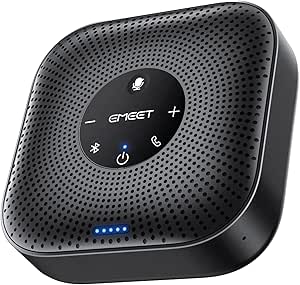 | Best Overall Conference Speakerphone | Microphones: 4 | Voice pickup: 360° | Connectivity: USB-C, USB-C-to-A adapter, Bluetooth 5.0 | VIEW ON AMAZON | See Our Full Breakdown |
| TONOR Conference Microphone for PC, USB Microphone for Win & Mac, G11 |  | Best for Simple Wired Meetings | Polar pattern: Omnidirectional | Pickup distance: 11.5 ft | Connectivity: USB | VIEW ON AMAZON | See Our Full Breakdown |
| Logitech Blue Yeti USB Microphone, Blackout |  | Best for Versatile Recording | Microphone array: Three-capsule | Pickup patterns: Cardioid, omnidirectional, bidirectional, stereo | Connectivity: USB | VIEW ON AMAZON | See Our Full Breakdown |
| CMTECK Omnidirectional USB Conference Microphone |  | Best Compact Conference Mic | Polar pattern: Omnidirectional | Pickup range: Up to 10 ft (3 m) | Connectivity: USB | VIEW ON AMAZON | See Our Full Breakdown |
| ANSTEN Conference USB Microphone, Omnidirectional Condenser PC Mic for Video Conferencing and Recording |  | Best for Portable Laptop Calls | Polar pattern: Omnidirectional | Connectivity: USB | Connector: USB Type-C | VIEW ON AMAZON | See Our Full Breakdown |
| TONOR TM20 USB Conference Microphone with Mute Button |  | Best for Small Meetings | Microphone type: USB condenser | Pickup pattern: 360° omnidirectional | Pickup range: Up to 5 m (16.4 ft) | VIEW ON AMAZON | See Our Full Breakdown |
| JLab Talk USB Microphone |  | Best for Flexible Recording | Connectivity: USB | Pickup patterns: Cardioid, omnidirectional, stereo, and bidirectional | Audio resolution: 96 kHz/24-bit | VIEW ON AMAZON | See Our Full Breakdown |
| PolaTab Q95 Mini USB Conference Speakerphone with Microphone and USB Hub |  | Best All-in-One Compact Speakerphone | Model: Q95 mini | Microphone: Built-in omnidirectional | Voice pickup range: Up to 3 m radius | VIEW ON AMAZON | See Our Full Breakdown |
| omnidirectional microphone | Connectivity | Weight | Signal-to-noise ratio |
|---|---|---|---|
| EMEET M0 Plus Conference Speak | USB-C, USB-C-to-A adapter, Bluetooth 5.0 | 0.26 kg | — |
| TONOR Conference Microphone fo | USB | 135 g | 78 dB |
| Logitech Blue Yeti USB Microph | USB | — | 100 dB |
| CMTECK Omnidirectional USB Con | USB | 6.1 oz | — |
| ANSTEN Conference USB Micropho | USB | — | 88 dB |
| TONOR TM20 USB Conference Micr | — | — | — |
| JLab Talk USB Microphone | USB | 739 g | 95 dB |
| PolaTab Q95 Mini USB Conferenc | USB 2.0 | — | — |
More Details on Our Top Picks
EMEET M0 Plus Conference Speakerphone with 4 Microphones
For meetings where people sit around a table, the EMEET M0 Plus is the most self-contained microphone pick here: its four microphones provide 360° voice pickup, while the built-in speaker means callers can hear replies without separate audio equipment. Noise reduction, echo cancellation, and full-duplex audio support more natural group conversation. Compared with the TONOR G11, which is a microphone only, the EMEET handles both sides of a call and adds Bluetooth alongside USB-C. Its main tradeoff is scale: supporting up to 16 attendees requires linking a second compatible speakerphone, and the listed 10-meter Bluetooth range and up-to-10-hour talk time may constrain room placement or longer sessions. I’d choose it for flexible small-room calls, not as a general-purpose recording mic.
Pros:- Four microphones capture voices from around the table
- Built-in speaker supports two-way calls without separate speakers
- USB-C and Bluetooth 5.0 offer wired and wireless connection options
- Noise reduction, echo cancellation, and full-duplex audio support clearer conversation
Cons:- Supporting up to 16 attendees requires linking two compatible speakerphones
- Up to 10 hours of talk time may not cover extended sessions without recharging
- Bluetooth range is listed at 10 meters, which can limit wireless placement
Best for: Small teams that need a portable, all-in-one speakerphone for round-table video calls
Not ideal for: Podcasters and solo recording creators who need a dedicated recording microphone or detailed control over pickup patterns
- Microphones:4
- Voice pickup:360°
- Connectivity:USB-C, USB-C-to-A adapter, Bluetooth 5.0
- Bluetooth range:10 meters
- Speaker output:3 W
- Talk time:Up to 10 hours
- Daisy chain capacity:Up to 16 attendees with two compatible speakerphones
- Weight:0.26 kg
Our verdict“Choose the EMEET M0 Plus if your priority is a portable, 360° meeting microphone with its own speaker for small-group calls.”
TONOR Conference Microphone for PC, USB Microphone for Win & Mac, G11
The TONOR G11 is a straightforward choice when you want an omnidirectional microphone for a shared desk or small meeting table and already have speakers. Its 11.5-foot pickup distance gives participants room to sit back from the mic, and the mute button makes it easy to silence a conversation without searching through meeting software. Compared with the CMTECK Omnidirectional USB Conference Microphone, the G11 lists a longer pickup distance and a metal-and-nylon enclosure with an anti-slip base. It also works over USB with Windows and Mac. The tradeoff is that it is only a microphone: unlike the EMEET M0 Plus, it cannot play meeting audio, and its 1.8-meter cable may limit placement. Some computers may also need the mic selected manually as the input.
Pros:- Omnidirectional pickup covers voices from different sides of a table
- Listed pickup distance reaches 11.5 feet
- Mute button includes an indicator light
- Metal-and-nylon construction and anti-slip base help keep it stable on a desk
Cons:- No built-in speaker, so meeting playback requires separate audio equipment
- The 1.8-meter cable may restrict placement
- Some systems may require manual selection of the microphone input
Best for: Office teams and remote workers who need a plug-and-play omnidirectional mic for a laptop or PC meeting setup with separate speakers
Not ideal for: People who need a cordless all-in-one speakerphone or need to place the mic far from the computer
- Polar pattern:Omnidirectional
- Pickup distance:11.5 ft
- Connectivity:USB
- Compatibility:Windows and Mac
- Cable length:1.8 m
- Signal-to-noise ratio:78 dB
- Enclosure material:Metal and nylon
- Weight:135 g
Our verdict“Pick the TONOR G11 for a stable, wired meeting mic with a longer listed pickup distance than the CMTECK, provided you already have speakers.”
Logitech Blue Yeti USB Microphone, Blackout
The Blue Yeti is the most adaptable recording microphone in this group for creators who also need an omnidirectional mode for round-table conversations. Its four selectable pickup patterns let you switch between group capture, solo voice recording, and other setups without changing microphones; onboard gain, mute, pattern, and headphone controls make adjustments accessible at the desk. Compared with the TONOR G11, which is designed around omnidirectional meeting pickup, the Yeti offers more recording flexibility and a positionable stand. That flexibility comes with a setup tradeoff: the full Blue VO!CE feature set requires Logitech G HUB, and the corded USB design is less convenient for mobile meeting rooms than the EMEET M0 Plus. It also lacks a built-in speaker, so it is not a complete conference speakerphone.
Pros:- Four pickup patterns include omnidirectional, cardioid, bidirectional, and stereo
- Onboard controls provide quick access to gain, mute, pattern, and headphone volume
- Positionable desktop stand supports desk-based recording
- USB connection supports Mac and PC setup
Cons:- Full Blue VO!CE functionality requires Logitech G HUB
- Corded USB design limits placement compared with the Bluetooth EMEET M0 Plus
- No built-in speaker for meeting playback
Best for: Home creators who record solo content but also want an omnidirectional mode for group calls or discussions
Not ideal for: Teams seeking a portable speakerphone or buyers who want a dedicated meeting mic with no companion software features
- Microphone array:Three-capsule
- Pickup patterns:Cardioid, omnidirectional, bidirectional, stereo
- Connectivity:USB
- Frequency response:20 Hz–20 kHz
- Signal-to-noise ratio:100 dB
- Channels:2
- Enclosure material:Metal
- Power source:Corded electric
Our verdict“Choose the Blue Yeti if you need an omnidirectional microphone that can also switch into several recording patterns at the same desk.”
CMTECK Omnidirectional USB Conference Microphone
The CMTECK Omnidirectional USB Conference Microphone suits buyers who want a compact table mic for Windows or macOS calls, with fewer setup demands than a multi-pattern recording microphone. Its up-to-10-foot pickup range, built-in mute button, and noise and echo reduction target the practical needs of a small meeting. Compared with the TONOR G11, its stated pickup range is shorter than the G11’s 11.5 feet, but its compact format and 6-foot cable offer a different fit for a nearby laptop or desktop. It is a microphone only, so the EMEET M0 Plus is a better match if you also need a speaker or Bluetooth connection. Compatibility is another boundary: the provided data excludes Raspberry Pi and Android, which rules it out for some setups.
Pros:- Omnidirectional pickup is suited to voices around a small meeting table
- Noise and echo reduction support clearer calls
- Built-in mute button has status lights
- Compact form and 6-foot cable suit nearby desk setups
Cons:- Not compatible with Raspberry Pi or Android
- Microphone only, with no built-in speaker
- Listed pickup range is shorter than the TONOR G11’s 11.5 feet
Best for: Remote workers who want a compact USB conference mic for Windows or macOS calls at a desk
Not ideal for: Android or Raspberry Pi users, and teams needing a speakerphone or a pickup range beyond 10 feet
- Polar pattern:Omnidirectional
- Pickup range:Up to 10 ft (3 m)
- Connectivity:USB
- Connector:Micro USB
- Cable length:6 ft (1.8 m)
- Compatible systems:Windows and macOS
- Not compatible with:Raspberry Pi and Android
- Weight:6.1 oz
Our verdict“Choose the CMTECK for a compact Windows or Mac conference microphone if its 10-foot pickup range covers your table.”
ANSTEN Conference USB Microphone, Omnidirectional Condenser PC Mic for Video Conferencing and Recording
The ANSTEN Conference USB Microphone is aimed at laptop users who want a portable, single-purpose microphone for video calls, online classes, or basic recording. Its omnidirectional pickup is designed to collect voices from around the mic, while a mute button gives a quick way to cut audio. Compared with the CMTECK Omnidirectional USB Conference Microphone, the ANSTEN listing specifies a USB Type-C connector and an 88 dB signal-to-noise ratio, but gives no pickup-distance figure or cable length. That leaves less information for judging table coverage and placement. It also lacks a speaker, and the stated compatibility excludes Linux, Android, Raspberry Pi, and Xbox. I’d shortlist it for a simple supported laptop setup, while the EMEET M0 Plus makes more sense when the meeting needs speaker playback too.
Pros:- Omnidirectional pattern is intended to capture voices from multiple directions
- USB Type-C connection supports a simple wired laptop setup
- Mute button provides direct audio control
- Portable design is suited to moving between supported workspaces
Cons:- No built-in speaker for meeting playback
- Compatibility is limited; the listing excludes Linux, Android, Raspberry Pi, and Xbox
- Product data gives no pickup distance or cable length for planning placement
Best for: Laptop users who want a portable USB Type-C omnidirectional mic for supported Mac or Windows calls and classes
Not ideal for: Linux, Android, Raspberry Pi, or Xbox users, and anyone who needs built-in speakers or documented pickup distance
- Polar pattern:Omnidirectional
- Connectivity:USB
- Connector:USB Type-C
- Signal-to-noise ratio:88 dB
- Channels:1
- Form factor:Table
- Power source:Corded electric
- Color:Black
Our verdict“Pick the ANSTEN for portable omnidirectional laptop calls on supported systems if you do not need a speaker or a specified pickup range.”
TONOR TM20 USB Conference Microphone with Mute Button
The TONOR TM20 is a straightforward choice for small online meetings where several people need to speak from around one table. Its 360° pickup and stated range of up to 5 m give it broader room coverage than the PolaTab Q95 Mini’s stated 3 m radius, while its one-touch mute button makes it easy to silence the mic between discussions. Noise reduction and echo cancellation are intended to help keep voices clearer during calls, and the Windows and macOS plug-and-play setup avoids extra driver steps. The tradeoff is that the TM20 is microphone-only: unlike the Q95 Mini, it does not provide a speakerphone or built-in USB hub. It also needs a computer and a USB connection, so it suits a desk-based meeting better than a portable, all-in-one call setup.
Pros:- 360° pickup captures voices around the room
- Stated pickup range reaches up to 5 m
- One-touch mute button has a status indicator
- Plug-and-play compatibility with Windows and macOS
Cons:- Does not include a speaker for hearing call participants
- Requires a USB-connected computer
- Room pickup may also capture unwanted sounds despite noise reduction
Best for: Small teams or households sharing a computer for calls who need a simple room microphone and quick mute control.
Not ideal for: Buyers who need a speakerphone, a built-in USB hub, or a wireless microphone for calls away from a computer.
- Microphone type:USB condenser
- Pickup pattern:360° omnidirectional
- Pickup range:Up to 5 m (16.4 ft)
- Connection:USB 2.0
- Compatibility:Windows and macOS
- Mute control:One-touch button with status indicator
Our verdict“Choose the TM20 for computer-based group calls where broad pickup and a visible mute control matter more than built-in speakers.”
JLab Talk USB Microphone
The JLab Talk is the most adaptable recording pick here for someone who wants an omnidirectional mode alongside other ways to capture sound. Its four selectable pickup patterns let a creator switch between solo recording, two-person conversation, stereo capture, and room pickup; the TONOR TM20 is more focused on shared meetings and offers a simpler 360° pattern. The listed 96 kHz/24-bit recording capability and adjustable gain and volume controls give more room to shape a desktop recording setup. That flexibility comes with practical limits: its larger desktop footprint takes space, and the listing calls for a USB-C connection that may not suit every computer or device. It also lacks an included microphone stand, so buyers may need to plan how to position it. For meetings alone, the TM20 is the simpler fit.
Pros:- Four selectable pickup patterns include omnidirectional
- Listed 96 kHz/24-bit audio capability
- Adjustable gain and volume controls
- USB plug-and-play setup
Cons:- Bulky desktop footprint takes up workspace
- USB-C connection may not fit every device
- No microphone stand is included
Best for: Podcasters, streamers, and home creators who want omnidirectional pickup plus selectable patterns for different recording formats.
Not ideal for: People seeking a compact, dedicated conference mic or those without a compatible USB-C connection and suitable placement setup.
- Connectivity:USB
- Pickup patterns:Cardioid, omnidirectional, stereo, and bidirectional
- Audio resolution:96 kHz/24-bit
- Frequency range:20 Hz–20 kHz
- Signal-to-noise ratio:95 dB
- Controls:Adjustable gain and volume
- Weight:739 g
- Dimensions:9.25 × 7.68 × 7.68 in
Our verdict“Pick the JLab Talk if you need one desktop microphone for both omnidirectional room capture and other recording patterns.”
PolaTab Q95 Mini USB Conference Speakerphone with Microphone and USB Hub
The PolaTab Q95 Mini combines a 360° microphone with a speaker and a built-in USB hub, making it a more self-contained meeting device than the microphone-only TONOR TM20. Its stated 3 m pickup radius is suited to a small table or a few nearby participants, though it is shorter than the TM20’s stated 5 m range. Echo cancellation and noise suppression are aimed at keeping calls clearer, while the 3 m cable gives some flexibility to place it on a desk. The hub can be useful when a computer has limited USB ports. This is still a wired setup, and its physical mute button silences the microphone but not the speaker, so audio may continue during mute. Choose it for compact shared calls; skip it if longer-range mic coverage or more complete mute control matters most.
Pros:- Built-in 360° microphone and speaker
- Stated voice pickup range reaches a 3 m radius
- Echo cancellation and noise suppression
- Built-in USB hub and 3 m cable
Cons:- Wired USB connection limits placement
- Mute button silences the microphone but not the speaker
- Stated pickup radius is shorter than the TONOR TM20’s
Best for: Small teams and remote workers who want a compact USB conference device with both room pickup and a built-in speaker.
Not ideal for: Groups spread across a larger room, or users who need wireless placement or a mute control that silences both microphone and speaker.
- Model:Q95 mini
- Microphone:Built-in omnidirectional
- Voice pickup range:Up to 3 m radius
- Connectivity:USB 2.0
- Cable length:3 m (9.8 ft)
- USB hub:Built-in
- Compatibility:Windows 7–10, macOS, and popular conferencing platforms
- Frequency range:20 Hz–20 kHz
Our verdict“Choose the Q95 Mini for small computer-based meetings when an integrated speaker, microphone, and USB hub are more useful than extended pickup range.”

How We Picked
I ranked these options by how well their design matches the needs behind an omnidirectional microphone search: capturing more than one speaker, connecting easily to a computer, and supporting calls or recording without unnecessary setup. I gave more weight to clearly useful pickup options and practical meeting controls than to broad claims about audio quality that the product details alone cannot establish.
The order reflects distinct use cases. The EMEET M0 Plus leads for shared-room calls because its four-microphone speakerphone format is purpose-built for group conversation. The Blue Yeti and JLab Talk rank as more flexible choices for recording, while the TONOR, CMTECK, and ANSTEN models are simpler conference-oriented alternatives. The PolaTab Q95 earns a place for its speakerphone and USB hub combination, though that bundled utility may matter more than specialized microphone control for some buyers.
| omnidirectional microphone | Connectivity |
|---|---|
| EMEET M0 Plus Conference Speak | USB-C, USB-C-to-A adapter, Bluetooth 5.0 |
| TONOR Conference Microphone fo | USB |
| Logitech Blue Yeti USB Microph | USB |
| CMTECK Omnidirectional USB Con | USB |
| ANSTEN Conference USB Micropho | USB |
| TONOR TM20 USB Conference Micr | — |
| JLab Talk USB Microphone | USB |
| PolaTab Q95 Mini USB Conferenc | USB 2.0 |
Factors to Consider When Choosing Omnidirectional Microphone
Choosing an omnidirectional microphone starts with the space and people it needs to cover. I’d decide how many voices must be heard, how much room sound is acceptable, and whether the mic will be used only for calls or also for recording.
Match Pickup Coverage to the Room
Omnidirectional pickup is useful when speakers sit around a table or move within a shared space. It also hears more of the room, including keyboard taps, ventilation, and voices outside the call. A quiet, furnished room can make broad pickup easier to manage than a bare office with hard surfaces. For a single speaker in a noisy space, a directional setting may produce a cleaner result even if the mic also offers omnidirectional mode. Before buying, think about the farthest speaker and whether everyone can sit at a similar distance. A microphone’s pickup pattern describes direction, not guaranteed coverage at every seat.
Separate a Conference Speakerphone from a Recording Mic
A conference speakerphone combines a microphone with a speaker for calls, while a standalone USB microphone is usually designed to capture sound for a computer or recording setup. The combination can reduce desk clutter and simplify group meetings. It may be less suited to recording workflows that need headphones, monitoring, or finer control over the signal. Conversely, a recording microphone can offer multiple patterns that are useful for interviews or music but add choices a meeting host may never use. Avoid buying by the word “omnidirectional” alone: check whether the product is meant to play call audio back as well as capture it. Your main task should decide which format comes first.
Check Controls You Will Use During Calls
Mute access matters most when calls are frequent and interruptions are common. A button on the microphone can be quicker than finding an on-screen control, but its location and mute indicator should be clear from your seat. Gain controls are more relevant when you record at changing distances or with different speakers. Extra controls can help, yet they also make a device less simple for a user who wants plug-and-play meetings. Think through a typical call and identify the two or three adjustments you actually make. Favor those controls over a long feature list.
Plan for Distance and Speaker Placement
Microphone placement can matter as much as the pickup pattern. A small desktop mic placed at one end of a long table may hear nearby speakers more clearly than people at the far end. For group use, place the device near the center and keep objects from blocking the path between speakers and microphone. If participants routinely lean back or move around, a multi-microphone speakerphone may be a better fit than a compact mic intended for a desk. Test the intended layout before an important meeting when possible. A product label cannot compensate for poor placement.
Decide Whether Multiple Pickup Patterns Earn Their Complexity
Cardioid, stereo, bidirectional, and omnidirectional modes address different recording arrangements. Multiple patterns can be useful if one microphone will move between solo narration, interviews, and group capture. If the mic will stay on a conference table, extra modes may add little day-to-day value. Check how the patterns are selected and whether the controls make the active mode obvious. Buyers sometimes choose a versatile model expecting it to improve every situation, but pattern options do not replace a treated room or careful placement. Pay for flexibility when you have a clear use for it.
Confirm Computer and Desk Compatibility
USB connection details affect how easily a microphone fits into an existing setup. Check the connector type, operating system support, cable reach, and whether your computer has an available port. A speakerphone with a built-in hub can be handy when ports are scarce, while an all-in-one design may take more desk space than a compact mic. Consider whether the device will be moved between rooms or left connected at one workstation. Also check whether your call software allows the microphone and speaker to be selected separately. A smooth connection is part of getting reliable use from any pickup pattern.
Frequently Asked Questions
Is an omnidirectional microphone a good choice for meetings with several people?
It can be, especially when participants sit around one table and the room is reasonably quiet. The pattern can capture voices arriving from different directions without turning the mic toward each speaker. It also picks up more ambient sound, so a noisy room may make a directional mic or a better-placed speakerphone preferable. For a group call, consider the room layout and the distance between the farthest person and the microphone. A model designed as a conference speakerphone is often a more natural fit than a recording mic used across a large table.
Will an omnidirectional USB mic work for one person on video calls?
Yes, but broad pickup may not help if you are the only speaker. It can capture room noise that a more focused pickup pattern would reduce. If you choose an omnidirectional model, place it close enough to your mouth and keep the surrounding space quiet. A microphone with selectable patterns gives you room to adapt if you later record interviews or group discussions. For solo calls in a busy room, prioritize placement and noise conditions over the pattern name on the box.
Should I choose a speakerphone or a standalone microphone for a shared office?
Choose a speakerphone when several people need to join calls together and you want the device to handle both playback and voice capture. A standalone microphone can make more sense when call audio goes through headphones or a separate speaker system. Think about echo management too: using a room speaker with an open microphone can send playback back into the call. A combined conference unit is designed around that shared-call workflow, while a recording mic may offer more pickup choices. The EMEET and PolaTab options illustrate the speakerphone approach in this roundup.
Does a microphone with several pickup patterns make more sense than a dedicated omnidirectional model?
It does if you expect to record different formats, such as solo narration, two-person interviews, and group discussions. A dedicated conference mic can be easier when your use is mostly meetings and you want fewer settings to manage. More patterns do not automatically mean better capture; the room, mic position, and speaker distance still shape the result. The Blue Yeti and JLab Talk offer broader pattern flexibility than the conference-first models here. Choose versatility when you can name the situations where you will use it.
What should I check before using a desktop omnidirectional mic in a large meeting room?
Check the distance from the microphone to each speaker, the room’s noise level, and whether furniture or laptops block voices. Broad pickup does not guarantee that people at the far end will sound as clear as those nearby. A central position and a quiet room can help, but a single desktop device may not suit a long table. If the room is used regularly for group calls, compare a multi-microphone speakerphone with a basic USB mic. Confirm the setup in your call software before relying on it for an important meeting.
Conclusion
For most shared-room calls, I’d choose the EMEET M0 Plus as the best overall because its four-microphone speakerphone design aligns directly with group conversations. The TONOR TM20 is my best value-style pick for buyers who want a simple conference mic with a physical mute button, while the Logitech Blue Yeti is the best premium-style option for people who need multiple pickup patterns for recording as well as calls. Beginners who prefer a straightforward USB conference setup can start with the TONOR G11. For specific needs, choose the JLab Talk when pattern flexibility matters, or the PolaTab Q95 when a speakerphone with a USB hub suits the desk. Match the device to your room and call format first; the omnidirectional label alone does not settle the choice.