
For a printer for home use, I’d start with the Brother Work Smart 1360 as the best overall balance of home-friendly functions and everyday versatility. The HP Smart Tank 5003 and Canon MegaTank G3270 stand out for households that print often and want refillable ink tanks, while compact models such as the Canon PIXMA TS4320 suit lighter workloads. The main tradeoffs are ongoing ink costs versus upfront convenience, and extra features such as an automatic document feeder versus a smaller footprint. Read on for the full comparison, including which models make the most sense for occasional printing, family documents, and heavier workloads.

Get audio and creator gear delivered free with Prime
- Fast, free delivery on millions of items
- Prime Video, Amazon Music and more included
- Member-only deals all year
Complete the kit


Key Takeaways
- The Brother Work Smart 1360 is the strongest all-round fit in this lineup for home buyers who want versatile everyday printing without choosing a specialist model.
- Refillable tanks change the ownership equation. The HP Smart Tank 5003, Canon MegaTank G3270, and Epson EcoTank ET-2803 are better matches for frequent printing than entry-level cartridge printers, but buyers need to weigh the larger tank-style setup against their available space and habits.
- Document handling separates basic home printers from more capable ones. The Canon PIXMA TR4720 models add an automatic document feeder and fax, making them more useful for paperwork than the simpler PIXMA TS3720.
- Compact, basic models fit light use best. The Canon PIXMA TS3720 and similarly straightforward options are aimed at occasional school or household jobs, not people who regularly print large batches.
- This roundup includes two versions of the Canon PIXMA TR4720 and several closely related HP DeskJet and Canon PIXMA models. Buyers should compare the exact model and included features rather than assume similar names mean identical configurations.
| HP DeskJet 2923 Wireless All-in-One Color Inkjet Printer, Scanner, Copier, 6 Month Trial of Instant Ink Included, AI-Capable (B18JWA) |  | Best for Simple, Occasional Printing | Printer type: HP thermal inkjet | Functions: Print, scan, copy | Connectivity: Wireless; printing from phone or tablet | VIEW ON AMAZON | See Our Full Breakdown |
| HP OfficeJet Pro 8125 Wireless All-in-One Color Inkjet Printer | 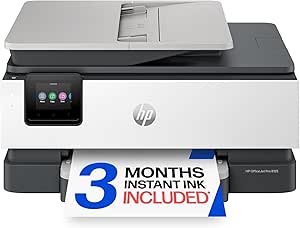 | Best for a Busy Home Office | Printer type: HP thermal inkjet | Connectivity: Wireless | Print speed: 20 ppm black; 10 ppm color | VIEW ON AMAZON | See Our Full Breakdown |
| HP Envy 6555 Wireless All-in-One Color Inkjet Printer |  | Best for Family Workflows | Printer type: HP thermal inkjet | Functions: Print, scan, copy | Connectivity: Wireless; mobile printing | VIEW ON AMAZON | See Our Full Breakdown |
| Canon PIXMA TR4720 All-in-One Wireless Printer, Home Use with Auto Document Feeder, Mobile Printing and Built-in Fax | 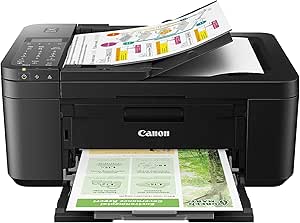 | Best for Home Faxing | Printer type: Inkjet | Functions: Print, copy, scan, fax | Connectivity: Wireless; mobile printing | VIEW ON AMAZON | See Our Full Breakdown |
| Canon PIXMA TS3720 Wireless All-in-One Printer for Basic Home Printing, White |  | Best for Basic, Flexible Media Printing | Printer type: Inkjet | Functions: Print, copy, scan | Connectivity: Wi-Fi (2.4 GHz and 5 GHz); USB | VIEW ON AMAZON | See Our Full Breakdown |
| HP Smart Tank 5003 Wireless All-in-One Ink Tank Printer, Scanner, Copier |  | Best for High-Volume Home Printing | Printer type: HP Thermal Inkjet | Functions: Print, scan, copy | Wireless printing: Yes; supports phone and tablet printing | VIEW ON AMAZON | See Our Full Breakdown |
| HP DeskJet 2955 Wireless All-in-One Color Inkjet Printer, Scanner, Copier |  | Best for First-Time Printer Buyers | Printer type: HP Thermal Inkjet | Functions: Print, scan, copy | Connectivity: Wireless; supports phone and tablet printing | VIEW ON AMAZON | See Our Full Breakdown |
| Canon PIXMA TR4720 All-in-One Wireless Printer with Auto Document Feeder, Mobile Printing, and Built-in Fax |  | Best for Home Office Paperwork | Printer type: Inkjet | Functions: Print, copy, scan, fax | Connectivity: Wi-Fi | VIEW ON AMAZON | See Our Full Breakdown |
| Brother Work Smart 1360 Wireless Color Inkjet All-in-One Printer |  | Best for Shared Home Workspaces | Printer type: Inkjet | Functions: Print, scan, copy | Connectivity: Wireless, USB | VIEW ON AMAZON | See Our Full Breakdown |
| Canon PIXMA TS4320 Wireless Color Inkjet Printer with Print, Copy, Scan |  | Best Compact Pick for Light Home Use | Printer type: Inkjet | Functions: Print, copy, scan | Connectivity: Dual-band Wi-Fi, 2.4 GHz or 5 GHz | VIEW ON AMAZON | See Our Full Breakdown |
| HP DeskJet 4327 Color Inkjet Printer | Wireless | All-in-One |  | Best for Basic Home Tasks | Printer type: HP Thermal Inkjet | Functions: Print, copy, scan | Connectivity: Wireless, USB, Apple AirPrint, wireless direct printing, Mopria | VIEW ON AMAZON | See Our Full Breakdown |
| Canon MegaTank G3270 All-in-One Wireless Color Printer |  | Best for High-Volume Home Printing | Printer type: Inkjet | Functions: Print, copy, scan | Connectivity: Wi-Fi, USB | VIEW ON AMAZON | See Our Full Breakdown |
| Canon PIXMA TR7120 Wireless Color Inkjet Printer, Duplex Printing, White |  | Best for Multipage Home Work | Printer type: Inkjet | Functions: Print, scan, copy | Connectivity: USB, Wi-Fi | VIEW ON AMAZON | See Our Full Breakdown |
| Canon PIXMA TS6520 Wireless Color Inkjet Printer, Duplex Printing, Copier/Scanner, 1.42-inch OLED Display, Compact, White |  | Best Compact Pick for Everyday Printing | Printer type: Inkjet | Functions: Print, scan, copy | Connectivity: USB, Wi-Fi | VIEW ON AMAZON | See Our Full Breakdown |
| Epson EcoTank ET-2803 Wireless Color All-in-One Supertank Printer |  | Best for Low-Interruption Ink-Tank Printing | Printer type: Inkjet | Functions: Print, scan, copy | Ink system: Refillable ink tanks | VIEW ON AMAZON | See Our Full Breakdown |
| printer for home use | Printer type | Functions | Connectivity | Maximum media size |
|---|---|---|---|---|
| HP DeskJet 2923 Wireless All-i | HP thermal inkjet | Print, scan, copy | Wireless; printing from phone or tablet | — |
| HP OfficeJet Pro 8125 Wireless | HP thermal inkjet | — | Wireless | — |
| HP Envy 6555 Wireless All-in-O | HP thermal inkjet | Print, scan, copy | Wireless; mobile printing | — |
| Canon PIXMA TR4720 All-in-One | Inkjet | Print, copy, scan, fax | Wireless; mobile printing | — |
| Canon PIXMA TS3720 Wireless Al | Inkjet | Print, copy, scan | Wi-Fi (2.4 GHz and 5 GHz); USB | — |
| HP Smart Tank 5003 Wireless Al | HP Thermal Inkjet | Print, scan, copy | — | Legal, 8.5 x 14 inches |
| HP DeskJet 2955 Wireless All-i | HP Thermal Inkjet | Print, scan, copy | Wireless; supports phone and tablet printing | 8.5 x 11.69 inches |
| Canon PIXMA TR4720 All-in-One | Inkjet | Print, copy, scan, fax | Wi-Fi | — |
| Brother Work Smart 1360 Wirele | Inkjet | Print, scan, copy | Wireless, USB | 8.5 x 14 inches |
| Canon PIXMA TS4320 Wireless Co | Inkjet | Print, copy, scan | Dual-band Wi-Fi, 2.4 GHz or 5 GHz | Letter, 8.5 x 11 inches |
| HP DeskJet 4327 Color Inkjet P | HP Thermal Inkjet | Print, copy, scan | Wireless, USB, Apple AirPrint, wireless direct printing, Mopria | — |
| Canon MegaTank G3270 All-in-On | Inkjet | Print, copy, scan | Wi-Fi, USB | 8.5 x 14 inches |
| Canon PIXMA TR7120 Wireless Co | Inkjet | Print, scan, copy | USB, Wi-Fi | Legal, 8.5 x 14 inches |
| Canon PIXMA TS6520 Wireless Co | Inkjet | Print, scan, copy | USB, Wi-Fi | Letter, 8.5 x 11 inches |
| Epson EcoTank ET-2803 Wireless | Inkjet | Print, scan, copy | Wireless, Wi-Fi, AirPrint, Epson Smart Panel app | 8.5 x 14 inches |
More Details on Our Top Picks
HP DeskJet 2923 Wireless All-in-One Color Inkjet Printer, Scanner, Copier, 6 Month Trial of Instant Ink Included, AI-Capable (B18JWA)
The HP DeskJet 2923 suits a home that needs basic color printing, scanning, and copying without a large machine. Its 7.6-pound weight and phone-or-tablet printing make it easier to place and use than the more office-focused HP OfficeJet Pro 8125. It also includes a six-month Instant Ink trial, which may suit households willing to use HP’s ink subscription service. The tradeoff is modest capacity: the tray holds just 60 sheets, duplex printing is manual, and black-and-white copying reaches only 6 pages per minute. Compared with the Canon PIXMA TS3720, it offers a similar lightweight, entry-level approach, but neither is a strong match for frequent, hands-off two-sided printing. Choose it for routine forms and occasional school or household pages; skip it if you regularly print long documents.
Pros:- Print, scan, and copy functions cover common household tasks.
- Wireless printing supports phones, tablets, laptops, and PCs.
- At 7.6 pounds, it is easier to move than larger home-office models.
- Includes a six-month Instant Ink trial.
Cons:- The 60-sheet capacity means frequent reloading for regular printing.
- Two-sided printing is manual rather than automatic.
- Black-and-white copying is limited to 6 pages per minute.
Best for: Households that print occasional forms, school pages, and simple color documents and want a lightweight wireless all-in-one.
Not ideal for: Busy home offices or families with frequent multi-page jobs, since the 60-sheet tray and manual duplex printing call for more hands-on paper handling.
- Printer type:HP thermal inkjet
- Functions:Print, scan, copy
- Connectivity:Wireless; printing from phone or tablet
- Paper capacity:60 sheets
- Maximum print resolution:Up to 4800 x 1200 optimized dpi color; up to 1200 x 1200 rendered dpi black and white
- Maximum black-and-white copy speed:6 pages per minute
- Duplex printing:Manual, with driver support
- Weight and dimensions:7.6 lb; 11.97 x 16.73 x 6.06 in
- Warranty:One-year limited warranty
Our verdict“Choose the HP DeskJet 2923 for lightweight, occasional home printing, but pick the OfficeJet Pro 8125 if your household needs higher capacity and faster document output.”
HP OfficeJet Pro 8125 Wireless All-in-One Color Inkjet Printer
For a household that prints work documents in volume, the HP OfficeJet Pro 8125 is the lineup’s clearest productivity pick. Its 225-sheet tray, rated speeds of 20 pages per minute in black and 10 in color, and touchscreen give it a more office-ready feel than the HP DeskJet 2923 or Canon PIXMA TS3720. The one-sided automatic document feeder can help with scanning or copying stacks of pages, while wireless access and secure printing add flexibility for shared home-office use. That capacity and speed come with a larger, heavier body, so it is less suited to a small desk or occasional printing. It also requires HP cartridges with original chips or circuitry, a meaningful limitation for buyers who want more freedom in cartridge sourcing.
Pros:- 225-sheet input tray reduces reloads compared with the 60-sheet DeskJet 2923.
- Rated print speeds of 20 ppm black and 10 ppm color suit recurring work documents.
- Touchscreen, wireless connectivity, and secure printing support shared home-office use.
- One-sided automatic document feeder handles multi-page originals more conveniently than a flatbed alone.
Cons:- At 17.6 pounds and over 18 inches wide, it needs more room than compact home printers.
- Requires cartridges with original HP chips or circuitry.
- The automatic document feeder is one-sided, not a duplex ADF.
Best for: Remote workers and households that regularly print, scan, or copy multi-page documents and want a larger paper supply.
Not ideal for: Occasional-printing households with limited desk space or buyers who want flexibility to use third-party cartridges.
- Printer type:HP thermal inkjet
- Connectivity:Wireless
- Print speed:20 ppm black; 10 ppm color
- Maximum print resolution:4800 x 1200 dpi
- Input tray capacity:225 sheets
- Scanner:Flatbed with one-sided automatic document feeder
- Display:2.7-inch touchscreen
- Weight and dimensions:17.6 lb; 13.29 x 18.11 x 9.17 in
- Warranty:One-year limited hardware warranty
Our verdict“Pick the OfficeJet Pro 8125 if home-office document volume and paper capacity matter more than a compact footprint or cartridge flexibility.”
HP Envy 6555 Wireless All-in-One Color Inkjet Printer
The HP Envy 6555 bridges basic household printing and home-office features. Its 35-sheet automatic document feeder can take some repetition out of scanning or copying multi-page papers, while automatic duplex printing handles two-sided jobs without the manual page flipping required by the HP DeskJet 2923. A 2.4-inch touchscreen and mobile printing make everyday controls more approachable, and the 100-sheet tray offers more breathing room than the DeskJet’s 60-sheet capacity. The OfficeJet Pro 8125 remains the stronger choice for faster output and a much larger paper supply; the Envy is better sized for a family that prints regularly but not at office volume. Its 13.5-pound body and HP cartridge restrictions still make it less appealing for compact setups or buyers seeking cartridge choice.
Pros:- 35-sheet automatic document feeder helps with multi-page scanning and copying.
- Automatic duplex printing avoids manual page turning.
- 100-sheet tray holds more paper than the DeskJet 2923’s 60-sheet supply.
- Wireless mobile printing and a 2.4-inch touchscreen simplify everyday use.
Cons:- Less suited to high-volume work than the faster, 225-sheet OfficeJet Pro 8125.
- Requires cartridges with original HP chips or circuitry.
- At 13.5 pounds, it is not as light as the DeskJet 2923.
Best for: Families that regularly print schoolwork and household documents and want an ADF plus automatic two-sided printing.
Not ideal for: High-volume home offices needing faster output and a larger tray, or buyers who want to use cartridges without original HP chips or circuitry.
- Printer type:HP thermal inkjet
- Functions:Print, scan, copy
- Connectivity:Wireless; mobile printing
- Display:2.4-inch touchscreen
- Automatic document feeder:35 sheets
- Input tray capacity:100 sheets
- Maximum print resolution:4800 x 1200 dpi color; 1200 x 1200 dpi black and white
- Weight and dimensions:13.5 lb; 14.21 x 17.05 x 6.73 in
- Warranty:One-year limited warranty
Our verdict“Choose the Envy 6555 for family printing that benefits from an ADF and automatic duplexing, but step up to the OfficeJet Pro 8125 for heavier workloads.”
Canon PIXMA TR4720 All-in-One Wireless Printer, Home Use with Auto Document Feeder, Mobile Printing and Built-in Fax
The Canon PIXMA TR4720 is the home-use pick for buyers who still need a fax alongside printing, copying, and scanning. Its automatic document feeder and built-in fax give it a document-handling role that the Canon PIXMA TS3720 does not fill, while automatic duplex printing saves manual effort on two-sided pages. Wireless and mobile printing add convenience, but this is not the speed-focused choice: its rated output is about 8.8 ipm in black and 4.4 ipm in color, well below the HP OfficeJet Pro 8125’s listed speeds. The 100-sheet capacity is a step up from the TS3720’s 60 sheets, though still modest for a busy home office. Its basic LCD also offers less direct control than the HP models’ touchscreens.
Pros:- Built-in fax adds a function absent from the other Canon model in this batch.
- Automatic document feeder makes multi-page jobs easier than using a flatbed one page at a time.
- Automatic duplex printing supports hands-off two-sided output.
- 100-sheet capacity exceeds the Canon PIXMA TS3720’s 60-sheet tray.
Cons:- Listed speeds of 8.8 ipm black and 4.4 ipm color are slow beside the OfficeJet Pro 8125.
- The basic LCD offers less direct control than a touchscreen.
- Its 100-sheet paper supply may need frequent refills in a busy home office.
Best for: Home users who need fax capability and want an ADF for occasional multi-page copying or scanning.
Not ideal for: Households printing large batches or users who want a modern touchscreen and higher output speeds.
- Printer type:Inkjet
- Functions:Print, copy, scan, fax
- Connectivity:Wireless; mobile printing
- Print speed:Approx. 8.8 ipm black; 4.4 ipm color
- Maximum print resolution:4800 x 1200 dpi
- Paper capacity:100 sheets
- Display:LCD
- Weight and dimensions:12.7 lb; 11.7 x 17.2 x 7.5 in
- Warranty:One-year limited warranty
Our verdict“Choose the PIXMA TR4720 if faxing and an ADF matter more than speed or a more advanced display.”
Canon PIXMA TS3720 Wireless All-in-One Printer for Basic Home Printing, White
The Canon PIXMA TS3720 keeps the essentials in a compact all-in-one: printing, copying, scanning, and wireless connection, with support for media such as envelopes, labels, and banners. That range gives it a different home role from the fax-equipped Canon PIXMA TR4720, which is better for document workflows, while the HP OfficeJet Pro 8125 is a much more capable choice for sustained office output. The TS3720’s 60-sheet tray and single-sided printing suit light use, not a steady stream of two-sided paperwork. Its 1.5-inch LCD is also more basic than the touchscreen controls on the HP Envy 6555. Choose this Canon when you want straightforward household printing and media flexibility; look elsewhere if automatic duplexing, an ADF, or frequent batch printing is part of the job.
Pros:- Handles varied media, including envelopes, labels, high-resolution paper, and banners.
- Wi-Fi supports wireless printing, with USB also available.
- Combines print, copy, and scan functions for everyday household tasks.
- At 8.7 pounds, it is lighter than the Canon PIXMA TR4720.
Cons:- Single-sided printing requires manual page handling for two-sided documents.
- The 60-sheet tray is small for regular or shared household printing.
- It lacks an automatic document feeder for multi-page scanning or copying.
Best for: Occasional home users who print everyday documents, photos, envelopes, or labels and want wireless access in a compact all-in-one.
Not ideal for: Remote workers and families with frequent double-sided or multi-page jobs, since it lacks duplex printing and an ADF.
- Printer type:Inkjet
- Functions:Print, copy, scan
- Connectivity:Wi-Fi (2.4 GHz and 5 GHz); USB
- Maximum print resolution:4800 x 1200 dpi
- Maximum black-and-white copy speed:7.7 pages per minute
- Paper capacity:60 sheets
- Display:1.5-inch LCD
- Media support:Envelopes, high-resolution paper, labels, plain paper, banners
- Weight and dimensions:8.7 lb; 17.2 x 12.9 x 5.8 in
Our verdict“Pick the PIXMA TS3720 for light, varied home printing, but choose the TR4720 if you need an ADF, fax, or automatic duplexing.”
HP Smart Tank 5003 Wireless All-in-One Ink Tank Printer, Scanner, Copier
I’d rank the HP Smart Tank 5003 highest for households that print often, since its refillable tanks and included ink are better suited to sustained use than the cartridge-based HP DeskJet 2955. It handles printing, scanning, and copying, with wireless printing from phones and tablets; the flatbed scanner and legal-size support add flexibility for home paperwork. The ink-refill system is designed to make replenishing less messy, while the tank format can reduce the hassle of frequent cartridge changes. That capacity has a footprint: at about 17 inches wide, it takes more room than a compact occasional-use model. Its 100-sheet tray is modest for a high-volume printer, and manual duplexing means two-sided jobs require user involvement. I’d choose it for regular printing, not for fast, unattended batches.
Pros:- Refillable ink tanks and included bottles suit frequent home printing.
- Wireless printing supports laptops, PCs, and smartphones.
- Prints, scans, and copies, with legal-size media support.
- Flatbed scanner handles everyday document and photo scanning.
Cons:- The 100-sheet capacity can mean frequent paper replenishment.
- Two-sided printing is manual rather than automatic.
- Its roughly 17-inch width may be awkward in a small workspace.
Best for: Families, students, or home workers who print documents and color pages regularly and want refillable ink tanks.
Not ideal for: Occasional printers with limited desk space, or anyone who needs automatic two-sided printing and fast, large batches.
- Printer type:HP Thermal Inkjet
- Functions:Print, scan, copy
- Wireless printing:Yes; supports phone and tablet printing
- Maximum media size:Legal, 8.5 x 14 inches
- Maximum sheet capacity:100 sheets
- Print resolution:Up to 4800 x 1200 optimized dpi color; up to 1200 x 1200 dpi black and white
- Duplex printing:Manual
- Included ink:HP 32XL Black and HP 31 Cyan, Magenta, and Yellow bottles
- Dimensions:14.23 x 17.11 x 6.19 inches
Our verdict“Choose the Smart Tank 5003 if your household prints regularly and values tank capacity over a compact footprint and automatic duplexing.”
HP DeskJet 2955 Wireless All-in-One Color Inkjet Printer, Scanner, Copier
The HP DeskJet 2955 is a straightforward home all-in-one for people who want color printing, scanning, and copying without the larger paper capacity or tank setup of the HP Smart Tank 5003. Its flatbed scanner and wireless phone printing suit homework, forms, and occasional household pages, while the 60-sheet tray keeps the unit aimed at light workloads. It uses HP 68 cartridges and includes a trial of Instant Ink, which may appeal to buyers who prefer cartridge delivery over refilling tanks; ongoing ink needs still make it a less natural fit for frequent printing than the Smart Tank. Manual duplexing also means you’ll handle two-sided pages yourself. Its listed maximum copy speed is six black-and-white pages per minute, so I’d keep it to small jobs rather than shared, deadline-heavy use.
Pros:- Combines color printing, flatbed scanning, and copying in one unit.
- Wireless support enables printing from smartphones and computers.
- 60-sheet capacity fits light home workloads without a large paper supply.
- Instant Ink eligibility offers an optional cartridge-delivery approach.
Cons:- The 60-sheet tray is smaller than the 100-sheet tray on the Smart Tank 5003 and Canon PIXMA TR4720.
- Manual duplexing makes double-sided printing less convenient.
- Cartridges are less suited to sustained printing than the Smart Tank 5003’s refillable tanks.
Best for: First-time printer owners, students, and households that need wireless color printing and scanning for occasional assignments and forms.
Not ideal for: Homes with frequent or high-volume printing, or buyers who want automatic duplexing and a larger paper tray.
- Printer type:HP Thermal Inkjet
- Functions:Print, scan, copy
- Connectivity:Wireless; supports phone and tablet printing
- Scanner:Flatbed
- Maximum sheet capacity:60 sheets
- Maximum media size:8.5 x 11.69 inches
- Print resolution:Up to 4800 x 1200 optimized dpi color; up to 1200 x 1200 rendered dpi black and white
- Duplex printing:Manual, with driver support
- Compatible cartridges:HP 68 Black and HP 68 Tri-Color
Our verdict“Pick the DeskJet 2955 for simple, occasional home printing and scanning, but choose a tank model if your household prints frequently.”
Canon PIXMA TR4720 All-in-One Wireless Printer with Auto Document Feeder, Mobile Printing, and Built-in Fax
For a home office that still handles faxing and multi-page documents, the Canon PIXMA TR4720 offers a more paperwork-focused feature set than the simpler Canon PIXMA TS4320. It prints, scans, copies, and faxes, while its automatic document feeder can take some of the page-by-page work out of scanning or copying a stack. Wireless and mobile printing add convenience for shared household devices, and automatic duplex printing helps with routine two-sided documents. The tradeoff is that it remains a cartridge-based inkjet with a 100-sheet capacity, so it is not the best match for high-volume printing; the HP Smart Tank 5003 is a stronger fit for that workload. I’d favor the TR4720 when faxing and document handling matter more than low-maintenance ink capacity or a larger paper supply.
Pros:- Combines printing, copying, scanning, and faxing.
- Automatic document feeder helps with multi-page scanning and copying.
- Automatic duplex printing reduces manual handling of two-sided jobs.
- Wi-Fi and mobile printing suit shared home devices.
Cons:- The 100-sheet capacity is limited for frequent or larger print jobs.
- Cartridge-based ink may need more frequent replacement than a tank system.
- Fax and feeder features add less value for buyers who only print occasional pages.
Best for: Hybrid workers and home-office users who need faxing, wireless printing, and easier handling of multi-page documents.
Not ideal for: High-volume households seeking refillable tanks, or buyers who have no use for faxing and an automatic document feeder.
- Printer type:Inkjet
- Functions:Print, copy, scan, fax
- Connectivity:Wi-Fi
- Maximum print resolution:4800 x 1200 dpi
- Maximum sheet capacity:100 sheets
- Media size:A4/Letter
- Duplex printing:Automatic
- Compatible ink cartridges:Canon PG-275 Black and CL-276 Color
- Display:LCD
Our verdict“Choose the TR4720 when faxing and multi-page document handling are regular home-office needs, rather than choosing it for high-volume printing.”
Brother Work Smart 1360 Wireless Color Inkjet All-in-One Printer
The Brother Work Smart 1360 is the most work-oriented choice in this group for a household that shares printing between school, work, and everyday documents. Its 150-sheet tray holds more paper than the 100-sheet Canon PIXMA TR4720 and the 60-sheet HP DeskJet 2955, so refills are less frequent. Automatic duplexing and a 20-sheet document feeder also help with routine two-sided printing and multi-page scans. Wireless, USB, and cloud connectivity give it flexible ways to connect, although the supplied specs list no Ethernet port. Unlike the TR4720, it does not include faxing; unlike the HP Smart Tank 5003, it is not described as a refillable-tank model. Its 16.8-pound weight and 150-sheet limit make it less suited to moving around or very heavy workloads, but the feature balance suits a shared home desk.
Pros:- 150-sheet capacity exceeds the 100-sheet trays on the Canon PIXMA TR4720 and HP Smart Tank 5003.
- Automatic duplex printing makes two-sided documents easier to produce.
- 20-sheet automatic document feeder supports multi-page scanning and copying.
- Wireless, USB, and cloud connectivity offer several printing routes.
Cons:- No fax function, unlike the Canon PIXMA TR4720.
- No Ethernet connection is listed in the supplied specifications.
- At 16.8 pounds, it is less convenient to move than the lighter HP Smart Tank 5003.
Best for: Families or hybrid workers sharing a printer for schoolwork, home-office documents, and occasional multi-page scanning.
Not ideal for: Buyers who need faxing, Ethernet, a refillable tank system, or a lightweight printer to move between rooms.
- Printer type:Inkjet
- Functions:Print, scan, copy
- Connectivity:Wireless, USB
- Paper capacity:150 sheets
- Automatic document feeder:20 sheets
- Maximum media size:8.5 x 14 inches
- Automatic duplex:Yes
- Maximum copy speed:11 pages per minute
- Dimensions and weight:13.5 x 15.4 x 7.2 inches; 16.8 pounds
Our verdict“Choose the Work Smart 1360 for a shared home workspace where a larger paper tray, duplexing, and an automatic document feeder matter most.”
Canon PIXMA TS4320 Wireless Color Inkjet Printer with Print, Copy, Scan
The Canon PIXMA TS4320 is aimed at lighter home use: homework, recipes, forms, and occasional color photos, rather than the shared-office workload the Brother Work Smart 1360 is built to handle. Its compact body, wireless setup, and phone-printing support make it easier to fit into a small workspace, while automatic duplexing is a welcome convenience for a basic printer. The flatbed scanner adds copying and scanning without requiring a separate device. Compared with the HP Smart Tank 5003, it lacks a refillable ink-tank setup, and its 100-sheet tray is smaller than the Brother’s 150-sheet capacity. The two-cartridge system keeps the arrangement simple, but this is a better match for occasional pages than repeated high-volume jobs. I’d pick it for uncomplicated tasks where space and easy mobile printing matter more than throughput.
Pros:- Compact design suits smaller desks and home work areas.
- Wireless printing supports phones and tablets through Canon PRINT, AirPrint, and Mopria.
- Automatic duplex printing reduces manual page handling.
- Flatbed scanner supports everyday copying and scanning.
Cons:- The 100-sheet capacity is lower than the Brother Work Smart 1360’s 150 sheets.
- No automatic document feeder is listed, so multi-page scans require more handling.
- Its cartridge-based system is less suited to frequent printing than the HP Smart Tank 5003’s refillable tanks.
Best for: Apartment dwellers, students, and hybrid workers who print occasionally and want a compact wireless printer with scanning and automatic two-sided printing.
Not ideal for: Households printing frequently, buyers who need an automatic document feeder, or anyone seeking the paper capacity of the Brother Work Smart 1360.
- Printer type:Inkjet
- Functions:Print, copy, scan
- Connectivity:Dual-band Wi-Fi, 2.4 GHz or 5 GHz
- Maximum media size:Letter, 8.5 x 11 inches
- Maximum sheet capacity:100 sheets
- Duplex printing:Automatic
- Scanner:Flatbed
- Compatible cartridges:Canon PG-295 and CL-286
- Dimensions and weight:14.8 x 14 x 6.7 inches; 15.5 pounds
Our verdict“Pick the PIXMA TS4320 for occasional home printing in a compact space, but choose a higher-capacity model for regular shared workloads.”
HP DeskJet 4327 Color Inkjet Printer | Wireless | All-in-One
The HP DeskJet 4327 is a straightforward choice for households that need occasional color printing plus scanning and copying. Its auto document feeder is a practical advantage over the Canon PIXMA TS6520, which has a flatbed scanner but no feeder; it makes handling a short stack of pages less hands-on. Wireless, AirPrint, Mopria, and USB connections also let different household devices send jobs without relying on one computer. The tradeoff is pace and capacity: at 8.5 ppm in black and 5.5 ppm in color, it is better for homework, forms, and occasional photos than a busy family’s frequent print runs. The 60-sheet tray is smaller than the 100-sheet capacity of the Canon MegaTank G3270, and the listed specs do not confirm automatic duplexing. The included Instant Ink trial may suit users who want automatic ink delivery, but this remains a basic, cartridge-based pick.
Pros:- Auto document feeder helps with multipage scanning and copying.
- Wireless, AirPrint, Mopria, wireless direct, and USB connectivity support varied home devices.
- Compact 10.6-pound design is easier to place than larger home-office machines.
- Six-month Instant Ink trial offers automatic ink delivery during the trial period.
Cons:- 60-sheet input tray needs more frequent refilling than the 100-sheet Canon MegaTank G3270.
- Modest listed print speeds suit occasional jobs better than heavy household workloads.
- Automatic duplex printing is not listed, and maximum copy resolution is 300 x 300 dpi.
Best for: Households that print forms, school pages, and occasional color documents and want an ADF for scanning or copying multipage jobs.
Not ideal for: Frequent printers who want a large paper supply, confirmed automatic two-sided printing, or high-volume ink-tank operation.
- Printer type:HP Thermal Inkjet
- Functions:Print, copy, scan
- Connectivity:Wireless, USB, Apple AirPrint, wireless direct printing, Mopria
- Print speed:Black: 8.5 ppm; color: 5.5 ppm
- Input tray capacity:60 sheets
- Document feeder:Auto document feeder
- Maximum copy resolution:300 x 300 dpi
- Dimensions and weight:13.07 x 16.85 x 7.87 inches; 10.6 pounds
- Warranty:One-year limited warranty
Our verdict“Choose the DeskJet 4327 for basic wireless home printing with an ADF, but skip it for high-volume or duplex-focused use.”
Canon MegaTank G3270 All-in-One Wireless Color Printer
For a home that prints regularly, the Canon MegaTank G3270’s main advantage is its refillable ink system: the listed yield reaches up to 6,000 black-and-white or 7,700 color pages per ink set. That makes it a better fit for sustained document and school-project printing than the cartridge-based HP DeskJet 4327, though its larger, refillable system asks for more setup attention. The G3270 also offers a 100-sheet tray and a higher listed black print speed of 11 ppm, while color jobs are slower at 6 ppm. Its 4800 x 1200 dpi maximum print resolution supports detailed color output, and it handles media up to legal size. The tradeoffs are a single paper tray, no listed automatic duplexing or document feeder, and a relatively deep 21.9-inch footprint. I’d favor it for print volume, not for quick multipage scanning or the smallest desk.
Pros:- Refillable ink system is rated for up to 6,000 black-and-white and 7,700 color pages per set.
- 100-sheet capacity is larger than the HP DeskJet 4327’s 60-sheet tray.
- 11 ppm black speed supports document-heavy home workloads.
- 4800 x 1200 dpi maximum print resolution and legal-size media support add versatility.
Cons:- Color speed is listed at 6 ppm, so color-heavy jobs may take time.
- Single-tray design offers no separate paper source for different media.
- No auto document feeder or automatic duplex feature is listed.
Best for: Families, home learners, and home-office users who print often and want refillable ink with high stated page yields.
Not ideal for: Buyers with limited desk depth or those who need an auto document feeder, multiple paper trays, or confirmed automatic duplex printing.
- Printer type:Inkjet
- Functions:Print, copy, scan
- Connectivity:Wi-Fi, USB
- Print speed:Black and white: 11 ppm; color: 6 ppm
- Maximum print resolution:4800 x 1200 dpi
- Ink yield:Up to 6,000 black-and-white and 7,700 color pages per set
- Maximum sheet capacity:100 sheets
- Maximum media size:8.5 x 14 inches
- Dimensions and weight:21.9 x 16.4 x 10.6 inches; 13.2 pounds
Our verdict“Pick the MegaTank G3270 if high home print volume and refillable ink matter more than an ADF or automatic duplexing.”
Canon PIXMA TR7120 Wireless Color Inkjet Printer, Duplex Printing, White
The Canon PIXMA TR7120 is the stronger fit for households that regularly scan or copy several pages and want to save paper when printing. Its auto document feeder handles a stack of originals, while automatic duplex printing can print on both sides without manually turning pages. That combination gives it a more task-ready setup than the Canon PIXMA TS6520, which lacks an ADF, even though both offer home-oriented wireless all-in-one functions. The TR7120 also supports a broad set of photo and document sizes, including legal paper, and has a 100-sheet capacity. It is not the right match for high-volume printing: the tray is modest, and its one-tray layout limits paper flexibility. The monochrome OLED display and lack of Ethernet may also matter to buyers who prefer more direct controls or a wired network connection.
Pros:- Auto document feeder simplifies multipage scanning and copying.
- Automatic duplex printing saves paper and avoids manual page flipping.
- Supports a wide range of document and photo sizes, including legal paper.
- 100-sheet capacity is more generous than the HP DeskJet 4327’s 60-sheet tray.
Cons:- A single 100-sheet tray may require frequent refills for busy households.
- No Ethernet connection is listed for wired networking.
- Monochrome OLED display may offer less at-a-glance guidance than a larger color screen.
Best for: Home users who scan multipage forms or copy documents often and want automatic two-sided printing for everyday paperwork.
Not ideal for: High-volume households needing larger paper capacity, users who require Ethernet, or buyers who rarely use an ADF and duplexing.
- Printer type:Inkjet
- Functions:Print, scan, copy
- Connectivity:USB, Wi-Fi
- Maximum media size:Legal, 8.5 x 14 inches
- Maximum sheet capacity:100 sheets
- Paper handling:Auto document feeder; automatic duplex printing
- Display:OLED
- Dimensions:14.8 x 14 x 8.2 inches
- Warranty:1 year
Our verdict“Choose the TR7120 for home paperwork that benefits from an ADF and automatic duplexing, rather than for maximum print volume.”
Canon PIXMA TS6520 Wireless Color Inkjet Printer, Duplex Printing, Copier/Scanner, 1.42-inch OLED Display, Compact, White
The Canon PIXMA TS6520 is aimed at homes that want a compact printer for routine documents, schoolwork, and occasional photos without paying for a document feeder they may not use. It includes automatic two-sided printing, scanning, copying, and wireless mobile printing, while its small 14.8 x 14 x 6.7-inch body is shorter than the Canon PIXMA TR7120. That makes it easier to fit on a shelf or crowded desk. The tradeoff is document handling: unlike the TR7120, the TS6520 has no ADF, so scanning or copying a stack means placing pages on the flatbed one at a time. Its 100-sheet capacity suits intermittent home use, not long print runs, and the monochrome OLED is a small control screen. I’d pick this over the more task-oriented TR7120 when footprint and simple daily use matter more than batch scanning.
Pros:- Compact 6.7-inch height fits more easily into tight home workspaces than the TR7120.
- Automatic duplex printing reduces manual page handling and paper use.
- Dual-band Wi-Fi and mobile printing support printing from phones and computers.
- Flatbed scanning, copying, and color printing cover common household tasks.
Cons:- No auto document feeder, making multipage scanning and copying slower than on the TR7120.
- 100-sheet capacity is limited for frequent or high-volume printing.
- Small monochrome OLED provides less room for settings and status information.
Best for: Students, families, and hybrid workers who need wireless printing, scanning, copying, and duplexing in a compact home workspace.
Not ideal for: Users who frequently scan or copy multipage documents, since it lacks the Canon PIXMA TR7120’s auto document feeder.
- Printer type:Inkjet
- Functions:Print, scan, copy
- Connectivity:USB, Wi-Fi
- Duplex printing:Automatic
- Maximum media size:Letter, 8.5 x 11 inches
- Maximum sheet capacity:100 sheets
- Scanner type:Flatbed
- Display:1.42-inch monochrome OLED
- Dimensions and weight:14.8 x 14 x 6.7 inches; 15.4 pounds
Our verdict“Choose the TS6520 for compact, everyday home printing with automatic duplexing, but opt for the TR7120 if you handle multipage documents often.”
Epson EcoTank ET-2803 Wireless Color All-in-One Supertank Printer
The Epson EcoTank ET-2803 is a sensible home pick for people who want refillable tanks and fewer ink interruptions without moving to a more elaborate office machine. Epson lists an included ink supply of up to two years at about 125 pages per month, a useful match for households with steady but moderate printing. Like the Canon MegaTank G3270, it has a 100-sheet tray and refillable ink tanks; the Canon, however, has stated yields of up to 6,000 black-and-white and 7,700 color pages per set, while the Epson listing emphasizes the included supply rather than comparable per-set yields. The ET-2803 supports print, scan, and copy, plus Wi-Fi, AirPrint, and the Epson Smart Panel app. Its listed black speed is 10 ppm, and no ADF or duplex feature is specified, so it suits routine home jobs better than batch paperwork.
Pros:- Refillable ink tanks reduce reliance on frequent cartridge changes.
- Included ink is stated to last up to two years at approximately 125 pages per month.
- Wi-Fi, AirPrint, and Epson Smart Panel support mobile home printing.
- Print, scan, and copy functions cover common household needs.
Cons:- 100-sheet tray is limited for larger print runs.
- No auto document feeder or automatic duplex feature is listed.
- Listed maximum black speed of 10 ppm is modest for frequent document jobs.
Best for: Households with steady, moderate printing who prefer refillable ink and mobile app control over cartridge changes.
Not ideal for: Buyers who need an ADF, confirmed automatic duplex printing, faster document handling, or a clear black-and-color page-yield comparison.
- Printer type:Inkjet
- Functions:Print, scan, copy
- Ink system:Refillable ink tanks
- Maximum black print speed:10 ppm
- Maximum resolution:5760 x 1440 dpi
- Connectivity:Wireless, Wi-Fi, AirPrint, Epson Smart Panel app
- Maximum sheet capacity:100 sheets
- Maximum media size:8.5 x 14 inches
- Dimensions and weight:22.8 x 14.8 x 10 inches; 8.8 pounds
Our verdict“Pick the ET-2803 for moderate home printing and refillable-ink convenience, but choose the Canon MegaTank G3270 if stated page-yield figures are a priority.”

How We Picked
I ranked these printers around the needs that shape a home purchase: the mix of documents and color pages a household prints, ease of wireless and mobile use, scanning and copying functions, paper-handling features, physical fit, and the likely burden of ink replenishment. Refillable-tank models earned attention for households with regular print volume, while basic cartridge-based models remain sensible for occasional jobs where a simpler setup matters more than capacity. An automatic document feeder, duplex printing, or fax can be useful, but only when a buyer will use it.
The order favors broad usefulness first, then clearer specialist strengths. The Brother Work Smart 1360 leads as a balanced choice; tank printers rank higher for sustained printing, while compact or entry-level models suit smaller workloads and simpler needs. Similar models are not treated as interchangeable: the list includes two Canon PIXMA TR4720 entries, so I’d verify the exact listing and configuration before buying. No single printer suits every home, and the ranking reflects how well each option fits common household tasks rather than feature count alone.
| printer for home use | Printer type | Functions |
|---|---|---|
| HP DeskJet 2923 Wireless All-i | HP thermal inkjet | Print, scan, copy |
| HP OfficeJet Pro 8125 Wireless | HP thermal inkjet | — |
| HP Envy 6555 Wireless All-in-O | HP thermal inkjet | Print, scan, copy |
| Canon PIXMA TR4720 All-in-One | Inkjet | Print, copy, scan, fax |
| Canon PIXMA TS3720 Wireless Al | Inkjet | Print, copy, scan |
| HP Smart Tank 5003 Wireless Al | HP Thermal Inkjet | Print, scan, copy |
| HP DeskJet 2955 Wireless All-i | HP Thermal Inkjet | Print, scan, copy |
| Canon PIXMA TR4720 All-in-One | Inkjet | Print, copy, scan, fax |
| Brother Work Smart 1360 Wirele | Inkjet | Print, scan, copy |
| Canon PIXMA TS4320 Wireless Co | Inkjet | Print, copy, scan |
| HP DeskJet 4327 Color Inkjet P | HP Thermal Inkjet | Print, copy, scan |
| Canon MegaTank G3270 All-in-On | Inkjet | Print, copy, scan |
| Canon PIXMA TR7120 Wireless Co | Inkjet | Print, scan, copy |
| Canon PIXMA TS6520 Wireless Co | Inkjet | Print, scan, copy |
| Epson EcoTank ET-2803 Wireless | Inkjet | Print, scan, copy |
Factors to Consider When Choosing Printer For Home Use
Before choosing, I’d match the printer to the household’s actual printing pattern rather than buying for a rare task. The right fit depends on how often you print, what kinds of pages you need, and how much space and setup you’re willing to give the device.
Estimate Your Real Monthly Print Volume
Think about a typical month, not the busiest week of the school year. Occasional forms and return labels rarely justify choosing a large-capacity system solely to avoid cartridge changes. On the other hand, regular worksheets, recipes, and multi-page work documents can make refillable tanks a better long-term fit. A common mistake is to compare the printer purchase alone and ignore the supplies needed to keep it running. If your print habits vary, leave room for peaks such as school projects or tax paperwork. Frequent color printing also changes the calculation, since a household’s mix of pages matters as much as the total count.
Choose Supplies for Your Printing Habits
Cartridge printers are often easier to understand at setup, while tank models are designed around refillable ink reservoirs. The tradeoff is not simply cheap versus expensive: refill frequency, storage, spill tolerance, and the amount you print all affect the experience. A tank can be a poor fit if the printer sits unused for long stretches and you mainly need an occasional document. Before buying, check how ink is supplied and whether the printer’s workflow suits your household. Avoid assuming that every ink plan or included trial will match your future usage. Pick a system you can maintain without changing how you normally print.
Decide Whether You Need an Automatic Document Feeder
A flatbed scanner handles a page at a time, which is fine for a signed form or a single photo. An automatic document feeder can save effort when you regularly copy or scan several sheets, and it is a practical distinction between the PIXMA TR4720 and simpler models such as the TS3720. It does not replace a duplex scanner, so check whether two-sided originals are part of your routine. Fax is useful for some work and administrative tasks but may be irrelevant for many households. Consider your paperwork before paying for functions that will rarely leave the menu. If you scan in batches, paper handling may matter more than print speed.
Plan for Space, Paper, and Everyday Access
Measure the shelf or desk where the printer will live, including room to open the scanner lid and access paper trays. Compact models can be easier to place, but small dimensions do not always mean easy paper handling or fewer setup steps. Consider where blank paper and supplies will be stored, and whether the printer needs to be reachable by everyone in the household. Wireless printing can reduce cable clutter, but the device still needs a reliable place on your home network. A printer tucked into a tight cabinet may be frustrating to use even if it fits. Choose a location that works for routine loading, scanning, and clearing paper jams.
Check the Features You Will Use Every Week
Duplex printing can cut down on paper for longer documents, but it adds little value if you mostly print single-page forms. Mobile printing is helpful when household members send jobs from phones or tablets, while a clear on-device display can make basic tasks less dependent on an app. Compare the connection and control options with the devices people in your home actually use. Do not select a printer based on a long feature list if setup and maintenance feel harder than your current routine. It can be useful to prioritize one or two recurring tasks, such as double-sided homework or scanning signed documents. This keeps a home printer practical rather than over-specified.
Separate Occasional Printing from Shared Household Work
A printer for one person’s occasional forms has different demands from a shared device used for homework, household records, and work documents. Shared use makes straightforward wireless access, predictable paper loading, and simple copying more valuable. If several people print at once or create regular batches, capacity and document handling deserve more attention than a tiny footprint. A basic model can be the right choice when jobs are light, but it may feel limiting as needs grow. Avoid buying for a hypothetical office if the printer will mostly handle a few pages a month. Start with the tasks your household already performs and allow for a realistic amount of growth.
Frequently Asked Questions
Should I choose a refillable-tank printer or a cartridge printer for home use?
I’d choose based on how regularly the household prints, not on the printer’s advertised category alone. A tank model such as the HP Smart Tank 5003, Canon MegaTank G3270, or Epson EcoTank ET-2803 makes more sense when printing is frequent enough to make refillable supplies useful. For occasional jobs, a cartridge-based printer can be simpler to own and may take up less room. Also account for color pages, periods of low use, and how comfortable you are handling ink refills. If your volume is uncertain, estimate a normal month before deciding.
Is an automatic document feeder worth having on a home printer?
An automatic document feeder earns its place if you often scan or copy multiple loose pages. It can save repeated trips to the scanner glass, which is why the Canon PIXMA TR4720 models suit paperwork-heavy homes better than basic single-sheet options. If you mostly scan photos, one-page forms, or rarely use the scanner, an ADF may add little practical value. Check whether you need to handle two-sided originals, since an ADF does not automatically mean two-sided scanning. Match the feature to a recurring task rather than an occasional possibility.
Which type of home printer is best if I only print occasionally?
For a few pages now and then, I’d favor a straightforward, compact model over paying for a large-capacity system or office-oriented features. Options such as the Canon PIXMA TS3720 are positioned for basic household printing, while a more versatile all-in-one can make sense if you also need frequent scanning or copying. Think about whether color is genuinely necessary; many home tasks can be handled in black and white. Occasional use can also make ink management more relevant, so check the supply approach before purchasing. Avoid buying for a heavy workload that your household does not have.
Do I need duplex printing for a printer at home?
Duplex printing is useful when you regularly print multi-page documents and want to use both sides of a sheet without turning pages by hand. It is less valuable for photos, labels, or short forms, where single-sided output is common. Several Canon PIXMA models in this lineup list duplex printing, but the feature should not outweigh more frequent needs such as dependable scanning or a suitable ink system. Consider how much paper you print over a typical month. If most jobs are only one or two pages, duplex may be a convenience rather than a deciding feature.
How should I choose between the two Canon PIXMA TR4720 listings?
The two entries share the TR4720 name and list similar core features, including an automatic document feeder, mobile printing, and fax. That overlap means I would not assume the listings represent meaningfully different printers based on their titles alone. Check the exact model identifier, included accessories, and seller listing details before placing an order. If those details match, choose the listing with the clearest product information and return terms rather than treating it as a separate feature tier. The same habit is useful for closely named DeskJet and PIXMA models elsewhere in this roundup.
Conclusion
For most households seeking a balanced best overall choice, I’d start with the Brother Work Smart 1360. For buyers who print often and want refillable ink, the HP Smart Tank 5003, Canon MegaTank G3270, and Epson EcoTank ET-2803 are the clearest alternatives; among these, the right pick depends on the preferred brand and setup. The Canon PIXMA TS3720 is a sensible beginner-friendly option for straightforward, occasional jobs, while the HP OfficeJet Pro 8125 suits homes with more demanding document needs. For paperwork that involves batches of pages, look to the Canon PIXMA TR4720 and its ADF; for a compact setup, compare the smaller PIXMA options. I’d choose by print volume and recurring tasks first, then use extra features to break a tie.