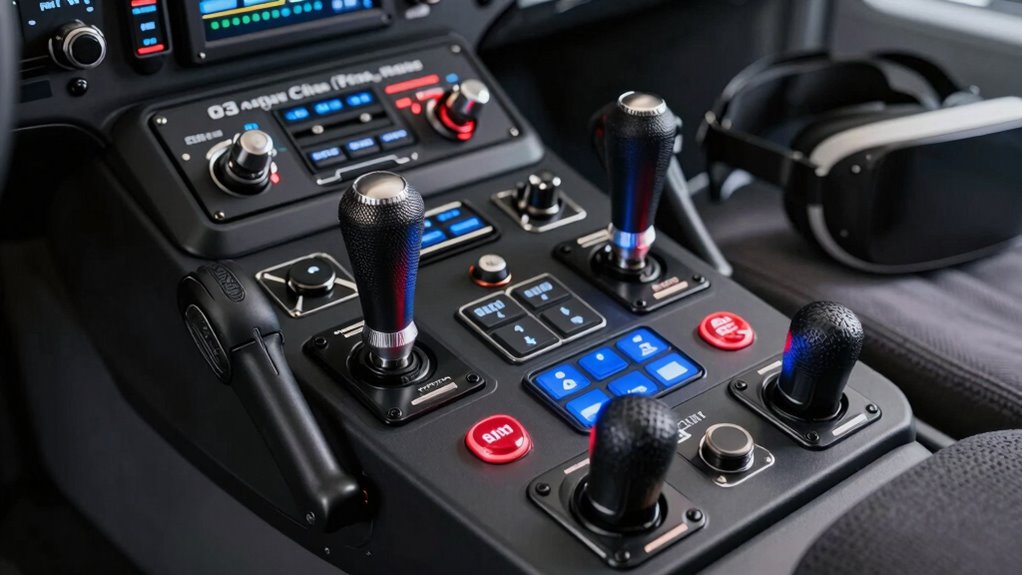

For serious flight sim enthusiasts using VR, choosing the right controls can make or break your immersion. The best pro flight sim controls for VR offer precision, durability, and compatibility, but they come with tradeoffs like price and complexity. The Logitech G Pro Flight Yoke System stands out for its realistic feel, while the Thrustmaster T-Flight Hotas X offers great value for newcomers. More advanced users might prefer the Logitech G X56 H.O.T.A.S for its versatility. Keep reading to see how these options compare and which one fits your flight style.

Get audio and creator gear delivered free with Prime
- Fast, free delivery on millions of items
- Prime Video, Amazon Music and more included
- Member-only deals all year
Complete the kit



Key Takeaways
- High-end controls like the Logitech G X56 excel in versatility but come with a steep price, making them ideal for dedicated simmers.
- Budget-friendly options such as the Thrustmaster T-Flight Hotas X provide solid performance for beginners but lack some advanced features.
- Compatibility with VR headsets varies; some controls are optimized for VR, while others require additional setup or adapters.
- Build quality and realistic feedback are critical for immersion; premium models generally outperform cheaper alternatives.
- Choosing between yoke, joystick, or HOTAS depends on your preferred aircraft type and control style—there’s no one-size-fits-all.
| PXN 2113PRO PC Joystick USB Gaming Flight Simulator Controller Flight Stick |  | Best for Budget-Conscious VR Pilots | Compatibility: Windows 7/8/10/11 | Supported Platforms: PC only | Vibration Function: Yes | VIEW ON AMAZON | See Our Full Breakdown |
| Logitech G Pro Flight Yoke System + Pro Flight Rudder Pedals Bundle |  | Best for Realistic, Professional-Grade Flight Control | Number of programmable controls: 54 | Pedal type: Self-centering rudder pedals | Yoke controls: 14 buttons, 3-position mode switch | VIEW ON AMAZON | See Our Full Breakdown |
| Logitech G Saitek X52 Pro Flight Control System – Black/Silver |  | Best for Customizable, Mid-Range VR Flight Control | System requirements: Windows 10/8.1/7, 2 USB 2.0 ports | Handle adjustment: 5 positions | Grip: Soft-touch, contoured | VIEW ON AMAZON | See Our Full Breakdown |
| Logitech G X56 H.O.T.A.S Throttle and Joystick Flight Simulator Game Controller + Pro Flight Rudder Pedals Bundle |  | Best for High-Performance, Fully Customizable VR Flight Sim | Control Surface Options: All control surfaces required for high-performance flight | Mini Analog Stick: For pitch, roll, yaw, and weapons | RGB Backlighting: Yes, customizable | VIEW ON AMAZON | See Our Full Breakdown |
| Thrustmaster T-Flight Hotas X USB Flight Sim Stick & Throttle – PC |  | Best for Casual and Intermediate VR Pilots | Number of action buttons: 12 | Number of axes: 5 | Detachable throttle: Yes | VIEW ON AMAZON | See Our Full Breakdown |
| Logitech G Pro Flight Rudder Pedals |  | Best for Realistic Rudder and Brake Control | Platform Compatibility: Windows 7, 8, 8.1, 10 | Dimensions: 31x41x17 cm | Weight: 2.3 kg | VIEW ON AMAZON | See Our Full Breakdown |
| Thrustmaster T-Flight Hotas One MSFS 2024 Collector Edition – Xbox & PC |  | Best for Versatile Flight Control on Xbox and PC | Compatibility: Xbox Series X|S and PC | Axes: 5 axes including Z-axis rudder | Action Buttons: 14 | VIEW ON AMAZON | See Our Full Breakdown |
| Thrustmaster T16000M FCS – Precision Combat Flight Sim Joystick for PC |  | Best for Precise, Customizable Flight Control | Sensor Technology: Hall Effect magnetic sensors | Design: Ambidextrous ergonomic | Buttons: 16 programmable | VIEW ON AMAZON | See Our Full Breakdown |
| Logitech G PRO Flight Yoke System |  | Best for Realistic Flight Experience with Modular Design | Controller Type: Yoke | Connectivity Technology: USB | Button Quantity: 14 | VIEW ON AMAZON | See Our Full Breakdown |
| Logitech G X56 H.O.T.A.S Throttle and Joystick Flight Simulator Controller |  | Best for Fully Customizable, High-Performance Flight Control | Compatibility: PC, Windows 11/10/8.1/7 | Control Surfaces: Multiple programmable buttons, mini analog sticks | Lighting: RGB backlighting | VIEW ON AMAZON | See Our Full Breakdown |
| Thrustmaster Sol-R1 Hall-Effect Space Combat Flight Sim Joystick – PC | 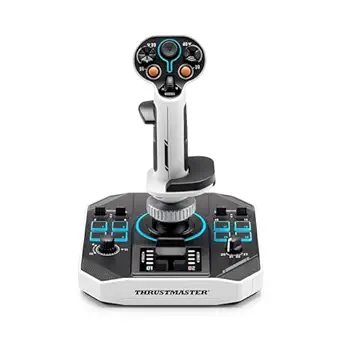 | Best for High-Precision Space Combat in VR | Number of action buttons: 21 | Trigger buttons: 2 | Hat switches: 2 | VIEW ON AMAZON | See Our Full Breakdown |
| Logitech G Pro Flight Switch Panel |  | Best for Realistic Cockpit Controls in VR | Compatibility: Microsoft FSX, Prepar3D 2.2+, X-Plane 10, Windows 7/8/8.1/10 | Features: LED gear status indicators, customizable layout, mounting brackets | Modularity: Modular and interchangeable panels | VIEW ON AMAZON | See Our Full Breakdown |
| pro flight sim controls for vr | Compatibility |
|---|---|
| PXN 2113PRO PC Joystick USB Ga | Windows 7/8/10/11 |
| Logitech G Pro Flight Yoke Sys | — |
| Logitech G Saitek X52 Pro Flig | — |
| Logitech G X56 H.O.T.A.S Throt | — |
| Thrustmaster T-Flight Hotas X | PC |
| Logitech G Pro Flight Rudder P | — |
| Thrustmaster T-Flight Hotas On | Xbox Series X|S and PC |
| Thrustmaster T16000M FCS | — |
| Logitech G PRO Flight Yoke Sys | — |
| Logitech G X56 H.O.T.A.S Throt | PC, Windows 11/10/8.1/7 |
| Thrustmaster Sol-R1 Hall-Effec | PC |
| Logitech G Pro Flight Switch P | Microsoft FSX, Prepar3D 2.2+, X-Plane 10, Windows 7/8/8.1/10 |
More Details on Our Top Picks
PXN 2113PRO PC Joystick USB Gaming Flight Simulator Controller Flight Stick
The PXN 2113PRO stands out as an accessible entry point for flight enthusiasts who want a realistic feel without breaking the bank, especially compared to the more complex Logitech G X56 H.O.T.A.S bundle. It offers vibration feedback, which adds immersion, but lacks force feedback, making it less suited for those seeking highly tactile control. Its ergonomic design helps reduce fatigue during long sessions, yet it’s limited to Windows and doesn’t support Mac or consoles. The programmable buttons allow customization, though they may not match the depth of controls found on higher-end setups. Overall, this joystick provides a solid experience for casual VR flight simmers who prioritize ease of use and affordability over advanced features.
Pros:- Realistic flight experience with vibration feedback
- Multiple programmable buttons for customization
- Ergonomic and comfortable to hold
- Easy to set up without driver installation
Cons:- Lacks force feedback for tactile realism
- Limited to Windows, no Mac or console support
Best for: Budget-conscious VR pilots seeking a straightforward, comfortable joystick for flight sims on Windows.
Not ideal for: Advanced flight sim enthusiasts or VR users who want force feedback or multi-platform compatibility.
- Compatibility:Windows 7/8/10/11
- Supported Platforms:PC only
- Vibration Function:Yes
- Number of Buttons:12 programmable
- Control Axes:4 axes
- Hat Switch:8-way
Our verdict“This pick is best for entry-level VR pilots who value simplicity and affordability over advanced force feedback features.”
Logitech G Pro Flight Yoke System + Pro Flight Rudder Pedals Bundle
Compared with the PXN 2113PRO, this bundle offers a far more immersive and authentic flying experience, thanks to a full yoke and rudder pedals, ideal for serious VR flight simmers. Its 54 programmable controls and self-centering pedals allow precise customization, but this complexity could overwhelm casual users or those with limited space. The yoke’s multiple controls mimic real aircraft, making it suitable for extended sessions, while the pedals add a critical layer of realism. However, the setup is more involved and requires dedicated space and a higher budget. For dedicated pilots who want the closest simulation experience, this bundle is worth the investment—though it’s not suited for beginners or casual VR flyers.
Pros:- Highly realistic flight control experience
- Extensive programmable controls for customization
- Adjustable, non-slip rudder pedals
- Authentic feel for serious flight simulation
Cons:- Complex setup process
- Premium price point
- Requires ample space for installation
Best for: Experienced VR flight enthusiasts who want a comprehensive, realistic cockpit setup.
Not ideal for: Casual players or those with limited space, due to setup complexity and higher price.
- Number of programmable controls:54
- Pedal type:Self-centering rudder pedals
- Yoke controls:14 buttons, 3-position mode switch
- Foot rests:Adjustable with non-slip materials
Our verdict“Ideal for dedicated VR pilots seeking an authentic, full-featured cockpit experience, despite the higher cost and setup effort.”
Logitech G Saitek X52 Pro Flight Control System – Black/Silver
The Logitech G Saitek X52 Pro bridges the gap between basic controllers and high-end setups like the Logitech G X56, offering a good balance of features and affordability. Its illuminated buttons improve visibility in VR, while the LCD display provides useful feedback without needing to switch screens. The adjustable handle and soft-touch grip make extended flights comfortable, but it requires multiple USB ports, which can be a limitation for some setups. While it offers extensive control customization, its software setup can be confusing for new users. This system is well-suited for VR pilots who want more control options than a joystick but don’t need the full complexity of premium H.O.T.A.S systems.
Pros:- Illuminated buttons enhance visibility
- Customizable controls with software
- Ergonomic, soft-touch grip for comfort
- LCD multi-function display
Cons:- Requires multiple USB ports
- Software setup can be complex for newbies
Best for: Intermediate VR flight enthusiasts seeking customizable controls with good visual feedback.
Not ideal for: Beginners who find software setup daunting or users with limited USB ports.
- System requirements:Windows 10/8.1/7, 2 USB 2.0 ports
- Handle adjustment:5 positions
- Grip:Soft-touch, contoured
- Illumination:Yes
Our verdict“A solid choice for VR pilots wanting a versatile, mid-range control system with visual enhancements and customization options.”
Logitech G X56 H.O.T.A.S Throttle and Joystick Flight Simulator Game Controller + Pro Flight Rudder Pedals Bundle
Compared to the X52 Pro, the X56 H.O.T.A.S bundle offers a more advanced, RGB-backlit setup with additional control surfaces, making it ideal for VR pilots who demand detailed realism. Its mini analog sticks provide precise control over pitch, roll, yaw, and weapons, with the RGB lighting adding aesthetic flair. The adjustable rudder pedals and smooth analog controls give a tactile experience that surpasses simpler setups. However, this level of customization comes with a steep learning curve and setup complexity, requiring compatible software and a significant investment. This bundle is best suited for VR pilots who want to fine-tune every aspect of their flight and are prepared for a more involved setup process.
Pros:- Highly customizable control surfaces
- RGB backlighting for immersive aesthetics
- Precise analog sticks and adjustable rudder pedals
- Comprehensive high-performance controls
Cons:- Complex setup process
- Premium price point
- Requires compatible software for full features
Best for: High-end VR pilots who want a fully customizable, visually stunning flight control system.
Not ideal for: Casual VR players or those new to flight simulation due to setup complexity and cost.
- Control Surface Options:All control surfaces required for high-performance flight
- Mini Analog Stick:For pitch, roll, yaw, and weapons
- RGB Backlighting:Yes, customizable
- Rudder Pedals:Smooth, adjustable tension
Our verdict“Perfect for VR pilots demanding maximum customization and realism, provided they are ready for an advanced setup.”
Thrustmaster T-Flight Hotas X USB Flight Sim Stick & Throttle – PC
The Thrustmaster T-Flight Hotas X offers a straightforward, plug-and-play experience that appeals to casual and intermediate VR pilots who want full control without complexity. Its ergonomic design and fully programmable controls, including a detachable throttle, allow for flexible setup and customization. While it lacks the advanced features and high-end build of the X56 H.O.T.A.S, it provides reliable performance for those starting out or flying less demanding titles. The limited number of axes and simpler control layout make it less ideal for highly detailed, professional-grade VR flight sims, but it’s a practical choice for immediate use and moderate customization.
Pros:- Ergonomic and comfortable for long sessions
- Fully programmable controls
- Detachable throttle for flexible setup
- Plug-and-play with preconfigured profiles
Cons:- Limited to PC compatibility
- Lacks advanced features of higher-end systems
Best for: Casual VR pilots or newcomers who want an easy-to-use, reliable hotas setup.
Not ideal for: Advanced VR pilots seeking extensive customization or professional-grade controls.
- Number of action buttons:12
- Number of axes:5
- Detachable throttle:Yes
- Adjustable resistance:Yes
- Compatibility:PC
Our verdict“An excellent starter hotas for casual VR pilots who want immediate control and easy setup without fuss.”
Logitech G Pro Flight Rudder Pedals
The Logitech G Pro Flight Rudder Pedals stand out for their highly realistic self-centering motion combined with adjustable tension, offering a more authentic feel than the T-Flight Hotas One’s simpler rudder controls. These pedals excel in providing independent differential toe brakes, crucial for precise aircraft maneuvers, especially in complex simulations. Compared to the T16000M’s rudder, they deliver a more tangible and accurate pedal experience, although they lack wireless options and are somewhat bulky. Their adjustable foot rests and non-slip materials add to stability, making them ideal for dedicated sim pilots who prioritize realism.
Pros:- Realistic self-centering rudder with adjustable tension
- Independent differential toe brakes for nuanced control
- Adjustable foot rests with non-slip materials for stability
Cons:- Limited to Windows PC, no wireless connectivity
- Size may be cumbersome for small setups
Best for: Flight sim enthusiasts seeking highly realistic rudder and brake feedback, especially those with space for larger hardware.
Not ideal for: Casual players or those with limited space, as the pedals are somewhat bulky and require a wired connection to Windows systems.
- Platform Compatibility:Windows 7, 8, 8.1, 10
- Dimensions:31x41x17 cm
- Weight:2.3 kg
- Rudder Axis:9-bit
- Toe Brake Axis:7-bit
- Connectivity:USB 2.0
Our verdict“This pick is perfect for serious flight sim fans who want authentic rudder and brake operation and have space for larger hardware.”
Thrustmaster T-Flight Hotas One MSFS 2024 Collector Edition – Xbox & PC
The Thrustmaster T-Flight Hotas One Collector Edition makes a strong case for versatility, especially compared to the more specialized Logitech G PRO Flight Yoke System, which offers more realism but less flexibility. Its high-precision controls, including multiple axes and buttons, are great for varied aircraft types, and the detachable throttle adds customization options. However, it requires a separate purchase of rudder pedals, and its complexity can be daunting for beginners. The ergonomic design and compatibility with Microsoft Flight Simulator 2024 make it ideal for gamers who want a comprehensive, adaptable setup without investing in a full cockpit system.
Pros:- Officially licensed for Microsoft Flight Simulator 2024
- Multiple axes and 14 action buttons for detailed control
- Detachable throttle for flexible setup
Cons:- Requires separate purchase of rudder pedals
- Can be complex for beginners to configure
Best for: Gamers seeking a flexible, high-quality joystick compatible with both Xbox and PC, who are willing to expand their setup later.
Not ideal for: Complete newcomers to flight sim who prefer plug-and-play simplicity or those seeking dedicated rudder controls included in the package.
- Compatibility:Xbox Series X|S and PC
- Axes:5 axes including Z-axis rudder
- Action Buttons:14
- Detachable Throttle:Yes
- Rudder System:Dual rudder system
- Adjustable Resistance:Yes
Our verdict“This joystick is a solid choice for versatile players who want a high-quality, expandable control system for Xbox or PC flight sims.”
Thrustmaster T16000M FCS – Precision Combat Flight Sim Joystick for PC
The Thrustmaster T16000M FCS shines with its Hall Effect magnetic sensors, providing drift-free, consistent accuracy, which is especially beneficial over the Logitech G PRO Flight Yoke System’s more traditional sensors. Its ambidextrous ergonomic design suits both left and right-handed users, unlike the more specialized yoke or rudder-centric options. The 16 programmable buttons and 8-way hat switch offer extensive customization, echoing the flexibility of the X56 H.O.T.A.S but with a more straightforward setup. Still, it has a learning curve for those unfamiliar with software profiles and does not include pedals, which might limit immediate realism for some.
Pros:- Hall Effect sensors provide consistent, drift-free accuracy
- Ambidextrous ergonomic design for comfort
- Multiple programmable buttons for tailored control
Cons:- No included pedals or throttle
- Requires software for full profile customization
Best for: Serious flight sim players needing precise, customizable controls with a focus on accuracy and ergonomy.
Not ideal for: Beginners or casual players who prefer simple plug-and-play solutions, or those who want an all-in-one kit with pedals included.
- Sensor Technology:Hall Effect magnetic sensors
- Design:Ambidextrous ergonomic
- Buttons:16 programmable
- Hat Switch:8-way
- Axes:4 including rudder
- Software Compatibility:Thrustmaster T.A.R.G.E.T
Our verdict“Ideal for experienced sim pilots who prioritize precision and customization over simplicity or bundled hardware.”
Logitech G PRO Flight Yoke System
The Logitech G PRO Flight Yoke System offers a more realistic control setup than the X56 H.O.T.A.S for users who prefer manual yoke flying, especially compared to the more complex HOTAS configurations. Its sturdy, modular design with multiple programmable controls allows for highly customizable setups that can mimic real aircraft controls. While it is designed primarily for Windows PCs, its weight and size demand a sturdy mounting surface, which might be a challenge in smaller spaces. Unlike the rudder pedals and throttle included with the X56, this system provides a more authentic feel but requires additional peripherals for full control.
Pros:- Realistic yoke with precise control
- Multiple programmable controls for customization
- Modular design with adjustable mounting options
Cons:- Heavy, needs sturdy mounting
- Requires software for full functionality
- Limited to Windows, less compatible with consoles
Best for: Aviation enthusiasts seeking a realistic, modular yoke setup for Windows flight sims, especially those focusing on pilot-like control fidelity.
Not ideal for: Casual gamers or those with limited space, since the yoke system is heavy and requires extensive setup and additional peripherals.
- Controller Type:Yoke
- Connectivity Technology:USB
- Button Quantity:14
- Compatible Devices:Windows
- Item Weight:6.2 pounds
- Item Dimensions:18.9 x 15.8 inches
Our verdict“This system suits dedicated flight enthusiasts wanting a realistic, modular yoke experience on Windows PCs, ready to expand with additional peripherals.”
Logitech G X56 H.O.T.A.S Throttle and Joystick Flight Simulator Controller
The Logitech G X56 H.O.T.A.S combines dual throttles, RGB lighting, and extensive programmable controls, making it ideal for players who want a high degree of customization and immersion. Its 16-bit hall-effect sensors provide highly responsive and accurate control, comparable to the precision of the T16000M but with more bells and whistles. The dual throttles and gimballed mini-sticks offer a level of control suitable for both gaming and professional simulation, surpassing the simplicity of the T-Flight Hotas. However, its multiple USB connections and complex setup may intimidate beginners, and the premium price makes it less accessible for casual users.
Pros:- Highly customizable controls and RGB lighting
- Accurate, responsive hall-effect sensors
- Dual throttles with friction adjuster and throttle lock
Cons:- Requires multiple USB ports, limiting on some systems
- Complex setup can be daunting for newcomers
Best for: Advanced flight sim players and professionals seeking a fully customizable, high-end controller with immersive lighting and dual throttles.
Not ideal for: Beginners or budget-conscious users who prefer straightforward, plug-and-play options without extensive configuration.
- Compatibility:PC, Windows 11/10/8.1/7
- Control Surfaces:Multiple programmable buttons, mini analog sticks
- Lighting:RGB backlighting
- Sensors:16-bit hall-effect
- Spring Options:4 adjustable springs
- Cable Length:2 meters
Our verdict“This controller is best suited for experienced flight enthusiasts and professionals demanding top-tier customization and responsiveness.”
Thrustmaster Sol-R1 Hall-Effect Space Combat Flight Sim Joystick – PC
The Thrustmaster Sol-R1 stands out for its use of Hall-Effect technology, which delivers exceptional accuracy and smoothness—an upgrade over traditional potentiometer-based joysticks like the T-Flight Hotas X. Its 21 action buttons and multiple controls enable complex maneuvers essential for immersive space combat, especially in VR where precision is key. The ambidextrous design with customizable grips ensures comfort during extended sessions, but the array of controls can be intimidating for newcomers, demanding a steep learning curve. Compatibility is limited to PC, which could restrict users with multi-platform setups. Compared to the T. Flight Hotas X, the Sol-R1 offers finer input fidelity, but at the cost of increased complexity. This pick is ideal for dedicated space sim enthusiasts who prioritize accuracy and are comfortable with advanced controls.Pros:- Exceptional accuracy thanks to Hall-Effect technology
- Multiple customizable buttons and controls for immersive gameplay
- Ambidextrous, adjustable design for extended comfort
Cons:- Steep learning curve due to numerous controls
- Limited to PC, restricting multi-platform use
Best for: Space combat VR players who want high-precision control and are willing to manage a complex setup.
Not ideal for: Beginners or casual flight sim players who prefer simple, plug-and-play controllers.
- Number of action buttons:21
- Trigger buttons:2
- Hat switches:2
- Mini stick:1
- Thumbwheel:1
- Technology:Hall-Effect AccuRate Technology
- Compatibility:PC
- Design:Ambidextrous with interchangeable wrist and thumb rests
- Lighting:Backlit
Our verdict“This joystick suits serious space sim fans seeking unparalleled precision and customization in VR, despite its complexity.”
Logitech G Pro Flight Switch Panel
The Logitech G Pro Flight Switch Panel excels in delivering authentic cockpit controls, with LED indicators for gear status that add to VR immersion—an advantage over simpler panels like the PXN 2113PRO, which lack such visual feedback. Its modular design allows for tailored setups, making it versatile across different aircraft types, and it’s compatible with a wide range of flight sims like Microsoft FSX and X-Plane. However, it relies heavily on compatible flight software, which could involve extra configuration, and it doesn’t include physical controls like a yoke or throttle, limiting its standalone utility. Compared to the Saitek X52 Pro, which offers integrated yoke and throttle, this panel focuses on specific switches and indicators, making it a better choice for realism but less for comprehensive control. This panel is best suited for VR pilots seeking precise, customizable cockpit elements without cluttering their space.Pros:- Realistic gear control with clear LED indicators
- Highly customizable and modular for different aircraft
- Compatible with multiple flight simulation platforms
Cons:- Requires compatible flight software and setup effort
- Limited to switch controls, no yoke or throttle included
Best for: VR flight enthusiasts who want realistic, customizable cockpit switch controls and already have a primary flight control system.
Not ideal for: Users new to flight sims or those seeking an all-in-one control system, as it requires additional components and setup.
- Compatibility:Microsoft FSX, Prepar3D 2.2+, X-Plane 10, Windows 7/8/8.1/10
- Features:LED gear status indicators, customizable layout, mounting brackets
- Modularity:Modular and interchangeable panels
Our verdict“This switch panel is perfect for VR users who want authentic cockpit switches and are comfortable with detailed configuration, rather than a full control system.”
How We Picked
These products were selected based on their compatibility with VR, build quality, control fidelity, ease of setup, and user reviews. Preference was given to controls that integrate seamlessly with popular flight sim platforms and VR headsets, providing a realistic experience. We prioritized models that balance performance and value, avoiding overly niche or outdated designs. Our ranking reflects a combination of durability, usability, and overall value for serious flight sim enthusiasts who want a premium VR experience.| pro flight sim controls for vr | Compatibility |
|---|---|
| PXN 2113PRO PC Joystick USB Ga | Windows 7/8/10/11 |
| Logitech G Pro Flight Yoke Sys | — |
| Logitech G Saitek X52 Pro Flig | — |
| Logitech G X56 H.O.T.A.S Throt | — |
| Thrustmaster T-Flight Hotas X | PC |
| Logitech G Pro Flight Rudder P | — |
| Thrustmaster T-Flight Hotas On | Xbox Series X|S and PC |
| Thrustmaster T16000M FCS | — |
| Logitech G PRO Flight Yoke Sys | — |
| Logitech G X56 H.O.T.A.S Throt | PC, Windows 11/10/8.1/7 |
| Thrustmaster Sol-R1 Hall-Effec | PC |
| Logitech G Pro Flight Switch P | Microsoft FSX, Prepar3D 2.2+, X-Plane 10, Windows 7/8/8.1/10 |
Factors to Consider When Choosing Pro Flight Sim Controls For Vr
Choosing the right pro flight sim controls for VR involves several key factors beyond just price. First, consider compatibility with your VR headset and flight simulation software to avoid setup headaches. Next, think about the type of aircraft you prefer; yokes suit commercial jets, while HOTAS setups are better for fighters or space sims. Build quality and feedback mechanisms like force feedback or Hall sensors impact immersion—higher-end models typically deliver more realistic control. Ease of setup and adjustability can save time and frustration, especially for longer sessions. Finally, assess your budget against your desired fidelity and feature set to find a balanced choice that enhances your flight experience without unnecessary complexity.Compatibility with VR and Flight Software
Ensuring your controls work seamlessly with your VR headset and preferred flight sim software is essential. Some controllers are designed specifically for PC and may require additional drivers or adapters, while others come with native VR support. Compatibility issues can lead to setup headaches or limited functionality, so verify supported platforms before purchasing. A control system that integrates well enhances immersion and reduces frustration, especially during long VR sessions.
Control Type and Aircraft Preference
Deciding whether you want a yoke, joystick, or HOTAS setup depends on the aircraft you most often fly in simulations. Yokes mimic commercial aircraft controls and improve realism for airliner pilots, while HOTAS (Throttle, Hat, Stick) configurations are favored for fighter jets and space sims due to their versatility. Your choice affects the control layout, feel, and complexity, so align this with your preferred flying style for better immersion.
Build Quality and Feedback
High-quality materials and force feedback mechanisms significantly boost immersion. Premium models often feature Hall sensors or force feedback motors that simulate the resistance and feel of real controls. Cheaper options may lack this feedback, resulting in a less convincing experience. Investing in durable, well-constructed controls ensures longevity and consistent performance, especially during intense VR sessions.
Ease of Setup and Customization
Controls that are easy to assemble, calibrate, and customize save time and reduce frustration. Look for adjustable grips, programmable buttons, and straightforward software interfaces. Complex setups can be daunting, especially for newcomers, so balancing features with user-friendliness is key. A well-designed control system allows quick adjustments to suit different aircraft types or personal preferences, enhancing overall satisfaction.
Budget and Value
There’s a wide price range in pro flight controls, so define your budget early. High-end models offer advanced features and superior feedback but come at a premium, while budget options provide a solid entry point. Consider what features are most important for your experience—if realism and durability matter most, it may be worth investing more. Conversely, if you’re just starting out, a more affordable control can still deliver good results without overextending your budget.
Frequently Asked Questions
Can I use a regular gaming joystick for VR flight simming?
While a standard gaming joystick can work for VR flight sims, it may lack the precision and feedback needed for a fully immersive experience. Pro controls designed for flight simulation often include features like force feedback, multiple axes, and more realistic ergonomics, which enhance realism and control accuracy. If you’re serious about VR flying, investing in a dedicated pro control system will significantly improve your experience and help you handle aircraft more precisely.
Are HOTAS controls better than yoke systems for VR flight sims?
HOTAS setups generally offer more versatility and are favored for space and fighter aircraft, which makes them ideal for VR enthusiasts interested in those genres. Yokes excel in commercial and general aviation simulations, providing a more authentic experience. The choice depends on your aircraft preference; however, HOTAS controls tend to be more adaptable across different flight types, especially if you enjoy multi-genre flying in VR.
Do I need special mounts or stands for these controls in VR?
Most professional flight controls are designed to be mounted on desks or dedicated stands, which stabilize the controls during intense VR sessions. Using proper mounts improves control accuracy and comfort, preventing unwanted movement. Some models include mounting options, while others require third-party stands. Ensuring your setup is secure allows you to focus fully on flying without distractions or control slippage.
How important is force feedback in VR flight controls?
Force feedback dramatically enhances immersion by mimicking real-world control resistance, turbulence, and aircraft behavior. In VR, this feedback creates a more tactile experience that aligns with visual cues, making flying feel more authentic. Higher-end controls with force feedback tend to be more expensive but provide a significant boost in realism, especially important for seasoned sim pilots who seek a convincing flight experience.
Is it worth investing in a full control panel for VR flight sims?
Adding a control panel with switches, buttons, and displays can significantly boost the realism and functionality of your VR flight setup. It allows for quick access to essential controls without fumbling through menus, which is crucial during immersive flights. However, full panels can be costly and require additional space, so consider whether your flight style or simulation preferences justify this investment. For serious virtual pilots, it often enhances both realism and convenience.
Conclusion
For casual VR flyers, a budget-friendly HOTAS like the Thrustmaster T-Flight offers good performance without breaking the bank. Dedicated sim enthusiasts seeking maximum realism should consider the Logitech G X56 H.O.T.A.S or the Logitech G Pro Flight Yoke System, which excel in build quality and feedback. Beginners will benefit from simpler, more straightforward controls like the Thrustmaster T-Flight Hotas X, while advanced users may prioritize modular setups or full panels for immersive experience. Ultimately, your choice should align with your aircraft preferences, budget, and how much realism you desire in VR flying.
As an affiliate, we earn on qualifying purchases.Halloween Picks
halloween