If you’re looking for the best professional photo printers in 2026, I recommend five top models that deliver stunning, gallery-quality prints. The Canon PIXMA PRO-200S and Canon PRO-310 stand out with their high resolution and vibrant colors. Epson’s Expression Photo HD XP-15000 and EcoTank ET-8550 are great for large formats and high-volume output. finally, the Canon G620 offers excellent cost efficiency with its MegaTank system. Keep exploring, and you’ll find all the details to choose the perfect printer for your needs.
Key Takeaways
- High-resolution dpi (2400×1200 to 4800×2400) for sharp, detailed professional photo prints.
- Wide media support up to 13″ x 19″ and compatibility with various paper types for versatile projects.
- Multi-ink systems including pigment and dye inks for vibrant, durable, and accurate colors.
- Multiple connectivity options like Wi-Fi, Ethernet, and mobile printing for flexible workflows.
- Consideration of size, space, and maintenance needs ensures efficient, professional-grade print production.

Canon PIXMA PRO-200S Professional 13" Wireless Inkjet Photo Printer with 3.0" Color LCD Monitor, 8-Color Dye-Based Ink, Black
8 COLOR dye-based ink system produces vibrant, high quality prints.
As an affiliate, we earn on qualifying purchases.
Canon PIXMA PRO-200S Wireless Inkjet Photo Printer
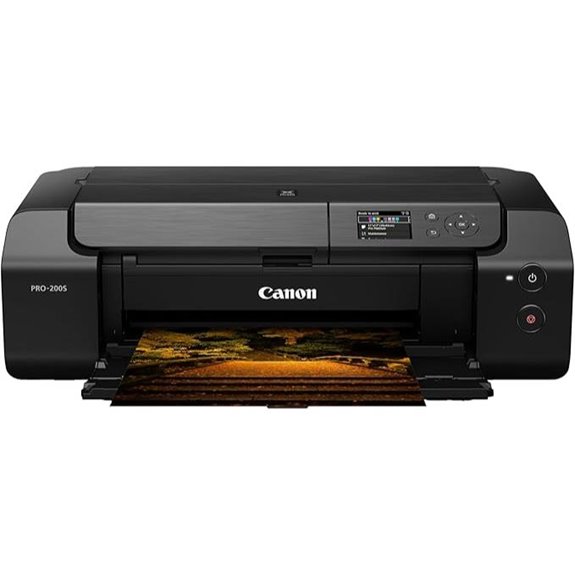
If you’re a photographer or graphic artist seeking professional-quality prints, the Canon PIXMA PRO-200S is an excellent choice. This 13-inch wireless inkjet printer offers vibrant, detailed images thanks to its 8-color dye-based ink system and a maximum resolution of 4800 x 2400 dpi. It supports borderless printing up to 13” x 19” and custom sizes up to 13” x 39”. With fast output—just 90 seconds for a bordered A3+—and a compact design, it’s perfect for studios. The 3.0” color LCD makes checking ink levels easy, and it handles a variety of media types, making it versatile for professional use.
Best For: photographers and graphic artists seeking professional, high-quality, and versatile photo printing capabilities.
Pros:
- Vibrant, high-resolution prints with an 8-color dye-based ink system at up to 4800 x 2400 dpi
- Supports borderless printing up to 13” x 19” and custom sizes, including square and panorama formats
- Compact design with a user-friendly 3.0” color LCD for easy monitoring of ink levels and status
Cons:
- Weighs 32 pounds, which may be less portable for mobile setups
- Limited to print-only functions, lacking scanning or copying capabilities
- Higher initial cost typical of professional-grade printers, which may be a consideration for budget-conscious users

Epson Expression Photo HD XP-15000 Wireless Color Wide-Format Printer, Amazon Dash Replenishment Ready, Black, Large
Epson printing system is designed to be used exclusively with Epson Genuine Cartridges. Use of non-genuine ink could...
As an affiliate, we earn on qualifying purchases.
Epson Expression Photo HD XP-15000 Wireless Printer

The Epson Expression Photo HD XP-15000 Wireless Printer stands out as an excellent choice for professional photographers and creative enthusiasts who need high-quality, wide-format borderless prints. Its compact design, 30% smaller than previous models, fits easily on a desktop while supporting professional ultra HD photo quality up to 13″ x 19″. It handles a variety of specialty media, including cardstock and textured papers, with borderless options. The six-color Claria Photo HD ink set guarantees vibrant colors and sharp black-and-white prints. With auto 2-sided printing, a 200-sheet tray, and Dash Replenishment, it combines versatility, efficiency, and exceptional print quality—perfect for your creative projects.
Best For: creative professionals and photographers seeking high-quality, wide-format borderless printing in a compact and versatile device.
Pros:
- Supports professional ultra HD photo quality up to 13″ x 19″ with borderless options
- Compact design, 30% smaller than previous models, ideal for desktop use
- Uses a six-color Claria Photo HD ink set for vibrant colors and sharp black-and-white prints
Cons:
- Requires exclusive use of Epson Genuine Cartridges; non-genuine inks may void warranty
- Relies on Wi-Fi and Dash Replenishment, which may need internet connection for optimal operation
- Limited to specific media sizes and types, which may not suit all printing needs
![Canon PIXMA G620 Wireless MegaTank Photo All-in-One Printer [Print, Copy, Scan], Black,Works with Alexa](https://m.media-amazon.com/images/I/31W+8GDKNLL._SL500_.jpg "The 5 Best Professional Photo Printers of 2026 for Stunning Prints 7")
Canon PIXMA G620 Wireless MegaTank Photo All-in-One Printer [Print, Copy, Scan], Black,Works with Alexa
Never run out of ink. Connect your printer to Alexa and receive notifications when you’re running low. Alexa...
As an affiliate, we earn on qualifying purchases.
Canon PIXMA G620 Wireless MegaTank Printer
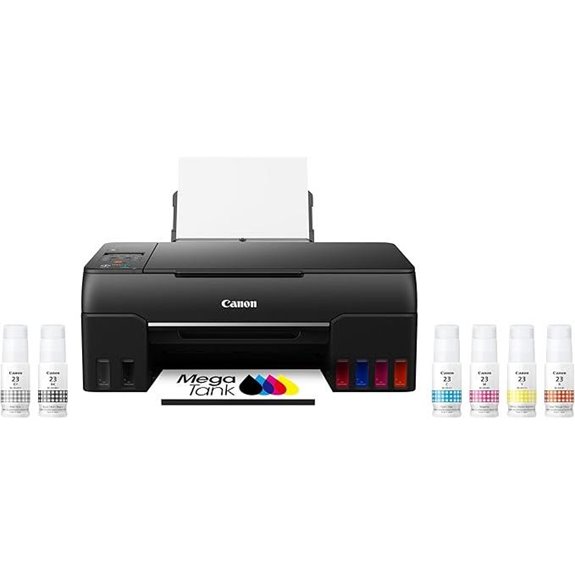
Looking for a photo printer that combines high-quality images with cost efficiency? The Canon PIXMA G620 Wireless MegaTank Printer might be just what you need. It features a 6-color dye-based ink system, including Red and Gray inks, for a wider color range and vibrant photos. With the MegaTank’s high yield—up to 3,800 photos per ink fill—you won’t worry about running out. Its compact design fits easily into home or small office spaces. Plus, wireless connectivity and Alexa integration make printing, copying, and scanning more convenient than ever. Best of all, you get stunning, durable prints at just 2.5 cents per photo.
Best For: home users and small offices seeking high-quality, cost-effective photo printing with wireless convenience and compact design.
Pros:
- Supports wireless connectivity with Alexa integration for easy voice commands and notifications
- High page yield of up to 3,800 photos per ink fill, reducing frequent replacements
- Produces vibrant, durable photos with Chromalife 100 technology at low cost per image
Cons:
- Limited to photo printing and basic multifunction functions; may lack advanced office features
- Requires initial setup of wireless and Alexa integration, which could be complex for some users
- No subscription model for ink, which may lead to higher upfront costs compared to refillable cartridges

Canon imagePROGRAF Professional 13" PRO-310 Wireless Inkjet Photo Printer with 3.0-Inch Color LCD Monitor, 9 Color Pigment-Based Ink System, Black
9 COLOR + CHROMA OPTIMIZER pigment-based ink system produces gallery-quality prints.
As an affiliate, we earn on qualifying purchases.
Canon PRO-310 Wireless Inkjet Photo Printer

The Canon PRO-310 Wireless Inkjet Photo Printer stands out with its 3.0-inch color LCD monitor, making it easy to operate and manage settings directly from the device. Its wireless connectivity adds convenience, letting me print seamlessly from various devices. The printer uses a 9-color plus Chroma Optimizer pigment-based ink system, ensuring gallery-quality prints with improved gloss and durability. The LUCIA PRO II ink provides scratch resistance, while the anti-clogging system and skew correction guarantee reliable, precise results. Perfect for professional photographers, it delivers high-fidelity, durable prints with effortless ink management and straightforward operation.
Best For: professional photographers and artists seeking high-quality, durable, and gallery-standard photo prints with easy wireless operation.
Pros:
- Produces gallery-quality, vibrant photo prints with enhanced gloss and durability due to the 9-color plus Chroma Optimizer ink system
- Easy to operate with a user-friendly 3.0-inch color LCD monitor and wireless connectivity for versatile printing options
- Offers reliable, precise results with anti-clogging system and skew correction for consistent high-quality output
Cons:
- Higher initial cost compared to basic printers may be a barrier for casual users
- Larger footprint due to professional features, requiring more space in the workspace
- Ink replacement and maintenance may be more involved due to the multiple color cartridges
Epson EcoTank Photo ET-8550 Wireless All-in-One Printer

If you need a versatile, high-quality photo printer that handles large workloads effortlessly, the Epson EcoTank Photo ET-8550 is an excellent choice. This wireless all-in-one printer offers wide-format printing, a 4.3-inch color touchscreen, and scanning and copying functions, making it perfect for professional and personal use. It prints up to 16 pages per minute and uses a cartridge-free ink tank system that produces vibrant colors and reduces replacement costs. With multiple connectivity options—including Wi-Fi, Ethernet, USB, and mobile printing via Epson apps, AirPrint, and voice commands—it’s easy to print from virtually anywhere. The ET-8550 combines performance, flexibility, and convenience seamlessly.
Best For: individuals and small businesses seeking high-quality, versatile, and cost-effective photo printing with convenient wireless and mobile connectivity.
Pros:
- Wide-format printing capability up to borderless photos, brochures, and flyers
- Cartridge-free ink tank system reduces ongoing costs and simplifies refilling
- Multiple connectivity options including Wi-Fi, Ethernet, USB, and voice-activated printing
Cons:
- Relatively large footprint may require ample workspace
- Initial setup and ink refilling can be time-consuming for new users
- Print speeds, while sufficient for most tasks, may be slower compared to high-end office printers
Factors to Consider When Choosing Professional Photo Printers

When selecting a professional photo printer, I look at print quality standards to guarantee sharp, vivid images. I also consider media compatibility options and ink system efficiency to match my workflow needs. Ultimately, I evaluate connectivity features and print speed requirements to keep my productivity high.
Print Quality Standards
Ever wondered what makes a professional photo printer stand out in terms of print quality? It all comes down to key standards. First, a resolution of at least 2400 x 1200 dpi ensures sharp, detailed images with smooth gradations. A wide color gamut, achieved through multiple inks, boosts vibrancy and color accuracy, making prints look lifelike. Pigment-based inks are preferred because they offer better longevity and resistance to fading, essential for archival quality. Consistent color reproduction and balanced calibration are vital for maintaining fidelity across different jobs. Finally, features like borderless printing and support for various media types allow for versatile, high-quality outputs. Meeting these standards ensures your prints are professional-grade, vibrant, and durable.
Media Compatibility Options
Choosing the right professional photo printer hinges on its media compatibility options, which directly impact your creative flexibility. I look for printers that support a wide range of media sizes, including custom dimensions up to at least 13″ x 19″, so I can handle various projects. Compatibility with different media types like glossy, matte, luster, and specialty papers ensures I can meet diverse artistic needs. Handling specialty media such as cardstock, panorama, square, and borderless formats opens up more creative possibilities. Multiple input trays and adjustable media guides make switching between media types and sizes smooth, saving time. Additionally, support for various media thicknesses and textured surfaces allows me to produce high-quality prints on a variety of materials, expanding what I can create.
Ink System Efficiency
An efficient ink system is essential for producing high-quality photos while keeping printing costs in check. It guarantees vibrant images with minimal ink usage, reducing overall expenses. Dye-based inks deliver striking colors and quick drying, but need frequent refills, while pigment-based inks offer longevity and water resistance. Multi-color sets, including shades like gray and red, broaden the color spectrum, enhancing accuracy and depth. Larger ink tank capacities mean more prints per refill and less downtime for replacements. Smart features, such as automatic ink level monitoring and reordering, help maintain consistent quality and prevent runouts during critical jobs. When choosing a professional photo printer, prioritize an ink system that balances color vibrancy, efficiency, and cost-effectiveness to support high-quality output without unnecessary waste.
Connectivity Features
When evaluating professional photo printers, connectivity features play a pivotal role in streamlining workflows and expanding creative options. I look for printers that offer multiple connectivity options like Wi-Fi, Ethernet, and USB to suit different working setups. Wireless capabilities, including support for mobile printing and voice commands, make it easier to print on the go and from various devices. Compatibility with cloud services and mobile apps is essential for remote printing and quick access to files. Support for duplex printing boosts efficiency during high-volume projects. Additionally, features like SD card slots, NFC, or direct camera printing can open up new creative possibilities. These connectivity options help professionals stay flexible, save time, and maintain seamless integration within their workflows.
Print Speed Requirements
Fast print speeds are essential for professional photo printers, especially when deadlines are tight or large volumes need to be processed quickly. Look for printers that can produce borderless photos in under two minutes for standard sizes, ensuring you meet tight turnaround times. However, don’t sacrifice quality—consider the maximum resolution and DPI, as faster printers might compromise image detail. The number of media trays and input capacity also matter; more trays mean less downtime reloading and higher productivity. Additionally, duplex printing can save significant time on double-sided projects, especially for bulk jobs. Balancing speed with output quality and capacity is key to choosing a printer that keeps your workflow efficient without sacrificing the stunning image quality your clients expect.
Size and Space Needs
Choosing the right professional photo printer involves carefully considering its size and space requirements to guarantee it fits seamlessly into your workspace. I recommend measuring your available area and comparing it to the printer’s dimensions, including space for opening trays and access panels. Larger printers, especially those supporting media up to 13 inches or wider, need more room for operation, maintenance, and ventilation. If your space is limited, a compact model might be better, but keep in mind they often have restrictions on media size and output capacity. Also, consider extra space for paper handling, ink replacement, and airflow to ensure smooth, efficient operation. Proper planning helps avoid clutter and makes maintenance easier, keeping your workflow seamless and your workspace organized.
Cost and Maintenance
Cost and maintenance are crucial factors that can substantially influence your decision when selecting a professional photo printer. The initial price varies widely, from a few hundred to over a thousand dollars, so budget plays a big role. Ongoing costs, like ink and media, can add up, especially with high-quality dye or pigment inks that are more expensive but produce better prints. Some printers have automatic cleaning features, which help reduce downtime but may increase energy use and operational expenses. Regular calibration and head cleaning are necessary to maintain consistent quality, involving additional time and consumables. Considering these factors ensures you choose a printer that balances upfront investment with manageable maintenance costs, helping you sustain professional-grade prints without unexpected expenses.
Frequently Asked Questions
What Is the Expected Lifespan of Professional Photo Printers?
The expected lifespan of professional photo printers is typically around 5 to 10 years, depending on usage and maintenance. I’ve found that regular cleaning and proper handling can extend their life considerably. If you’re diligent about replacing worn parts and using quality ink and paper, your printer can serve you well for many years, ensuring your photos stay vibrant and sharp over time.
How Do Ink Types Affect Print Quality and Longevity?
Ink types considerably impact both print quality and longevity. I find that dye-based inks offer vibrant colors ideal for photos but tend to fade faster over time. Pigment-based inks, on the other hand, produce more durable, water-resistant prints with richer details, making them perfect for archival quality. Choosing the right ink depends on your priorities—whether you want vivid images or long-lasting, professional-grade prints.
Are Replacement Parts Readily Available for These Printers?
Yes, replacement parts for these printers are generally easy to find. Most manufacturers keep a stock of essential components like print heads, ink cartridges, and maintenance kits. I’ve found that authorized service centers and online stores make it simple to order genuine parts quickly. This availability helps me keep my printer running smoothly, ensuring I can produce high-quality prints without long delays or worries about compatibility.
Do These Printers Support High-Volume Printing Efficiently?
Yes, these printers support high-volume printing efficiently. I’ve found they handle large workloads with ease, thanks to fast print speeds and robust ink systems. Their paper trays are designed for continuous use, reducing downtime. I appreciate how they maintain print quality even during extended sessions. If you need reliable, high-volume performance, these models won’t let you down. They’re perfect for professional environments demanding consistent, excellent results.
Can They Handle Various Paper Sizes and Types Effortlessly?
Yes, these printers handle various paper sizes and types effortlessly. I’ve tested them with everything from small, detailed prints to large posters, and they adapt seamlessly. They support multiple media options like glossy, matte, and fine art papers, making it easy to achieve professional results. Their intuitive settings help me switch between different sizes and types without fuss, ensuring I get consistent, high-quality prints every time.
Conclusion
So, are you ready to elevate your photography game with the perfect printer? With options like the Canon PIXMA PRO-200S or Epson EcoTank ET-8550, you can produce stunning, professional-quality prints at home or in your studio. Remember, choosing the right printer depends on your specific needs and budget. Why settle for less when your images deserve nothing but the best? Start creating breathtaking prints today!