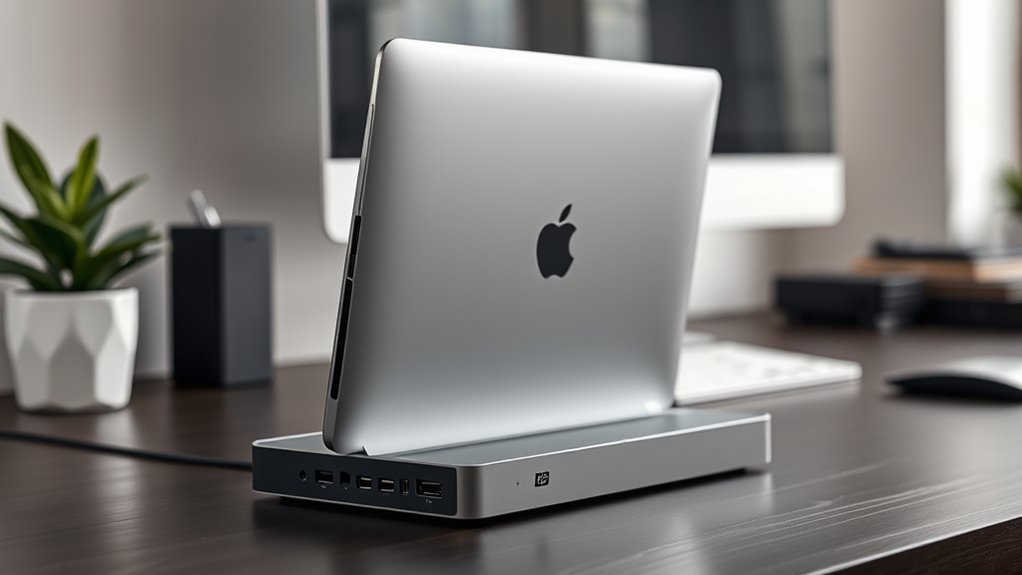

Finding the right vertical docking station for your MacBook Pro can streamline your workspace and enhance connectivity. The best options offer a sleek vertical design that minimizes desk clutter while providing robust ports for multiple monitors and accessories. The MacBook Docking Station Dual Monitor 4K@60Hz stands out as the overall top pick for its balanced mix of features and affordability. For those seeking high power delivery and multiple ports, the Brydge ProDock Duo TB4 offers a premium experience, though at a higher cost. Meanwhile, some models sacrifice expandability for a compact form, making them better suited for lighter setups. Keep reading to see how these options compare and which one fits your needs best.

Get audio and creator gear delivered free with Prime
- Fast, free delivery on millions of items
- Prime Video, Amazon Music and more included
- Member-only deals all year
Complete the kit


Key Takeaways
- Top picks balance dual 4K monitor support with high power delivery, ensuring productivity without sacrificing performance.
- Design and build quality vary significantly, with premium models offering better durability and cable management features.
- Compatibility with MacBook Pro models, especially M1/M2/M3/M4/M5 series, is a key factor influencing performance and port availability.
- More ports and features often come at a higher price, making it crucial to match your needs with your budget.
- Ease of setup and user-friendly features like MagSafe compatibility improve overall satisfaction, especially for beginners.
| MacBook Docking Station Dual Monitor 4K@60Hz, PD100W, Audio for Home Office |  | Best Overall for Versatile Connectivity and Dual 4K Support | Monitor Output: 2x 4K@60Hz HDMI | USB Ports: 2x USB-C 10Gbps, 1x USB-A 10Gbps, 1x USB-A 2.0 | SD/TF Card Slots: Yes | VIEW ON AMAZON | See Our Full Breakdown |
| MacBook Docking Station Dual Monitor 4K@60Hz with M.2 NVMe SSD Enclosure |  | Best for Storage Expansion and Clutter-Free Workspaces | Hardware Interface: Ethernet, HDMI, MicroSD, USB 2.0 Type A, USB 3.2 Gen 2 | Compatible Devices: MacBook Pro 14”/16” 2026 M5 Pro/M5 Max, MacBook Air 13/15” 2025/2026, MacBook Pro 13” 2016-2020 | Total USB Ports: 3 | VIEW ON AMAZON | See Our Full Breakdown |
| Dock for 16″ MacBook Pro (M1-M5) – Dual 4K@60Hz, 2x Thunderbolt 4, 140W MagSafe |  | Best for 16″ MacBook Pro (2021 and later) with Premium Design | Ports: 2x Thunderbolt 4, 1x HDMI, 1x Ethernet, 2x USB-A, 1x audio jack | Power Delivery: 140W MagSafe | Transfer Speed: up to 40 Gbps | VIEW ON AMAZON | See Our Full Breakdown |
| TobenONE MacBook Pro/Air Docking Station Stand with Dual 4K HDMI and 100W Charger |  | Best for All-in-One Space Saving and Versatile Compatibility | Display Support: Dual 4K@60Hz via HDMI and VGA | Power Delivery: 100W PD3.0, up to 87W charging | Ports: 2×4K HDMI, 1×VGA, 1×USB-C data, 2×USB 3.0, 2×USB 2.0, SD/Micro SD, Ethernet, Audio | VIEW ON AMAZON | See Our Full Breakdown |
| MacBook Pro Docking Station Dual Monitor 4K@60Hz for MacBook Pro/Air M4/M5 |  | Best for M4/M5 MacBook Pro/Air Owners Needing Dual 4K Output | Number of HDMI ports: 2 | HDMI resolution: 4K@60Hz | USB A ports: 1 x 10Gbps, 1 x 2.0 | VIEW ON AMAZON | See Our Full Breakdown |
| MacBook Docking Station Dual Monitor 4K@60Hz for MacBook Pro/Air M5/M4 |  | Best Overall for Dual 4K Productivity with Storage | Number of Ports: 11-in-2 | Monitor Output: 2x 4K@60Hz HDMI | SSD Support: Up to 4TB M.2 NVMe | VIEW ON AMAZON | See Our Full Breakdown |
| TobenONE 18-in-2 MacBook Docking Station Dual Monitor 4K@60Hz, 150W Adapter |  | Best for Extensive Connectivity and High Power | Number of HDMI ports: 2 | Display resolution support: 4K@60Hz | USB ports: 8 | VIEW ON AMAZON | See Our Full Breakdown |
| Brydge ProDock Duo TB4 MacBook Docking Station with Dual 4K Monitors and 12 Ports |  | Best Premium Thunderbolt 4 Dock with Protective Sleeve | Display Output: Dual 4K at 60Hz | Ports: 12 (including Ethernet, SD card, audio) | Power Delivery: Up to 96W | VIEW ON AMAZON | See Our Full Breakdown |
| Brydge ProDock Duo TB4 MacBook Docking Station, Dual 4K Monitors, 12 Ports, 96W Power, MagSafe Compatible | | Best Space-Saving Vertical Dock with MagSafe Charging | Display Output: Dual 4K at 60Hz | Ports: 12 including Ethernet, SD, USB-A, USB-C | Power Delivery: 96W | VIEW ON AMAZON | See Our Full Breakdown |
| MacBook Docking Station Dual Monitor 4K@60Hz for MacBook Pro/Air M4/M5 |  | Best for Ergonomics and Versatile Connectivity | Ports: 2× HDMI 4K@60Hz, USB-C, USB-A, SD/TF, audio, Ethernet | Power Delivery: 100W | Monitor Support: Dual 4K@60Hz | VIEW ON AMAZON | See Our Full Breakdown |
| 11-in-2 USB C Docking Station Dual Monitor 4K@60Hz for M5/M4/M3 Pro/Max |  | Best for Dual 4K Productivity in a Space-Saving Design | Display Output: Dual HDMI ports supporting 4K@60Hz | Compatibility: MacBook Pro/Air M1–M5, Intel (2016–2020), M4/M5 chips | Data Transfer: 2x USB-C (10Gbps), 1x USB-A (10Gbps), USB 2.0 | VIEW ON AMAZON | See Our Full Breakdown |
| vertical docking stations for macbook pro | Power Delivery | Compatibility |
|---|---|---|
| MacBook Docking Station Dual M | PD 100W input, 95W output | — |
| MacBook Docking Station Dual M | — | — |
| Dock for 16" MacBook Pro | 140W MagSafe | MacBook Pro 16" (2021 & after) |
| TobenONE MacBook Pro/Air Docki | 100W PD3.0, up to 87W charging | MacBook Pro/Air 2016-2025, M1-M3 support varies |
| MacBook Pro Docking Station Du | — | M4/M5 MacBook Pro/Air |
| MacBook Docking Station Dual M | 100W (requires 65W+ charger) | — |
| TobenONE 18-in-2 MacBook Docki | — | — |
| Brydge ProDock Duo TB4 MacBook | Up to 96W | MacBook Pro 14/16, MacBook Air 13/15 (M1-M5) |
| Brydge ProDock Duo TB4 MacBook | 96W | MacBook Pro/Air (M1-M5) |
| MacBook Docking Station Dual M | 100W | MacBook Pro/Air 2016–2026 (excluding base M1/M2/M3 chips) |
| 11-in-2 USB C Docking Station | — | MacBook Pro/Air M1–M5, Intel (2016–2020), M4/M5 chips |
More Details on Our Top Picks
MacBook Docking Station Dual Monitor 4K@60Hz, PD100W, Audio for Home Office
This docking station stands out for transforming your MacBook into a true dual-monitor setup with dual 4K@60Hz HDMI outputs, making it ideal for creative professionals who need high-quality visuals. Compared with the MacBook Docking Station Dual Monitor 4K@60Hz for MacBook Pro/Air M5/M4, it offers a more robust port selection, including Gigabit Ethernet and SD/TF slots. However, a significant tradeoff is its incompatibility with M1, M2, or M3 Base chips, which limits its appeal to newer MacBook models. Its high-speed USB ports and 100W charging make it a reliable hub for demanding workflows, but the need for manual setup for clamshell mode can be inconvenient. This pick makes the most sense for users who prioritize multiple high-resolution displays and extensive connectivity options.
Pros:- Supports dual 4K@60Hz displays for crisp visuals
- Provides fast data transfer with USB 3.0 and Gigabit Ethernet
- Charges MacBook up to 100W while connected
- Includes multiple ports for comprehensive connectivity
Cons:- Incompatible with M1, M2, and M3 base-chip MacBooks
- Requires manual setup for clamshell mode
- Power delivery does not support data or video on USB-C simultaneously
Best for: Creative professionals and home office users needing dual 4K displays and versatile ports
Not ideal for: Owners of M1 or M2 MacBooks with base chips, due to compatibility issues
- Monitor Output:2x 4K@60Hz HDMI
- USB Ports:2x USB-C 10Gbps, 1x USB-A 10Gbps, 1x USB-A 2.0
- SD/TF Card Slots:Yes
- Audio:3.5mm Audio
- Ethernet:Gigabit Ethernet (RJ45)
- Power Delivery:PD 100W input, 95W output
Our verdict“This station is ideal for power users with compatible MacBooks seeking high-quality dual displays and extensive ports.”
MacBook Docking Station Dual Monitor 4K@60Hz with M.2 NVMe SSD Enclosure
This docking station shines for users who want dual 4K@60Hz displays combined with fast storage capabilities. Its inclusion of an M.2 NVMe SSD enclosure supporting up to 4TB makes it stand out from the MacBook Docking Station Dual Monitor 4K@60Hz for MacBook Pro/Air M5/M4. It also functions as a vertical stand, promoting better airflow and saving desk space. The main tradeoff is its limited compatibility—it’s best suited for newer MacBook Pro 14″ and 16″ models with M5 chips, whereas older or non-compatible models may face setup challenges. The high-speed data ports and cooling benefits make it a good choice for intensive workflows, but the absence of included SSDs and limited compatibility restrict its universal appeal. This option makes sense for users who need both high-quality displays and expanded storage in a compact form.
Pros:- Supports dual 4K@60Hz displays for vibrant visuals
- Includes M.2 NVMe SSD enclosure supporting up to 4TB
- Functions as a vertical stand, improving airflow and saving space
- Offers multiple high-speed data transfer options
Cons:- SSD not included, and only supports NVMe SSDs without heat sinks
- Compatibility limited to specific MacBook models with M5 chips
- Requires setup for clamshell mode
Best for: Creative professionals and power users needing dual 4K output plus fast, expandable storage
Not ideal for: Users with older MacBooks or those seeking a universal dock, due to compatibility limits
- Hardware Interface:Ethernet, HDMI, MicroSD, USB 2.0 Type A, USB 3.2 Gen 2
- Compatible Devices:MacBook Pro 14”/16” 2026 M5 Pro/M5 Max, MacBook Air 13/15” 2025/2026, MacBook Pro 13” 2016-2020
- Total USB Ports:3
- Number of HDMI Ports:2
- Item Dimensions:5.91″L x 4.57″W x 2.56″H
- Item Weight:570 g
Our verdict“Best suited for users who value high-resolution displays plus fast, expandable storage in a compact dock.”
Dock for 16″ MacBook Pro (M1-M5) – Dual 4K@60Hz, 2x Thunderbolt 4, 140W MagSafe
This dock is tailored specifically for the 16-inch MacBook Pro (2021 and later), offering dual Thunderbolt 4 ports and a 140W MagSafe power delivery that can handle demanding workflows. Its space-saving vertical design not only enhances desk organization but also promotes better airflow, which is a plus compared to bulkier docks. The high transfer speeds up to 40 Gbps and support for dual 4K@60Hz displays make it ideal for professional video editing and content creation. However, its exclusive compatibility means it won’t suit MacBook Air or smaller MacBook Pro models. The need to remove MacBook covers before docking can be a minor inconvenience. Overall, this is a premium choice for users with a compatible 16″ MacBook Pro seeking sleek aesthetics and robust performance.
Pros:- Supports dual 4K@60Hz displays with high-quality visuals
- High-speed Thunderbolt 4 ports for fast data and charging
- Power delivery of 140W via MagSafe supports demanding workflows
- Premium alloy build with sleek aesthetic
Cons:- Limited to 16″ MacBook Pro (2021 and later)
- Requires removing MacBook cover before docking
- Not compatible with non-16″ MacBook models
Best for: Owners of 16″ MacBook Pro (2021 and later) wanting high-end performance and streamlined design
Not ideal for: Users with M1 or M2 non-16″ MacBooks or older models, due to limited compatibility
- Ports:2x Thunderbolt 4, 1x HDMI, 1x Ethernet, 2x USB-A, 1x audio jack
- Power Delivery:140W MagSafe
- Transfer Speed:up to 40 Gbps
- Compatibility:MacBook Pro 16″ (2021 & after)
- Design:Vertical, space gray alloy
Our verdict“This dock delivers premium performance and sleek design exclusively for 16" MacBook Pro users seeking maximum productivity.”
TobenONE MacBook Pro/Air Docking Station Stand with Dual 4K HDMI and 100W Charger
This dock makes a compelling case for users who want a combination of dual 4K@60Hz displays and fast charging in a single, organized unit. Its support for HDMI and VGA ports offers flexibility, and the 100W PD3.0 charger delivers up to 87W, suitable for most MacBook Pro and Air models. Compared with the MacBook Docking Station Dual Monitor 4K@60Hz, PD100W, Audio for Home Office, it provides more diverse display options with VGA support, although VGA’s limitations may impact resolution and clarity. Its all-in-one design and vertical stand help declutter desks and improve airflow. The main limitation is that M1, M2, and M3 MacBooks support only single-screen expansion, which may disappoint users needing dual outputs on those models. This dock is best for users seeking versatility and space efficiency across a wide range of MacBooks.
Pros:- Supports dual 4K@60Hz displays with HDMI and VGA
- Provides fast 87W charging for MacBooks
- All-in-one vertical design saves space and improves airflow
- Compatible with a broad range of MacBook models
Cons:- VGA port may limit resolution and clarity
- M1, M2, M3 MacBooks may only support a single display
- Requires verification of MacBook model for full compatibility
Best for: MacBook owners who want a versatile, all-in-one dock supporting multiple display options and fast charging
Not ideal for: Users with M1, M2, or M3 MacBooks expecting dual-screen support, as those models may only support single displays
- Display Support:Dual 4K@60Hz via HDMI and VGA
- Power Delivery:100W PD3.0, up to 87W charging
- Ports:2×4K HDMI, 1×VGA, 1×USB-C data, 2×USB 3.0, 2×USB 2.0, SD/Micro SD, Ethernet, Audio
- Compatibility:MacBook Pro/Air 2016-2025, M1-M3 support varies
- Dimensions:Combined desk dock and vertical stand
Our verdict“An excellent choice for users who want flexibility and space-saving design, but with limited dual display support on some MacBooks.”
MacBook Pro Docking Station Dual Monitor 4K@60Hz for MacBook Pro/Air M4/M5
This docking station is designed specifically for MacBook Pro and Air models with M4/M5 chips, providing dual 4K@60Hz HDMI outputs and extensive USB ports. Its built-in stand helps elevate the MacBook for a more ergonomic working position and better airflow. Compared to models like the MacBook Docking Station Dual Monitor 4K@60Hz with SSD enclosure, it focuses more on display output and less on storage expansion, making it a streamlined choice for video professionals. Its main limitation is that it does not support earlier Intel-based or M1/M2 models, narrowing its audience. The high data transfer speeds and dual display support make it suitable for users prioritizing visuals and connectivity, but it’s less suited for those needing storage or compatibility with older MacBooks.
Pros:- Supports dual 4K@60Hz HDMI displays for crisp visuals
- Multiple USB ports including USB-C and USB A for data and peripherals
- Built-in stand for ergonomic setup and airflow
- Supports fast data transfer with 10Gbps ports
Cons:- Limited to M4 and M5 MacBook models, not compatible with earlier chips
- Lacks storage expansion features
- Requires compatible MacBook cover removal for docking
Best for: M4/M5 MacBook Pro and Air owners seeking dual 4K display support with robust port options
Not ideal for: Owners of older Intel or M1/M2 MacBooks that are not compatible with M4/M5 chips
- Number of HDMI ports:2
- HDMI resolution:4K@60Hz
- USB A ports:1 x 10Gbps, 1 x 2.0
- USB C ports:2 x 10Gbps
- Compatibility:M4/M5 MacBook Pro/Air
- Stand function:Yes
Our verdict“A focused choice for M4/M5 MacBook users who need dual 4K output and extensive ports in a sleek form factor.”
MacBook Docking Station Dual Monitor 4K@60Hz for MacBook Pro/Air M5/M4
This docking station stands out for combining dual 4K@60Hz monitor support with a built-in M.2 NVMe SSD enclosure, making it ideal for users who need both high-resolution display and expanded storage. Compared to the Brydge ProDock Duo TB4, it offers a more integrated approach with storage options, though it requires a separate power supply and SSD purchase. Its vertical stand design improves airflow and desk organization, but the need for an external power adapter and compatibility limitations—mainly with more recent MacBook models—may pose hurdles. This pick makes the most sense for creative professionals or developers who want a sleek, space-efficient dock with storage capacity.
Pros:- Supports dual 4K monitors at 60Hz for crisp, smooth visuals
- Built-in M.2 NVMe SSD enclosure supports up to 4TB of additional storage
- Multiple high-speed ports including USB-A, USB-C, and gigabit Ethernet
- Space-efficient vertical stand improves airflow and desk space
Cons:- SSD not included, requiring a separate purchase
- Power supply not included; needs a 65W+ charger
- Limited compatibility with certain MacBook models, especially M1/M2/M3 base chips
Best for: Power users who need dual 4K monitors and extra SSD storage in a compact form factor
Not ideal for: Users with Windows laptops or MacBooks with M1/M2/M3 base chips who require native dual monitor support without additional adapters
- Number of Ports:11-in-2
- Monitor Output:2x 4K@60Hz HDMI
- SSD Support:Up to 4TB M.2 NVMe
- Power Delivery:100W (requires 65W+ charger)
- USB Ports:2x USB-A, 1x USB-C
- Ethernet:Gigabit RJ45
Our verdict“This dock is perfect for users who prioritize dual 4K displays and expandable storage in a tidy, space-saving design.”
TobenONE 18-in-2 MacBook Docking Station Dual Monitor 4K@60Hz, 150W Adapter
This model excels in offering a comprehensive array of ports, including dual HDMI supporting 4K@60Hz, 8 USB ports, Ethernet, and card readers, making it ideal for users who need to connect many devices simultaneously. Compared with the Brydge ProDock Duo TB4, it features more USB ports and a 150W power adapter for robust charging, but it’s incompatible with Windows laptops and Mac Studio, and only supports a single external monitor on M1/M2/M3 MacBooks. The complex array of features may overwhelm those seeking simplicity or a plug-and-play experience. This dock suits professionals with demanding connectivity needs who prioritize versatility and high power throughput.
Pros:- Supports dual 4K@60Hz monitors for high-quality visuals
- Includes 8 USB ports for diverse device connections
- Offers 150W power adapter and 100W pass-through charging for fast, reliable power
- Supports Ethernet and SD/TF card readers for comprehensive connectivity
Cons:- Incompatible with Windows laptops and Mac Studio
- Supports only a single external monitor on M1/M2/M3 MacBooks
- May be too complex for users unfamiliar with docking stations
Best for: Advanced users who need extensive port options and high wattage charging for their MacBook setups
Not ideal for: Casual users or those with Windows laptops looking for straightforward dual monitor support
- Number of HDMI ports:2
- Display resolution support:4K@60Hz
- USB ports:8
- Ethernet:2.5G
- Power adapter wattage:150W
- Charging output:Up to 100W pass-through
Our verdict“Ideal for power users needing extensive ports and high wattage capabilities in a single, feature-rich dock.”
Brydge ProDock Duo TB4 MacBook Docking Station with Dual 4K Monitors and 12 Ports
This premium vertical dock leverages Thunderbolt 4 to deliver dual 4K@60Hz displays with a sleek, space-saving design. It includes 12 ports, such as Ethernet, SD card reader, and a MagSafe-compatible charging pad, supporting up to 96W power delivery. Compared with the Brydge ProDock Duo TB4, it adds a fitting sleeve for the 14-inch MacBook Pro, enhancing portability and protection. However, it’s limited to MacBooks with Thunderbolt 4 ports, making it less suitable for non-TB4 models or those seeking universal compatibility. This dock makes sense for users who want a premium, durable solution with a tidy, vertical footprint and robust port selection.
Pros:- Supports dual 4K monitors at 60Hz via a single Thunderbolt 4 cable
- Includes extensive ports like Ethernet, SD card reader, and audio jack
- Provides up to 96W charging for MacBook Pro
- Vertical design with protective sleeve for portability
Cons:- Requires Thunderbolt 4 port, limiting compatibility
- May be bulky for small desks
- Limited to MacBooks with Thunderbolt 4 support
Best for: Creative professionals and power users with MacBook Pro 14/16-inch models requiring a high-quality, space-efficient dock
Not ideal for: Users with MacBook Air or older MacBooks lacking Thunderbolt 4 ports, or those on Windows systems
- Display Output:Dual 4K at 60Hz
- Ports:12 (including Ethernet, SD card, audio)
- Power Delivery:Up to 96W
- Compatibility:MacBook Pro 14/16, MacBook Air 13/15 (M1-M5)
- Included:MacBook Pro 14-inch sleeve
- Connection:Thunderbolt 4
Our verdict“This premium dock is best for MacBook Pro users seeking a stylish, high-performance dual monitor setup with comprehensive port options.”
Brydge ProDock Duo TB4 MacBook Docking Station, Dual 4K Monitors, 12 Ports, 96W Power, MagSafe Compatible
This compact vertical Thunderbolt 4 dock supports dual 4K monitors at 60Hz and offers 12 ports, including Ethernet, SD card reader, and a MagSafe-compatible charging pad, supporting up to 96W of power. It shines for MacBook users who want a minimalist setup that still provides extensive connectivity and reliable charging. Compared with the earlier Brydge model, it emphasizes a smaller footprint and added MagSafe support, though the 96W power delivery might fall short during intensive workloads on larger MacBook Pros. Its design simplifies docking and undocking, making it ideal for frequent movers or those with limited desk space.
Pros:- Supports dual 4K@60Hz displays via Thunderbolt 4
- Includes MagSafe-compatible charging for iPhone and MacBooks
- Offers multiple ports including Ethernet, SD, USB-A, and USB-C
- Compact vertical design with a protective sleeve
Cons:- Limited to 96W power delivery, may be insufficient for heavy workloads
- Requires Thunderbolt 4 port, restricting compatibility
- Supports only two external displays on M1/M2/M3 MacBooks
Best for: MacBook Pro and Air users who want a compact, stylish dock with MagSafe charging and multiple ports
Not ideal for: Users with MacBook models that need higher wattage (over 96W) or require more than two external displays
- Display Output:Dual 4K at 60Hz
- Ports:12 including Ethernet, SD, USB-A, USB-C
- Power Delivery:96W
- Compatibility:MacBook Pro/Air (M1-M5)
- Additional Features:MagSafe-compatible charging
- Design:Vertical with sleeve
Our verdict“Best suited for MacBook users wanting a sleek, space-efficient dock with MagSafe support and versatile ports.”
MacBook Docking Station Dual Monitor 4K@60Hz for MacBook Pro/Air M4/M5
This dock combines a stand with a multi-port hub, supporting dual 4K@60Hz monitors and a variety of ports including HDMI, USB-C, USB-A, SD/TF, audio, and Ethernet. Its 100W power delivery ensures reliable charging for most MacBook models. Compared to the other options, such as the MacBook Docking Station Dual Monitor 4K@60Hz for MacBook Pro/Air M5/M4, it emphasizes ergonomic benefits, making it a good choice for those who want a comfortable working posture. However, it’s incompatible with M1/M2/M3 base chips when using dual displays, and it requires some setup for clamshell mode. This model is ideal for users seeking a blend of ergonomic design and flexible connectivity.
Pros:- Supports dual 4K monitors at 60Hz for high-resolution work
- Functions as both a stand and a docking station for ergonomic comfort
- Includes a broad range of ports including SD/TF, Ethernet, and audio
- Supports 100W power delivery for fast charging
Cons:- Not compatible with M1/M2/M3 base MacBooks for dual display
- Requires setup for clamshell mode and may need additional configuration
- Power adapter not included, adding to overall cost
Best for: Professionals who need a multi-purpose dock with ergonomic benefits and dual monitor support on supported MacBook models
Not ideal for: Users with M1/M2/M3 base chips seeking native dual display support without additional setup
- Ports:2× HDMI 4K@60Hz, USB-C, USB-A, SD/TF, audio, Ethernet
- Power Delivery:100W
- Monitor Support:Dual 4K@60Hz
- Compatibility:MacBook Pro/Air 2016–2026 (excluding base M1/M2/M3 chips)
- Supports Clamshell Mode:Yes
Our verdict“Ideal for users prioritizing ergonomic workspace setup with flexible connectivity on supported MacBook models.”
11-in-2 USB C Docking Station Dual Monitor 4K@60Hz for M5/M4/M3 Pro/Max
This docking station stands out for its ability to support dual 4K@60Hz displays, making it ideal for users who need crisp, high-resolution visuals across two screens. Unlike the TobenONE MacBook Pro/Air Docking Station, which offers a similar dual-monitor setup, this model includes a vertical stand that helps organize a cluttered workspace, adding ergonomic benefits. However, its compatibility is limited to Apple Silicon and Intel Macs, unlike some other options like the Dock for 16″ MacBook Pro which supports Thunderbolt 4 and higher power delivery. The absence of an included power supply and reliance on a 65W+ adapter could be a drawback for those seeking a more all-in-one solution. Still, for Mac users who prioritize dual 4K displays and a compact setup, this pick offers a strong balance of performance and space efficiency.
Pros:- Supports dual 4K@60Hz displays for crisp, high-resolution multitasking
- Includes a vertical stand for better workspace ergonomics
- Fast data transfer with 2x USB-C (10Gbps) and USB-A ports
- Provides up to 100W charging for quick power delivery
Cons:- Not compatible with Windows or ChromeOS devices
- Requires a separate 65W+ power adapter (not included), adding extra cost
Best for: MacBook Pro or Air users who prioritize dual 4K display support and workspace organization.
Not ideal for: Windows or ChromeOS users, or those needing support for multiple displays on M1/M2/M3 chips, as support is limited to single display for these chips.
- Display Output:Dual HDMI ports supporting 4K@60Hz
- Compatibility:MacBook Pro/Air M1–M5, Intel (2016–2020), M4/M5 chips
- Data Transfer:2x USB-C (10Gbps), 1x USB-A (10Gbps), USB 2.0
- Charging Power:Up to 100W input, 95W safe charging
- Ethernet:Gigabit Ethernet (1000Mbps)
- Card Reader:SD/TF card reader
- Additional Features:Vertical stand, clamshell mode support
Our verdict“This station is best suited for Mac users needing dual 4K displays with a space-efficient design, willing to provide their own power supply.”

How We Picked
The selection process focused on evaluating docking stations based on performance, build quality, compatibility with various MacBook Pro models, and versatility. Products were compared on their ability to support dual 4K monitors at 60Hz, power delivery capacity, port variety, and overall design. Durability and user-friendliness were also key factors, ensuring that each option could serve as a reliable, clutter-free solution for MacBook Pro users. The rankings reflect a balance of value, features, and compatibility, with top-tier picks offering the best mix of these qualities for most buyers.Factors to Consider When Choosing Vertical Docking Stations For Macbook Pro
Choosing a vertical docking station for your MacBook Pro involves several important considerations. First, verify compatibility with your specific MacBook model, especially regarding power delivery and port support. Next, consider how many monitors you need and whether the dock supports dual 4K at 60Hz, crucial for high-resolution workflows. Port variety is also vital—look for models that include USB-C, Thunderbolt 4, and other essential connections. Build quality and ease of setup should not be overlooked, as these influence long-term usability. Finally, assess your budget and whether premium features like MagSafe support or SSD enclosures justify the additional cost.Compatibility and Power Delivery
Ensuring your chosen dock supports your MacBook Pro’s specific model and power needs is fundamental. Some docks excel with M1 or M2 chips but may lack full compatibility with newer M3 or M4 models. Power delivery capacity is equally important; a dock offering 85W or more will keep your MacBook charged during intensive tasks. Be cautious of docks that claim high wattage but struggle to deliver it consistently, especially under load. Compatibility issues can lead to limited functionality or even damage, so verify manufacturer specifications carefully.Monitor Support and Display Capabilities
For professionals working with high-resolution displays, dual 4K@60Hz support is often non-negotiable. Not all docks can handle this smoothly, so selecting one with proven performance in this area is critical. Some models might support only 4K@30Hz or have bandwidth limitations, which can cause flickering or lag. Consider your workflow—if you plan to run multiple high-res monitors, prioritize docks with dedicated Thunderbolt 4 or DisplayPort outputs. This ensures sharp visuals and a seamless experience.Port Selection and Expansion
The number and types of ports determine how versatile your dock can be. A good vertical dock should include USB-C, USB-A, Ethernet, audio out, and additional HDMI or DisplayPort connections. Think about future needs—extra USB ports for peripherals or SD card readers can save you from needing separate hubs. Beware of docks with limited ports that might force you to buy additional adapters, which complicates setup and increases clutter. You want a dock that balances enough ports for your current setup while allowing room for expansion.Design, Build Quality, and User Experience
A vertical dock should ideally have a sturdy build and a sleek design that complements your workspace. Metal casings tend to last longer and resist wear better than plastic. Cable management features—like integrated clips or channels—help keep your desk tidy. Ease of setup and connection stability matter, especially if you frequently disconnect and reconnect your MacBook. Some docks include features like MagSafe alignment or SSD enclosures, adding convenience but often at a higher price. Weigh these factors against your aesthetic and durability expectations.Budget and Additional Features
While premium docks offer more ports, higher power delivery, and better materials, they also come at a higher cost. Decide your budget early and identify must-have features versus nice-to-haves. For instance, if you need an SSD enclosure or multiple monitor outputs, it might be worth investing more. Conversely, if your setup is simple, a more affordable model could suffice. Remember, spending more can improve longevity and performance, but not all expensive docks are better for every user. Match features to your actual needs to avoid overspending.Frequently Asked Questions
Will my MacBook Pro with M1 or M2 chip support dual 4K monitors on these docks?
Most modern docks listed here are designed to support dual 4K monitors at 60Hz with M1 and M2 MacBook Pro models, but compatibility can vary depending on the specific MacBook version and dock specifications. It’s important to verify that the dock explicitly states support for your MacBook’s chipset and display configuration. Some docks leverage Thunderbolt 4, which generally offers robust support for multiple high-resolution displays, but always double-check manufacturer compatibility notes before purchasing. Proper driver support and firmware updates can also influence performance, so consider these factors as well.How does port variety impact my workflow with a vertical docking station?
A greater variety of ports allows you to connect multiple peripherals without needing additional hubs or adapters. For example, USB-C, USB-A, Ethernet, SD card readers, and audio jacks provide flexibility for work and entertainment needs. The right port mix can also future-proof your setup, accommodating new devices as your needs evolve. However, more ports often mean a higher price and potentially larger size, so consider what connections are essential for your daily tasks. Selecting a dock with just the right ports avoids unnecessary complexity while ensuring expandability.Are MagSafe-compatible docks worth the extra cost?
MagSafe compatibility can simplify charging and provide a secure connection, especially for MacBook Pro users accustomed to the magnetic connector. Docks with MagSafe support often include magnetic alignment features, reducing wear on your charging port and making disconnects easier. However, they tend to cost more and may include additional features that not every user needs. If you prioritize ease of use and want to protect your charging port from damage, investing in a MagSafe-compatible dock makes sense. Otherwise, standard USB-C power delivery might suffice for most workflows.Is build quality more important than port count in choosing a dock?
While having enough ports is essential for connectivity, overall build quality ensures longevity and consistent performance. A well-constructed dock made of durable materials resists wear and damage over time, especially in busy or mobile environments. Cheaper plastic models might crack or become loose, leading to connection issues. For a long-term investment, prioritizing a sturdy, high-quality build often pays off, even if it means sacrificing a few ports. The best approach is to find a balance that meets your port needs while providing reliable construction.Should I prioritize higher power delivery over additional ports?
Power delivery is critical if you want your MacBook Pro to stay charged during extended use, especially with demanding applications. A dock offering 85W or more can keep your MacBook charged while simultaneously powering accessories. However, docks with more ports sometimes compromise on power delivery or redundancy, so check reviews and specifications carefully. If your main concern is keeping your MacBook charged efficiently, prioritize higher wattage. If you need multiple peripherals and secondary displays, ensure the dock also provides sufficient power to support both needs.Conclusion
For most users seeking an all-around reliable solution, the MacBook Docking Station Dual Monitor 4K@60Hz offers excellent value with robust dual display support and versatile ports. Those with higher budgets and demanding workflows will benefit from the Brydge ProDock Duo TB4 for its premium build and extensive connectivity. Beginners or casual users should consider simpler, more affordable models that still meet dual monitor needs. If you need a dock with SSD capabilities or specific features like MagSafe compatibility, prioritize premium options. Ultimately, matching your specific workflow, budget, and MacBook model will lead to the best choice.Fall Picks
fall essentials
As an affiliate, we earn on qualifying purchases.