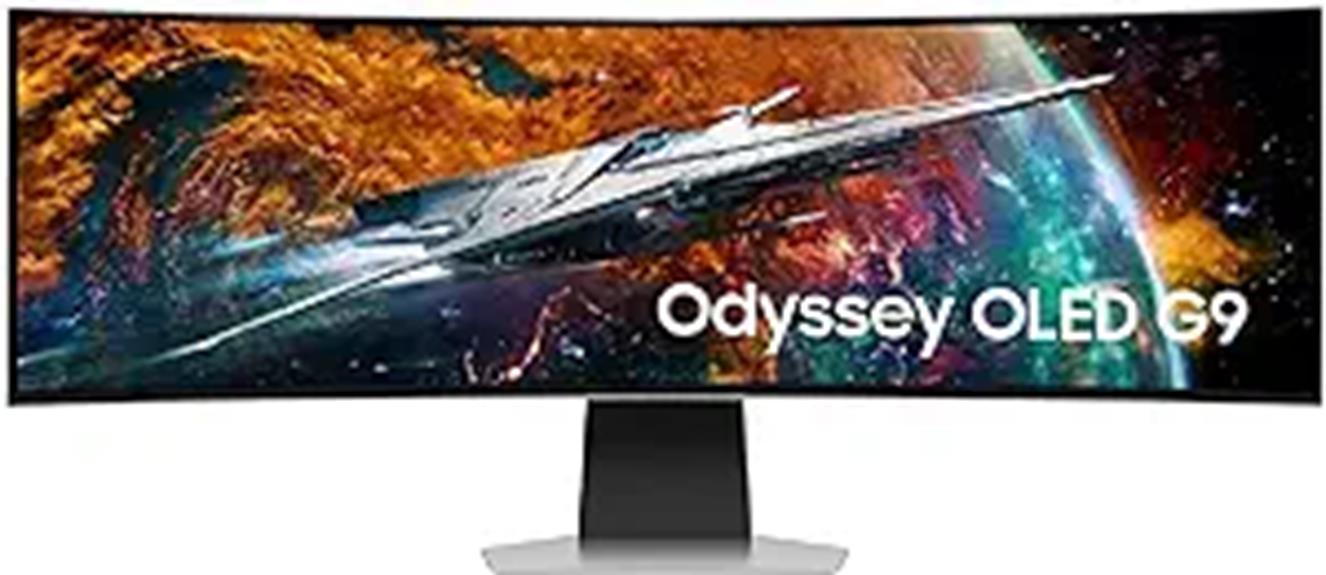
For an immersive Samsung Odyssey OLED G9 experience, my best overall pick is the Samsung 49-inch Odyssey G93SC: its QD-OLED panel and 32:9 curve put expansive, high-contrast gaming first. The 57-inch Odyssey Neo G9 is the standout for maximum screen space and sharp detail, while the 27-inch Odyssey OLED G6 suits players who prioritize speed over ultrawide immersion. The main tradeoffs are OLED contrast versus LCD brightness, screen size versus desk and GPU demands, and high refresh rates versus the cost of driving more pixels. Read on for how these six models differ and which one fits your setup and games.

Get audio and creator gear delivered free with Prime
- Fast, free delivery on millions of items
- Prime Video, Amazon Music and more included
- Member-only deals all year
Complete the kit


Key Takeaways
- The G93SC leads for OLED ultrawide immersion: its 49-inch, 32:9 QD-OLED format suits players who want broad peripheral coverage and deep contrast.
- The 57-inch Neo G9 is the scale-and-resolution pick: dual 4K UHD detail and a large curved display demand more desk space and graphics power than the 49-inch options.
- The 27-inch OLED G6 favors competitive play: its QHD resolution and 360Hz refresh rate prioritize rapid motion and a manageable screen footprint, not panoramic gaming.
- The G91F is a more restrained 49-inch alternative: its 144Hz refresh rate and DisplayHDR 600 make it less speed-focused than the 240Hz G9 models.
- OLED and Neo QLED serve different priorities: OLED models emphasize contrast and pixel response, while the Neo G9 offers a very large LCD canvas without the same OLED panel tradeoffs.

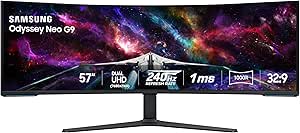


| samsung odyssey oled g9 review immersive gaming experience | Resolution | Refresh rate | Response time | Display size |
|---|---|---|---|---|
| Samsung 27” Odyssey OLED G5 | QHD (2560 x 1440) | 180Hz | 0.03ms (GTG) | 27 inches |
| Samsung 57" Odyssey Neo G9 | Dual 4K UHD | 240Hz | 1ms (GTG) | 57 inches |
| Samsung 27” Odyssey OLED G6 | QHD | 360Hz | 0.03ms (GTG) | 27 inches |
| Samsung 49-inch Odyssey G9 | 5120 x 1440 | 144Hz | 1ms | 49 inches |
| Samsung 49" Odyssey G93SC Seri | 5120 x 1440 (Dual QHD) | 240Hz | 0.03ms (GTG) | — |
| Samsung 49” Odyssey G9 Series | Dual QHD (5120 x 1440) | 240Hz | 1ms GtG | — |
More Details on Our Top Picks
Samsung 27” Odyssey OLED G5 (G50SF) Series QHD Gaming Monitor
The Odyssey OLED G5 brings QD-OLED contrast and color to a 27-inch screen, making it a more practical fit for a typical desk than the panoramic 49-inch Odyssey G93SC. Its QHD resolution keeps games sharp without asking a graphics card to drive a super-ultrawide canvas, while 180Hz and a 0.03ms response time support responsive play. Glare Free technology can help keep reflections from competing with dark scenes, and Pantone validation speaks to color accuracy beyond gaming. The tradeoff is scale: this monitor cannot deliver the wraparound field of view that defines the G93SC or the 57-inch Neo G9. Its 180Hz ceiling also trails the G6’s 360Hz. I’d choose it for OLED image quality in a compact setup, not for maximum speed or panoramic immersion.
Pros:- QD-OLED panel pairs vivid color with deep blacks.
- 180Hz refresh rate and 0.03ms response time support responsive gameplay.
- Glare Free technology helps reduce distracting reflections.
- Pantone validation supports color-accurate viewing.
Cons:- A 27-inch screen lacks the panoramic impact of the 49-inch and 57-inch models.
- Its 180Hz refresh rate is below the OLED G6’s 360Hz and G93SC’s 240Hz.
- OLED requires care around static images to limit burn-in risk.
Best for: Desk-constrained gamers who want QD-OLED contrast, accurate color, and high-refresh QHD play without moving to an ultrawide monitor.
Not ideal for: Players seeking a wraparound 32:9 view or the highest refresh rates; the 27-inch screen and 180Hz limit are less immersive and slower than the Odyssey G93SC and OLED G6.
- Display size:27 inches
- Resolution:QHD (2560 x 1440)
- Panel technology:QD-OLED
- Refresh rate:180Hz
- Response time:0.03ms (GTG)
- HDR:HDR10
- Adaptive sync:G-Sync and AMD FreeSync
- Additional features:Glare Free technology, OLED Safeguard, Auto Source Switch+
Our verdict“Choose the OLED G5 if you want compact QD-OLED gaming with a fast response, but skip it if ultrawide immersion is the priority.”
Samsung 57″ Odyssey Neo G9 (G95NC) Dual 4K UHD Curved Gaming Monitor
The 57-inch Odyssey Neo G9 is the lineup’s scale-first choice: its 1000R curve and Dual 4K UHD resolution create a huge, tightly wrapped view that goes beyond the 49-inch Odyssey G9 models. The 240Hz refresh rate and 1ms response time keep that broad canvas suited to fast gaming, while Quantum Mini LED provides a different image approach from the QD-OLED panels in the G93SC and OLED G6. That distinction matters: you get a massive, bright-capable display rather than OLED’s pixel-level black control. The tradeoffs are substantial desk space and the graphics hardware needed to drive so many pixels at high frame rates. Its 41.9-pound weight and wide footprint also make placement a project. I’d rank it highest for sheer field of view, but not for compact setups or OLED-specific contrast.
Pros:- 57-inch Dual 4K UHD canvas offers broader immersion than the 49-inch Odyssey G9 models.
- 1000R curvature wraps the wide display around the viewer.
- 240Hz refresh rate and 1ms response time suit fast gameplay.
- DisplayPort 2.1 and HDMI 2.1 provide modern high-bandwidth connections.
Cons:- Its 52.3-inch width and 41.9-pound weight demand substantial desk space and support.
- Driving Dual 4K UHD at high frame rates can call for powerful graphics hardware.
- VA LED technology does not provide the OLED pixel-level black control of the G93SC or OLED G6.
Best for: Enthusiast PC gamers with a deep, wide desk and powerful graphics hardware who want a giant curved workspace for gaming and multitasking.
Not ideal for: Small-desk users and buyers specifically seeking OLED black levels; this model is exceptionally large and uses a VA LED panel rather than OLED.
- Display size:57 inches
- Resolution:Dual 4K UHD
- Curvature:1000R
- Display technology:VA LED with Quantum Mini LED
- Refresh rate:240Hz
- Response time:1ms (GTG)
- Brightness:420 cd/m²
- Connectivity:DisplayPort 2.1, HDMI 2.1, USB hub
- Dimensions:19.7 x 52.3 x 24 inches (D x W x H)
Our verdict“Pick the Neo G9 for the largest curved gaming canvas in this group, provided your desk and graphics hardware can handle its demands.”
Samsung 27” Odyssey OLED G6 (G60SD) Series Gaming Monitor with QHD & QD-OLED, 360Hz, 0.03ms, FreeSync Premium Pro
For players who put response and refresh ahead of screen size, the Odyssey OLED G6 is the sharper specialist than the OLED G5. Both are 27-inch QHD QD-OLED monitors with 0.03ms response times, but the G6 raises refresh to 360Hz, giving compatible systems more room to show rapid motion clearly. Its cooling system, anti-glare features, and three-year warranty add reassurance for a high-use gaming display. Compared with the 49-inch G93SC, though, it gives up the expansive 32:9 view and the G93SC’s 240Hz ultrawide format. The G6 is built around focused play, not cinematic width. Its advanced settings may take more setup, and buyers using non-AMD graphics hardware should verify adaptive-sync compatibility for their setup. I’d choose it for competitive QHD gaming, not for a living-room-scale view.
Pros:- 360Hz refresh rate exceeds the OLED G5 and 49-inch G93SC.
- QD-OLED panel combines deep blacks with vivid color.
- 0.03ms response time supports quick on-screen response.
- Dynamic cooling, glare reduction, and a three-year warranty are included.
Cons:- The 27-inch screen cannot match the panoramic immersion of the G93SC or Neo G9.
- A PC must sustain high frame rates to make full use of 360Hz.
- Advanced settings and adaptive-sync compatibility may require extra setup checks.
Best for: Competitive gamers with a PC capable of driving very high frame rates who want QD-OLED contrast and a 360Hz refresh rate in a standard-size monitor.
Not ideal for: Gamers who want an ultrawide, cinematic view or prefer a simpler setup; its 27-inch format and advanced settings are a different proposition from the G93SC.
- Display size:27 inches
- Resolution:QHD
- Panel technology:QD-OLED
- Refresh rate:360Hz
- Response time:0.03ms (GTG)
- Adaptive sync:AMD FreeSync Premium Pro
- Cooling system:Dynamic Cooling System with Pulsating Heat Pipe
- Additional features:Anti-glare, Glare Free technology, ambient lighting, ergonomic stand
- Warranty:3 years
Our verdict“Choose the OLED G6 if competitive speed matters more than ultrawide scale and your system can take advantage of 360Hz.”
The 49-inch Odyssey G9 G91F makes the 32:9 format the main attraction: its 5120 x 1440 canvas can fill peripheral vision and also keep multiple windows side by side. It is a more accessible step into Samsung’s super-ultrawide format than the 57-inch Neo G9, and its ergonomic stand offers tilt and height adjustment. The 144Hz refresh rate is smooth for many games, but it trails the 240Hz OLED G93SC and Neo G9, as well as the 360Hz OLED G6. Its VA panel and DisplayHDR 600 rating also make it a different visual proposition from the G93SC’s QD-OLED, which is the better match for buyers prioritizing OLED black levels. The G91F is the practical panoramic pick, but its size still calls for a wide desk and careful setup.
Pros:- 49-inch 32:9 screen supports a panoramic gaming view and side-by-side work.
- 5120 x 1440 resolution gives the ultrawide canvas substantial horizontal detail.
- DisplayHDR 600 and AMD FreeSync Premium Pro support enhanced visuals and smoother play.
- Stand provides height and tilt adjustment.
Cons:- 144Hz is slower than the 240Hz G93SC and Neo G9 and the 360Hz OLED G6.
- VA display does not offer the QD-OLED contrast of the G93SC.
- The 45.18-inch width requires a wide desk and careful placement.
Best for: Multitaskers and immersive-game fans who want a 49-inch 32:9 screen, adjustable stand, and VA display without stepping up to the 57-inch Neo G9.
Not ideal for: Competitive players prioritizing the highest refresh rates or OLED contrast; the G91F is limited to 144Hz and uses a VA panel.
- Display size:49 inches
- Aspect ratio:32:9
- Resolution:5120 x 1440
- Display technology:VA
- Refresh rate:144Hz
- Response time:1ms
- HDR:DisplayHDR 600
- Adaptive sync:AMD FreeSync Premium Pro
- Dimensions:16.56 x 45.18 x 22.38 inches (D x W x H)
Our verdict“Choose the G91F for a broad 49-inch gaming and multitasking view if 144Hz and VA technology meet your needs.”
Samsung 49″ Odyssey G93SC Series QD-OLED Curved Gaming Monitor
The Odyssey G93SC is the closest match here for buyers who want both OLED image quality and a truly expansive gaming view. Its 49-inch, 32:9 Dual QHD panel puts more of a game world in sight than the 27-inch OLED G6, while QD-OLED delivers deep blacks and vivid color that distinguish it from the VA-based G91F. The 240Hz refresh rate and 0.03ms response time also make it faster than that G91F for quick motion, though the OLED G6 reaches 360Hz for competitive play on a smaller screen. That scale needs ample desk space, and the supplied details do not clarify stand adjustability. Brightness is listed at 250 cd/m², so buyers should weigh that figure against their room lighting. I’d rank it first for the roundup’s OLED-and-ultrawide brief, not as the most compact or highest-refresh option.
Pros:- 49-inch 32:9 QD-OLED panel creates a wide, immersive field of view.
- Deep blacks and vivid color distinguish it from the VA-based G91F.
- 240Hz refresh rate and 0.03ms response time support fast gameplay.
- Dual QHD resolution provides a broad 5120 x 1440 workspace.
Cons:- The 47.1-inch width requires substantial desk space.
- Listed brightness is 250 cd/m², which may be limiting in bright rooms.
- Stand adjustability details are not provided.
Best for: Gamers who want a 49-inch 32:9 OLED experience with fast refresh for immersive play, racing, simulation, and multitasking.
Not ideal for: Small-desk owners, buyers who need a clearly specified adjustable stand, or competitive players focused on 360Hz; the OLED G6 is faster at a much smaller size.
- Screen size:49 inches
- Resolution:5120 x 1440 (Dual QHD)
- Aspect ratio:32:9
- Display technology:QD-OLED
- Refresh rate:240Hz
- Response time:0.03ms (GTG)
- HDR:HDR10+
- Brightness:250 cd/m²
- Connectivity:2 HDMI, USB hub
Our verdict“Choose the G93SC if you want the strongest blend of 49-inch ultrawide immersion and QD-OLED visuals, and have room for its wide footprint.”
The 49-inch Odyssey G9 is the pick for players who want a wide, wraparound view without giving up a fast refresh rate. Its 32:9 Dual QHD screen puts more of a game world within your field of view, while 240Hz and 1ms GtG response time suit quick competitive play. The 1000R curve helps keep the broad panel in view, and DisplayHDR 1000 adds punch to supported highlights. Compared with the 49-inch Odyssey G9 G91F, this model’s 240Hz refresh rate is the stronger fit for high-frame-rate gaming; the 57-inch Neo G9 offers more resolution, but demands more from the desk and graphics hardware. The tradeoff is substantial: this monitor is wide and heavy, and reaching its full refresh and adaptive-sync potential depends on a capable PC.
Pros:- 49-inch 32:9 screen creates a broad, immersive view for supported games
- 240Hz refresh rate and 1ms GtG response time support fast gameplay
- DisplayHDR 1000 support and a stated 1,000,000:1 contrast ratio
- Height-adjustable stand helps tailor screen position
Cons:- 45.2-inch width and 34.4-pound weight call for substantial desk space and support
- Driving 5120×1440 at high frame rates requires a capable graphics card
- The VA display is not an OLED panel like the Odyssey G93SC
Best for: PC gamers with a deep, wide desk and a graphics card capable of driving a 5120×1440 display at high frame rates, especially fans of racing, simulation, and expansive first-person games.
Not ideal for: Players with limited desk space, modest graphics hardware, or a preference for a compact OLED display such as the 27-inch Odyssey OLED G6.
- Screen size:49 inches
- Display technology:VA
- Resolution:Dual QHD (5120 x 1440)
- Aspect ratio:32:9
- Refresh rate:240Hz
- Response time:1ms GtG
- Curve:1000R
- DisplayHDR:DisplayHDR 1000
- Dimensions and weight:16.6 x 45.2 x 22.4 inches; 34.4 pounds
Our verdict“Choose this Odyssey G9 if you want a deeply curved, high-refresh 49-inch gaming view and have the desk space and PC hardware to support it.”
How We Picked
I ranked these six monitors by how well they serve the promised immersive gaming experience, then weighed refresh rate, resolution, panel type, curvature, and practical setup demands. Screen size alone did not determine placement: a 49-inch OLED can be a better fit for contrast-rich games, while the 57-inch Neo G9 makes more sense for buyers whose desk and graphics card can handle its expansive dual 4K format.
The G93SC ranks first for balancing a wide 32:9 view with QD-OLED contrast. The Neo G9 ranks next for sheer scale and detail, with a larger hardware and space commitment. The OLED G6 ranks highly for a different kind of immersion—fast, responsive QHD play—while the G91F and 49-inch 240Hz G9 offer LCD alternatives with different refresh and HDR priorities. The OLED G5 rounds out the list as a compact entry point, where QHD OLED matters more than ultrawide scope.
| samsung odyssey oled g9 review immersive gaming experience | HDR | Adaptive sync | Display technology |
|---|---|---|---|
| Samsung 27” Odyssey OLED G5 | HDR10 | G-Sync and AMD FreeSync | — |
| Samsung 57" Odyssey Neo G9 | — | — | VA LED with Quantum Mini LED |
| Samsung 27” Odyssey OLED G6 | — | AMD FreeSync Premium Pro | — |
| Samsung 49-inch Odyssey G9 | DisplayHDR 600 | AMD FreeSync Premium Pro | VA |
| Samsung 49" Odyssey G93SC Seri | HDR10+ | — | QD-OLED |
| Samsung 49” Odyssey G9 Series | — | — | VA |
Factors to Consider When Choosing Samsung Odyssey Oled G9 Review Immersive Gaming Experience
Before choosing an Odyssey, I would match the monitor to the games, room, and PC that will drive it. The most immersive display on paper can disappoint if its format is poorly supported or its pixel load overwhelms your system.
Choose the screen shape around your games
A 32:9 display expands peripheral vision in supported racing, flight, and open-world games, but it does not make every title more immersive. Some games show limited side content, use awkward menus, or place interface elements far from the center. Check support for your regular games before paying for an ultrawide format. A 27-inch QHD monitor keeps the full image easy to scan and is often more practical for competitive titles. If you split time between gaming and productivity, a super-ultrawide can double as a broad workspace, but it also needs more desk width.
Match resolution and refresh rate to your graphics card
Higher resolution creates a sharper, more detailed scene, yet it also asks the graphics card to render many more pixels. The 57-inch dual 4K Neo G9 is a much heavier workload than a QHD 27-inch model, and a 49-inch DQHD screen also needs more rendering power than standard QHD. A high refresh rate only pays off when your PC can produce enough frames in the games you play. Before choosing a monitor, check your graphics card, the games’ performance demands, and whether you are willing to lower settings or use upscaling. Buyers who value smooth competitive play may get more from the OLED G6’s 360Hz QHD format than from a much larger screen they cannot drive at a high frame rate.
Decide whether OLED contrast fits your habits
OLED’s individually lit pixels can produce deep blacks and strong contrast, making dark scenes and cinematic games feel more dimensional. That appeal comes with care considerations: static interface elements and long periods of fixed desktop content may call for attention to the panel’s care features and usage guidance. LCD models such as the Neo G9 or G91F can be a better match for buyers who prefer not to manage OLED-specific habits. Think about how many hours the display will show the same HUD, taskbar, or work window. Pick OLED for the image character you value, not just because the label sounds like an automatic upgrade.
Treat curvature and desk fit as part of the purchase
A strongly curved ultrawide wraps more of the image into your field of view, but it also takes up substantial horizontal space and can require a deeper viewing position. Measure the desk’s usable width and depth, and check the stand’s footprint before choosing a 49- or 57-inch model. A monitor that crowds speakers, leaves little mouse room, or sits too close can make long sessions less comfortable. The 27-inch OLED G5 and G6 are easier to place in smaller rooms and simpler setups. Wall mounting may help with desk space, but confirm the mount’s capacity and the monitor’s compatibility first.
Read HDR and refresh claims in context
HDR labels and peak figures do not tell the whole story of how a game will look in a bright room or a dark scene. Panel technology, local dimming behavior, screen reflections, and the content itself all shape the result. Compare the G91F’s DisplayHDR 600 positioning with the 49-inch G9’s VESA DisplayHDR 1000 claim, but do not treat the number alone as a guarantee of a better image. Refresh rate is equally dependent on the connection, settings, and frame output from the PC. Check the full model specification and available ports for the exact refresh rate and resolution combination you plan to use.
Pay for the feature you will notice every session
The jump from a compact QHD OLED to a giant super-ultrawide is most worthwhile when your favorite games benefit from scale or when you also use the extra desktop space. If your routine centers on competitive shooters, high refresh and a clear view of the action may matter more than a 32:9 canvas. If you play cinematic single-player games, OLED contrast or a broad curved screen may have a stronger daily impact. Avoid paying for resolution your system cannot run comfortably or screen space your desk cannot accommodate. Prioritize the feature that matches your actual play habits, then treat the remaining specifications as supporting details.
Frequently Asked Questions
Is a 49-inch Odyssey OLED G9 a better choice than the 57-inch Neo G9 for gaming?
My answer depends on whether you value OLED contrast or maximum resolution and scale. The 49-inch G93SC offers QD-OLED image characteristics in a broad 32:9 format, while the 57-inch Neo G9 provides dual 4K UHD resolution across a larger screen. The Neo model also places greater demands on desk space and graphics hardware. Check whether your games support super-ultrawide aspect ratios and whether your PC can render at the chosen resolution. For OLED-focused cinematic play, I would lean toward the G93SC; for a huge, highly detailed display, the Neo G9 is the more fitting pick.
Will my PC run the 57-inch Neo G9 at its full resolution and refresh rate?
That depends on the graphics card, connection, game, and settings, so the monitor’s specifications alone cannot answer it. Rendering dual 4K UHD demands substantially more GPU power than driving a QHD panel, especially in modern games with demanding visual effects. Check your graphics card’s output support and the monitor’s requirements for the full resolution and refresh combination. You may need to reduce graphics settings or use upscaling to reach smoother frame rates. If your system is not ready for that workload, the 49-inch or 27-inch options can be a more balanced match.
Should I choose the 360Hz OLED G6 or a 240Hz 49-inch G9 for competitive games?
The OLED G6 is the more focused competitive option: its QHD resolution and 360Hz refresh rate keep the display compact and oriented toward rapid motion. A 49-inch 240Hz G9 gives you a wider field of view, but that format can make fast action and interface elements harder to scan at once, depending on the game. Your PC also needs to deliver high frame rates to make full use of either refresh rate. Check whether your main competitive titles support ultrawide layouts and whether you prefer a centered view or peripheral screen space. For esports-first use, I would favor the G6; for mixed gaming with a strong ultrawide preference, consider the G9.
Is OLED a sensible choice if I use the same monitor for work and gaming?
It can be, especially if you value deep contrast for games and media, but your daily content matters. Work that leaves static windows, toolbars, or taskbars in the same place for long sessions calls for careful use of the panel’s care features and guidance. Consider how much of your day is spent on fixed desktop layouts versus varied games and video. A super-ultrawide OLED can also support side-by-side windows, though its width may not suit every desk or workflow. If you would rather avoid OLED-specific care considerations, an LCD Odyssey such as the Neo G9 or G91F is worth comparing.
Is the 27-inch OLED G5 a meaningful alternative to the OLED G6?
Yes, if you want a compact QHD OLED gaming monitor and do not need the G6’s 360Hz refresh target. The G6 is the clearer choice for competitive players who can use its higher refresh rate and want a speed-oriented setup. The G5 makes more sense when a straightforward 27-inch format and OLED contrast matter more than the highest refresh specification in this lineup. Neither model provides the panoramic view of a 49-inch G9, so choose them for a centered, manageable screen rather than an expansive field of view. Confirm the exact model specifications before buying, as features can vary across product versions.
Conclusion
My best overall pick is the Samsung Odyssey G93SC for buyers who want the defining combination of OLED contrast and 49-inch ultrawide gaming. For best value within this lineup, I would choose the 27-inch OLED G5 when QHD OLED is the priority and a compact screen is a better fit than an ultrawide; it is not the choice for maximum refresh or panoramic immersion. The best premium pick is the 57-inch Neo G9 for players with the desk and GPU to make use of its dual 4K UHD canvas. The best choice for competitive beginners is the OLED G6, which pairs QHD with a 360Hz refresh rate in a less demanding size than the giant models. For a specific LCD ultrawide need, compare the G91F for its 144Hz format with the 49-inch 240Hz G9 for a faster refresh target; choose based on your game priorities, room, and PC capability.