For shoppers comparing Black Friday podcast mixers, the RØDE RØDECaster Duo is my best overall pick for its more production-focused controls and room to build a polished recording setup. The MAONO E2 Gen2 is a more approachable alternative, while the FIFINE AmpliGame SC3 suits creators who want simple controls for streaming and voice chat. The main tradeoff is between a dedicated mixer with greater recording flexibility and a budget bundle that includes more starter gear but may offer fewer ways to shape a show. I compare all 15 options by intended use, input needs, control layout, and included accessories. Read on for the full breakdown and a guide to choosing the right fit.

Get audio and creator gear delivered free with Prime
- Fast, free delivery on millions of items
- Prime Video, Amazon Music and more included
- Member-only deals all year
Complete the kit


Key Takeaways
- The RØDE RØDECaster Duo stands apart as the premium production choice: it is aimed at creators who want a dedicated studio-style control surface, not just a basic sound card bundled with a microphone.
- MAONO’s AME2 and E2 Gen2 fill the middle ground: they offer podcast-oriented mixer and interface formats without asking beginners to start with a full production studio.
- Gaming mixers are a different kind of value: the FIFINE SC8, FIFINE AmpliGame SC3, and MAONO G1 Neo are better matched to streaming and voice chat than to complex multi-mic podcast recording.
- Bundles trade simplicity for component choice: the ALSO GO, OZMI, Ideanthro, G10, MAONO, and TENLAMP kits can help assemble a starter setup, but buyers should check connections and upgrade paths before choosing one.
- Feature-heavy mixers need a clear use case: Bluetooth, voice effects, autotune, many DSP effects, or surround features can be useful for performance and streaming, but they matter less than the right inputs and monitoring for a spoken-word show.
| FIFINE SC8 Gaming Audio Mixer with Virtual 7.1 Surround Sound |  | Best for Gaming-Focused Podcast Streams | Channels: 5 | Connectivity: USB-C, optical, 3.5 mm AUX | Microphone inputs: XLR and 6.35 mm | VIEW LATEST PRICE | See Our Full Breakdown |
| MAONO AME2 Podcast Audio Interface Mixer |  | Best for Soundboard-Heavy Shows | Channels: 10 | Microphone inputs: XLR; supports condenser and dynamic microphones | Phantom power and gain: 48V phantom power; up to 60 dB microphone gain | VIEW LATEST PRICE | See Our Full Breakdown |
| MAONO E2 Gen2 Podcast Audio Interface and Mixer |  | Best Portable Podcast Mixer | Channels: 10 | XLR combo inputs: 2 | Preamp gain: Up to 60 dB | VIEW LATEST PRICE | See Our Full Breakdown |
| MAONO G1 Neo Gaming Audio Mixer with XLR Input and 48V Phantom Power | 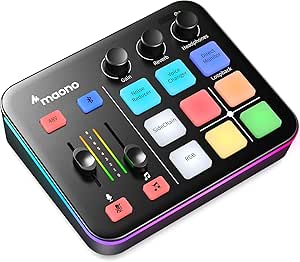 | Best Compact Gaming Mixer | Channels: 4 | Audio input: XLR | Phantom power: 48V | VIEW LATEST PRICE | See Our Full Breakdown |
| ALSO GO Podcast Equipment Bundle with V8s Sound Card and BM-800 Microphone |  | Best All-in-One Starter Bundle | Mixer channels: 2 | Microphone: BM-800 condenser microphone | Connectivity: USB Type-C | VIEW LATEST PRICE | See Our Full Breakdown |
| RØDE RØDECaster Duo Compact Audio Production Studio |  | Best Premium Podcast Mixer | Channels: 4 | Inputs: 2 Neutrik combo jacks | Preamps: Revolution Preamps; 76 dB gain, -131.5 dBV EIN | VIEW LATEST PRICE | See Our Full Breakdown |
| ALSO GO Podcast Equipment Bundle with F998 Audio Mixer and BM800 Microphone | 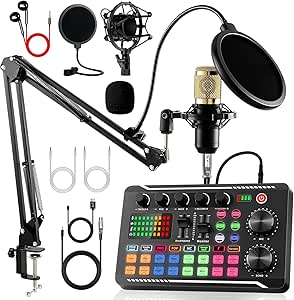 | Best Budget Starter Bundle | Mixer model: F998 audio mixer; listing also references P99 | Channels: 2 | Included microphone: BM800 studio condenser microphone | VIEW LATEST PRICE | See Our Full Breakdown |
| OZMI Podcast Equipment Bundle with RGB Audio Mixer, Microphone, Headphones, and Boom Arm |  | Best for Portable, Effects-Led Streaming | Channels: 1 | Connectivity: Bluetooth, USB, 3.5 mm AUX, OTG/PC | Battery capacity: 3600 mAh | VIEW LATEST PRICE | See Our Full Breakdown |
| Ideanthro C200 Pro Podcast Equipment Bundle with Audio Mixer and Microphone |  | Best for Two-Person Beginner Podcasts | Channels: 2 | Connectivity: Bluetooth | Audio input: TRS / XLR | VIEW LATEST PRICE | See Our Full Breakdown |
| G10 Podcast Equipment Bundle with Audio Mixer and Microphone |  | Best for Flexible Connections | Channels: 2 | Audio inputs: XLR, TRS, and 3.5 mm | Output connectors: TRS, USB Type-C, and XLR | VIEW LATEST PRICE | See Our Full Breakdown |
| Ideanthro V200 Podcast Audio Mixer with Bluetooth, Voice Effects, and Autotune |  | Best for Mobile, Effects-Heavy Streaming | Channels: 2 | Microphone inputs: 2 × 5V mic inputs | Connectivity: Auxiliary, Bluetooth 5.0, USB-C OTG | VIEW LATEST PRICE | See Our Full Breakdown |
| Kaschun 4-Channel Audio Mixer with Bluetooth, USB Interface, 99 DSP Effects, 7-Band EQ, and 48V Phantom Power |  | Best for Hands-On Sound Shaping | Channels: 4 | Connectivity: Auxiliary, Bluetooth, USB, XLR | Inputs: Microphone, MP3, XLR, 6.5mm, Bluetooth, USB | VIEW LATEST PRICE | See Our Full Breakdown |
| FIFINE AmpliGame SC3 Gaming Audio Mixer |  | Best for Desktop Streamers | Channels: 4 | Power: USB-C | Microphone input: XLR with 48V phantom power | VIEW LATEST PRICE | See Our Full Breakdown |
| MAONO Podcast Equipment Bundle with Audio Mixer and 3.5 mm Microphone |  | Best Ready-to-Start Bundle | Model and channels: Maonocaster Lite AM200; 9 channels | Connectivity: USB Type-C, 3.5mm, auxiliary, Bluetooth | Microphone input: 3.5mm; phantom power not supported | VIEW LATEST PRICE | See Our Full Breakdown |
| TENLAMP G10 Creator Audio Mixer Bundle with Microphone |  | Best Two-Channel Creator Bundle | Channels: 2 | Connectivity: Auxiliary, Bluetooth, USB | Power source: Battery powered | VIEW LATEST PRICE | See Our Full Breakdown |
| Black Friday podcast mixer | Connectivity | Channels |
|---|---|---|
| FIFINE SC8 Gaming Audio Mixer | USB-C, optical, 3.5 mm AUX | 5 |
| MAONO AME2 Podcast Audio Inter | XLR, 3.5 mm TRRS, 6.35 mm, USB-C, Bluetooth | 10 |
| MAONO E2 Gen2 Podcast Audio In | AUX, Bluetooth, USB, 3.5 mm audio, XLR | 10 |
| MAONO G1 Neo Gaming Audio Mixe | USB; Bluetooth input | 4 |
| ALSO GO Podcast Equipment Bund | USB Type-C | — |
| RØDE RØDECaster Duo Compact Au | USB-C, Bluetooth, Wi-Fi, Ethernet, 3.5 mm TRRS | 4 |
| ALSO GO Podcast Equipment Bund | Bluetooth and USB | 2 |
| OZMI Podcast Equipment Bundle | Bluetooth, USB, 3.5 mm AUX, OTG/PC | 1 |
| Ideanthro C200 Pro Podcast Equ | Bluetooth | 2 |
| G10 Podcast Equipment Bundle w | 3.5 mm, 6.35 mm, XLR/48V microphone, Bluetooth, and Type-C | 2 |
| Ideanthro V200 Podcast Audio M | Auxiliary, Bluetooth 5.0, USB-C OTG | 2 |
| Kaschun 4-Channel Audio Mixer | Auxiliary, Bluetooth, USB, XLR | 4 |
| FIFINE AmpliGame SC3 Gaming Au | — | 4 |
| MAONO Podcast Equipment Bundle | USB Type-C, 3.5mm, auxiliary, Bluetooth | — |
| TENLAMP G10 Creator Audio Mixe | Auxiliary, Bluetooth, USB | 2 |
More Details on Our Top Picks
FIFINE SC8 Gaming Audio Mixer with Virtual 7.1 Surround Sound
The FIFINE SC8 suits a podcast setup where live gaming audio matters as much as the microphone. Separate controls for mic, game, and background audio—and a dedicated game/chat balance dial—make it easier to adjust a stream mix without digging through software. Its XLR and 6.35 mm inputs with 48V phantom power support compatible analog microphones, while virtual 7.1, EQ presets, voice effects, and sound buttons lean heavily toward gaming and entertainment.
Compared with the MAONO AME2, the SC8 has fewer described podcast production tools and no stated multi-device sound-pad recording capacity; its advantage is a more explicit focus on game/chat control. The tradeoff is a narrower fit: it does not support USB microphones, and an XLR cable is not included. I’d choose it for gaming-led shows, not as a general-purpose podcast hub.
Pros:- XLR and 6.35 mm microphone inputs with 48V phantom power support compatible analog mic setups.
- Separate microphone, game, and background controls plus a game/chat balance dial simplify live mixing.
- Virtual 7.1 sound, three EQ modes, and eight voice effects add gaming-oriented audio options.
- Four customizable sound buttons provide quick access to recurring clips.
Cons:- USB microphones are not supported.
- An XLR cable is not included, adding a separate setup requirement for XLR users.
- Its gaming-focused feature set is less suited to podcast production than the MAONO AME2’s loopback and larger sound-pad bank.
Best for: Gaming podcasters and livestreamers with an analog XLR or 6.35 mm microphone who want hands-on control of game, chat, and background audio.
Not ideal for: USB-microphone owners or interview-focused podcasters who need a broader set of podcast-specific production features.
- Channels:5
- Connectivity:USB-C, optical, 3.5 mm AUX
- Microphone inputs:XLR and 6.35 mm
- Phantom power:48V
- Audio features:Virtual 7.1 surround sound; three EQ modes
- Voice effects and sound buttons:Eight voice changer effects; four customizable buttons
- USB microphone compatibility:Not supported
- Dimensions:9.53 × 6.14 × 2.68 in
Our verdict“Choose the SC8 for a gaming-led podcast stream with an analog microphone, but skip it if you rely on USB mics or want a more podcast-centered mixer.”
MAONO AME2 Podcast Audio Interface Mixer
The MAONO AME2 is the most soundboard-oriented pick in this group: its 11 customizable pads let hosts trigger clips and loops during a show, while loopback helps bring computer audio into a recording or stream. XLR preamps offer up to 60 dB of gain, and 48V phantom power covers compatible condenser microphones; the instrument input also gives musicians a direct route into a session.
Compared with the MAONO E2 Gen2, the AME2 offers more pads and a wider listed range of effects, including reverb and tone controls. The E2 Gen2 counters with a built-in battery and a one-touch mute button, so it may suit mobile creators better. AME2’s main limits are that it cannot use USB microphones and its pads hold only 20 or 60 seconds, depending on the pad. I’d favor it for planned clips, not long-form playback.
Pros:- Eleven customizable sound pads support clips and looping, with different recording limits by pad.
- XLR preamps provide up to 60 dB of gain and 48V phantom power.
- Loopback, six reverb modes, and tone controls support a more produced live sound.
- Instrument input and connections for computers, phones, tablets, and cameras suit varied recording setups.
Cons:- USB microphones are not supported.
- Sound-pad recordings are limited to 20 or 60 seconds, depending on the pad.
- Compared with the battery-powered MAONO E2 Gen2, this corded model is less convenient for setups without a nearby power source.
Best for: Podcast hosts and streamers using analog microphones who want a large bank of short custom clips, loopback, and an instrument input.
Not ideal for: Creators with USB microphones or those who need long sound files stored directly on the mixer.
- Channels:10
- Microphone inputs:XLR; supports condenser and dynamic microphones
- Phantom power and gain:48V phantom power; up to 60 dB microphone gain
- Sound pads:11 customizable pads; three support up to 60 seconds and eight up to 20 seconds
- Effects:Six reverb modes; 12-step auto-tune; treble, mid-range, bass, and pitch controls
- Connectivity:XLR, 3.5 mm TRRS, 6.35 mm, USB-C, Bluetooth
- Instrument input:6.35 mm
- Weight:0.95 kg
Our verdict“Pick the AME2 if analog-mic podcasting and quick access to short clips are your priorities, and pass if you need USB-mic support or portable battery operation.”
MAONO E2 Gen2 Podcast Audio Interface and Mixer
The MAONO E2 Gen2 earns its place for creators who need to record or stream away from a fixed desk. Its built-in battery is rated for up to eight hours, and two XLR combo inputs with preamps offering up to 60 dB of gain give it a practical base for interviews or a two-mic show. Loopback, monitoring, one-touch mute, and connections for Bluetooth, AUX, and 3.5 mm audio add flexibility when sources change between sessions.
Compared with the MAONO AME2, the E2 Gen2 trades the AME2’s 11 pads and broader listed effect controls for battery operation and a mute button. Its eight customizable buttons hold clips of up to 20 seconds, so it is better for brief cues than a large soundboard library. It also does not charge a phone or provide power delivery, and its listed maximum sample rate is 48 kHz. I’d pick it for mobile recording, not as a phone power hub.
Pros:- Built-in battery is rated for up to eight hours of use.
- Two XLR combo inputs and preamps with up to 60 dB of gain support two-mic recording.
- Loopback, monitoring, and one-touch mute are useful for live recording and streaming.
- Eight customizable sound-effect buttons and Bluetooth, AUX, and 3.5 mm connections support varied workflows.
Cons:- Does not support phone charging or power delivery.
- Each sound-effect button supports clips of up to 20 seconds.
- The listed maximum sample rate is 48 kHz, while the AME2 offers a larger sound-pad bank and more detailed listed tone controls.
Best for: Mobile podcasters and two-person interview hosts who want dual XLR inputs, monitoring, and battery operation without depending on a wall outlet.
Not ideal for: Creators who need phone charging, longer stored sound clips, or a higher listed sample rate than 48 kHz.
- Channels:10
- XLR combo inputs:2
- Preamp gain:Up to 60 dB
- Maximum sample rate:48 kHz
- Sound-effect buttons:Eight; up to 20 seconds per button
- Connectivity:AUX, Bluetooth, USB, 3.5 mm audio, XLR
- Battery life:Up to 8 hours
- Weight:0.89 kg
Our verdict“Choose the E2 Gen2 for battery-powered two-mic podcasting and mobile streaming, but look elsewhere if phone charging or a larger soundboard is part of your setup.”
MAONO G1 Neo Gaming Audio Mixer with XLR Input and 48V Phantom Power
The MAONO G1 Neo is the compact choice for a creator who wants a small, gaming-oriented control surface rather than a larger podcast hub. It combines an XLR input, built-in preamp, and 48V phantom power with noise reduction, voice effects, customizable sound pads, Bluetooth accompaniment, loopback, and direct monitoring. At 6.29 × 2 × 5.19 inches, it takes less desk space than the FIFINE SC8, which is a useful distinction for a crowded streaming setup.
The SC8 has more clearly specified gaming controls, including a dedicated game/chat balance dial and virtual 7.1 sound; the G1 Neo instead emphasizes compactness and Bluetooth accompaniment. The G1 Neo’s described input is a single XLR, so it is less suited to multi-microphone podcasting than the MAONO E2 Gen2, which has two XLR combo inputs. I’d keep this pick to one-mic streams. The product data also leaves microphone compatibility details unspecified.
Pros:- Compact 6.29 × 2 × 5.19-inch body suits tight streaming desks.
- XLR input, built-in preamp, and 48V phantom power support compatible analog microphones.
- Loopback and direct monitoring help manage live audio and playback.
- Bluetooth accompaniment, sound pads, noise reduction, voice effects, and RGB lighting offer streaming tools in a small unit.
Cons:- Only one XLR input is specified, limiting its fit for multi-microphone podcasting.
- The product description does not specify which XLR microphones are compatible.
- Compared with the FIFINE SC8, it lacks listed virtual 7.1 surround sound and a dedicated game/chat balance dial.
Best for: Single-mic gaming podcasters or streamers with limited desk space who want XLR support, monitoring, and Bluetooth accompaniment.
Not ideal for: Two-host shows, buyers who need clearly documented microphone compatibility, or creators seeking the SC8’s specified game/chat balance and virtual surround features.
- Channels:4
- Audio input:XLR
- Phantom power:48V
- Connectivity:USB; Bluetooth input
- Features:Noise reduction, voice effects, customizable sound pads, loopback, direct monitoring, RGB lighting
- Output connector:USB Type-C
- Dimensions:6.29 × 2 × 5.19 in
- Weight:1.2 lb
Our verdict“Choose the G1 Neo for a compact, single-mic streaming desk with Bluetooth and monitoring, but favor a dual-input mixer for co-hosted podcasts.”
ALSO GO Podcast Equipment Bundle with V8s Sound Card and BM-800 Microphone
The ALSO GO bundle is the ready-to-assemble option in this group: it packages a BM-800 condenser microphone, mixer, boom arm, pop filter, shock mount, and earphone. That makes it a different kind of Black Friday podcast pick from the MAONO AME2 or MAONO E2 Gen2, which are mixers for buyers bringing their own microphones and accessories. For a first recording setup, having the basic hardware together can reduce the number of separate components to source.
The mixer adds sound effects, four voice-changing modes, and noise reduction, with USB-C connectivity and listed support for computers and smartphones across several operating systems. The tradeoff is that its specifications describe two channels and do not establish the same XLR preamp and phantom-power capability listed for the MAONO models. I would treat it as an entry-level bundle, not a flexible upgrade platform. The listed 5 MHz frequency response is unclear, and the included battery needs charging before first use or after extended storage.
Pros:- Includes a BM-800 condenser microphone, mixer, adjustable boom arm, shock mount, pop filter, and earphone.
- Mixer offers ten sound effects and four voice-changing modes.
- Noise reduction, a dual-layer pop filter, and foam cover address common unwanted sound sources.
- Listed compatibility includes Windows, Mac OS, iOS, and Android devices.
Cons:- Two channels and no listed XLR preamp or phantom-power specification make it less clearly suited to multi-mic upgrades than the MAONO AME2.
- The listed 5 MHz frequency response is unusual and unclear as an audio specification.
- The included lithium-ion battery requires charging before first use or after extended storage.
Best for: First-time solo podcasters or streamers who need a microphone, basic mixer, boom arm, and pop-filter accessories in one bundle.
Not ideal for: Hosts who need two XLR microphones, documented phantom power, or clearly specified audio performance for a more expandable recording setup.
- Mixer channels:2
- Microphone:BM-800 condenser microphone
- Connectivity:USB Type-C
- Compatible devices and systems:Personal computer and smartphone; Windows, Mac OS, iOS, Android
- Microphone polar pattern:Hyper cardioid
- Audio sensitivity:85 dB
- Signal-to-noise ratio:85 dB
- Included components:Microphone, mixer, adjustable mic arm, pop filter, shock mount, fixing clip, earphone, charging cable
Our verdict“Pick this bundle to start a solo podcast with the core microphone accessories included, but choose a better-documented XLR mixer if you plan to expand.”
RØDE RØDECaster Duo Compact Audio Production Studio
For a host who wants a recording hub rather than a basic effects mixer, the RØDECaster Duo is the strongest fit in this group. Its two Revolution preamps offer substantial gain for quieter microphones, while APHEX processing and customizable SMART pads put sound shaping and production cues within reach during a session. It can record stereo or multitrack to a microSD card, USB storage, or a computer, giving it more recording flexibility than the bundled Ideanthro C200 Pro. The tradeoff is its price-tier positioning: this is a dedicated, cord-powered studio device, not an all-in-one starter kit with a microphone and boom arm. Its two physical combo inputs also limit how many wired sources you can connect directly. I’d choose it for a serious solo host or two-person show that values production control over bundled accessories.
Pros:- Two high-gain, low-noise combo inputs suit a range of microphones and instruments
- Stereo and multitrack recording can go to microSD, USB storage, or a computer
- APHEX processing and programmable SMART pads support hands-on production
- Connectivity includes USB-C, Bluetooth, Wi-Fi, Ethernet, and 3.5 mm TRRS
Cons:- Only two physical Neutrik combo inputs are available
- Requires corded power rather than offering a portable battery workflow
- Does not include a microphone or boom arm
Best for: Podcast hosts who want a compact, standalone recording and production hub for one or two people
Not ideal for: First-time creators seeking a complete microphone-and-mount bundle, or larger groups needing more than two physical mic inputs
- Channels:4
- Inputs:2 Neutrik combo jacks
- Preamps:Revolution Preamps; 76 dB gain, -131.5 dBV EIN
- Controls:4 faders and 6 programmable SMART pads
- Connectivity:USB-C, Bluetooth, Wi-Fi, Ethernet, 3.5 mm TRRS
- Recording media:microSD card, USB storage device, or computer
- Dimensions and weight:9.25 x 8.86 x 2.99 in; 2 kg
Our verdict“Choose the RØDECaster Duo if you want advanced recording and production controls in a compact studio, not a beginner bundle.”
ALSO GO Podcast Equipment Bundle with F998 Audio Mixer and BM800 Microphone
The ALSO GO F998 bundle is aimed at newcomers who want a microphone, mixer, boom arms, pop filters, and cables in one package. Its 16 background effects, seven recording modes, and four voice-changing modes favor casual, effects-led streaming over detailed microphone mixing. That makes it a different proposition from the RØDECaster Duo, which offers more serious recording options and preamp control but does not include a mic or mounting kit. This bundle’s appeal is convenience, though the product details name both the F998 and P99 mixer, leaving the exact included model unclear. Its 3.5 mm connection and two-channel listing also point to a simpler setup than a dedicated studio interface. I’d pick it for a first streaming desk, but not for a podcast workflow that depends on clear, verified routing and upgrade flexibility.
Pros:- Bundle includes a BM800 microphone, boom arms, pop filters, shock mounts, earphone, and cables
- Multiple effects, recording modes, and voice-changing options suit casual streaming
- Supports wired USB and Bluetooth connections with listed computer and mobile platforms
- Pop filter and foam cap provide basic wind and plosive protection
Cons:- Product information refers to both F998 and P99, creating uncertainty about the included mixer
- Two-channel design and 3.5 mm connector offer less flexibility than the RØDECaster Duo’s combo inputs
- The included battery may need charging before use or after extended storage
Best for: New streamers who want a basic mixer, microphone, boom arms, and common recording accessories in one bundle
Not ideal for: Podcasters who need a clearly specified mixer model, advanced recording control, or a dependable multi-microphone studio setup
- Mixer model:F998 audio mixer; listing also references P99
- Channels:2
- Included microphone:BM800 studio condenser microphone
- Connectivity:Bluetooth and USB
- Connector type:3.5 mm jack
- Sound features:16 background effects, 7 recording modes, 4 voice changer modes
- Included accessories:Boom arms, earphone, shock mounts, pop filters, foam caps, and cables
Our verdict“Choose this bundle for an inexpensive-feeling all-in-one start, but skip it if you need clear model details or studio-style input flexibility.”
OZMI Podcast Equipment Bundle with RGB Audio Mixer, Microphone, Headphones, and Boom Arm
The OZMI bundle makes more sense as a portable creator kit than as a conventional multi-mic podcast mixer. Its rechargeable battery, Bluetooth, AUX, and OTG/PC connections give mobile creators several ways to bring in audio, while ducking, loopback, pitch effects, and custom pads add live-stream control. It also includes headphones, a microphone, a boom stand, and a pop filter, so it arrives closer to a complete desk setup than the RØDECaster Duo, which focuses on production hardware and recording flexibility. The main constraint is its one-channel listing: co-host conversations with separate mic control are not its strength. The product data also says some functions depend on compatible devices or stereo music sources. I’d favor it for solo gaming or mobile content, not a two-person podcast that needs independently managed microphones.
Pros:- Includes a condenser microphone, monitoring headphones, boom stand, and pop filter
- Rechargeable 3600 mAh battery supports use away from a fixed desktop power source
- Ducking, loopback, and independent faders provide live audio control
- Offers Bluetooth, USB, AUX, and OTG/PC connectivity
Cons:- One-channel listing makes it a poor fit for separately managing multiple podcast microphones
- Some functions require compatible devices or supported stereo music sources
- Its effect and RGB-focused design offers less traditional recording detail than the RØDECaster Duo
Best for: Solo streamers and mobile creators who want a rechargeable effects mixer with a basic mic-and-headphone setup
Not ideal for: Co-hosted podcast teams needing separate microphone channels or buyers who want every function to work across all devices
- Channels:1
- Connectivity:Bluetooth, USB, 3.5 mm AUX, OTG/PC
- Battery capacity:3600 mAh
- Pitch effects:12 settings
- Presets and voice effects:6 preset modes and 4 voice changer modes
- Sound controls:3 built-in sound effects, 4 custom sound pads, ducking, and loopback
- Included components:RGB mixer, 3.5 mm condenser microphone, headphones, boom stand, and pop filter
Our verdict“Pick the OZMI for a portable solo-streaming kit with effects; choose a multi-input mixer for co-hosted podcasting.”
Ideanthro C200 Pro Podcast Equipment Bundle with Audio Mixer and Microphone
For a new show with a host and co-host, the Ideanthro C200 Pro offers a more relevant starting point than single-channel bundles such as the OZMI. It lists dual-microphone support and dual headphone monitoring, so two people can speak and monitor together without immediately outgrowing the basic setup. Three-band EQ, noise reduction, and dual-core DSP provide useful live adjustments, while the included condenser microphone, boom arm, shock mount, and pop filter cover the core desk hardware. It is less production-focused than the RØDECaster Duo, which adds standalone multitrack recording and a broader connection set, and the C200 Pro requires corded power. The Bluetooth connection is listed, but detailed routing behavior is not specified, so I wouldn’t choose it for a complex studio workflow. It’s a sensible bundle for a simple two-person show.
Pros:- Supports two microphones and dual headphone monitoring for co-host sessions
- Includes a condenser microphone, adjustable boom arm, shock mount, pop filter, and cables
- Three-band EQ and noise reduction offer direct control over vocal sound
- Five voice modes, sound pads, reverb, custom effects, and auto-ducking add live options
Cons:- Requires corded electric power
- Included boom arm and accessories take up desk space
- Does not list the standalone recording options available on the RØDECaster Duo
Best for: First-time two-person podcast teams who want dual mic support, shared headphone monitoring, and included recording accessories
Not ideal for: Mobile podcasters who need battery operation, or established studios seeking detailed standalone multitrack recording
- Channels:2
- Connectivity:Bluetooth
- Audio input:TRS / XLR
- Audio processing:Dual-core DSP and noise reduction
- EQ:Independent high, mid, and low controls
- Effects:Five voice modes, sound pads, reverb, custom effects, vocal cancellation, and auto-ducking
- Included components:Mixer, condenser microphone, adjustable boom arm, shock mount, pop filter, and cables
Our verdict“Choose the C200 Pro for an accessory-rich first co-host setup, but look elsewhere for battery-powered recording or advanced studio production.”
G10 Podcast Equipment Bundle with Audio Mixer and Microphone
The G10 bundle stands out for connection variety: its listed inputs span XLR, TRS, and 3.5 mm, with Bluetooth and Type-C also included. That gives a creator more ways to connect devices than the simpler ALSO GO F998 bundle, whose listed connector is 3.5 mm, and it adds a microphone and boom arm to get started. Noise reduction, EQ, voice changing, and built-in effects target live streaming and casual recording rather than a detailed, standalone recording workflow like the RØDECaster Duo. There are two practical caveats: the included microphone is 3.5 mm, which may not match every intended setup, and the listing gives conflicting counts for its reverb presets. At 4.6 lb and with a wide range of connections, it is better suited to a fixed creator desk than a minimalist travel kit.
Pros:- Lists XLR, TRS, and 3.5 mm inputs alongside Bluetooth and Type-C connectivity
- Includes a condenser microphone and boom arm
- Noise reduction, EQ controls, voice changing, and sound effects support live adjustments
- Battery-powered design avoids requiring a fixed corded power connection
Cons:- The included microphone uses a 3.5 mm connector, which may not suit every setup
- Reverb preset information conflicts between five modes and 19 modes
- At 4.6 lb, it is less convenient to move than compact options such as the OZMI
Best for: Desk-based creators who need varied device connections and want a bundled microphone and boom arm for streaming or basic podcasting
Not ideal for: Buyers who need a clearly specified reverb configuration, a confirmed XLR microphone in the box, or a lightweight portable mixer
- Channels:2
- Audio inputs:XLR, TRS, and 3.5 mm
- Output connectors:TRS, USB Type-C, and XLR
- Connectivity:3.5 mm, 6.35 mm, XLR/48V microphone, Bluetooth, and Type-C
- Power:Battery powered; 5 V
- Audio features:Noise reduction, voice changer, 12 built-in sound effects, and EQ controls
- Included components:Audio mixer, 3.5 mm condenser microphone, and boom arm
- Dimensions and weight:11.73 x 5.51 x 8.58 in; 4.6 lb
Our verdict“Choose the G10 for a desk setup that needs many connection types, but verify the included mic and effect details before building a workflow around it.”
Ideanthro V200 Podcast Audio Mixer with Bluetooth, Voice Effects, and Autotune
The V200 is the most portable effects-focused choice in this group: it runs on a rechargeable battery and combines Bluetooth 5.0, USB-C OTG, and two microphone inputs in a two-channel mixer. Its color display and separate controls can make a mobile setup easier to manage, while autotune, voice effects, sound pads, ducking, and loopback suit playful live shows more than a straightforward spoken-word recording chain. Compared with the USB-powered FIFINE AmpliGame SC3, the V200 is less tied to a desktop and adds wireless input, but its battery lasts only about 3.5 hours. The FIFINE offers four independently controlled channels; the V200 instead favors portability and built-in vocal processing. I’d shortlist it for creators who want effects on the move, not for long sessions or a clean, expandable studio rig.
Pros:- Rechargeable battery supports recording and streaming away from a fixed power source.
- Two 5V microphone inputs and multiple outputs accommodate a simple two-person live setup.
- Autotune, five voice effects, four sound pads, ducking, and loopback add interactive options.
- Bluetooth 5.0 and USB-C OTG support flexible connections to compatible devices.
Cons:- Approximately 3.5 hours of battery operation may not cover a long recording or live event.
- Two channels provide less independent source control than the four-channel FIFINE AmpliGame SC3.
- Bluetooth range is specified up to 12 m in open space, so wireless placement has limits.
Best for: Mobile streamers and karaoke hosts who want built-in vocal effects, Bluetooth input, and battery operation in a compact two-mic setup.
Not ideal for: Podcasters recording long sessions or building a multi-source desktop setup; the roughly 3.5-hour battery life and two-channel design limit those uses.
- Channels:2
- Microphone inputs:2 × 5V mic inputs
- Connectivity:Auxiliary, Bluetooth 5.0, USB-C OTG
- Display:2-inch full-color LCD
- Voice effects:5 effects; 12-step autotune
- Custom sound pads:4
- Battery:1200mAh; approximately 3.5 hours
- Outputs:Dual 3.5mm TRRS live outputs
Our verdict“Choose the V200 for portable, effects-rich two-mic streaming, but pick the FIFINE AmpliGame SC3 for a USB-powered desktop setup with more independently controlled channels.”
Kaschun 4-Channel Audio Mixer with Bluetooth, USB Interface, 99 DSP Effects, 7-Band EQ, and 48V Phantom Power
The Kaschun is the strongest fit here for podcasters who want conventional mixer controls and room to shape sound. Its four channels, 48V phantom power, and 7-band EQ give it a more studio-oriented role than the effects-led Ideanthro V200, while 99 DSP effects offer plenty of options for callers, music, or more produced segments. USB supports playback, recording, and mixing with a computer, and Bluetooth brings in audio wirelessly. That wireless connection is input-only, though, so it cannot send a mix to a Bluetooth speaker. There is also a mode limitation: USB/Bluetooth playback should be off when channels 3 and 4 are in use. Compared with the FIFINE AmpliGame SC3, Kaschun favors EQ and DSP variety over dedicated streaming controls and sound buttons.
Pros:- Four channels support a broader mix of microphones and other audio sources than two-channel options.
- 48V phantom power supports compatible condenser microphones.
- Seven-band EQ and 99 DSP effects offer extensive tone and effect adjustment.
- USB supports computer playback, recording, and mixing, with Bluetooth available for wireless input.
Cons:- Bluetooth is input-only and cannot transmit audio to a Bluetooth speaker.
- USB/Bluetooth playback mode should be turned off when using channels 3 and 4.
- Corded power makes it less suited to mobile recording than the battery-powered Ideanthro V200.
Best for: Home podcasters and small studio creators who need four inputs, phantom power for compatible microphones, and substantial EQ and effects control.
Not ideal for: Streamers who need simple, clearly separated playback workflows or Bluetooth output; the playback-mode limitation can complicate channel use.
- Channels:4
- Connectivity:Auxiliary, Bluetooth, USB, XLR
- Inputs:Microphone, MP3, XLR, 6.5mm, Bluetooth, USB
- Outputs:USB, XLR / 1/4 inch
- DSP effects:99
- Equalizer:7-band EQ
- Phantom power:48V
- Dimensions and weight:9.65 × 7.87 × 1.58 inches; 1.2 kg
Our verdict“Pick the Kaschun for a compact, corded setup built around four-channel mixing and sound shaping, but choose the FIFINE AmpliGame SC3 for more direct streaming controls.”
FIFINE AmpliGame SC3 Gaming Audio Mixer
The AmpliGame SC3 makes the most sense for creators who want a USB-powered desktop control surface with separate level adjustments for microphone, line-in, headphones, and line-out. That hands-on layout is more useful for balancing a live stream than the Kaschun’s emphasis on DSP effects and EQ, while 48V phantom power allows use with compatible XLR condenser microphones. Mute and monitoring controls, four customizable sound buttons, and voice modes add stream-friendly shortcuts without requiring a battery-powered unit like the Ideanthro V200. The limits are practical: it does not support USB microphones, and connecting an external audio device through line-in requires a separate 3.5mm cable. It also arrives without an XLR cable. For Windows or Mac desktop streaming, those are manageable setup needs; for phone-first recording, this is a less natural fit.
Pros:- Four independently controlled channels make live level balancing more direct.
- 48V phantom power supports compatible XLR condenser microphones.
- Mute, monitoring, customizable sound buttons, and voice effects suit interactive streams.
- USB-C power and Windows/Mac compatibility support a straightforward desktop setup.
Cons:- USB microphones are not supported.
- XLR microphone cable is not included.
- External line-in devices require a separate 3.5mm audio cable.
Best for: Windows and Mac streamers using an XLR microphone who want independent controls for mic, line-in, headphones, and output at a desk.
Not ideal for: Creators who rely on a USB microphone or want a battery-powered, phone-first mixer; this model requires USB-C power and does not support USB mics.
- Channels:4
- Power:USB-C
- Microphone input:XLR with 48V phantom power
- Input interfaces:XLR microphone, line-in, headset
- Output interfaces:Headphones, line-out, headset
- Voice effects:6 voice-changing modes; 12 autotune options
- Custom sound buttons:4
- Dimensions and weight:4.44 × 6.45 × 1.6 inches; 0.5 kg
Our verdict“Choose the SC3 for hands-on Windows or Mac streaming with an XLR mic, but select the Ideanthro V200 if portability and battery operation matter more.”
MAONO Podcast Equipment Bundle with Audio Mixer and 3.5 mm Microphone
The MAONO AM200 bundle is the clearest pick for a beginner who wants the mixer and basic recording hardware together. A condenser microphone, tripod, windscreen, and cables reduce the extra pieces to source before recording, while the mixer adds sound pads, voice effects, reverb, tone controls, and noise reduction. Its standout advantage over the FIFINE AmpliGame SC3 is breadth of device compatibility: it supports computers and mobile devices, and can stream to up to four devices and four platforms for as many as two people. The tradeoff is microphone flexibility. The included mic uses a 3.5mm input, and the mixer does not support phantom power, so it is not the natural choice for upgrading to a conventional phantom-powered condenser. Unlike the more modular Kaschun, this is a bundle-first setup with fewer paths for studio expansion.
Pros:- Includes a condenser microphone, tripod, windscreen, mixer, and several connection cables.
- Works with Windows, macOS, iOS, Android, PCs, laptops, smartphones, and tablets.
- Offers four recordable and eight built-in sound effects alongside voice effects and tone controls.
- Supports streaming with up to two people across four devices and four platforms.
Cons:- No phantom power, limiting compatibility with many conventional condenser microphones.
- The 6.35mm-to-3.5mm instrument adapter is not included.
- Phones without a 3.5mm jack need a separate OTG adapter.
Best for: First-time podcasters and mobile creators who want a mixer, 3.5mm condenser microphone, stand, windscreen, and cables in one package.
Not ideal for: XLR microphone owners or creators planning to upgrade to a phantom-powered condenser; this mixer does not provide phantom power.
- Model and channels:Maonocaster Lite AM200; 9 channels
- Connectivity:USB Type-C, 3.5mm, auxiliary, Bluetooth
- Microphone input:3.5mm; phantom power not supported
- Custom sound effects:4 recordable and 8 built-in
- Simultaneous streaming:Up to 2 people, 4 devices, and 4 platforms
- Included items:Microphone, mic cable, tripod, windscreen, mixer, charging cable, two 3.5mm TRRS cables, manual
- Compatibility:Windows, macOS, iOS, Android, PCs, laptops, smartphones, and tablets
- Dimensions and weight:9.44 × 5.11 × 1.65 inches; 1.3 kg
Our verdict“Choose the MAONO bundle to get a ready-to-start mobile or desktop podcast kit, but opt for the Kaschun if microphone and mixer expansion matter more.”
TENLAMP G10 Creator Audio Mixer Bundle with Microphone
The TENLAMP G10 is aimed at creators who want a two-channel mixer and microphone bundle with vocal processing built in, rather than the wider input count of the MAONO AM200. It includes noise reduction, bass and treble adjustment, reverb, pitch controls, and voice effects for podcasts, gaming, and live singing. Its stated compatibility with PC, phone, and tablet gives it a flexible role across basic creator setups, and the included microphone helps new users get started without assembling a separate mic package. Against the Ideanthro V200, the G10 is also a two-channel battery-powered option, but the available data does not specify its battery runtime or capacity, making session planning harder. The MAONO bundle supports more simultaneous people and platforms; the G10 is the simpler fit for a solo creator who wants sound-shaping tools and a bundled mic.
Pros:- Bundle combines a two-channel mixer, condenser microphone, and accessories.
- Noise reduction, bass, treble, reverb, and pitch controls provide several ways to shape a voice.
- Supports PC, phone, and tablet use across Windows, Mac, iOS, and Android.
- Bluetooth, USB, and auxiliary connectivity support different creator setups.
Cons:- Two channels offer less room for multiple sources than the nine-channel MAONO AM200.
- Battery capacity and operating time are not specified in the provided product data.
- The listed software update support date is unknown.
Best for: Solo creators who want a two-channel mixer, included condenser microphone, and voice and tone controls for PC, phone, or tablet recording.
Not ideal for: Two-person shows or buyers who need a clearly specified battery runtime; the two-channel design and unspecified battery duration may not suit those needs.
- Channels:2
- Connectivity:Auxiliary, Bluetooth, USB
- Power source:Battery powered
- Audio input:TRS / XLR
- Output connectors:3.5mm TRS, 6.35mm TRS, OTG/Type-C
- Audio controls:Noise reduction, bass, treble, reverb, pitch
- Supported devices:PC, phone, and tablet
- Dimensions and weight:10.9 × 2.28 × 7.67 inches; 4.2 pounds
Our verdict“Pick the TENLAMP G10 for a bundled, effects-equipped solo setup, but choose the MAONO AM200 for more participants and broader simultaneous streaming.”
How We Picked
I ranked these 15 Black Friday podcast mixers by how well each product fits a real recording or streaming job, rather than by the length of its feature list. I weighed connection options, microphone support, monitoring and control usability, and whether the product is a standalone mixer or a bundle with a microphone and other accessories. I also considered how clearly each option serves its intended buyer, since gaming-focused controls and bundled starter gear do not replace the flexibility of a podcast-oriented production setup.
The order reflects useful capability, ease of setup, and room to grow. The RØDECaster Duo ranks first for buyers prioritizing a dedicated production workflow; MAONO’s podcast interfaces follow as more approachable alternatives. Gaming mixers and all-in-one bundles rank according to their narrower use cases, included equipment, and likely limitations for a growing show. I did not treat seasonal deal language as evidence of performance, and buyers should confirm current compatibility, included accessories, and sale terms before purchasing.
Factors to Consider When Choosing Black Friday Podcast Mixers
Before choosing among these Black Friday podcast mixers, map the equipment to your actual recording setup. A low-cost bundle can be a practical starting point, but a mixer that lacks the inputs you need may cost more to replace than to plan for. These factors help separate a convenient starter kit from a setup that can support a show as it grows.
Count microphones and guests before comparing effects
Start with the number of people who will speak at the same time, then check the mixer’s microphone inputs and the connection type each one accepts. A solo host may need only a straightforward input and monitoring, while a two-person table recording calls for enough independent mic connections and control over each voice. Remote guests can change the requirement again, since a call-in workflow may depend on separate computer audio routing rather than another physical microphone input. A common mistake is counting the bundled microphone as proof that the mixer supports multiple hosts. Choose for your normal episode, with a little headroom if you expect to add a co-host; do not pay for channels you have no plan to use.
Check compatibility across the full recording chain
A mixer, microphone, headphones, computer, and recording app must work together, and a bundle does not automatically make every connection compatible. Check whether the microphone uses XLR or a 3.5 mm plug, what the mixer accepts, and whether the intended computer or phone can connect directly. Phantom power is relevant to certain condenser microphones, but it is not a general sound-quality upgrade and should match the mic’s requirements. Also check monitoring: being able to hear your own voice without distracting delay can matter more than extra sound effects. Confirm included cables and adapters rather than assuming a kit has every part needed. This avoids a last-minute accessory purchase or a setup that cannot connect to your preferred device.
Separate podcast controls from streaming effects
Sound pads, voice effects, RGB lighting, autotune, and game-audio features can make a livestream more interactive, but they are not the same as controls for a clean spoken-word recording. For a conventional podcast, prioritize understandable input controls, reliable monitoring, and an uncomplicated path into your recording software. If your format includes live reactions or audience interaction, effects and quick-access buttons may earn their space. Buyers sometimes choose the mixer with the most advertised effects and only later discover that the core workflow is awkward. Match features to what happens during an episode, not to a hypothetical production style. A simpler interface may be the better buy if it makes recording and editing more repeatable.
Decide whether a bundle saves effort or limits upgrades
Starter kits can put a mixer, microphone, and accessories in one box, which reduces the work of assembling a first setup. The tradeoff is that a bundled microphone or headset may not suit your voice, room, or future recording plans. Think about which components you expect to keep: if the mixer is the long-term purchase, check whether it can support a better microphone later. If you mainly want to start recording with minimal extra shopping, a complete bundle may be a sensible compromise. Avoid paying for accessories you already own or would replace immediately. Compare the usefulness of the full kit, not just the number of items listed.
Plan for your room, portability, and future workflow
The recording space affects what equipment will help: an untreated, noisy room may benefit more from microphone placement and sensible recording habits than from a mixer with a large effects library. Consider desk space, cable routing, and whether you need to carry the setup between locations. Compact gaming mixers can suit a tight streaming desk, while a larger production surface may make a multi-step show easier to control but harder to pack away. Also ask how you will record backups, handle remote guests, and move audio into editing software. These workflow details are easy to overlook when comparing feature lists. Choose a setup that fits both the room you have now and the way you expect to publish.
Frequently Asked Questions
Should I choose the RØDE RØDECaster Duo or a MAONO mixer for a first podcast?
Choose based on how much control and setup complexity you want, not on the idea that a premium unit automatically makes a better first purchase. The RØDECaster Duo is aimed at creators who want a dedicated production-style workflow and expect to use its broader control approach. The MAONO AME2 and E2 Gen2 are more relevant if you want a podcast-oriented interface without stepping straight into that premium format. Before deciding, list your microphone count, recording device, and must-have controls. If your show is simple, a less elaborate mixer may leave more of your budget for a suitable microphone and headphones.
Can a gaming audio mixer work for a regular podcast?
It can work for a simple spoken-word setup if its inputs, computer connection, and monitoring match your recording needs. The FIFINE SC8, FIFINE AmpliGame SC3, and MAONO G1 Neo are positioned around gaming or streaming, so their convenience features may fit live voice chat better than a multi-person podcast workflow. Check whether you can connect the microphone you own and record cleanly into your preferred software. Also consider whether you need separate control of multiple speakers or remote-call audio. If those needs are central, a podcast-focused interface is a safer match than choosing by gaming effects alone.
Are podcast mixer bundles a good choice if I already own a microphone?
They can be, but a bundle may include a microphone or accessories that add little value to your setup. Check whether the mixer accepts your microphone’s connector and whether it supplies any power the microphone requires. Then compare the bundle with a mixer-only option, including any cables or adapters you still need. If the included mic is the main reason the bundle seems attractive, it may be better to choose equipment around the mic you already trust. A bundle makes more sense when its other components fill genuine gaps, such as headphones or a boom arm.
Do I need 48V phantom power for podcasting?
Not every podcast microphone needs phantom power, so the answer depends on the microphone rather than the show format. Some condenser microphones require it, while other microphone types and models may not. Check the microphone’s specifications before buying a mixer or turning on phantom power, and follow its connection guidance. Having the feature can give you more microphone options later, but it does not by itself improve every recording. If you already own a mic, confirm its power requirements first; if you are choosing one later, treat phantom power as compatibility flexibility rather than a quality guarantee.
Which mixer type makes the most sense for a two-person show with remote guests?
Look for a workflow that handles both local microphones and computer or phone audio cleanly, rather than assuming that a higher channel count solves everything. Two hosts at one table need enough independent microphone connections and monitoring, while a remote guest adds a separate call-audio routing question. Check how the mixer sends audio to recording software and whether you can hear the guest without feeding their voice back into the call. A production-focused option may suit a show with recurring guests and more live control, while a simpler interface can work if remote calls are occasional. Sketch the signal path before buying so you can spot missing connections early.
Conclusion
For the strongest all-around production setup in this lineup, I’d choose the RØDE RØDECaster Duo; it is the best overall fit for creators who want a dedicated studio-style mixer. For a more approachable podcast-oriented choice, the MAONO E2 Gen2 is my value-minded pick, while the MAONO AME2 is another option for buyers comparing podcast interfaces. Beginners who want several starter components together should focus on the ALSO GO, OZMI, Ideanthro, G10, MAONO, or TENLAMP bundles, checking the included connections against their gear before buying. For gaming and streaming, the FIFINE AmpliGame SC3, FIFINE SC8, or MAONO G1 Neo are more closely aligned with that use. If you specifically want a feature-rich compact setup, compare the Ideanthro V200 and Kaschun 4-channel mixer against your actual needs for effects, Bluetooth, and inputs. The right Black Friday choice is the one that fits your recording workflow, not the one with the longest feature list.
Black Friday Picks

Amazon Kindle Paperwhite (16 GB, 11th Generation, 2021) – 6.8-inch Display, Adjustable Warm Light, Black
As an affiliate, we earn on qualifying purchases.