AIThis post was created with the assistance of artificial intelligence (AI).

Prime Big Deal Days · Oct 6–7Offer from Amazon
Get audio and creator gear delivered free — and shop member deals
- Fast, free delivery on millions of items
- Access to Prime Big Deal Days deals on October 6–7
- Prime Video, Amazon Music and more included
Start your free Prime trial Free trial for eligible customers · Cancel anytime
As an affiliate, we earn on qualifying purchases.
QUANTA Updated
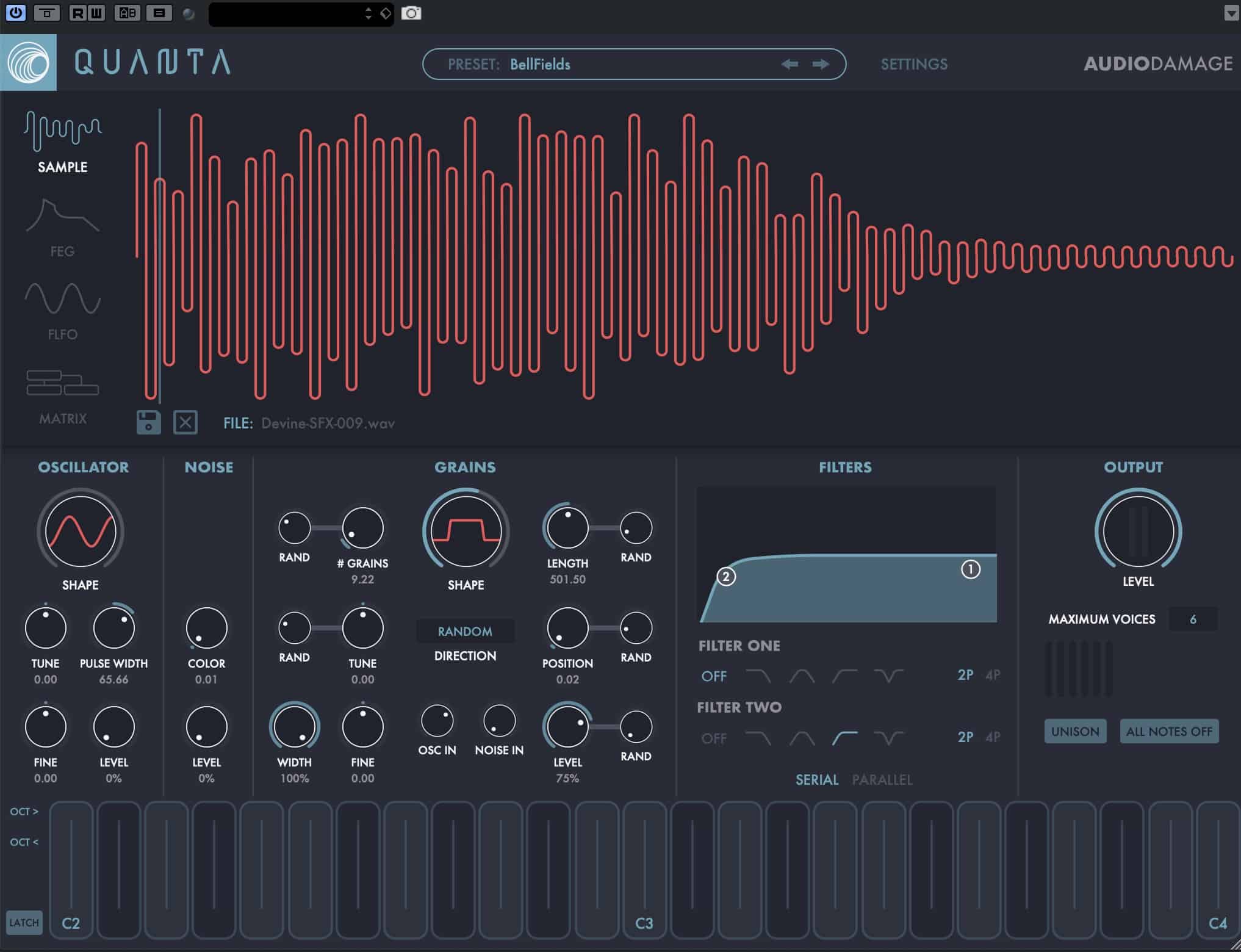
Audio Damage released an updated version of QUANTA. Quanta is a full-featured ten-voice true stereo granular synthesizer, with up to a hundred 1000ms grains per voice, and full control over the grain state, with direct randomization and modulation of most parameters. Drag-and-drop a sample (WAV, AIFF, Ogg, or FLAC) on to the window and go to work.
New & Enhanced in QUANTA V1.1.8
- Audio Damage replaced the original Quanta preset manager with the New Hotness they created for Phosphor, and subsequently added to Continua. This is a much better-preset manager, and you now have three layers of folders and are able to move things around and create your own top-level folders if you want.
- All versions now have the on-screen keyboard that was originally only in the iOS standalone.
- The preset folder move script that was introduced in the macOS installer for v1.1.2 has been removed. It was, quite literally, far more trouble than it was worth. On macOS, Quanta’s preset folder is now in ~/Music/Audio Damage. If you see the “Download Factory Content” button on an update, you didn’t install the last two versions, so the preset folder location has been moved. You can either grab the factory content again or physically move your original preset folder to the new location. (You can find the original in /Application Support/Audio Damage. Just move the entire /Quanta folder to ~/Music/Audio Damage.)
- Additionally, the signing problems that started cropping up in V1.1 have been entirely solved. Hopefully. Audio Damage thinks. If you’re still experiencing Gatekeeper issues, an old certificate is hanging around, and the solution is to delete all versions of Quanta, re-scan in your host (to clear the cache if it has one), and then install this version.
- One for the Windows people, and not a “fix” as such: Audio Damage have discovered a problem with HiDpi scaling in Live (and maybe other hosts). If you’re running on a HiDpi system with the auto-scaling off, the drop target is not correctly scaled. Audio Damage doesn’t know if this is a bug in JUCE or a bug in Live. The drop target is still there. It is just much smaller than it should be and resides in the lower right-hand corner of the waveform display. The short-term solution is to either drop in the lower right-hand corner (you’ll be able to tell you’re in the right place because you’ll get that lit-up surround) or to turn on auto-scaling for Quanta. Then the target will be its correct size. Audio Damage asked both the JUCE people and Live for an answer on this.
- Many small bug fixes and optimizations, as usual.

Fall Picks
fall essentials
fall essentials
As an affiliate, we earn on qualifying purchases.