
Get audio and creator gear delivered free with Prime
- Fast, free delivery on millions of items
- Prime Video, Amazon Music and more included
- Member-only deals all year
Complete the kit


Key Takeaways
- High core counts and fast clock speeds are essential for smooth VR gameplay.
- Compatibility with the latest DDR5 memory and PCIe 5.0 can future-proof your setup.
- Unlocked processors support overclocking but may require robust cooling solutions.
- Power consumption varies, impacting overall system efficiency and heat management.
- Budget options like the Ryzen 5 5500 still handle VR but with some performance compromises.


| processor for vr gaming | Threads | Cores | Socket | Cache |
|---|---|---|---|---|
| Intel Core i7-14700K Desktop P | 28 | — | — | — |
| Intel Core i7-12700KF Desktop | — | 12 (8P+4E) | LGA1700 | 11 MB L2, 25 MB L3 |
| AMD Ryzen 5 9600X 6-Core | 12 | 6 | AM5 | 38 MB |
| AMD Ryzen 7 9800X3D 8-Core | 16 | 8 | AM5 | 96MB L3 |
| AMD Ryzen 5 5500 6-Core | 12 | 6 | AM4 | — |
More Details on Our Top Picks
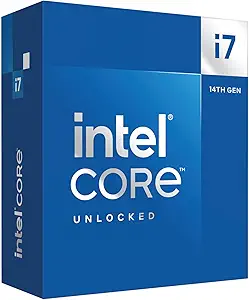
Intel Core i7-14700K Desktop Processor with 20 Cores and Integrated Graphics
The Intel Core i7-14700K is a powerhouse with 20 cores—8 performance cores and 12 efficiency cores—delivering exceptional multitasking and VR performance. Its high clock speeds—up to 5.6 GHz—mean it can handle demanding VR applications without lag. The integrated Intel UHD Graphics 770 provides basic display support, though most VR setups will benefit from a dedicated GPU. Compared to the Intel Core i7-12700KF, this CPU offers more cores and better future-proofing but at the cost of higher power consumption and a more expensive motherboard. Its unlocked nature makes overclocking feasible, which can boost performance further, but heatsinks and cooling solutions must be robust.
Pros:- Massive core and thread count supports complex VR environments
- Supports both DDR4 and DDR5 for flexibility
- Unlocked for overclocking
- Integrated graphics for basic display needs
Cons:- Requires compatible motherboard with BIOS update
- High power draw at 125W
- Desktop-only, not suitable for laptops
Best for: High-end VR enthusiasts needing raw power and multitasking headroom.
Not ideal for: Casual gamers or those on a tight budget who don’t want to invest in high-end cooling or motherboard upgrades.
- Processor Series:Core i7
- Processor Speed:Up to 5.6 GHz
- Processor Socket:LGA 1700
- Secondary Cache:33 MB
- Wattage:125W
- Threads:28
Our verdict“This CPU is ideal for power users who want the best performance for VR and are prepared to handle its cooling and power requirements.”
Intel Core i7-12700KF Desktop Processor, 12 Cores (8P+4E), up to 5.0 GHz, Unlocked, LGA1700, 600 Series Chipset
The Intel Core i7-12700KF offers a solid middle ground with 12 cores—8 performance cores and 4 efficiency cores—and a turbo boost up to 5.0 GHz. It’s highly capable for VR, providing excellent frame rates and multitasking abilities. It’s more power-efficient than the 14700K at 125W, but still demands a compatible LGA1700 motherboard. Its hyper-threading technology allows for smooth multitasking, which is beneficial for VR streaming or running background apps. However, it lacks integrated graphics, so a dedicated GPU is a must for VR. Compared to AMD options, this CPU is slightly more budget-friendly while still delivering top-tier performance.
Pros:- High core count with hyper-threading
- Turbo speeds up to 5.0 GHz
- Power-efficient architecture
- Supports latest LGA1700 motherboards
Cons:- Requires discrete graphics card for VR
- High power consumption at 125W
- Potentially more expensive motherboard upgrade
Best for: Gamers who want high FPS VR experiences without the need for maximum cores or integrated graphics.
Not ideal for: Users seeking an all-in-one solution or those who prefer integrated graphics for troubleshooting or casual use.
- Cores:12 (8P+4E)
- Max Turbo Frequency:5.0 GHz
- Socket:LGA1700
- Cache:11 MB L2, 25 MB L3
- Power Consumption:125W
Our verdict“This processor fits those who want strong VR performance with less fuss over cores, provided they have a dedicated GPU.”
AMD Ryzen 5 9600X 6-Core, 12-Thread Unlocked Desktop Processor
The AMD Ryzen 5 9600X is a compelling choice for VR gamers seeking high frame rates without the premium price of higher-core CPUs. With 6 cores and 12 threads, and a boost clock reaching 5.4 GHz, it handles VR environments smoothly, especially when paired with high-quality GPUs. Its support for DDR5-5600 and PCIe 5.0 ensures better future-proofing, but it is limited by its 6-core design, which might bottleneck multitasking or streaming in demanding VR setups. It’s ideal for users who prioritize gaming performance and are willing to invest in a compatible AM5 motherboard, but cooler not included adds a small extra cost.
Pros:- High gaming frame rates with 5.4 GHz boost
- Supports latest DDR5 and PCIe 5.0
- Unlocked for overclocking
Cons:- Cooler sold separately
- Limited core count for multitasking
- Requires compatible AM5 motherboard
Best for: Gamers who want excellent VR performance without the highest-end CPU price tag.
Not ideal for: Users planning heavy multitasking or running multiple demanding background applications simultaneously.
- Cores:6
- Threads:12
- Max Boost Clock:5.4 GHz
- Socket:AM5
- Cache:38 MB
Our verdict“This CPU is a smart pick for gamers focused on VR frame rates, especially if they upgrade with high-speed DDR5 memory and a good GPU.”
AMD Ryzen 7 9800X3D 8-Core, 16-Thread Desktop Processor
The AMD Ryzen 7 9800X3D offers a unique advantage with its 96MB L3 cache, optimizing gaming performance in VR. With 8 cores and 16 threads, and a boost clock up to 5.2 GHz, it delivers impressive frame rates and smooth multitasking. Its Zen5 architecture ensures power efficiency and thermal improvements, but it requires an AM5 motherboard and cooling solutions sold separately. This CPU excels in gaming scenarios, especially those benefiting from larger cache sizes, but may be overkill for casual VR users or those with tighter budgets.
Pros:- Large 96MB L3 cache enhances gaming performance
- High clock speeds up to 5.2 GHz
- Supports latest memory and PCIe standards
Cons:- Cooler not included
- Requires AM5 motherboard
- Premium price
Best for: VR gamers seeking top-tier gaming performance with large cache benefits.
Not ideal for: Casual users or those who prefer integrated solutions or lower-cost options.
- Cores:8
- Threads:16
- Max Boost Clock:5.2 GHz
- Cache:96MB L3
- Socket:AM5
Our verdict“This processor is tailored for dedicated gamers aiming for the highest frame rates and cache benefits in VR.”
AMD Ryzen 5 5500 6-Core, 12-Thread Unlocked Desktop Processor with Wraith Stealth Cooler
The AMD Ryzen 5 5500 offers decent VR performance at a more accessible price point. Its 6 cores and 12 threads, with a boost clock of 4.2 GHz, can handle most VR games comfortably when paired with a good GPU. It includes the Wraith Stealth cooler, simplifying setup for budget-conscious users. While it supports DDR4-3200 and is unlocked for overclocking, this processor is less future-proof than DDR5 options and might struggle with multitasking or streaming-heavy VR experiences. It’s a good entry-level choice for casual VR gamers who want to keep costs down.
Pros:- Includes Wraith Stealth cooler
- Good performance for the price
- Unlocked for overclocking
Cons:- Limited to DDR4-3200
- Lower core count limits multitasking
- Needs discrete GPU for VR
Best for: Casual VR gamers with a limited budget who still want acceptable performance.
Not ideal for: Power users or those wanting the highest possible frame rates and multitasking capabilities.
- Cores:6
- Threads:12
- Max Boost Clock:4.2 GHz
- Socket:AM4
- Cooler:Wraith Stealth
Our verdict“This CPU provides decent VR performance at a budget-friendly price, suitable for casual gamers with modest requirements.”

How We Picked
I selected these processors based on their core counts, clock speeds, VR-specific performance potential, and compatibility with high-speed memory. I compared their architectural features, power efficiency, and overclocking support, emphasizing processors that are popular or emerging for high-end VR gaming in 2026. The goal was to identify options that balance raw power with value and future-proofing, considering real-world tradeoffs like cooling, motherboard requirements, and price.| processor for vr gaming | Socket |
|---|---|
| Intel Core i7-14700K Desktop P | — |
| Intel Core i7-12700KF Desktop | LGA1700 |
| AMD Ryzen 5 9600X 6-Core | AM5 |
| AMD Ryzen 7 9800X3D 8-Core | AM5 |
| AMD Ryzen 5 5500 6-Core | AM4 |
Factors to Consider When Choosing Processor For Vr Gaming
Choosing the right processor for VR gaming in 2026 involves balancing core count, clock speed, future-proofing, and budget. High-end VR experiences demand more cores and faster speeds to handle complex environments smoothly. Compatibility with DDR5 memory and PCIe 5.0 can extend the lifespan of your system, but often comes with higher costs. Overclocking support offers extra performance headroom, but requires good cooling. I’ll break down what to consider based on your gaming style and setup constraints.Core Count and Clock Speed
For immersive VR, high core counts allow better multitasking and smoother experiences, especially with demanding titles or streaming. A processor with at least 8 cores and high clock speeds (4.5 GHz or more) can significantly improve frame rates and reduce lag. However, more cores and higher speeds typically come with increased power consumption and cost. Balance your needs with your cooling capabilities and budget to choose the right sweet spot.
Future-Proofing and Compatibility
Support for DDR5 memory and PCIe 5.0 is becoming standard in 2026, offering better bandwidth and longevity for your VR rig. While these features tend to increase initial costs, they help ensure your system remains capable as VR software evolves. Be mindful of motherboard compatibility—some CPUs require specific chipsets and BIOS updates, which can add to the overall upgrade cost.
Overclocking and Cooling
Unlocked CPUs enable overclocking, which can provide extra performance for VR. But overclocking demands high-quality cooling solutions—air or liquid—to prevent overheating. If you’re comfortable with setting up advanced cooling, an unlocked processor is worth considering. Otherwise, stick to stock speeds to avoid thermal issues and system instability.
Power Consumption and Budget
Power draw varies significantly among these processors. High-core-count CPUs like the Intel Core i7-14700K consume more power and generate more heat, demanding better cooling and power supplies. Budget options like the Ryzen 5 5500 are more efficient but may not deliver the same level of VR performance. Evaluate your system’s power capacity and cooling solution to ensure stability and longevity.
Frequently Asked Questions
What is the most important CPU feature for VR gaming?
The most critical feature is a high core count combined with fast clock speeds, which ensures smooth rendering of complex VR environments without lag or stuttering. VR relies heavily on processing multiple streams of data simultaneously, making multitasking ability and raw speed vital.Should I prioritize integrated graphics for VR?
Generally, integrated graphics are not sufficient for VR gaming, as VR applications demand a dedicated GPU for high frame rates and low latency. The processors reviewed with integrated graphics are better suited for troubleshooting or casual use, not high-performance VR gaming.Is overclocking necessary for VR performance?
Overclocking isn’t essential but can improve VR performance by increasing frame rates and reducing latency. However, it requires good cooling and a stable power supply. If you’re not comfortable with overclocking, a high-quality stock processor will still deliver excellent VR experiences.How does memory support affect VR gaming?
Fast, modern memory like DDR5 can enhance data transfer speeds, reducing bottlenecks during demanding VR sessions. Future-proofing with PCIe 5.0 also allows for quicker data streaming from SSDs and GPUs, helping maintain smooth performance in newer VR titles.What is the best processor for a budget VR build?
The AMD Ryzen 5 5500 offers a balance of decent VR performance, included cooler, and affordability, making it suitable for entry-level VR setups. While it’s less future-proof and has lower core counts than high-end options, it can still handle most VR games at acceptable levels.Conclusion
For those building a high-end VR rig and prioritizing maximum performance, the Intel Core i7-14700K makes the most sense. Users seeking a strong balance of power and cost-effectiveness should consider the Intel Core i7-12700KF. Gamers focused on pure gaming performance with a budget in mind will find the AMD Ryzen 5 9600X or Ryzen 5 5500 suitable, though the latter may require compromises in future-proofing. Ultimately, your choice depends on your VR ambitions, cooling setup, and budget constraints.Halloween Picks
halloween
As an affiliate, we earn on qualifying purchases.