
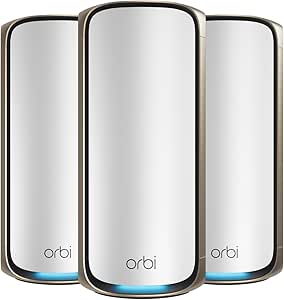
The best Netgear Orbi mesh WiFi systems balance whole-home coverage, wireless backhaul, and the features your devices can actually use. I’d put the Orbi 870 Series forward as the best overall choice for many homes, while the Orbi RBK863S is a strong WiFi 6 alternative and the Orbi 970 Series suits buyers seeking a premium WiFi 7 setup. The main tradeoffs are paying for newer wireless standards and extra capacity versus choosing a simpler kit that fits your internet plan and floor plan. Older WiFi 6 and WiFi 6E models can still make sense when compatibility and coverage matter more than the newest features. Read on for the full breakdown of all 15 systems and how to match one to your home.

Get audio and creator gear delivered free — and shop member deals
- Fast, free delivery on millions of items
- Access to Prime Big Deal Days deals on October 6–7
- Prime Video, Amazon Music and more included
Complete the kit


Key Takeaways
- WiFi 7 is not one-size-fits-all: The 870 and 770 Series offer different positions in the newer generation, while the 970 Series is the premium option for buyers who want a higher-end, quad-band system.
- WiFi 6 kits remain relevant: The RBK863S, RBK862S, and RBK853 give buyers tri-band options without making WiFi 7 a requirement.
- Kit size changes the coverage equation: Several systems come with two satellites, while others are router-and-satellite or two-pack bundles; match node count to your layout rather than assuming more nodes always mean better performance.
- WiFi 6E models fill a specific gap: The RBKE963 and RBKE962 add 6 GHz capability, which can benefit compatible devices, but that band does not improve every older client’s connection.
- Renewed listings need extra scrutiny: The RBK370, RBE773, and 770 Series renewed options may suit buyers seeking a specific configuration, but verify condition, included hardware, and return terms before choosing them over a standard kit.




| Netgear Orbi mesh WiFi system | Coverage | Bands | Model | Maximum speed |
|---|---|---|---|---|
| NETGEAR Orbi RBK862S Tri-Band | Up to 5,400 sq. ft. | Tri-band | RBK862S | — |
| NETGEAR Orbi AC3000 Whole Home | Up to 7,500 sq. ft. | Tri-band | RBK53-100NAS | — |
| NETGEAR Orbi 870 Series WiFi 7 | Up to 9,000 sq. ft. | Tri-band | — | Up to 21 Gbps |
| NETGEAR Orbi 970 Series Quad-B | Up to 10,000 sq. ft. | Quad-band | RBE973S | Up to 27 Gbps |
| NETGEAR Orbi RBKE963 WiFi 6E M | Up to 9,000 sq. ft. | Quad-band | RBKE963 | Up to 10.8 Gbps |
| NETGEAR Orbi RBK863S Tri-Band | Up to 8,000 sq. ft. | — | RBK863S | — |
| NETGEAR Orbi 770 Series WiFi 7 | Up to 8,000 sq. ft. | — | — | Up to 11 Gbps |
| NETGEAR Orbi 370 Series Dual-B | Up to 6,000 sq. ft. | Dual-band | RBE373 | Up to 5 Gbps |
| NETGEAR Orbi RBK853 Tri-Band W | Up to 7,500 sq. ft. | — | RBK853 | — |
| NETGEAR Orbi RBKE962 Quad-Band | Up to 6,000 sq. ft. | — | RBKE962 (Orbi 960 Series) | — |
| NETGEAR Orbi 360 Series WiFi 7 | Up to 4,000 sq. ft. | Dual-band | — | Up to 5 Gbps |
| NETGEAR Orbi 970 Series WiFi 7 | Up to 10,000 sq. ft. | Quad-band | — | Up to 27 Gbps |
| NETGEAR Orbi 370 Series WiFi 7 | Up to 6,000 sq. ft. | Dual-band | — | Up to 5 Gbps |
| NETGEAR Orbi RBK752 Tri-Band W | Up to 5,000 sq. ft. | Tri-band | RBK752 | Up to 4.2 Gbps |
| NETGEAR Orbi 770 Tri-Band WiFi | Up to 8,000 sq. ft. | Tri-band | RBE773 | Up to 11 Gbps |
More Details on Our Top Picks
NETGEAR Orbi RBK862S Tri-Band WiFi 6 Mesh System with Router and Satellite
The RBK862S is a strong fit for a large home that needs capable WiFi 6 coverage without moving to WiFi 7. Its router-and-satellite kit covers up to 5,400 sq. ft., supports up to 100 devices, and includes a 10 Gbps internet port—useful if your service or wired setup can take advantage of that connection. Compared with the older Orbi AC3000 RBK53, it offers a newer WiFi generation and higher stated maximum speed, though the RBK53 includes two satellites and claims broader coverage. The RBK862S is a more modern choice for many connected devices, but its single satellite may be less suitable for homes with distant rooms or multiple floors. It also has a one-year Armor subscription, after which continued subscription features may require renewal, and it is for U.S. use only.
Pros:- WiFi 6 tri-band system with stated speeds up to 6 Gbps
- Coverage up to 5,400 sq. ft. and support for up to 100 devices
- 10 Gbps internet port supports high-bandwidth wired service
- Includes a one-year NETGEAR Armor subscription
Cons:- Only one satellite is included, limiting placement options compared with three-unit kits
- Armor subscription is limited to one year
- Designed for use in the U.S. only
Best for: U.S. households with WiFi 6 devices, up to 100 connected devices, and an internet plan that can benefit from a 10 Gbps port.
Not ideal for: People needing coverage beyond 5,400 sq. ft. or extra satellite placement out of the box, and buyers outside the U.S.
- Model:RBK862S
- WiFi generation:WiFi 6 (802.11ax)
- Bands:Tri-band
- Maximum WiFi speed:Up to 6 Gbps
- Coverage:Up to 5,400 sq. ft.
- Device capacity:Up to 100 devices
- Internet port:10 Gbps
- Included components:Router and 1 satellite
- Security:WPA2-PSK, WPA3, and one-year NETGEAR Armor subscription
Our verdict“Choose the RBK862S if you want a modern WiFi 6 Orbi kit with a 10 Gbps internet port and do not need more than one satellite.”
NETGEAR Orbi AC3000 Whole Home Tri-Band Mesh WiFi System (Router and Two Satellites, RBK53)
The Orbi RBK53 makes its case with a router and two satellites, giving buyers more placement flexibility than the one-satellite RBK862S kit. Its stated coverage reaches 7,500 sq. ft., so it suits a large home where reaching remote rooms matters more than having the latest wireless generation. The tradeoff is clear: this is a WiFi 5 system with speeds up to 3 Gbps, well behind the WiFi 6 RBK862S and far below the WiFi 7 Orbi 870 Series in stated maximum speed. Four Gigabit Ethernet ports on each unit also offer practical wired connections, while the Orbi app handles setup and network tools. Pick it for its three-unit layout and established basics, but skip it if you are buying for newer WiFi devices or want more future-facing wireless capacity.
Pros:- Router and two satellites provide flexible coverage placement
- Stated coverage up to 7,500 sq. ft.
- Four Gigabit Ethernet ports on both the router and satellites
- Orbi app supports setup, guest networks, parental controls, and speed tests
Cons:- WiFi 5 is an older generation than the RBK862S’s WiFi 6 and the Orbi 870 Series’ WiFi 7
- Maximum stated speed is 3 Gbps
- Does not include a multi-gig internet port
Best for: Households with a large floor plan that want three mesh units, app management, and do not need WiFi 6 or WiFi 7.
Not ideal for: Buyers with newer high-performance devices or a plan to upgrade to the latest WiFi generation soon.
- Model:RBK53-100NAS
- WiFi generation:WiFi 5
- Bands:Tri-band
- Maximum data transfer rate:Up to 3 Gbps
- Coverage:Up to 7,500 sq. ft.
- Included components:1 router and 2 satellites
- Ethernet ports:4 Gigabit ports on the router and each satellite
- Management:Orbi app
- Security protocols:WPS, WPA2, and WPA3
Our verdict“Choose the RBK53 when a three-unit layout and broad stated coverage matter more than newer WiFi capabilities.”
NETGEAR Orbi 870 Series WiFi 7 Mesh System, 3-Pack
The Orbi 870 Series gives large households a three-unit WiFi 7 setup without stepping up to the 970 Series’ quad-band design and higher stated capacity. The router and two satellites are rated for coverage up to 9,000 sq. ft. and up to 150 devices, making this a better match than the RBK862S for homes that need more satellite reach and newer wireless support. Its stated speed reaches 21 Gbps, with a 10 Gig internet port and 2.5 Gig LAN ports for fast wired connections. It also works with WiFi 6 and WiFi 5 devices, so older hardware need not be replaced to use the system. The tradeoffs are that it is tri-band rather than quad-band like the Orbi 970, and NETGEAR Armor is only a 30-day trial before a separate subscription is needed. It is U.S.-only.
Pros:- WiFi 7 tri-band system with stated speeds up to 21 Gbps
- Three units cover up to 9,000 sq. ft. and support up to 150 devices
- 10 Gig internet port and 2.5 Gig LAN ports
- App-guided setup and automatic firmware updates
Cons:- Tri-band design has one fewer band than the quad-band Orbi 970 and RBKE963
- NETGEAR Armor requires a separate subscription after its 30-day trial
- Designed for use in the U.S. only
Best for: Large U.S. homes with WiFi 7 devices, multiple wired high-speed connections, and up to 150 connected devices.
Not ideal for: Buyers who need the 970 Series’ stated 10,000 sq. ft. coverage, quad-band design, or a security subscription included beyond the trial.
- WiFi standard:WiFi 7
- Bands:Tri-band
- Included components:1 router and 2 satellites
- Maximum speed:Up to 21 Gbps
- Coverage:Up to 9,000 sq. ft.
- Device capacity:Up to 150 devices
- Ports:10 Gig internet port and 2.5 Gig LAN ports
- Compatibility:Cable or fiber modem equipment; supports WiFi 6 and WiFi 5 devices
- Security:Advanced Router Protection, automatic firmware updates, and 30-day NETGEAR Armor trial
Our verdict“Choose the Orbi 870 Series for broad WiFi 7 coverage and multi-gig wired ports without moving up to the quad-band Orbi 970.”
NETGEAR Orbi 970 Series Quad-Band WiFi 7 Mesh Network System with Router and 2 Satellite Extenders
The Orbi 970 Series is the premium choice here for homes that need the largest stated coverage and device capacity in this batch. Its router and two satellites cover up to 10,000 sq. ft. and support up to 200 devices, exceeding the Orbi 870 Series’ stated 9,000 sq. ft. and 150-device limits. The quad-band WiFi 7 design adds a dedicated backhaul, helping mesh units communicate without relying on the same wireless capacity as client devices. A 10 Gig internet port supports high-speed service, while backward compatibility keeps older WiFi devices working. That extra headroom may be unnecessary in a smaller home or a household with modest network demands; the Orbi 870 Series offers a less elaborate tri-band WiFi 7 configuration. This system is also U.S.-only, and the supplied details do not specify an included subscription term for security services.
Pros:- Quad-band WiFi 7 with dedicated backhaul
- Stated coverage up to 10,000 sq. ft.
- Supports up to 200 devices
- Includes a 10 Gig internet port and automatic firmware updates
Cons:- Its coverage and capacity may be more than a modest home needs
- U.S.-only availability limits use in other regions
- Provided product details do not specify the duration of any security subscription
Best for: Owners of very large U.S. homes with many connected devices who want WiFi 7, quad-band mesh, and a dedicated backhaul.
Not ideal for: Smaller households that cannot use the extra coverage and capacity, or buyers seeking a clearly stated long-term security subscription.
- Model:RBE973S
- WiFi standard:WiFi 7
- Bands:Quad-band
- Maximum speed:Up to 27 Gbps
- Coverage:Up to 10,000 sq. ft.
- Device capacity:Up to 200 devices
- Included components:Router and 2 satellite extenders
- Internet port:10 Gig
- Compatibility:Backward compatible with older WiFi devices
Our verdict“Choose the Orbi 970 Series if your large home can make use of its quad-band WiFi 7 design, dedicated backhaul, and 10,000-square-foot coverage rating.”
NETGEAR Orbi RBKE963 WiFi 6E Mesh System with Router and Two Satellite Extenders
The RBKE963 is the WiFi 6E pick for buyers whose devices can use the 6 GHz band, but who do not need WiFi 7. This quad-band system includes a router and two satellite extenders, covers up to 9,000 sq. ft., and supports up to 200 devices. Its 10.8 Gbps stated maximum speed and 10 Gig internet port give it substantial capacity, while the extra 6 GHz band can provide a less congested connection for compatible devices. Against the newer WiFi 7 Orbi 870 Series, the RBKE963 has a higher stated device capacity and quad-band design, but it does not offer WiFi 7’s newer generation. Compared with the Orbi 970, it also has a lower stated maximum speed and coverage. NETGEAR lists automatic firmware updates and safety features, but the supplied details do not specify the exact security protections or an included subscription.
Pros:- Quad-band WiFi 6E includes a dedicated 6 GHz band
- Router and two satellite extenders cover up to 9,000 sq. ft.
- Supports up to 200 connected devices
- 10 Gig internet port and automatic firmware updates
Cons:- WiFi 6E is an older generation than WiFi 7 systems such as the Orbi 870 and 970 Series
- The supplied details do not specify subscription terms for security features
Best for: Households with WiFi 6E phones, computers, or other devices that want a 6 GHz band and broad mesh coverage.
Not ideal for: Buyers prioritizing WiFi 7 or the highest stated coverage and speed, who should compare it with the Orbi 870 or 970 Series.
- Model:RBKE963
- WiFi standard:WiFi 6E
- Bands:Quad-band
- Maximum speed:Up to 10.8 Gbps
- Coverage:Up to 9,000 sq. ft.
- Device capacity:Up to 200 devices
- Included components:Router and 2 satellite extenders
- Internet port:10 Gig
- Security:Automatic firmware updates and safety features
Our verdict“Choose the RBKE963 if your devices can use WiFi 6E’s 6 GHz band and you prefer that capability over stepping up to WiFi 7.”
NETGEAR Orbi RBK863S Tri-Band WiFi 6 Mesh System with Router and 2 Satellites
The RBK863S is the stronger fit for a large home that needs broad coverage without moving to WiFi 7: its router and two satellites are rated for up to 8,000 sq. ft. and as many as 100 devices. Tri-band WiFi 6 helps distribute traffic across the mesh, while the 10 Gbps internet port leaves room for a fast incoming connection. Compared with the RBK853, it offers more stated coverage and a faster internet port, making it the more appealing of the two for expansive layouts or faster service. The tradeoff is that its WiFi generation is older than the Orbi 770’s WiFi 7, and the included Armor subscription lasts one year, with some security features requiring a subscription. It is also specified for U.S. use only.
Pros:- Router and two satellites are rated to cover up to 8,000 sq. ft.
- Tri-band WiFi 6 supports a mesh network with up to 100 connected devices.
- 10 Gbps internet port suits a high-speed incoming connection.
- Includes a one-year NETGEAR Armor subscription.
Cons:- WiFi 6 is an older standard than the WiFi 7 Orbi 770.
- Some NETGEAR Armor security features require a subscription.
- Made for use in the U.S. only.
Best for: U.S. households with a large floor plan, many connected devices, and a fast internet connection that do not need WiFi 7.
Not ideal for: Buyers seeking WiFi 7, or households outside the U.S.; the listed regional compatibility is U.S.-only.
- Model:RBK863S
- WiFi generation:WiFi 6 (802.11ax)
- Frequency band:Tri-band
- Maximum WiFi speed:Up to 6 Gbps
- Coverage:Up to 8,000 sq. ft.
- Maximum connected devices:100
- Internet port:10 Gbps
- Included security subscription:NETGEAR Armor, 1 year
Our verdict“Choose the RBK863S for expansive U.S. homes that value 8,000-square-foot coverage and a 10 Gbps internet port over WiFi 7.”
NETGEAR Orbi 770 Series WiFi 7 Mesh System, 3-Pack
For buyers ready to move to WiFi 7, the Orbi 770 3-pack pairs a router and satellites with stated coverage of up to 8,000 sq. ft. and speeds up to 11 Gbps. Its support for internet plans up to 2.5 Gbps gives it a clear role between older WiFi 6 systems such as the RBK863S and more demanding premium setups: you get the newer WiFi standard without needing the RBK863S’s 10 Gbps port. App-guided setup and management can also make placement and routine network changes easier. The main compromise is ongoing security cost: Armor is only a 30-day trial, then requires a separate subscription. Coverage and actual speeds also depend on the home, device mix, and plan, and this system is specified for U.S. use.
Pros:- WiFi 7 supports maximum speeds up to 11 Gbps.
- Three-piece system is rated for up to 8,000 sq. ft.
- Supports up to 100 devices and internet plans up to 2.5 Gbps.
- Orbi app provides guided setup and network management.
Cons:- NETGEAR Armor requires a separate subscription after the 30-day trial.
- Its stated internet plan support tops out at 2.5 Gbps.
- Coverage and real-world speeds vary with home layout, placement, devices, and internet plan.
Best for: U.S. households with a large home, WiFi 7 devices, and cable or fiber service up to 2.5 Gbps.
Not ideal for: Buyers who want included long-term security coverage or need a mesh system for use outside the United States.
- WiFi standard:WiFi 7
- System configuration:Router and satellites, 3-pack
- Frequency bands:Tri-band
- Maximum speed:Up to 11 Gbps
- Coverage:Up to 8,000 sq. ft.
- Device capacity:Up to 100 devices
- Internet plan support:Up to 2.5 Gbps
- Additional satellite coverage:Up to 2,750 sq. ft.
Our verdict“Pick the Orbi 770 3-pack if you want WiFi 7 and broad coverage for a large home with internet service up to 2.5 Gbps.”
NETGEAR Orbi 370 Series Dual-Band WiFi 7 Mesh System (RBE373), Router and 2 Extenders, BE5000 Renewed
The renewed Orbi 370 RBE373 is the lower-spec route to WiFi 7 in this group. Its router and two extenders cover up to 6,000 sq. ft., with capacity for 70 devices and a 2.5 Gigabit internet port. That makes it a sensible match for a busy but not especially device-dense home; the Orbi 770 reaches farther, supports more devices, and uses tri-band WiFi 7, while this model keeps the configuration dual-band. The listed maximum speed is 5 Gbps, but the renewed condition is the bigger buying distinction: buyers should be comfortable with a product that is not new. Built-in security is listed, though the supplied details do not specify a subscription. Choose it for its coverage and WiFi 7 generation, not for the strongest capacity or a fresh-from-manufacturer condition.
Pros:- WiFi 7 support in a router-and-two-extender configuration.
- Coverage is rated for up to 6,000 sq. ft.
- Supports up to 70 connected devices.
- 2.5 Gigabit Ethernet internet port and built-in security features.
Cons:- Renewed condition may not suit buyers who want a new product.
- Dual-band design differs from the tri-band Orbi 770 and RBK863S.
- Capacity is limited to 70 connected devices, below the 100-device systems in this roundup.
Best for: Buyers seeking a renewed WiFi 7 router-and-two-extender system for a home up to 6,000 sq. ft. with no more than about 70 connected devices.
Not ideal for: Buyers who require a new system, need capacity above 70 devices, or prefer tri-band mesh for a larger or busier home.
- Model:RBE373
- WiFi standard:WiFi 7
- Bands:Dual-band
- System components:1 router and 2 extenders
- Maximum speed:Up to 5 Gbps
- Coverage:Up to 6,000 sq. ft.
- Maximum connected devices:70
- Internet port:2.5 Gigabit Ethernet
- Condition:Renewed
Our verdict“Choose this renewed RBE373 if you want WiFi 7 coverage across a medium-to-large home and accept a dual-band, renewed system.”
NETGEAR Orbi RBK853 Tri-Band WiFi 6 Mesh System with Router and 2 Satellites
The RBK853 makes the most sense when Ethernet access at several points in the home matters as much as wireless coverage. Its router and two satellites each have four Gigabit Ethernet ports, giving wired TVs, consoles, or desktop PCs practical connection options without relying on a separate switch at every node. It covers up to 7,500 sq. ft. and supports 100 devices, but the RBK863S reaches a stated 8,000 sq. ft. and has a 10 Gbps internet port, so the RBK853 is not the stronger pick for maximum reach or faster incoming service. Its 2.5 Gbps internet port and WiFi 6 fit many existing plans, while the 30-day Armor trial is brief and the system is specified for U.S. use only.
Pros:- Four Gigabit Ethernet ports are available on the router and each satellite.
- Router and two satellites are rated for up to 7,500 sq. ft.
- Supports up to 100 connected devices.
- 2.5 Gbps internet port and Orbi app-based setup and management.
Cons:- WiFi 6 is older than the WiFi 7 standard in the Orbi 770 and RBE373.
- Coverage rating is lower than the RBK863S’s stated 8,000 sq. ft.
- NETGEAR Armor includes only a 30-day trial, and the system is for U.S. use only.
Best for: Households with wired devices in multiple rooms that want Ethernet ports on the router and both satellites.
Not ideal for: Buyers seeking WiFi 7, coverage beyond its 7,500-square-foot rating, or a longer included Armor subscription.
- Model:RBK853
- WiFi generation:WiFi 6 (802.11ax)
- Network type:Tri-band mesh
- Advertised data rate:AX6000, up to 6 Gbps
- Coverage:Up to 7,500 sq. ft.
- Maximum devices:100
- Internet port bandwidth:2.5 Gbps
- Ethernet ports:4 Gigabit Ethernet ports on the router and each satellite
- Security:NETGEAR Armor with 30-day trial
Our verdict“Choose the RBK853 if you want Ethernet ports at every mesh node and can work within its WiFi 6 and 7,500-square-foot limits.”
NETGEAR Orbi RBKE962 Quad-Band WiFi 6E Mesh System with Router and Satellite
The RBKE962 is the standout for households that can use its 6 GHz band and want capacity for as many as 200 devices. Its quad-band design and 10.8 Gbps stated maximum speed put it in a different class from the tri-band WiFi 6 RBK853, while the 10 Gig internet port supports a fast incoming connection. The tradeoff is the included layout: this pack has one router and one satellite, not the router-and-two-satellite setup of the RBK863S or RBK853. Its rated coverage is 6,000 sq. ft., less than either of those systems. The 6 GHz band only benefits compatible WiFi 6E devices, so homes without such devices may get more practical value from a broader-coverage WiFi 6 or WiFi 7 option.
Pros:- Quad-band WiFi 6E includes a dedicated 6 GHz band.
- Supports up to 200 connected devices.
- Maximum data rate is listed at up to 10.8 Gbps.
- 10 Gig internet port, WPA3, and automatic firmware updates with security features.
Cons:- 6 GHz benefits require WiFi 6E-compatible devices.
- The included system has one satellite and is rated for up to 6,000 sq. ft., less coverage than the RBK853 or RBK863S.
- Real-world coverage and speeds vary with home and network conditions.
Best for: Homes with WiFi 6E-compatible devices, many simultaneous connections, and a need for a 10 Gig internet port.
Not ideal for: Buyers whose devices do not support WiFi 6E, or who need a router plus two satellites for wider coverage.
- Model:RBKE962 (Orbi 960 Series)
- WiFi generation:WiFi 6E (802.11ax)
- Frequency band:Quad-band, including 6 GHz
- Maximum data transfer rate:Up to 10.8 Gbps
- Coverage:Up to 6,000 sq. ft.
- Supported devices:Up to 200
- Internet port:10 Gig
- Included components:Router and one satellite extender
- Security protocol:WPA3
Our verdict“Choose the RBKE962 if your household has WiFi 6E devices and values a 10 Gig port and high device capacity more than maximum mesh coverage.”
NETGEAR Orbi 360 Series WiFi 7 Mesh System, 2-Pack
The Orbi 360 is a straightforward way to bring WiFi 7 to a two-unit setup without stepping up to the 970 Series’ extensive coverage and quad-band hardware. Its router and satellite are rated for up to 4,000 sq. ft. and 70 devices, making this a better fit for a moderately sized home than the three-unit Orbi 370. The advertised 5 Gbps WiFi speed is ample headroom for many connected devices, though this system supports internet plans only up to 2.5 Gbps, so it is not the match for a 10 Gig connection. App-guided setup and compatibility with WiFi 6 and WiFi 5 devices help simplify an upgrade. The tradeoffs are its smaller coverage footprint than three-unit kits and an Armor subscription after the included trial.
Pros:- WiFi 7 support with advertised speeds up to 5 Gbps
- Two included units cover up to 4,000 sq. ft.
- Supports up to 70 connected devices
- App-guided setup and compatibility with WiFi 6 and WiFi 5 devices
Cons:- Less coverage than the three-unit Orbi 370 system
- Compatible with internet plans up to 2.5 Gbps, not 10 Gig service
- NETGEAR Armor requires a subscription after its 30-day trial
Best for: Households moving to WiFi 7 that need two mesh units for a home up to about 4,000 sq. ft. and use a cable or fiber plan up to 2.5 Gbps.
Not ideal for: Owners of very large or multi-story homes who need three included units, or subscribers seeking to use internet service above 2.5 Gbps.
- WiFi standard:WiFi 7
- Bands:Dual-band
- Maximum speed:Up to 5 Gbps
- Coverage:Up to 4,000 sq. ft.
- Device capacity:Up to 70 devices
- Included units:Router and satellite
- Internet plan compatibility:Cable or fiber plans up to 2.5 Gbps
- Security:Advanced Router Protection, automatic firmware updates, and 30-day NETGEAR Armor trial
Our verdict“Choose the Orbi 360 if you want a two-unit WiFi 7 mesh for a moderately sized home, but pick the Orbi 370 for more reach or the Orbi 970 for 10 Gig connectivity.”
NETGEAR Orbi 970 Series WiFi 7 Mesh System, 3-Pack
For buyers who need wide coverage and a high-capacity wired connection, the Orbi 970 is the most ambitious system in this group. Its quad-band WiFi 7 design, router, and two satellites are rated for up to 10,000 sq. ft. and 200 devices—well beyond the Orbi 370’s 6,000 sq. ft. and 70-device limits. The 10 Gig internet and LAN ports, alongside 2.5 Gig LAN, also make it a stronger fit for fast fiber service and wired devices than the Orbi 360. Those capabilities are compelling for a large home with demanding workloads, but they may go unused in a smaller household or on a slower internet plan. Coverage and speeds depend on placement and conditions, and NETGEAR Armor requires a subscription after its trial.
Pros:- Three-unit WiFi 7 system rated for coverage up to 10,000 sq. ft.
- Supports up to 200 connected devices
- Quad-band design with advertised speeds up to 27 Gbps
- Includes 10 Gig internet and LAN ports plus 2.5 Gig LAN
Cons:- Its capacity and port speeds may be unnecessary for smaller homes or slower plans
- Coverage and real-world speeds vary with layout, placement, devices, and internet service
- NETGEAR Armor requires a subscription after its 30-day trial
Best for: Owners of large homes with up to 10 Gig cable or fiber service, multiple demanding users, and wired equipment that can use multi-gig LAN ports.
Not ideal for: People with modest internet service or smaller homes who do not need extensive coverage, 10 Gig ports, or capacity for many devices.
- WiFi standard:WiFi 7
- Bands:Quad-band
- Maximum speed:Up to 27 Gbps
- Coverage:Up to 10,000 sq. ft.
- Device capacity:Up to 200 devices
- System contents:1 router and 2 satellites
- Ports:10 Gig internet, 10 Gig LAN, and 2.5 Gig LAN
- Internet compatibility:Cable and fiber plans up to 10 Gbps
Our verdict“Pick the Orbi 970 when a very large home, high device count, and 10 Gig wired networking justify its capabilities; otherwise, the Orbi 370 or 360 is a more focused fit.”
NETGEAR Orbi 370 Series WiFi 7 Mesh System, 3-Pack
The Orbi 370 makes the strongest case for buyers who want three-unit WiFi 7 coverage without the Orbi 970’s quad-band and 10 Gig focus. The router and two satellites are rated for up to 6,000 sq. ft., giving it more reach than the two-unit Orbi 360, while both systems list speeds up to 5 Gbps and support up to 70 devices. That makes the 370 a practical choice for spreading coverage across a larger home, though its dual-band design and 2.5 Gbps internet-plan limit set it apart from the much higher-capacity 970. App setup, guest access, and support for WiFi 6 and WiFi 5 devices ease everyday management. Actual reach depends on the home and satellite placement, and Armor moves to a subscription after its trial.
Pros:- Three included units are rated for coverage up to 6,000 sq. ft.
- WiFi 7 speeds up to 5 Gbps and capacity for up to 70 devices
- Works with WiFi 6 and WiFi 5 devices
- App supports setup, connected-device management, and guest access
Cons:- Dual-band rather than the Orbi 970’s quad-band design
- Compatible with internet plans up to 2.5 Gbps
- Coverage varies with home layout, building materials, and satellite placement
Best for: Households that need three mesh units to cover a larger home and want WiFi 7 for up to 70 devices on internet service up to 2.5 Gbps.
Not ideal for: Users with 10 Gig service, very high device counts, or a need for quad-band networking; the Orbi 970 is better matched to those demands.
- WiFi standard:WiFi 7
- Bands:Dual-band
- Maximum speed:Up to 5 Gbps
- Coverage:Up to 6,000 sq. ft.
- Device capacity:Up to 70 devices
- Package contents:Router and two satellites
- Internet plan compatibility:Up to 2.5 Gbps
- Additional satellite coverage:Up to 2,000 sq. ft.
Our verdict“Choose the Orbi 370 for broad three-unit WiFi 7 coverage on a plan up to 2.5 Gbps, and look to the Orbi 970 only if you need its higher capacity and multi-gig ports.”
NETGEAR Orbi RBK752 Tri-Band WiFi 6 Mesh System with Router and Satellite
The RBK752 is the clear alternative for buyers who would rather choose a tri-band WiFi 6 system than pay for WiFi 7 features they may not use. Its router and satellite are rated for up to 5,000 sq. ft. and 40 devices, with AX4200 speeds up to 4.2 Gbps. That is lower device capacity than the WiFi 7 Orbi 360 and 370, both rated for 70 devices, but the RBK752 includes Gigabit Ethernet ports on both units and supports internet service up to 2 Gbps. Its two-unit arrangement is simpler than the Orbi 370’s three-piece kit, though buyers with hard-to-reach rooms may need separately purchased satellites. This is a less future-facing pick, and Armor protection includes only a 30-day trial.
Pros:- Tri-band WiFi 6 with AX4200 speeds up to 4.2 Gbps
- Two-unit system rated for coverage up to 5,000 sq. ft.
- Gigabit Ethernet ports on both router and satellite
- Supports internet service up to 2 Gbps
Cons:- Supports up to 40 devices, fewer than the Orbi 360 and Orbi 370
- Additional satellites are sold separately
- NETGEAR Armor includes a 30-day trial
Best for: Households with WiFi 6 and older devices, internet service up to 2 Gbps, and a home that suits a two-unit mesh with wired connections at both locations.
Not ideal for: Buyers seeking WiFi 7, support for more than 40 devices, or three included mesh units for broader coverage; compare the Orbi 370 for those needs.
- Model:RBK752
- WiFi generation:WiFi 6 (802.11ax)
- Bands:Tri-band
- Maximum speed:Up to 4.2 Gbps
- Coverage:Up to 5,000 sq. ft.
- Maximum devices:40
- Included units:Router and 1 satellite
- Ethernet ports:Router: 3 Gigabit; satellite: 2 Gigabit
Our verdict“Choose the RBK752 if WiFi 6 and Ethernet on both units suit your setup; choose the Orbi 370 for WiFi 7 and a third included unit.”
NETGEAR Orbi 770 Tri-Band WiFi 7 Mesh System (RBE773), Router and 2 Satellites, Renewed
The renewed Orbi 770 RBE773 sits between the Orbi 370 and Orbi 970 in capability: it has tri-band WiFi 7, three included units, and a claimed coverage area of up to 8,000 sq. ft. That gives it more stated reach and a tri-band configuration compared with the dual-band Orbi 370, while avoiding the 970’s quad-band, 10 Gig emphasis. Advertised speeds reach 11 Gbps, and the 2.5 Gig internet port fits plans faster than those supported by the Orbi 370. The main distinction is condition: this is a renewed system, so buyers should be comfortable choosing a renewed product rather than a new one. Its U.S.-only compatibility also narrows where it fits, and coverage depends on placement and home conditions.
Pros:- Tri-band WiFi 7 with advertised speeds up to 11 Gbps
- Router and two satellites are rated for coverage up to 8,000 sq. ft.
- 2.5 Gig internet port
- WPA3, WPA2, and automatic firmware updates
Cons:- Renewed condition may not suit buyers who want a new system
- U.S.-only region compatibility
- Does not match the Orbi 970’s listed 10 Gig internet and LAN ports
Best for: U.S. buyers who want a renewed, three-unit WiFi 7 system with tri-band networking, up to 8,000 sq. ft. of rated coverage, and a 2.5 Gig internet port.
Not ideal for: Buyers who require a new system, need 10 Gig internet connectivity, or live outside the United States.
- Model:RBE773
- WiFi generation:WiFi 7
- Bands:Tri-band
- Maximum speed:Up to 11 Gbps
- Coverage:Up to 8,000 sq. ft.
- Included units:1 router and 2 satellite extenders
- Internet port bandwidth:2.5 Gbps
- Ports:7
- Condition:Renewed
Our verdict“Pick this renewed Orbi 770 if you want a tri-band WiFi 7 three-pack with greater listed coverage than the Orbi 370, but skip it if renewed condition or U.S.-only use is a concern.”
How We Picked
I ranked these Orbi systems by how well their wireless generation, band configuration, and included node count serve distinct household needs. I gave weight to practical coverage potential, the ability to handle multiple active devices, wired connection options where specified, and whether a system’s capabilities are likely to match common internet plans and client devices. I also separated two-pack, three-piece, and router-plus-satellite configurations rather than treating their bundle names as interchangeable.
The ranking favors kits that offer a useful blend of current features and broad household fit, then gives premium placement to systems whose added capacity makes sense for demanding homes. Older WiFi 6 models remain in the lineup for buyers who value a proven generation over newer standards, while WiFi 6E and renewed models are judged by their more specific appeal and added purchase checks. Since bundle names and hardware can vary by listing, I’d confirm the exact model number, included units, and condition before ordering.
| Netgear Orbi mesh WiFi system | Bands | Device capacity | WiFi standard | Maximum speed |
|---|---|---|---|---|
| NETGEAR Orbi RBK862S Tri-Band | Tri-band | Up to 100 devices | — | — |
| NETGEAR Orbi AC3000 Whole Home | Tri-band | — | — | — |
| NETGEAR Orbi 870 Series WiFi 7 | Tri-band | Up to 150 devices | WiFi 7 | Up to 21 Gbps |
| NETGEAR Orbi 970 Series Quad-B | Quad-band | Up to 200 devices | WiFi 7 | Up to 27 Gbps |
| NETGEAR Orbi RBKE963 WiFi 6E M | Quad-band | Up to 200 devices | WiFi 6E | Up to 10.8 Gbps |
| NETGEAR Orbi RBK863S Tri-Band | — | — | — | — |
| NETGEAR Orbi 770 Series WiFi 7 | — | Up to 100 devices | WiFi 7 | Up to 11 Gbps |
| NETGEAR Orbi 370 Series Dual-B | Dual-band | — | WiFi 7 | Up to 5 Gbps |
| NETGEAR Orbi RBK853 Tri-Band W | — | — | — | — |
| NETGEAR Orbi RBKE962 Quad-Band | — | — | — | — |
| NETGEAR Orbi 360 Series WiFi 7 | Dual-band | Up to 70 devices | WiFi 7 | Up to 5 Gbps |
| NETGEAR Orbi 970 Series WiFi 7 | Quad-band | Up to 200 devices | WiFi 7 | Up to 27 Gbps |
| NETGEAR Orbi 370 Series WiFi 7 | Dual-band | Up to 70 devices | WiFi 7 | Up to 5 Gbps |
| NETGEAR Orbi RBK752 Tri-Band W | Tri-band | — | — | Up to 4.2 Gbps |
| NETGEAR Orbi 770 Tri-Band WiFi | Tri-band | — | — | Up to 11 Gbps |
Factors to Consider When Choosing Best Netgear Orbi Mesh WiFi Systems
Choosing an Orbi kit starts with the home and devices you need to connect, not the newest WiFi label. These broader checks can help prevent buying too much system—or choosing a setup that cannot solve the real coverage problem.
Match WiFi Generation to Your Devices
A router can only deliver a newer WiFi standard’s benefits to devices that support it. WiFi 7 systems such as the 970, 870, 770, and 370 Series may give newer phones and computers more headroom, but older clients still connect using their supported standards. WiFi 6 and WiFi 6E kits can remain sensible when most household devices do not support WiFi 7. Check the wireless capabilities of your busiest devices, not just the newest one in the home. A common mistake is choosing a higher-generation kit while overlooking a weak internet plan or an older client mix. Put the budget toward the feature most likely to change your daily connection, whether that is a newer standard, another node, or wired backhaul.
Choose Node Count Around Your Floor Plan
Mesh performance depends on where nodes can be placed, not simply how many are in the box. A multi-level home, long layout, or thick interior walls may need more than one satellite to reach distant rooms, while a compact home may get better results from a smaller kit with well-positioned units. Before buying, sketch the router location, the rooms with weak signal, and any likely satellite spots with power and open space. Avoid hiding satellites in cabinets or placing them at the far edge of an already weak signal. More nodes can help fill coverage gaps, but overcrowding can add setup complexity without fixing a poor placement plan. Compare the actual bundle contents, since two-pack and three-piece descriptions can refer to different combinations of router and satellites.
Decide Whether Tri-Band or Quad-Band Matters
Extra bands can give a mesh system more room to manage traffic between nodes and client devices, but the benefit depends on layout, congestion, and the devices in use. Tri-band WiFi 6 options such as the RBK863S and RBK853 may be a better fit than a basic dual-band configuration when several people stream, game, and work at once. The quad-band 970 and 960-series systems target buyers who want more capacity and have the broadband service and hardware to use it. Do not assume that more bands automatically solve weak coverage; node placement and backhaul conditions still matter. If you can connect mesh units with Ethernet, ask whether that would address the same backhaul concern more directly. Pay for extra band capacity when your household load justifies it, not simply because a spec sheet lists more bands.
Treat 6 GHz and WiFi 7 as Different Upgrade Questions
WiFi 6E adds access to the 6 GHz band for compatible devices, while WiFi 7 is a newer generation with a broader set of wireless capabilities. The RBKE963 and RBKE962 are the lineup’s WiFi 6E choices, so they may appeal to homes with supported clients that can benefit from that band. A 6 GHz signal does not reach through every wall as easily as lower-frequency bands, so device compatibility alone does not promise better whole-home coverage. When comparing 6E with WiFi 7, consider which devices you expect to keep and replace over the life of the system. Avoid treating the generation number as a guarantee of faster internet; the modem, service plan, client device, and placement all affect results. Select the standard that fits your actual upgrade path rather than buying around a hypothetical future device.
Check Wired Connections and Internet-Service Fit
Fast wireless features have limited value if the incoming internet connection or wired network becomes the bottleneck. Compare the Orbi model’s Ethernet ports and supported connections with your modem, desktop, network storage, and any satellite locations where wired backhaul is possible. A wired link between nodes can be useful when walls or distance make wireless backhaul difficult, but it requires suitable cabling or an existing wired network. If your service plan is modest, a premium system may not change the speed you see online, though it could still help with coverage or multiple devices. Check the specific model’s port details rather than assuming every system in a series has the same layout. This step can keep a buyer from paying for wireless capacity while leaving a simpler, cheaper network bottleneck untouched.
Inspect Renewed Bundles Before Choosing
Renewed options such as the RBK370, RBE773, and renewed 770 Series can offer a route to a particular Orbi configuration, but their listing details deserve careful review. Confirm that the package includes the router and the stated number of extenders or satellites, since photographs and abbreviated titles may not show every included unit. Check the stated condition, warranty coverage, return window, and whether power adapters are included. A missing satellite or accessory can change the value of a bundle and complicate setup. Also verify the precise model number, because names within a product series can refer to different configurations. Choose a renewed kit only when its condition and included hardware are clear enough to compare fairly with a standard bundle.
Frequently Asked Questions
Should I choose a WiFi 7 Orbi or a WiFi 6 model?
I’d choose WiFi 7 if several important devices already support it, or if you are buying a system to keep through your next device upgrades. The 870 and 770 Series offer newer-generation choices, while the 970 Series is the premium step-up in this group. A WiFi 6 kit such as the RBK863S or RBK853 can be a more practical match when most devices are older and your internet plan does not call for more capacity. Check device compatibility and your service speed before deciding that a newer label will improve everyday use. The right choice is the one whose capabilities your home can put to work.
Is a three-piece Orbi kit always better than a two-piece kit?
No. A three-piece kit can help when a home has distant rooms, multiple floors, or obstacles that weaken the signal, but it is not automatically better in a smaller or open-plan space. Each unit needs a sensible location, and a satellite placed too far from the router may have a weak connection of its own. Map the rooms where coverage matters and consider whether Ethernet can connect the nodes. Check whether the listing counts the router as one of the pieces, since bundle wording varies. Choose node count based on your floor plan rather than the number in the product title.
Does WiFi 6E make more sense than WiFi 7 for a home with newer devices?
It depends on which wireless standards those devices support and what capability you want from the system. The RBKE963 and RBKE962 add WiFi 6E and 6 GHz access, while WiFi 7 models belong to a newer generation. A device needs 6E support to use the 6 GHz band, and that band’s reach can be more limited through walls than lower-frequency signals. If your household’s newer devices support WiFi 7, a WiFi 7 kit may better match your upgrade plans. If they support WiFi 6E but not WiFi 7, one of the 6E systems may be the closer fit.
Should I buy a renewed Orbi system?
A renewed system may suit a buyer who wants a specific model or configuration and is comfortable checking the listing details closely. For the RBK370, RBE773, and renewed 770 Series options, verify the exact model, condition, included router and satellites, and supplied power adapters. Review the seller’s warranty and return terms before purchase, since they affect how easily you can address missing or faulty hardware. Compare the bundle contents with a standard kit rather than comparing names alone. If the listing leaves important details unclear, a clearly specified alternative is the safer choice.
Will a premium Orbi system improve my internet speed?
Not necessarily. A premium model can provide more wireless capacity or help distribute a connection across a larger home, but it cannot raise the speed supplied by your internet plan. Your results also depend on the modem, placement, connected device, and whether mesh links use wireless or Ethernet backhaul. Before choosing a 970 Series kit, check whether the rest of your network can make use of its added capability. If your main issue is one distant room, improving satellite placement or adding the right node may matter more than moving to a higher-end system. Match the purchase to the actual bottleneck.
Conclusion
For the widest balance of current features and household flexibility, I’d start with the Orbi 870 Series as my best overall pick. Buyers seeking best value should compare the WiFi 6 RBK863S and RBK853 with the entry-focused 370 Series, choosing based on device support and the exact bundle. The Orbi 970 Series is my best premium recommendation for homes that can use its higher-capacity, quad-band WiFi 7 approach. For beginners, a clearly specified Orbi 370 or 770 three-piece kit is easier to shortlist when the priority is straightforward whole-home coverage rather than maximizing every spec. Choose the RBKE963 or RBKE962 for a specific WiFi 6E need, and consider renewed systems only after checking condition and included hardware. The best fit is the Orbi whose standard, node count, and connection options match your home—not simply the newest model in the lineup.
Fall Picks
fall essentials
As an affiliate, we earn on qualifying purchases.