
For most mobile podcasting, I’d start with the Hollyland Lark M2: its compact wireless lavalier format and charging case suit interviews and on-location recording. The MAONO PD200W stands out for a more traditional podcast microphone with wireless flexibility, while the ES-384 is aimed at recording several speakers with its four-channel system. The main tradeoff is between easy, discreet phone recording and a fuller studio-style setup with more equipment and connection decisions. Compatibility, the number of speakers, and how you monitor or record audio matter as much as wireless range. Read on for how all 12 options differ and which type of podcasting setup each one best serves.

Get audio and creator gear delivered free — and shop member deals
- Fast, free delivery on millions of items
- Access to Prime Big Deal Days deals on October 6–7
- Prime Video, Amazon Music and more included
Complete the kit



Key Takeaways
- The Hollyland Lark M2 is the strongest all-around fit for mobile podcasting among these picks, while the MAONO PD200W better suits podcasters who want a desk-oriented microphone with wireless capability.
- The lineup splits into two different workflows: compact lavalier kits for phones and on-the-go recording, and larger podcast or multi-channel systems for seated conversations.
- Speaker count changes the buying decision. The ES-384 is the standout for a four-person setup, while the ZealSound K66 Dual targets two-person recording rather than a larger panel.
- Phone compatibility is not interchangeable. USB-C and iPhone-focused models may require different connections, so matching the receiver to the recording device is a first-step filter.
- Extra features only help when they fit the workflow. A charging case, noise reduction, app tools, or hybrid connectivity can be useful, but they do not replace checking monitoring, room noise, and recording needs.
| SUDEHO Wireless Mini Lavalier Microphones with Charging Case |  | Best for Adjustable Noise Control | Connectivity: Wireless with plug-in receiver; no Bluetooth or app required | Noise cancellation: Three adjustable levels | Audio modes: Mute, acoustic, noise cancellation, and voice change | VIEW LATEST PRICE | See Our Full Breakdown |
| MAYBESTA Wireless Mini Lavalier Microphones for iPhone and Android, 2-Pack |  | Best for Simple Two-Person Recording | Connectivity: Wireless | Connectors: Lightning and USB Type-C | Compatible devices: Android, laptop, smartphone, tablet, and iPad | VIEW LATEST PRICE | See Our Full Breakdown |
| GoorDik Wireless USB-C Lavalier Microphone with Noise Reduction | 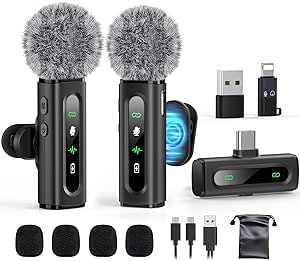 | Best for Adapter Flexibility | Connector and adapters: USB Type-C receiver with USB-A and Lightning adapters | Microphones: Two wireless transmitters | Pickup pattern: Omnidirectional | VIEW LATEST PRICE | See Our Full Breakdown |
| NEEWER KM19 Mini Wireless Lavalier Microphone Kit, Black |  | Best for Recording Controls | Connectivity: 2.4 GHz wireless | Connector: USB Type-C | Microphones: Two transmitters | VIEW LATEST PRICE | See Our Full Breakdown |
| Mini Mic Pro Wireless Lavalier Microphone for iPhone and Android | 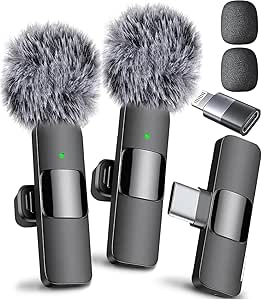 | Best for Charging While Recording | Connectivity: Wireless, 2.4 GHz | Connectors: Lightning and USB Type-C | Included microphones: Two lavalier microphones | VIEW LATEST PRICE | See Our Full Breakdown |
| AUDIGO Wireless Microphone and Mobile Studio App for iOS and Android, Black |  | Best for Mobile Multitrack Podcasting | Microphone type: Studio condenser | Connectivity: Bluetooth 5.2 and Wi-Fi | Audio format: 24-bit/48 kHz WAV | VIEW LATEST PRICE | See Our Full Breakdown |
| NPTCL Wireless Lavalier Microphone for USB-C and iPhone |  | Best Value for Two-Person Mobile Interviews | Microphones included: 2 | Battery life: Up to 6 hours per microphone; up to 24 hours with charging case | Maximum recording range: 70 feet | VIEW LATEST PRICE | See Our Full Breakdown |
| MAONO PD200W Hybrid Wireless Podcast Microphone |  | Best for a Flexible Podcast Studio | Microphone type: Dynamic | Connectivity: Wireless, USB, and XLR | Polar pattern: Unidirectional | VIEW LATEST PRICE | See Our Full Breakdown |
| ES-384 4-Channel UHF Wireless Lavalier Microphone System |  | Best for Four-Person Group Recording | Channels: 4 | Microphones: 4 wireless lapel microphones | Receiver: Rechargeable 6.35 mm plug-in receiver | VIEW LATEST PRICE | See Our Full Breakdown |
| Hollyland Lark M2 Wireless Lavalier Microphone System with Charging Case | 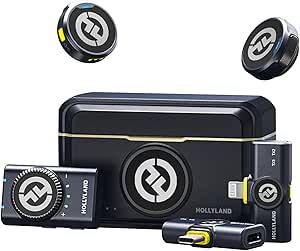 | Best Compact Cross-Device Kit | Connectivity: 2.4 GHz | Connectors: 3.5 mm jack, Lightning, and USB Type-C | Audio format: 48 kHz/24-bit | VIEW LATEST PRICE | See Our Full Breakdown |
| ZealSound K66 Dual Wireless Podcast Microphones for PC and iPhone |  | Best for Two-Person Podcasts | Wireless connection: 2.4 GHz receiver | Audio resolution: 48 kHz/24-bit | Pickup pattern: Cardioid | VIEW LATEST PRICE | See Our Full Breakdown |
| ZealSound K66 Wireless USB Microphone with Noise Reduction |  | Best for Solo Wireless Recording | Audio capture: 48 kHz | Microphone type: Condenser | Pickup pattern: Cardioid | VIEW LATEST PRICE | See Our Full Breakdown |
| wireless microphones for podcasting | Connectivity | Battery life |
|---|---|---|
| SUDEHO Wireless Mini Lavalier | Wireless with plug-in receiver; no Bluetooth or app required | — |
| MAYBESTA Wireless Mini Lavalie | Wireless | — |
| GoorDik Wireless USB-C Lavalie | — | 6–12 hours per transmitter |
| NEEWER KM19 Mini Wireless Lava | 2.4 GHz wireless | Up to 6 hours per transmitter; up to 30 hours with charging case |
| Mini Mic Pro Wireless Lavalier | Wireless, 2.4 GHz | Up to 6 hours per charge |
| AUDIGO Wireless Microphone and | Bluetooth 5.2 and Wi-Fi | Up to 6 hours of recording |
| NPTCL Wireless Lavalier Microp | USB-C; USB adapter included | Up to 6 hours per microphone; up to 24 hours with charging case |
| MAONO PD200W Hybrid Wireless P | Wireless, USB, and XLR | Up to 60 hours with RGB lighting off |
| ES-384 4-Channel UHF Wireless | 6.35 mm input | — |
| Hollyland Lark M2 Wireless Lav | 2.4 GHz | Up to 10 hours per charge; up to 40 hours with charging case |
| ZealSound K66 Dual Wireless Po | — | Up to 16 hours |
| ZealSound K66 Wireless USB Mic | USB receiver; Lightning-compatible and USB-C adapters | — |
More Details on Our Top Picks
SUDEHO Wireless Mini Lavalier Microphones with Charging Case
The SUDEHO suits mobile podcasters who want simple setup with a little more control over the sound than a basic plug-in lavalier offers. Its receiver pairs automatically, and the three noise-cancellation levels let you adjust how much background sound is reduced for different recording spaces. Mute and voice-change modes add flexibility, though the latter is more playful than essential for a podcast. Compared with the NEEWER KM19, SUDEHO has a longer stated total runtime with its case, but NEEWER offers stereo or mono output and published recording specifications that give podcasters more audio detail to assess. SUDEHO’s main limitation is the six-hour microphone runtime per charge; the case extends total use, but not continuous recording time. Device compatibility details are also limited.
Pros:- Automatic pairing with a plug-in receiver and no app or Bluetooth setup
- Three adjustable noise-cancellation levels for different recording environments
- Charging case provides up to 36 hours of total use
- Includes mute, acoustic, noise-cancellation, and voice-change modes
Cons:- Microphone runtime is up to six hours per charge, regardless of the case’s longer total runtime
- Compatibility information is limited beyond iPhone, iPad, and Android
- Voice-change features may be less useful for straightforward podcast recording
Best for: Mobile podcasters recording interviews or solo segments on a compatible iPhone, iPad, or Android device who want adjustable noise reduction and easy pairing.
Not ideal for: Creators who need a clearly documented computer setup, advanced output controls, or recording sessions longer than six hours without a charging break.
- Connectivity:Wireless with plug-in receiver; no Bluetooth or app required
- Noise cancellation:Three adjustable levels
- Audio modes:Mute, acoustic, noise cancellation, and voice change
- Microphone battery life:Up to 6 hours
- Total battery life with case:Up to 36 hours
- Charging time:About 1 hour
- Wireless range:Up to 164 ft (50 m)
Our verdict“Choose SUDEHO if adjustable noise reduction and long total runtime matter more than detailed compatibility information or extended continuous recording.”
MAYBESTA Wireless Mini Lavalier Microphones for iPhone and Android, 2-Pack
The MAYBESTA two-microphone set is aimed at podcasters who record conversations on phones or tablets and want a straightforward way to mic two people. Its Lightning and USB-C connector options cover a useful range of devices, while omnidirectional pickup suits speakers who may shift position rather than stay fixed at a desk. The receiver is designed to fit many phones with cases, which can save setup hassle on location. Compared with the GoorDik, MAYBESTA also supports laptop use according to its compatibility details, but GoorDik specifies two transmitters, includes both USB-C and Lightning adapters, and lists battery life and range. MAYBESTA’s key compromise is that its battery life is not specified, making it harder to plan longer interviews. Buyers must also select the connector version that matches their device.
Pros:- Two microphones support recording a host and guest
- Lightning and USB-C connector options cover a range of compatible devices
- Plug-and-play setup without an app or adapter
- Omnidirectional pickup, noise reduction, and a receiver designed for many phone cases
Cons:- Battery life is not specified, complicating planning for longer recordings
- The connector must match the recording device
- Published details do not specify wireless range or frequency response
Best for: Phone-first interview hosts who need two wireless mics and want Lightning or USB-C connectivity across compatible phones, tablets, or laptops.
Not ideal for: Podcasters who need confirmed runtime for long sessions, or who want one kit with clearly documented adapters and recording range.
- Connectivity:Wireless
- Connectors:Lightning and USB Type-C
- Compatible devices:Android, laptop, smartphone, tablet, and iPad
- Pickup pattern:Omnidirectional
- Frequency:2.4 GHz
- Signal-to-noise ratio:80 dB
- Features:Mute function, noise reduction, plug and play, portable, stable transmission
Our verdict“Pick MAYBESTA for convenient two-person phone recordings, but choose a model with documented runtime if session length is a concern.”
GoorDik Wireless USB-C Lavalier Microphone with Noise Reduction
GoorDik makes sense for podcasters who want a two-person kit and expect to move between devices. It includes two transmitters plus USB-C and Lightning adapters, so the recording setup can extend beyond a single connector type; the listed USB-A adapter adds another connection option. Foam covers and furry windshields offer practical ways to manage handling noise and outdoor wind. Battery life is stated as six to twelve hours per transmitter, a more useful planning guide than the unspecified runtime of the MAYBESTA set. The tradeoff is setup: some Android phones may need OTG activation, and computers may require a manual input selection. Its stated range is up to 30 meters, shorter than the NEEWER KM19’s 100-meter claim, so GoorDik is better suited to nearby conversations than speakers moving far from the receiver.
Pros:- Two transmitters support host-and-guest recordings
- Includes USB-C, USB-A, and Lightning adapter options
- Foam covers and furry windscreens help with handling and outdoor wind
- Lists six to twelve hours of transmitter battery life
Cons:- Some Android phones may require OTG activation
- Computers may need the microphone selected as the default input
- Stated range of up to 30 meters is shorter than the NEEWER KM19’s stated range
Best for: Interview podcasters who record two people on USB-C or Lightning devices and want adapter and windscreen options in the kit.
Not ideal for: Creators who need the longest stated wireless range or want a setup that works without checking Android OTG settings or computer input selection.
- Connector and adapters:USB Type-C receiver with USB-A and Lightning adapters
- Microphones:Two wireless transmitters
- Pickup pattern:Omnidirectional
- Noise modes:Active noise reduction and original sound
- Battery life:6–12 hours per transmitter
- Wireless range:Up to 30 meters
- Frequency response:20–20,000 Hz
- Included wind protection:Four foam covers and two furry windshields
Our verdict“Choose GoorDik for a two-person kit with useful device adapters and wind protection, provided you are comfortable checking connection settings.”
NEEWER KM19 Mini Wireless Lavalier Microphone Kit, Black
The NEEWER KM19 is the strongest fit here for podcasters who want more control over how a two-person recording is captured. Its two transmitters support host-and-guest sessions, while stereo or mono output gives more flexibility than a basic lavalier set. The listed 48 kHz/24-bit recording specification and 81 dB signal-to-noise ratio also provide more audio detail to compare than the MAYBESTA set, whose recording specifications are sparse. A charging case brings total stated runtime to up to 30 hours, and its 100-meter range gives speakers room to move. That capability comes with constraints: it uses USB-C, is not compatible with GoPro, and some Android devices require OTG activation. Its six-hour per-transmitter runtime also sets a limit on uninterrupted sessions.
Pros:- Two transmitters with stereo or mono output options
- 48 kHz/24-bit sampling specification and 81 dB signal-to-noise ratio
- Charging case provides up to 30 hours of total runtime
- Stated wireless range reaches up to 100 meters
Cons:- Not compatible with GoPro
- Some Android devices require OTG activation
- Each transmitter runs for up to six hours per charge
Best for: Two-person podcast teams recording on compatible USB-C phones or computers who want stereo/mono options, longer total runtime, and room to move.
Not ideal for: GoPro users, podcasters relying on devices without USB-C support, or anyone who needs more than six hours of continuous transmitter use.
- Connectivity:2.4 GHz wireless
- Connector:USB Type-C
- Microphones:Two transmitters
- Sampling:48 kHz, 24-bit
- Output modes:Stereo or mono
- Battery life:Up to 6 hours per transmitter; up to 30 hours with charging case
- Wireless range:Up to 100 m (328 ft)
- Frequency response:20 Hz–20 kHz
- Compatibility:iPhone, Android devices, tablets, Mac computers, and laptops; not compatible with GoPro
Our verdict“Choose the KM19 if recording controls and long total runtime are priorities, and your devices support its USB-C receiver.”
Mini Mic Pro Wireless Lavalier Microphone for iPhone and Android
The Mini Mic Pro stands apart for a practical session-saving feature: the recording device can be charged while the microphone is in use. That can help solo podcasters avoid stopping when a phone battery runs low, though it does not extend the microphone’s own up-to-six-hour runtime. Included USB-C and Lightning adapters make it a flexible option for compatible phones and tablets, and setup does not require an app or Bluetooth pairing. It also includes foam and deadcat tips for reducing wind noise. Compared with the GoorDik, Mini Mic Pro lists two lavalier microphones and both connector types, but GoorDik provides a stated range and a six-to-twelve-hour battery estimate. Mini Mic Pro’s charging time and wireless range are not specified, leaving less information for planning longer or more distant recordings.
Pros:- USB-C and Lightning adapters support a range of compatible devices
- Plug-and-play setup without an app or Bluetooth
- Recording device can be charged while the microphone is in use
- Includes foam tips and deadcat tips for wind protection
Cons:- Microphone battery life is up to six hours per charge
- Charging time and wireless range are not specified
- Published details provide less runtime guidance than the GoorDik set
Best for: Solo mobile podcasters recording on compatible iPhone or Android devices who want to keep the recording device powered during a session.
Not ideal for: Hosts who need documented wireless range, more than six hours of microphone runtime, or clear charging-time information before planning a long interview.
- Connectivity:Wireless, 2.4 GHz
- Connectors:Lightning and USB Type-C
- Included microphones:Two lavalier microphones
- Microphone pattern:Omnidirectional
- Battery life:Up to 6 hours per charge
- Recording features:One-touch recording, battery indicator, clip, and noise reduction
- Wind protection:Two foam tips and two deadcat tips
- Dimensions:3 × 0.5 × 0.25 inches
Our verdict“Pick Mini Mic Pro for flexible mobile recording when charging the device mid-session matters more than documented range or longer mic runtime.”
AUDIGO Wireless Microphone and Mobile Studio App for iOS and Android, Black
Audigo is the most production-focused mobile pick here: its companion app can record, edit, mix, and share multitrack audio, while automatically syncing audio to video. That gives solo creators more room to shape an episode on a phone than the simpler plug-and-play approach of the NPTCL Wireless Lavalier. Its 24-bit/48 kHz stereo recording and adjustable stereo width suit location interviews or video podcasts where spatial sound matters. At just 54 g, it is easy to carry, though its compact form is less like a conventional podcast mic you can position on a desk. The tradeoffs are up to six hours of recording per charge and app features that require an optional paid Studio+ plan. I’d choose it for mobile editing, not for a long, hardware-only studio session.
Pros:- App supports multitrack recording, editing, mixing, and sharing
- Records 24-bit/48 kHz stereo audio with adjustable stereo width
- Automatically syncs audio with video in the app
- Compact 54 g design with a magnetic multi-mount
Cons:- Battery life is limited to up to six hours of recording
- Some app features require an optional paid Studio+ plan
Best for: Mobile podcasters who record on a compatible phone or tablet and want multitrack editing and video sync in one app.
Not ideal for: Hosts recording long sessions at a fixed desk who want a traditional microphone workflow or do not want app features tied to an optional plan.
- Microphone type:Studio condenser
- Connectivity:Bluetooth 5.2 and Wi-Fi
- Audio format:24-bit/48 kHz WAV
- Frequency response:20 Hz–20 kHz
- Maximum SPL:120 dB at 1 kHz
- Battery life:Up to 6 hours of recording
- Weight:54 g
- Compatible devices:Smartphones and tablets
Our verdict“Choose Audigo if mobile multitrack production and automatic video sync matter more than a conventional desk-mic setup.”
NPTCL Wireless Lavalier Microphone for USB-C and iPhone
Two included lavalier microphones and automatic pairing make the NPTCL a straightforward choice for interview podcasts recorded on compatible phones or computers. Unlike the single compact Audigo, it is set up for two people speaking at once, and it needs no app or Bluetooth pairing to get started. The charging case raises total use to up to 24 hours, which is more practical for several short recording sessions than relying on each mic’s six-hour battery. Noise reduction and windscreens can help with outdoor speech, but this is still a lightweight clip-on setup rather than a desk microphone with the more studio-oriented options of the MAONO PD200W. Compatibility is broad across listed USB-C devices, yet the product details only confirm iPhone 15/16 and do not name earlier iPhone models. Check your device connection before buying.
Pros:- Includes two microphones for simultaneous two-person recording
- Automatic pairing requires no app or Bluetooth setup
- Charging case provides up to 24 hours of total use
- Noise reduction and windscreens support clearer speech in less controlled locations
Cons:- Each microphone runs for up to six hours per charge
- Compatibility details do not confirm iPhone models earlier than 15
Best for: Two-person interview podcasters who record on Android, iPhone 15/16, USB-C iPads, or computers and want a simple clip-on kit.
Not ideal for: Owners of unlisted iPhone models or hosts who want a desktop microphone with USB or XLR recording options.
- Microphones included:2
- Battery life:Up to 6 hours per microphone; up to 24 hours with charging case
- Maximum recording range:70 feet
- Connectivity:USB-C; USB adapter included
- Pairing:Automatic; no app or Bluetooth required
- Pickup:Two people simultaneously
- Compatible devices:Android phones, iPhone 15/16, USB-C iPhone and iPad, MacBook, laptops, and computers
Our verdict“Pick the NPTCL for simple two-person mobile interviews, provided your recording device is among the listed compatible models.”
MAONO PD200W Hybrid Wireless Podcast Microphone
The PD200W is the most adaptable desk-oriented choice in this group: it can connect wirelessly, over USB, or through XLR, so a creator can use it with a computer now and compatible audio equipment later. That flexibility separates it from the clip-on NPTCL, which is built for mobile two-person interviews rather than a podcast desk. Its dynamic capsule and unidirectional pickup are suited to focusing on the speaker, while three-stage noise cancellation and app adjustments offer ways to tailor the sound. Up to 60 hours of battery life with RGB lighting off also outlasts the six-hour-per-mic NPTCL specification. The compromises are its 1.32 kg weight and the need for separate camera or Lightning accessories; recording with two wireless microphones also depends on a compatible receiver setup. It makes most sense as a flexible home-studio mic, not a pocket kit.
Pros:- Supports wireless, USB, and XLR connectivity
- Dynamic, unidirectional pickup is suited to focusing on the speaker
- Up to 60 hours of battery life with RGB lighting off
- App provides EQ and reverb adjustments
Cons:- At 1.32 kg, it is much less portable than the Audigo or lavalier systems
- Camera and Lightning accessories are sold separately
- Two-microphone wireless recording requires a compatible receiver setup
Best for: Home-studio podcasters who want one dynamic microphone that can move between wireless, computer USB, and XLR setups.
Not ideal for: Traveling interviewers who need a lightweight clip-on system, or buyers who expect camera and Lightning connections in the box.
- Microphone type:Dynamic
- Connectivity:Wireless, USB, and XLR
- Polar pattern:Unidirectional
- Signal-to-noise ratio:82 dB
- Maximum SPL:128 dB
- Wireless range:Up to 60 m
- Battery life:Up to 60 hours with RGB lighting off
- Weight:1.32 kg
Our verdict“Choose the PD200W if you want a desk microphone that can adapt to wireless, USB, and XLR podcast workflows.”
ES-384 4-Channel UHF Wireless Lavalier Microphone System
Four separate lavalier microphones and independent volume controls give the ES-384 a distinct role: recording several speakers hands-free through compatible audio equipment. It supports a larger group than the two-mic NPTCL set, making it a better fit for panel discussions, classroom-style podcasts, or interviews with multiple guests. Its 6.35 mm plug-in receiver connects directly to a compatible mixer, amplifier, PA speaker, or karaoke speaker, and the stated range reaches up to 164 feet. That setup is less convenient for computer-first podcasting than the MAONO PD200W, which offers USB and XLR connections. The ES-384 also depends on gear with a 6.35 mm input, and its receiver is a plug-in design rather than a rack receiver. I’d choose it for group coverage where the existing audio system matches, not as a general-purpose phone kit.
Pros:- Four included lapel microphones support multi-speaker sessions
- Independent volume controls allow per-channel adjustment
- Hands-free clip-on format suits interviews and presentations
- Receiver plugs directly into compatible 6.35 mm audio equipment
Cons:- Requires compatible audio equipment with a 6.35 mm input
- Plug-in receiver is less suited to rack-based setups than a rack receiver
- Not presented as a direct USB or smartphone recording system
Best for: Podcast hosts recording panels or group conversations who have a mixer, amplifier, or other compatible equipment with a 6.35 mm input.
Not ideal for: Solo creators or computer-and-phone-first podcasters who need a direct USB connection or a compact receiver for mobile recording.
- Channels:4
- Microphones:4 wireless lapel microphones
- Receiver:Rechargeable 6.35 mm plug-in receiver
- Wireless range:Up to 164 ft
- Volume control:Independent volume controls
- Connectivity:6.35 mm input
Our verdict“Choose the ES-384 for four-speaker recordings when your mixer or PA system has a compatible 6.35 mm input.”
Hollyland Lark M2 Wireless Lavalier Microphone System with Charging Case
The Lark M2 is the most versatile compact lavalier option for creators who move between cameras, phones, and computers. Its listed connectors cover 3.5 mm, Lightning, and USB-C, while the NPTCL is more narrowly specified around USB-C devices and an included USB adapter. The system records 48 kHz/24-bit audio, offers noise cancellation and mono or stereo modes, and comes pre-paired for quick setup. Up to 40 hours with the charging case makes it a stronger choice for repeated mobile sessions than Audigo’s six-hour recording limit, though Audigo offers in-app multitrack editing that the Lark M2 does not list. The 300 m transmission figure is for line-of-sight use, not a promise for a room full of obstacles. Also, switching mono and stereo modes requires a camera connection through the 3.5 mm jack, which limits that control on other connections.
Pros:- Supports cameras, smartphones, and computers through listed connectors
- Records 48 kHz/24-bit audio with noise cancellation
- Pre-paired setup helps speed up recording
- Charging case provides up to 40 hours of use
Cons:- The 300 m range applies to line-of-sight conditions
- Mono/stereo switching requires a camera connection through the 3.5 mm jack
Best for: Mobile podcasters who need a compact lavalier system for compatible cameras, phones, and computers, with a charging case for repeated sessions.
Not ideal for: Creators who need app-based multitrack editing or want to switch mono and stereo modes without a 3.5 mm camera connection.
- Connectivity:2.4 GHz
- Connectors:3.5 mm jack, Lightning, and USB Type-C
- Audio format:48 kHz/24-bit
- Transmission range:Up to 300 m line of sight
- Battery life:Up to 10 hours per charge; up to 40 hours with charging case
- Signal-to-noise ratio:70 dB
- Frequency response:20 Hz–20 kHz
- Channels:2
Our verdict“Pick the Lark M2 if you need one compact lavalier kit across compatible cameras and mobile devices, rather than in-app multitrack production.”
ZealSound K66 Dual Wireless Podcast Microphones for PC and iPhone
For recording a co-host or guest on the same device, the dual-microphone setup is the main reason to choose this K66: both microphones connect through one receiver, avoiding the single-speaker limitation of the ZealSound K66 Wireless USB Microphone. Its individual gain controls let speakers adjust their levels separately, while zero-latency headphone monitoring helps catch problems during the conversation. Cardioid pickup, noise reduction, and foam windscreens are useful for a desktop recording space, though they do not replace a quiet room. The included USB-C and Lightning adapters widen its device options, and up to 16 hours of wireless use suits longer sessions. The tradeoff is that connecting both microphones to one device requires wireless mode; Bluetooth is for background music, not microphone audio. Choose this over a lavalier kit when two desktop mics matter more than a small, wearable setup.
Pros:- Two wireless microphones can record to one device for co-host or guest conversations.
- Independent gain controls help balance the two speakers.
- Zero-latency headphone monitoring and mute controls support live recording checks.
- Includes USB-C and Lightning adapters, desktop stands, and foam windscreens.
Cons:- Both microphones must be used in wireless mode when connected to one device.
- Bluetooth does not transmit microphone audio.
- Noise reduction is offered, but the supplied details do not quantify its performance.
Best for: Two-person podcast hosts recording at a desk who want separate microphones, individual level controls, and a receiver that connects to one compatible device.
Not ideal for: Solo creators who want a compact wearable mic, or podcasters who need Bluetooth to carry microphone audio to their recording device.
- Wireless connection:2.4 GHz receiver
- Audio resolution:48 kHz/24-bit
- Pickup pattern:Cardioid
- Battery life:Up to 16 hours
- Recharge time:Approximately 3 hours
- Monitoring:3.5 mm headphone jack with zero-latency monitoring
- Controls:Independent gain, echo, mute, and headphone volume
- Compatibility:PC, Mac, PS4/PS5, iPhone, iPad, USB-C Android phones, and tablets
- Included accessories:Two microphones, two metal desktop stands, USB receiver, USB-C and Lightning adapters, foam windscreens, and USB cables
Our verdict“Choose this kit for two-speaker desktop podcasts; solo creators and anyone needing a wearable setup can favor a single mic or lavalier system instead.”
ZealSound K66 Wireless USB Microphone with Noise Reduction
This single-microphone K66 suits a podcaster who wants desktop-style controls without a wired-only setup. Its 2.4 GHz receiver connects to compatible computers and mobile devices, while gain, echo, mute, and monitoring-volume controls make routine adjustments accessible at the mic. The zero-latency headphone jack helps you hear the feed while recording, and wired backup gives you another connection option for extended sessions. Compared with the ZealSound K66 Dual Wireless Podcast Microphones, this version is simpler for solo recording but cannot capture two speakers on separate microphones through the same receiver. Its cardioid pickup and noise reduction are aimed at speech, though no measured noise-reduction results are supplied. Device compatibility also depends on connection support, so check your phone or tablet before buying. Pick it over the dual kit if you record alone and prefer a less elaborate setup.
Pros:- 2.4 GHz wireless receiver supports compatible computers and mobile devices.
- Gain, echo, mute, and monitoring-volume controls are available on the microphone.
- Zero-latency headphone monitoring supports listening while recording.
- Wired backup mode provides another connection option for longer sessions.
Cons:- A single microphone does not provide the dual-speaker setup offered by the ZealSound K66 Dual.
- Noise-reduction performance is not quantified in the supplied product details.
- Compatibility depends on the device and its connection support.
Best for: Solo podcasters recording at a desk or on a compatible phone who want wireless connection, on-mic adjustments, and a wired fallback.
Not ideal for: Co-hosts who need two microphones connected to one device, or buyers whose phone or tablet lacks compatible receiver or adapter support.
- Audio capture:48 kHz
- Microphone type:Condenser
- Pickup pattern:Cardioid
- Wireless connection:2.4 GHz
- Connectivity:USB receiver; Lightning-compatible and USB-C adapters
- Monitoring:3.5 mm headphone jack with zero-latency monitoring
- Controls:Gain, monitoring volume, echo, and mute
- Modes:Wireless and wired backup
- Compatibility:Windows PC, Mac, laptops, PS4, PS5, iPhone, iPad, Android devices, and compatible tablets
Our verdict“Choose this K66 for solo podcasting with wireless convenience and wired backup, but pick the dual version if you regularly record two speakers.”
How We Picked
I ranked these microphones around the needs that shape a podcast recording: clear, dependable voice capture; practical wireless operation; useful compatibility with phones or computers; and a setup that suits the intended number of speakers. I also weighed usability details such as charging arrangements, noise-reduction options, app support, and whether a model is designed for a mobile lavalier workflow or a desk-based podcast.
The order reflects fit across those needs, not a claim that one microphone is best for every room or device. The Hollyland Lark M2 leads as a versatile mobile choice, while the MAONO PD200W and multi-microphone systems rank higher for specific studio or group formats. Compact budget-style lavaliers remain useful for simple phone recording, but they rank below more adaptable picks when connection options, recording control, or multi-person flexibility matter. Product names alone do not confirm every device combination, so I treat compatibility as something buyers should verify before choosing.
Factors to Consider When Choosing Wireless Microphones For Podcasting
Choosing a wireless microphone for podcasting starts with the recording setup, not the feature list. Decide where you record, how many people speak at once, and what device captures the audio; those answers can narrow the field before you compare accessories or extra modes.
Match the Microphone Style to Your Recording Setup
A lavalier clips near the speaker’s mouth, which can keep voice level more consistent when someone moves or turns during an interview. A desk-style microphone is better suited to seated conversations where each speaker can stay near a dedicated mic. These formats are not interchangeable: a small clip-on is easier to carry, while a desk mic can feel more natural for a fixed recording space. Think about clothing noise, mic placement, and whether the frame needs to show equipment. A common mistake is choosing the smallest option for a studio discussion, then finding that managing several transmitters is more trouble than using separate desk mics. Pick the form factor around how the show is actually recorded.
Count Speakers Before Comparing Features
One host recording alone has different needs from a two-person interview or a panel. For multiple voices, check how many transmitters are included and whether the receiver can handle them at the same time; a product name that mentions dual or four-channel operation signals a different use case from a single-mic kit. More channels can simplify shared recording, but they also add setup steps and more devices to charge and position. For rotating guests, consider how quickly each person can be mic’d and whether the system’s receiver works with your recorder. Avoid assuming that two microphones automatically create two isolated audio tracks; confirm the recording output and software workflow. Buying for the expected format can prevent paying for channels you rarely use—or outgrowing a single-transmitter kit.
Verify Connections Across the Entire Recording Chain
Compatibility means more than whether a receiver plugs into a phone. Check the connector, the phone or computer’s input behavior, the recording app, and whether an adapter is needed. iPhone generations and USB-C devices can differ, and a connection that works for video capture may not behave the same way in every podcast app. Before recording a full episode, make a short test and confirm that the app is receiving the external microphone rather than the built-in one. If you record to a computer, check whether the system is intended to connect directly or requires another interface. A little setup checking can matter more than choosing between two similar lavalier kits.
Plan for Monitoring, Backup, and Room Noise
Wireless convenience does not remove the need to listen for problems. Monitoring lets a host catch clothing rub, dropouts, or a muted transmitter before those issues reach the finished episode. If a system lacks the monitoring or backup workflow you need, plan a separate test recording and check audio levels before each session. Noise-reduction features can help with steady background sound, but they cannot make a loud or echoing room sound like a treated studio. Close mic placement and a quieter recording space often matter more than a processing label. Buyers recording important interviews should prioritize a reliable way to confirm capture over extra effects.
Weigh Portability Against Setup Control
Charging cases and small receivers suit creators who record away from a desk and want fewer loose pieces to carry. A more involved system may offer a better match for several speakers or a repeatable studio arrangement, but it can take more time to connect and manage. Consider where batteries will be charged, how transmitters are stored, and whether a guest can use the system with little instruction. Portability can make spontaneous recording easier, though compact equipment may leave fewer options for hands-on control. Conversely, extra controls are not automatically useful if recording happens on a phone with a simple app. Choose the amount of setup complexity you are willing to maintain between episodes.
Pay for the Workflow You Will Actually Use
App features, wireless modes, and noise controls can justify a more advanced microphone when they solve a regular recording problem. They add little value if the show uses one phone, one speaker, and a basic recording app. Before paying for a premium-style system, identify the feature that would change your work: more speakers, a desk-ready format, easier charging, or a particular device connection. For beginners, a straightforward kit that matches the phone may be easier to learn than a system with several recording options. For a growing show, compatibility with future devices and extra speakers may be worth more than a compact design. Let the weekly workflow—not a long specification list—set the budget and feature priorities.
Frequently Asked Questions
Can I use a wireless lavalier microphone for a sit-down podcast?
Yes, a lavalier can work well for a seated show, especially when hosts or guests move naturally or the recording needs to look uncluttered. Clip it consistently near each speaker’s mouth and check for fabric rubbing before recording. For a fixed desk setup, a dedicated podcast microphone may be easier to position and manage than a transmitter clipped to clothing. The right choice depends on whether mobility or a stationary recording routine matters more. Make a short test with the room and clothing you plan to use.
Do I need a separate wireless microphone for every podcast guest?
Usually, each speaker needs a microphone or transmitter if you want consistent voice capture and control over placement. A multi-channel kit can support several transmitters, but confirm the number of simultaneous speakers and how audio is delivered to your recording device. Some setups combine voices, while others may support separate channels; that difference affects editing. For a recurring two-person show, a dual system can be more practical than sharing one mic. For occasional guests, weigh the extra equipment against how often you will use it.
Will a USB-C wireless microphone work with my iPhone?
It depends on the iPhone model, connector, receiver, and recording app. A USB-C receiver is not a safe assumption for every iPhone, and adapters may not support every microphone or app combination. Check the manufacturer’s compatibility information for your exact device rather than relying on the connector shape alone. Then test that the app records from the external microphone and not the phone’s built-in mic. If you switch between iPhone and Android, choose a kit with clearly documented support for both or plan for separate receivers.
Is noise reduction enough to record a podcast in a noisy room?
No. Noise reduction can lessen some background sound, but it may also affect voice quality and will not reliably remove nearby conversation, traffic, or strong room echo. Start by recording in the quietest available space and positioning the microphone close to the speaker. Listen to a test through headphones so you can catch persistent noise before a full episode. If the room is busy, schedule recording at a quieter time or use a better-suited space. Treat processing as a helpful tool, not a substitute for mic placement and room control.
Should I choose a phone lavalier kit or a wireless podcast microphone for a new show?
Choose a phone lavalier kit if you plan to record video interviews, travel, or work with a phone as your main capture device. A wireless podcast microphone is a better fit if you expect a desk-based show and want a more traditional mic format or a setup designed around computer recording. Also think about the number of hosts: a single microphone may not suit a two-person conversation, regardless of its sound features. Beginners often benefit from the simpler setup that matches their current device and show format. If you anticipate changing platforms soon, check connection options before committing.
Conclusion
For the best overall mobile option, I’d choose the Hollyland Lark M2 for its compact lavalier approach and charging-case workflow. The best value direction is a simple phone-compatible lavalier such as the MAYBESTA or GoorDik, provided its connection matches your device and you do not need studio controls. For a premium-style desk setup, the MAONO PD200W is the more natural fit; for beginners, a straightforward Mini Mic Pro or NPTCL-style kit keeps the setup focused on phone recording. If you record several guests, look at the ES-384 for four-channel needs or the ZealSound K66 Dual for a two-person format. Match the microphone to your speakers, device, and recording location first, then choose the extra features you will actually use.
Fall Picks
fall essentials
As an affiliate, we earn on qualifying purchases.