
🔍 Read the full analysis: 8 Drawing Tablets For Artists Creating Digital Work In 2027 on ThorstenMeyerAI.com

Get audio and creator gear delivered free with Prime
- Fast, free delivery on millions of items
- Prime Video, Amazon Music and more included
- Member-only deals all year
TL;DR
A buying guide compares eight tablets for digital artists, spanning computer-connected displays, screenless pen tablets and standalone devices. It recommends choosing by workflow, workspace, compatibility and portability rather than pen specifications alone; exact details for similar XP-Pen listings should be verified before purchase.
A buyer’s guide to eight drawing tablets for 2027 compares devices for artists who want to draw on a screen, use a screenless tablet with a computer, or work on a standalone device, building on the original analysis. The guide names the HUION Kamvas 13 (Gen 3) as its top overall pick, while stressing that computer compatibility, drawing area and portability may matter more to an individual buyer than headline pen specifications, a useful perspective when comparing tablets for drawing.
In its roundup, the guide places the Kamvas 13 (Gen 3) first among computer-connected display tablets, citing its screen and dual dials. It also names the HUION Inspiroy H1060P as a value option for artists who already have a computer and want a larger screenless work area. The guide notes that both require a computer-based setup; the display model also needs a compatible connection.
For compact pen tablets, the guide includes the HUION Inspiroy H640P and Wacom Intuos Small, alongside other drawing tablets for digital art. It says their smaller surfaces may suit limited desks, travel or wrist-led drawing, but can constrain broad gestures. The H1060P offers more room, while taking up more desk space.
The roundup also lists two XP-Pen Artist 13.3 Pro V2 entries, the standalone Frunsi RubensTab T11 Pro and the PicassoTab A10. The guide does not provide a clear distinction between the two XP-Pen listings. It characterizes the Frunsi and PicassoTab as options for supported standalone drawing, and advises buyers to check app availability and workflow fit.
The 8 picks
- 1
 HUION Kamvas 13 (Gen 3) 13.3-Inch Drawing Pen Display with Dual Dial and StandView on Amazon →
- 2
 PicassoTab 10" Standalone Drawing Tablet (A10)View on Amazon →
- 3
 XP-Pen Artist 13.3 Pro V2 Drawing Tablet with Screen, 16K Pressure Levels, Re…View on Amazon →
- 4
 XPPen Artist 13.3 Pro V2 Drawing Tablet with ScreenView on Amazon →
- 5
 Frunsi RubensTab T11 Pro Standalone Drawing TabletView on Amazon →
- 6
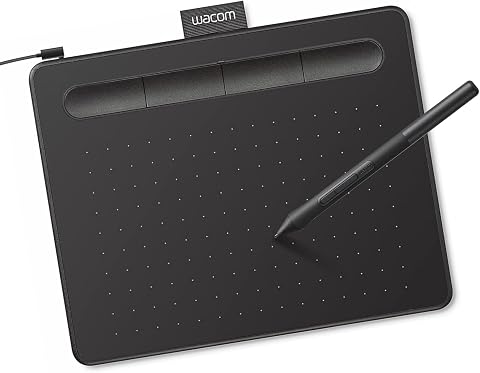 Wacom Intuos Small Wired Drawing Tablet with PenView on Amazon →
- 7
 HUION Inspiroy H1060P Graphics Drawing Tablet, 10 x 6.25 inView on Amazon →
- 8
 HUION Inspiroy H640P 6 × 4-Inch Drawing Tablet with Battery-Free StylusView on Amazon →
Match the Tablet to Your Workflow
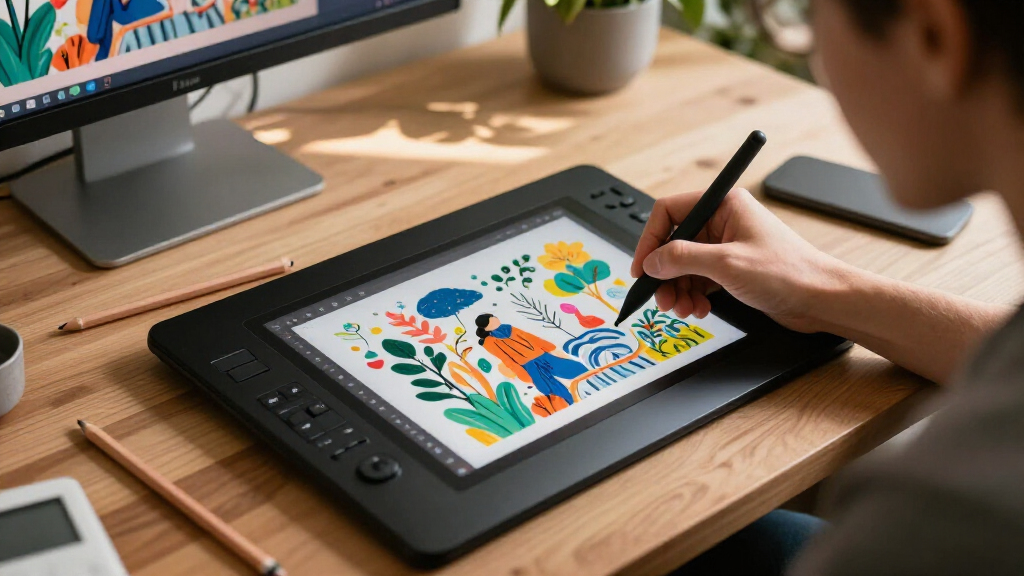
The guide’s list is useful because its eight products do not serve the same purpose. It explains that a display tablet puts the artwork beneath the pen, which may feel direct, but still depends on a computer and suitable connections. A screenless tablet can be less costly and use a separate monitor, though drawing while looking elsewhere can take practice. A standalone model reduces reliance on a computer for supported tasks, but its app selection and workflow may differ.
According to the guide, that distinction affects both purchase price and daily use. Artists who travel may value fewer devices and cables; those working at a desk may prefer a larger surface or configurable controls. The guide’s central advice is to start with setup, software support and active drawing area, then compare pen features once the basic fit is clear.
Products Worth Considering

Amazon Kindle Scribe Colorsoft 64GB with Premium Pen

Samsung Odyssey G55C 32-Inch QHD 1000R Curved Gaming Monitor

LG UltraGear 32-inch QHD Curved Gaming Monitor, 180Hz, 1ms, AMD FreeSync
As an affiliate, we earn on qualifying purchases.
Three Setups, Different Tradeoffs
The roundup groups tablets by how they connect to an artist’s workflow: screen tablets connect to a computer and show the image on the drawing surface; pen tablets control a cursor on a separate display; and standalone tablets run supported drawing tasks without a computer connection. The guide presents these as categories with different compatibility checks, not simply different screen sizes.
The source says its ranking weighs practical fit, controls, portability, stated pen features and learning curve. It cautions that pressure and tilt specifications are useful only when the tablet, driver, operating system and drawing application work together. For display tablets, the guide advises buyers to confirm the required connection and whether adapters or additional cables are needed.
Specifications Need Buyer Verification
The source material for the guide does not include a dated product-specification table, current prices, test results or a detailed account of the software supported by each model. The ranking is presented as a practical assessment, not as a controlled comparison with measured performance or verified value at a particular price.
The guide describes the two XP-Pen Artist 13.3 Pro V2 entries as closely related, but does not establish whether their specifications or packages are identical. Buyers should compare exact model names, included accessories, connection requirements and current manufacturer details. Compatibility may also vary by computer, operating system and drawing app; standalone devices require a separate check of available apps. The source does not establish that every listed tablet is available or unchanged in 2027.
Check Fit Before You Buy
Before ordering, artists should follow the guide’s advice to confirm that the tablet works with their computer or mobile device, operating system and preferred drawing software. For a screen tablet, check display connections and cable needs; for a standalone model, confirm that the required apps are available. Compare the active work area with desk space and drawing habits, and test whether shortcut keys or dials match commands used regularly.
For the similar XP-Pen listings, the guide recommends verifying the exact product version and package with the seller or manufacturer. Prices, bundles and specifications can change, so a 2027 purchase decision should use current product information rather than relying on the roundup’s ranking alone.
Key Questions
Which tablet does the guide rank first?
The guide names the HUION Kamvas 13 (Gen 3) as its top overall pick, citing its display and dual dials. It still requires a compatible computer and connection.
Which option is aimed at buyers seeking value?
The guide identifies the HUION Inspiroy H1060P as a value choice for people who already have a computer and want a larger screenless drawing surface.
What is the difference between a pen tablet and a display tablet?
As the guide explains, a pen tablet has no built-in screen, so the artwork appears on a separate monitor. A display tablet shows the image on the surface where the artist draws, but generally connects to a computer.
Can the standalone tablets run any drawing app?
Not necessarily. The guide says the Frunsi RubensTab T11 Pro and PicassoTab A10 support standalone use for drawing tasks, but buyers should check that their preferred apps are available and suit their workflow.
Are the two XP-Pen listings different products?
The guide describes the Artist 13.3 Pro V2 listings as closely related but does not establish whether they differ. Check the exact model, specifications and included accessories before buying.
Source: ThorstenMeyerAI.com