Design decisions, trade-offs, and lessons learned from building a 14,000-line TypeScript application for an audience that cares about audit trails more than animations.
QAtrial is a regulated quality workspace that runs entirely in the browser. No backend, no database, no authentication server. Just a React 19 single-page application that talks to localStorage for persistence and optionally to LLM APIs for AI features. It manages requirements, tests, risk assessments, electronic signatures, audit trails, and compliance reports for regulated industries across 37 countries and 10 industry verticals.
This article is a tour through the architecture — the choices we made, why we made them, and what we would do differently.
Design Philosophy
Three principles shaped every architectural decision:
Client-first, no server required. Regulated industries handle sensitive data — pre-submission regulatory information, proprietary manufacturing processes, clinical trial data. Requiring a cloud account or even a self-hosted server creates barriers to adoption and raises data governance questions. By running entirely in the browser, QAtrial sidesteps these concerns. Your data never leaves your machine unless you explicitly export it or configure an external AI provider.
Privacy by default. The AI features are optional. Without configuring an LLM provider, QAtrial is a fully functional quality management tool. When AI is configured, the application supports local models (via Ollama) that keep data on-network. The choice to send data to an external API is always explicit.
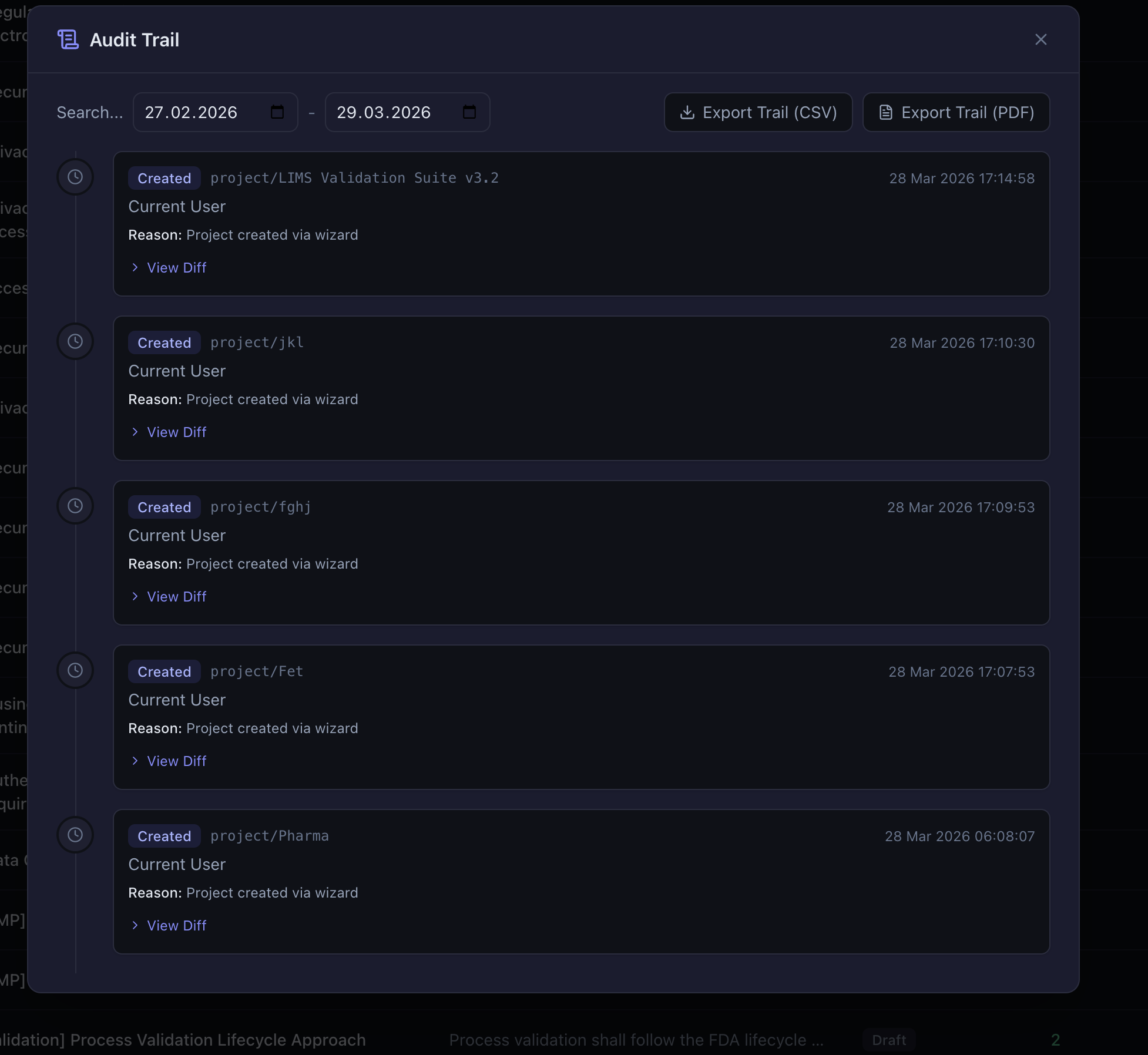
GxP awareness as a cross-cutting concern. Audit trail, electronic signatures, and change control are not features bolted onto a generic project management tool. They are woven into every state mutation. Creating a requirement logs an audit entry. Modifying a test logs an audit entry with before/after diffs. Deleting anything logs an audit entry. This happens at the store level, not the component level, which means no UI code path can bypass the audit trail.

Angular Development with TypeScript
As an affiliate, we earn on qualifying purchases.
As an affiliate, we earn on qualifying purchases.
Tech Stack and Rationale
React 19 + TypeScript
Type safety is not optional for regulated software. When a function expects a RiskLevel of "low" | "medium" | "high" | "critical" and you pass "Low", the compiler catches it. When a Test object requires linkedRequirementIds: string[] and you forget to initialize it, the compiler catches it. QAtrial defines over 50 TypeScript types in src/types/index.ts, and they serve as a living specification of the data model.
React 19 was chosen for its maturity and ecosystem. The component model maps naturally to the application’s UI structure: tables for requirements and tests, modals for creation and editing, dashboards for analytics, and panels for AI interactions.
Zustand Over Redux
QAtrial has 9 stores. In Redux, that would mean 9 slices, 9 sets of action creators, 9 reducers, and a combineReducers call to wire them together. Zustand gives us the same functionality with dramatically less boilerplate:
export const useRequirementsStore = create<RequirementsState>()(
  persist(
    (set, get) => ({
      requirements: [],
      counter: 0,
      addRequirement: (req) => set((state) => ({
        requirements: [...state.requirements, req],
        counter: state.counter + 1,
      })),
      // ... more actions
    }),
    { name: 'qatrial:requirements' }
  )
);
The persist middleware handles localStorage serialization and rehydration automatically. Some stores use onRehydrateStorage for side effects: useThemeStore applies the dark CSS class to <html> on rehydration, and useLocaleStore calls i18next.changeLanguage() to restore the user’s language preference.
Cross-store interactions use getState() for synchronous reads. When a requirement is deleted, useRequirementsStore.deleteRequirement() calls useTestsStore.getState().removeRequirementLink(id) to clean up dangling references in all tests. This maintains referential integrity without a relational database.
Vite 6
Fast cold starts and hot module replacement matter for developer experience. With 84 source files and 12 translation files, the development server starts in under a second. The production build uses Rollup under the hood, with tree-shaking that keeps the bundle reasonable despite heavy dependencies like Recharts.
TanStack Table v8
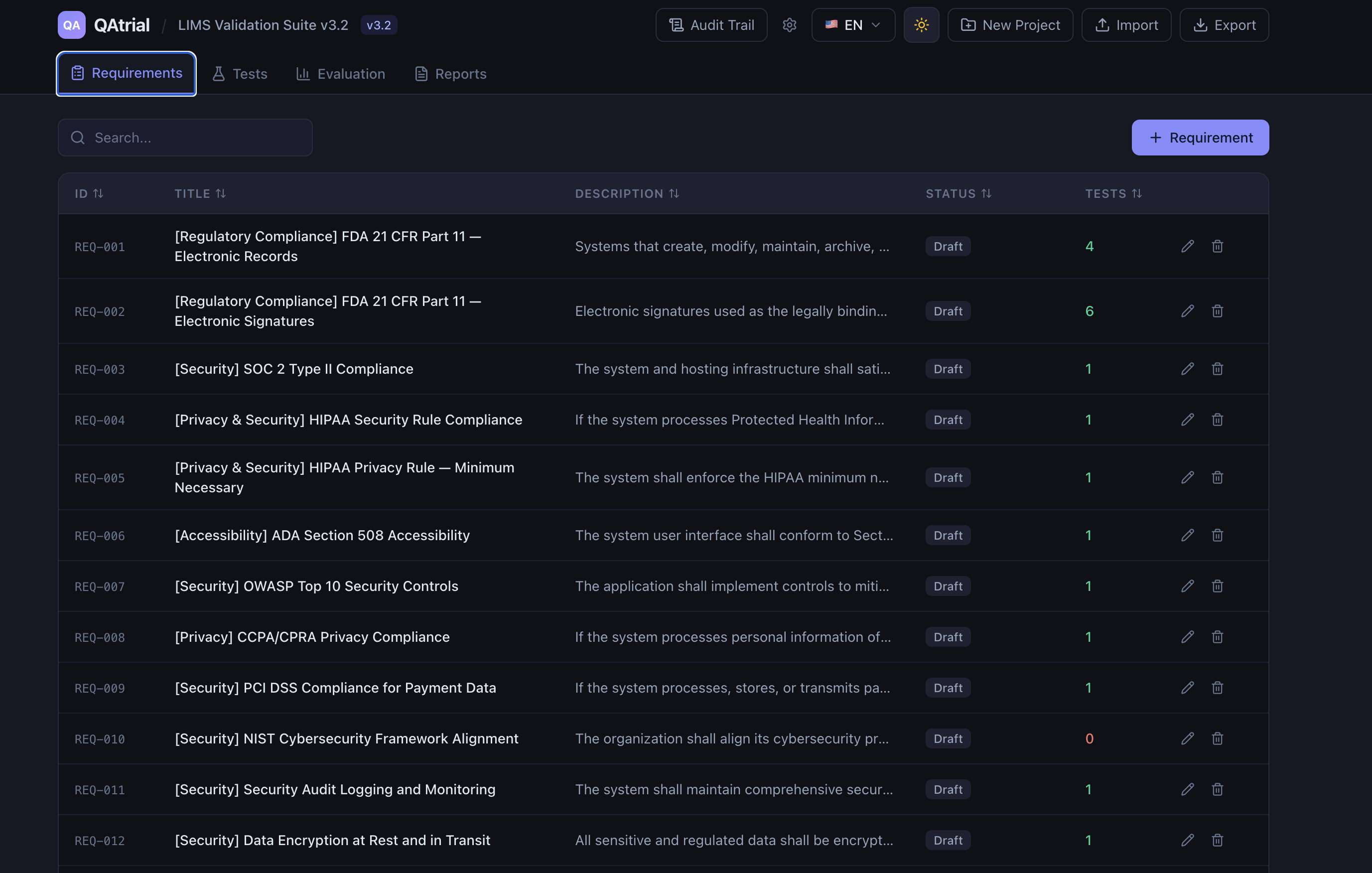
The requirements and tests tables are the primary UI for day-to-day use. They need sorting (by ID, title, status, risk level, regulatory reference), searching (free-text across title and description), and column flexibility. TanStack Table is headless — it provides the logic (sorting algorithms, filter functions, pagination state) without any UI, which means every visual detail is controlled by our Tailwind-styled components.
This was a deliberate choice over component libraries like AG Grid or MUI DataGrid. In a regulated application, auditors may ask about the behavior of UI components. With a headless library, we own the rendering and can explain exactly how sorting and filtering work because we wrote the JSX.
i18next with HTTP Backend
QAtrial supports 12 languages with approximately 440 translation keys each. Loading all 12 translation files (5,280+ key-value pairs) in the initial bundle would be wasteful. The i18next-http-backend plugin fetches translation files via HTTP from public/locales/{lng}/common.json on demand. Only the active language is loaded.
The fallback chain is simple: user’s selected language, then English. If a key is missing in the selected language, English text appears. This ensures the UI always displays something meaningful, even for partially translated languages.
A single common namespace holds all keys, grouped by prefix: app.*, nav.*, wizard.*, requirements.*, tests.*, dashboard.*, risk.*, ai.*, reports.*, audit.*, signature.*, changeControl.*, countries.*, verticals.*, modules.*, projectTypes.*, statuses.*. Every component uses the useTranslation() hook. There are no hardcoded strings in the UI.
Recharts
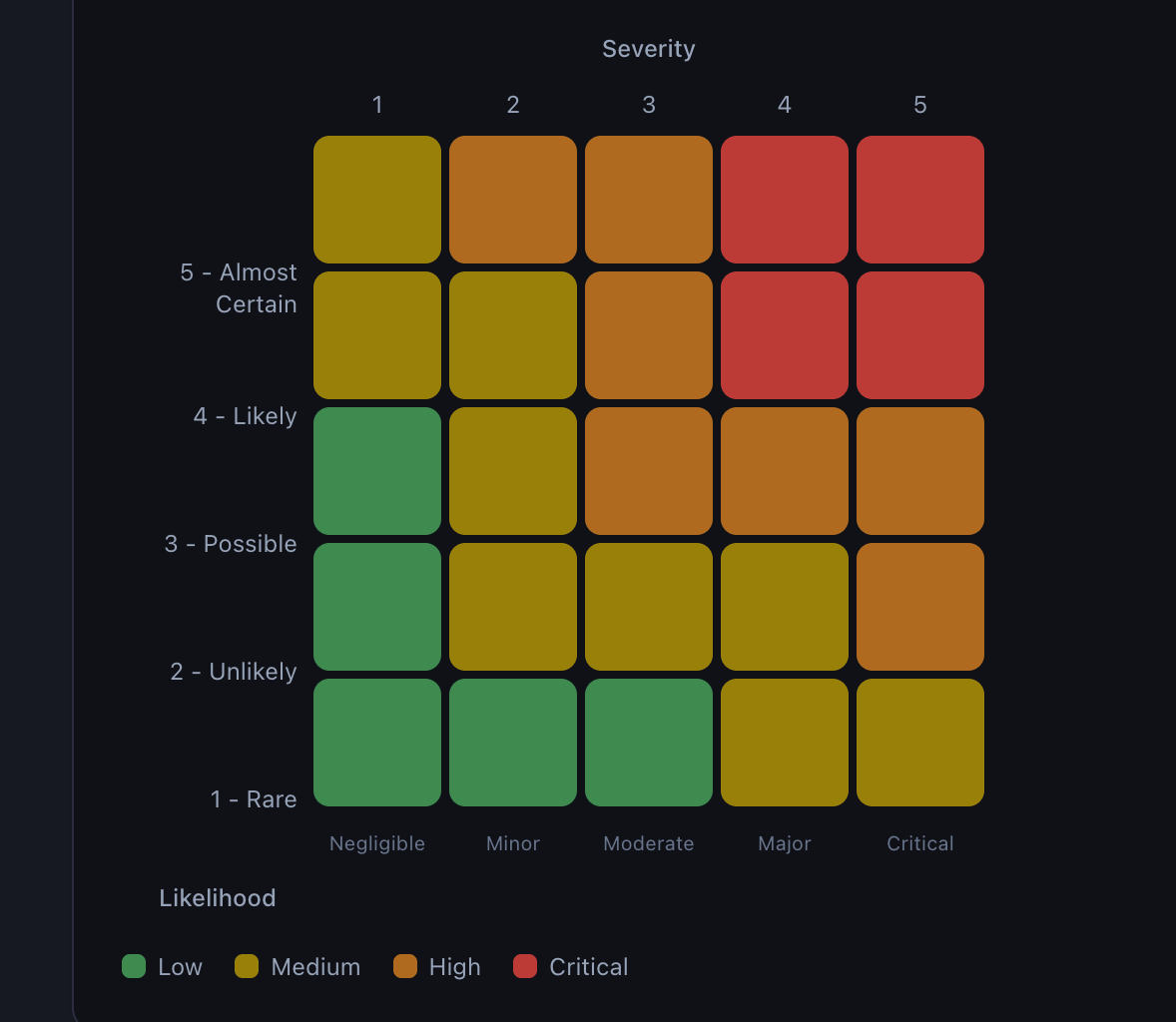
The seven-tab evaluation dashboard uses pie charts, bar charts, and a custom 5×5 risk matrix. Recharts was chosen for its declarative React API and reasonable bundle size. The trade-off is that Recharts is not small — it adds meaningful weight to the production bundle. For a dashboard-heavy application this is acceptable, but it is worth noting: if you only need one chart, Recharts is overkill. We need seven dashboard views with multiple chart types, so the cost is justified.
Tailwind CSS 4 with @theme
Tailwind CSS 4 introduces @theme for registering CSS custom properties as Tailwind tokens. QAtrial defines 50+ color tokens as CSS custom properties at :root with dark mode overrides under .dark:
:root {
  --color-surface: #ffffff;
  --color-text-primary: #111827;
  --color-accent: #6366f1;
}

.dark {
  --color-surface: #1f2937;
  --color-text-primary: #f9fafb;
  --color-accent: #818cf8;
}
These are mapped to Tailwind utilities via @theme, enabling classes like bg-surface, text-text-primary, and border-border. Theme switching is a single DOM operation: toggling the dark class on <html>. No JavaScript style recalculation, no React re-renders for color changes, no flash of unstyled content.

React Key Concepts: An in-depth guide to React's core features
As an affiliate, we earn on qualifying purchases.
As an affiliate, we earn on qualifying purchases.
The Template Composition Engine
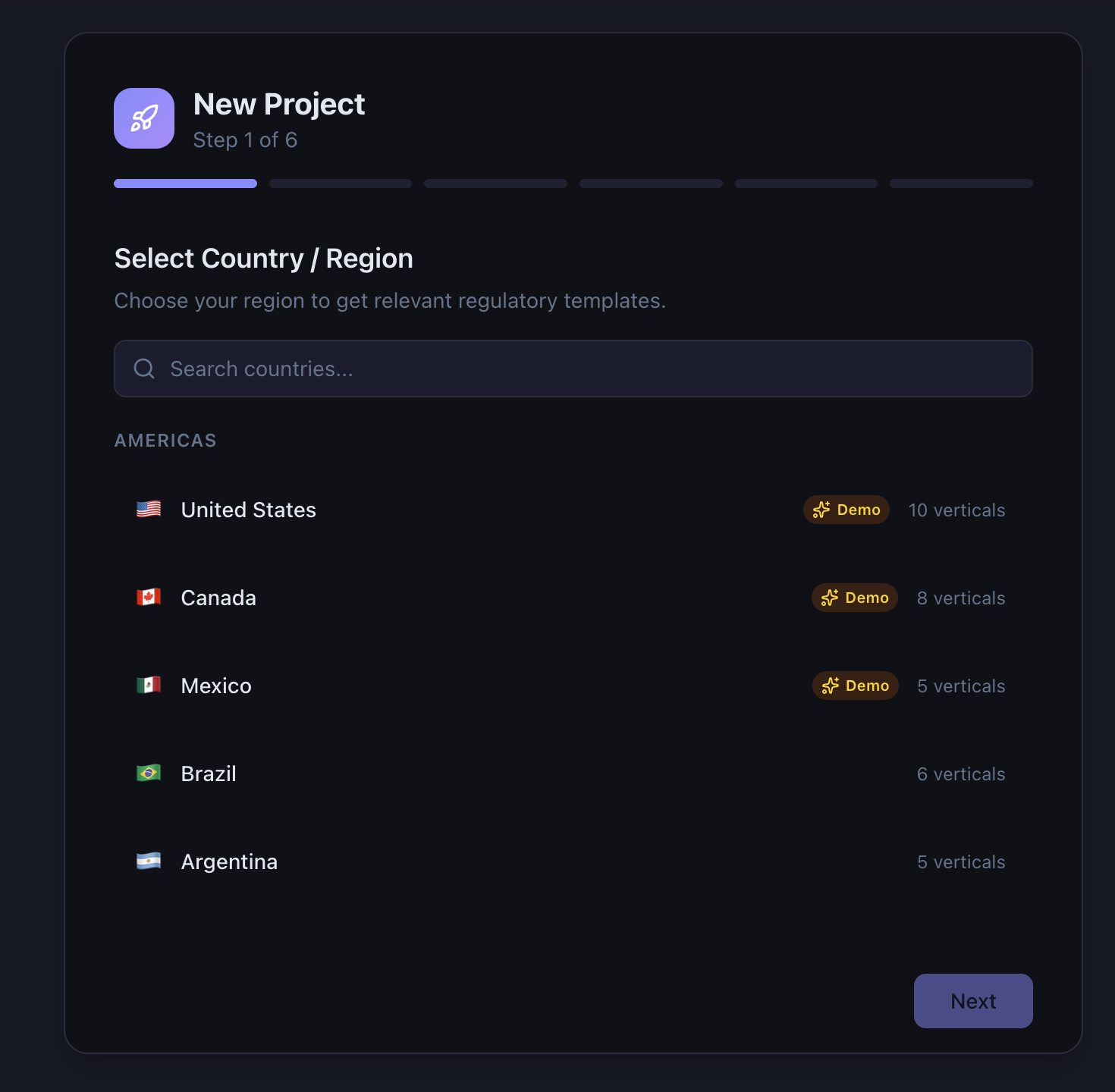
This is the most architecturally interesting part of QAtrial. It solves a combinatorial problem: 37 countries times 10 verticals times 8 project types times 15 optional modules produces an astronomical number of possible configurations, each with a different set of applicable requirements and tests.
The Composition Algorithm
composeTemplate(config) {
  1. Load regional base (EU countries get eu/base.ts)
  2. Load country base (e.g., de/base.ts)
  3. Load vertical common (e.g., medical_devices/common.ts)
  4. Load vertical + project type (e.g., medical_devices/embedded.ts)
  5. Load country + vertical overlay (e.g., de/overlays/medical_devices.ts)
  6. Load selected modules (e.g., MODULE_DEFINITIONS["audit_trail"])
  7. Deduplicate by title (last entry wins)
  Return: { requirements: [...], tests: [...] }
}
Each step appends to accumulating requirement and test arrays. Later entries override earlier ones during deduplication, which uses exact title matching. This allows specific templates (German overlay) to refine generic ones (EU base) by using the same title with updated content.
Why Dynamic import()
Template files are loaded via dynamic import():
const module = await import(`./regions/${countryCode}/base.ts`);This keeps the initial bundle small. A project configured for Japan + CRO never loads the EU base template, the Medical Devices vertical, or any of the 14 other country base templates. Only the files needed for the selected configuration are fetched.
The trade-off is that template loading is asynchronous, which adds complexity to the setup wizard’s composition step. The wizard shows a loading indicator while templates are being composed.
Why TypeScript, Not JSON
Template files are TypeScript modules, not JSON files. This was a deliberate choice:
- Type checking: Template requirements and tests conform to
TemplateRequirementandTemplateTestinterfaces. The compiler catches structural errors at build time. - Computed values: Some template fields are computed (for example, a test’s description might include a reference to the country’s regulatory authority name).
- IDE support: Developers editing templates get autocomplete, type hints, and inline documentation.
The cost is that non-developers cannot easily edit template files. A JSON-based template system would be more accessible to regulatory affairs professionals who are not programmers. This is a trade-off we may revisit.
Tag-Based Test Linking
Tests link to requirements through tags, not direct indices or IDs. A template test declares linkedReqTags: ["audit-trail", "event-logging"], and a template requirement declares tags: ["audit-trail", "event-logging", "data-integrity"]. During project creation, the wizard matches tags and converts them to direct ID links (linkedRequirementIds: ["REQ-003", "REQ-007"]).
Why not link by index? Because template composition is additive. When a module adds a new requirement with the tag “audit-trail,” tests from the country template that also reference “audit-trail” automatically link to it. Index-based linking would break every time a new source added requirements to the array.

Local AI with Ollama for Developers: The 2026 Guide to Private Models, APIs, RAG, Structured Outputs, and Real-World Workflows
As an affiliate, we earn on qualifying purchases.
As an affiliate, we earn on qualifying purchases.
AI Provider Abstraction
The AI system supports two provider types behind a single complete() function:
async function complete(request: CompletionRequest): Promise<CompletionResponse> {
  const provider = resolveProvider(request.purpose, providers);
  if (provider.type === 'anthropic') {
    // Anthropic Messages API: x-api-key header, /v1/messages endpoint
  } else {
    // OpenAI Chat Completions: Bearer token, /chat/completions endpoint
  }
}
The OpenAI-compatible path is intentionally broad. It handles OpenAI’s own API, OpenRouter (which proxies to dozens of models), and Ollama (which exposes a local OpenAI-compatible endpoint at http://localhost:11434/v1). By supporting the OpenAI format as a de facto standard, QAtrial gets broad model compatibility for free.
Purpose-Scoped Routing
Each provider is assigned purposes: Test Generation, Gap Analysis, Risk Classification, Report Narrative, CAPA, or the catch-all “All.” The resolver finds enabled providers matching the requested purpose, sorts by priority (lower number = higher priority), and returns the best match. If no specific match exists, it falls back to “All” providers.
This enables cost optimization. Report generation (which needs high-quality writing) can use Claude Sonnet. Risk classification (which needs structured reasoning but shorter output) can use a faster, cheaper model. Test generation for internal development (where data sensitivity is high) can use a local Llama instance.
Prompt Architecture
All six prompt templates follow a consistent pattern: a context interface, a builder function, and an async main function. Temperature defaults to 0.3 for regulatory precision — we want consistent, deterministic outputs, not creative variation.
Structured outputs (test cases, risk classifications, gap analyses, CAPA suggestions) are requested as JSON with explicit schemas. The parser handles a common LLM behavior: wrapping JSON in markdown code fences. Narrative outputs (executive briefs, VSR sections) are used as-is.
Every response records the provider ID and model name, creating auditability from AI suggestion back to the model that generated it.
![Express Schedule Free Employee Scheduling Software [PC/Mac Download]](https://m.media-amazon.com/images/I/41yvuCFIVfS._SL500_.jpg "Building a Regulated Quality Platform with React, Zustand, and AI: QAtrial's Technical Architecture 8")
Express Schedule Free Employee Scheduling Software [PC/Mac Download]
Simple shift planning via an easy drag & drop interface
As an affiliate, we earn on qualifying purchases.
As an affiliate, we earn on qualifying purchases.
State Management Architecture
The 9 Stores
| Store | Key | Responsibility |
|---|---|---|
useProjectStore | qatrial:project | Project metadata |
useRequirementsStore | qatrial:requirements | Requirements CRUD + counter |
useTestsStore | qatrial:tests | Tests CRUD + requirement links + counter |
useAuditStore | qatrial:audit | Audit trail entries |
useLLMStore | qatrial:llm | Provider configs + token usage |
useThemeStore | qatrial:theme | Light/dark preference |
useLocaleStore | qatrial:locale | Language + country |
useChangeControlStore | qatrial:change-control | Change control config |
useImportExport | N/A | Import/export (not persisted) |
Cross-Store Integrity
The setup wizard writes to four stores simultaneously: project metadata, requirements (bulk set), tests (bulk set), and audit trail (project creation event). This is not transactional — if the browser crashes mid-write, stores could be inconsistent. In practice, localStorage writes are fast enough that this has not been an issue, but it is an architectural weakness that a real database would solve.
Requirement deletion cascades to test link cleanup across stores. Import validates referential integrity by stripping dangling requirement links from tests before loading. These are manual consistency checks that a relational database would handle automatically.
Audit Trail as a Cross-Cutting Concern
The audit store exposes a log() function that components and other stores call after state mutations:
useAuditStore.getState().log({
  action: 'update',
  entityType: 'requirement',
  entityId: req.id,
  previousValue: JSON.stringify(oldReq),
  newValue: JSON.stringify(newReq),
  userName: projectStore.owner,
});
This is called explicitly, not through middleware. The trade-off is that developers must remember to call log() after every mutation. A middleware-based approach would be more foolproof but harder to implement with Zustand’s minimal API. For 84 source files and a small contributor base, explicit logging is manageable. At scale, it would become a risk.
Lessons Learned and Trade-offs
localStorage Limitations
localStorage has a 5-10 MB limit depending on the browser. For a project with a few hundred requirements and tests, this is ample. For a project with thousands of requirements, a comprehensive audit trail, and full before/after diffs for every change, it will eventually run out.
The mitigation is JSON export/import, which offloads data to the filesystem. But the real solution is a proper database — IndexedDB for client-side, or a backend with PostgreSQL for multi-user scenarios. This is the most significant architectural limitation of the current design.
Bundle Size
Recharts adds meaningful weight. The 12 translation files are lazy-loaded but still represent network requests. The template files are dynamically imported but tree-shaking cannot optimize TypeScript modules loaded at runtime. The production bundle is reasonable for a desktop browser but heavier than it needs to be for the core functionality.
A future optimization would be code-splitting the dashboard and report generation into separate chunks, loading them only when the user navigates to those tabs.
Why Templates Are TypeScript, Not JSON
We covered this above, but it is worth emphasizing: this decision prioritizes developer experience and type safety over accessibility to non-developers. A regulatory affairs professional with deep knowledge of ANVISA requirements cannot contribute a Brazilian template without learning TypeScript (or having a developer translate their knowledge into code). A JSON-based template system with a schema validator would lower the barrier to contribution. This is a trade-off we are actively evaluating.
Single-User Limitation
The current architecture has no concept of users, roles, or permissions. The “owner” field in project metadata is a text string, not an authenticated identity. Electronic signatures use a password field, but there is no user database to validate against. This is sufficient for individual use and small teams sharing exported JSON files, but it does not meet the multi-user requirements of larger organizations.
Adding multi-user support would require a backend server with authentication, a real database with concurrent access controls, role-based permissions, and conflict resolution for simultaneous edits. The Zustand stores are designed to be replaceable — swapping localStorage persistence for API calls to a backend would require changes to the persistence layer but not to the component code that reads from stores.
Future Architecture Considerations
The path from the current client-side architecture to an enterprise-ready platform involves several known steps:
- IndexedDB for client-side storage: Replace localStorage with IndexedDB to remove the size limit while maintaining the no-server-required model
- Optional backend: A Node.js or Python backend with PostgreSQL for organizations that need multi-user collaboration, real authentication, and centralized data
- Role-based access control: Admin, author, reviewer, approver roles with segregation of duties as required by 21 CFR 11.10(d)
- Real-time collaboration: WebSocket-based synchronization for concurrent editing
- API integrations: REST or GraphQL APIs for integration with ALM tools, ERP systems, and document management systems
- Plugin architecture: Allow third-party extensions without modifying the core codebase
The current architecture was designed with these extensions in mind. Zustand stores provide a clean abstraction layer — components read from stores, stores read from persistence. Changing the persistence mechanism (localStorage to IndexedDB to REST API) does not require rewriting components.
The 84-file, 14,000-line codebase is small enough to understand in its entirety and large enough to be useful. That is a good place to start.
QAtrial is available at github.com/MeyerThorsten/QAtrial.