This checklist is for musicians and creators who want to make music away from a fixed studio, whether they are sketching ideas, recording, or building a portable setup. The picks cover audio, input, and monitoring, plus storage, laptop positioning, and power.

Get audio and creator gear delivered free with Prime
- Fast, free delivery on millions of items
- Prime Video, Amazon Music and more included
- Member-only deals all year
Each section focuses on one role in the setup and names the selected product. The order starts with the tools for making and hearing music, then moves to workflow and workspace support that can help a mobile rig stay organized.
Use the list as a starting point, then check each product’s current specifications against your devices and routine. Pay close attention to connections, dimensions, and compatibility before buying; a component only helps if it works with the rest of your setup.
Portable Audio Interface
An audio interface is a central choice when a mobile setup needs to connect audio equipment to a computer. The Focusrite Scarlett Solo 4th Gen USB-C Audio Interface is the pick for this slot. Before choosing any interface, list the sources you expect to record and confirm that the available connections suit them. A common mistake is buying around a product name alone without checking the ports and supported setup details.
USB-C in the name makes the computer connection worth checking carefully: verify that your laptop or other host has a suitable port and that the required cable is included or available. Also consider the physical footprint and how the interface will fit in your bag or on a small work surface. Compare its documented inputs and outputs with your actual microphones, instruments, and monitoring gear rather than assuming a particular configuration.
Check compatibility with your operating system and music software before committing, and review the manufacturer’s setup guidance for any power or driver requirements. Match the connections first, then decide whether the interface fits your recording routine and travel setup.
What to look for:
- Confirm USB-C host and cable compatibility
- Match documented inputs to your recording sources
- Check outputs for your monitoring setup
- Verify operating system and software support
- Compare dimensions with your travel bag
Focusrite Scarlett Solo 4th Gen USB-C Audio Interface

The Scarlett Solo 4th Gen is a USB-C audio interface for recording vocals and guitar. It offers a 120 dB dynamic range, Air mode for added vocal and guitar presence, and includes recording software, plugins, instruments, and mastering tools.
Pros:
- 120 dB dynamic range
- Air mode enhances vocals and guitars
- Includes recording software and plugins
Cons:
- Availability can vary
Best for: Creators building a simple, mobile recording chain
Not ideal for: Setups that need more inputs than the listed model provides
Bottom line: Choose it after confirming its documented connections match your computer and recording gear.
USB MIDI Keyboard
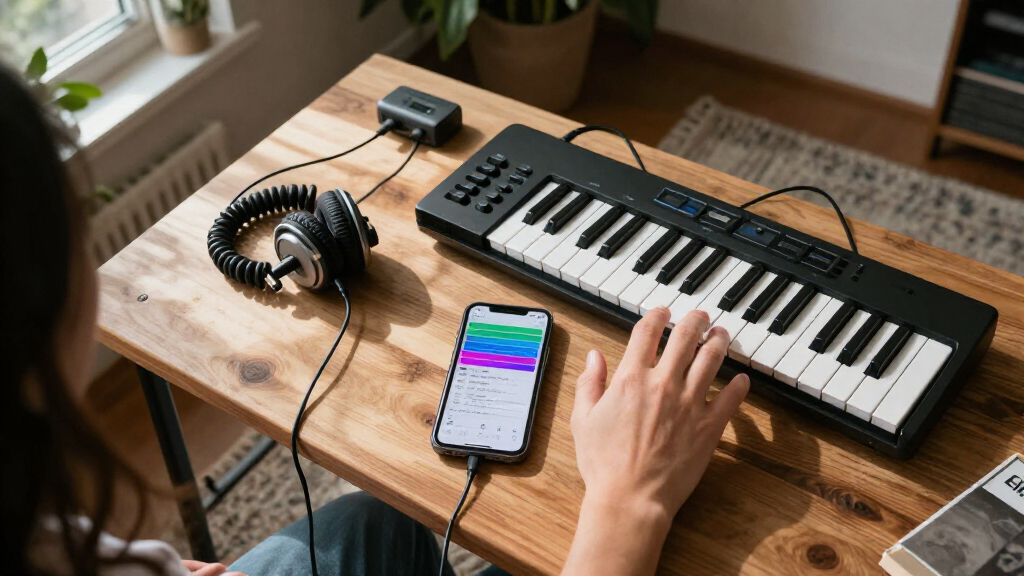
A MIDI keyboard gives a mobile producer a physical way to enter notes and work with music software. The M-Audio Keystation 61 MK3 USB MIDI Controller is the selection here. Its 61-key format makes dimensions and portability especially important considerations: measure the instrument and compare that footprint with your workspace, case, and travel plans. A common mistake is focusing on key count without considering whether the keyboard can be comfortably carried and set up where you work.
Check the controller’s documented controls and connections against the way you make music. Confirm that your computer has a compatible USB connection and that your preferred software can recognize the controller. MIDI controllers do not by themselves determine which sounds are available, so check how the device works with your software and any instruments you plan to use. Avoid assuming that a particular cable, adapter, or software bundle is included unless the listing confirms it.
Think about where the keyboard will sit in relation to your laptop and stand, and whether you have enough room to play without crowding other equipment. Fit and software support matter as much as the keyboard’s feature list when assembling a practical portable rig.
What to look for:
- Measure its 61-key footprint against your bag and desk
- Confirm USB connection and any adapter needs
- Check compatibility with your music software
- Review the documented controls for your workflow
- Verify included cables and software in the listing
M-Audio Keystation 61 MK3 USB MIDI Controller

The Keystation 61 MK3 is a USB MIDI controller with 61 full-size, velocity-sensitive semi-weighted keys, pitch and modulation wheels, and a sustain pedal input. It connects to Mac or PC without drivers or an external power supply, and includes software and online lessons.
Pros:
- Full-size semi-weighted keys are velocity-sensitive
- Includes hands-on controls for software and expressive playing
- Plug-and-play Mac and PC connection
- Comes with music software and lessons
Cons:
- iOS connectivity requires a separately sold adapter
Best for: Producers who want a full-size key layout in their mobile setup
Not ideal for: Travelers with very limited carrying or desk space
Bottom line: Confirm the keyboard’s footprint and software compatibility before building your setup around it.
Closed-Back Studio Headphones
Headphones are a personal fit decision as well as a monitoring choice, and a closed-back design can be relevant when working in shared or mobile spaces. The selected model is the Focal Lensys Professional Closed-Back Headphones. Before buying, check the manufacturer’s description of its connection, included accessories, and supported use. A common mistake is assuming that the word “professional” alone tells you whether the headphones will suit your preferred monitoring routine.
Comfort depends on the individual, so look for details about the headband, ear pads, adjustment range, and weight, then consider whether you can try them on or use a return option. If you wear glasses, account for that in your fit assessment. Check the connector against your interface or computer, including whether an adapter is required. Do not assume that every cable or carrying accessory shown in a listing comes in the box.
For mobile production, consider how the headphones will travel and whether their storage needs fit your bag. Look for clear documentation about replacement parts and cleaning if you expect regular use. Connection, fit, and storage are the practical checks that help determine whether this pick belongs in your everyday kit.
What to look for:
- Confirm connector compatibility with your interface
- Check whether an adapter or extra cable is needed
- Review fit and adjustment details for your comfort
- Consider fit with glasses if relevant
- Check included storage accessories and replacement parts
Focal Lensys Professional Closed-Back Headphones

Focal’s Lensys Professional headphones feature dual aluminum/magnesium drivers and sound isolation design, providing detailed monitoring and authentic playback. They are designed for studio use, monitoring, and casual listening, with soft memory foam earpads and a sturdy headband for comfort.
Pros:
- High-quality aluminum/magnesium drivers deliver detailed sound
- Effective sound isolation for studio and casual use
- Comfortable soft memory foam earpads and sturdy headband
- Suitable for monitoring, recording, and playback
Cons:
- Wired connection may limit mobility
- Lack of foldable design for portability
- No water resistance for outdoor use
Best for: Producers seeking closed-back headphones for mobile sessions
Not ideal for: Buyers who cannot confirm the fit or connector suits them
Bottom line: Check connector details and personal comfort before choosing these for regular sessions.
Portable SSD Drive
Portable storage can help keep project files and working materials together as a music setup moves between locations. This checklist’s pick is the SanDisk 8TB Extreme Portable SSD. Before deciding, confirm that the capacity and file organization suit your library and backup habits. A common mistake is treating a single portable drive as a complete backup plan without considering a second copy of important sessions.
Check the drive’s documented connection and transfer requirements against your computer, including any cable or port differences. Review its dimensions and any included protection or carrying accessories to see whether it will travel well with your other equipment. Confirm compatibility with the operating systems and file formats you use, and consider whether your computer has enough available storage and connection capacity to work with projects as expected.
Think through how you will label, organize, and back up projects before the drive fills with sessions. If you move between computers, verify that your workflow can access the same files on each one. Compatibility and backup habits deserve attention alongside capacity, especially when a drive will hold active creative work.
What to look for:
- Confirm connection and cable compatibility
- Check operating system and file system requirements
- Review dimensions for travel and storage
- Plan a second copy for important project files
- Match capacity to your library and project workflow
SanDisk 8TB Extreme Portable SSD

The SanDisk 8TB Extreme Portable SSD offers high-speed NVMe performance with up to 1050MB/s read and 1000MB/s write speeds. It features rugged durability with drop, water, and dust resistance, along with password protection and a 5-year warranty, making it ideal for active lifestyles and professional use.
Pros:
- High-speed data transfer with up to 1050MB/s read and 1000MB/s write speeds
- Rugged design with drop, water, and dust resistance for durability
- Includes password protection with 256-bit AES encryption for security
- Compact and portable, ideal for travel and on-the-go use
Cons:
- Performance may vary depending on host device and conditions
- Limited to USB 3.0 and USB 3.2 Gen 2 connectivity, may require compatible ports
- Price not specified, which could be a consideration for budget-conscious buyers
Best for: Creators who want portable space for music projects
Not ideal for: Anyone expecting one drive to serve as their only backup
Bottom line: Confirm connection requirements and keep a separate backup of important work.
Foldable Laptop Stand
A laptop stand can make a mobile workspace easier to arrange by changing where the computer sits relative to the desk. The selected stand is the Nulaxy 18" Height Telescopic 360° Rotating Aluminum Laptop Stand Desk, and the key buying task is checking fit. Measure your laptop’s width and depth, then compare them with the stand’s documented supported dimensions and weight limits. A common mistake is assuming that an 18-inch label guarantees compatibility with every laptop of that size.
Review how the telescopic adjustment works and whether the stand can be set to a comfortable height on the surfaces where you work. Check the footprint, folded dimensions, and weight if it will be carried regularly. The rotating feature may matter for how you position a screen, but confirm how the base is designed to be used and whether it suits your desk space. Avoid relying on product photos to infer stability or exact adjustment range.
Consider how the raised laptop will sit alongside a keyboard, MIDI controller, or interface, and whether the cables can reach without pulling. Supported laptop size and stability should guide the choice; also verify that the stand’s setup leaves enough room for your hands and other gear.
What to look for:
- Compare laptop dimensions with documented support range
- Check the stand’s stated weight limit
- Review height adjustment and folded dimensions
- Assess footprint against your usual work surface
- Confirm cables reach comfortably at your intended height
Nulaxy 18" Height Telescopic 360° Rotating Aluminum Laptop Stand Desk, Gray
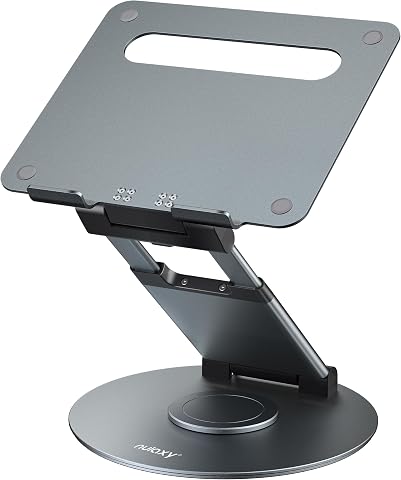
This adjustable laptop stand features 360° rotation, height up to 18 inches, and tilt angle adjustment for ergonomic comfort. It supports laptops up to 17 inches and 22 pounds, making it ideal for office use and collaboration.
Pros:
- 360° rotation for easy sharing and collaboration
- Adjustable height and tilt for ergonomic comfort
- Supports laptops up to 17 inches and 22 lbs
- Sturdy aluminum construction
Cons:
- Requires external keyboard and mouse for optimal typing
- Adjustments should be made with laptop removed for safety
Best for: Creators who want adjustable laptop positioning
Not ideal for: Setups where laptop dimensions exceed the stated support range
Bottom line: Measure your laptop and desk space against the stand’s specifications before buying.
USB-C Power Bank
Portable power can matter when a creator works away from a convenient outlet, but compatibility depends on the devices and charging needs in the setup. The chosen option is the Anker 25,000mAh Portable Laptop Power Bank with 165W Output. Check your laptop’s charging requirements and compare them with the bank’s documented output and supported charging standards. A common mistake is assuming the headline output guarantees compatibility with every laptop or that capacity alone predicts how long it will run.
Confirm which ports are available, how power is shared when multiple devices are connected, and what cables are included. Check the manufacturer’s guidance for recharging the bank itself, as well as the dimensions and weight to see whether it fits your travel kit. If you plan to power an interface or other accessories, verify their requirements too rather than assuming the laptop rating covers every device in the chain.
Consider when you will recharge between sessions and whether the bank’s form factor suits your routine. Review any airline or travel restrictions that apply to carrying power banks before a trip. Charging standards and real device needs are the checks that matter most when adding portable power to a music setup.
What to look for:
- Compare laptop charging requirements with documented output
- Check ports and simultaneous power behavior
- Verify included cables and charging standards
- Review dimensions and weight for travel
- Confirm travel rules for carrying the power bank
Anker 25,000mAh Portable Laptop Power Bank with 165W Output

This portable power bank features a 25,000mAh capacity and three 100W USB-C ports, allowing simultaneous charging of multiple devices such as laptops, smartphones, and tablets. It includes built-in retractable USB-C cables and is designed for travel, outdoor activities, and emergency backup.
Pros:
- High-capacity 25,000mAh for extended use
- Multiple USB-C ports for simultaneous device charging
- Built-in retractable cables for convenience and durability
- Compact and travel-friendly design
Cons:
- No charger included in the package
- Requires a 100W or higher charger for fast recharging
- Limited to airline carry-on restrictions (100Wh limit)
Best for: Creators who need a portable charging option for compatible devices
Not ideal for: Devices whose charging requirements do not match its documented output
Bottom line: Verify the laptop and accessory charging requirements against the bank’s specifications.
Build your kit in the order that addresses your biggest workflow gap: start with the computer connections and audio needs, then add a MIDI controller or headphones if those support how you create. Add storage and power based on your project and travel routines, and choose the stand after measuring both your laptop and typical work surface. Check compatibility at each step so the pieces work together.
You do not need to assemble everything at once. Use this checklist to compare specifications, confirm fit, and add the pieces that support your sessions now. A thoughtful mobile setup can grow with your music-making habits, one well-matched component at a time.
Fall Picks
fall essentials
As an affiliate, we earn on qualifying purchases.