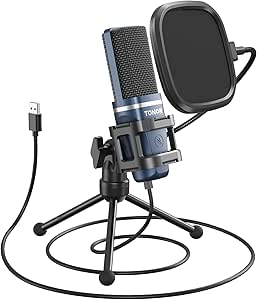
The best USB microphone for podcasting overall in this roundup is the FIFINE AmpliTank K688, a dynamic USB/XLR option that gives podcasters a straightforward computer connection and room to expand to XLR later. The Logitech Blue Yeti stands out for creators who want multiple pickup patterns, while the FIFINE T669 suits buyers who prefer a condenser mic kit for a desk studio. The main tradeoff is between dynamic mics, which can better suit untreated rooms, and condenser models, which can capture more room sound along with your voice. I also weigh direct monitoring, mute and gain controls, included accessories, and whether a model’s gaming focus helps or distracts from podcast use. Read on for the full breakdown and a recommendation matched to your recording setup.

Get audio and creator gear delivered free with Prime
- Fast, free delivery on millions of items
- Prime Video, Amazon Music and more included
- Member-only deals all year
Complete the kit


![Aokeo Pop Filter, [Upgraded Three Layers] Metal Mesh & Fo...](https://m.media-amazon.com/images/I/81prHDtlOsL._AC_SL480_.jpg "12 Best USB Microphones for Podcasting in 2027 6")
Key Takeaways
- The K688 ranks first for flexibility: its USB/XLR connection suits a new podcaster who wants a simple start with a possible upgrade path.
- Room conditions shape the shortlist: dynamic options such as the K688, AM8, and MAONO PD200W are more fitting for less-treated spaces than the condenser-focused T669, K669B, and Blue Yeti.
- The Blue Yeti’s pickup-pattern range is a specific advantage: it offers more recording configurations than the simpler single-speaker USB choices, but that flexibility can mean more setup decisions.
- Bundles and controls matter as much as the microphone capsule: the T669 and AM8T kit emphasize included setup gear, while models such as the ZealSound and CMTECK G009 highlight onboard controls and convenience.
- Gaming features do not automatically improve a podcast: RGB lighting and gaming-oriented styling on the A6V, A6T, and AM8 matter less than microphone placement, room noise, and monitoring.






| USB microphones for podcasting | Connectivity | Polar pattern | Signal-to-noise ratio |
|---|---|---|---|
| FIFINE AmpliGame AM8 USB/XLR D | USB and XLR | Unidirectional | 80 dB |
| FIFINE T669 Studio Condenser U | USB | Unidirectional | — |
| FIFINE K669B USB Microphone | USB | Unidirectional | 78 dB |
| ZealSound Podcast Microphone f | USB-C with Lightning adapters included | — | — |
| CMTECK USB Computer Microphone | USB | Unidirectional | 76 dB |
| FIFINE AmpliGame AM8T XLR/USB | USB and XLR | Unidirectional | — |
| Tonor Podcast Microphone | USB Type-A | Unidirectional | 80 dB |
| FIFINE AmpliTank K688 Dynamic | USB and XLR | Unidirectional | — |
| FIFINE AmpliGame A6V USB Gamin | USB | Bidirectional | 70 dB |
| FIFINE AmpliGame A6T USB Gamin | USB | Unidirectional | 70 dB |
| Logitech Blue Yeti USB Microph | USB | Multipattern; four pickup patterns | 100 |
| MAONO PD200W Hybrid Wireless P | USB, wireless, and XLR | Unidirectional | 82 dB |
More Details on Our Top Picks
FIFINE AmpliGame AM8 USB/XLR Dynamic Microphone for Gaming Streaming
I’d choose the FIFINE AmpliGame AM8 when a podcaster wants a simple USB start without giving up the option to move to an XLR mixer later. Its dynamic, unidirectional pickup is a practical fit for untreated rooms, where rejecting some off-axis noise matters more than capturing a wide soundstage. Compared with the USB-only FIFINE T669, the AM8 offers a clearer upgrade path, though the T669 includes a boom arm and pop filter that the AM8 listing does not specify. USB brings convenient mute and volume controls plus RGB lighting; those extras are limited or inactive over XLR. The tradeoff is a gaming-oriented design and an XLR cable that must be supplied separately. I’d skip it if the goal is a complete recording kit straight out of the box.
Pros:- USB and XLR connections allow a move from direct computer recording to an XLR interface
- Unidirectional dynamic design is suited to reducing distracting room sound around a close-talking host
- On-mic mute and volume controls make quick recording adjustments easier
- Metal and ABS construction combines a sturdy enclosure with a gaming-style appearance
Cons:- XLR cable is not included, adding a separate setup requirement for mixer or interface use
- RGB lighting and some controls are unavailable or limited when connected through XLR
- Unlike the FIFINE T669 kit, the listed package does not specify a boom arm or pop filter
Best for: Solo podcasters recording in a home office who want USB convenience now and the option to add XLR equipment later
Not ideal for: Buyers who need an included boom arm, pop filter, or XLR cable, or who want a strictly podcast-focused, no-lighting setup
- Connectivity:USB and XLR
- Microphone type:Dynamic
- Polar pattern:Unidirectional
- Frequency response:50 Hz–16 kHz
- Signal-to-noise ratio:80 dB
- Power source:Corded electric
- Enclosure material:ABS plastic and metal
Our verdict“Pick the AM8 if you want a dynamic USB podcast mic with a genuine XLR upgrade path and can provide your own mounting and XLR accessories.”
FIFINE T669 Studio Condenser USB Microphone for Recording and Podcasting
The FIFINE T669 is my pick for a first home podcast setup when having the supporting hardware matters as much as the microphone. Its USB condenser mic, boom arm, and pop filter give a new host a more ready-to-position recording station than the desktop-only FIFINE K669B. The listed 20 Hz–20 kHz response covers a broad range, while the unidirectional pattern focuses on the person speaking into the mic. That condenser design can suit a controlled room and detailed vocal recording, but it is less compelling if the room is noisy or untreated; the dynamic AM8 is the more room-conscious choice in this lineup. The T669 connects directly by USB and supports computers and PS4/PS5, but it is not listed as Xbox-compatible and has no XLR connection for later expansion.
Pros:- Included boom arm helps position the mic close to the host and clear desk space
- Pop filter is supplied to help manage plosive sounds during close speech
- USB setup avoids the need for a separate audio interface
- 20 Hz–20 kHz listed frequency response supports voice and broader recording uses
Cons:- Condenser design may pick up more room sound than the dynamic FIFINE AM8
- USB-only connection does not provide an XLR upgrade path
- Not listed as compatible with Xbox consoles
Best for: New podcasters recording at a desk who want a USB microphone with a boom arm and pop filter in the same kit
Not ideal for: Hosts recording in a noisy room, Xbox users, or podcasters planning to connect an XLR mixer or interface
- Connectivity:USB
- Connector types:USB Type-A and USB Type-C
- Polar pattern:Unidirectional
- Frequency response:20 Hz–20 kHz
- Channels:1
- Included form factor:Microphone with boom arm
- Hardware platforms:Laptop, PC, PS4, and PS5
Our verdict“Choose the T669 if you want a ready-to-position USB starter kit for a reasonably quiet recording space.”
FIFINE K669B USB Microphone, Condenser Recording Mic for Vocals, Meetings
For a podcaster who wants a straightforward desktop mic rather than a full recording kit, the FIFINE K669B keeps the setup simple: connect by USB, place it on the desk, and adjust its volume control. Its metal enclosure and unidirectional pickup make it a practical basic choice for solo speech, though the compact desktop form puts it closer to keyboard and desk noise than a boom-arm setup. That is where the FIFINE T669 has an advantage: its included arm can bring the mic toward the speaker and free up desk space. Both are USB condenser options, but the K669B is the leaner choice when accessories are not the priority. It lacks XLR, and some apps may need automatic volume adjustment disabled to keep recording levels consistent.
Pros:- Plug-and-play USB connection keeps setup accessible for computer-based recording
- Metal enclosure offers a sturdier feel than a lightweight plastic desktop mic
- Physical volume control allows quick level changes at the microphone
- Unidirectional pickup is suited to focusing on one speaker
Cons:- Desktop placement can leave the mic near keyboard, desk, and handling noise
- USB-only design offers no XLR connection for an audio interface
- Some applications may require automatic volume adjustment to be disabled
Best for: Solo hosts, students, and remote workers who record at a computer and want a simple USB mic with a physical volume control
Not ideal for: Podcasters who need a boom arm, XLR expansion, phone compatibility, or reliable use without adjusting application audio settings
- Connectivity:USB
- Connector types:USB Type-A and USB Type-C
- Polar pattern:Unidirectional
- Frequency response:20 Hz–20 kHz
- Signal-to-noise ratio:78 dB
- Channels:1
- Enclosure material:Metal
- Included features:Desktop stand, volume control, and 6.5 ft USB-B to USB-A/C cable
Our verdict“Get the K669B for uncomplicated solo recording at a computer, but choose the T669 if an included boom arm and pop filter are priorities.”
The ZealSound K66 earns its place for podcasters who record across a computer and mobile devices, rather than staying at one fixed desk. Its USB-C connection and included Lightning adapters make it more flexible for phones and tablets than the computer-focused FIFINE K669B. Physical gain, volume, mute, and monitoring controls can help a host manage a session without hunting through software menus, while zero-latency monitoring supports checking a live mic signal. The K66 also lists echo and noise-reduction features, but those controls may take some adjustment; they are not a substitute for mic placement or a quiet room. Compared with the AM8, it has no XLR route to an interface, so it makes more sense for direct USB recording than a setup intended to grow into hardware-based mixing.
Pros:- USB-C connection and included Lightning adapters support a broad mix of devices
- Physical gain, volume, and mute controls enable quick session adjustments
- Zero-latency monitoring helps the host hear the live microphone signal
- Listed compatibility includes computers, mobile devices, and PS4/PS5
Cons:- USB-only connection does not support direct XLR mixer or interface use
- Noise-reduction and echo controls may take time to configure
- Control options may feel unnecessarily involved for a basic solo podcast setup
Best for: Mobile podcasters and creators who record on a mix of Windows or Mac computers, iPhones, iPads, and Android devices
Not ideal for: Buyers who want XLR connectivity, a simple one-control setup, or a dynamic mic suited to a noisy untreated room
- Connectivity:USB-C with Lightning adapters included
- Frequency response:40 Hz–18 kHz
- Sampling rate:46 kHz
- Sensitivity:−45 dB ±3 dB
- Device compatibility:Windows, Mac, iPhone, iPad, Android, PS4, and PS5
- Monitoring:Zero-latency monitoring
- Controls and features:Gain, volume, mute, echo, and noise reduction
Our verdict“Choose the K66 if recording across phones, tablets, and computers matters more than XLR expandability or a minimal control layout.”
CMTECK USB Computer Microphone G009, Noise-Cancelling Desktop Mic for PC/Laptop, Online Chat, Podcasting, Gaming, YouTube, with Mute Button
The CMTECK G009 is a compact voice-chat style option for podcasters who value a small footprint and quick muting over a more traditional mic-and-arm arrangement. Its adjustable gooseneck lets a host aim the capsule toward their mouth, and the LED mute indicator offers a visible cue during calls or recordings. Compared with the FIFINE K669B, the G009’s flexible stem is easier to reposition without moving a fixed desktop mic, but the K669B provides a more conventional recording-microphone form and lists a broad 20 Hz–20 kHz response. I would treat the G009 as a practical choice for spoken segments, meetings, and casual podcasting, not as a feature-rich studio centerpiece. It is USB-only, has limited listed platform support, and its compact desktop format may not suit hosts seeking a more adjustable boom-arm position.
Pros:- Flexible gooseneck makes it easy to aim the microphone toward the speaker
- LED mute indicator provides a clear visual check of mute status
- USB connection supports a simple computer-based setup
- Compact desktop form takes less space than a boom-arm arrangement
Cons:- USB-only connectivity leaves no option for an XLR interface or mixer
- Listed compatibility excludes Linux, Android, and Raspberry Pi
- Desktop gooseneck positioning offers less reach and flexibility than the T669’s boom arm
Best for: PC and Mac users recording short solo segments, online interviews, or voice chat who want a small mic with a visible mute status
Not ideal for: Linux, Android, or Raspberry Pi users, and podcasters who need XLR, mobile connections, or a boom-arm recording position
- Connectivity:USB
- Polar pattern:Unidirectional
- Form factor:Gooseneck desktop microphone
- Signal-to-noise ratio:76 dB
- Channels:1
- Compatible devices:Desktop computers and laptops
- Controls:Mute function and volume control
- Dimensions:2.68 × 4.21 × 4.41 in
Our verdict“Pick the G009 for compact computer-based speech recording and quick muting, not for a studio setup that needs broader connectivity or mic positioning.”
FIFINE AmpliGame AM8T XLR/USB Gaming Microphone Set, Dynamic PC Mic
The AM8T is the easiest pick here for a new podcaster who wants a dynamic mic and a boom arm in one package. Its USB and XLR connections let you start on a computer and later add a mixer or audio interface, while the included arm helps place the mic close to your mouth for focused speech. Compared with the FIFINE K688, this kit is more ready to mount out of the box, though the K688 has a metal body and also provides USB monitoring controls. The AM8T’s mute button and headphone volume control are useful during live sessions; RGB is an aesthetic extra rather than a podcasting advantage. Plan for a separate XLR cable if you move to an interface, and check that your desk can take the clamp before buying.
Pros:- USB and XLR connections support both beginner and upgraded recording setups
- Included adjustable boom arm makes close mic placement easier
- Mute and headphone volume controls are accessible during recording
- Unidirectional dynamic design suits focused, single-host speech
Cons:- XLR cable is not included for interface-based recording
- Desk clamp is specified for desktops less than 2 inches thick
- Boom arm and controls may take more setup than a basic desktop USB mic
Best for: First-time podcasters who want a dynamic microphone, boom arm, and a path from USB to an XLR recording setup.
Not ideal for: Podcasters with a thick or incompatible desk, or anyone seeking a simple, accessory-free USB microphone without RGB.
- Connectivity:USB and XLR
- Microphone type:Dynamic
- Polar pattern:Unidirectional
- Frequency range:50 Hz–16 kHz
- Controls and monitoring:Mute function, headphone jack, and volume control
- Included accessory:Adjustable boom arm stand
- Weight:2.6 pounds
Our verdict“Choose the AM8T if you want a dynamic podcast mic with its own boom arm and room to grow into XLR recording.”
Tonor Podcast Microphone, USB Condenser Mic for PC & Laptop
The Tonor TC-777 favors a straightforward desktop setup: connect by USB Type-A, position the mic, and record. Its condenser capsule, cardioid-style unidirectional pickup, shock mount, and pop filter provide a useful starting point for solo podcast speech without needing to assemble a boom-arm kit. Compared with the FIFINE A6T, the Tonor is less oriented around gaming decor and comes with a desktop stand rather than a boom arm, which can suit a compact desk but leaves less freedom to move the mic. The included accessories help manage plosives and desk vibration, but this is still a fixed-pattern, one-channel microphone—not a flexible choice for roundtable conversations. It works with PC, Mac, PS4, and PS5, but not Xbox, and its USB-only design offers no XLR upgrade path.
Pros:- USB Type-A connection supports a simple computer setup
- Included shock mount and pop filter help reduce handling noise and plosives
- Adjustable angle makes it easier to aim the mic at a seated speaker
- Compatible with Windows, Mac, PS4, and PS5
Cons:- USB-only connection cannot be used with an XLR interface
- Unidirectional pattern is limited for recording multiple people around a table
- Not compatible with Xbox consoles
Best for: Solo podcasters recording at a desk who want a basic USB condenser with a pop filter and shock mount included.
Not ideal for: Xbox users, multi-person hosts seeking multiple pickup directions, or podcasters who want XLR connectivity and an upgrade path.
- Connectivity:USB Type-A
- Microphone type:Condenser
- Polar pattern:Unidirectional
- Impedance:680 ohms
- Signal-to-noise ratio:80 dB
- Included accessories:Shock mount, pop filter, and adjustable stand
- Compatibility:Windows, Mac, PS4, and PS5; not Xbox
Our verdict“Pick the TC-777 for uncomplicated solo podcasting at a computer, but skip it if you need XLR or multi-person pickup.”
FIFINE AmpliTank K688 Dynamic Microphone, XLR/USB Podcast Recording PC Mic
The K688 suits a podcaster who wants a substantial metal-bodied dynamic mic and expects to change recording setups over time. USB makes computer recording accessible, while XLR supports a later move to an audio interface; its headphone jack, volume control, and mute function add practical hands-on control when used over USB. Compared with the AM8T, the K688 is less of a ready-made mounting kit: it does not include a boom arm or stand, so you can choose your own support but must supply it. The mic’s unidirectional pattern is a sensible fit for one speaker, though it rewards close placement, which may feel restrictive if you tend to lean back while speaking. Also account for the fact that some controls are USB-only and an XLR cable is not included.
Pros:- USB and XLR connectivity accommodate computer recording and later interface use
- Metal enclosure provides a more substantial build than plastic-bodied options
- USB mode offers a headphone jack, volume control, and mute function
- Unidirectional dynamic design focuses on a single speaker
Cons:- Boom arm, microphone stand, and XLR cable are not included
- Close speaking distance is needed for the intended sound capture
- Some controls and features are available only over USB
Best for: Solo podcasters who want USB now, XLR later, and the freedom to select their own stand or boom arm.
Not ideal for: Buyers who need a complete microphone-and-arm kit, or speakers who cannot keep the mic close while recording.
- Connectivity:USB and XLR
- Microphone type:Dynamic
- Polar pattern:Unidirectional
- Frequency range:50 Hz–16 kHz
- Enclosure:Metal
- USB controls:Mute function and headphone volume control
- Included cable:Detachable USB-C cable
Our verdict“Choose the K688 if you want a durable USB/XLR podcast mic and are comfortable sourcing your own mounting gear.”
FIFINE AmpliGame A6V USB Gaming Microphone with RGB Lighting
The A6V is a compact desktop option for podcasters who want a quick USB connection and physical controls without committing to an XLR setup. Its included tripod, shock mount, and pop filter keep the basic recording kit together, while the tap-to-mute control and gain knob make it easier to manage a live recording from the desk. Compared with the FIFINE A6T, the A6V’s tripod-based form is less suited to positioning the mic over a keyboard or clearing desk space with an arm. Its bidirectional pattern is unusual among these picks: it can suit two people facing each other, but it may also capture more room sound than the unidirectional Tonor TC-777. RGB and a high stated sampling rate are secondary to placement and room acoustics for spoken-word work, and the A6V has no XLR output.
Pros:- USB plug-and-play connection keeps setup simple
- Tap-to-mute and gain knob provide convenient desk-side control
- Tripod, shock mount, and pop filter are included
- Bidirectional pattern can accommodate two speakers facing one another
Cons:- USB-only design does not support XLR recording or interface upgrades
- Bidirectional pickup can include unwanted room sound compared with unidirectional options
- RGB lighting may be distracting and does not improve spoken-word capture
Best for: Podcasters recording at a small desk who prefer a USB tripod mic with mute and gain controls, or occasionally record two speakers facing each other.
Not ideal for: Users who need an XLR upgrade path, a boom-arm setup, or strong rejection of sound from behind the microphone.
- Connectivity:USB
- Polar pattern:Bidirectional
- Frequency range:60 Hz–18 kHz
- Signal-to-noise ratio:70 dB
- Controls:Tap-to-mute and gain knob
- Cable:6.5-foot detachable USB-C cable
- Included accessories:Shock mount, pop filter, and adjustable tripod stand
Our verdict“Pick the A6V for a compact, controlled USB desk setup, but choose a unidirectional mic if room-noise rejection matters more.”
FIFINE AmpliGame A6T USB Gaming Microphone Kit, Condenser Mic for Streaming
The A6T makes sense for a first-time podcaster who wants a USB condenser and boom arm in one kit. The arm helps bring the mic closer to the speaker and clear space beneath it, while the included shock mount and pop filter address common desk-recording nuisances. Its unidirectional pattern is a more focused fit for solo speech than the FIFINE A6V’s bidirectional pickup, though neither model offers XLR for future interface-based recording. The A6T adds a touch-mute control and adjustable volume, with RGB lighting aimed more at a streaming setup than an audio benefit. Compared with the Tonor TC-777, it takes more desk installation but gives you a boom-arm position rather than a basic desktop stand. The tradeoff is a USB-dependent setup and a fixed pickup pattern that does not suit a group around one mic.
Pros:- Included boom arm supports close positioning and frees desktop space
- Shock mount and pop filter are supplied for a more complete starter setup
- Unidirectional pattern is suited to a single host
- Touch mute and adjustable volume offer convenient recording controls
Cons:- USB-only connectivity provides no XLR upgrade path
- Unidirectional pickup is not suited to capturing a group around the mic
- RGB lighting is a cosmetic feature that may not suit a focused recording space
Best for: New solo podcasters who record at a computer and want a boom arm, pop filter, and shock mount included.
Not ideal for: Podcasters planning to use an XLR interface, record several speakers around one mic, or avoid clamp-mounted desk equipment.
- Connectivity:USB
- Microphone type:Condenser
- Polar pattern:Unidirectional
- Frequency range:60 Hz–18 kHz
- Signal-to-noise ratio:70 dB
- Controls:Touch mute and adjustable volume
- Included accessories:Boom arm, shock mount, and pop filter
Our verdict“Choose the A6T if you want a beginner-friendly solo podcast kit with a boom arm, and skip it if you need XLR or group pickup.”
Logitech Blue Yeti USB Microphone for PC, Mac, Gaming, Recording, Streaming, Podcasting, Studio, and Computer – Blackout
I’d choose the Blue Yeti when a podcast setup needs to handle more than one recording arrangement. Its four pickup patterns let you switch between solo speech, a two-person conversation, or a group around a table, while the AM8 and K688 are dynamic USB/XLR options aimed more squarely at close-miked voice recording. That flexibility is useful, but the Yeti’s condenser design can also pick up more room sound, so untreated spaces may make it harder to get a clean, focused voice track.
Onboard gain, mute, and volume controls keep routine adjustments within reach, and Blue VO!CE software adds voice effects for creators who want to shape their sound. The tradeoff is extra software for full feature access and a larger feature set than a casual solo podcaster may need. I rank it as a versatile studio-style choice, not the simplest plug-in-and-talk option.
Pros:- Four pickup patterns suit solo voice, interviews, and group recordings.
- Onboard gain, mute, and volume controls make quick recording adjustments easier.
- Blue VO!CE software offers voice effects and sound-shaping options.
- Metal enclosure and included stand support a desktop recording setup.
Cons:- Condenser pickup can capture room noise in untreated recording spaces.
- Full software functionality requires Logitech G HUB.
- The multiple patterns and controls may be unnecessary for straightforward solo podcasting.
Best for: Podcasters who record solo episodes, interviews, and occasional group discussions at a computer and want to switch pickup patterns without changing microphones.
Not ideal for: Solo podcasters recording in noisy or untreated rooms, or anyone who wants a minimal setup without additional software features.
- Connectivity:USB
- Microphone design:Tri-capsule array
- Polar pattern:Multipattern; four pickup patterns
- Frequency range:20 Hz–20 kHz
- Channels:2
- Signal-to-noise ratio:100
- Audio sensitivity:120 dB
- Enclosure:Metal
Our verdict“Choose the Blue Yeti if you want one USB mic for several podcast formats; skip it if your priority is focused voice pickup in a noisy room.”
MAONO PD200W Hybrid Wireless Podcast Microphone for PC, Dynamic XLR USB Mic
The MAONO PD200W is the lineup’s most adaptable choice for podcasters who move between a computer, camera, and mobile device. It offers wireless, USB, and XLR connections, giving it more ways to fit a changing recording setup than the USB-only Blue Yeti. Its unidirectional dynamic design is geared toward capturing the speaker in front of it, a practical match for voice recording, while noise reduction and customizable sound profiles add options for tailoring the result.
That range of connections comes with added setup decisions: buyers need to pick a connection method, manage battery power for wireless use, and may need separate camera or Lightning accessories. Unlike the simpler USB-focused K669B, this mic makes most sense when wireless mobility or XLR expansion is genuinely useful. I’d pass if the goal is a fixed, uncomplicated desktop podcast station.
Pros:- Wireless, USB, and XLR connectivity can fit a range of recording setups.
- Unidirectional dynamic design is suited to focused voice recording.
- Noise reduction and customizable sound profiles provide sound-shaping options.
- Compatible with computers, smartphones, cameras, audio interfaces, and mixers.
Cons:- Wireless operation requires battery power and adds charging or battery-management tasks.
- Multiple connection methods can make setup less direct than a USB-only microphone.
- Some camera and Lightning accessories are sold separately.
Best for: Mobile creators and podcasters who record across a computer, smartphone, or camera and want the option to add wireless or XLR connections.
Not ideal for: First-time podcasters who only need a straightforward USB desktop mic, or buyers who do not want to manage battery power and connection setup.
- Connectivity:USB, wireless, and XLR
- Connector types:USB Type-C and XLR
- Microphone design:Dynamic
- Polar pattern:Unidirectional
- Frequency response:Up to 16 kHz
- Channels:1
- Signal-to-noise ratio:82 dB
- Power:Battery powered or corded electric
- Weight:1.32 kg
Our verdict“Pick the PD200W if your podcast workflow spans mobile devices, cameras, or XLR gear; choose a simpler USB mic if you record only at a desk.”

How We Picked
I compared these microphones as tools for spoken-word recording, prioritizing voice-focused pickup, connection options, monitoring, onboard controls, and setup practicality. I also looked at whether the included stand or kit could help a beginner get recording without extra purchases, and whether the mic’s design fits solo desk recording, a shared room, or a more expandable studio setup. A microphone’s label or gaming features did not earn a higher place on their own; the question was whether those features solve a podcasting need.
The ranking favors useful podcast flexibility and a clear setup path over feature count alone. The K688 leads for its USB/XLR choice, while the Blue Yeti ranks for pickup-pattern versatility and the T669 for an accessible condenser-style kit. Compact desktop options and gaming-focused models rank lower when their strengths are narrower or their recording setup offers less room to adapt. Each pick has a tradeoff: room noise, limited controls, a more involved setup, or features that serve streaming better than podcast production.
| USB microphones for podcasting | Connectivity | Polar pattern |
|---|---|---|
| FIFINE AmpliGame AM8 USB/XLR D | USB and XLR | Unidirectional |
| FIFINE T669 Studio Condenser U | USB | Unidirectional |
| FIFINE K669B USB Microphone | USB | Unidirectional |
| ZealSound Podcast Microphone f | USB-C with Lightning adapters included | — |
| CMTECK USB Computer Microphone | USB | Unidirectional |
| FIFINE AmpliGame AM8T XLR/USB | USB and XLR | Unidirectional |
| Tonor Podcast Microphone | USB Type-A | Unidirectional |
| FIFINE AmpliTank K688 Dynamic | USB and XLR | Unidirectional |
| FIFINE AmpliGame A6V USB Gamin | USB | Bidirectional |
| FIFINE AmpliGame A6T USB Gamin | USB | Unidirectional |
| Logitech Blue Yeti USB Microph | USB | Multipattern; four pickup patterns |
| MAONO PD200W Hybrid Wireless P | USB, wireless, and XLR | Unidirectional |
Factors to Consider When Choosing USB Microphones For Podcasting
Before choosing a microphone, match it to your room, recording format, and working habits, not just the feature list. These decisions can have a bigger effect on your podcast workflow than extra lighting or a long list of advertised uses.
Match the microphone to the room
Room sound can be more noticeable in a recording than small differences between microphones. Hard walls, windows, and bare desks reflect your voice, so a sensitive condenser may pick up more of that space along with speech. A dynamic mic can be a more forgiving choice when you cannot treat the room, but it still needs close, consistent placement. Soft furnishings and a quieter recording time can help any microphone. Avoid buying a mic on the assumption that a noise-cancellation label will remove echo or all background sound. If the room is lively, prioritize mic position and room adjustments before paying for extra features.
Choose USB simplicity or an XLR upgrade path
USB is usually the direct route for recording to a computer: connect the mic and select it as the input. XLR can make sense if you expect to add an audio interface, mixer, or more microphones later, but it adds equipment and setup decisions. A USB/XLR model offers a bridge between those approaches, though the XLR connection alone does not mean the mic sounds better. Check what is included and what each connection requires before planning a studio expansion. For a solo host who wants to record now, a clear USB workflow may matter more than theoretical future flexibility. For a show with planned growth, the extra connection can keep options open.
Think through solo, guest, and group recording
A microphone that works well for one person at a desk may not suit two hosts sharing a mic. Multiple pickup patterns can help with certain shared recording layouts, but they also make placement and room sound more consequential. For remote guests, separate microphones and separate tracks often give more control over each voice than asking several people to crowd one mic. Check whether your recording software can manage the number of inputs you plan to use. Also decide whether guests will join in person or over a call, since those workflows need different equipment. Buy for your regular format rather than an occasional recording scenario.
Treat monitoring and controls as workflow tools
Headphone monitoring lets you hear your voice while recording, which can reveal a bad cable connection, clipping, or distracting room noise before a session ends. A physical mute control can be handy during live recording, but it does not replace editing or a well-managed recording session. Gain controls are useful when they are easy to reach, though setting gain too high can make room noise more prominent. Check that the microphone offers the connections and controls you will actually use, including headphone monitoring if that is part of your workflow. Software monitoring may introduce a delay, so direct monitoring can be preferable for some speakers. Keep the first setup simple and add control complexity only when it solves a recurring problem.
Separate useful accessories from desk clutter
A bundled stand or boom can reduce setup friction, but an included accessory is only useful if it places the mic at a comfortable distance and angle. A desktop stand may take up space and transmit desk bumps, while a boom arm can free room but needs a secure attachment point. A pop filter or windscreen can help manage plosives, yet it cannot correct a mic positioned too far away. Before choosing a kit, check what is included and whether it suits your desk and posture. Avoid paying extra attention to decorative lighting if your priority is reliable speech capture. Put budget and space toward the pieces that improve daily recording.
Plan for maintenance and future changes
Podcast gear gets handled regularly, so sturdy connectors, accessible controls, and a stand that stays in position can matter over time. Keep USB cables from being tugged, store the mic away from spills, and use a pop filter or windscreen as directed to limit debris and moisture near the capsule. Think about whether you might record on another device or add a second host, but do not buy for an upgrade you have no plan to make. A more flexible mic can be worthwhile if it fits a likely next step; otherwise, a simpler USB setup may be easier to maintain. Confirm compatibility with your computer or mobile device before ordering, especially if your recording setup relies on adapters.
Frequently Asked Questions
Should I choose a dynamic or condenser USB microphone for a home podcast?
Choose based on the room and how you speak into the mic. A dynamic model is often a practical fit for a less-treated room because close placement can help keep the voice prominent relative to room sound. A condenser can suit a quiet, controlled space and may capture more detail, but it can also make reflections and background noise more apparent. Neither type fixes a noisy or echoing room by itself. For a typical untreated home office, I would start by comparing dynamic options such as the K688 or AM8 with your room and mic-positioning habits.
Is a USB/XLR microphone worth choosing if I only record into a computer now?
It can be worthwhile if you have a realistic plan to add an interface, mixer, or different recording setup later. For a solo host who expects to stay with computer recording, USB simplicity may be more useful than an unused XLR connection. Remember that XLR requires compatible equipment and adds another part to configure; it does not automatically improve sound. A hybrid mic such as the K688 or AM8 lets you begin over USB while keeping another connection available. Pick the extra flexibility only if it matches a likely change in your workflow.
Can one USB microphone record two podcast hosts clearly?
It depends on the microphone’s pickup options, the hosts’ positions, and the room. A multi-pattern mic such as the Blue Yeti gives more ways to arrange a shared recording, but both voices can still pick up room reflections and may not be equally easy to balance. Two separate microphones generally give more control over each host, provided your computer and software can handle the inputs. Remote guests have different needs and often do not require a shared in-person mic. If co-hosting is the regular format, plan the whole recording chain rather than buying based only on a mic’s pattern choices.
Do I need a boom arm, pop filter, or audio interface with these microphones?
Not every setup needs all three. A boom arm can improve placement and clear desk space, while a pop filter can reduce plosive bursts; neither is mandatory if the included stand and wind protection already work for you. A USB connection can record directly to a computer, so an interface is not needed for that basic workflow. An interface becomes relevant when using an XLR connection or building a setup around multiple inputs. Check how the mic sits relative to your mouth before buying accessories, since poor placement can undermine an otherwise capable setup.
Which features should I prioritize if I record podcasts and livestreams?
Start with the recording features that matter in both activities: reliable connection, comfortable mic placement, headphone monitoring, and easy access to mute or gain controls. RGB lighting may suit a visible streaming setup, but it does not improve spoken-word capture. A gaming-oriented model can still work for podcasting if its pickup and controls fit your room and workflow. If you record in a noisy space, prioritize microphone type and close placement over visual effects. Choose the feature set that helps you manage a live session without adding controls you will rarely use.
Conclusion
For most solo podcasters who want a direct USB start and room to expand later, I recommend the FIFINE AmpliTank K688 as the best overall. The FIFINE K669B is the best value-style pick for a straightforward desk setup, while the Logitech Blue Yeti is the best premium choice for buyers who want pickup-pattern flexibility. Beginners who want a bundled condenser setup should look at the FIFINE T669; those recording in a less-treated room may prefer the FIFINE AM8 or MAONO PD200W. For a compact, simple desktop option, the CMTECK G009 is a distinct fit, while the A6V and A6T make more sense when gaming-oriented presentation is part of the brief. Choose by room and recording format first, then use controls and accessories to narrow the final decision.
Halloween Picks
halloween
As an affiliate, we earn on qualifying purchases.